
By ToolixLab Research Team · Last updated: July 2026
Quick Answer
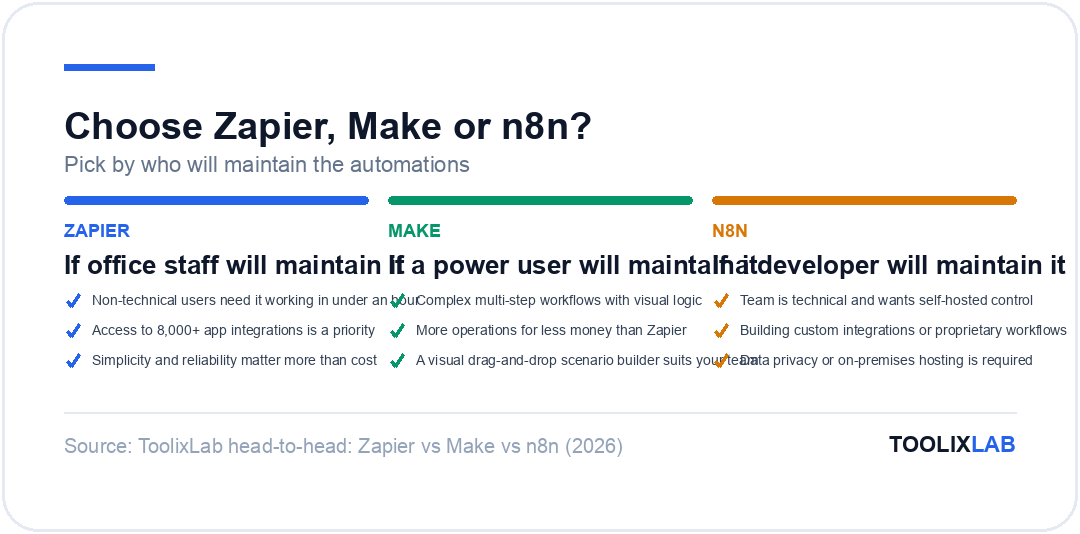
Zapier wins for non-technical teams who value the largest app library and fastest setup. Make wins on price-per-operation and visual control for complex multi-step scenarios. n8n wins for technical teams who want self-hosting, data sovereignty, and unlimited executions at a flat cost. Pick by who will maintain the automations: office staff → Zapier, a power user → Make, a developer → n8n.
Quick Verdict: The 2026 Automation Stack
8,000+ apps · From $29.99/mo
3,000+ apps · From $10.59/mo
400+ apps · Free (self-hosted)
Automation isn't just about "saving time" anymore; in 2026, it's the nervous system of every AI-powered business. If your workflows aren't automated, you're not just slow—you're paying a hidden tax on every single operation.
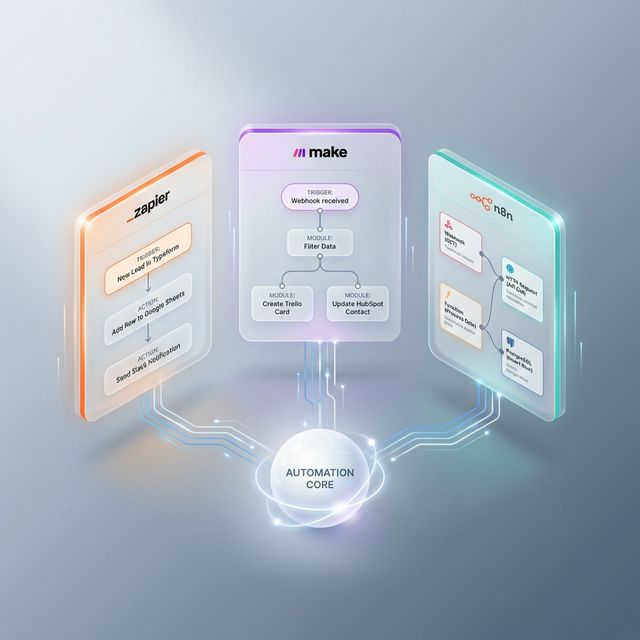
The "Automation War" has three primary contenders: Zapier (the user-friendly pioneer with 8,000+ integrations), Make (the visual architect with the best price-to-power ratio), and n8n (the open-source powerhouse that's become the de facto "OS for AI Agents"). While they all move data from Point A to Point B, their architectures, pricing models, and AI strategies could not be more different.
In this 5,000-word architectural deep-dive, we aren't just comparing features. We are looking at Scalability, AI Agent Orchestration, Data Sovereignty, and Cost-Per-Execution at scale. Whether you're a solopreneur automating a newsletter or a CTO managing millions of events, this guide will help you choose the platform you can scale with for the next five years.
📋 What You'll Learn
- The philosophical differences that shape each platform
- Head-to-head feature matrix across 8 critical dimensions
- 2026 pricing breakdown at real-world scale
- Which platform wins the AI Agent race
- Real-world workflow examples you can copy
- Our final cheatsheet: who should use what
1. The Philosophical Divide: How They Think
Understanding the "mindset" of each tool is more important than their button locations. Each was built for a fundamentally different type of user.
Zapier: The Radical Simplicity Engine
Zapier's philosophy is: Programming for people who don't want to program. Their interface is strictly linear (Trigger → Action 1 → Action 2). They intentionally hide the complexity of JSON, Webhooks, and API keys behind a mask of user-friendly dropdowns. For a marketing manager who needs to send a Facebook Lead to a Google Sheet, Zapier is unbeatable because it requires zero mental load. In 2026, they've doubled down on this with an AI-powered Zap builder that lets you describe your workflow in plain English.
Make: The Visual Workflow Map
Make (formerly Integromat) views automation as a living map. Instead of a list of steps, you see a canvas where you can drag and drop "modules" and connect them with lines. This allows for complex branching logic (if this, then do that; if not, do this other thing) to be visualized instantly. Make assumes you understand basic data concepts like "arrays" and "variables," making it the favorite for operations specialists. Their 2026 addition, the "Make Grid," provides a bird's-eye view of all your scenarios, agents, and connected apps across your entire organization.
n8n: The Dev-First Orchestrator
n8n is built for those who want Total Code Control. While it has a node-based UI like Make, it is fundamentally an "Open Fair-Code" platform. You can self-host it on your own servers, meaning you don't pay per task. It's designed for developers who are comfortable writing JavaScript or Python inside a "Function Node" to transform data exactly how they want it. In 2026, n8n has positioned itself as the infrastructure layer for AI Agents, with native LangChain integration that no competitor can match.
Zapier
"The Speed King"
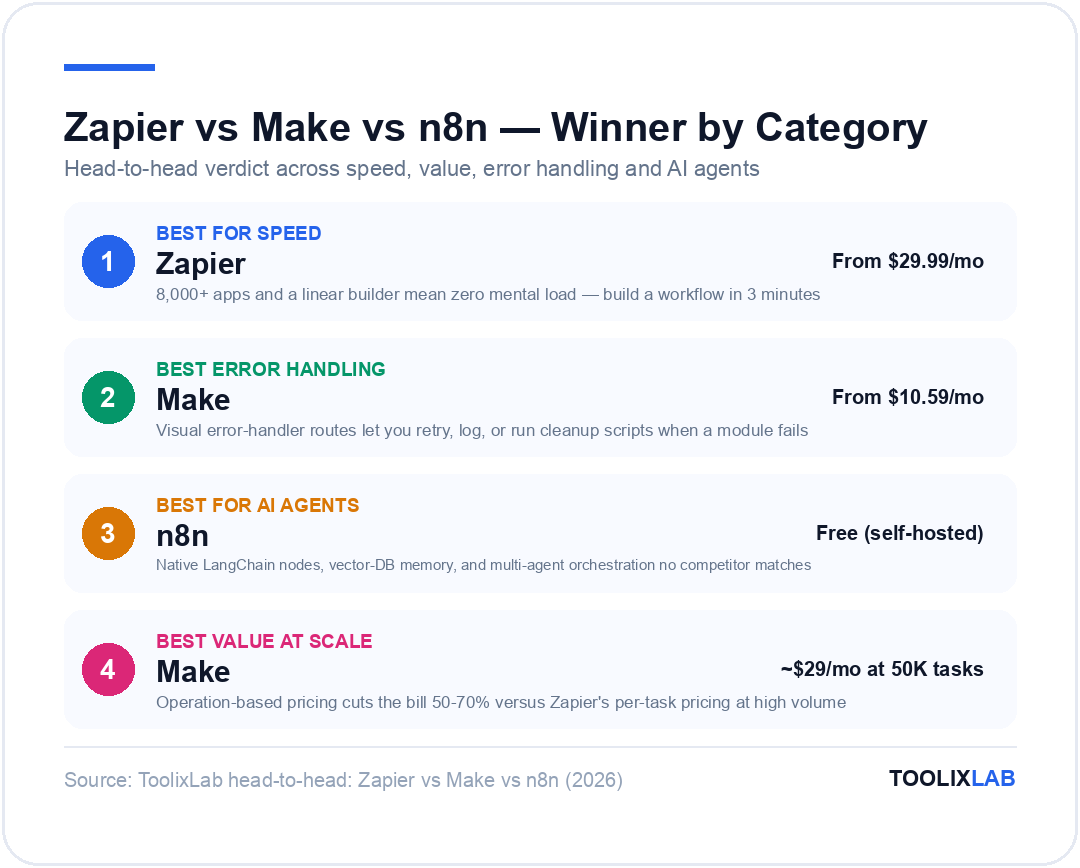
Build a workflow in 3 minutes. Pay a premium for the convenience. Best for non-technical teams.
Make
"The Visual Architect"
Complex logic made visible. Best price-to-power ratio. Ideal for growing SMBs.
n8n
"The AI Agent OS"
Self-host for free. Absolute privacy. The infrastructure choice for AI-native companies.
2. Integration Ecosystem: Breadth vs. Depth
In 2026, an automation tool is only as good as its library.
Zapier (8,000+ Apps): This is Zapier's "Moat." If a startup launches a new SaaS tool today, they build a Zapier integration first. Because Zapier is the market leader, they have the most "Long Tail" integrations. If you use an obscure real-estate CRM or a niche veterinarian software, Zapier is often your only plug-and-play choice.
Make (3,000+ Apps): Make has fewer apps, but their integrations are deeper. While Zapier might only give you "New Email" as a trigger, Make often exposes raw metadata or specific API endpoints that Zapier skips. They also have a far superior HTTP Request module, allowing you to connect to any API that isn't officially supported with much less friction than Zapier's "Webhooks by Zapier."
n8n (400+ Apps): n8n has the smallest library, but it doesn't matter as much for its target audience. Developers use the HTTP Request Node or the Code Node (JavaScript/Python) to build their own integrations. n8n also allows for Community Nodes, where you can install integration packages built by other developers from npm or GitHub—a model no other platform offers.
3. The 2026 Head-to-Head Feature Matrix
| Feature | Zapier | Make | n8n |
|---|---|---|---|
| Integrations | 8,000+ | 3,000+ | 400+ (+ community) |
| Workflow Builder | Linear (step-by-step) | Visual canvas | Visual canvas + Code |
| AI Agent Support | Zapier Central (beta) | Make Grid + AI modules | Native LangChain nodes ✨ |
| Custom Code | Limited (Code by Zapier) | JavaScript in modules | Full JS/Python nodes |
| Error Handling | Basic (email alerts) | Advanced (visual routes) ✨ | Advanced (try/catch) |
| Self-Hosting | ❌ No | ❌ No | ✅ Yes (free) |
| Free Tier | 100 tasks/mo | 1,000 ops/mo | Unlimited (self-hosted) |
| Learning Curve | Easiest ✨ | Moderate | Steepest |
4. The "Cost of Scale": A Brutal 2026 Pricing Breakdown
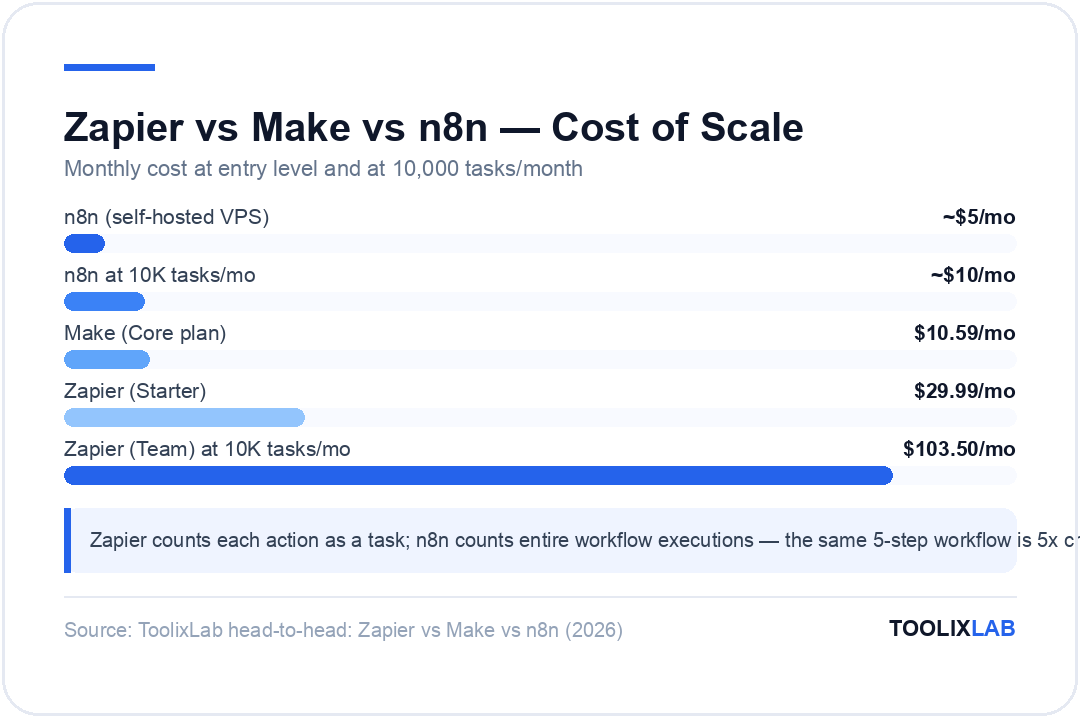
This is where most businesses make their biggest mistake. They start on Zapier because it's easy, and then they get blindsided by a $600+ monthly bill once they start scaling. Let's look at the math.
| Volume | Zapier | Make | n8n (Self-Hosted) |
|---|---|---|---|
| 100 Tasks/mo | Free | Free | Free (+ ~$5 VPS) |
| 750 Tasks/mo | $29.99/mo | Free (1,000 ops incl.) | ~$5-10/mo (VPS) |
| 10,000 Tasks/mo | $103.50/mo (Team) | $10.59/mo (Core) | ~$10/mo (VPS) |
| 50,000 Tasks/mo | $599+/mo | ~$29/mo (Teams) | ~$15/mo (VPS) |
💡 Key Pricing Insight
Zapier counts each "action" as a task. A 5-step Zap uses 5 tasks per run. n8n counts entire workflow executions — that same 5-step workflow is 1 execution. This means n8n is effectively 5x cheaper even before considering self-hosting. Make counts "operations" (similar to Zapier's tasks), but their per-operation cost is dramatically lower.
5. AI Agents: The 2026 Battleground
This is the single biggest differentiator in 2026. AI Agents — autonomous workflows that reason, plan, and execute multi-step tasks — are transforming automation from "if-this-then-that" recipes into intelligent digital workers.
n8n: The Undisputed AI Agent Leader
n8n has become the go-to platform for building AI agents. Their native LangChain integration allows you to:
- Connect any LLM — OpenAI, Anthropic Claude, Google Gemini, or even local models via Ollama
- Add memory — Connect to Pinecone, Weaviate, or Supabase vector stores so your agent "remembers" past conversations
- Give agents tools — Your agent can search Google, query a database, send emails, or call any API autonomously
- Build multi-agent systems — Chain agents together where one agent delegates subtasks to another
Because n8n is self-hosted, the economics of running AI agents (which generate millions of tasks) actually work. On Zapier, running an AI agent that makes 50 API calls per conversation would cost $50+ per day.
Zapier: "Central" and AI Agents (Beta)
Zapier Central is Zapier's answer to the AI agent trend. It lets you create AI-powered "bots" that can interact with your connected apps using natural language. You can say, "Every time I get a new lead in HubSpot, research their company and draft a personalized email." It's impressively simple to set up. The downside? Every action the AI takes burns through your task quota, making it expensive for high-frequency use cases. Zapier also offers an AI-powered Zap builder that can create workflows from plain English descriptions.
Make: The "Grid" Approach
Make's approach is the "Make Grid," a visual dashboard that shows all your scenarios, AI modules, and agents in one view. Make lets you plug ChatGPT, Claude, and other AI tools directly into scenarios as modules. You can build "adaptable agents" that respond to goals and real-time data rather than fixed rules. It's more visual and less code-heavy than n8n, but doesn't offer the same depth of LLM orchestration (no native vector database or memory integration).
🤖 AI Agent Capability Summary
| Capability | Zapier | Make | n8n |
|---|---|---|---|
| LLM Integration | OpenAI, basic | OpenAI, Claude, Gemini | Any LLM (including local) |
| Memory / Vector DB | ❌ | ❌ | ✅ Pinecone, Weaviate, etc. |
| Multi-Agent Systems | ❌ | Limited | ✅ Native support |
| Cost at Scale | High (per-task) | Moderate | Low (self-hosted) |
6. Advanced Features: Logic & Error Handling
What happens when something breaks? This is the difference between a "toy" and an "enterprise engine."
Make: The King of Error Handling
In Zapier, if a step fails, the whole "Zap" usually just stops and sends you an email. In Make, you can add "Error Handler" routes. If a module fails, you can tell Make to "Retry 3 times," "Proceed anyway but log to Slack," or "Run a different cleanup script." This visual error handling makes Make far more resilient for mission-critical workflows like payment processing or inventory sync.
n8n: The "Wait" Node & Sub-Workflows
n8n is incredible for long-running processes. You can have a workflow that starts on Monday, triggers a "Wait" node for 3 days, checks if a customer has replied, and then continues based on the response. n8n also supports sub-workflows, letting you call one workflow from another—essential for building modular, maintainable automation at enterprise scale.
Zapier: Paths & Filters
Zapier has improved significantly with Paths (conditional branching) and Filters. For simple "if/else" logic, they work well. But for anything involving more than 3-4 branches or nested conditions, the linear interface becomes unwieldy compared to Make's visual canvas.
7. Real-World Workflow Examples
Theory is useless without practice. Here's the same business problem solved on each platform:
⚡ Zapier: "Lead → CRM → Slack Notification"
A new lead fills out a Typeform → Zapier creates a HubSpot contact → sends a Slack message to #sales.
Setup time: 5 minutes · Tasks used per run: 2 · Best for: Simple, linear processes
🗺️ Make: "E-commerce Order Processing Pipeline"
Shopify order arrives → Make checks inventory → IF in stock: process & send to ShipStation; IF out of stock: email customer + add to backorder list in Airtable → log everything to Google Sheets.
Setup time: 30 minutes · Operations per run: 4-6 · Best for: Branching logic with error handling
🤖 n8n: "AI-Powered Support Agent"
Customer emails support@ → n8n's AI agent searches your knowledge base (Pinecone) → drafts a response using Claude → IF confidence > 90%: auto-reply; IF < 90%: create Zendesk ticket for human review → log interaction to Postgres for training data.
Setup time: 2-3 hours · Executions per run: 1 · Best for: AI-heavy, data-sovereign workflows
8. Data Privacy & GDPR: The Sovereign Move
For most US companies, storing data in the cloud is fine. But for European companies, healthcare providers, or financial institutions, data privacy is a dealbreaker.
Zapier & Make: Your data passes through their servers. While they are highly secure and SOC2 compliant, you are still trusting a third party with your customers' PII (Personally Identifiable Information). Both store data on US-based infrastructure by default, though Make offers EU data residency options.
n8n: Because you can install n8n on your own local server or a private cloud within your own VPC, your data never leaves your infrastructure. For many enterprises, this is the only reason they choose n8n—and it's a massive competitive advantage. This makes n8n the only viable choice for HIPAA, SOX, or strict GDPR compliance scenarios where data must not cross borders.
📖 Read Also:
Building an AI-powered automation stack? Start with our guide on the 20 Best AI Tools for Small Business to find the right tools to connect.
Switching Between Platforms: What It Actually Costs
A question we get constantly: "We started on Zapier and the bill is growing — how painful is migrating?" The honest answer: there is no import button between any of these platforms. Every workflow must be rebuilt by hand, so the real cost is rebuild time multiplied by your workflow count.
Zapier → Make is the most common migration, driven almost entirely by pricing at scale. Simple two-step Zaps rebuild in minutes; the payoff is that Make's operation-based pricing typically cuts the bill by 50–70% for high-volume workflows. Budget one evening per ten simple workflows, and expect the handful of complex ones to take as long as all the simple ones combined.
Zapier/Make → n8n is a bigger jump because you're also adopting hosting responsibility (unless you use n8n's cloud tier). Do this when data sovereignty, unlimited executions, or custom code nodes justify having a technical owner for the platform — not purely to save money, because the hours of a developer maintaining a self-hosted instance are a real cost too.
The pragmatic middle path: migrate incrementally. Run both platforms during a transition month, move your highest-volume workflows first (they're where the savings live), and leave rarely-triggered automations on the old platform until their natural end of life. And before migrating anything, prune: in every audit we've done, 20–30% of long-running automations were dead weight nobody had switched off.
Frequently Asked Questions
Which is cheapest at high volume?
Self-hosted n8n, by a wide margin — you pay for the server, not per execution. Among the hosted options, Make's per-operation pricing usually undercuts Zapier's per-task pricing significantly at equivalent volume.
Can non-technical users handle Make or n8n?
Make, yes — with a learning curve; its visual scenario builder is approachable once the operations model clicks. n8n assumes comfort with data structures, expressions, and occasionally JavaScript; a determined non-developer can learn it, but it's built for technical users.
Do all three support AI steps in workflows?
Yes — all three connect to OpenAI, Anthropic, and other model APIs, and each has been shipping AI-agent features. The difference is philosophy: Zapier optimizes for pre-built AI actions, Make for visual AI orchestration, and n8n for full control over prompts, models, and custom logic.
Can I use more than one platform?
Plenty of teams do: Zapier for quick office automations anyone can maintain, plus n8n (or Make) for the heavy data pipelines. The overhead of two platforms is real, so only split when one platform is clearly failing a category of work.
Final Verdict: How to Choose in 2026
Pick for the scale you expect, not the scale you have.
You're a non-technical team with under 1,000 tasks/mo. You value setup speed over cost. You need access to 8,000+ niche app integrations. You want AI automation without writing code.
You're a growing team that needs complex branching logic, visual debugging, and enterprise-grade error handling. You process 5,000-100,000 operations/month and want to keep costs under $50/mo.
You're a developer or enterprise that needs absolute data sovereignty, unlimited execution volume, native AI agent orchestration with LangChain, and the ability to run custom JavaScript/Python.
🌟 The "Smart Move": Start with Make for 90% of business workflows. Add n8n when you need AI agents or data sovereignty. Use Zapier only for niche app connections Make doesn't support.
Conclusion: Automation is the New Literacy
The "No-Code" label is a misnomer. Automation is eventually just "Logic in a suit." Whether you choose Zapier, Make, or n8n, you are becoming a system architect. The real insight for 2026 is that these tools are no longer competing on the same axis — Zapier is an app connector, Make is a workflow engine, and n8n is an AI infrastructure platform. They can even coexist in the same stack.
Don't let the choice paralyze you. Pick the one that matches your current technical comfort level, but keep a watchful eye on your monthly task volume and AI ambitions. The goal isn't just to automate; it's to automate intelligently. Welcome to the age of the Agentic Enterprise.
Further Reading & Sources
⚖️ Our Verdict
Zapier, Make, and n8n are all excellent tools for different types of users — and the right choice depends almost entirely on your technical comfort level and workflow complexity. Zapier wins on simplicity and app breadth, Make wins on power at a lower price point, and n8n wins on full control and self-hosting. There is no universal best option; there is only the right option for your situation.
✅ Choose Zapier if...
- • Non-technical users need it working in under an hour
- • Access to 7,000+ app integrations is a priority
- • Simplicity and reliability matter more than cost
✅ Choose Make if...
- • You need complex multi-step workflows with visual logic
- • You want more operations for less money than Zapier
- • A visual drag-and-drop scenario builder suits your team
✅ Choose n8n if...
- • Your team is technical and wants full self-hosted control
- • You're building custom integrations or proprietary workflows
- • Data privacy or on-premises hosting is a requirement