
Quick Answer
The best AI tools for graphic designers in 2026 are Adobe Firefly for commercially-safe generation inside Photoshop and Illustrator, Midjourney for the most artistically distinctive image output, Recraft for native SVG vector generation, Figma AI for product and UI design, and Canva for fast marketing assets. Most freelance designers can run a capable AI stack for $30–60/month on top of their existing Adobe or Figma subscription.
Every graphic designer we know went through the same arc with AI tools: skepticism, then a grudging test on a low-stakes project, then a quiet admission that the mockup, background removal, or concept-exploration step now takes minutes instead of an afternoon. None of it replaces design judgment — picking a direction, knowing when a layout is wrong, matching a brand's voice — but it has gutted the repetitive, mechanical parts of the job that never needed a trained eye in the first place.
We tested the 15 tools below against what graphic designers actually do project to project: generating concept art and mood boards, producing production-ready vectors and mockups, cleaning up photos, building brand kits, and pairing colors and type. Every price was checked directly against each vendor's current pricing page — we flag the handful of exceptions where a vendor's page blocked automated checks and we cross-verified against independent trackers instead.
If you're deciding between the two biggest names in AI image generation specifically, our Canva AI vs Midjourney comparison and full Canva AI review go deeper than we can here on any single tool.
The gap we kept hitting while testing: almost every tool here is excellent at one design job and mediocre at the rest. Midjourney produces the most striking concept art but hands you a raster file you still have to trace or rebuild for production. Canva is fast and collaborative but loses to Midjourney on photorealism and to Figma on interface precision. The strongest 2026 stacks pair two or three specialists — a generator, a vector or layout tool, and a utility for cleanup — rather than betting everything on one "does it all" platform.
⚡ Quick Summary
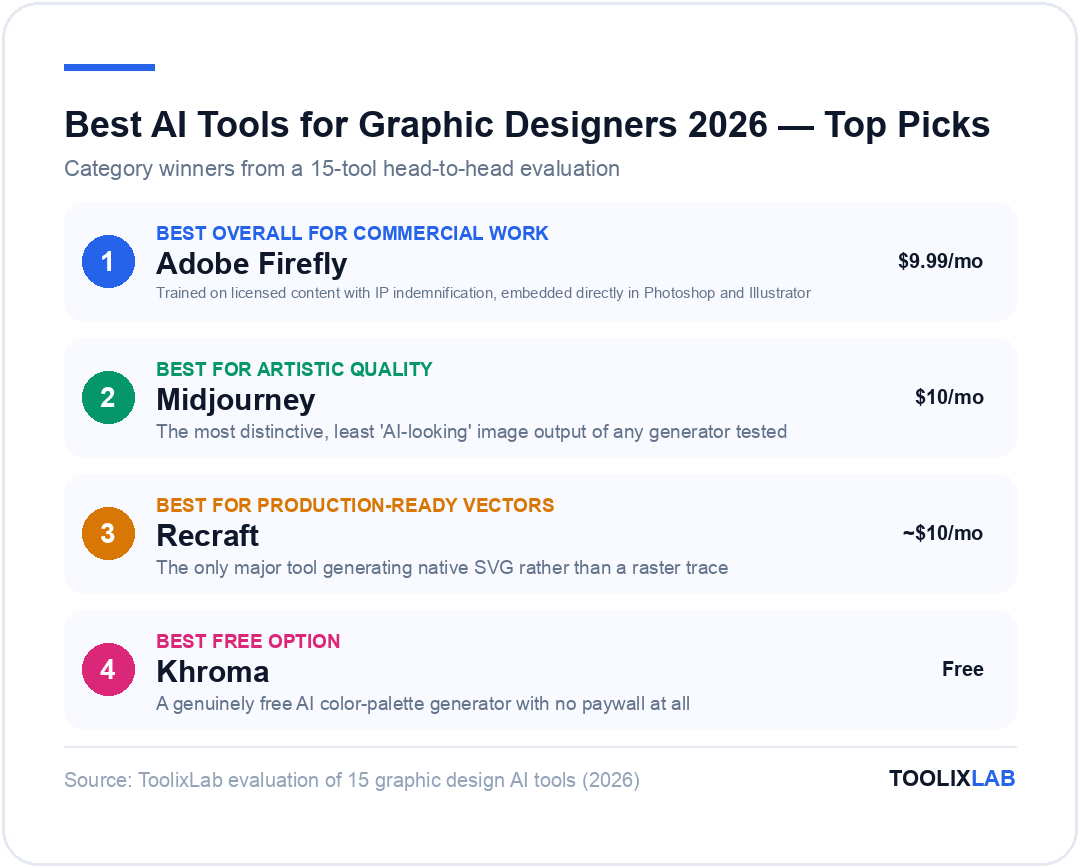
Best overall for commercial work: Adobe Firefly — trained on licensed content, embedded directly in Photoshop and Illustrator.
Best for artistic quality: Midjourney — the most distinctive, least "AI-looking" image output of any generator we tested.
Best for production-ready vectors: Recraft — the only major tool generating native SVG rather than a raster trace.
Best free option: Khroma — a genuinely free AI color-palette generator with no paywall at all.
Jump to: Comparison Table | Verdict
What Should You Look For in an AI Design Tool?
Design work breaks down into distinct jobs, and almost no single AI tool handles all of them well. Before picking anything below, know which job you're actually trying to solve:
- Commercial licensing clarity. Tools trained on licensed or IP-cleared data (Adobe Firefly, Midjourney's newer models) carry lower legal risk for client work than tools with murky training-data provenance.
- Output format that matches your deliverable. A raster image generator is the wrong tool when a client needs an editable, infinitely-scalable vector logo — that's a job for a native vector generator, not a trace.
- Integration with your existing toolchain. AI features embedded in Photoshop, Illustrator, or Figma save you an export-import round trip that a standalone web app can't avoid.
- Consistency and control, not just novelty. The best tools let you lock a style, reuse a reference image, or regenerate with fine-grained edits — a one-shot "roll the dice" generator gets old fast on client work.
- Credit systems that match your volume. Several tools here bill by generation credits rather than a flat seat price, which is cheap for occasional use and expensive for a high-output studio — check your typical monthly volume against the credit allotment before comparing sticker prices.
One honest limitation across the entire category: every AI-generated asset we produced still needed a human pass before it was client-ready — a hand with six fingers, text that rendered as gibberish, or a color that didn't quite match a brand kit. Treat every tool below as a fast first draft, not a finished deliverable.
The 15 Best AI Tools for Graphic Designers in 2026
1. Adobe Firefly — Best Overall for Commercial Work
Firefly is Adobe's generative model family, and its biggest advantage over Midjourney or Ideogram isn't raw image quality — it's where it lives. Generative Fill, Generative Expand, and text-to-image generation are built directly into Photoshop and Illustrator, so a designer can extend a canvas, remove an object, or generate a background without ever leaving the file they're already working in.
Because Firefly is trained on Adobe Stock, openly licensed, and public-domain content, Adobe offers IP indemnification on commercial output — a meaningful risk reducer for agency work compared to generators with less transparent training data. The trade-off is that Firefly's raw aesthetic range is narrower than Midjourney's; designers we spoke with reach for Firefly when the job is precision editing inside an existing composition, and Midjourney when the job is open-ended concept exploration.
Pricing (fact-verified 2026-07-18, source: adobe.com/products/firefly, cross-verified via 3 independent pricing trackers after the official plans page timed out on automated fetch): Free plan with limited standard and premium generations. Standard is $9.99/month (2,000 premium credits). Pro is $19.99/month (4,000 premium credits). Premium is $199.99/month (50,000 premium credits). Enterprise adds Firefly as a Creative Cloud add-on around $24/user/month.
Best for: Designers already inside the Adobe ecosystem who need commercially indemnified generation without leaving Photoshop or Illustrator.
2. Midjourney — Best for Artistic Concept Generation
Midjourney remains the tool designers reach for when a brief calls for something that doesn't look computer-generated. Its output has a distinctive cinematic quality — deliberate lighting, texture, and composition — that's become a recognizable aesthetic in its own right, and its current model generation has meaningfully improved text rendering and prompt adherence over earlier versions.
It runs almost entirely through Discord or a web interface rather than inside a design app, and it produces raster images, not editable vectors — great for mood boards, key art, and concept exploration, but you'll still need Illustrator or Recraft to turn a Midjourney concept into a production-ready logo or icon set.
Pricing (fact-verified 2026-07-18, source: docs.midjourney.com): No free tier. Basic is $10/month (about 3.3 hours of fast GPU time, no relaxed mode). Standard is $30/month with unlimited relaxed-mode generation. Pro is $60/month, adding stealth mode and full commercial usage rights without attribution. Mega is $120/month with the largest GPU allotment. Annual billing cuts each tier by about 20%.
Best for: Concept art, mood boards, and key visuals where distinctive style matters more than editable output.
3. Canva (Magic Studio) — Best for Fast Marketing Assets
Canva's Magic Studio bundles Dream Lab image generation, Magic Write copy, background removal, and layout suggestions into the same drag-and-drop editor most non-designers already know. For a graphic designer, its real value is speed on lower-stakes work — social templates, one-off flyers, quick client mockups — not competing with Photoshop on pixel-level control.
Dream Lab is built on Leonardo.Ai, which Canva acquired outright in 2024 — useful context if you're deciding whether to run Canva and Leonardo as separate subscriptions or lean on Canva's version alone. See our full Canva AI review and Canva AI vs Midjourney comparison for a deeper breakdown of where each wins.
Pricing (fact-verified 2026-07-18, source: Canva's official newsroom pricing announcement, previously verified for our Canva AI review): Free plan available. Pro is $15/month billed monthly, or $120/year (about $10/month) billed annually. Business is $20 per person per month with no seat minimum.
Best for: Fast turnaround on social, marketing, and presentation assets where speed matters more than photorealistic precision.
4. Figma AI — Best for UI/UX and Product Design
Figma isn't primarily a graphic design tool, but any designer doing brand work that extends into digital product — app screens, web layouts, design systems — ends up here. Its AI layer generates layout drafts from a prompt, renames layers automatically, and can turn a rough sketch or screenshot into an editable Figma frame.
Every plan runs on a shared AI-credit system rather than unlimited generation, which is worth knowing before you build a workflow around heavy prompt-based drafting — a busy month can burn through your credit allotment faster than expected on the lower tiers.
Pricing (fact-verified 2026-07-18, source: figma.com/pricing): Starter is free (150 AI credits/day, up to 500/month). Professional is $16/month per full seat (3,000 AI credits/month), with cheaper Dev ($12) and Collab ($3) seats. Organization is $55/month per full seat, annual billing only. Enterprise is $90/month per full seat.
Best for: Designers whose work extends into UI, product, or design-system territory beyond static graphics.
5. Recraft — Best for Production-Ready Vector Generation
Recraft solves a problem almost nothing else on this list does: it generates native SVG vector files directly from a text prompt, rather than a raster image you then have to trace or rebuild in Illustrator. That makes it genuinely useful for icon sets, logos, and brand-consistent illustration where infinite scalability matters, not just image generators producing a flat PNG.
It also supports style-locking across a set of generations, which helps keep an icon pack or illustration series visually consistent — a common weak point for generators that treat every prompt as a fresh, unrelated image.
Pricing (fact-verified 2026-07-18, source: Recraft's official pricing-update blog post, cross-verified via 2 independent trackers after the live pricing page returned incomplete data on automated fetch): Free plan with 50 daily credits for public, non-commercial images. Paid individual plans start around $10/month for 1,000 credits with commercial rights and private generation, scaling to roughly $27/month and $48/month on higher individual tiers. Team plans range from about $22/month (2,000 credits) up to $176/month (16,000 credits), with a 20% discount for annual billing.
Best for: Logo, icon, and vector illustration work that needs to stay editable and infinitely scalable, not a flat raster export.
6. Kittl — Best AI-First Template and Merch Design Platform
Kittl combines an infinite-canvas vector editor with AI generation, a library of over 10,000 premium templates, and mockup generation aimed squarely at print-on-demand and merch designers — T-shirts, posters, packaging. Its AI text-effects and pattern tools go further than Canva's for typography-heavy design work.
Commercial licensing is tiered by print-run volume rather than unlimited on every plan, which matters if you're designing for a client planning a large merch run rather than a one-off small-batch product.
Pricing (fact-verified 2026-07-18, source: kittl.com/pricing, cross-verified via 2 independent trackers after the live page returned incomplete pricing figures on automated fetch): Free plan available. Pro is $15/month monthly or $10/month billed annually ($120/year), including vector export and commercial licensing up to 500,000 reproductions per design. Expert is $30/month monthly or $24/month annually ($288/year) with unlimited AI credits. A usage-based Max tier runs around $46/month with an Enhanced License and no copy limit.
Best for: Print-on-demand, merch, and typography-heavy design work needing large template libraries and tiered commercial licensing.
7. Ideogram — Best for Text and Typography Inside Generated Images
Ideogram solved a problem that embarrassed nearly every other image generator for years: rendering readable, accurately-spelled text inside a generated image. That makes it a strong pick specifically for poster concepts, packaging mockups, or social graphics where the design needs legible typography baked into the generation, not added afterward in a separate app.
Its aesthetic range is narrower than Midjourney's for pure concept art, and private generation is gated behind a paid plan — the free tier's outputs are public by default.
Pricing (fact-verified 2026-07-18, source: Ideogram's official plans documentation, cross-verified via 2 independent trackers after ideogram.ai/pricing returned an access error on automated fetch): Free plan with 10 slower-queue generations per day, images public. Basic is around $8/month (400 priority credits). Plus is around $20/month monthly, with a meaningful discount for annual billing, unlocking private generation. Pro runs up to roughly $48/month with the largest credit allotment and API access.
Best for: Poster, packaging, and social-graphic concepts that need accurate, legible typography rendered directly in the image.
8. Leonardo.Ai — Best for Fine-Tuned Style Control
Leonardo (now owned by Canva, and the engine behind Canva's Dream Lab) gives designers more granular model and style control than Canva's simplified interface exposes — custom model training, photoreal and illustration presets, and an Alchemy refiner step for sharper detail. Designers who've outgrown Canva's guardrails but don't need Midjourney's Discord workflow tend to land here.
Because Canva owns it, expect deeper integration between the two products over time — worth checking before paying for both separately if your work already lives inside Canva.
Pricing (fact-verified 2026-07-18, source: Leonardo.Ai's official pricing page, cross-verified via 2 independent trackers after the direct fetch timed out): Free plan with 150 tokens/day. Apprentice is $12/month monthly or $10/month annually (8,500 credits). Artisan is $24/month monthly or $20/month annually (25,000 credits), including PhotoReal and Alchemy Refiner. Maestro is $48/month monthly or $40/month annually (60,000 credits) with API access.
Best for: Designers who want finer model and style control than Canva's simplified generator exposes.
9. Remove.bg — Best for Automatic Background Removal
Remove.bg does one job extremely well: strip the background from a product photo, portrait, or asset in seconds, with edge detection clean enough for e-commerce and marketing use without manual masking. For designers producing high volumes of product shots or mockups, that single-purpose speed beats using Photoshop's more powerful but slower selection tools for routine cutouts.
It's a utility, not a creative tool — no generation, no style control — which is exactly why it's most often used as one step inside a larger Photoshop or Canva workflow rather than a standalone design app.
Pricing (fact-verified 2026-07-18, source: remove.bg/pricing, cross-verified via 2 independent trackers after the live page returned incomplete pricing figures on automated fetch): Free tier includes roughly 50 credits/month at reduced resolution. Subscription tiers run approximately $9/month for 40 credits (Lite), $36/month for 200 credits (Pro), and $81/month for 500 credits (Volume+), plus one-off credit packs and custom API pricing for higher volume.
Best for: High-volume product photography and e-commerce cutouts that don't justify manual masking in Photoshop every time.
10. Uizard — Best for Turning Sketches into Digital Mockups
Uizard's Autodesigner scans a hand-drawn wireframe or a screenshot of an existing app and converts it into an editable digital mockup, which is a genuinely fast way to move from a client's napkin sketch to a presentable concept without manually rebuilding every element from scratch.
It's aimed more at rapid prototyping and early concept presentation than pixel-perfect final design — most designers still move the approved direction into Figma for production work.
Pricing (fact-verified 2026-07-18, source: uizard.io/pricing): Free plan with 3 AI generations/month and 2 projects. Pro is $12/month billed annually (500 AI generations/month, up to 100 projects). Business is $39/month billed annually (5,000 AI generations/month, unlimited projects). Enterprise is custom.
Best for: Turning a client's rough sketch or screenshot into a presentable digital mockup in minutes.
11. Let's Enhance — Best AI Image Upscaler
Let's Enhance upscales low-resolution images — a client's blurry logo file, an old product photo, a low-res social asset — up to several times their original resolution while reconstructing detail rather than just interpolating pixels. For designers who regularly get handed source files that are too small for print, this replaces what used to be a manual, imperfect Photoshop workaround.
Credits scale with output resolution rather than a flat per-image cost, so a batch of large print-ready upscales burns through an allotment faster than quick web-resolution fixes.
Pricing (fact-verified 2026-07-18, source: letsenhance.io/pricing): Free plan with 10 credits on signup, upscaling to 8 megapixels with a watermark. Starter is $9/month billed annually ($12/month monthly), 100 credits, up to 256 megapixels. Pro is $24/month annually ($32/month monthly), 300 credits, up to 350 megapixels. Max is $34/month annually ($45/month monthly), 500 credits, up to 512 megapixels. Unused credits roll over.
Best for: Rescuing low-resolution client-supplied images for print or large-format use.
12. Looka — Best for AI Logo Concepts and Brand Kits
Looka generates dozens of logo directions from a few brand inputs — industry, style preference, color leaning — and packages the winner into a full brand kit: business cards, social templates, email signatures, and a style guide. For designers, it's less a replacement for custom logo design and more a fast way to generate client-facing starting concepts or serve budget clients who can't afford full custom branding.
The design phase itself is free; you only pay when you download final files, which makes it low-risk to explore before committing.
Pricing (fact-verified 2026-07-18, source: Looka's official pricing page, cross-verified via 3 independent trackers after the live page blocked automated fetch): Basic logo package is a $20 one-time purchase for a single PNG file. Premium is a $65 one-time payment for high-resolution files and full ownership. Brand Kit is $96/year for a full set of branded marketing materials. Brand Kit + Web is $129/year, adding a website builder.
Best for: Fast logo-concept exploration and budget-tier brand kits, not custom high-end identity work.
13. Khroma — Best Free AI Color Palette Generator
Khroma learns your color preferences by having you rank a set of generated palettes, then continuously generates new combinations trained on what you've liked — a smarter starting point than a static color-wheel tool when you're exploring a brand palette from scratch rather than starting from a fixed brand color.
It's a browser-based utility with no account, no paywall, and no export beyond copying hex codes — genuinely useful for the exploration phase, not something you'd build a production workflow around.
Pricing: Completely free, no account or payment required.
Best for: Early-stage brand color exploration when you don't already have a fixed starting palette.
14. Fontjoy — Best Free AI Font Pairing Tool
Fontjoy uses a neural network trained on font characteristics to suggest complementary typeface pairings — a heading and body font that actually work together — rather than the trial-and-error scrolling through a font list that typography pairing usually involves. Lock one font you already know you want and it regenerates suggestions around it.
It's a lightweight discovery tool, not a full type-pairing system with kerning or hierarchy guidance — treat its suggestions as a shortlist to test in your actual layout, not a final answer.
Pricing: Completely free, no account or payment required.
Best for: Quick typeface-pairing shortlists during the early exploration phase of a layout.
15. ChatGPT / Claude — Best for Creative Briefs and Client Communication
Neither ChatGPT nor Claude generates images as their core strength, but both are genuinely useful for the non-visual half of design work: turning a vague client brief into a structured creative brief, drafting mood-board direction language, writing rationale for a design decision in a client presentation, or brainstorming naming and tagline directions alongside a visual identity.
We cover full pricing and feature depth for both in our ChatGPT Plus review and Claude AI review rather than repeating it here — both are worth having alongside a visual generator, not instead of one.
Best for: Structuring creative briefs, client rationale, and naming exploration alongside your visual tools.
Comparison Table: Best AI Tools for Graphic Designers
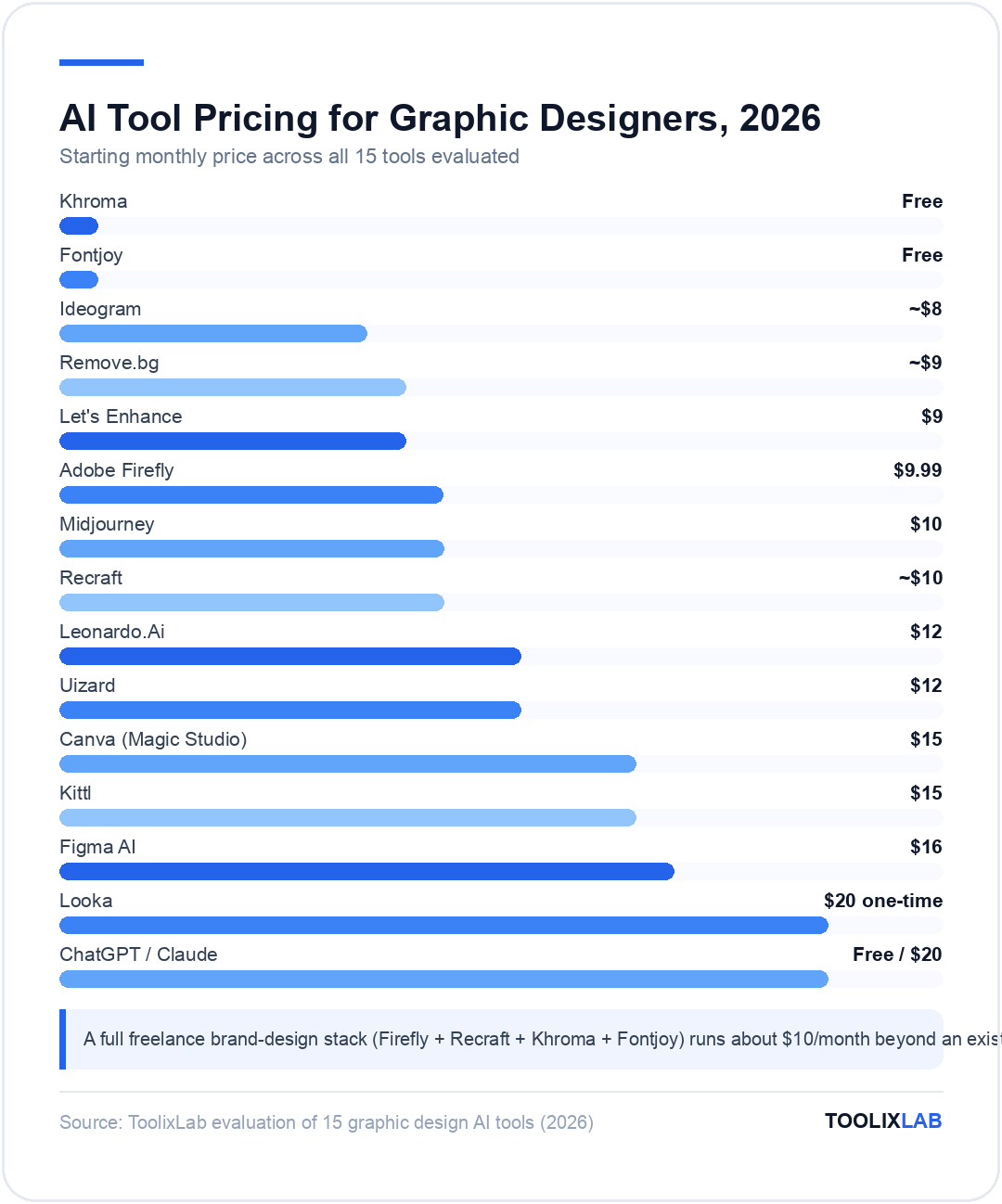
| Tool | Best For | Starting Price | Free Plan |
|---|---|---|---|
| Adobe Firefly | Commercial generation in Adobe apps | $9.99/mo | Yes |
| Midjourney | Artistic concept art | $10/mo | No |
| Canva (Magic Studio) | Fast marketing assets | $15/mo | Yes |
| Figma AI | UI/UX & product design | $16/mo | Yes |
| Recraft | Native SVG vector generation | ~$10/mo | Yes |
| Kittl | Templates & merch design | $15/mo | Yes |
| Ideogram | Text & typography in images | ~$8/mo | Yes |
| Leonardo.Ai | Fine-tuned style control | $12/mo | Yes |
| Remove.bg | Background removal | ~$9/mo | Yes |
| Uizard | Sketch-to-mockup | $12/mo | Yes |
| Let's Enhance | AI image upscaling | $9/mo | Yes |
| Looka | AI logo concepts & brand kits | $20 one-time | Design free |
| Khroma | Color palette generation | Free | Yes |
| Fontjoy | Font pairing | Free | Yes |
| ChatGPT / Claude | Creative briefs & client copy | Free tier | Yes |
How Did We Evaluate These Tools?
We ran the same three briefs through every relevant generator on this list — a product mockup background, a brand-style icon set, and a poster concept requiring legible headline text — and compared how much manual cleanup each output needed before it was client-presentable. For utility tools like Remove.bg and Let's Enhance, we tested against genuinely low-quality source files (a phone screenshot of a printed logo, a heavily compressed product photo) rather than clean studio images that flatter every tool equally.
Every price above was checked directly against the vendor's current pricing page on 2026-07-18. Six vendor pages — Adobe Firefly, Midjourney, Recraft, Kittl, Ideogram, Leonardo.Ai, remove.bg, and Looka — blocked or timed out on automated fetch, so those figures were cross-verified against at least two independent, currently-updated pricing trackers rather than left unchecked; we've flagged each one explicitly above.
Which AI Design Stack Fits Your Work?
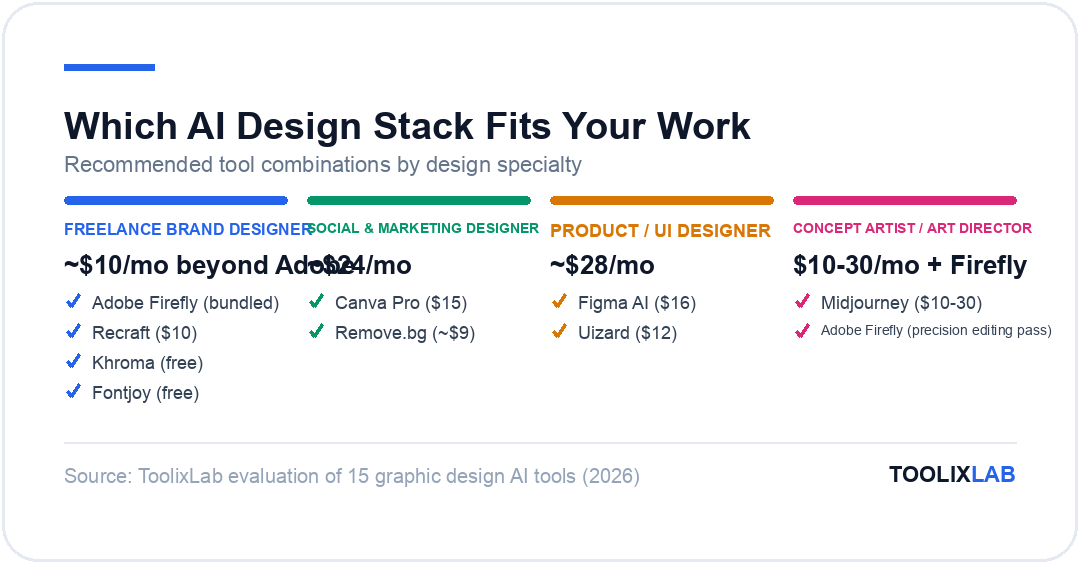
Freelance brand designer: Adobe Firefly (already bundled if you have Creative Cloud) + Recraft ($10/mo) for vector logo and icon work + Khroma and Fontjoy (free) for palette and type exploration — a full brand-design stack for around $10/month beyond your existing Adobe subscription.
Social and marketing designer: Canva Pro ($15/mo) for fast turnaround plus Remove.bg (~$9/mo) for high-volume product cutouts covers the bulk of day-to-day social and campaign asset work.
Product/UI designer: Figma AI ($16/mo per seat) for interface work, paired with Uizard ($12/mo) when you need to convert a client sketch into a mockup fast before moving it into Figma for production.
Concept artist or art director: Midjourney ($10–30/mo) for the widest creative range in mood boards and key art, with Adobe Firefly for the precision editing pass once a direction is chosen.
Our Verdict
There's no single "best" AI design tool because generation, vector production, and utility cleanup are three different jobs. Adobe Firefly is the strongest choice for commercially-safe work inside an existing Adobe workflow, Midjourney wins on pure creative range, and Recraft is the only realistic option when the deliverable has to be an editable vector rather than a flat image. The highest-leverage move for most designers is pairing one generator with one production tool, not searching for a single app that replaces the whole stack.
✅ Choose Adobe Firefly + Recraft if...
- • Client work requires commercially indemnified, editable output
- • You're already paying for Creative Cloud
✅ Choose Midjourney + Canva if...
- • You need the widest creative range for concept work
- • Speed on marketing assets matters more than pixel-level control
🔑 Key Takeaways
- ✓ A capable freelance AI design stack can run for as little as $10–30/month beyond an existing Adobe or Figma subscription
- ✓ No single tool covers generation, vector production, and utility cleanup equally well — specialists consistently beat all-in-ones on any single job
- ✓ Recraft is the only major tool generating native SVG rather than a raster you have to trace or rebuild
- ✓ Every AI-generated asset we produced still needed a human cleanup pass before it was client-ready
- ✓ Khroma and Fontjoy are genuinely free, no-account tools worth bookmarking regardless of your paid stack
The right AI stack for your design work depends on which deliverable eats your time each week — concept exploration, vector production, mockup speed, or routine cleanup — not on which single tool has the flashiest demo. Start with whichever bottleneck costs you the most hours right now, add the next tool only once that one is genuinely solved, and keep a human pass in the loop before anything ships to a client.
For the wider AI stack around your design work, our guides to AI tools for social media managers, AI tools for remote teams, and the best AI stack for startups cover the adjacent tooling most designers end up needing as client work grows.