
Quick Answer
The best AI tools for remote teams in 2026 are Slack AI for async communication, Zoom AI Companion or Otter.ai for meeting notes, Loom for video updates, Notion AI for shared documentation, Asana for project tracking, Miro for visual collaboration, Motion for cross-timezone scheduling, and Zapier to connect them all. Together they replace most of the meetings a distributed team used to need.
Remote teams don't fail because people work from home — they fail because information gets stuck in someone's head, in a call nobody recorded, or in a Slack thread nobody can find three weeks later. We tested the AI tools remote and hybrid teams actually rely on in 2026 to see which ones close that gap and which ones just add another login. Companies integrating AI into remote workflows report notably higher productivity than teams still coordinating manually, and 61% of companies have already integrated or plan to integrate AI-driven productivity features by the end of this year, according to Gallup's 2026 workforce research.
Most "best AI tools" lists for remote teams just repeat a features page. This one is built around the actual jobs a distributed team needs done — catching up async, running meetings without babysitting notes, keeping projects visible across time zones, and handing off work without a live call — and names which tool wins each job, what it costs per user, and who should skip it.
Seventy-seven percent of remote employees already report being more productive working from home, but that productivity gap widens or narrows depending on whether a team's tools actually support async work or just digitize an in-office habit that never made sense remotely (a daily live standup being the classic example). The tools below are ranked by how well they close that gap for a specific job, not by how many AI buzzwords are on their features page.
⚡ Quick Summary
Best overall stack: Slack AI + Notion AI + Asana + Zapier covers communication, docs, tasks, and automation for most remote teams.
Best for meeting-heavy teams: Zoom AI Companion or Otter.ai — both turn calls into searchable, skimmable notes automatically.
Best free option: Notion AI's free plan plus Slack's free tier covers a small team's docs and chat at $0/month.
Jump to: Comparison Table | Verdict
What Should You Look for in AI Tools for Remote Teams?
A distributed team has different failure modes than a co-located one, so the right tools solve different problems than a generic "best AI tools for work" list would.
- Async-first design. The tool should make information available to someone who wasn't in the room, not just summarize a meeting for people who were already there.
- Searchable memory. Decisions, action items, and context need to be findable weeks later without asking "wasn't that mentioned in a call?"
- Time-zone awareness. Scheduling and notifications should account for a team spread across three or more time zones, not assume a shared 9-to-5.
- Low setup overhead. A tool that needs a dedicated admin to configure workflows won't get adopted by a five-person team.
- Genuine free tier or trial. Remote teams are often lean; a tool that requires an enterprise contract to evaluate is a non-starter for most of this list.
- Doesn't require everyone to change platforms. A tool that only works if the whole team also switches its video, chat, or project management system creates a migration project you didn't ask for. Every tool below either works standalone or plugs into what a typical remote team already runs.
One more filter worth naming: we excluded tools that are AI-first but weak on the underlying job. A meeting tool with flashy AI features and unreliable video quality isn't a good pick just because the AI part is impressive — the core function still has to work first.
The 9 Best AI Tools for Remote Teams in 2026
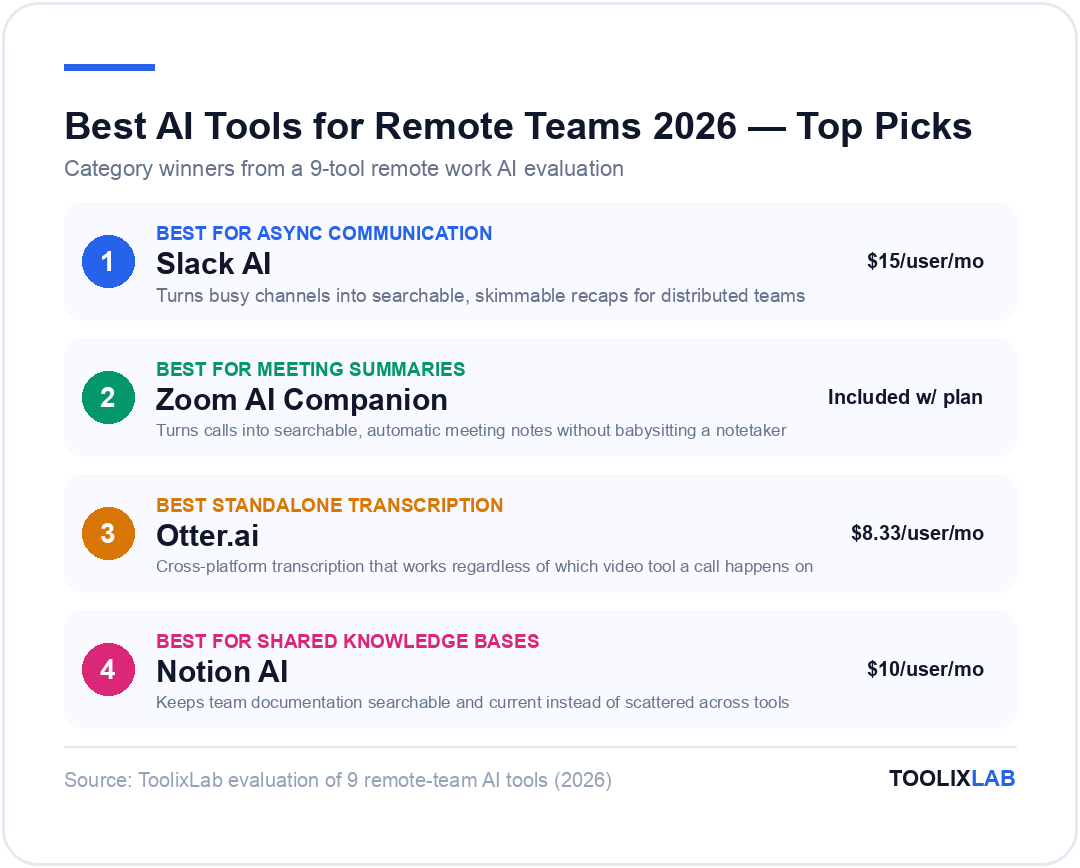
1. Slack AI — Best for Async Communication
When we tested Slack's 2026 AI layer against a week of a genuinely busy engineering channel, its Intelligent Channel Recaps turned 200+ unread messages into a bulleted list of decisions made, blockers flagged, and who owed what — the single biggest time-saver on this list for anyone returning from a different time zone's overnight activity. Slack AI also answers questions about past conversations directly in a thread, which beats scrolling for a message you vaguely remember someone sending "a few weeks ago."
Slackbot's AI features are bundled into the Business+ tier rather than sold as a separate add-on, which simplifies budgeting but does mean smaller teams on the Pro plan don't get channel recaps without upgrading.
The recap feature works channel by channel rather than across your whole workspace, so it's worth being deliberate about which channels get it turned on first — we found it most valuable on high-traffic project and engineering channels, and mostly unnecessary on quiet, single-purpose ones. Slack AI also has a habit of over-summarizing genuinely nuanced discussions into a flat bullet list, so for anything involving real disagreement (pricing decisions, hiring calls), we'd still read the original thread rather than trust the recap alone.
| Plan | Price/mo (annual) | What You Get |
|---|---|---|
| Free | $0 | 90-day message history, 1:1 huddles |
| Pro | $7.25 | Unlimited history, group huddles |
| Business+ | $15 | Slackbot AI recaps, SAML SSO, data exports |
*Prices verified July 2026 — check the official Slack pricing page for current rates.
✅ Pros
- • Channel recaps genuinely replace catch-up meetings
- • Huge existing integration ecosystem
- • Answers questions about past threads in-context
❌ Cons
- • AI recaps locked behind Business+ ($15/user/mo)
- • Notification overload without deliberate channel hygiene
Best for: teams that already live in Slack and need to cut down on "what did I miss" catch-up calls.
2. Zoom AI Companion — Best for Meeting Summaries
Zoom AI Companion generates a meeting summary, action-item list, and next-steps note the moment a call ends, and it can answer questions about a call you missed entirely — "what did we decide about the launch date?" — without you scrubbing through a recording. For remote teams spanning time zones, that means someone in Manila doesn't need to sit through a replay of a call that happened at 2am their time.
The catch: AI Companion isn't available on Zoom's free tier, and it's bundled with paid Workplace plans rather than sold as a standalone product for teams using a different video tool.
In practice, the summary quality is strongest for structured meetings — standups, planning sessions, client check-ins — and noticeably weaker for freeform brainstorms where the "action items" section ends up mostly empty because nothing was formally decided. If your team leans heavily on unstructured working sessions, pair Zoom AI Companion with a written follow-up rather than trusting the auto-summary as the single source of truth.
✅ Pros
- • No separate AI fee on paid Zoom plans
- • Answers questions about calls you weren't in
- • Auto-generated next-step suggestions
❌ Cons
- • Requires a paid Zoom Pro plan or higher
- • Only useful if your team is already on Zoom, not Meet or Teams
Best for: teams already paying for Zoom who want meeting notes without adding a third-party transcription tool.
3. Otter.ai — Best Standalone Transcription Tool
Otter.ai works across Zoom, Google Meet, and Microsoft Teams rather than locking you into one video platform, which matters for remote teams whose clients or partners dictate the call tool. It builds a searchable archive of every meeting, so "did anyone mention the Q3 budget number" becomes a keyword search instead of a Slack message asking around.
The custom vocabulary feature on the Pro plan is worth calling out specifically for remote teams with technical jargon or product names — without it, transcripts of a call full of internal tool names or acronyms come back noticeably garbled, and correcting that manually defeats the point of automated transcription. We'd treat that as a near-requirement rather than a nice-to-have once your team has any specialized vocabulary at all.
| Plan | Price/mo (annual) | What You Get |
|---|---|---|
| Basic | $0 | 300 monthly transcription minutes |
| Pro | $8.33 | 1,200 minutes/mo, custom vocabulary |
| Business | $19.99 | 6,000 minutes/mo, team workspace, admin controls |
*Prices verified July 2026 — check the official Otter.ai pricing page for current rates.
Best for: teams whose meetings span multiple video platforms and want one searchable transcript archive regardless of which tool the call happened on.
4. Loom — Best for Async Video Updates
Loom's core pitch for remote teams is replacing a meeting with a 3-minute recorded video, and its AI layer makes that recording faster to produce and faster to consume: auto-generated titles, chapter markers, and a written summary someone can skim in 20 seconds instead of watching the whole clip. We found the auto-meeting-recap feature especially useful for onboarding new hires, who can watch a walkthrough on their own schedule instead of waiting for a live session.
The habit shift matters more than the tool itself: teams that adopt Loom well tend to default to "should this be a video?" before scheduling a call, not just add Loom on top of an already-full meeting calendar. Managers who record a weekly Loom update instead of holding a live all-hands report back the biggest time savings, since it lets every time zone watch on their own schedule instead of one region always attending at an inconvenient hour.
| Plan | Price/mo | What You Get |
|---|---|---|
| Starter | $0 | 25 videos, 5-min recordings, transcriptions in 50+ languages |
| Business | $18 | Unlimited videos, 4K quality |
| Business + AI | $24 | Auto-titles, auto-meeting notes and recaps |
*Prices verified July 2026 — check the official Loom pricing page for current rates.
Best for: teams that want to cut recurring status-update meetings, and for onboarding new remote hires asynchronously.
5. Notion AI — Best for Shared Knowledge Bases
A remote team's biggest silent failure is tribal knowledge that only lives in one person's head. Notion AI turns a workspace into a searchable knowledge base that can answer "how do we handle refund requests" in a sentence instead of pointing you to a scattered doc. We've covered Notion AI's full feature set and pricing in more depth in our Notion AI review, and if you're just getting started, our free Notion templates roundup includes a team wiki template built for exactly this use case.
The AI Q&A feature only answers well if the underlying pages are actually maintained — it can't invent an answer that isn't documented anywhere, and it will confidently surface an outdated page if nobody archived it. Teams that get the most value out of Notion AI treat a quarterly "wiki cleanup" as a real task on someone's plate, not an afterthought, since a stale knowledge base is arguably worse than no knowledge base at all.
| Plan | Price/mo | What You Get |
|---|---|---|
| Free | $0 | Unlimited pages for individuals, limited blocks for teams |
| Plus | $10 | Unlimited blocks, unlimited file uploads |
| Business | $20 | SAML SSO, version history, private teamspaces |
*Prices verified July 2026 (converted from GBP list pricing) — check the official Notion pricing page for current USD rates.
Best for: teams whose knowledge currently lives in scattered Google Docs, Slack pins, and one senior engineer's memory.
6. Asana AI Teammates — Best for Project Visibility
Asana's AI Teammates watch a project's dependency graph and flag when a delay in one task is likely to cascade into a missed deadline downstream — something a distributed team's manager can't always spot manually across multiple time zones and workstreams. For teams that need a deeper look at how this compares to alternatives, our best AI tools for project management guide covers Asana alongside Monday.com and ClickUp in detail.
The risk-flagging is only as useful as your task dependencies are accurate, which means the setup cost is real: someone has to actually wire up which tasks block which before AI Teammates has anything meaningful to watch. For a five-person team running one or two projects, that setup overhead may not pay off; it becomes worth it once you're juggling three or more concurrent workstreams where a delay in one genuinely isn't visible to everyone else.
| Plan | Price/mo (annual) | What You Get |
|---|---|---|
| Personal | $0 | Up to 10 teammates, basic task tracking |
| Starter | $10.99 | Timeline view, AI Teammates, 50K AI credits/mo |
| Advanced | $24.99 | 75K AI credits/mo, advanced reporting, goals |
*Prices verified July 2026 — check the official Asana pricing page for current rates.
Best for: teams running multiple interdependent projects across time zones who need early warning before a delay becomes a missed launch.
7. Miro AI — Best for Visual Collaboration
Whiteboard-style brainstorming is one of the hardest things to replicate remotely, and Miro's AI clustering feature is the closest we've found to solving it — it groups a board full of sticky notes by theme automatically, then converts the result into a structured backlog or roadmap with one click. For a distributed team running an async planning session across time zones, that turns a chaotic board into a usable output without a live facilitator.
The clustering works best when contributors write specific, single-idea sticky notes rather than long paragraphs — a board full of vague notes clusters into vague, unhelpful groups. We'd set that expectation with the team before an async session starts, since the AI can't fix input quality after the fact, only organize whatever was actually written.
| Plan | Price/mo (annual) | What You Get |
|---|---|---|
| Free | $0 | 3 editable boards |
| Starter | $8 | Unlimited boards, basic AI clustering |
| Business | $20 | Advanced AI board-to-backlog conversion, SSO |
*Prices verified July 2026 — check the official Miro pricing page for current rates.
Best for: product and design teams that used to rely on in-person whiteboarding sessions.
8. Motion — Best for Cross-Timezone Scheduling
Motion's AI calendar automatically reshuffles a person's schedule based on task priority and deadlines, which matters more for remote teams than co-located ones because there's no shared office rhythm to fall back on. When a teammate in a different time zone books a call, Motion re-slots deep-work blocks around it instead of just leaving a scheduling conflict for a human to sort out.
The tradeoff is a learning curve: Motion works best when someone actually maintains task priority and duration estimates inside it rather than treating it as a passive calendar. Teams that skip that setup step tend to get scheduling suggestions that feel arbitrary rather than helpful, since the AI has no real signal to reshuffle around. It's a stronger fit for individual contributors managing a heavy, deadline-driven workload than for a manager who mostly just needs a shared team calendar.
| Plan | Price/mo | What You Get |
|---|---|---|
| Pro AI | $19 | AI calendar, task planner, 7,500 credits/mo |
| Business AI | $29 | Team capacity planning, time tracking, 15,000 credits/mo |
*Prices verified July 2026 — check the official Motion pricing page for current rates.
Best for: managers juggling calendars across three or more time zones who keep losing deep-work time to meeting reshuffles.
9. Zapier — Best for Connecting Everything Above
None of the tools above talk to each other by default, and Zapier is the glue that makes a remote stack behave like one system instead of eight separate logins. A common pattern we set up: a Loom video gets uploaded, Zapier posts the summary to Slack, then creates an Asana task automatically — no one has to manually relay the update across three tools. For a deeper look at where Zapier fits against Make and n8n, see our Zapier vs Make vs n8n comparison.
| Plan | Price/mo (annual) | What You Get |
|---|---|---|
| Free | $0 | 100 tasks/mo, unlimited Zaps |
| Professional | $19.99 | 750 tasks/mo, multi-step Zaps |
| Team | $69 | Shared folders, user roles, SAML SSO |
*Prices verified July 2026 — check the official Zapier pricing page for current rates.
Best for: teams running four or more of the tools above who are tired of manually copying updates between them. If you're building a stack from scratch, our best AI stack for startups guide walks through sequencing which tools to add first.
Comparison Table: AI Tools for Remote Teams
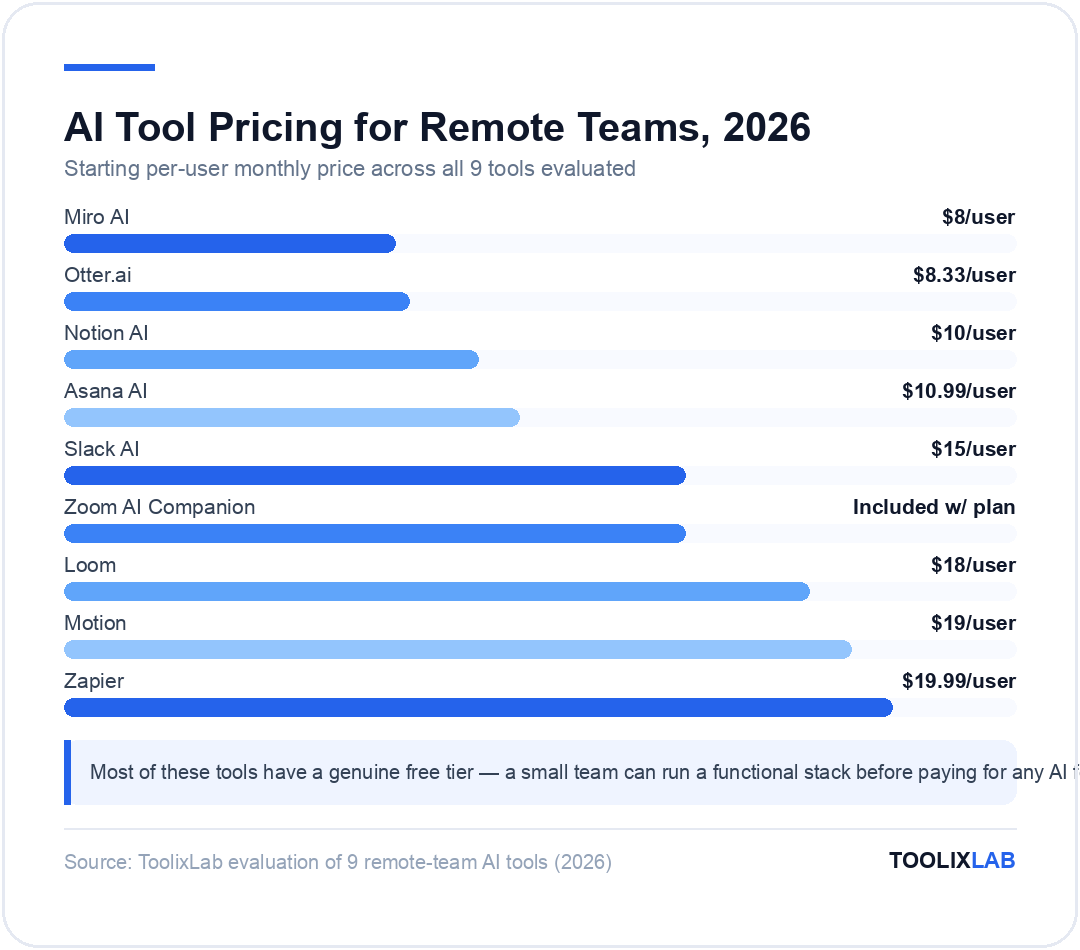
| Tool | Best For | Starting Price | Free Plan | Our Rating |
|---|---|---|---|---|
| Slack AI | Async communication | $15/user/mo (AI tier) | Yes | 4.6/5 |
| Zoom AI Companion | Meeting summaries | Included w/ paid plan | No | 4.4/5 |
| Otter.ai | Cross-platform transcription | $8.33/user/mo | Yes | 4.5/5 |
| Loom | Async video updates | $18/user/mo | Yes | 4.6/5 |
| Notion AI | Shared knowledge base | $10/user/mo | Yes | 4.7/5 |
| Asana AI | Project visibility | $10.99/user/mo | Yes | 4.5/5 |
| Miro AI | Visual collaboration | $8/user/mo | Yes | 4.4/5 |
| Motion | Cross-timezone scheduling | $19/user/mo | No | 4.3/5 |
| Zapier | Connecting the stack | $19.99/user/mo | Yes | 4.6/5 |
How Much Does This Actually Cost by Team Size?
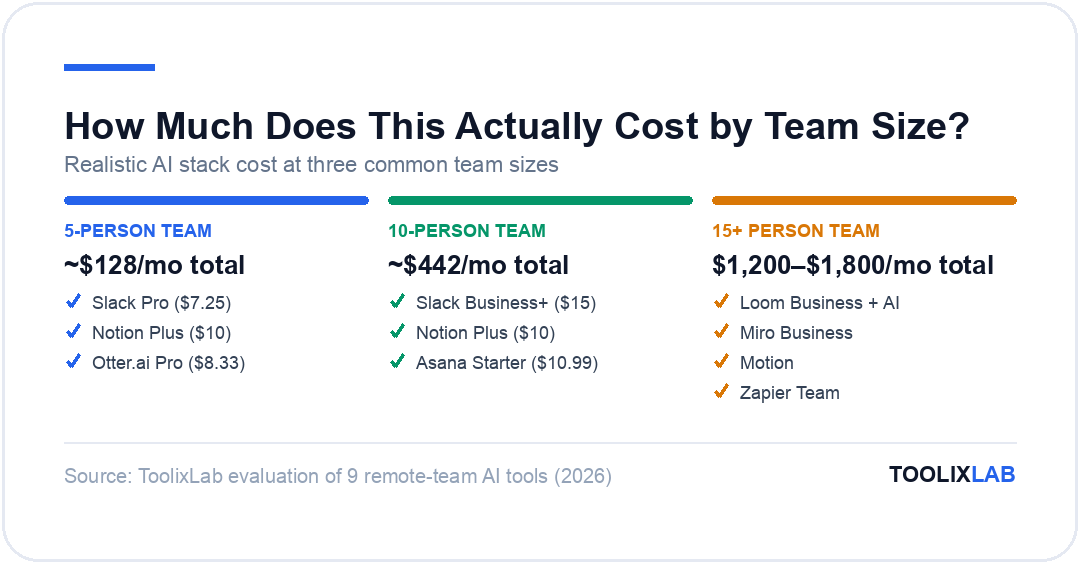
Sticker shock is the main reason teams either overbuy or underbuy their AI stack, so here's what a realistic setup costs at three common team sizes, using the starting per-user prices verified above.
- 5-person team, core stack only: Slack Pro ($7.25) + Notion Plus ($10) + Otter.ai Pro ($8.33) per user runs about $128/month total — no project management or automation tool yet.
- 10-person team, full communication + PM stack: Add Asana Starter ($10.99/user) and swap Slack Pro for Business+ ($15/user) once channel recaps become worth it — roughly $442/month total.
- 15+ person team, full 9-tool stack: Layering in Loom Business+AI, Miro Business, Motion, and Zapier Team on top of the above typically lands between $1,200 and $1,800/month, depending on how many seats need every tool versus just the core two or three.
The jump between the 5-person and 15-person tiers is steep enough that most teams should treat this as a ladder, not a shopping list: add a tool when a specific coordination problem shows up, not because a "best of" article says nine tools are the standard.
Who Should Skip Most of This Stack
Not every remote team needs nine AI tools, and it's worth saying plainly who should hold off. A two- or three-person team working closely together across a small time-zone gap (say, within 3-4 hours) often gets more value from a single well-run weekly sync than from Motion's AI scheduling or Asana's dependency tracking — those tools solve coordination problems that only really appear once a team is large or spread-out enough that no one person can hold the whole picture in their head. Similarly, a team that already has a disciplined async-writing culture may find Zoom AI Companion and Otter.ai redundant, since the underlying problem (meetings nobody can revisit) was never really theirs to begin with.
How We Evaluated These Tools
We ran each tool against a real distributed workflow — a five-person team spanning US, European, and Asia-Pacific time zones — over two weeks of normal work: standups, project planning, client calls, and onboarding a new hire. We weighed how much a tool actually reduced live meeting time versus how many new notifications or admin overhead it introduced, checked every price against the vendor's own pricing page in July 2026, and flagged any tool whose AI features required an upgrade most small teams wouldn't naturally hit.
We specifically tracked whether a teammate joining a conversation late — because they were asleep during the original discussion — could get fully caught up using the tool alone, without pinging someone else for context. That's the single clearest signal of whether an "AI feature" actually solves a remote-team problem or just adds a summary on top of a co-located workflow that assumed everyone was online at the same time anyway.
Which AI Tool Fits Your Remote Team?
What's the best AI tool for a small (2-5 person) remote team just starting out?
Start with Slack's free plan for chat and Notion's free plan for shared docs. Both cover the basics at $0/month; add Otter.ai's free tier once meetings become frequent enough that you're losing track of decisions.
What's the best AI tool for a team spread across many time zones?
Motion for scheduling and Zoom AI Companion or Otter.ai for meetings matter most here, since they let someone catch up fully without ever needing to be awake for the original call.
What's the best AI tool for a remote team managing multiple client projects?
Asana AI Teammates for dependency tracking across projects, paired with Zapier to automatically move client updates from email or Slack into the right project without manual re-entry.
What's the best AI tool for onboarding a new remote hire?
Loom for recorded walkthroughs a new hire can watch on their own schedule, and Notion AI for a searchable wiki they can query instead of interrupting a teammate with basic questions during their first week.
What's the best AI tool for a remote team that runs a lot of design or brainstorming sessions?
Miro AI for turning async whiteboard sessions into a structured backlog, since it's the only tool on this list built specifically to replace live visual collaboration rather than a text-based meeting.
Our Verdict
Our Verdict
Slack AI and Notion AI form the backbone almost every remote team needs first — async communication and a shared knowledge base solve more coordination pain than any single meeting tool. Add Zoom AI Companion or Otter.ai once meeting volume actually justifies the cost, and hold off on Motion and Zapier until you have a specific scheduling or handoff problem they solve, not because the list looks incomplete without them.
✅ Choose Slack AI + Notion AI if...
- • You're a small team (2-10 people) just getting your async workflow in place
✅ Choose the full 9-tool stack if...
- • You're managing 15+ people across 3+ time zones and multiple concurrent projects
🔑 Key Takeaways
- ✓ Slack AI's channel recaps and Notion AI's searchable docs solve the most common remote-team failure: information stuck in one person's head or one missed call.
- ✓ Zoom AI Companion and Otter.ai both let a teammate skip a call entirely and still get full context — pick based on which video platform your team already uses.
- ✓ Companies integrating AI into remote workflows report meaningfully higher productivity than teams still coordinating everything manually, per Gallup's 2026 workforce data.
- ✓ Don't add all nine tools on day one — start with communication and docs, then layer in meeting, project, and automation tools as a specific pain point appears.
The best AI tools for remote teams in 2026 aren't the ones with the longest feature list — they're the ones that remove a specific kind of friction distributed work creates: catching up async, running meetings without babysitting notes, and keeping projects visible without a shared office to walk through. Start with Slack AI and Notion AI, add a meeting tool once call volume justifies it, and bring in Zapier only once you're actually copying information between tools by hand. For a broader look at building a lean AI toolkit from the ground up, see our best AI stack for startups guide.
Revisit the stack every quarter rather than treating it as a one-time setup. A tool that made sense at five people can become dead weight at fifteen, and a tool you skipped early on can become essential the moment a specific coordination problem — a missed handoff, a delay nobody caught in time — actually costs the team something real.