
Notion crossed 30 million users in 2025, and when it launched its built-in AI assistant, millions of those users faced the same question: is it worth paying extra for something already baked into the tool I live in every day? After testing Notion AI across writing, summarization, databases, and team workflows for several months, we have a clear answer — and it's more nuanced than most reviewers admit.
⚡ TL;DR — Notion AI Review 2026
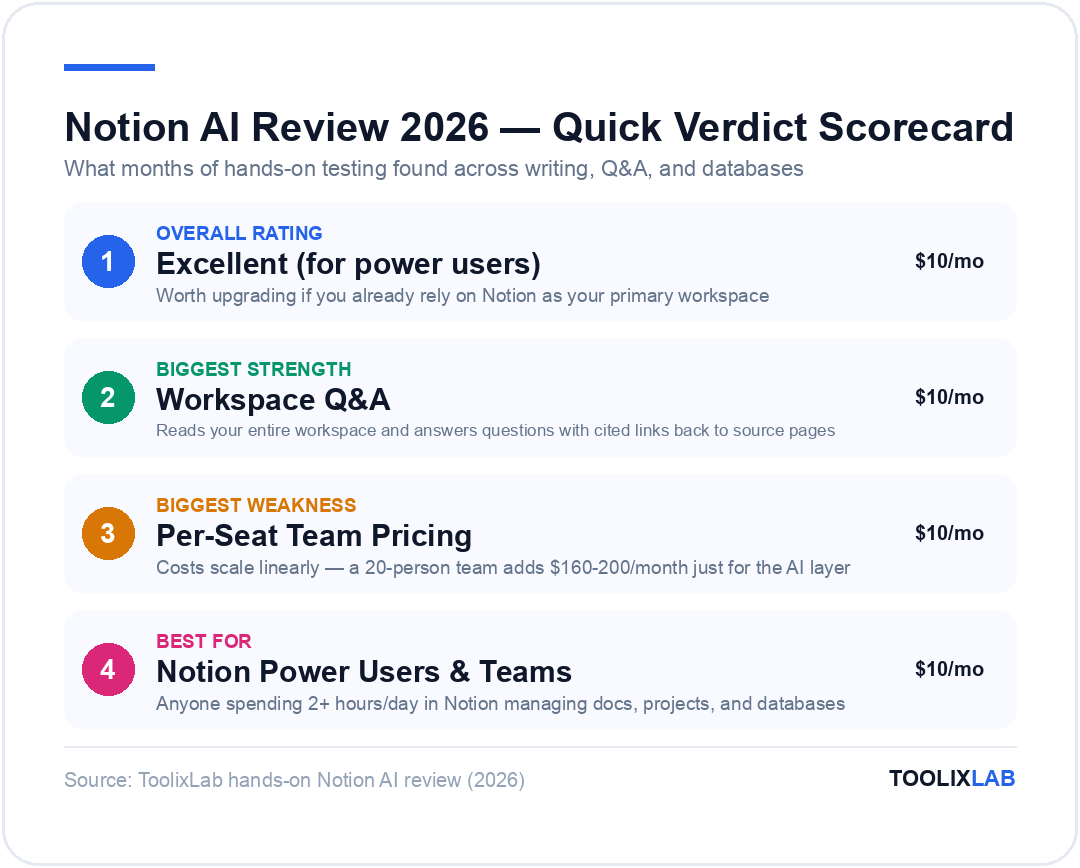
- ✓Best-in-class context: AI reads your entire workspace — pages, databases, linked docs — not just one file at a time
- ✓Tight integration: Summarize meeting notes, fill database properties, draft docs without switching tabs
- ✓$10/member/month add-on (or $8 billed annually) on top of any Notion plan
- ✓Free trial: 20 AI responses free before committing
- ✗Writing quality lags behind dedicated tools like Jasper or Claude for long-form content
- ✗No image generation or advanced multimodal features
- ✗Per-member pricing gets expensive fast for larger teams
- →Verdict: Worth it for power Notion users; skip it if you rarely use Notion's docs and databases
What Is Notion AI? A Quick Overview
Notion AI is an artificial intelligence layer built directly into the Notion workspace. Unlike standalone AI tools you switch between, Notion AI lives inside the pages and databases you already work in. You can invoke it anywhere in Notion — inside a document, a table cell, a project tracker, or a meeting notes page — with a simple slash command or by highlighting text.
Launched in early 2023 and significantly upgraded through 2024 and 2025, Notion AI is now powered by multiple AI models — including Claude and GPT-5.4 — with Notion routing queries to the best model depending on the task and plan tier. In 2026, Notion also introduced "Notion Q&A," a feature that lets you ask natural language questions and get answers pulled from across your entire workspace.
The core pitch is simple: instead of copying content out of Notion, pasting it into ChatGPT, and copying the result back, Notion AI brings the intelligence directly to where your content lives. For teams that use Notion as their single source of truth, that's a genuinely compelling value proposition.
Notion AI is available as a paid add-on on top of any Notion plan — Free, Plus, Business, or Enterprise. You pay per member per month, and the AI features activate workspace-wide for everyone on that billing tier.
Notion AI Features: Everything You Get
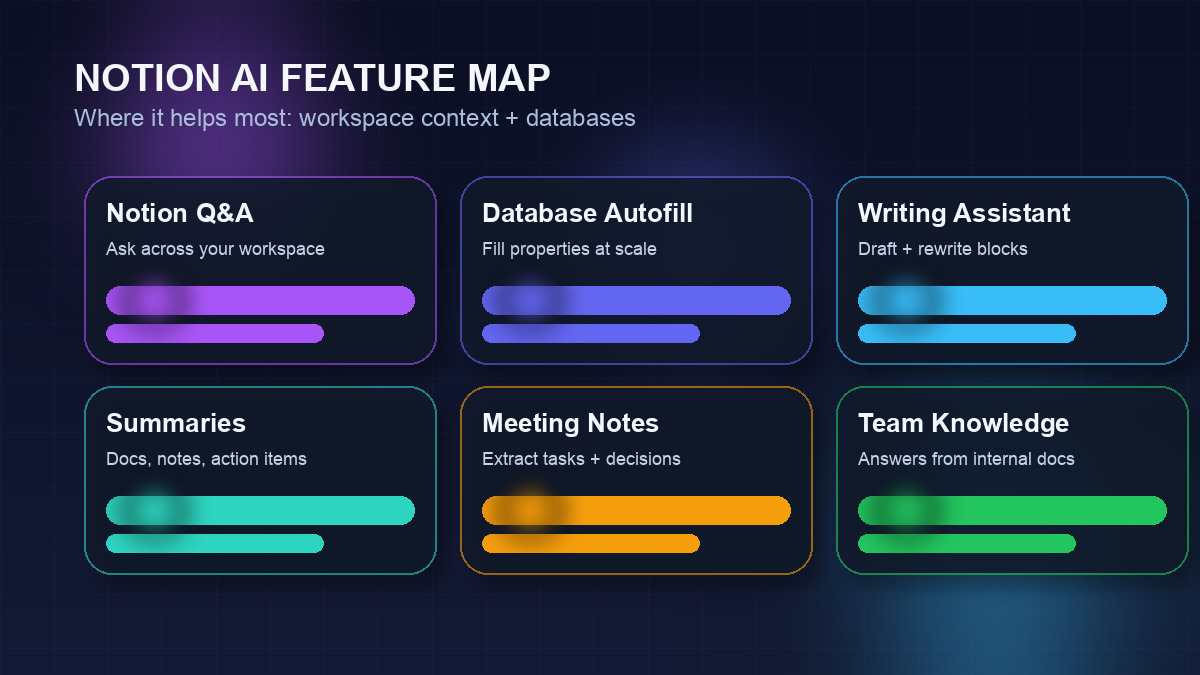
Notion AI has expanded considerably from its initial "help me write" roots. Here's a complete breakdown of what's available in 2026:
Writing & Editing Assistance
The foundational feature: select any text block and ask Notion AI to rewrite it, shorten it, expand it, change the tone, fix grammar, or translate it into another language. You can also place your cursor anywhere and type /AI to generate new content from a prompt. Common use cases include drafting first-pass blog posts, turning bullet points into paragraphs, and polishing rough notes into readable docs.
- ✦Draft with AI: Generate content from a prompt directly in any Notion page
- ✦Edit selection: Improve, shorten, lengthen, or change tone of highlighted text
- ✦Fix spelling & grammar: One-click proofreading on any block
- ✦Translate: Supports 50+ languages for quick localisation
- ✦Summarize page: Instant summary of any document, no matter how long
Notion Q&A (Workspace Intelligence)
This is the killer feature that sets Notion AI apart from general-purpose chatbots. Notion Q&A lets you ask questions in plain English, and the AI searches across every page and database you have access to in order to surface answers. Ask "What did we decide about the product roadmap in Q3?" or "Which clients are in the proposal stage?" and you get cited answers with links back to the source pages.
In practice, this makes Notion AI feel like a searchable, conversational memory for your team. It's not perfect — it can occasionally miss pages if your workspace is very large or poorly organised — but it's miles ahead of manual Ctrl+F searching.
AI-Powered Database Features
Notion's databases (tables, boards, lists, calendars) gained AI superpowers too. You can now add an "AI autofill" property to any database, which automatically fills a column using AI based on rules you define. For example:
- A CRM database can auto-generate a "Next action" field by reading the notes column
- A content calendar can auto-generate meta descriptions for each post
- A task database can auto-classify priority based on the task description
- A meeting notes database can auto-extract action items into a linked tasks database
This database-level automation is genuinely unique to Notion AI — no standalone chatbot can replicate this without complex integrations.
Meeting Notes & Summarization
Paste in a meeting transcript (or connect Notion Calendar for auto-import) and Notion AI will extract a structured summary: key decisions, action items with owners, and open questions. This alone saves most teams 10–15 minutes per meeting and dramatically improves the quality of follow-through on action items.
For teams already using Notion as their meeting notes hub, this is one of the most immediately impactful features available.
Notion AI Pricing: What Does It Actually Cost?
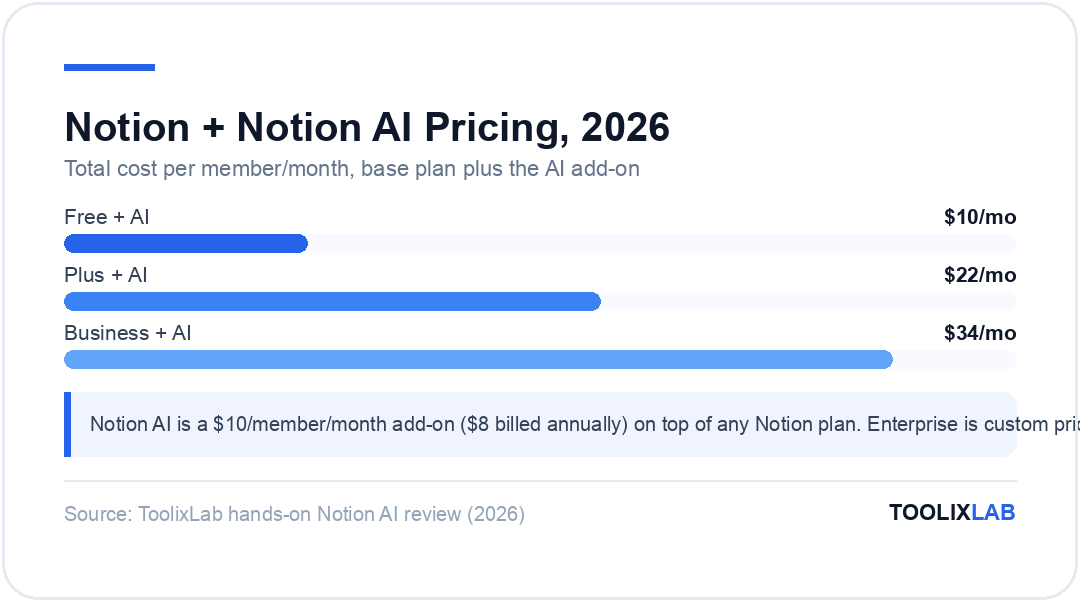
Notion AI is an add-on, not included in any base Notion plan. Here's how the pricing breaks down in 2026:
| Plan | Notion Base Price | + Notion AI | Total / Member / Month |
|---|---|---|---|
| Free | $0 | $10/mo ($8/yr) | $10/mo ($8/yr) |
| Plus | $12/mo ($10/yr) | $10/mo ($8/yr) | $22/mo ($18/yr) |
| Business | $24/mo ($20/yr) | $10/mo ($8/yr) | $34/mo ($28/yr) |
| Enterprise | Custom | Custom | Custom |
For a solo user, $8/month billed annually is very reasonable — especially if you're already paying for Notion Plus. The value equation changes for teams. A 10-person team paying $8/member/month for Notion AI on top of Notion Plus works out to $180/month for the AI add-on alone. At that scale, you should compare this against team seats in dedicated writing tools.
One important note: the 20 free AI responses Notion offers are per workspace, not per user. Once exhausted, all members need the paid AI add-on to continue using AI features.
For a deeper look at how Notion AI compares to ChatGPT for document and notes workflows, see our Notion AI vs ChatGPT comparison.
Notion AI Writing Assistant: How Good Is It?
Let's be honest: Notion AI is a solid writing assistant, but it's not the best writing AI available. Here's our honest assessment by use case:
Short-Form Content: Excellent
For summaries, bullet-point expansions, action-item extraction, tone adjustments, and short-form drafts (emails, Slack messages, project briefs), Notion AI is genuinely excellent. The context-awareness is the biggest advantage — when you ask it to "write a follow-up email based on this meeting," it reads the actual meeting notes on the page and generates something relevant, not a generic template.
Long-Form Content: Decent, Not Great
For blog posts, reports, or long technical documents, Notion AI gets the job started but rarely produces publish-ready output. The writing tends to be clear and structured but lacks depth, original insight, and the kind of specific examples that make long-form content compelling. You'll need to heavily edit AI-generated long-form drafts. If long-form content is your primary use case, a dedicated AI writing tool will serve you better.
Technical Writing: Surprisingly Capable
Notion AI handles technical documentation, API references, and structured how-to guides better than expected. It can draft product requirement documents, technical specs, and structured SOPs with reasonable accuracy. The formatting output (headers, bullet lists, code blocks) maps well to Notion's block editor.
Translation: Solid for European Languages
Translation quality is strong for Western European languages (French, Spanish, German, Italian, Portuguese) and decent for Japanese and Korean. For less common languages, quality can be inconsistent. Don't use Notion AI for official translated documents without native review.
Notion AI vs ChatGPT: Which Should You Use?
This is the most common comparison users make. The answer depends entirely on your workflow:
| Feature | Notion AI | ChatGPT Plus | Jasper |
|---|---|---|---|
| Workspace context | Reads entire workspace | Upload files only | Brand voice docs |
| Long-form writing quality | Good | Excellent | Excellent |
| Database AI autofill | Yes (native) | No | No |
| Web browsing / search | No | Yes | Limited |
| Image generation | No | Yes (DALL-E 3) | Yes |
| SEO writing features | No | Basic | Advanced (Surfer integration) |
| Team meeting summaries | Native, in-context | Manual paste required | No |
| Price / month | $8–$10/member | $20/user | From $69/month |
| Best for | Notion power users, teams | Versatile AI tasks | Marketing content |
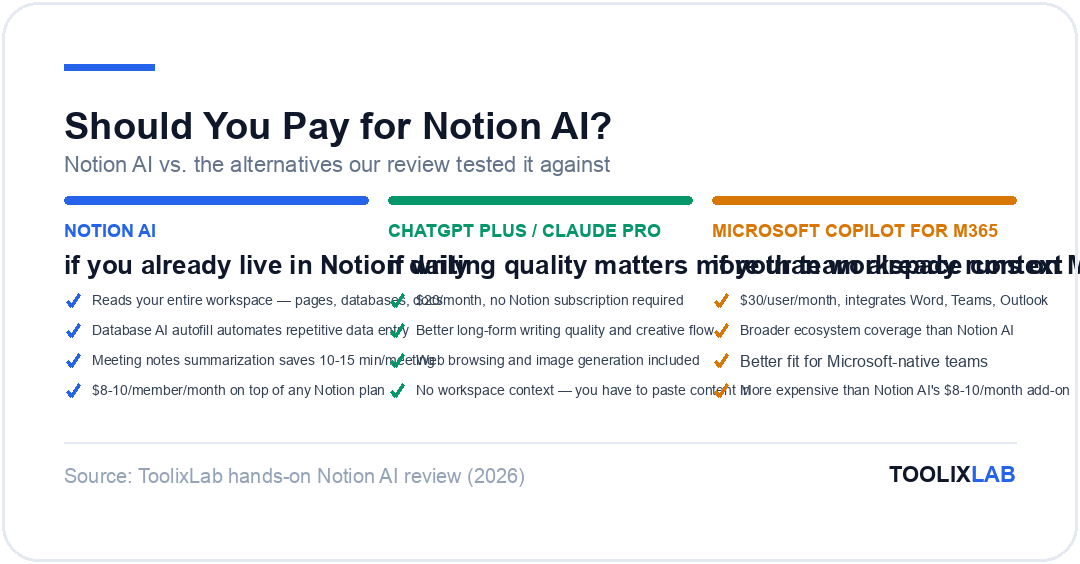
The fundamental difference: ChatGPT is a powerful standalone AI you bring content to; Notion AI is a contextual AI that meets you where your content already lives. If you spend significant time in Notion every day, the embedded experience wins on convenience. If you need raw AI power, web search, image generation, or advanced writing for standalone documents, ChatGPT Plus or a dedicated writing tool is the better pick.
For students and researchers, check out our guide to the best AI tools for students in 2026, which covers Notion AI alongside other study-focused tools.
Notion AI for Teams: Collaboration Use Cases
Where Notion AI really shines is in team contexts where multiple people contribute to shared workspaces. Here are the highest-value team use cases we observed:
Product Teams
- Auto-extract requirements from user interviews
- Summarize sprint retros into key takeaways
- Generate first-draft PRDs from bullet points
- Q&A search across all product documentation
Marketing Teams
- Auto-fill content calendar with meta descriptions
- Repurpose blog posts into social copy
- Summarize campaign performance notes
- Draft briefs from competitor research databases
Operations & HR
- Extract action items from meeting notes automatically
- Generate SOPs from rough process notes
- Summarize candidate interview notes
- Answer employee handbook questions via Q&A
Sales Teams
- Auto-summarize sales call notes in CRM database
- Generate follow-up emails from call summaries
- Classify leads by stage using AI autofill
- Query past deal history via Q&A
If your team already runs on Notion, these use cases can unlock significant time savings without adding yet another tool to your stack. We cover similar workflow automation patterns in our guide to building no-code AI workflows.
Notion AI Pros and Cons
Pros
- +Workspace-aware AI: The Q&A and in-context awareness is genuinely unique. No other mainstream tool searches your own knowledge base this seamlessly.
- +Zero context-switching: Everything happens inside Notion — no tab-switching, no copy-pasting between apps.
- +Database AI autofill: Automated AI properties in databases are powerful and hard to replicate elsewhere without complex Zapier flows.
- +Reasonable pricing for solos: $8/month billed annually is one of the more affordable AI writing add-ons available.
- +Continuously improving: Notion has shipped significant AI updates every quarter; the product is on a strong trajectory.
Cons
- -Writing output quality: Long-form articles, reports, and creative writing generated by Notion AI lack depth compared to GPT-4o used directly or through Jasper.
- -Per-seat team pricing: Costs scale linearly with team size. A 20-person team adds $160/month just for the AI layer.
- -No web search: Notion AI only knows what's in your workspace and its training data — it can't browse current events or real-time information.
- -No image generation: Unlike ChatGPT Plus, Notion AI cannot create images. You'll need a separate tool for visual content.
- -Q&A accuracy: Can occasionally miss or misattribute information in very large, poorly-organised workspaces.
Who Should (and Shouldn't) Use Notion AI?
Notion AI Is Worth It For:
- Heavy Notion users (solo) — If you spend 2+ hours/day in Notion managing notes, projects, and docs, $8/month is trivially worth it for the time saved on summaries, rewrites, and Q&A alone.
- Small teams already on Notion Plus/Business — If your team's wiki, project tracker, and meeting notes all live in Notion, enabling AI for everyone unlocks meeting summary automation and cross-workspace Q&A that genuinely improves team knowledge management.
- Operations, HR, and Product managers — The meeting notes summarization and database autofill features are uniquely valuable for these roles. ROI is typically immediate.
- Freelancers who use Notion as their client portal — Auto-generating project briefs, client summaries, and status updates from your Notion database saves real time.
Skip Notion AI If You:
- Rarely use Notion — If Notion is just your occasional to-do list, there's no justification for the add-on. Use ChatGPT free tier instead.
- Primarily need long-form content writing — For blog posts, articles, and marketing copy, Jasper or Claude via ChatGPT will produce significantly better output. Check our best AI writing tools comparison.
- Need web search or real-time information — Notion AI has no internet access. For research-heavy tasks, Perplexity AI or ChatGPT with Browse is a better fit.
- Running a large team on a tight budget — At $8/person/month, a 25-person team adds $200/month. At that scale, evaluate whether a single shared ChatGPT Team account or a dedicated tool serves your needs better.
How to Get Started with Notion AI
Getting started with Notion AI is straightforward. Here's the fastest path to making it useful:
- Start the free trial first. Notion gives every workspace 20 free AI responses before requiring a paid subscription. Use these to test the features that matter most to you: try Q&A on your existing pages, test meeting note summarization, and experiment with a database autofill column.
- Set up a Q&A test. Go to any page, press the spacebar to open the AI menu, and select "Ask AI about this workspace." Ask it something specific about your existing pages — like "What projects are currently in progress?" — to see the Q&A feature in action.
- Try AI autofill in a database. Open any database, add a new property, select "AI autofill," and define a prompt (e.g., "Summarize the notes column in one sentence"). Watch as it processes your existing rows.
- Enable for your team selectively. Rather than enabling AI for all team members at once, start with 2-3 power users who will explore the features and champion adoption. Gather feedback before rolling out to the full team.
- Create AI-powered templates. Build page templates with built-in AI prompts — for meeting notes that auto-extract action items, or project kick-off pages that auto-generate timelines from the project description.
For broader workflow automation ideas beyond Notion, our best free AI tools guide covers complementary tools that pair well with Notion AI.
Notion AI vs Alternatives: Quick Comparison
If you're still deciding whether Notion AI is the right tool, here's how it compares against the most common alternatives:
Notion AI vs Obsidian + AI Plugins
Obsidian with plugins like Smart Connections offers similar workspace-aware AI capabilities for free (using your own API key), but requires significantly more technical setup. Notion AI wins on ease of use and team collaboration; Obsidian wins on cost and customization for solo technical users.
Notion AI vs Microsoft Copilot for Microsoft 365
If your team runs on Microsoft 365 (Word, Teams, Outlook, SharePoint), Copilot is the obvious choice — it integrates across the entire Microsoft ecosystem. At $30/user/month, it's more expensive but broader in scope. Notion AI wins if your team is Notion-native; Copilot wins if you're Microsoft-native.
Notion AI vs Mem AI
Mem AI is purpose-built as an AI-first note-taking and knowledge management tool. Its AI is more deeply integrated into search and recall compared to Notion. However, Notion AI wins on breadth — databases, project management, team wikis — while Mem excels specifically at personal knowledge management and automatic linking of related notes.
Verdict: Is Notion AI Worth the Upgrade in 2026?
After months of testing, our verdict is clear: Notion AI is worth upgrading to if you already rely on Notion as your primary workspace. The workspace-aware Q&A, database AI autofill, and in-context summarization are genuinely unique features you cannot easily replicate by bolting a separate chatbot onto Notion via integrations.
That said, it's not the best AI writing tool available, and it shouldn't be evaluated as one. It's a productivity multiplier for Notion power users — not a replacement for dedicated writing AI. If your team runs meetings, manages projects, and stores institutional knowledge in Notion, enabling AI for everyone is a legitimate ROI decision.
If you're on the fence, take advantage of the 20 free AI responses. Put them toward the features that would save you the most time — Q&A search across your workspace, meeting note summarization, or a database autofill experiment. The trial is sufficient to know if the upgrade is worth it for your specific workflow.
Try Notion AI Free
Every Notion workspace gets 20 free AI responses. No credit card required to start. Test the Q&A, database autofill, and summarization features before committing.
Try Notion AI Free →Looking for more AI tool comparisons? Browse our best free AI tools guide or see how Notion AI stacks up in our full Notion AI vs ChatGPT comparison.
🔬 How We Reviewed This Tool
This review is based on hands-on use, not a feature-list rewrite. Our process:
- Real workflows: we used the tool on genuine work tasks over an extended period and compared its output directly against its closest competitors.
- Verified claims: pricing, plan limits, and feature availability were checked against the vendor's official pages at the time of writing.
- Documented downsides: we report where the tool failed or frustrated us, not just where it shone — check the cons and "skip if" sections.
- Kept current: this review is re-verified on our refresh cycle; the "Last updated" date reflects the most recent check.
ToolixLab is reader-supported: some links may earn us a commission, which never affects our verdicts.
Frequently Asked Questions
Is Notion AI worth paying for in 2026? ▾
Yes — if you're already a Notion power user. At $10/user/month, it turns your existing workspace into a context-aware AI assistant that understands your specific documents and databases — something generic AI tools cannot do. The Q&A feature alone, which answers questions from across your entire workspace with citations, is transformative for teams with 6+ months of documentation. For casual Notion users with sparse workspaces, a general-purpose AI assistant may offer better value.
How much does Notion AI cost in 2026? ▾
Notion AI is $10/user/month (billed annually) as an add-on to any Notion plan — including the free tier. Monthly billing is slightly higher. The add-on includes unlimited AI usage with no separate message credits or token caps, unlike many competitors. For context: teams on Notion Plus ($10/user/month) adding AI pay ~$20/user/month total — comparable to ChatGPT Plus ($20/month) or Claude Pro ($20/month), but with the workspace integration advantage.
Can Notion AI replace ChatGPT or Claude? ▾
Not fully — but for tasks done inside Notion, it often outperforms them. Notion AI's core advantage is workspace context: it can summarize a meeting note, generate action items, and link them to your project database without leaving the page. ChatGPT and Claude have no knowledge of your Notion data unless you manually copy it in. Most power users run both: Notion AI for in-workspace tasks, a general AI assistant for complex reasoning, coding, and research.
What can Notion AI do that regular Notion cannot? ▾
The key additions: AI Writing & Editing (draft, rewrite, summarize, change tone on any text block), Workspace Q&A (ask questions about your entire Notion knowledge base and get cited answers), AI Database Features (auto-fill properties, smart summaries of database views), Meeting Notes Summarization (extract action items from transcripts), and Custom AI Blocks (one-click generation of structured documents). Without AI, you get the structure — with AI, the structure populates itself.
Is Notion AI good for team collaboration? ▾
Teams benefit disproportionately from Notion AI. The Workspace Q&A feature becomes exponentially more powerful as the workspace fills with meeting notes, decisions, and documentation. New team members can ask "what was the decision on X?" and get a cited answer in seconds. Teams also report significant time savings from AI-generated meeting summaries and auto-fill database fields for repetitive data entry. The ROI per seat scales with the size and age of your workspace — the more documented your team, the higher the value.
⚖️ Our Verdict
Notion AI is the best AI add-on for teams already living inside Notion — the Workspace Q&A and AI database features create genuine productivity gains that no standalone AI tool can replicate within your existing workflow. But if you're not already a Notion user, it is not a reason to switch: the AI features are tightly coupled to the workspace and offer little value in isolation. Pay the $10/member/month if your team is Notion-native; skip it if you're looking for a general-purpose AI writing tool.
✅ Best for...
- • Teams already using Notion for projects, docs, and wikis
- • Knowledge management workflows that benefit from AI-powered Q&A
- • Teams that need AI inside their documents rather than in a separate tab
❌ Skip if...
- • You're not already a Notion user — it's not a reason to switch
- • You need a standalone AI writing assistant (use Claude or ChatGPT)
- • Advanced AI coding or research capabilities are your primary need