
Last updated: April 2026.
The best AI video generation tools in 2026 are no longer a novelty. Runway's Gen-4.5 (text-to-video), OpenAI's Sora 2, and Google's Veo 3.1 can now produce footage that passes for real film at a glance — and tools like HeyGen and Synthesia have quietly taken over corporate training videos, product demos, and social content for thousands of marketing teams. The market has exploded past 50 platforms, quality ranges from genuinely cinematic to unusably glitchy, and pricing has never been more confusing.
We tested 15 of the most widely used AI video generation tools — from text-to-video engines to AI avatar platforms, editing tools, and script-to-video converters — to give you an honest, ranked breakdown. No vague "it's great for creativity" write-ups. Just real pricing, real limitations, and clear answers on who each tool is actually built for.
Whether you're a content creator trying to 10x output, a marketer building video at scale, or a business owner needing professional video without a production budget — this guide covers the best AI video generator tools for 2026 across every use case and budget.
⚡ Quick Summary
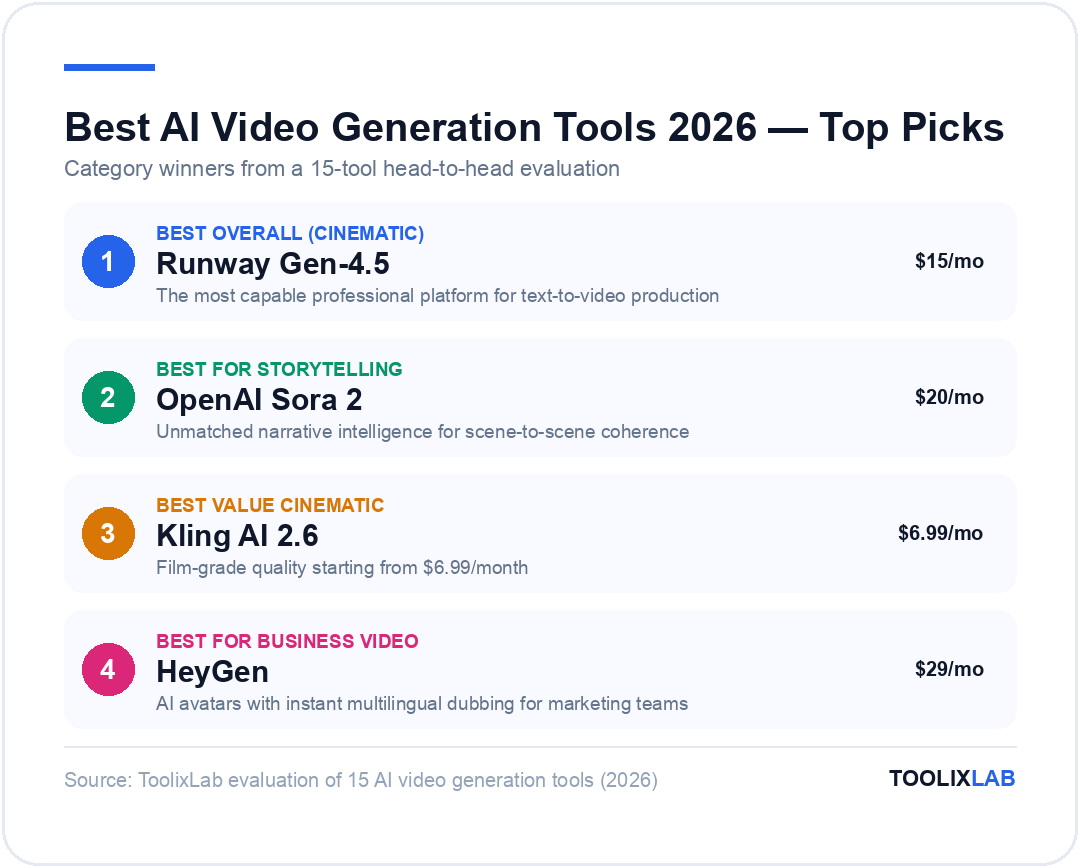
Best overall (cinematic): Runway Gen-4.5 — the most capable professional platform
Best for storytelling: OpenAI Sora 2 — unmatched narrative intelligence
Best value cinematic: Kling AI 2.6 — film-grade quality from $6.99/month
Best for business video: HeyGen — AI avatars, instant multilingual dubbing
Best free editor: CapCut AI — more AI features free than most paid tools
Best for repurposing: Opus Clip — turns any long video into viral short clips in minutes
Jump to: Comparison Table | Which to Choose | FAQ
What to Look for in an AI Video Generation Tool in 2026
The gap between marketing copy and actual output quality is bigger in AI video than in almost any other category. Before you commit to a subscription, here's what actually matters:
Output consistency: Can the tool reliably produce usable video on the first or second attempt, or do you need to generate 20 clips to find one keeper? Runway and Kling have made significant strides here; some newer tools still burn credits on unusable results.
Physics and motion quality: Does the video look physically coherent — natural movement, realistic lighting, stable camera motion? This is where the gap between top-tier tools (Sora 2, Veo 3.1, Runway) and mid-tier tools (Pika, HaiLuo) is most visible.
Use case fit: Text-to-video, image-to-video, avatar-based, editing-focused, and script-to-video are all different tools solving different problems. Buying a text-to-video engine when you actually need a video editor is a common expensive mistake.
Credit/pricing transparency: Many platforms use credit systems that make real costs opaque. A "$12/month" plan might only generate 10 usable clips if each generation costs 8+ credits. We break down actual cost per video in each review below.
Export quality and watermarks: Free tiers almost universally add watermarks. If you're producing content for clients or publishing on behalf of a brand, check the minimum paid tier needed to export clean.
Best AI Video Generation Tools in 2026 — Reviewed & Ranked
Part 1: Best Cinematic Text-to-Video Generators
1. Runway Gen-4.5 — Best All-Round Professional Platform
Runway has earned its reputation as the professional's choice for AI video generation, and Gen-4 makes a stronger case than ever. The platform goes far beyond basic text-to-video: it offers video-to-video transformation, image animation, motion control, AI-powered editing, and a multi-shot storytelling feature that maintains character and scene consistency across clips — something most competitors still struggle with. The output quality at the Pro tier is genuinely usable in commercial productions.
What sets Runway apart is its depth of creative control. You can direct camera movement, specify actor appearance via reference images, control lighting mood, and chain multiple shots together in a coherent sequence. For a filmmaker or agency video team, this matters enormously — you're not just rolling dice hoping for a usable output. The Runway Gen-4 model introduced in late 2025 significantly improved physical consistency and reduced the "AI uncanny valley" effect that plagued earlier versions. See our full Runway AI review for pricing tiers and hands-on testing notes.
The downside is the credit system. At $15/month (Standard), you get 625 credits — and a single high-quality generation can cost 5–10+ credits. Power users find themselves on the $95/month Unlimited plan surprisingly quickly. There's no free tier with meaningful output quality.
| Plan | Price/month | Credits & Key Features |
|---|---|---|
| Free | $0 | 125 credits/mo, watermarked exports, 720p |
| Standard | $15/mo | 625 credits/mo, no watermark, 4K upscaling |
| Pro | $35/mo | 2,250 credits/mo, priority generation, team assets |
| Unlimited | $95/mo | Unlimited relaxed-speed generation, full feature set |
✅ Pros
- • Best creative control of any platform
- • Character and scene consistency across multi-shot projects
- • Genuinely commercial-grade output at Pro tier
- • Active R&D — models improve rapidly
❌ Cons
- • Credit system makes real cost hard to predict
- • Power users hit limits quickly on lower plans
- • Steeper learning curve than consumer tools
Best for: Film production, agency video teams, commercial ad production, any workflow where output quality is non-negotiable.
2. OpenAI Sora 2 — Best for Narrative & Storytelling Video
⚠️ Update — April 2026
OpenAI discontinued Sora on April 26, 2026. The Sora API remains live until September 24, 2026. See our guide to what replaced Sora in 2026 for the best current alternatives.
Sora 2 is the most narratively intelligent AI video tool available in 2026. Where Runway and Veo excel at photorealistic physics and camera control, Sora 2 understands story — it can take a complex scene description with dialogue, emotional beats, and character motivations and translate it into video with a continuity of feel that competing models don't match. The "storyboard mode" lets you define multiple scenes in sequence and maintain character appearance across all of them, which was a long-standing technical limitation across the industry.
OpenAI removed free access to Sora in January 2026, making it exclusively available through ChatGPT Plus ($20/month) or ChatGPT Pro ($200/month). This is a significant shift — and a pricing consideration. If you're already on ChatGPT Pro, Sora 2 is exceptional value. If you're not, paying $200/month just for video generation is hard to justify against Runway or Kling unless storytelling quality is your specific priority.
The one genuine weakness: Sora 2 sometimes prioritises visual drama over physical accuracy. Fast-moving action sequences can show more artifacts than Veo 3.1 or Runway Gen-4. For marketing content, event highlight reels, or short film sequences, it's outstanding. For technical product demonstrations requiring precise, accurate motion, look elsewhere.
| Access Via | Price/month | Sora Usage |
|---|---|---|
| ChatGPT Plus | $20/mo | Limited Sora access, 720p, usage caps apply |
| ChatGPT Pro | $200/mo | Full Sora 2 access, 1080p, higher generation limits |
✅ Pros
- • Unmatched narrative and storytelling coherence
- • Excellent multi-scene character consistency
- • Integrated into ChatGPT workflow
- • Includes audio generation
❌ Cons
- • No free tier — requires ChatGPT Plus minimum
- • $200/mo Pro plan required for serious use
- • Less physically precise than Veo or Runway
Best for: Filmmakers, short film creators, brand storytelling campaigns. Strong value for existing ChatGPT Pro subscribers.
3. Google Veo 3.1 — Best for Cinematic Realism & Physical Accuracy
Google's Veo 3.1 has rapidly closed the gap with — and in some benchmarks surpassed — Sora and Runway on one specific dimension: physical realism. Veo's outputs show notably more accurate lighting, material textures, fluid dynamics, and camera motion physics than most competing models. The Google DeepMind Veo team has clearly prioritised photorealism over narrative complexity — the right call for product visualisations, architectural renders, nature footage, and commercial advertising.
The access model is currently the limitation. Veo 3.1 is available through Google's VideoFX and Gemini Ultra, and enterprise API access through Google Cloud Vertex AI. There's no clean standalone subscription for individual creators at a predictable price point the way Runway or Kling offers. If you're already deep in the Google Cloud ecosystem, the Vertex AI API makes Veo highly competitive. If not, the setup overhead can outweigh the quality advantage.
✅ Pros
- • Most physically accurate video of any model in 2026
- • Film-grade lighting and material rendering
- • Integrated audio in latest version
- • Strong API access via Google Cloud
❌ Cons
- • No clean standalone consumer subscription
- • Access via Gemini Ultra is limited and variable
- • Enterprise/developer focus limits ease of use
Best for: Enterprise teams, Google Cloud users, developers building video products, anyone needing the highest physical realism.
4. Kling AI 2.6 — Best Value for Cinematic AI Video
Kling AI from Kuaishou has become the market's standout value play. At $6.99/month, the output quality from Kling 2.6 competes directly with platforms charging 3–5x more. The model produces smooth, natural motion with good lighting coherence and surprisingly accurate hands and facial expressions — two areas where many competitors still struggle. The 2.6 release notably improved dynamic camera movements and added better high-motion action sequence handling.
The main caveat with Kling is the credit expiry policy: paid credits expire at the end of their validity period if unused. Unlike competitors with monthly refresh systems, this means inconsistent users may waste purchased credits. For regular, consistent production workflows, this is a non-issue — Kling is exceptional value. For occasional use, the credit waste risk narrows the pricing advantage. Read our full Kling AI review for the complete credit-system breakdown.
| Plan | Price/month | Credits & Features |
|---|---|---|
| Free | $0 | Daily free credits, watermarked, queue priority limited |
| Starter | $6.99/mo | 660 credits/mo, no watermark, 1080p export |
| Standard | $15.99/mo | 3,000 credits/mo, priority queue, commercial use |
| Pro | $45.99/mo | 8,000 credits/mo, fastest queue, all features unlocked |
✅ Pros
- • Best price-to-quality ratio in the market
- • Noticeably improved hands and faces vs earlier versions
- • Strong 5-second and 10-second clip quality
- • Fast generation times even on lower plans
❌ Cons
- • Credits expire at end of validity period
- • Creative control is less refined than Runway
- • Occasional inconsistency on complex prompts
Best for: Freelancers, content creators, and small teams who need cinematic output at a fraction of enterprise pricing.
5. Pika 2.5 — Best for Quick, Creative Social Content
Pika has carved a distinct niche as the fastest path from idea to social-ready clip. Where Runway and Sora ask you to think like a director, Pika is designed for rapid experimentation — prompts are simpler, generation is fast, and the interface is built around quickly iterating on short clips (typically 3–5 seconds). Pika 2.5 includes "Pikaffects," a suite of cinematic effects (explosion, melt, inflate, crush) that make it particularly popular for product teases and social engagement content.
Pika's output quality is one notch below the top tier — it lacks the physical coherence of Runway or the narrative depth of Sora — but for social media content where speed and virality matter more than cinematic precision, that trade-off is entirely reasonable at $8/month.
| Plan | Price/month | Key Features |
|---|---|---|
| Basic | $8/mo | 700 credits/mo, no watermark, Pikaffects unlocked |
| Pro | $28/mo | 2,300 credits/mo, priority queue, longer clips |
| Fancy | $76/mo | 6,000 credits/mo, fastest generation, all features |
✅ Pros
- • Fastest workflow for quick social clips
- • Pikaffects feature unlocks engaging creative effects
- • Very accessible pricing
- • Beginner-friendly interface
❌ Cons
- • Output quality below Runway/Kling/Sora tier
- • Limited clip length (3–5s for best results)
- • Less suitable for professional productions
Best for: Social media managers, content creators, brand marketers needing fast, attention-grabbing clips for TikTok, Reels, and YouTube Shorts.
Part 2: Best AI Avatar & Business Video Platforms
6. HeyGen — Best AI Avatar Video for Marketing & Business
HeyGen is the market leader in AI avatar video, and for good reason. The platform can turn a script into a professional-looking spokesperson video in minutes — with your own digital twin (cloned from a 2-minute video sample), one of 100+ stock avatars, or a generated avatar. The real game-changer is HeyGen's instant video translation: you can upload any video and have it dubbed into 40+ languages with lip-sync so accurate it's difficult to detect. This feature alone has made HeyGen the go-to tool for global marketing teams.
The Creator plan at $29/month includes unlimited video creation, which is genuinely generous compared to Synthesia's minute-based limits. The 200 monthly credits translate to roughly 10 minutes of Avatar IV video — enough for regular marketing output, though heavy users will push against it. If you're producing daily social content with avatars, the Business plan at $149/month becomes the practical ceiling.
HeyGen — Create spokesperson videos in minutes
Clone your own avatar, translate into 40+ languages, generate unlimited scripts-to-video with a Creator plan.
🎁 Free plan: 3 videos/month, no credit card required
| Plan | Price/month | Key Features |
|---|---|---|
| Free | $0 | 3 videos/month, watermarked, limited avatars |
| Creator | $29/mo | Unlimited videos, 200 Avatar IV credits, video translation, custom avatars |
| Business | $149/mo | Team collaboration, brand kit, API access, priority support |
✅ Pros
- • Best-in-class video translation & lip-sync
- • Easy avatar cloning from short video sample
- • Unlimited videos on Creator plan is generous
- • 100+ stock avatars with diverse representation
❌ Cons
- • Avatar IV credit cap limits heavy production use
- • Not suitable for cinematic/narrative video
- • Business plan pricing jumps steeply from Creator
Best for: Marketing teams, online educators, HR/L&D departments, any business producing regular spokesperson or explainer video content at scale.
7. Synthesia — Best Enterprise AI Video Platform
Where HeyGen targets marketing and creators, Synthesia has built its business around enterprise learning and development. The platform is the go-to choice for corporate training videos, HR onboarding, compliance content, and internal communications at scale. Its 160+ AI avatars include ultra-realistic "Express" avatars that pass casual inspection, and the built-in template library for corporate video formats (course modules, SOPs, product walkthroughs) saves significant production time.
Synthesia's pricing structure uses a minute-based system: the Starter plan at $29/month gives you 10 minutes of video per month, the Creator plan at $89/month gives 30 minutes. For teams producing frequent short videos this feels restrictive; for a team that needs 3–5 polished training modules per month, it's entirely workable. Enterprise pricing (custom) includes SCORM export for LMS integration, which is a key differentiator that HeyGen doesn't match.
✅ Pros
- • Industry-leading for L&D and training video
- • SCORM/LMS integration on enterprise plans
- • 160+ avatars, excellent diversity options
- • Very polished template library
❌ Cons
- • Minute-based limits feel restrictive on lower plans
- • Expensive vs HeyGen for equivalent output volume
- • Not the right tool for creative/marketing video
Best for: Enterprise HR, L&D teams, compliance and training video at scale. The obvious choice if you need SCORM/LMS export.
Part 3: Best AI-Powered Video Editing Tools
8. Descript — Best AI Video Editor for Podcasters & YouTubers
Descript solves the hardest part of video editing for talking-head content: the editing itself. The platform converts your video to a text transcript, and you edit the video by editing the text — delete a sentence in the transcript, and the video cut happens automatically. This workflow is genuinely transformative for interview-format content, podcasts, and tutorials. The AI "Overdub" voice cloning feature lets you fix mispronounced words or re-record sentences by typing — your voice, perfectly matched.
Descript also removes filler words ("um", "uh", "like") in one click, generates automatic captions, and can remove eye contact issues via AI eye contact correction. For content creators who spend hours cutting pauses and stumbles from talking-head videos, Descript typically cuts editing time by 60–70%. If you're building an AI content creation workflow, Descript is often the edit layer for video.
If Overdub's voice cloning isn't quite what your podcast needs, it's worth comparing it against the two leading dedicated AI voice generators — our ElevenLabs vs Murf AI showdown breaks down which one produces more natural narration for long-form audio. And if podcasting is your primary format rather than video, our dedicated roundup of the best AI tools for podcasters in 2026 goes deeper on scripting-to-editing workflows Descript doesn't cover on its own.
| Plan | Price/month | Key Features |
|---|---|---|
| Free | $0 | 60 min/month transcription, watermark on exports |
| Hobbyist | $16/mo (annual) | 10 hrs transcription/mo, no watermark, Overdub voice |
| Creator | $24/mo (annual) | Unlimited transcription, full AI tools, 4K export |
| Business | $50/mo (annual) | Team workspaces, 30+ language translation, brand kit |
✅ Pros
- • Edit video by editing text — transformative for talking-head content
- • Filler word removal saves enormous editing time
- • Voice cloning (Overdub) is genuinely impressive
- • Strong captions and transcript export
❌ Cons
- • Not built for cinematic or B-roll heavy editing
- • Slower to master for traditional video editors
- • AI tools are speech/transcript-centric
Best for: Podcasters, YouTubers, course creators, and anyone editing interview or talking-head video at volume.
9. CapCut AI — Best Free AI Video Editor (by Far)
CapCut remains the most capable free video editor available, and its AI layer is increasingly competitive with paid tools. Auto captions, background removal, auto-reframe for different aspect ratios, AI noise cancellation, smart cutout for subjects — all available on the free tier with 1080p export and no watermark. The Pro plan at $9.99/month adds 4K export, the full asset library, and more advanced AI generation features.
CapCut is the obvious choice for social media content creators who need a capable, fast editing tool on mobile or desktop. The AI generation features (text-to-video, AI image generation, script-to-video) are not on par with dedicated tools like Runway or HeyGen, but they're good enough for social-first content. For automating social media video content, CapCut is frequently the most cost-effective choice. Teams managing an entire content calendar rather than one-off clips should see our full roundup of best AI tools for social media managers, and for the still-image side of that workflow, our Canva AI vs Midjourney comparison covers which generator fits a fast-turnaround social posting schedule.
✅ Pros
- • Exceptional AI feature set — completely free
- • Auto captions, background removal, reframe all free
- • Works on mobile and desktop
- • Huge template and asset library
❌ Cons
- • Chinese-owned (ByteDance) — data privacy concerns for enterprises
- • Not suitable for complex, professional edits
- • AI generation quality lags dedicated text-to-video tools
Best for: Social media creators, content marketers producing Reels/Shorts/TikTok content who need capable editing for free.
10. Opus Clip — Best for Video Repurposing & Short-Form Content
Opus Clip does one thing exceptionally well: it turns long-form video into viral short clips. Upload a webinar, podcast, YouTube video, or meeting recording, and Opus Clip's AI identifies the most engaging 30–90 second segments, cuts them, adds captions, applies a visual layout optimised for vertical video, and assigns each clip a "Virality Score." The Virality Score is a genuine differentiator — it's not just cutting clips, it's predicting what will perform.
At $15/month, Opus Clip is the obvious productivity multiplier for anyone with a content archive they're not fully utilising. One hour of podcast → 8–12 platform-ready clips, fully captioned, with hooks identified. For a solo creator or marketing team repurposing long-form content, the ROI is immediate.
✅ Pros
- • Best-in-class for long-to-short video repurposing
- • Virality Score is a meaningful quality signal
- • Auto-captions, auto-reframe, auto-layout included
- • Very fast — 1-hour video processed in minutes
❌ Cons
- • Single-purpose tool — only for repurposing existing content
- • Clip selection can miss context (needs manual review)
- • Not useful if you don't already have long-form content
Best for: Podcasters, YouTubers, and content teams who want to squeeze maximum reach from existing long-form content without additional editing overhead.
Part 4: Best Script-to-Video & All-in-One Platforms
11. InVideo AI — Best for Marketers Building Videos at Scale
InVideo AI bridges the gap between text-to-video and full video production. Describe your video idea in plain text ("make a 60-second product explainer for a project management app targeting startup founders"), and InVideo generates a full video complete with stock footage, voiceover, music, captions, and scene structure. The quality is good enough for YouTube ads, explainer videos, and social campaigns, and the ability to iterate by giving natural language follow-up instructions ("make the intro shorter", "change the background music to something more energetic") is genuinely fast.
At roughly $25/month on the paid plan, InVideo AI positions itself as the productivity tool for marketing teams that need video volume without a video editor on staff. It's not the right choice for premium creative output — but for informational YouTube content, ads, and product explainers, it's hard to beat for speed.
✅ Pros
- • Text prompt → full video including stock footage, VO, music
- • Natural language iteration is genuinely fast
- • Good for marketers without video editing background
- • Large stock media library built in
❌ Cons
- • Stock footage output looks generic at times
- • Not suitable for cinematic or creative-led projects
- • Free tier watermarks all output
Best for: Marketing teams, solo marketers, and agencies needing to produce explainer and ad videos at volume without a video production background.
12. Veed.io — Best for Browser-Based All-in-One Editing
Veed.io has grown from a basic online video editor into a capable AI-powered production platform. Its particular strength is accessibility — everything runs in the browser, there's nothing to download, and the interface is clean enough for non-technical teams to onboard in minutes. The AI features (auto-subtitles in 100+ languages, background noise removal, AI avatars, eye contact fix, auto-cut) are all solid. It's not best-in-class at any single feature, but the breadth of what's available in one browser tab at $25/month is very competitive.
✅ Pros
- • Fully browser-based — no download or install
- • Excellent auto-subtitle accuracy (100+ languages)
- • Broad feature set for a single subscription
- • Great for teams needing a shared video workspace
❌ Cons
- • Not best-in-class at any individual feature
- • Slower processing on large files vs desktop apps
- • AI generation features are relatively basic
Best for: Small teams, solopreneurs, educators, and content marketers who need a broad video toolkit without software installation overhead.
Part 5: Specialist & Budget Options Worth Knowing
13. Luma AI Dream Machine — Best for Artistic Image-to-Video
Luma AI's Dream Machine is the specialist choice for image-to-video generation with a distinctive cinematic and artistic quality. Upload a still image and Dream Machine animates it with fluid, natural motion that rivals the top text-to-video tools for visual quality. It's particularly impressive for nature scenes, abstract motion, and product shots — the motion feels organic rather than mechanical. Luma offers 30 free generations per month on the free tier, making it accessible for experimentation without commitment. If image-to-video is your main interest because you're coming from stills rather than film, our best AI tools for photographers guide covers the wider photo-to-video and editing stack in more depth.
✅ Pros
- • Outstanding image-to-video quality
- • 30 free generations/month on free plan
- • Excellent for product photography animation
❌ Cons
- • Less suited for pure text-to-video workflows
- • Fewer editing or composition features
Best for: Photographers, product marketers, and creators who want to animate existing images into stunning video loops.
14. Adobe Firefly Video — Best for Adobe Creative Cloud Users
Adobe's Firefly Video integrates AI video generation directly into Premiere Pro and After Effects, making it the natural choice for professional video editors already in the Adobe ecosystem. The key advantage is workflow integration: you can generate B-roll, extend clips, and create background footage without leaving your existing editing environment. The quality is competitive with mid-tier dedicated tools, and Adobe's "commercially safe" training data guarantee is increasingly important for agencies and brands with IP concerns.
✅ Pros
- • Native Premiere Pro & After Effects integration
- • Commercially safe training data (important for agencies)
- • No separate subscription if already on Creative Cloud
❌ Cons
- • Requires Adobe Creative Cloud ($59.99+/mo)
- • Generation quality below Runway/Sora/Kling top tier
- • Limited standalone use case
Best for: Professional video editors and agencies already embedded in the Adobe Creative Cloud stack.
15. HaiLuo AI (MiniMax) — Best Budget Cinematic Option
HaiLuo AI from MiniMax is the surprise budget contender of 2026. At $4.99/month for a starter plan, it delivers cinematic video quality that genuinely punches above its weight — fluid motion, natural camera movement, and consistently better than expected human rendering. It's not at the level of Runway Gen-4 or Sora 2 for complex scenes, but for straightforward promotional and atmospheric clips, it's the cheapest way to get legitimately usable output. For freelancers testing AI video workflows before committing to a higher tier, HaiLuo AI is an excellent starting point.
✅ Pros
- • Lowest entry price for cinematic-quality AI video
- • Surprisingly good fluid motion and lighting
- • Great for testing AI video workflows on a budget
❌ Cons
- • Less consistency than Kling or Runway at scale
- • Smaller community and fewer learning resources
- • Limited editing features compared to full platforms
Best for: Freelancers, students, and individuals who want to experiment with AI video generation without committing to a large budget.
All 15 AI Video Generation Tools Compared
Here's a side-by-side view of all 15 AI video generation tools covered in this guide — sortable by use case, pricing, free plan availability, and quality tier.
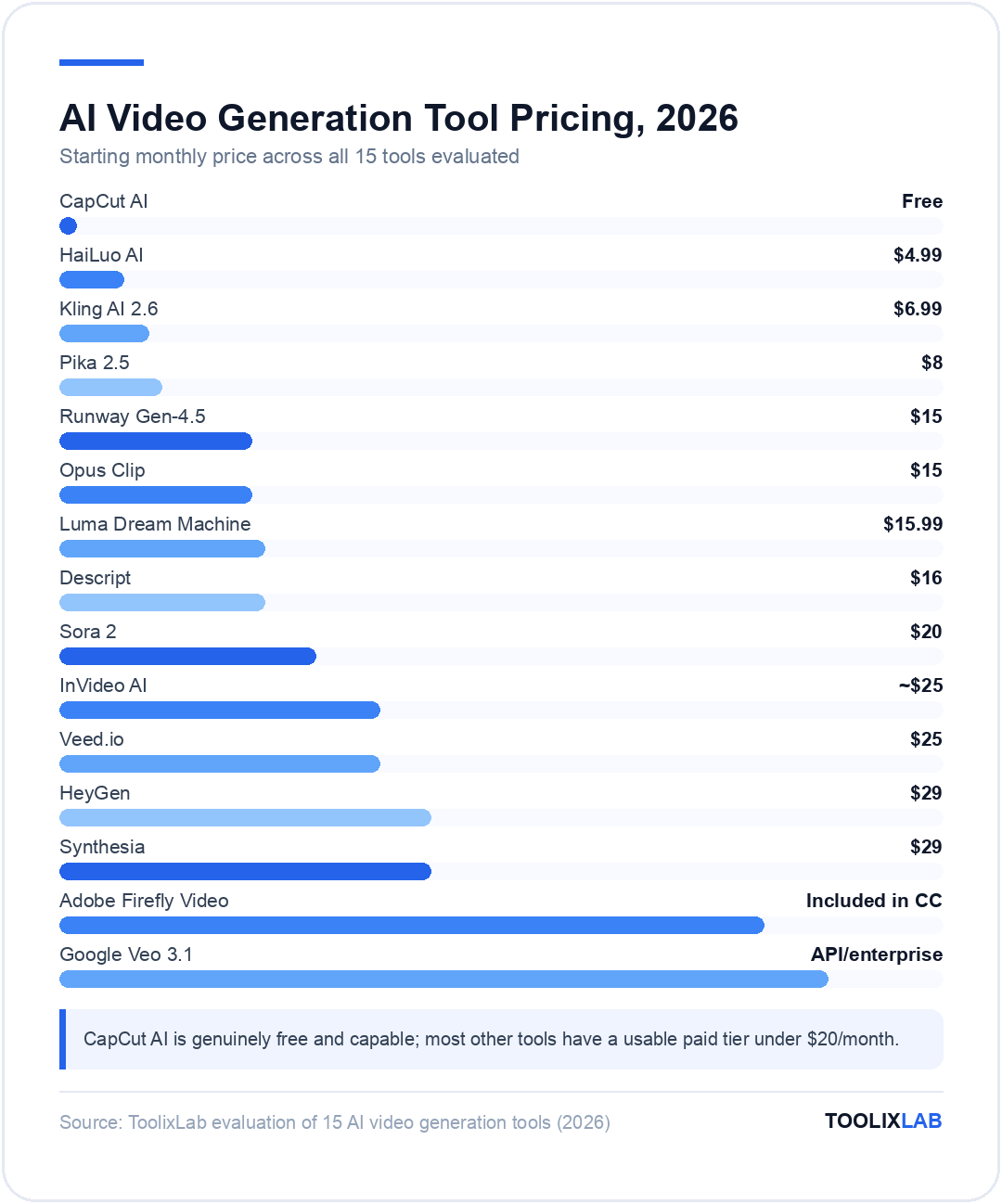
| Tool | Best For | Starting Price | Free Plan | Quality Tier |
|---|---|---|---|---|
| Runway Gen-4.5 | Professional production | $15/mo | ✅ Limited | ★★★★★ |
| OpenAI Sora 2 | Storytelling & narrative | $20/mo (ChatGPT+) | ❌ No | ★★★★★ |
| Google Veo 3.1 | Cinematic realism | API/enterprise | ⚠️ Via Gemini | ★★★★★ |
| Kling AI 2.6 | Best value cinematic | $6.99/mo | ✅ Daily credits | ★★★★½ |
| Pika 2.5 | Fast social clips | $8/mo | ✅ Limited | ★★★★ |
| HeyGen | AI avatar & business video | $29/mo | ✅ 3 vids/mo | ★★★★★ |
| Synthesia | Enterprise L&D | $29/mo | ❌ No | ★★★★★ |
| Descript | Podcast & YouTube editing | $16/mo (annual) | ✅ 60 min/mo | ★★★★★ |
| CapCut AI | Free social editing | Free | ✅ Very generous | ★★★★ |
| Opus Clip | Long-to-short repurposing | $15/mo | ✅ Limited | ★★★★★ |
| InVideo AI | Script-to-video at scale | ~$25/mo | ✅ Watermarked | ★★★½ |
| Veed.io | Browser-based all-in-one | $25/mo | ✅ Limited | ★★★½ |
| Luma Dream Machine | Image-to-video animation | $15.99/mo | ✅ 30 gen/mo | ★★★★½ |
| Adobe Firefly Video | Adobe CC users | Included in CC | ❌ CC required | ★★★★ |
| HaiLuo AI | Budget cinematic | $4.99/mo | ✅ Daily credits | ★★★½ |
Best Free AI Video Generator Tools in 2026
Every major AI video generator offers some form of free access — but the quality gap between free and paid tiers is significant. Here are the four free AI video generator options that actually deliver usable output, what you get on each free plan, and where the hard limits kick in.
| Tool | Free Allowance | Max Resolution | Watermark | Best For |
|---|---|---|---|---|
| CapCut AI | Unlimited (editing) | 1080p | None | Free editing, captions, social clips |
| Kling AI | 66 credits/day | 720p | Yes | Testing text-to-video quality |
| HeyGen | 3 videos/month | 720p | Yes | Testing AI avatar quality |
| Pika | 80 credits/month | 480p | Yes | Quick social clip experimentation |
| Luma Dream Machine | 30 generations/month | 720p | Yes | Image-to-video without a subscription |
Which AI Video Tool Should You Use?
Our Verdict
There's no single "best" AI video generation tool in 2026 — the right answer depends entirely on your use case, audience, and budget. We've tested all 15 AI video generation tools covered in this guide against real-world workflows. Here's our clearest decision guide.
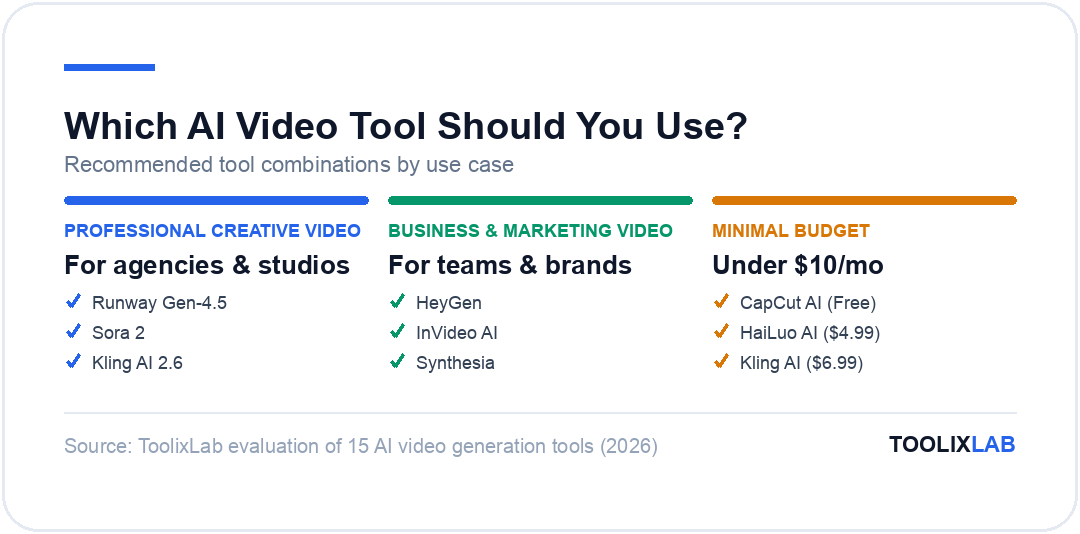
🎥 For professional creative video:
- • Runway Gen-4.5 — best overall creative control
- • Sora 2 — best if narrative quality is the priority
- • Kling AI 2.6 — best if budget matters
📣 For business & marketing video:
- • HeyGen — spokesperson and translated video
- • InVideo AI — script-to-video at scale
- • Synthesia — enterprise training & L&D
✂️ For editing existing content:
- • Descript — best for podcast/YouTube editing
- • Opus Clip — best for repurposing into short clips
- • CapCut AI — best free option for social media
💰 For minimal budget:
- • CapCut AI — genuinely free and capable
- • HaiLuo AI — $4.99/mo for cinematic quality
- • Kling AI — $6.99/mo for professional output
The stack that makes the most sense for most marketing teams in 2026: Kling AI or Runway for generating original footage, Descript for editing talking-head content, Opus Clip for repurposing, and HeyGen for multilingual spokesperson content. That covers 90% of professional video needs at $50–110/month total — far less than traditional video production budgets. If you're building a full content production workflow with AI, see our guide on the best AI SEO tools for 2026 to maximise visibility.
For a broader look at how AI video tools fit into a complete marketing toolkit, our best AI tools for marketing in 2026 guide covers the full stack. And if you're specifically focused on written content alongside video, check out our best AI writing tools for content creators roundup.
How We Evaluated These Tools
We evaluated each AI video generation tool against a standardised set of test prompts across three categories: a simple outdoor cinematic scene, a human subject speaking to camera, and a product-on-surface showcase. Tools were scored on output quality (motion coherence, lighting accuracy, visual artifacts), workflow efficiency (time from prompt to usable output), pricing transparency (actual cost per usable clip), and feature completeness. We used each tool's paid tier for quality assessment where a free trial was available, and relied on verified user reviews from G2 and Reddit's video creation community to validate findings.
🔑 Key Takeaways
- ✓ The best AI video generation tools for cinematic quality in 2026 are Runway Gen-4.5, Sora 2, and Veo 3.1 — each with different strengths
- ✓ Kling AI at $6.99/month offers the best price-to-quality ratio for professional output in 2026
- ✓ HeyGen is the dominant platform for AI avatar and translated marketing video
- ✓ CapCut AI is genuinely unmatched as a free tool — its AI feature set beats many paid alternatives
- ✓ The best "complete stack" for most teams: Kling/Runway + Descript + Opus Clip + HeyGen ($50–110/mo total)
- ✓ Adobe Firefly Video only makes sense if you're already paying for Creative Cloud
Frequently Asked Questions
What is the best AI video generation tool in 2026?
The best AI video generation tool depends on your use case. For professional cinematic video, Runway Gen-4.5 offers the best overall creative control. For narrative storytelling, Sora 2 leads. For the best price-to-quality ratio, Kling AI 2.6 starting at $6.99/month is the standout. For business and marketing video with AI avatars, HeyGen is the market leader.
What's the difference between text-to-video and AI video editing tools?
Text-to-video tools (Runway, Sora, Kling, Pika) generate new video footage from a text prompt or image. AI video editing tools (Descript, CapCut, Opus Clip) work with footage you already have, using AI to speed up editing, add captions, remove filler words, or repurpose content. These solve different problems — you likely need tools from both categories for a complete workflow.
Is there a good free AI video generator in 2026?
Yes. CapCut AI is the most capable free video tool available — auto captions, background removal, AI effects, and 1080p export are all free with no watermark. For text-to-video generation, Kling AI offers free daily credits with watermarked output, Luma Dream Machine gives 30 free generations per month, and HeyGen offers 3 free avatar videos per month. None of the premium cinematic generators (Runway, Sora) have genuinely useful free tiers.
Can I use AI-generated video for commercial purposes?
Most paid tiers explicitly grant commercial use rights. Runway, Kling, HeyGen, Synthesia, and Descript all allow commercial use on their paid plans. Free tiers typically restrict commercial use and/or require watermarks. Adobe Firefly Video has a specific "commercially safe" training data guarantee that is valuable for agencies. Always check the specific plan terms before using AI-generated video in paid advertising or client work.
How does Kling AI compare to Runway Gen-4?
Runway Gen-4.5 offers superior creative control, multi-shot consistency, and slightly better output quality for complex scenes. Kling AI 2.6 produces cinematic-quality results at 3–5x lower cost and with faster average generation times. For high-volume regular production where cost efficiency matters, Kling is often the better choice. For a film production or commercial ad where a single perfect output justifies premium pricing, Runway edges ahead.
Which AI tool is best for creating video content for social media?
For social media specifically: Pika 2.5 is best for quick, creative short clips with visual effects. CapCut AI is the best free all-round editor for Reels, TikTok, and YouTube Shorts. Opus Clip is the best tool for repurposing existing long-form content into social clips. HeyGen is best if you need a consistent spokesperson or branded avatar format for regular social content.
How much does it cost to produce AI video at scale in 2026?
A practical content team stack in 2026 runs $50–110/month: Kling AI Standard ($15.99) or Runway Standard ($15) for generation, Descript Creator ($24 annual) for editing, Opus Clip ($15) for repurposing, and HeyGen Creator ($29) for avatar content. That covers most professional video production needs. Compare this to even a single day of traditional video production ($1,500–5,000+), and the ROI of AI video tools at scale is clear.
Is Sora 2 worth $200/month?
Only if you're already on ChatGPT Pro for other reasons, or if narrative storytelling quality is your highest priority. Sora 2 via ChatGPT Pro is exceptional value if you use the full suite (o3, deep research, advanced voice). As a standalone video generation tool at $200/month, it's hard to justify against Runway Pro ($35) or Kling Standard ($15.99) which deliver comparable practical output for most use cases at a fraction of the cost.