
Quick Answer
The best AI tools for YouTube creators in 2026 are ChatGPT for scripting, TubeBuddy and VidIQ for SEO and analytics, Descript and Riverside for editing and recording, ElevenLabs and HeyGen for voice and avatars, OpusClip for Shorts, and Canva for thumbnails. Together they cover every stage of a video from idea to upload.
The best AI tools for YouTube creators in 2026 don't replace the parts of making videos that actually take talent — they remove the parts that take time. Tag research, transcript-based editing, chopping a 40-minute upload into ten Shorts, cleaning up audio recorded in a spare bedroom: none of that is the reason anyone starts a channel, and all of it used to eat hours per upload.
We tested the ten tools below across a full upload cycle — scripting a video, recording it, editing it, cutting it into Shorts, designing a thumbnail, and checking the SEO before publishing — and priced every plan directly from each vendor's current pricing page. Some names here overlap with our roundup of free AI video generation tools, but this list is scoped specifically to the YouTube workflow: SEO, editing, voice, and thumbnails, not general text-to-video generation.
If you only take one thing from this guide: don't buy all ten. Most creators need three or four tools covering different stages of the pipeline, not a subscription for every category. We flag exactly which ones to start with near the end.
⚡ Quick Summary
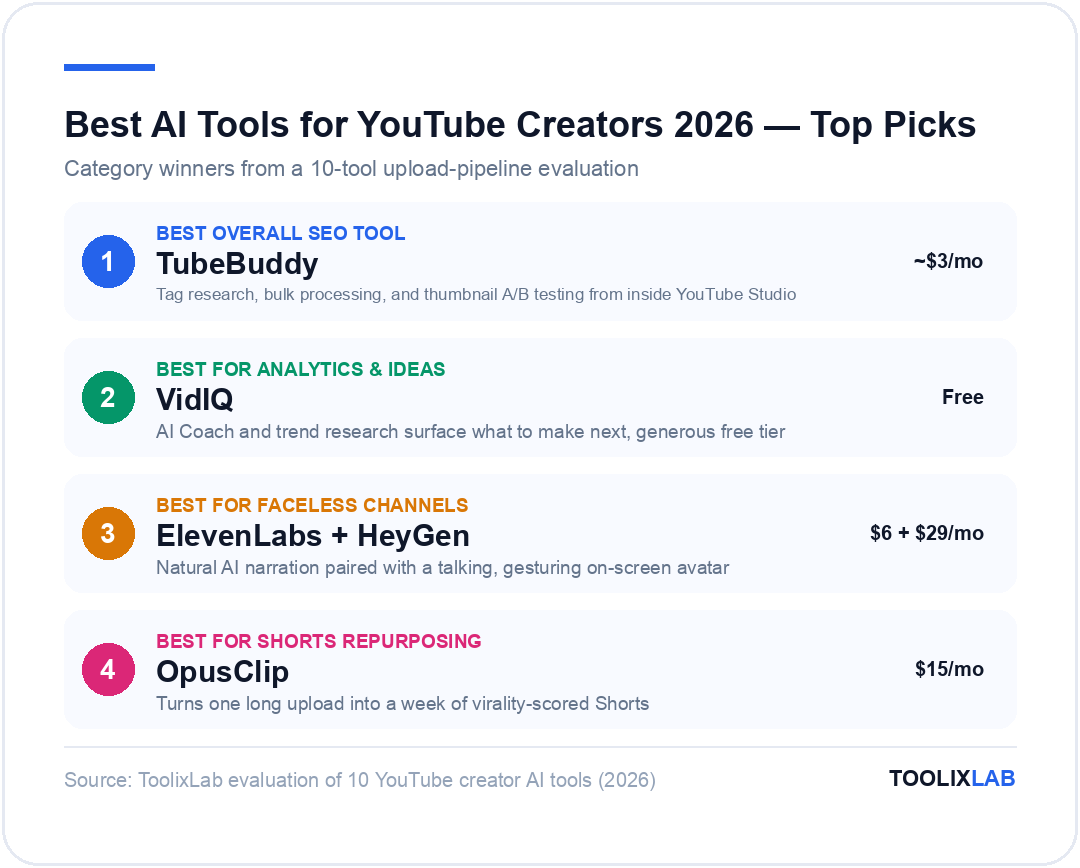
Best overall SEO tool: TubeBuddy — tag research, bulk processing, and thumbnail A/B testing from about $3/month annually
Best for analytics and ideas: VidIQ — AI Coach and trend research, free tier included
Best for faceless channels: ElevenLabs (voice) + HeyGen (avatars)
Best for Shorts repurposing: OpusClip — turns one long upload into a week of Shorts
Jump to: Comparison Table | Verdict
What Should You Look for in an AI Tool for YouTube in 2026?
Every tool in this guide earns its place by solving one specific bottleneck in the upload pipeline, not by claiming to do everything. Before you subscribe to anything, check it against four things:
Does it save real time, not just novelty time? AI thumbnail generators are fun to play with; whether they save you time versus a Canva template depends on how fast you can iterate to something that actually gets clicks. Does the free tier let you finish a real task? A capped trial that expires before you've cut one video tells you nothing. Does it export something you can actually publish? Watermarks, resolution caps, and format restrictions on cheap tiers are common — check before you commit a workflow to a tool. Does the price scale with your upload schedule? Credit-based tools (ElevenLabs, HeyGen, OpusClip) get expensive fast once you're publishing daily; check the math at your real volume, not the marketing example.
One more thing worth separating: AI video generation (text-to-video, like the tools compared in our Runway vs Kling vs Pika vs Veo comparison, our full Runway AI review, our Kling AI review, or what we found when we tracked what replaced Sora in 2026) is a different job than the YouTube-specific tools below. Full text-to-video is improving fast, but it still isn't how most working YouTube channels produce their main uploads — it shows up more in Shorts, B-roll, and thumbnail experimentation.
The 10 Best AI Tools for YouTube Creators in 2026
1. ChatGPT — Best for Scripting & Ideation
Every video starts somewhere, and for most creators that's a blank document, not a camera. ChatGPT is the fastest way to get from "I should make a video about X" to an actual outline — hooks, beat-by-beat structure, a title that isn't generic, and a description with the keywords you're targeting already worked in.
What it's actually good at: turning a rough topic into three or four distinct video angles, drafting a full script you then edit in your own voice, and generating a batch of title variants to pressure-test before you commit to one. It's noticeably weaker at anything that needs current, channel-specific data — it won't know your actual watch-time drop-off points or what your specific audience already knows, so treat its scripts as a first draft, not a final one. Pairing it with a structured prompt library cuts a lot of the back-and-forth needed to get a usable first draft.
| Plan | Price/mo | What You Get |
|---|---|---|
| Free | $0 | GPT access with usage limits — enough for occasional scripting |
| Plus | $20 | Much higher usage limits, faster responses, priority access to new models |
| Pro | $200 | Near-unlimited usage and access to OpenAI's most capable models |
*Prices verified July 2026 directly from chatgpt.com/pricing — check the official page for current rates.
✅ Pros
- • Free tier is genuinely usable for occasional scripting
- • Fastest way to go from topic to structured outline
- • Doubles as a title/description/SEO-copy generator
❌ Cons
- • Scripts read generic until you rewrite in your own voice
- • No awareness of your channel's actual analytics
- • Not built for video-specific tasks like editing or thumbnails
Best for: Any creator who scripts before filming, especially talking-head and educational channels where structure matters more than spontaneity.
2. TubeBuddy — Best for YouTube SEO & Channel Management
TubeBuddy installs as a browser extension that sits directly on top of YouTube Studio, which is the reason creators who've used it for years rarely switch away — there's no separate dashboard to remember to check. It surfaces tag suggestions, best-time-to-publish data, and keyword search volume right where you're already uploading.
The feature that separates it from a simple tag tool is bulk processing: changing a card, end screen, or annotation across dozens of older videos in one pass instead of opening each one manually. Thumbnail A/B testing (Legend tier) is the other standout — it rotates two thumbnail versions across real traffic and reports which one actually gets more clicks, rather than asking you to guess.
| Plan | Price/mo | What You Get |
|---|---|---|
| Free | $0 | Basic tag suggestions and a handful of core tools |
| Pro | ~$5 | Full tag explorer, video SEO scorecard (~$3/mo billed annually) |
| Star | ~$20 | Bulk processing, scheduling (~$12/mo billed annually) |
| Legend | ~$49 | Thumbnail A/B testing, full automation suite (~$23/mo billed annually) |
*Figures cross-referenced from current 2026 pricing trackers — TubeBuddy's own pricing page blocks automated verification, so confirm exact current rates at tubebuddy.com/pricing before buying.
✅ Pros
- • Lives inside YouTube Studio — no separate dashboard habit to build
- • Bulk editing saves hours on channels with a large back catalog
- • Real A/B thumbnail testing, not a guess
❌ Cons
- • A/B testing is locked behind the top Legend tier
- • Free plan is thin — you'll want Pro at minimum
- • Browser-extension model means it only works where you install it
Best for: Channels with a sizeable back catalog that need bulk SEO cleanup, and anyone who wants real thumbnail A/B data instead of gut-feel.
3. VidIQ — Best for Analytics & Content Ideas
VidIQ competes directly with TubeBuddy but leans harder into the "what should I make next" question rather than back-catalog cleanup. Its AI Coach reviews your channel's actual performance and suggests specific next-video ideas, and its trend-tracking surfaces topics gaining momentum in your niche before they peak.
The credit-based AI system (thumbnails, script ideas, title generation) is generous on the free tier for casual use, and the Boost plan's 2,000 monthly credits cover most solo creators comfortably. Where it gets expensive is Max Mode — the deeper AI Coach conversations and heavier automation genuinely require the top tier, and channels that lean on it daily will feel the $39-49/month price.
| Plan | Price/mo | What You Get |
|---|---|---|
| Free | $0 | 150 AI credits, niche trends, basic AI Coach tips |
| Boost | ~$19 | 2,000 AI credits, AI thumbnails, unlimited trends (~$16.58/mo annually) |
| Max | ~$49 | 6,000 AI credits, deep AI Coach, Max Mode ($39/mo billed annually) |
*Max-tier price confirmed directly on vidiq.com/pricing; Boost pricing cross-referenced against current trackers. Check the official page before buying.
✅ Pros
- • Free tier gives a real taste of AI Coach, not just a demo
- • Stronger at "what to make next" than TubeBuddy
- • Trend detection surfaces topics before they saturate
❌ Cons
- • Credit system means heavy users hit ceilings fast
- • No bulk back-catalog editing like TubeBuddy
- • Max tier is a real jump in price for daily use
Best for: Creators who want AI-assisted content strategy, not just SEO housekeeping — TubeBuddy and VidIQ overlap enough that most channels only need one.
4. Descript — Best AI Video Editor (Text-Based Editing)
Descript's core idea still feels like a trick the first time you use it: it transcribes your footage, and you edit the video by deleting words in the transcript. Cut a sentence, the corresponding video frames disappear with it. For talking-head content this alone removes the most tedious part of editing.
Filler-word removal ("um," "uh," dead air) runs automatically, and Studio Sound cleans up rough audio without a separate tool. The Creator plan's 20+ AI tools also cover green-screen-free background removal and an AI voice generator (Overdub) for fixing a flubbed line without a reshoot.
| Plan | Price/mo | What You Get |
|---|---|---|
| Free | $0 | 60 min/month media, 720p export, basic AI tools |
| Hobbyist | $16 | 600 min/month, 1080p watermark-free export, 100GB storage |
| Creator | $24 | 1,800 min/month, 4K export, full 20+ AI tool access, stock library |
| Business | $50 | 2,400 min/month, translation/dubbing, custom avatars, 5 seats |
*Prices verified July 2026 directly from descript.com/pricing — check the official page for current rates.
✅ Pros
- • Editing by deleting text is dramatically faster than a timeline for talking-head content
- • Studio Sound fixes bad room audio in one click
- • Free tier is enough to test the whole workflow on a short video
❌ Cons
- • Text-based editing helps less on heavily visual, B-roll-driven videos
- • Monthly minute caps add up fast for creators editing multiple long videos
- • Learning the timeline view still takes time for complex multi-track edits
Best for: Talking-head, podcast-style, and tutorial channels where dialogue drives the edit more than visuals.
5. Riverside — Best for Recording Interviews & Podcast-Style Videos
Riverside records each guest locally on their own device in 4K, then syncs the tracks afterward — which means a shaky internet connection during the call doesn't wreck your final footage the way a normal video call would. It's the go-to for creators running interview shows, co-hosted podcasts, or reaction-style formats.
Its AI editing agent and Magic Clips features can auto-generate short highlight clips from a long recording, which overlaps somewhat with dedicated repurposing tools like OpusClip but is convenient if you're already recording in Riverside. Built-in podcast hosting and multi-platform publishing round it out for creators running a show that lives on YouTube and audio platforms simultaneously.
| Plan | Price/mo | What You Get |
|---|---|---|
| Free | $0 | 2 hrs multi-track recording/month, 720p, Magic Clips |
| Pro | $29 | 4K video, no watermark, AI editing agent ($24/mo billed annually) |
| Grow | $39 | 2 studios, social scheduling, AI thumbnails ($34/mo billed annually) |
*Prices verified July 2026 directly from riverside.com/pricing — check the official page for current rates.
✅ Pros
- • Local recording means bad internet doesn't ruin the final footage
- • Free tier's 2 hours/month is enough for a weekly short-form podcast
- • Podcast hosting and video hosting bundled in one subscription
❌ Cons
- • Overkill if you only ever record solo, camera-to-desktop videos
- • Download/track-separation hours are capped even on paid tiers
- • Full editing suite is thinner than a dedicated editor like Descript
Best for: Interview shows, co-hosted podcasts, and any format recorded remotely with more than one person on camera.
6. ElevenLabs — Best AI Voice Generator for Faceless Channels
ElevenLabs makes narration for faceless and low-appearance channels sound like a person, not a robot reading a script — the difference that used to require hiring a voice actor. Text-to-speech quality here is the reason it's become the default pick for explainer, list, and true-crime-style narration channels that don't put a face on camera. See our full ElevenLabs review for the complete pricing and credit-system breakdown.
Instant Voice Cloning (Starter tier and up) lets you clone your own voice from a short sample and generate new lines in it — useful for fixing a flubbed take without re-recording, or for producing narration faster than you can read it live. Dubbing Studio also opens international audiences by translating a video into another language in the creator's own cloned voice.
For the music side of the equation — intro themes, background beds, or a full original soundtrack instead of licensed stock music — Suno AI generates full songs, vocals included, from a single text prompt. See our full Suno AI review for pricing and how its v5.5 vocal quality holds up.
| Plan | Price/mo | What You Get |
|---|---|---|
| Free | $0 | 10,000 credits/month, text-to-speech, voice design |
| Starter | $6 | 30,000 credits, commercial license, instant voice cloning |
| Creator | $22 | 121,000 credits, professional voice cloning |
| Pro | $99 | 600,000 credits, high-res audio output via API |
*Prices verified July 2026 directly from elevenlabs.io/pricing — check the official page for current rates.
✅ Pros
- • Most natural-sounding AI narration available for faceless channels
- • Voice cloning fixes flubbed lines without a reshoot
- • Dubbing Studio opens a real path to international audiences
❌ Cons
- • Credit system means a long-form narration script can burn through a tier fast
- • Free tier's commercial-use restrictions rule it out for monetized channels
- • Cloned voices still need a listen-through — occasional odd inflections slip in
Best for: Faceless channels, explainer content, and any creator who wants to publish more often than they can personally record narration.
7. HeyGen — Best AI Avatar Generator
HeyGen generates a talking, gesturing on-screen avatar from a script and a reference photo or video — no camera, lighting setup, or filming day required. The 2026 Avatar IV update noticeably improved micro-expressions and hand gestures, closing a lot of the "obviously AI" gap that made earlier avatar tools distracting to watch.
Custom Digital Twins (available from the free tier, more on paid plans) let a creator build a reusable avatar of themselves, then generate new videos just by changing the script — useful for channels producing frequent short updates, translated versions of the same video, or A/B testing a delivery style without re-filming each time.
| Plan | Price/mo | What You Get |
|---|---|---|
| Free | $0 | 3 videos/month (1 min max), 1 Custom Digital Twin |
| Creator | $29 | 600 credits, videos up to 30 min, voice cloning, 1080p |
| Pro | $49 | 1,000 credits, 4K export, unlimited photo avatars |
*Prices verified July 2026 directly from heygen.com/pricing — check the official page for current rates.
✅ Pros
- • Avatar IV's micro-expressions are a real step up from older, stiffer avatars
- • Custom Digital Twin available even on the free plan
- • Fast way to produce videos without ever being on camera
❌ Cons
- • Free tier's 1-minute cap only suits Shorts, not main uploads
- • Some viewers still notice it's an avatar, which isn't right for every niche
- • Credit costs climb fast for channels publishing long-form daily
Best for: Faceless or low-appearance channels that want a consistent on-screen presence without filming, and multi-language versions of the same video.
8. OpusClip — Best for Repurposing Long-Form Into Shorts
OpusClip takes a long-form upload and automatically finds the moments most likely to work as standalone Shorts — scoring each candidate clip for predicted performance instead of just chopping the video into equal segments. It adds captions, reframes to 9:16, and can post directly to YouTube Shorts, TikTok, and Instagram from inside the app.
For creators who already publish long-form and want a Shorts presence without editing each clip by hand, this is close to the fastest path available. It's a genuinely different job from the video-generation tools in our AI video tools for marketers guide — OpusClip repurposes footage you already have rather than generating anything new.
| Plan | Price/mo | What You Get |
|---|---|---|
| Free | $0 | AI clipping (spoken words), watermarked exports |
| Starter | $15 | Watermark-free, virality scoring, direct social posting |
| Pro | $29 | Custom reframing, moving object tracking |
*Prices verified July 2026 directly from opus.pro/pricing — check the official page for current rates.
✅ Pros
- • Virality scoring picks clips a human might scroll past on a first watch
- • Direct posting to three platforms saves a full export-and-upload step
- • Entry tier is priced for solo creators, not just agencies
❌ Cons
- • Free plan's watermark makes it unusable for a public channel
- • Auto-picked clips still need a quick manual review before posting
- • Works best on talk-heavy footage — less useful for visual-only content
Best for: Any long-form creator who wants a Shorts feed without manually re-editing every clip.
9. Canva — Best AI Tool for Thumbnails & Channel Art
Canva's Magic Studio combines AI image generation (Dream Lab), background removal, and a huge library of YouTube-specific thumbnail templates in one place, which makes it faster to test several thumbnail directions than opening a full design tool from scratch. We covered it in more depth, including Pro vs Business pricing, in our full Canva AI review.
For thumbnails specifically, the workflow is: generate a few background concepts in Dream Lab, drop in your own photo or text with Magic Design, and export at YouTube's recommended 1280×720. It's not a Photoshop replacement for pixel-level retouching, but for the speed-to-publish a weekly upload schedule demands, that trade-off is usually worth it.
| Plan | Price/mo | What You Get |
|---|---|---|
| Free | $0 | 1.6M+ templates, 5GB storage, basic AI tools |
| Pro | $15 | Dream Lab, Magic Studio, brand kit basics ($10/mo billed annually) |
| Business | $20/user | Team folders, brand controls, higher AI usage ceiling |
*Prices verified July 2026 — check canva.com/pricing for current rates.
Best for: Any creator who needs a fast, repeatable thumbnail workflow without hiring a designer for every upload.
10. Adobe Podcast — Best Free AI Tool for Cleaning Up Audio
Adobe Podcast's Enhance Speech tool does one thing and does it well: it takes audio recorded on a phone mic in an untreated room and makes it sound like it was recorded in a proper booth. Upload a clip, and it strips background noise, room echo, and hum without needing any manual EQ or noise-gate settings.
For creators who don't have (or want) a dedicated audio setup, this closes most of the gap between a bedroom recording and a studio one, and it's free for daily use within reasonable limits — a rare case among AI tools where the free tier is genuinely enough for a regular upload schedule, not a crippled trial.
| Plan | Price/mo | What You Get |
|---|---|---|
| Free | $0 | 1 hr/day audio enhancement, 30-min max file length |
| Premium | $9.99 | 4 hrs/day, video support, bulk uploads, strength controls |
*Prices verified July 2026 directly from podcast.adobe.com/en/plans — check the official page for current rates.
Best for: Any creator recording without a treated room or studio mic — pair it with Descript or Riverside for the video edit.
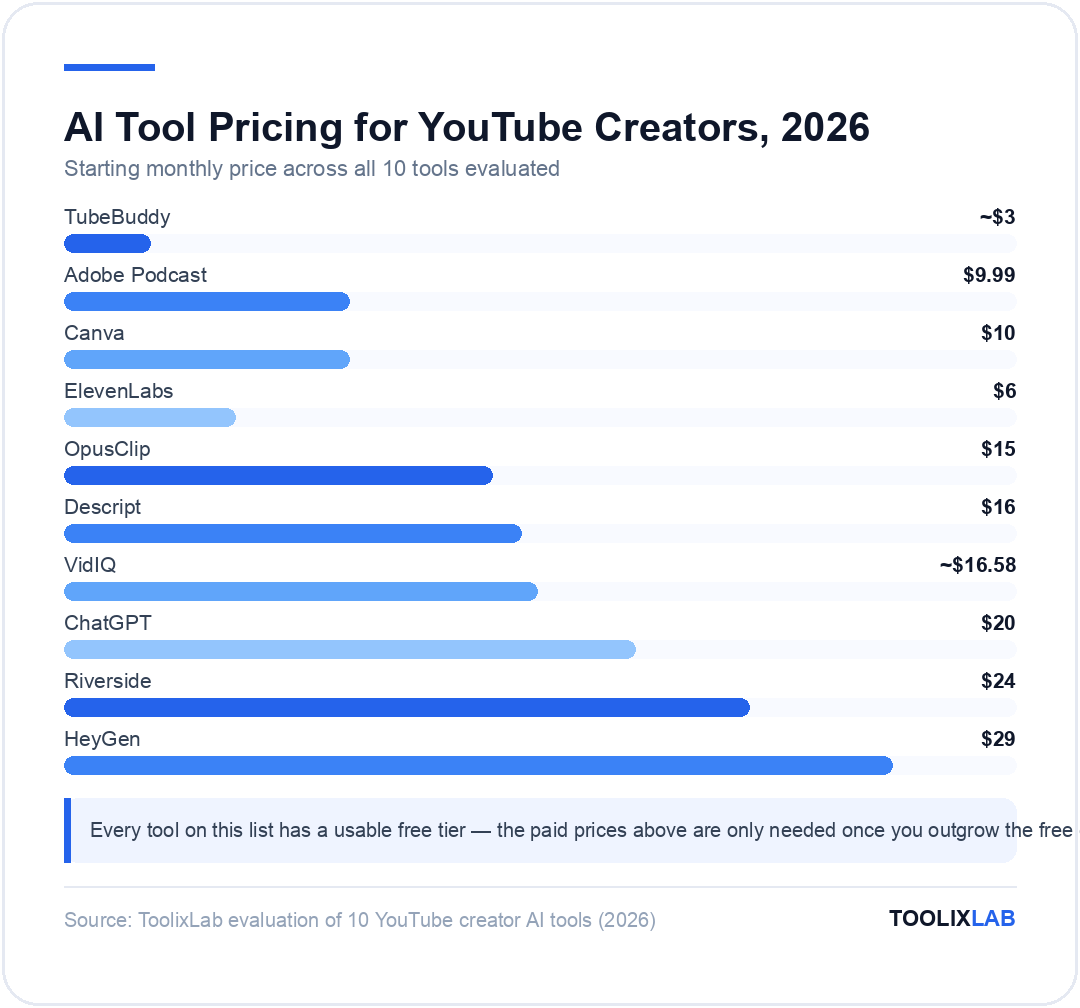
Comparison Table: 10 Best AI Tools for YouTube Creators
| Tool | Best For | Starting Price | Free Plan |
|---|---|---|---|
| ChatGPT | Scripting & ideas | $20/mo | Yes |
| TubeBuddy | SEO & bulk editing | ~$3/mo | Yes |
| VidIQ | Analytics & ideas | ~$16.58/mo | Yes |
| Descript | Text-based editing | $16/mo | Yes |
| Riverside | Interview recording | $24/mo | Yes |
| ElevenLabs | AI voiceover | $6/mo | Yes |
| HeyGen | AI avatars | $29/mo | Yes |
| OpusClip | Shorts repurposing | $15/mo | Yes |
| Canva | Thumbnails | $10/mo | Yes |
| Adobe Podcast | Audio cleanup | $9.99/mo | Yes |
How We Evaluated These Tools
We ran each tool through the part of the upload workflow it's built for — scripting a short explainer in ChatGPT, recording and editing it in Descript and Riverside, generating an AI-voiced version in ElevenLabs, cutting the same footage into Shorts with OpusClip, and pulling every price directly from each vendor's own pricing page in July 2026 (noted where a vendor's site blocked automated verification and we cross-referenced instead). We weighted free-tier usability heavily, since a free plan that can't finish one real task tells a creator nothing about whether the paid tier is worth it.
Which Tools Fit Your Channel?
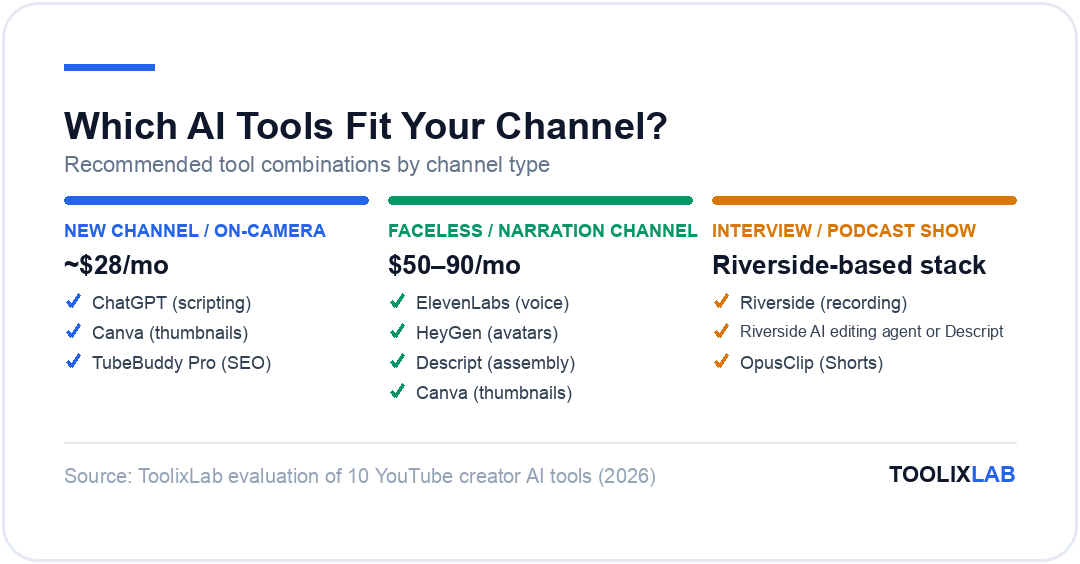
New channel, filming yourself: ChatGPT (scripting) + Canva (thumbnails) + TubeBuddy Pro (SEO) covers the essentials for about $28/month combined and doesn't require learning a heavy editor yet.
Faceless or narration channel: ElevenLabs (voice) + HeyGen or stock footage + Descript (assembly) + Canva (thumbnails) is the standard stack — expect $50-90/month once you're past the free tiers.
Interview or podcast-style show: Riverside (recording) + Descript or Riverside's own AI editing agent + OpusClip (Shorts from the same footage) is the tightest stack, since Riverside already covers hosting and multi-track sync.
Established channel with a back catalog: TubeBuddy Star or Legend for bulk SEO cleanup and thumbnail A/B testing pays for itself fastest here, since the value scales with the number of existing videos you can improve at once.
For a broader look at how these tools compare against the newest generation of pure text-to-video generators, see our breakdown of AI video generation adoption statistics and how viewers actually feel about AI-made video — both are worth reading before you lean too hard on avatars or synthetic voice for a channel that depends on audience trust.
What Are the Best Free AI Tools for YouTube Creators?
You can run a real upload schedule without paying for a single tool. ChatGPT's free tier handles scripting and title brainstorming, VidIQ's free plan includes 150 monthly AI credits and unlimited trend research, Canva's free tier covers thumbnails with basic Magic Studio access, and Adobe Podcast's Enhance Speech cleans up an hour of raw audio a day at no cost.
Where the free tiers genuinely fall short is anything with a hard usage cap tied to output volume — Descript's 60 free minutes a month covers roughly one long video, OpusClip's free exports carry a watermark that rules out a public channel, and HeyGen's free plan is capped at one-minute clips, which only suits Shorts. Treat the free stack above as the real starting point, and upgrade only the specific tool whose cap you actually hit.
Do AI Tools Actually Help You Grow on YouTube?
Indirectly, yes — and it's worth being honest about the mechanism. None of the ten tools above make a video more interesting or find you an audience. What they do is remove the manual overhead that keeps creators from publishing consistently: tag research that used to take twenty minutes per video, a transcript-based edit that replaces scrubbing a timeline, a Shorts clip that would otherwise never get cut because there wasn't time. Consistency is one of the few growth levers a creator fully controls, and that's the lever these tools actually pull.
Where it can backfire: leaning on an AI avatar or fully AI-scripted narration for a niche where viewers specifically value a real human perspective. Our data on how audiences trust AI-made video shows that disclosure and format both matter — viewers tolerate AI narration on explainer and list content far more readily than on anything presented as personal or experiential.
Our Verdict
No single tool covers the whole YouTube pipeline, and that's fine — the creators who get the most out of AI tools pick one per bottleneck instead of chasing an all-in-one. Start with a free-tier stack (ChatGPT, Canva, VidIQ), add TubeBuddy or Descript once you're uploading weekly, and only add voice or avatar tools if your format genuinely calls for a faceless approach.
✅ Start here if you're new
- • ChatGPT (free) for scripting
- • Canva (free) for thumbnails
- • VidIQ (free) for keyword ideas
✅ Add these once you're consistent
- • TubeBuddy Pro or Star for SEO at scale
- • Descript or Riverside for faster editing
- • OpusClip for a Shorts feed from existing footage
🔑 Key Takeaways
- ✓ TubeBuddy and VidIQ overlap heavily — most channels only need one, not both
- ✓ ElevenLabs and HeyGen together make a genuinely faceless channel possible without a camera
- ✓ OpusClip's virality scoring beats manually guessing which clip will work as a Short
- ✓ Adobe Podcast's free tier is one of the rare AI tools where "free" isn't a crippled trial
- ✓ A lean starter stack (ChatGPT, Canva, VidIQ, all free tiers) costs $0/month and covers scripting, thumbnails, and keyword research
The best AI tools for YouTube creators in 2026 work because they each remove one specific piece of manual labor — not because any single one replaces the judgment that makes a channel worth watching. Start with the free tiers above, notice which bottleneck actually slows down your upload schedule, and add a paid tool only when the free version stops being enough for that one job.
If you're building out a broader AI toolkit beyond YouTube specifically, our best AI stack for startups guide and Grammarly AI review cover the writing and workflow tools that pair well with everything above.