
By ToolixLab Research Team · Last Updated: June 2026
Quick Answer
The best AI video tools for marketers in 2026 are Runway Gen-4.5 (cinematic brand video), HeyGen (personalized avatar video at scale), Synthesia (corporate training), Pictory (blog-to-video repurposing), Creatify (product ads), VEED.IO (social editing), and Kling AI (best budget option). Each excels in a distinct marketing use case — no single tool does everything well.
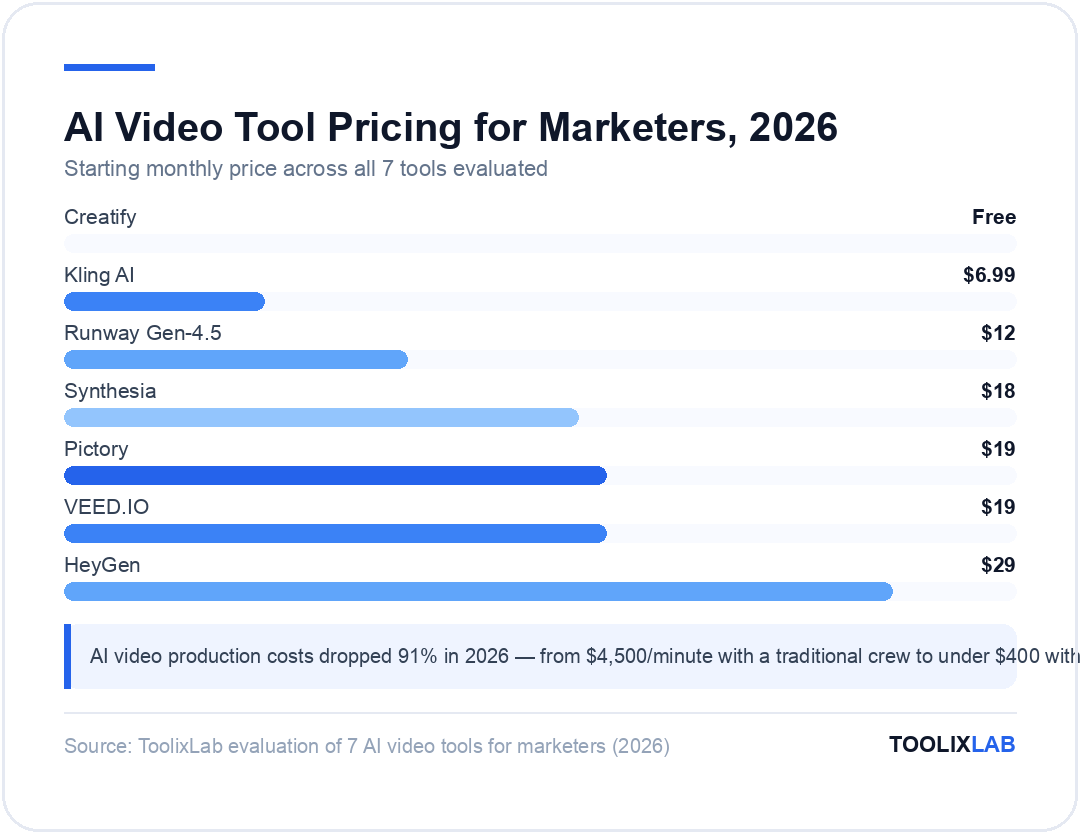
AI video production costs dropped 91% in 2026 — from $4,500 per minute with a traditional crew to under $400 with AI assistance, according to industry benchmarks. That's not a trend marketers can observe from a distance; it's a structural shift that changes what's possible with a normal marketing budget.
The AI video tools landscape also clarified significantly in early 2026. OpenAI discontinued Sora on April 26, 2026, accelerating consolidation around a set of specialized tools — each purpose-built for a distinct marketing workflow. The generalist era is over. In its place: tools that do one thing exceptionally well, at a price point that makes daily video production a realistic expectation for any marketing team.
This guide covers the 7 best AI video tools for marketers in 2026, tested across five core marketing use cases: cinematic brand video, personalized outreach, content repurposing, product ads, and social editing. For each tool, we cover what it actually does well, where it falls short, verified pricing from official sources, and who it's built for.
If you're newer to AI video generation broadly, start with our comprehensive guide to the best AI video generation tools in 2026 before diving into marketing-specific recommendations.
⚡ Quick Summary
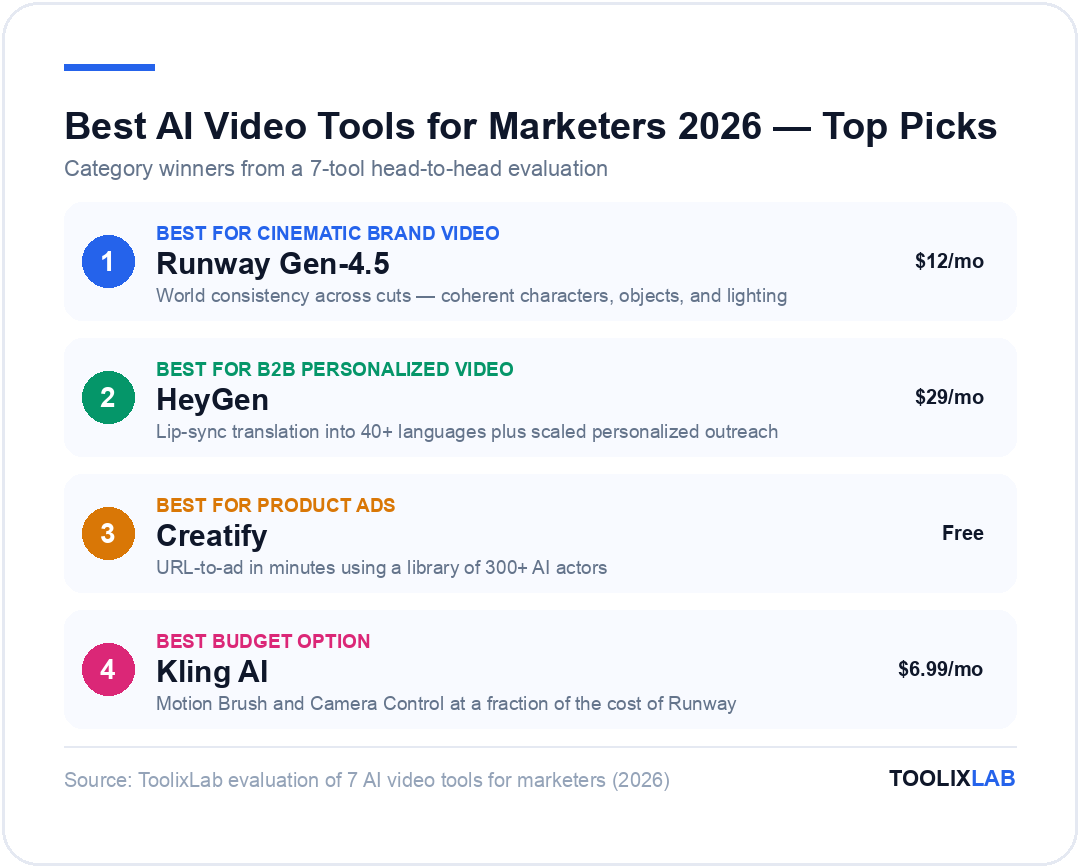
Best overall (brand video): Runway Gen-4.5 — cinematic output, world consistency
Best for B2B personalized video: HeyGen — lip-sync translation, 40+ languages
Best for product ads: Creatify — URL-to-ad in minutes, 300+ AI actors
Best for social editing: VEED.IO — browser-based, auto-subtitles in 50+ languages
Best budget option: Kling AI — from $6.99/mo, motion brush + camera control
Jump to: Comparison Table | How to Choose | FAQ
What Are AI Video Tools for Marketers?
"AI video tools for marketers" covers five distinct technology categories. Understanding which category a tool falls into saves you from buying the wrong subscription and wondering why it doesn't do what you expected.
Generative video tools (Runway, Kling AI, Google Veo) create original video from text prompts or static images. These are best for brand ads, product visualizations, and creative content that would otherwise require a full production crew. The output is generated — nothing is shot on camera.
Avatar-based video tools (HeyGen, Synthesia) use AI presenters to deliver scripted content. No camera, no studio, no talent scheduling required. They excel at training videos, product walkthroughs, personalized sales outreach, and any content format where a talking head is the right format.
Content repurposing tools (Pictory) take existing written content — blog posts, transcripts, long-form articles — and assemble them into publish-ready video using stock footage and AI voiceovers. The fastest path from a content library to a video library, without generating anything new.
Ad-specific tools (Creatify) are trained specifically on high-performing ad formats. They generate UGC-style testimonials and product demos directly from a product URL, with outputs optimized for Meta, TikTok, and Google Ads out of the box.
Video editing tools (VEED.IO) focus on polishing and publishing existing footage — AI subtitles, multi-format exports, brand templates, and translation. Less about creation, more about getting video ready to publish at social-media speed.
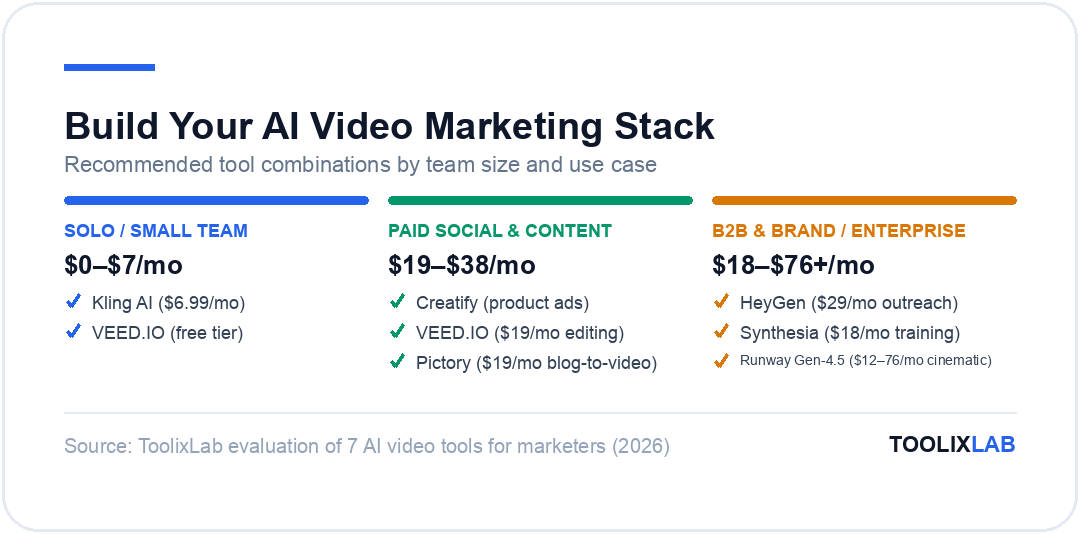
The best marketing video stacks in 2026 combine two or three of these categories rather than relying on a single platform to do everything. The tools below are the leaders in each.
Quick Comparison: Best AI Video Tools for Marketers 2026
Here's how the top 7 tools stack up across the key criteria marketers care about:
| Tool | Best For | Starting Price | Free Plan | Category |
|---|---|---|---|---|
| Runway Gen-4.5 | Cinematic brand video | $12/mo | ✅ 125 credits | Generative |
| HeyGen | Personalized B2B video | $29/mo | ✅ 3 videos/mo | Avatar |
| Synthesia | Corporate training | $18/mo | ✅ 3 videos/mo | Avatar |
| Pictory | Blog-to-video repurposing | $19/mo | ❌ | Repurposing |
| Creatify | Product ad generation | Free | ✅ 10 credits/mo | Ad-Specific |
| VEED.IO | Social media editing | $19/mo | ✅ (watermark) | Editing |
| Kling AI | Budget generative video | $6.99/mo | ❌ | Generative |
*Prices verified June 2026 — check official pricing pages for current rates.
1. Runway Gen-4.5 — Best for Cinematic Brand Video
Runway has been the benchmark for professional AI video generation since Gen-3, and the Gen-4.5 release in early 2026 extended that lead significantly. The headline feature is "world consistency": characters, objects, lighting, and physics remain coherent across cuts — which was the fundamental problem that made earlier generative video tools unsuitable for commercial work.
For marketers, world consistency means you can generate a 10-second brand video where the same product appears reliably across multiple angles without reformatting or morphing into something unrecognizable. Gen-4 Turbo mode processes faster at slightly lower quality — useful for rapid concept iteration before committing credits to a final render.
What Runway does best: Runway is the go-to when output quality is non-negotiable. It produces footage that holds up in brand ads, hero campaign videos, and any context where you'd normally need a director and camera crew. The credit-based system gives you flexibility to allocate toward high-value outputs rather than burning a fixed monthly render count on tests.
Where it falls short: Runway consumes credits at a meaningful rate. Gen-4.5 uses approximately 25 credits per second of video. At the Standard plan ($12/month, 625 credits), that's roughly 25 seconds of Gen-4.5 video per month — enough for a concept or two, not for production volume. High-output marketing teams will need the Pro ($28/month, 2,250 credits) or Max ($76/month, 9,500 credits) tier. There's also a learning curve to prompting effectively — Runway rewards specificity in camera direction, lighting description, and subject framing.
Runway is also part of a broader creative ecosystem: the platform includes image generation, video editing, and audio tools. For a marketing team building an in-house AI creative stack, that integration has real value.
| Plan | Price/mo (annual) | Credits/mo | Gen-4.5 Video Time |
|---|---|---|---|
| Free | $0 | 125 (one-time) | ~5 seconds |
| Standard | $12 | 625 | ~25 seconds |
| Pro | $28 | 2,250 | ~90 seconds |
| Max | $76 | 9,500 | ~380 seconds |
*Prices verified June 2026 — check runwayml.com/pricing for current rates.
✅ Pros
- • Best output quality of any text-to-video tool in 2026
- • World consistency across cuts — coherent characters and objects
- • Gen-4 Turbo mode for rapid concept iteration
- • Integrated image, video, and audio tools
- • Commercial license included on all paid plans
❌ Cons
- • Credits burn fast with Gen-4.5 (~25/second)
- • Standard plan too limited for production volume
- • Steep prompt engineering learning curve
- • No dedicated ad creation or repurposing workflow
2. HeyGen — Best for Personalized Video at Scale
HeyGen has established itself as the clear standard for avatar-based video in B2B marketing. The core premise is simple: record yourself once (or use one of HeyGen's stock avatars), write a script, and HeyGen renders a polished video with natural lip-sync. The features that make it a serious marketing tool in 2026 are Instant Avatar 4 — which can create a credible digital twin from a two-minute recording — and a video translation engine that supports 40+ languages with synchronized lip movement, not just dubbed audio.
The B2B personalization use case: HeyGen's breakout application in 2026 is hyper-personalized sales video outreach. Marketing and sales teams record a base video with a rep, then programmatically generate personalized versions for each prospect — with the rep saying the prospect's name, referencing their company, and speaking in their language. Tools like Clay and Zapier handle the variable injection; HeyGen handles the rendering. Response rates from these campaigns significantly outperform text-only cold outreach.
The localization use case: For global marketing teams, HeyGen's translation capability is genuinely transformative. A single English product video can be re-rendered into 40+ languages — with the presenter's lip movements synchronized to the new language — in the time it previously took to book a single voiceover artist. The output isn't perfect at close range, but for web and social distribution it holds up well.
Where it falls short: HeyGen is optimized for talking-head content. It doesn't handle action sequences, complex product shots, or environmental storytelling. The tool is also not a video editor — if you need B-roll, motion graphics, or multi-scene structure, you'll need a second tool. Avatar quality is excellent by current standards, but experienced viewers will identify AI artifacts on the Business Insider plan or under close scrutiny.
| Plan | Price/mo | What You Get |
|---|---|---|
| Free | $0 | 3 videos/mo, trial access to premium features |
| Creator | $29 | 600 credits/mo, Instant Avatar IV, lip-sync translation |
| Pro | $49+ | 1,000+ credits/mo, priority rendering, advanced API |
| Business | $149 + $20/seat | Team collaboration, custom avatars, full API access |
*Prices verified June 2026 — check heygen.com/pricing for current rates.
✅ Pros
- • Best-in-class lip-sync translation (40+ languages)
- • Instant Avatar IV — credible clone from 2-min recording
- • Strong B2B personalization use case at scale
- • API integration with CRM and outreach tools
- • Free plan available to test output quality
❌ Cons
- • Talking-head format only — no complex scenes
- • Credits deplete quickly for longer video formats
- • Avatar quality shows artifacts under close scrutiny
- • Business plan pricing increases steeply per seat
3. Synthesia — Best for Corporate Training & Explainer Videos
Synthesia is the enterprise-grade option for presenter-based video. Where HeyGen has leaned into sales personalization, Synthesia has built deeper into learning and development (L&D), compliance training, and internal communications. The result is a platform with the widest avatar library in the category — 230+ diverse AI presenters — and the broadest language support at 140+ languages.
The corporate training angle: Synthesia's core value proposition is eliminating the production overhead from routine corporate video. Training updates, compliance modules, onboarding sequences, and product announcement videos that previously required booking studios, scheduling presenters, and managing post-production can now be produced by a content team member with a browser and a script. The 2026 platform includes Synthesia Player — interactive branching video where viewers choose their own path — and direct integrations with major LMS platforms. These are features that matter specifically for enterprise content teams.
Where it falls short: Synthesia is less flexible creatively than generative tools. You're working within the avatar + background + script formula. There's no dynamic camera movement, no environmental storytelling, no ability to place products in scenes. For external marketing — brand ads, social content, product launches — Synthesia isn't the right fit. Its strength is in making internal video production scalable and consistent, not in generating creative commercial content.
| Plan | Price/mo | What You Get |
|---|---|---|
| Free (Basic) | $0 | 3 videos/mo, 1 min max, limited avatars |
| Starter | $18 | 10 videos/mo, 50+ avatars, 5 min max |
| Creator | Custom | Unlimited videos, 230+ avatars, all 140+ languages |
| Enterprise | Custom | SSO, LMS integration, compliance, custom avatars |
*Prices verified June 2026 — check synthesia.io/pricing for current rates.
✅ Pros
- • 230+ avatars — widest selection in the category
- • 140+ language support — most in the market
- • Interactive branching video (Synthesia Player)
- • LMS integrations for training workflows
- • Accessible free plan for testing
❌ Cons
- • Limited creative flexibility vs. generative tools
- • Starter plan (10 videos/mo) may feel restrictive
- • Not suited to external brand marketing or ads
- • Corporate look and feel — less dynamic than generative video
4. Pictory — Best for Repurposing Blog Content into Video
Pictory occupies a distinct niche: it converts existing text into video faster than any other tool on this list. Paste in a blog post URL, a script, or a long-form transcript, and Pictory automatically identifies key segments, matches relevant B-roll footage from its licensed library, adds an AI voiceover, and assembles a publish-ready video. For content marketing teams with a large existing archive of written content, Pictory is the highest-leverage tool available.
The content repurposing angle: Most marketing teams are sitting on months or years of blog content that never became video. Pictory turns that library into a systematic video production pipeline. Feed it your 10 most popular posts and you have 10 YouTube/LinkedIn videos with minimal additional effort. The auto highlight extraction feature is particularly useful for longer content formats — upload a 60-minute webinar recording and Pictory extracts the most quotable moments as standalone social clips.
The Professional plan adds ElevenLabs AI voices (which sound noticeably more natural than the standard voiceover options) and Getty/Storyblocks footage access, giving you a significantly wider visual library to draw from. For a content marketing team producing 10–20 videos per month, the Professional annual plan at $39/month is one of the better-value subscriptions in the AI tools category.
Where it falls short: Pictory is an assembly tool, not a generative one. The output depends entirely on the quality of available stock footage — there's no way to generate original visual sequences for scenes that don't have a stock equivalent. For content about highly specific topics, branded products, or anything requiring original visual creation, Pictory will hit a ceiling. Think of it as intelligent video assembly powered by text, not a creative production tool.
For teams managing a full content workflow including AI-written articles, our AI content creation workflow guide covers how Pictory fits into a broader production pipeline alongside writing and SEO tools.
| Plan | Price/mo (annual) | Videos/mo | Key Feature |
|---|---|---|---|
| Starter | $19 | 30 | AI voiceover, stock footage, auto-captions |
| Professional | $39 | 60 | ElevenLabs voices, Getty/Storyblocks footage |
| Teams | Custom | 90+ | Multi-user, shared brand kit |
*Prices verified June 2026 — check pictory.ai/pricing for current rates.
✅ Pros
- • Fastest blog-to-video workflow available
- • Auto highlight extraction for podcasts and webinars
- • ElevenLabs AI voices on Professional plan
- • Strong value at $39/month for 60 videos
❌ Cons
- • No generative video capability
- • Output limited by stock footage library
- • Limited brand customization on Starter
- • Not suitable for original creative production
5. Creatify — Best for Generating Product Ads
Creatify is the performance marketer's shortcut. Paste in a product URL — from Shopify, Amazon, or any e-commerce page — and Creatify scrapes the product images and description, then generates multiple ad variations using its library of 300+ AI actors delivering UGC-style testimonials and product demonstrations. The output is formatted for paid social from the start: multiple aspect ratios, platform-optimized lengths, and direct export to Meta, TikTok, and Google Ads.
Why UGC-style ads work in 2026: User-generated content style video ads — unpolished-looking testimonials from real-seeming people — consistently outperform studio-produced ads on performance channels. Authenticity beats production value on social feeds. Creatify is built on this insight: the AI actors are deliberately casual, the formats are deliberately short-form, and the variation count (typically 5–10 per product) is designed for A/B testing. For e-commerce brands running active paid social campaigns, the time-to-first-ad drops from days to minutes.
Where it falls short: Creatify is purpose-built for product ads. It's not the right tool for brand storytelling, corporate video, or content formats that require narrative arc. Experienced ad buyers may recognize the AI actors across different brands' campaigns — Creatify's actor library is shared across the platform, which is an aesthetic limitation as the tool becomes more widely used. For brands with distinctive visual identities, this is a real consideration.
The free plan (10 credits/month) is genuinely useful for testing — enough to generate a few ad variations and evaluate output quality before committing to a paid tier. For active campaigns, paid plans provide watermark-free exports and batch ad creation.
| Plan | Price/mo | What You Get |
|---|---|---|
| Free | $0 | 10 credits/mo, 300+ AI actors, 40 templates, watermark |
| Paid | from ~$39 | More credits, no watermark, batch ad creation |
| Enterprise | Custom | Dedicated support, custom AI actors, priority rendering |
*Free plan verified June 2026 — check creatify.ai/pricing for current paid tier rates.
✅ Pros
- • Fastest product-URL-to-ad workflow available
- • 300+ AI actors, diverse formats and ethnicities
- • Output pre-optimized for Meta, TikTok, Google
- • Free plan available for testing
- • Batch creation for A/B testing at scale
❌ Cons
- • Only suitable for product/e-commerce ad use cases
- • Shared actor library recognizable across brands
- • Limited brand customization depth
- • Not suited to non-product or brand storytelling
6. VEED.IO — Best for Social Media Video Editing
VEED.IO is the browser-based video editor that has become the default choice for social media managers who need to turn raw footage into publish-ready content fast. Unlike the generative tools above, VEED doesn't create video from nothing — it polishes video you already have. The value proposition is speed and accessibility: no software to install, no local rendering, and an interface that social media managers can pick up in under an hour.
The social editing angle: VEED's standout feature for marketers is its auto-subtitle capability. Upload a video, and VEED transcribes and burns in subtitles in under a minute — styled correctly for each platform (animated word-by-word captions for TikTok/Reels, full subtitles for LinkedIn/YouTube). The translation feature then converts those subtitles to 50+ languages with matched audio available on higher plans. For brands running multilingual social campaigns, this alone justifies the subscription cost.
VEED also handles the multi-format export problem efficiently. Shoot one piece of content in 16:9 and export it in 1:1, 9:16, and 4:5 versions in a single session — with VEED automatically adjusting framing for each aspect ratio. For teams managing content across Instagram, LinkedIn, TikTok, and YouTube simultaneously, this alone saves significant production time each week.
Where it falls short: VEED has no generative capability — you cannot create video from scratch. For complex multi-track editing projects, desktop tools like Premiere Pro or DaVinci Resolve offer more control. The free plan adds a VEED watermark to all exports, making it unsuitable for publishing. For serious social publishing, the Lite plan at $19/month is the minimum viable tier.
| Plan | Price/mo (annual) | What You Get |
|---|---|---|
| Free | $0 | Basic editor, auto-transcription, VEED watermark |
| Lite | $19 | No watermark, 50K+ assets, 200+ templates |
| Pro | $49 | All AI tools, translate to 50+ languages, brand kit |
| Enterprise | Custom | Multiple brand kits, personalized avatars, SSO |
*Prices verified June 2026 — check veed.io/pricing for current rates.
✅ Pros
- • Best auto-subtitle tool in the category
- • No software to install — entirely browser-based
- • Video translation to 50+ languages (Pro)
- • Efficient multi-format social export
- • 50K+ royalty-free assets on Lite+
❌ Cons
- • No generative video capability
- • Pro plan required for AI translation features
- • Limited for complex multi-track editing
- • Free plan adds watermark to all exports
7. Kling AI — Best Budget Option for Generative Video
Kling AI is the price-to-quality leader in the generative video category. Built by Kuaishou — China's major short-video platform — Kling generates text-to-video and image-to-video with output quality that rivals tools costing five to ten times as much. At $6.99/month for the entry tier, it's the most accessible premium generative video tool in the market.
What makes Kling stand out: Two features distinguish Kling from other affordable generative tools. Motion Brush lets you paint movement onto a static image — specify that the water should ripple, the hair should blow, or the product should rotate, and Kling animates only those specified areas. This is uniquely useful for e-commerce brands that want to add motion to product photography without full video production. Camera Control gives you direct control over virtual camera movement — pan, tilt, dolly in/out, and orbit — bringing cinematic shot language to a $6.99/month tool.
Where it falls short: Kling AI is operated by a Chinese company. For brands operating under GDPR, CCPA, or internal data governance policies, this warrants a review before uploading commercial assets or brand materials. Output quality on complex scenes with multiple interacting subjects is still slightly behind Runway Gen-4.5 and Google Veo 3, though the gap has narrowed considerably in 2026 updates. Customer support is primarily in Mandarin; English-language documentation is improving but inconsistent.
For teams evaluating the full generative video landscape, our complete guide to AI video generation tools compares Kling alongside Runway, Veo, Pika, and more with detailed quality benchmarks.
| Plan | Price/mo | Key Features |
|---|---|---|
| Basic | from $6.99 | Text-to-video, image-to-video, no watermark |
| Higher tiers | More credits | Motion Brush, Camera Control, Lip Sync, priority queue |
| Credits (add-on) | $1 = 66 credits | Flexible top-up, no subscription required |
*Prices verified June 2026 — check klingai.com for current tier breakdown.
✅ Pros
- • Best price-to-quality ratio for generative video
- • Motion Brush for animating still product images
- • Camera Control (pan, tilt, dolly, orbit)
- • Lip Sync support on paid plans
- • Flexible credit top-up option
❌ Cons
- • Chinese-owned — review for GDPR/CCPA compliance
- • Slightly behind Runway/Veo on complex scene realism
- • Limited English-language customer support
- • Pricing tiers less transparent than competitors
Honorable Mentions Worth Watching in 2026
Three tools didn't make the main list but deserve attention for specific use cases or because their trajectory suggests they'll be top-tier tools within 12 months.
Google Veo 3
Google DeepMind's Veo 3 is arguably the most technically impressive text-to-video model available in 2026, particularly for synchronized audio generation — Veo 3 generates ambient sound, dialogue, and music alongside video from a single text prompt. Available via Google AI Studio for developers and integrated into Gemini Advanced for consumers, it hasn't yet been packaged as a standalone marketer subscription. Once Google productizes Veo 3 for business users with a clear pricing model, it will immediately compete for the top spot on this list.
LTX Studio
LTX Studio from Lightricks is the only all-in-one platform that handles multi-scene video production with consistent characters across a full narrative. The storyboard-to-video pipeline — write a script, generate a storyboard, render a full video — is unique in the market. For marketing teams producing longer brand films or episodic content series, LTX Studio fills a gap that no other tool on this list addresses. It's less suited to the short-form social content that dominates most marketing budgets, but powerful for premium brand storytelling.
Pika
Pika remains relevant for quick experimental text-to-video generation with an accessible free tier. It's less capable than Runway or Kling for professional output, but it's a useful tool for rapid concept testing before committing credits on a premium platform. Pika's "Pikaffects" feature — which adds specific physical effects like melting, exploding, or morphing to video — has niche applications for creative campaigns that want unusual visual dynamics.
How to Choose the Right AI Video Tool for Your Marketing Goals
The biggest mistake marketers make when evaluating AI video tools is looking for one platform that does everything. The best marketing video stacks in 2026 are built around two or three specialized tools — not a single all-in-one solution that compromises on every use case.
Use this framework to identify your right combination:
Decision Framework by Use Case
Four questions to ask before committing to any tool:
- Do you need to generate original video, or repurpose existing content?
- Is your primary channel B2C social, B2B outreach, or internal communications?
- What's your volume requirement — a few premium pieces per month, or daily social content?
- Do you have data residency or compliance requirements? (Relevant for Kling AI in particular.)
For teams building out a broader AI marketing stack, our guide to the best AI marketing tools in 2026 covers the full picture — from content writing and SEO to automation and analytics. If you're specifically focused on automating social publishing end-to-end, our social media automation guide pairs well with the editing tools covered here.
🔑 Key Takeaways
- ✓ Runway Gen-4.5 leads for cinematic brand video — world consistency is the key differentiator; credit limits are the main constraint
- ✓ HeyGen is the only serious option for personalized B2B video at scale and multilingual lip-sync translation
- ✓ Synthesia dominates enterprise L&D and internal comms — not the best fit for external paid marketing
- ✓ Pictory delivers the fastest blog-to-video workflow available; it assembles, it doesn't generate
- ✓ Creatify turns a product URL into ad-ready video in minutes — purpose-built for e-commerce performance marketing
- ✓ VEED.IO is the benchmark for social-ready editing: auto-subtitles, multi-format export, 50+ language translation
- ✓ Kling AI offers the best price-per-second for generative video; review data privacy implications before using
Conclusion
The AI video tools landscape for marketers in 2026 is mature, specialized, and genuinely useful. Production costs have dropped 91% versus traditional video, but the more important shift is speed: marketing teams that previously shipped one brand video per quarter can now iterate daily. The constraint has moved from production budget to strategic clarity about which use case you're solving.
Match the tool to the job. Runway Gen-4.5 for premium cinematic output. HeyGen for personalized B2B video and multilingual content. Synthesia for corporate training at scale. Pictory for turning your written content library into video. Creatify for rapid product ad iteration. VEED.IO for social-ready editing and captions. Kling AI when quality matters but budget is a real constraint.
If you're just getting started, the lowest-risk entry point is the VEED.IO free plan (for editing and captions) combined with a free trial on either Creatify or HeyGen — depending on whether your priority is product ads or personalized outreach. Both have generous enough free tiers to evaluate real output quality before committing to a subscription.
For a wider view of where AI video fits in your marketing tech stack, our complete AI video generation guide covers the technical benchmarks in depth. And if you're building out the AI tools for coaches or consultants who need video for client delivery, our AI tools for coaches guide has a dedicated section on video workflows.
Frequently Asked Questions
What is the best AI video tool for marketers in 2026?
Runway Gen-4.5 leads for cinematic brand video and premium ad creative, while HeyGen dominates personalized B2B video at scale. For budget-conscious teams, Kling AI offers compelling quality from $6.99/month. The best choice depends on whether you need generative video, avatar-based content, or repurposing existing text into video — each category has a different leader.
Can AI video tools create ads that run on Meta or Google?
Yes. Creatify and HeyGen both offer exports optimized for ad platforms. Creatify generates product ads directly from a product URL and outputs in formats ready for Meta Ads, TikTok, and Google. Most tools export MP4/MOV at standard ad resolutions including 1:1, 9:16, and 16:9. Always verify that any AI-generated ad content meets the platform's current AI disclosure requirements.
How much does AI video generation cost per video in 2026?
Costs vary significantly by tool and quality tier. A 30-second Runway Gen-4.5 clip uses roughly 750 credits ($4–8 depending on plan). HeyGen Creator at $29/month gives 600 credits — enough for around 10–15 one-minute avatar videos. Kling AI offers the lowest cost-per-second for generative video starting from $6.99/month. Pictory and VEED.IO charge flat monthly fees regardless of video count within tier limits.
Do AI video tools work for social media content?
Absolutely. VEED.IO is purpose-built for social media editing with auto-subtitles, templates, and vertical/square export formats built in. Pictory excels at repurposing blog content into social clips. Runway and Kling AI generate original short-form social video from text prompts, ideal for Reels and TikTok campaigns where original creative content performs best.
What replaced Sora for AI video generation in 2026?
OpenAI discontinued Sora on April 26, 2026. The market has largely shifted to Google Veo 3 (benchmark for realism and synchronized audio), Runway Gen-4.5 (best for cinematic brand video), and Kling AI (best value for marketers). LTX Studio fills the gap for longer-form multi-scene production that Sora was beginning to address.
Are AI-generated marketing videos compliant with platform policies?
Most major platforms introduced AI content labeling requirements in 2025–2026. Facebook Ads Manager, Google Ads, and TikTok for Business all now require disclosure for AI-generated video content used in paid advertising. Always check the current policies for each platform before publishing AI-generated commercial content, as requirements continue to evolve.
Which AI video tool is best for creating product ads?
Creatify is purpose-built for product ads — paste in a product URL and it generates UGC-style ad videos with AI actors in minutes, ready for Meta, TikTok, and Google. HeyGen is the better choice for personalized video outreach. For premium brand ads requiring cinematic quality, Runway Gen-4.5 delivers the highest production value in the market.
Can AI video tools translate videos into other languages?
Yes. HeyGen leads with lip-sync video translation into 40+ languages from a single recorded video — the presenter's lip movements synchronize with the translated language. Synthesia supports 140+ languages for new avatar-based video creation. VEED.IO offers AI subtitle translation for 50+ languages on the Pro plan, making multilingual social content production significantly more accessible for marketing teams.
Related Guides
- 15 Best AI Video Generation Tools in 2026 — Comprehensive ranking of all major text-to-video models with quality benchmarks
- 25 Best AI Marketing Tools in 2026 — Full AI marketing stack covering content, SEO, analytics, and automation
- How to Automate Social Media with AI in 2026 — Step-by-step workflow for scaling social content production with AI tools
- How to Build an AI Content Creation Workflow 2026 — Complete pipeline from brief to published content using AI at every stage
- Best AI Tools for Coaches & Consultants 2026 — Includes video production tools for course creators and client delivery