
⚡ TL;DR — Quick Verdict
Coaches and consultants run businesses where time is the product. Every hour spent on admin — scheduling, invoicing, writing proposals, creating content, taking meeting notes — is an hour not spent delivering the high-value work clients pay for. And unlike corporate teams, most coaches and consultants are solo operators or small teams without an ops department to handle the operational load.
AI is changing the economics of this in 2026. The tools available today can handle a significant portion of the operational and content workload that has historically consumed 30–50% of a coach or consultant's working week. According to a 2025 International Coaching Federation report, 67% of professional coaches report administrative tasks as the primary constraint on their capacity to take on new clients — ahead of time availability and marketing effort.
This guide covers the 12 best AI tools for coaches and consultants in 2026 — evaluated specifically for the workflows that matter most in this profession: client acquisition and CRM, session preparation and delivery, content creation and thought leadership, and business operations. Each tool is assessed for price, practical fit, and genuine limitations — not just feature lists.
How AI Is Changing Coaching & Consulting in 2026
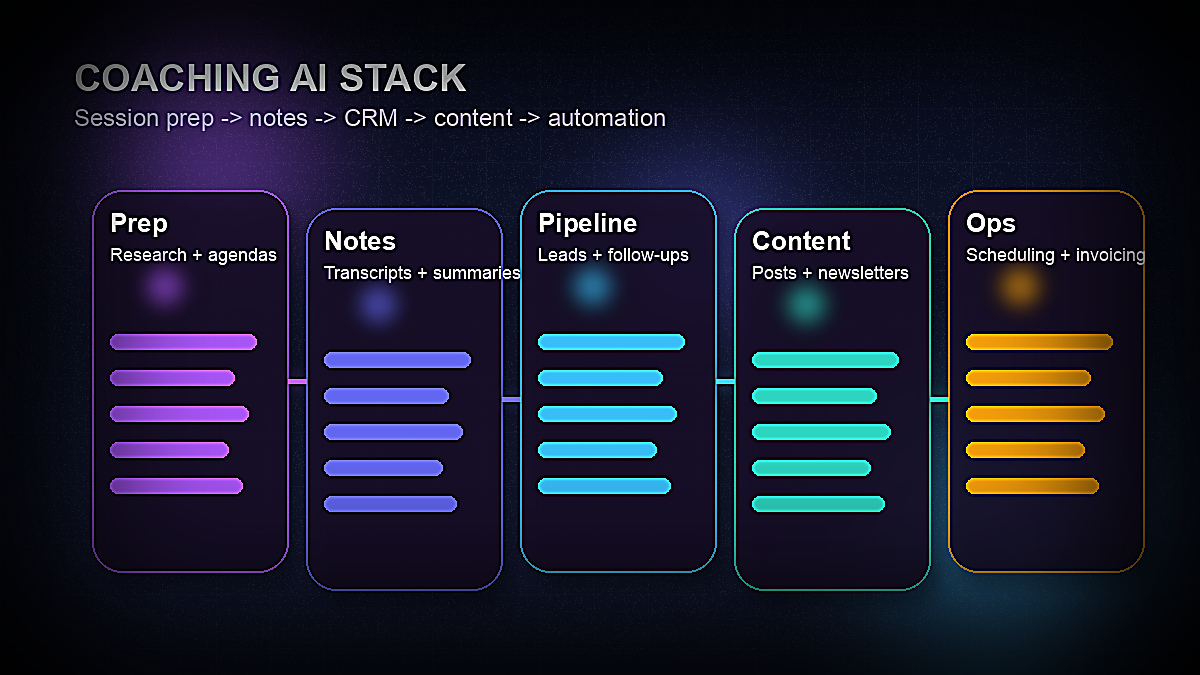
The coaching and consulting industry has always been knowledge-intensive and relationship-driven, which made it seem like an unlikely candidate for AI disruption. But the tools available in 2026 aren't disrupting the core of the work — they're eliminating the support work that surrounds it, and that changes the economics dramatically.
- →Session preparation — AI can research a client's industry, competitors, and recent news in minutes; generate structured coaching frameworks; and draft session agendas from a single input. A session prep task that took 45 minutes now takes 10.
- →Meeting notes and follow-up — AI transcription and summarization tools automatically capture call content, extract action items, and draft follow-up emails. The manual note-taking that previously fragmented coaches' attention during sessions is eliminated.
- →Proposal and deliverable creation — AI can generate first-draft consulting proposals, frameworks, worksheets, and client reports in minutes. Consultants who previously spent 4–6 hours on a proposal now spend 60–90 minutes refining an AI-generated draft.
- →Content and thought leadership — LinkedIn posts, newsletters, webinar outlines, and course content can all be drafted by AI from minimal input. Coaches who previously struggled to maintain a consistent content presence now publish weekly with a fraction of the effort.
- →Client acquisition workflows — AI-powered CRMs and sales tools automate follow-up sequences, draft personalized outreach, and surface the warmest prospects from a pipeline without requiring manual management.
- →Business operations — Scheduling, invoicing, contracts, and client onboarding flows can be largely automated with the right tool stack, reducing the admin layer that consumes the first and last hour of every working day.
The cumulative effect is that a solo coach or consultant using a well-chosen AI stack in 2026 can deliver the operational throughput of a small team. The bottleneck shifts from time to capacity — how many clients you can effectively serve at a high level, not how many admin tasks you can complete.
📊 Key Stat
Coaches and consultants who have systematically adopted AI tools report reclaiming an average of 8–12 hours per week from administrative tasks, content creation, and session preparation — equivalent to adding 20–30% more billable capacity without hiring. — McKinsey Global Institute, 2025
What to Look for in AI Tools for Coaches & Consultants
Not every AI tool on the market is suited to the coaching and consulting workflow. Before evaluating specific products, five criteria matter most for this professional context:
1. Client confidentiality and data handling. Coaching conversations often contain sensitive personal and professional information. Consulting engagements may involve confidential business strategy, financial data, and competitive intelligence. Any AI tool handling client data must have clear privacy policies, ideally with explicit assurances that your data is not used to train AI models. Business-tier plans from major providers typically offer stronger data protections than free consumer tiers — this is worth the upgrade cost if client confidentiality matters.
2. Integration with your existing workflow. AI tools that require you to abandon your current scheduling, CRM, or document systems create adoption friction that negates their efficiency benefits. Look for tools that integrate with what you already use — Google Calendar, Zoom, Gmail, Notion, or whatever your foundation stack is.
3. Output quality for professional communication. Coaches and consultants live and die by the quality of their written communication — proposals, reports, email sequences, and thought leadership content. Test AI writing tools against your own voice and standards before committing. The best tools produce output you can refine rather than output you need to rewrite.
4. Solopreneur and small team pricing. Enterprise-first tools priced for corporate sales teams often don't make economic sense for individual coaches or small consulting teams. The best tools for this market have transparent, affordable entry tiers that cover the core use case without requiring an enterprise contract.
5. Specialization vs. versatility. Some AI tools are purpose-built for coaches (Paperbell, Practice.do) and handle coaching-specific needs like session notes, client portals, and coaching agreements. Others are general AI platforms (Claude, ChatGPT) that require you to develop your own workflows but have much broader capability. A complete AI stack typically includes both types.

The 12 Best AI Tools for Coaches & Consultants in 2026
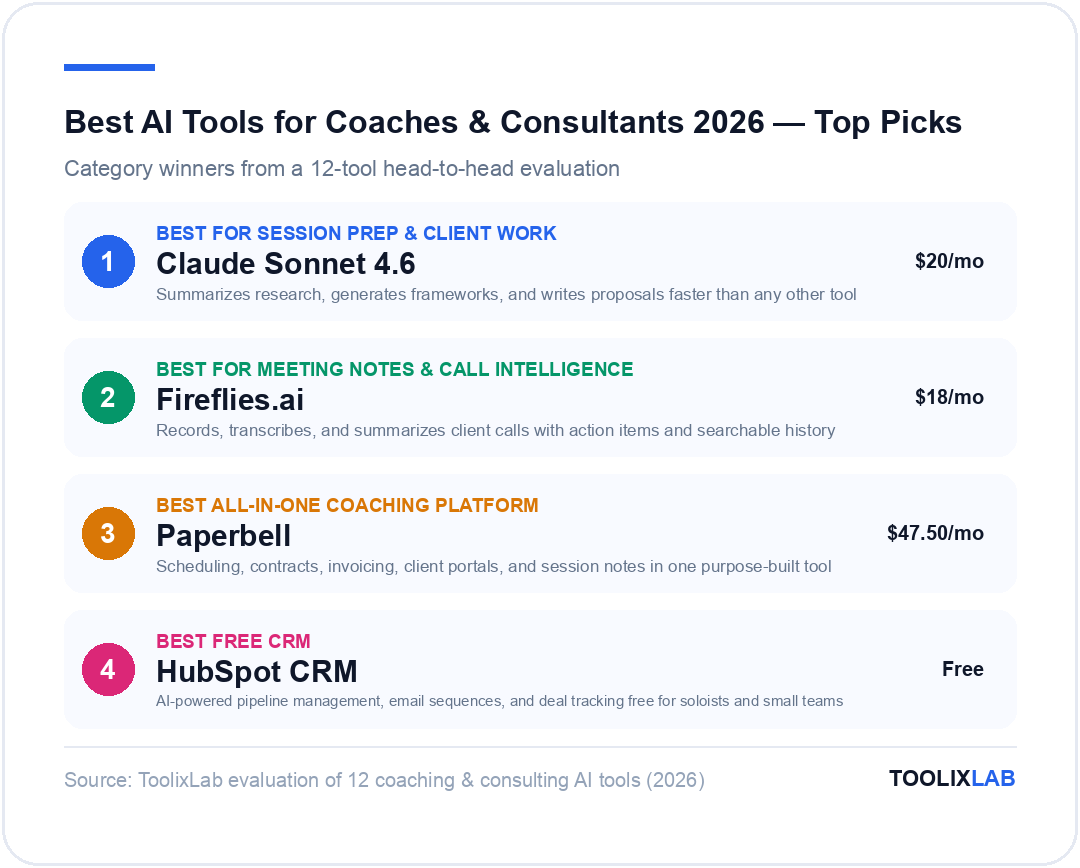
1. Claude Sonnet 4.6 — Best AI Assistant for Session Prep & Client Work
For coaches and consultants, an AI assistant that can think deeply, handle large amounts of context, and produce professional-quality written output is the highest-leverage tool in the stack. In 2026, Claude Sonnet 4.6 from Anthropic leads this category for professional services work.
Claude's 200,000-token context window is a significant practical advantage for coaching and consulting workflows. You can paste an entire client briefing document, a company's annual report, or a 90-minute coaching session transcript and ask Claude to analyze it, extract themes, generate frameworks, or draft a follow-up plan. Most AI assistants cut off at a fraction of this context, requiring you to chunk and reassemble content manually.
The use cases where Claude delivers the clearest ROI for coaches and consultants include: generating customized coaching frameworks from a brief description of the client's challenge; researching an industry or company ahead of a first session; drafting consulting proposals from a bullet-point brief; writing follow-up summaries from session notes; and creating worksheets, exercises, and client homework assignments.
Claude also tends to produce more nuanced, thoughtful responses for complex coaching and strategy questions than more pattern-matching tools — it handles the ambiguity and emotional complexity that characterizes genuine coaching conversations with more sophistication.
Pricing: Claude.ai Pro is $20/month for individuals, which includes priority access, larger file uploads, and the highest-capability models including Claude Sonnet 4.6 and Claude Opus 4.6. The free tier provides limited access to Claude and is sufficient for evaluating the tool but not for professional daily use. Teams plans are available starting at $25/user/month with enhanced collaboration features and data privacy assurances appropriate for client work.
Best for: Coaches and consultants who do significant research, framework development, proposal writing, and written client deliverables. Less critical if your primary AI need is scheduling automation or meeting transcription.
2. Fireflies.ai — Best for Meeting Notes & Call Intelligence
Every coaching and consulting engagement runs on conversations. The problem is that taking good notes during a session fragments your attention exactly when you need to be most present with the client — and writing up notes afterward extends the session's time cost by 20–30 minutes. Fireflies.ai eliminates both problems.
Fireflies joins your video calls (Zoom, Google Meet, Microsoft Teams) as an AI meeting bot, records and transcribes the conversation in real time, and generates a structured summary with key topics, decisions, and action items within minutes of the call ending. You receive a searchable record of every client interaction that you can query — "what commitments did Sarah make in Q1 sessions?" or "which clients have mentioned pricing pressure?" — across your entire call history.
For consultants running multiple client engagements simultaneously, the searchability feature is transformative. Instead of digging through notes files or memory, you can retrieve specific information from any client conversation in seconds. For coaches, the call transcript provides an accurate record for progress tracking that's more reliable than notes taken under time pressure.
Fireflies also generates AI-drafted follow-up email summaries and syncs meeting data with CRM tools including HubSpot and Salesforce, creating a continuous client interaction record without manual data entry.
A privacy consideration: you should notify clients before adding an AI meeting bot to your calls. Most coaches and consultants find that a simple disclosure at the start of the engagement — "I use an AI transcription service to ensure I capture everything accurately; transcripts are stored securely and only accessible to me" — resolves any concern. Some clients may prefer you disable recording, which is worth respecting.
Pricing: Free plan includes 800 minutes of transcription per seat per month. Pro plan is $18/user/month and removes minute limits, adds advanced AI summaries, and enables CRM integrations. Business plan at $29/user/month adds analytics and API access. For most solo coaches and small teams, the Pro plan is sufficient.
Best for: Any coach or consultant who runs multiple client calls per week and wants accurate session records without sacrificing presence during the conversation.
3. Paperbell — Best All-in-One Coaching Management Platform
Paperbell is purpose-built for coaches and addresses the painful reality that most coaching businesses are run across five or six disconnected tools — one for scheduling, another for payments, a third for contracts, a fourth for client communication. The result is administrative fragmentation that makes running a coaching practice feel more complex than it should.
Paperbell consolidates scheduling, contracts, invoicing, client portals, session packages, and group coaching management into a single platform designed specifically for coaching workflows. Clients can purchase a coaching package, sign a contract, schedule their first session, and complete their onboarding intake form in a single streamlined flow — without you sending a single manual email.
The AI features in Paperbell's 2026 version include session note generation (which produces structured notes from your input), automated follow-up messages, and intake form analysis that highlights themes across client responses. These aren't as powerful as standalone AI tools like Claude or Fireflies, but they're integrated into the coaching workflow in a way that requires no setup.
For consultants, Paperbell works well for project-based and retainer engagements. You can define deliverable milestones, create custom onboarding flows for different service types, and maintain a client portal where project assets and communication history are centralized.
Pricing: Paperbell is $47.50/month (paid annually, $57/month monthly). There is no free tier beyond a free trial, but the price is a flat fee regardless of the number of clients — which makes it extremely cost-effective as your practice grows. At 5+ active clients, it pays for itself in admin time saved within the first month.
Best for: Coaches who want to eliminate the multi-tool admin fragmentation of scheduling + contracts + invoicing + client communication. Consultants can use it for project-based work but may find it less suited to complex multi-stakeholder consulting engagements.
4. HubSpot CRM (Free) — Best Free AI CRM for Client Acquisition
Most coaches and consultants underinvest in pipeline management, which creates feast-or-famine revenue cycles: clients end one engagement while the next one hasn't been properly nurtured. HubSpot's free CRM is the highest-quality pipeline management tool available at no cost, and its 2026 AI features are genuinely useful for solo operators.
HubSpot's AI features on the free tier include email composition assistance (drafting follow-up and outreach emails from context), meeting scheduling via Calendly integration, and basic deal pipeline management. The paid Sales Hub tiers add AI lead scoring, automated email sequences, and conversation intelligence for sales calls — but the free tier is a meaningful starting point for coaches who aren't currently using any CRM.
The practical setup for a coaching or consulting business typically involves creating pipeline stages that match your sales process: Inquiry → Discovery Call Scheduled → Discovery Call Completed → Proposal Sent → Contract Signed → Active Client → Past Client. HubSpot AI can then draft outreach emails for contacts at each stage, surface contacts that haven't been touched in a defined period, and generate reports showing where prospects are dropping out of your funnel.
For consultants with a more complex enterprise sales process — multiple stakeholders, longer sales cycles, RFP responses — the paid Sales Hub Professional tier ($90/seat/month) adds the features that make enterprise pipeline management tractable. For most coaches and smaller consulting practices, the free tier or Sales Hub Starter ($20/seat/month) is sufficient. See our best AI tools for sales guide for a deeper look at CRM options across different pipeline complexity levels.
Pricing: Free CRM includes unlimited contacts, deal tracking, and email integration. Sales Hub Starter at $20/seat/month adds AI email writing, basic sequences, and call transcription. Sales Hub Professional at $90/seat/month adds full AI lead scoring, advanced automation, and conversation intelligence.
Best for: Coaches and consultants who don't currently use any CRM and want a free, full-featured starting point. Established practices with significant pipeline volume should consider paid tiers or dedicated sales tools. Also see our comparison of HubSpot AI vs Salesforce Einstein for enterprise consulting contexts.
5. Notion AI — Best for Knowledge Management & Client Deliverables
Coaching and consulting work generates a significant volume of structured information — client profiles, session notes, frameworks, research, proposals, SOPs, and deliverable templates — that needs to be organized, searchable, and reusable. Notion AI is the most powerful tool for managing this knowledge layer of a coaching or consulting practice.
With Notion AI, you can draft and iterate on client deliverables within the same workspace where you store your templates and frameworks. The AI can summarize long documents, generate first drafts from bullet points, extract action items from unstructured notes, and translate a rough framework into a structured client worksheet — all within the same document environment where the final deliverable lives.
For coaching businesses, the most valuable Notion AI use cases are: maintaining searchable client profiles with AI-generated summaries of each client's goals, progress, and open items; building a reusable framework library that AI can adapt for specific clients; drafting session agendas from a brief description of the client's current focus; and generating client onboarding documents from a template.
For consultants, Notion serves as a project workspace where research, analysis, draft deliverables, and final outputs are organized hierarchically. The AI's ability to summarize large research documents and generate structured reports from raw notes dramatically reduces the time between information gathering and deliverable production. See our full Notion AI review for a detailed breakdown of the AI features and their practical limits. If confidentiality is a bigger concern than cloud convenience for your client notes, our Notion AI vs Obsidian comparison covers the privacy and workflow trade-offs of a local-first alternative.
Pricing: Notion AI is available as an add-on for $10/user/month (on top of the workspace plan). Notion's base plans start at Free (limited blocks), Plus at $10/user/month, and Business at $15/user/month. Most solo coaches and small teams use Notion Plus + AI add-on for approximately $20/user/month.
Best for: Coaches and consultants who manage significant volumes of written knowledge — frameworks, research, client profiles, deliverable templates — and want AI integrated into the writing and organization workflow rather than requiring a separate tool.
6. Copy.ai — Best for Thought Leadership & Content Creation
Building a coaching or consulting practice requires a consistent content presence. Potential clients discover you through LinkedIn articles, newsletters, podcast appearances, and webinar content. The challenge is that content creation is time-consuming and mentally demanding — exactly the kind of work that gets deprioritized when client delivery is busy.
Copy.ai is one of the strongest AI writing tools for professional thought leadership content in 2026. Its Workflows feature allows you to create reusable content production pipelines — for example, a workflow that takes a coaching insight as input and produces a LinkedIn post, a newsletter section, and a Twitter thread simultaneously. This content repurposing workflow is particularly valuable for coaches and consultants who want to leverage a single idea across multiple distribution channels.
The platform includes templates specifically suited to professional services marketing: case study write-ups, keynote talk outlines, speaking bio generators, webinar invitation copy, and client testimonial frameworks. The output quality for professional tone and vocabulary is consistently strong, requiring less editing than more general AI tools.
For coaches who primarily need LinkedIn and newsletter content, Copy.ai's LinkedIn Post Generator and Email Newsletter workflows are particularly well-developed. You can input a coaching concept, a client success story (anonymized), or an industry observation and receive polished drafts in your voice within seconds. See our best AI prompts for marketers guide for additional content creation prompt frameworks applicable to coaching and consulting content. Whatever tool drafts the content, run the final version through a grammar and tone checker before it reaches a client's inbox — see our Grammarly AI review for whether the AI-powered tiers are worth it over the free version.
Pricing: Free plan allows 2,000 words per month — useful for evaluation but not for consistent content production. Starter plan at $49/month includes unlimited words, 5 users, and access to all templates. Teams plan at $249/month adds Workflows, unlimited users, and team management. Solo coaches will find the Starter plan sufficient; larger consulting teams benefit from Teams.
Best for: Coaches and consultants who want to maintain a consistent LinkedIn and newsletter presence without investing 5–10 hours per week in manual content creation. Less critical for practices that rely entirely on referrals and don't use content as a client acquisition channel.
7. Canva AI — Best for Visual Client Deliverables & Presentations
Coaches and consultants produce visual deliverables constantly: workshop slides, assessment frameworks, program brochures, LinkedIn graphics, client reports, and course materials. Canva's AI features in 2026 make professional-quality visual production accessible even without design skills.
The AI features most relevant to coaches and consultants are: Magic Design (generates complete slide decks from a text description), Magic Write (produces copy for presentations and documents), AI image generation for custom visuals, and the Bulk Create feature for producing multiple variations of a design (useful for personalizing deliverables across different client formats).
For workshop and coaching program facilitation, Canva AI can generate a complete visual deck framework from a session outline in under five minutes. The output usually requires refinement — adjusting colors to match your brand, replacing generic images with more specific ones, and tightening copy — but the structural work that previously consumed 2–3 hours is compressed to 20–30 minutes.
Canva's AI Brand Kit feature is worth setting up properly: by defining your brand colors, fonts, and logo, every AI-generated design defaults to your visual identity rather than generic templates. This significantly improves output quality without additional manual effort.
Pricing: Free plan includes limited AI credits. Canva Pro is $15/month per person and includes unlimited AI features, the full template library, background remover, and Brand Kit functionality. Canva for Teams starts at $10/person/month (minimum 3 users). For solo coaches and small consulting teams, Canva Pro is the appropriate tier. See our full Canva AI review for a deeper look at Magic Studio and whether it's worth the upgrade over the free plan.
Best for: Coaches and consultants who produce significant visual content — workshop materials, program brochures, LinkedIn graphics, and client presentations — and want professional quality without a designer or complex design tools like Adobe. If your visual output grows beyond what Canva's templates cover — custom illustration, brand assets, or program cover art — our roundup of best AI tools for graphic designers covers the tools worth adding to the stack. And if you're deciding whether to pay for any of these design or writing tools at all, our free vs paid AI tools breakdown lays out exactly what the free tiers actually get you.
8. Otter.ai — Best Budget Option for Meeting Transcription
Otter.ai is the most accessible AI meeting transcription tool for coaches and consultants who want automated session notes at a lower price point than Fireflies. It captures transcripts of Zoom, Google Meet, and Microsoft Teams calls, generates AI summaries, and highlights key moments from the conversation.
The 2026 version of Otter includes OtterPilot, which joins your meetings automatically and generates a meeting summary with key takeaways, follow-up action items, and a searchable transcript. For coaches who hold 3–5 client calls per week, this eliminates 15–25 minutes of manual note-writing per session — roughly 1–2 hours per week in recovered time.
Otter is slightly less sophisticated than Fireflies in its AI summaries and CRM integration, but it's meaningfully cheaper and has a more generous free tier. For coaches who primarily use Zoom and want clean transcripts without complex setup, Otter is often the better practical choice.
Pricing: Free plan includes 300 minutes of transcription per month — adequate for approximately 5 one-hour coaching sessions. Pro plan at $16.99/user/month removes limits and adds advanced features. Business plan at $30/user/month adds admin features for teams. Most individual coaches will find the free plan sufficient for evaluation and Pro for daily use.
Best for: Coaches on a tighter budget who want AI meeting transcription without the full Fireflies feature set, or those whose primary need is accurate transcripts rather than advanced call intelligence and CRM integration.
9. Calendly — Best for AI-Powered Scheduling & Client Intake
Scheduling friction is the silent time tax on every coaching and consulting practice. The back-and-forth email chains required to book a single discovery call can consume 15–30 minutes per prospective client. Calendly eliminates this with a shareable scheduling page where clients select from your available times — but the 2026 AI-enhanced version goes significantly further.
Calendly's AI features include smart scheduling suggestions that learn your preferences over time and optimize buffer time between different meeting types, automated intake form processing that routes incoming scheduling requests to the right meeting type based on the prospect's responses, and AI-generated meeting prep summaries that brief you on the upcoming client before each session.
The routing feature is particularly valuable for coaches and consultants with multiple service tiers. A prospective client who fills in a scheduling form indicating they're interested in a 12-month transformation program gets routed to a 60-minute strategy call; someone requesting a single-session intensive gets routed to a 45-minute slot with a different confirmation sequence. This type of intake automation previously required manual management or expensive CRM workflows.
Calendly also integrates natively with Zoom, Google Meet, HubSpot, Salesforce, Stripe, and most other tools in the coaching and consulting stack — making it a useful workflow hub beyond just scheduling. An automated workflow triggered when a discovery call is booked can send a pre-call questionnaire, add the contact to HubSpot, and create a Zoom link without any manual action.
Pricing: Free plan covers basic scheduling with one event type. Standard plan at $12/seat/month adds unlimited event types, polling, and integrations. Teams plan at $20/seat/month adds routing, collective availability, and advanced reporting. For coaches who want intake routing and CRM integration, the Teams plan is worth the investment.
Best for: Any coach or consultant who wants to eliminate scheduling back-and-forth and automate the intake workflow between first contact and first session. Essential for anyone running a high-volume lead generation strategy.
10. Loom AI — Best for Async Client Communication & Updates
Not every client interaction needs to be a live call. Consulting deliverable walkthroughs, coaching check-ins, proposal explanations, and feedback on client submissions are often better delivered as short async videos that clients can watch at their convenience. Loom AI makes this workflow faster and more professional than any other tool in this category.
The core Loom experience — record your screen and face simultaneously, share via link — remains the foundation, but the 2026 AI features add significant value for coaching and consulting use cases. AI-generated titles and summaries mean every video you record arrives in the client's inbox with a clear description of what it covers and the key takeaways, without any manual editing. Auto-chaptering breaks longer videos into navigable sections. Silence trimming removes dead air automatically.
For consultants, Loom's deliverable walkthrough workflow is particularly efficient: record a screen-share of the document with narrated commentary, share via link, and the client can review at their own pace and respond with text or video comments. This asynchronous review cycle is often faster than scheduling a live walkthrough call and is less demanding for clients in different time zones.
For coaches, Loom enables personalized client touchpoints between sessions — a 3-minute video to check in on a client's progress, a quick walkthrough of a new worksheet, or a motivational message during a difficult period — with less scheduling overhead than a live call and more personal impact than a text email.
Pricing: Free plan includes 25 videos and basic recording. Starter plan at $15/creator/month removes video limits and adds AI features including auto-transcription, summaries, and chaptering. Business plan at $25/creator/month adds custom branding and team management. The Starter plan is the right tier for individual coaches and consultants.
Best for: Coaches and consultants who want to deliver personalized async communication that goes beyond email but doesn't require scheduling a live call. Particularly valuable for deliverable walkthroughs, check-ins, and proposal explanations.
11. Zapier — Best for Workflow Automation Across Your Entire Stack
Individual AI tools create efficiency in their specific domains. Zapier is what connects them into an integrated system where actions in one tool automatically trigger responses in others — turning your tool stack into a coordinated workflow machine rather than a collection of separate apps.
The coaching and consulting automation workflows with the clearest ROI include: automatically adding new Calendly bookings to HubSpot and sending a pre-call questionnaire; creating a Notion client page when a new Paperbell client is created; sending a follow-up email sequence when a Fireflies call summary is generated; adding new inquiry form submissions to a HubSpot deal; and triggering an invoice in Stripe or PayPal when a Paperbell session package is completed.
Zapier's AI features in 2026 include natural language Zap creation (describe the automation you want in plain language and Zapier builds the workflow), AI-powered troubleshooting that diagnoses and often auto-repairs broken Zaps, and Zapier Agents that can handle more complex multi-step workflows requiring judgment rather than just data routing.
For coaches and consultants who are not technically inclined, Zapier's recent improvements to its AI-assisted setup reduce the barrier to automation significantly. Most of the automations described above can be configured in 10–15 minutes using the natural language builder without any technical knowledge. For more complex automation needs including custom code, multi-path logic, and conditional branching, see our guide to best workflow automation tools for small businesses for alternatives including Make.com and n8n. Also see the AI sales funnel workflow guide for Zapier-powered coaching pipeline automation in depth. For a step-by-step AI workflow built specifically around the coaching practice model — from client intake through session delivery and follow-up — see our dedicated AI workflow for coaches guide.
Pricing: Free plan includes 100 tasks per month — sufficient for testing but not for daily operational use. Starter plan at $29.99/month includes 750 tasks and multi-step Zaps. Professional at $73.50/month includes 2,000 tasks and premium features. Most solo coaches and consultants find the Starter plan adequate for core automation needs.
Best for: Any coach or consultant who uses three or more separate tools and wants them to work together automatically. The ROI increases with the volume and variety of your client intake, session delivery, and follow-up workflows.
12. Descript — Best for Podcast & Video Content Production
Many coaches and consultants use podcasting or YouTube content as a primary thought leadership channel. Descript is the most accessible AI-powered video and podcast editing tool in 2026 — and its approach of editing media by editing the text transcript is particularly suited to non-technical creators.
The workflow in Descript is: upload your recording, Descript generates a transcript, and you edit the video by editing the text — deleting words from the transcript removes them from the video, rearranging sentences rearranges the footage. The AI features layer on top of this: overdub generates AI voice to seamlessly correct misspeaks, eye contact correction makes it appear you're looking at the camera even when reading notes, and filler word removal automatically strips "um," "uh," and "you know" from the recording.
For coaches who host group calls or webinars, Descript's clip generation feature automatically identifies highlight moments from longer recordings and creates short-form clips suitable for LinkedIn, Instagram Reels, and YouTube Shorts — turning a 60-minute webinar into 5–10 distribution-ready clips without manual identification and editing.
If podcasting or video thought leadership is part of your client acquisition strategy, Descript dramatically reduces the production time and technical skill barrier. A 30-minute podcast episode that previously required 2–3 hours of editing can be production-ready in 45 minutes using Descript's AI tools.
Pricing: Free plan includes 1 hour of transcription per month. Creator plan at $24/month includes 10 hours of transcription, overdub, filler word removal, and all core AI editing features. Business plan at $40/month includes unlimited transcription and team collaboration. The Creator plan is sufficient for coaches and consultants producing weekly content.
Best for: Coaches and consultants who use a podcast, YouTube channel, or webinar program as a significant part of their client acquisition or community-building strategy. Less relevant if your practice relies on referrals and you don't produce audio or video content.
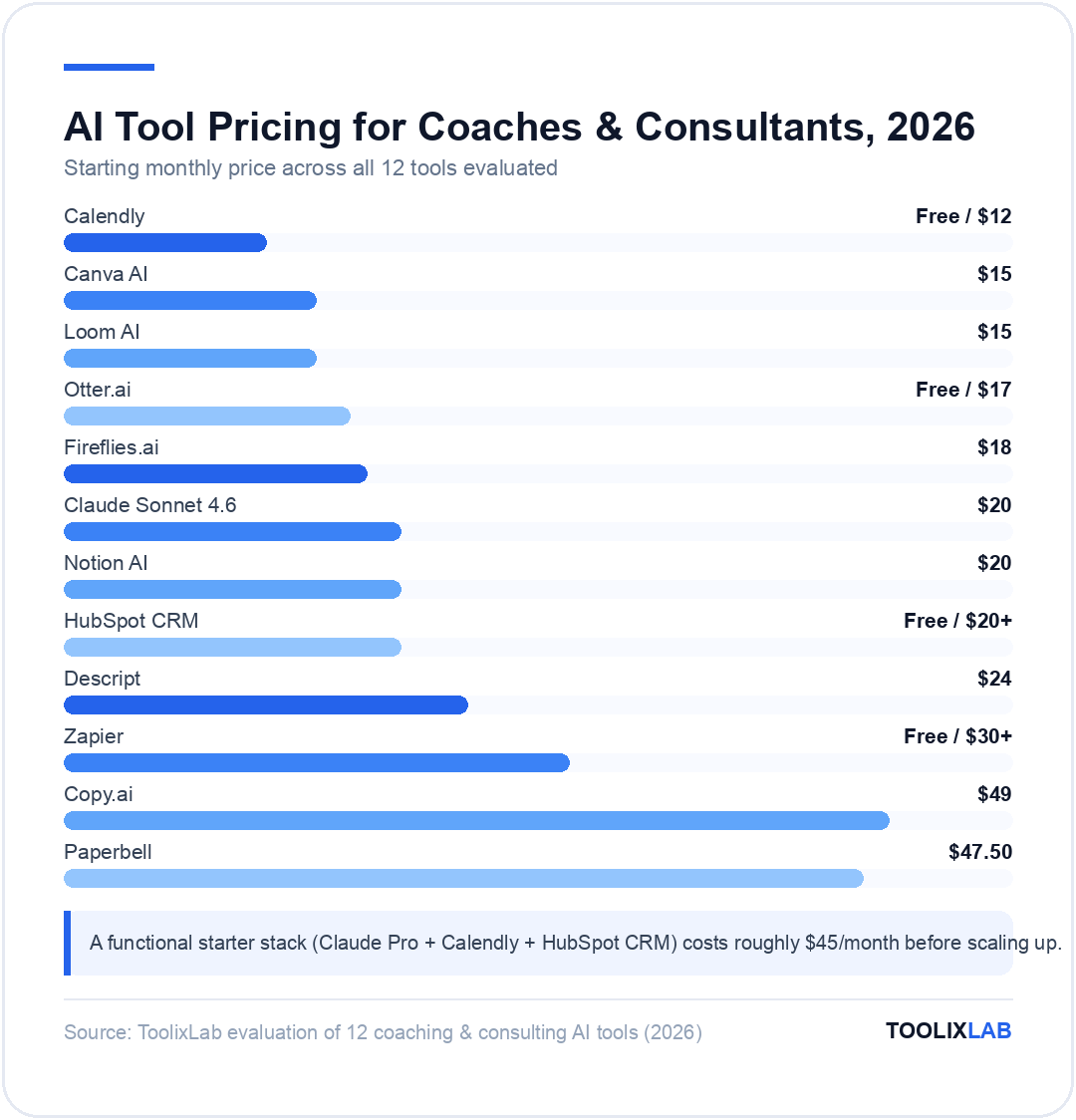
AI Tool Comparison: Coaches vs. Consultants
While coaches and consultants share many tool needs, the emphasis differs based on the nature of the work. Here's how the 12 tools map to each role:
| Tool | Price/month | Coaches | Consultants | Primary Use Case |
|---|---|---|---|---|
| Claude Sonnet 4.6 | $20 (Pro) | ⭐⭐⭐⭐⭐ | ⭐⭐⭐⭐⭐ | Session prep, proposals, frameworks, research |
| Fireflies.ai | $18 (Pro) | ⭐⭐⭐⭐⭐ | ⭐⭐⭐⭐⭐ | Meeting transcription, call intelligence, CRM sync |
| Paperbell | $47.50 | ⭐⭐⭐⭐⭐ | ⭐⭐⭐ | Coaching-specific: scheduling, contracts, invoicing |
| HubSpot CRM | Free / $20+ | ⭐⭐⭐⭐ | ⭐⭐⭐⭐⭐ | Pipeline management, outreach sequences, deal tracking |
| Notion AI | $20 (Plus + AI) | ⭐⭐⭐⭐ | ⭐⭐⭐⭐⭐ | Knowledge management, frameworks, deliverable drafting |
| Copy.ai | $49 (Starter) | ⭐⭐⭐⭐⭐ | ⭐⭐⭐⭐ | LinkedIn posts, newsletters, thought leadership copy |
| Canva AI | $15 (Pro) | ⭐⭐⭐⭐⭐ | ⭐⭐⭐⭐ | Workshop slides, program visuals, client presentations |
| Otter.ai | Free / $17 | ⭐⭐⭐⭐ | ⭐⭐⭐⭐ | Budget meeting transcription, session notes |
| Calendly | Free / $12+ | ⭐⭐⭐⭐⭐ | ⭐⭐⭐⭐⭐ | Scheduling automation, client intake routing |
| Loom AI | $15 (Starter) | ⭐⭐⭐⭐ | ⭐⭐⭐⭐⭐ | Async updates, deliverable walkthroughs, check-ins |
| Zapier | Free / $30+ | ⭐⭐⭐⭐ | ⭐⭐⭐⭐⭐ | Cross-tool automation, workflow integration hub |
| Descript | $24 (Creator) | ⭐⭐⭐⭐ | ⭐⭐⭐ | Podcast & video content production |
AI for Client Acquisition: Building a Smarter Coaching Pipeline
Client acquisition is where AI can have the highest leverage impact for coaches and consultants, because it directly determines revenue — and it's typically the area most neglected when client delivery is busy. A well-configured AI-powered acquisition workflow runs in the background regardless of how full your calendar is.
The components of an AI-powered client acquisition system for coaches and consultants in 2026 are:
Content that attracts inbound inquiries. Consistent thought leadership content — LinkedIn posts, newsletters, podcast appearances, and YouTube content — is the most scalable way to build an inbound coaching pipeline. Tools like Copy.ai and Canva AI dramatically reduce the time cost of consistent content production, making it viable even during busy delivery periods. The goal is to establish a recurring content cadence (typically 3–5 LinkedIn posts per week + a weekly or biweekly newsletter) that keeps you visible to your target audience and demonstrates your expertise continuously.
A friction-free intake and scheduling flow. When a prospective client encounters your content and decides to explore working with you, the barrier to taking the next step should be minimal. A Calendly scheduling page optimized with a brief intake form, routed to the appropriate discovery call type based on responses, means the time between "I want to talk to you" and "we have a call scheduled" is measured in minutes rather than days of email back-and-forth.
CRM-based pipeline management. Without a CRM, inquiries and discovery calls exist only in your memory and email inbox. A HubSpot pipeline with defined stages and automated follow-up sequences ensures that every prospect is followed up with consistently, regardless of how busy you are. AI-generated follow-up emails in HubSpot mean that writing personalized outreach after a discovery call takes 2 minutes rather than 20. For more detailed guidance on AI-driven pipeline building, see our best AI tools for marketing 2026 guide and the AI sales funnel workflow for step-by-step automation setup. If your consulting niche includes sales coaching specifically, our roundup of the best AI sales coaching tools in 2026 covers platforms like Gong, Chorus, and Salesloft that analyse call recordings to surface coaching opportunities automatically.
Proposal generation. Claude or ChatGPT can generate a customized first-draft proposal from a discovery call brief in 10–15 minutes. The inputs are: client name and context, the challenge they described, the proposed solution and deliverables, timeline, and fee. The output is a structured proposal document that you refine rather than write from scratch. This compresses proposal turnaround from 2–4 hours to 30–45 minutes — an important advantage in competitive pitches where response time signals your operational effectiveness. For a complete walkthrough of Claude's business features and the configurations that work best in professional services contexts, see our guide on how to use Claude AI for business.
AI for Client Delivery: Elevating Session Quality
The core of any coaching or consulting practice is the quality of what happens inside the client engagement. AI doesn't replace the relationship, the judgment, or the expertise — but it significantly enhances the surrounding infrastructure that supports high-quality delivery.
Session preparation. The difference between a good session and a transformative session is often the quality of the preparation. Before each session, Claude or ChatGPT can: summarize key themes from the Fireflies transcript of the previous session; generate 5–7 targeted questions aligned with the client's current focus; research any industry or technical context relevant to the session agenda; and draft a provisional session framework that you adapt in the moment. This 10-minute pre-session AI workflow replaces 30–45 minutes of manual review and note-reading.
Session delivery tools. Some coaches and consultants use AI in real-time during sessions — for example, having Claude available to pull up relevant frameworks or research while in conversation. This works better in consulting contexts (where reference material is appropriate) than in coaching contexts (where the use of external tools can disrupt the conversational flow). The more common approach is to keep AI tools in the preparation and follow-up phases rather than the session itself.
Post-session follow-up. The 30–60 minutes after a session that previously went to writing notes, drafting follow-up emails, and creating action plan summaries can be compressed significantly with AI. Fireflies generates the session summary and action items automatically. Claude can draft the client follow-up email from those notes in 2 minutes. Notion AI can update the client profile with key session themes and progress markers. A complete post-session workflow that previously took 45 minutes can be done in 15 with the right AI-assisted process.
Between-session support materials. Coaches who provide homework, worksheets, or reading between sessions can use AI to generate these materials at scale. Claude can create a customized worksheet, exercise, or reflection prompt based on a brief description of what the client is working on. This allows coaches to provide more personalized between-session materials without the production time that would otherwise make it impractical.
AI for Business Operations: Eliminating the Admin Tax
Business operations — scheduling, invoicing, contracts, client onboarding, bookkeeping — are necessary but rarely what coaches and consultants want to be doing. The goal is to reduce the time cost of operations to as close to zero as possible while maintaining professional standards.
The highest-ROI operational automation workflows for coaches and consultants in 2026 are:
Client onboarding automation. When a new client signs a contract in Paperbell or DocuSign, a Zapier workflow can automatically: create a Notion client workspace with a pre-populated template; add the client to HubSpot; schedule their first session in Calendly; send a welcome email with onboarding materials; and create an invoice in your billing system. The entire onboarding process that previously required 45 minutes of manual action completes in under 5 minutes, automatically.
Scheduling and calendar management. Calendly's AI scheduling, configured with proper event types, intake routing, and reminder sequences, reduces the ongoing scheduling maintenance to nearly zero. Clients book, reschedule, and cancel without requiring any manual action from you. The AI reminder sequence (24-hour and 1-hour pre-call reminders with session prep materials) reduces no-show rates significantly.
Invoicing and payment collection. Paperbell handles coaching package billing automatically. For project-based consulting, tools like HoneyBook or Dubsado can generate invoices from project milestones and send payment reminders automatically. The combination of automated invoicing and online payment processing (Stripe, PayPal) eliminates most of the cash flow management overhead of running a consulting practice.
Bookkeeping and financial tracking. Tools like FreshBooks and QuickBooks Online have AI-powered categorization and reporting that significantly reduces the manual bookkeeping burden. For solopreneurs, connecting these tools to your bank account and setting up AI auto-categorization means monthly bookkeeping takes 15 minutes rather than 2 hours. See our best AI tools for accountants guide for more detailed financial management tool recommendations.
If you run a solo coaching practice, our focused guide to the best AI tools for solopreneur coaches in 2026 covers a lean, budget-conscious stack built around the 5 core coaching jobs-to-be-done. For small-business coaches and consultants who want a broader view of AI tool integration across their entire operation, our best AI tools for small business guide covers the full stack including marketing, operations, and customer service tools. And our best AI tools for project management roundup covers the project delivery layer in depth — particularly relevant for consultants running structured multi-phase engagements.
How to Build Your AI Coaching & Consulting Stack
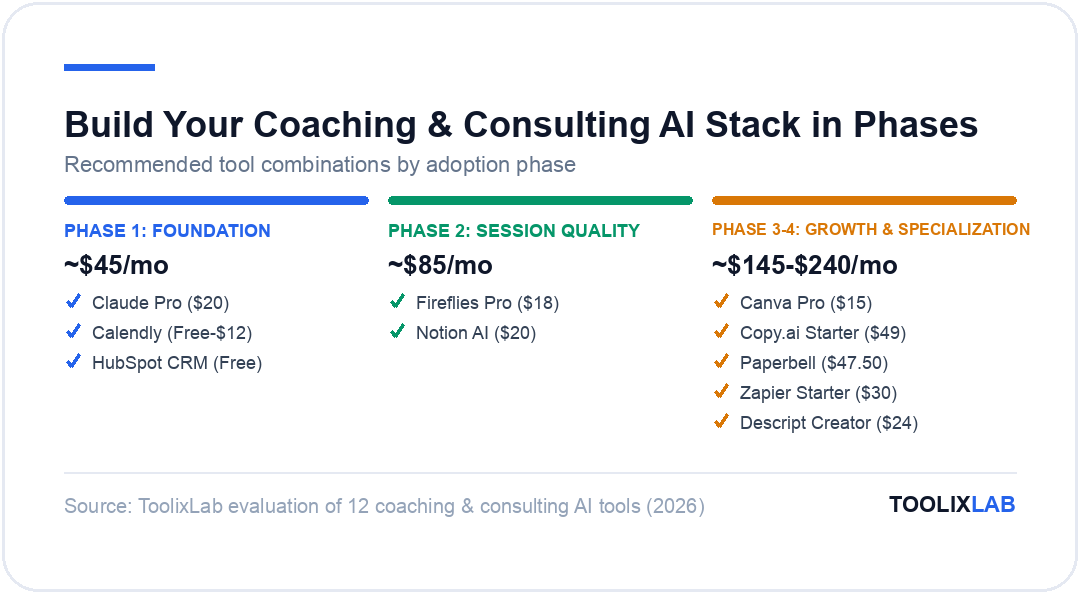
The most common mistake coaches and consultants make when building an AI stack is trying to adopt too many tools simultaneously. The cognitive and operational overhead of learning five new tools at once negates the efficiency gains each tool provides. A phased approach delivers better results.
Phase 1 — Foundation (Start here, total ~$45/month):
- ✓Claude Pro ($20/month) — your AI thinking partner for session prep, proposals, research, and written deliverables. Use this daily within 2 weeks.
- ✓Calendly (Free or Standard, $12/month) — eliminate scheduling back-and-forth. Configure your event types and intake form in 1 hour.
- ✓HubSpot CRM (Free) — start tracking your pipeline. Even basic usage will reveal which leads are being dropped and improve your follow-up consistency.
Phase 2 — Session Quality (Add after 30 days, total ~$85/month):
- ✓Fireflies Pro ($18/month) — add AI meeting transcription to all client calls. Within the first week, you'll wonder how you managed without it.
- ✓Notion AI ($20/month) — migrate your client files and framework library to Notion and configure client workspace templates. Takes 4–6 hours upfront to set up properly.
Phase 3 — Growth & Content (Add after 60 days, total ~$145/month):
- ✓Canva Pro ($15/month) — set up your Brand Kit and start using AI design for all client deliverables and marketing materials.
- ✓Copy.ai Starter ($49/month) — build a content workflow for LinkedIn and newsletter. Start with 3 posts per week and a biweekly newsletter.
Phase 4 — Specialization (Add based on your specific workflow, total ~$215–$240/month):
- ✓Paperbell ($47.50/month) — for coaches who want to consolidate scheduling + contracts + invoicing into one system.
- ✓Zapier Starter ($30/month) — for connecting your tools into automated workflows once Phase 1–3 tools are stable.
- ✓Descript Creator ($24/month) — only if podcast or video content is a primary client acquisition channel.
At the full Phase 4 stack, you're investing approximately $215–$240/month in AI tools. If this recovers 8–10 hours per week in previously manual work — a conservative estimate for a fully deployed stack — the ROI is significant even at a modest hourly rate. At $150/hour for coaching or consulting work, 8 hours recovered weekly is $1,200/week in recovered billable capacity against a $240/month tool investment.
💡 Quick Win
If you're starting from zero AI tools, the single highest-ROI first move is setting up Claude Pro and Calendly in the same week. Use Claude to create your session prep workflow and proposal templates; use Calendly to eliminate scheduling friction. Most coaches and consultants recover the combined $32/month cost in the first week in time saved.
Common Mistakes When Using AI in Coaching & Consulting
As AI adoption increases in professional services, certain patterns of misuse are becoming common. Avoiding these mistakes is as important as knowing which tools to use.
Using AI to generate insights you present as your own original thinking. AI-generated frameworks, research, and analysis are valuable starting points and efficiency tools. They become a professional liability if presented to clients as original proprietary methodology without disclosure. The appropriate use is as a starting material that you synthesize, adapt, and build upon with your own expertise — not as a substitute for developing genuine expert perspective.
Pasting client information into consumer AI tools without reviewing privacy terms. Free-tier ChatGPT and similar consumer tools may use your inputs for model training unless you opt out or use a paid plan. Never paste a client's name, company details, or sensitive personal information into a consumer AI tool without understanding its data handling policy. Use business-tier plans or API-based tools for any client-identifiable information.
Letting AI replace genuine client presence. The highest-value thing a coach or consultant brings to an engagement is their focused attention and judgment. AI should handle the surrounding work — preparation, follow-up, content, operations — so that client sessions are higher-quality, not shorter or less attentive. Coaches who use AI to generate session frameworks and then deliver those frameworks verbatim without adapting to the client in real time are not using the tools appropriately.
Over-automating the human touchpoints. Personalized outreach, relationship check-ins, and client communication are differentiators in a world where automation is increasingly prevalent. AI-drafted emails should still sound like you and feel personal to the recipient. The goal is efficiency in production, not automation of the relationship itself.
Trying to implement the full stack at once. As described in the phased approach above, tool overload creates adoption friction that negates efficiency gains. Start with the two or three tools that address your highest-friction workflows, use them consistently for 30 days, and then add the next layer. Patience in the adoption process produces better long-term results than ambitious initial configuration.
The Future of AI in Coaching & Consulting
The AI tools available in 2026 are already significantly changing what's possible for individual coaches and small consulting teams. But the trajectory of development suggests that the changes over the next 2–3 years will be even more substantial.
For a foundational understanding of what AI coaching actually is — how it differs from AI-assisted human coaching, what prospective clients want, and how to position it in your practice — see our pillar piece on what AI coaching is in 2026.
The areas where AI is developing most rapidly and will have the greatest impact on coaching and consulting specifically are: AI coaching companions that provide between-session support to clients (accountability check-ins, content delivery, progress tracking) while referring complex challenges to the human coach; AI-powered diagnostic tools that can analyze client responses, behavior patterns, and session transcripts to surface themes and progress signals that human coaches might miss across multiple clients; and AI proposal generation that produces highly personalized, research-grounded consulting proposals faster than any human could write them.
For coaches and consultants who invest in understanding and using these tools now, the competitive advantage compounds over time. The practices that have optimized their AI stack in 2026 will be better positioned to integrate the next generation of tools in 2027 and 2028 — not because they've adopted the latest technology, but because they've built the organizational habits, workflows, and judgment that make AI tools actually useful in professional practice.
If you work specifically in life coaching, we've published a dedicated deep-dive on the best AI tools for life coaches in 2026 — covering ICF-aligned session management, HIPAA-aware note-taking, and all-in-one platforms like Practice Better and Paperbell that are built for the life coaching workflow specifically.
If you coach C-suite leaders, VPs, or senior managers, see our dedicated guide on the best AI tools for executive coaches in 2026 — covering Claude for leadership development plans, Granola for confidential session note-taking, and the enterprise coaching platforms (CoachHub, Valence, BetterUp) worth recommending to corporate clients.
Coaching and consulting aren't the only client-facing practices seeing this shift — we've published equally detailed AI stack breakdowns for other service-based niches, including best AI tools for insurance agents, best AI tools for doctors and healthcare professionals, and best AI tools for restaurants and food businesses — if your practice sits closer to one of those verticals, those guides go deeper on the industry-specific platforms.
How AI Helps Coaches and Consultants Grow Their Business
Beyond operational efficiency, AI is now a genuine client-growth tool for coaches and consultants. Here's where it moves the needle most on revenue:
AI-powered client acquisition content. AI tools — Claude, Jasper, and Writesonic specifically — can produce thought leadership content at a volume previously only achievable by teams. A solo coach publishing 3–4 articles per week of genuine insight (AI-drafted, human-refined) builds authority and inbound leads faster than any paid channel at that budget.
AI client management and CRM automation. Tools like HubSpot AI and Notion AI allow coaches to manage their entire client pipeline — intake, onboarding, session scheduling, progress tracking, and offboarding — with minimal manual overhead. AI-powered client management means fewer dropped balls, better client experiences, and lower churn.
AI-assisted proposal creation. Consultants using Claude to draft client proposals report generating first drafts 70–80% faster than writing from scratch. The saved time either increases proposal volume (more pitches = more clients) or goes back into the client relationship. Either way, the ROI is direct.
The coaches and consultants growing fastest in 2026 are not those with the best AI stack — they're the ones who have integrated AI into the systems that previously constrained their growth capacity: content, client management, and proposal throughput.