
AI agents are the biggest shift in how we use artificial intelligence since ChatGPT launched. While chatbots answer questions, AI agents take actions — autonomously browsing the web, writing and running code, sending emails, managing databases, and completing multi-step tasks without you clicking a single button. By the end of 2026, Gartner predicts 40% of enterprise applications will embed task-specific AI agents, up from less than 5% in 2025. We tested 20+ agent platforms across automation, coding, research, and business workflows to find the 12 that actually deliver on the promise.
⚡ TL;DR — Best AI Agent Tools 2026
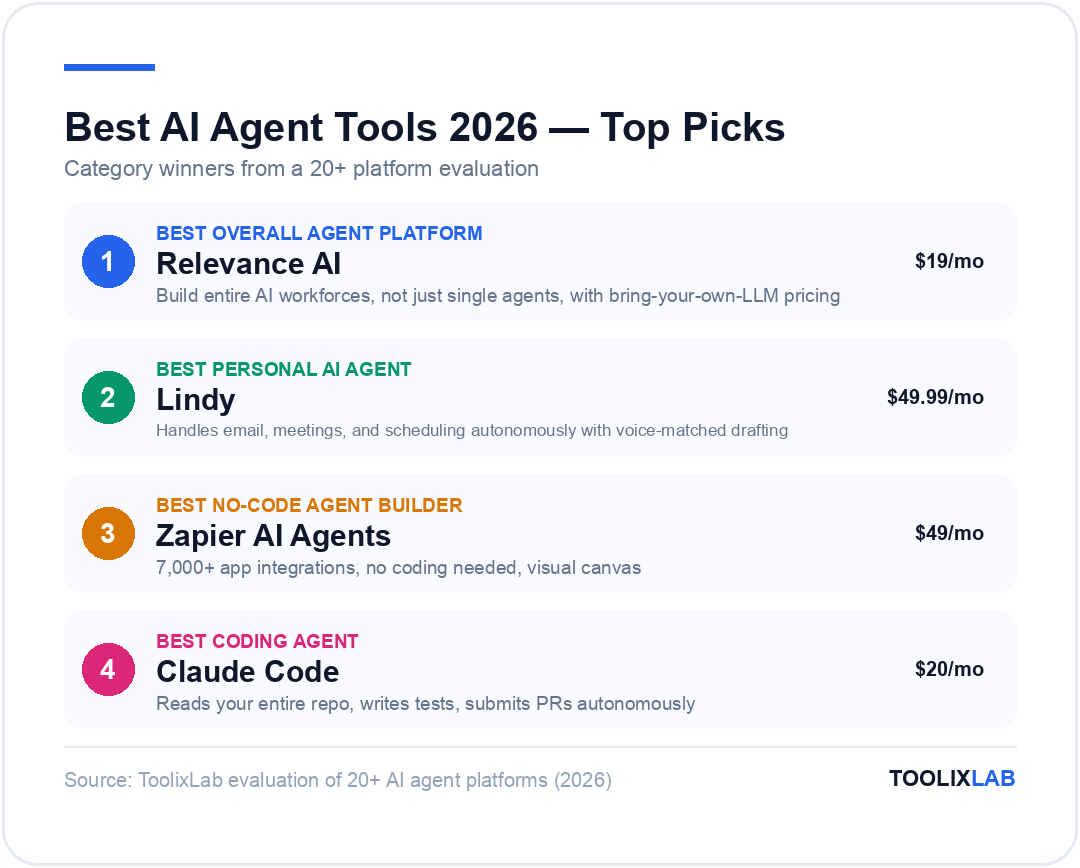
- ✓Best overall agent platform: Relevance AI — build entire AI workforces, not just single agents
- ✓Best personal AI agent: Lindy — handles email, meetings, and scheduling autonomously
- ✓Best no-code agent builder: Zapier AI Agents — 7,000+ app integrations, no coding needed
- ✓Best coding agent: Claude Code — reads your entire repo, writes tests, submits PRs autonomously
- ✓Best open-source agents: n8n + CrewAI — developer-grade control, self-hosted option
- ✓Best enterprise agent builder: Microsoft Copilot Studio — deep Office 365 integration
- ✓Free tiers available: Relevance AI (200 actions/mo), n8n (self-hosted), CrewAI (open source)
- →Bottom line: AI agents are no longer experimental — the right tool depends entirely on your use case and technical comfort level
What Are AI Agents? (And How They Differ from AI Chatbots)
Before diving into the tools, it's worth understanding what actually makes something an "AI agent" versus a regular AI chatbot or AI workflow.
A chatbot like the free version of ChatGPT operates in a request-response loop. You ask, it answers, you ask again. It has no memory of what you did yesterday, it can't take actions in external systems, and it stops working the moment you close the tab.
An AI workflow (like a Zapier automation with a ChatGPT action) is more powerful — it can trigger automatically and move data between apps — but it follows a rigid, pre-defined script. If something unexpected happens, it fails or skips. It can't adapt.
An AI agent is fundamentally different in three ways:
-
1
Autonomy: Agents decide their own next steps. Given a goal like "research our top 10 competitors and compile a pricing table," an agent independently decides to search the web, read pricing pages, extract data, and format a spreadsheet — without you specifying each step.
-
2
Tool use: Agents can use external tools — web browsers, code execution environments, APIs, databases, email clients — to take real actions in the world, not just generate text.
-
3
Memory and persistence: Agents maintain context across sessions. They remember what they did yesterday, build on past work, and get smarter about your preferences and systems over time.
The practical upshot: a chatbot writes an email draft for you; an AI agent monitors your inbox, drafts replies, schedules follow-ups, and books the meeting — all while you're in a different conversation.
How We Evaluated the Best AI Agent Tools
We tested each tool on a standardized set of real business tasks over 60 days, evaluating across five dimensions:
How independently can the agent complete a multi-step task without human hand-holding?
How many tools and apps can the agent connect to and take actions in?
What percentage of complex multi-step tasks did the agent complete correctly, without errors or hallucinations?
Can non-technical users build and deploy agents? How long does the first working agent take?
Is the pricing transparent? Does the free or entry tier offer genuine value, or is it a teaser?
The 12 Best AI Agent Tools in 2026
🏆 1. Relevance AI — Best for Building AI Workforces
Relevance AI has emerged as the most complete AI agent platform for business teams in 2026. Unlike tools that let you build one agent, Relevance lets you build an entire AI workforce — multiple specialized agents that work together, hand off tasks, escalate to humans when needed, and operate around the clock.
The platform takes a workforce metaphor seriously. You hire agents for specific roles — a Research Agent, a Prospecting Agent, a Support Agent — give them tools and knowledge, and they collaborate on complex goals. An outbound sales team using Relevance, for example, might deploy: a Prospect Researcher (finds and enriches leads), a Personalizer (writes custom email openers), an Outreach Agent (sends and sequences emails), and an Escalation Agent (alerts a human when a lead responds). All four run autonomously, 24/7.
What makes Relevance particularly powerful is its bring-your-own-LLM option. On Pro plans and above, you can connect your own OpenAI, Anthropic, or Google API keys, which dramatically reduces per-action costs compared to platforms that charge proprietary credits on top of model costs.
Relevance AI Pricing
- ✓Free: 200 actions/month, 1 workforce, unlimited agents & tools, 2,000+ integrations
- ✓Pro: $19/month — 2,500 actions/mo, unlimited workforces, scheduling, bring your own LLM
- ✓Team: $234/month — 7,000 actions/mo, 5 build users, 45 end users, A/B testing, calling & meeting agents
- ✓Enterprise: Custom — unlimited users, enterprise security, dedicated support
Best for: Sales teams, marketing agencies, operations teams that want to automate complex multi-step business processes with multiple specialized agents. The free tier is genuinely useful for small-scale experimentation.
Limitations: The action-based pricing can get expensive at scale if you're not using your own API keys. The interface has a learning curve steeper than Zapier for non-technical users.
🥈 2. Lindy — Best Personal AI Agent
If Relevance AI is about building AI workforces for business teams, Lindy is about giving individuals a genuinely capable personal AI agent — one that manages your inbox, handles meeting scheduling, takes notes, and executes tasks while you focus on higher-leverage work.
Lindy is powered by a custom orchestration layer that can call on Claude Sonnet 4.6, GPT-5.4, or other models depending on the task. What sets Lindy apart is the depth of integration with communication tools. Connect your Gmail, Outlook, Slack, and calendar — and Lindy will triage your inbox, label important emails, draft replies in your voice, schedule meetings when both parties are free, and prepare you for each meeting with a briefing from your previous interactions.
The style learning feature is particularly impressive: Lindy reads your sent emails to learn how you write — your typical greeting, sign-off, sentence length, and communication tone — and applies that to every draft it produces. After two weeks, the drafts are indistinguishable from your own emails.
Lindy Pricing
- ✓Plus: $49.99/month — 24/7 iMessage access, inbox management, voice-matched reply drafting, meeting scheduling and notes, style learning, 7-day free trial
- ✓Pro: $59.99/month — email triage, meeting notes, ad-hoc task support, 7-day free trial
- ✓Enterprise: Custom — team access controls, SSO, HIPAA compliance, dedicated support
Best for: Executives, founders, and professionals who receive high email volume and spend significant time on scheduling, inbox management, and meeting prep. The time ROI is clearest for people with 50+ emails/day.
Limitations: Primarily personal productivity focused — not designed for building outward-facing business workflows. iMessage integration is Apple-only.
🥉 3. Zapier AI Agents — Best No-Code Agent Builder
Zapier's transformation from a simple automation tool to a full AI agent platform is one of the most significant product evolutions in the space. Zapier AI Agents (launched in 2025, significantly expanded in 2026) lets you build agents using the same visual interface Zapier users already know — but instead of rigid if-this-then-that logic, agents can now reason, make decisions, and adapt to unexpected inputs.
The key differentiator is Zapier's integration library: 7,000+ apps. No other agent platform comes close. If a tool has a Zapier integration (and almost every SaaS product does), your Zapier agent can take actions in it without any API setup. Build an agent that monitors your CRM for new leads, researches each lead's LinkedIn and company website, writes a personalized outreach email, and sends it via your email provider — all within Zapier's visual canvas, all without writing code.
Zapier AI Agents are available on all Zapier paid plans. The Professional plan ($49/month) includes AI features with reasonable action limits for individual use. Teams and Company plans unlock higher limits and advanced agent features.
Best for: Business users and teams who want the power of AI agents without any coding. The existing Zapier ecosystem makes it the fastest path from "idea" to "working agent" for people already in the Zapier world. See our full Zapier vs Make vs n8n comparison for how it stacks up as an automation platform.
4. n8n — Best for Developer-Grade Agent Workflows
n8n raised $180 million at a $2.5 billion valuation in late 2025 for a reason: it's the most powerful open-source workflow automation tool that has fully embraced AI agents. Where Zapier is optimized for ease, n8n is optimized for control and cost efficiency.
n8n's AI agent capabilities center on its LangChain integration and native AI node library. You can build agents that use Claude Sonnet 4.6, GPT-5.4, or any other LLM as their reasoning engine, connect them to tools (web scraping, code execution, database queries, API calls), give them memory (conversation history, vector stores), and orchestrate multiple sub-agents in complex workflows. The visual workflow editor makes it accessible to technically-minded non-coders while giving developers full flexibility to write custom JavaScript or Python nodes.
The self-hosted Community Edition is completely free with unlimited executions — this is the option that makes n8n extraordinarily cost-effective at scale. Teams report saving 70–90% on automation costs by switching from Zapier to self-hosted n8n once their workflow volume grows. If you want cloud hosting without infrastructure management, the Starter plan is €24/month.
n8n Pricing
- ✓Self-hosted Community: Free forever — unlimited workflows, unlimited executions, 400+ integrations
- ✓Cloud Starter: €24/month — 2,500 executions/mo, 14-day free trial, managed hosting
- ✓Cloud Pro: €60/month — 10,000 executions/mo, unlimited active workflows
- ✓Enterprise: Custom — SSO, Git integration, multi-environment support
Best for: Developers, technical founders, and engineering-led teams who want maximum control, open-source flexibility, and the best cost-per-execution at scale. See our no-code AI workflow guide to get started with n8n agents without writing code.
5. Claude Code — Best Coding Agent
Claude Code is Anthropic's terminal-based agentic coding tool, and it represents a fundamentally different approach to AI-assisted development. While most coding assistants complete one function or file at a time, Claude Code operates at the repository level — it reads your entire codebase, understands the architecture, and can make coherent multi-file changes, write and run tests, fix bugs, and submit pull requests autonomously.
Powered by Claude Opus 4.6 (1M token context window), Claude Code can hold your entire codebase in context simultaneously — something impossible for earlier models with smaller context limits. This makes it uniquely suited for large-scale refactors, cross-file feature implementations, and debugging complex issues that span multiple modules.
Real-world usage reports from engineering teams in 2026 consistently highlight two things: Claude Code's ability to understand intent from a natural language description and translate it into correct code across multiple files, and its careful approach to safety — it tells you what it's about to do and asks for confirmation before making irreversible changes.
Claude Code is available on Claude Pro ($20/month), Max ($100–$200/month), Team ($25/user/month), and Enterprise plans. Install with:
npm install -g @anthropic-ai/claude-codeBest for: Software engineers working on complex codebases where cross-file understanding and autonomous multi-step code changes matter. See our full Claude AI guide for setup and usage tips. Compare with Cursor AI and GitHub Copilot for alternative coding agent options.
6. Cursor — Best AI Code Editor with Agent Mode
Cursor is a VS Code fork that has built one of the most polished AI coding agent experiences available in 2026. Its Agent Mode lets you describe a feature or bug fix in plain English, and Cursor's agent will analyze the relevant files, propose a plan, make multi-file edits, run terminal commands, and iterate until the tests pass — all within the familiar VS Code interface.
What distinguishes Cursor from Claude Code is the developer experience: Cursor lives inside your editor, making the experience feel native rather than terminal-based. You can review every change in a standard diff view, accept or reject individual edits, and have the agent explain its reasoning in the sidebar. For teams that prefer IDE-based workflows over terminal tools, Cursor is the more accessible agent option.
Best for: Developers who want agentic coding capabilities without leaving their code editor. Cursor's Pro plan ($20/month) includes 500 fast agent requests per month. Full review in our Cursor AI review and Cursor vs GitHub Copilot vs Codeium comparison.
7. ChatGPT (GPT-5.4) — Best General-Purpose Agent
ChatGPT has evolved from a chatbot into a capable general-purpose agent through its computer use and deep research capabilities. GPT-5.4, OpenAI's current frontier model, can browse the web, execute code in a sandbox, analyze files, generate and edit images, and chain multiple tool calls together to complete complex research and analysis tasks.
The Tasks feature (ChatGPT Plus and above) allows you to schedule recurring agentic tasks — for example, "every Monday morning, search for the top 5 AI news stories, summarize them, and send to my email." This brings persistent, scheduled agent behavior to the most widely used AI platform in the world.
ChatGPT's advantage over more specialized agent tools is the breadth of what GPT-5.4 can do well: writing, coding, analysis, research, image generation, voice conversation, and file processing — all in one tool. For users who need a single agent that does everything adequately, rather than specialized agents that do one thing exceptionally, ChatGPT Plus ($20/month) remains the most accessible entry point to agentic AI.
Best for: Individuals who want a capable all-in-one agent without building or configuring anything. The broad capability set makes it the default recommendation for AI agent beginners.
8. CrewAI — Best Open-Source Multi-Agent Framework
CrewAI is the leading open-source framework for building systems where multiple AI agents collaborate on a shared goal. Rather than a single agent trying to do everything, CrewAI lets you define a crew of specialized agents — each with a specific role, backstory, and set of tools — that communicate and delegate tasks among themselves to complete complex objectives.
A typical CrewAI setup for content production might include: a Research Agent (gathers information), an Analyst Agent (identifies key insights), a Writer Agent (drafts the article), and an Editor Agent (refines and formats). The agents pass their outputs to each other, building on previous work in a coordinated pipeline. This division-of-labor approach consistently produces higher-quality outputs than a single general-purpose agent trying to do all four roles.
CrewAI is Python-based and open source — you can run it locally, connect it to any LLM (Claude, GPT-5.4, local models), and customize every aspect of agent behavior. The CrewAI Enterprise platform offers a visual crew builder for teams that need a no-code interface.
Best for: Developers and data teams that want fine-grained control over multi-agent systems. If you're comfortable with Python, CrewAI is one of the most powerful free tools in this list. For non-coders, look at Relevance AI instead, which takes a similar multi-agent workforce approach with a no-code interface. See our full developer AI tools guide for more frameworks.
9. Microsoft Copilot Studio — Best Enterprise Agent Builder
Microsoft Copilot Studio is the enterprise-grade agent builder within the Microsoft 365 ecosystem. It allows IT teams and business analysts to build custom AI agents — called "Copilots" — that are deeply integrated with SharePoint, Teams, Outlook, Dynamics 365, and Azure services, without requiring software engineering expertise.
In 2026, Microsoft updated Copilot Studio with multi-model collaboration: agents can now use GPT-5.4 for drafting and Claude Sonnet 4.6 for review and fact-checking within the same workflow. This hybrid approach produces notably more accurate outputs for enterprise knowledge tasks like policy drafting, compliance review, and customer service responses.
Copilot Studio is priced per message for standalone use (approximately $200 per month for 25,000 messages), with more favorable terms available as part of the Microsoft 365 Copilot enterprise licensing agreement. For organizations already deep in the Microsoft ecosystem, the integration advantages — native SharePoint knowledge indexing, Teams channel deployment, Azure Active Directory authentication — make it the natural choice for enterprise agent deployment.
Best for: Enterprise organizations with heavy Microsoft 365 usage that need agents accessible via Teams, integrated with SharePoint content, and governed by Azure AD permissions and compliance policies.
10. Salesforce Agentforce — Best CRM-Native Agent
Salesforce Agentforce represents the most ambitious CRM-native agent platform in 2026. Built directly into Salesforce, Agentforce agents have immediate access to every customer record, opportunity, case, and interaction in your CRM — eliminating the data integration challenges that plague standalone agent tools trying to work with CRM data.
Agentforce ships with pre-built agent roles: a Sales Development Agent (qualifies leads, books meetings), a Customer Service Agent (resolves tier-1 cases autonomously), an Inside Sales Agent (manages pipeline tasks and follow-ups), and a Marketing Agent (personalizes campaign responses). Each can be customized to match your specific sales processes, product knowledge, and escalation rules.
The results from early enterprise adopters are striking: service teams report 40–70% of tier-1 cases resolved without human intervention, and sales teams report significant reduction in time-to-first-contact with inbound leads. Pricing is approximately $2/conversation for the autonomous agent actions, on top of existing Salesforce licensing.
Best for: Mid-market and enterprise Salesforce customers who want to automate sales and customer service workflows without pulling data out of Salesforce. The native data access is a genuine competitive advantage over external agent tools. Our full AI sales tools guide covers Agentforce alongside other sales AI platforms.
11. Perplexity AI — Best Research Agent
Perplexity AI occupies a unique position as an AI agent built specifically for research. Unlike general-purpose agents that can browse the web as one of many tools, Perplexity's entire architecture is designed around real-time, cited information retrieval — making it the most reliable research agent available in 2026.
The Deep Research feature (Pro plan) functions as a genuine research agent: given a complex question, it autonomously runs dozens of searches, reads and synthesizes sources, and produces a comprehensive cited report — typically in 3–5 minutes for work that would take a human researcher 30–60 minutes. The citations are real URLs you can verify, not hallucinated references, which makes the output trustworthy for business decision-making.
Perplexity Pro costs $20/month and includes unlimited standard searches, 300+ Deep Research reports per day, and the ability to upload and analyze documents alongside web research.
Best for: Research-intensive professionals — analysts, marketers, consultants, journalists, and students — who need reliable, cited answers at speed. Read our full Perplexity AI review for a detailed breakdown of its research capabilities.
12. GitHub Copilot Workspace — Best for GitHub-Native Teams
GitHub Copilot Workspace is GitHub's agentic development environment that turns a GitHub issue or pull request into a complete development task an AI agent can execute autonomously. Write an issue describing a bug or feature, and Copilot Workspace will plan the solution, write the code, run tests, and open a draft PR — all from within the GitHub interface, without switching to a local editor.
This "GitHub-native" approach is Copilot Workspace's key advantage over terminal-based coding agents. Product managers and team leads can create issues in plain language, and Copilot Workspace handles the implementation — dramatically lowering the barrier between a product decision and deployed code. For distributed teams using GitHub as their development hub, this is an exceptionally natural workflow.
Best for: Development teams already using GitHub for issue tracking and code review who want to reduce the friction between planning and implementation. Full comparison in our GitHub Copilot review.
AI Agent Tools Comparison Table
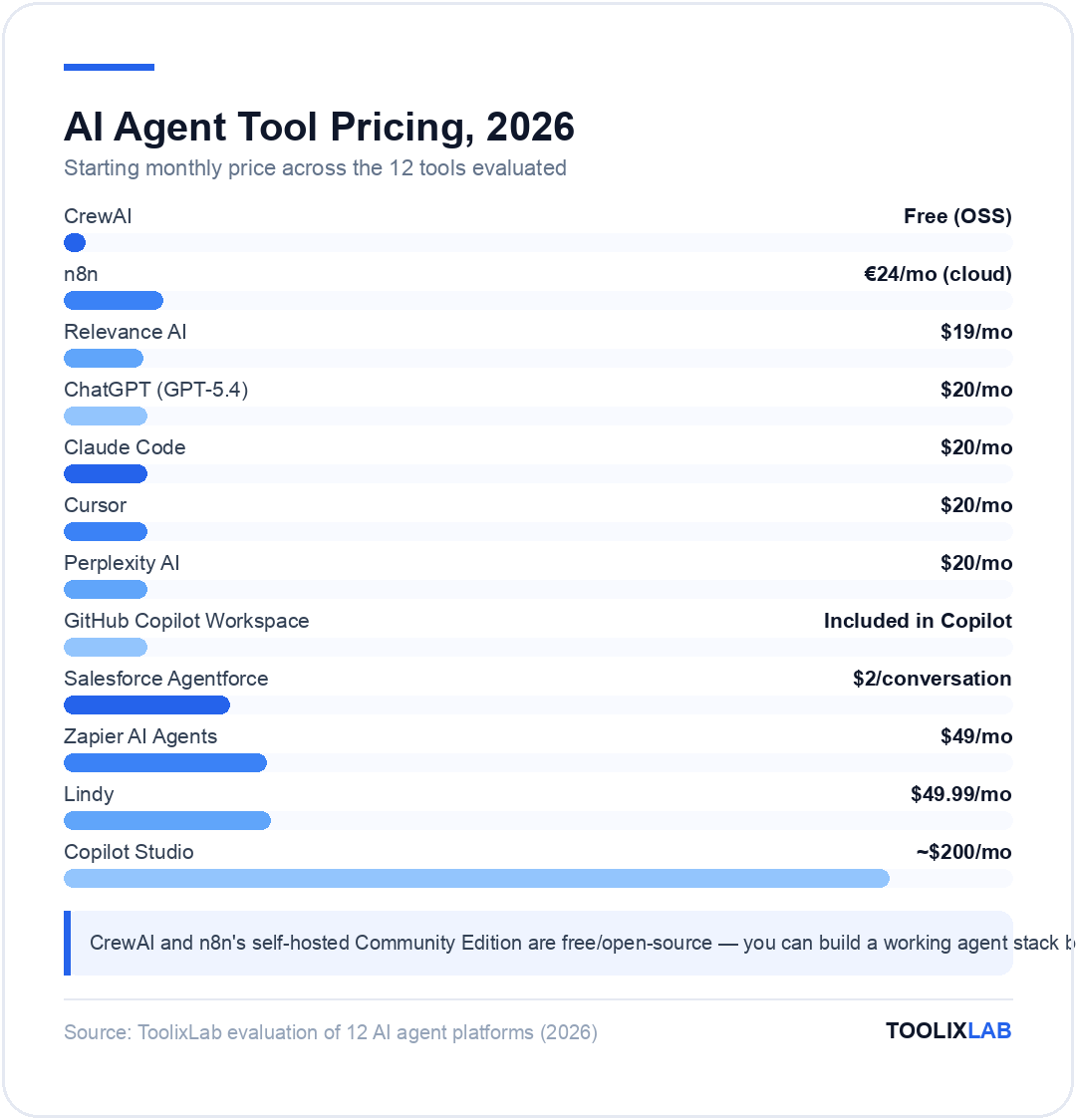
| Tool | Best For | Free Tier | Starting Price | Autonomy Level |
|---|---|---|---|---|
| Relevance AI | Business AI workforces | ✓ 200 actions/mo | $19/mo | Very High |
| Lindy | Personal productivity | 7-day trial | $49.99/mo | High |
| Zapier AI Agents | No-code business automation | Limited free plan | $49/mo | Medium |
| n8n | Developer workflows | ✓ Self-hosted free | €24/mo (cloud) | Very High |
| Claude Code | Agentic coding | ✗ Paid only | $20/mo (Pro) | Very High |
| Cursor | IDE-based coding agent | ✓ Limited hobby plan | $20/mo | High |
| ChatGPT (GPT-5.4) | General-purpose tasks | ✓ Free tier | $20/mo (Plus) | Medium |
| CrewAI | Multi-agent systems | ✓ Open source | Free (OSS) | Very High |
| Copilot Studio | Enterprise Microsoft teams | ✗ Paid only | ~$200/mo | High |
| Salesforce Agentforce | CRM-native agents | ✗ Paid only | $2/conversation | High |
| Perplexity AI | Research & analysis | ✓ Free tier | $20/mo (Pro) | Medium |
| GitHub Copilot Workspace | GitHub-native teams | Trial available | Included in Copilot | High |
Best AI Agents by Use Case
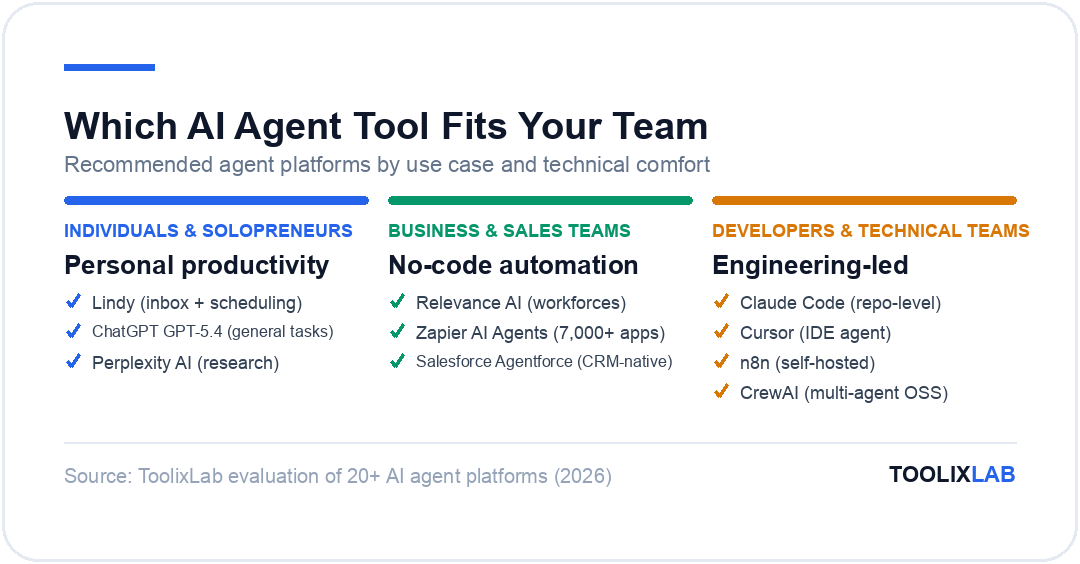
The biggest mistake most teams make is choosing an AI agent platform based on general reputation rather than their actual use case. Here's a quick decision guide:
📧 Email & Calendar Automation
#1 Lindy — unmatched depth for inbox management and scheduling
#2 Zapier AI Agents — if you need email connected to broader CRM workflows
💻 Coding & Development
#1 Claude Code — repo-level understanding, best for complex multi-file tasks
#2 Cursor — IDE-native experience, best for everyday coding speed
#3 GitHub Copilot Workspace — issue-to-PR workflow, best for GitHub-centric teams
🔍 Research & Analysis
#1 Perplexity AI — cited real-time research, best accuracy for current information
#2 ChatGPT (GPT-5.4) — broader capabilities, better for analysis + synthesis
🏢 Business Process Automation
#1 Relevance AI — multi-agent workforces, best for complex business workflows
#2 Zapier AI Agents — easiest setup, 7,000+ app integrations
#3 n8n — best cost efficiency and developer control
🤝 CRM & Sales
#1 Salesforce Agentforce — native CRM data access, best for Salesforce orgs
#2 Relevance AI — better for custom outbound sales workflows outside Salesforce
🔧 Enterprise & IT Teams
#1 Microsoft Copilot Studio — if your org runs on Microsoft 365
#2 Relevance AI Enterprise — for non-Microsoft enterprise needs
How to Choose the Right AI Agent Tool
With 12 solid options on this list, choosing can feel overwhelming. Run through these five questions to narrow it down:
1. What's the primary task you want to automate?
Be specific. "I want to save time" is not a use case. "I want to automatically research and qualify inbound leads before my sales team touches them" is. The more specific your use case, the clearer the tool choice becomes. Use the use-case table above as your starting point.
2. How technical is your team?
Non-technical teams: start with Zapier AI Agents or Relevance AI (no-code, visual builders). Technical teams and developers: n8n, CrewAI, or Claude Code give you far more power and cost control. Mixed teams: Relevance AI's hybrid approach (no-code surface, technical depth underneath) often works best.
3. What systems does your agent need to access?
Already deep in Salesforce? Agentforce. Microsoft 365 shop? Copilot Studio. Need to connect to 50+ different SaaS tools? Zapier. Running everything on open-source infrastructure? n8n. The integration ecosystem should drive 40% of your decision.
4. What's your volume of tasks per month?
Low volume (under 1,000 tasks/month): almost any tool works. Medium volume (1,000–50,000): action-based pricing on platforms like Relevance AI can get expensive — consider n8n self-hosted or using your own LLM API keys. High volume (50,000+): n8n self-hosted or CrewAI with direct API access is almost always the most cost-effective path.
5. Do you need human-in-the-loop oversight?
Some tasks (sending customer emails, making purchases, posting public content) require a human to review and approve before the agent acts. Most platforms support this — Relevance AI calls it "smart escalations," Lindy pauses for confirmation on high-stakes actions, Claude Code asks before making irreversible changes. Make sure the tool you choose can pause at the right checkpoints for your risk tolerance.
How to Build Your First AI Agent (30-Minute Quick Start)
The fastest path to a working AI agent for most people is Relevance AI's free tier. Here's a 30-minute setup for a Lead Research Agent — an agent that automatically researches new leads from your CRM and creates a summary before your sales team reaches out.
-
01
Create a free Relevance AI account
Sign up at relevanceai.com. The free plan gives you 200 actions/month — enough to test your first agent thoroughly.
-
02
Create a new Agent from a template
Click "Agents" → "New Agent" → choose the "Lead Researcher" template. Relevance ships dozens of pre-built templates for common business tasks.
-
03
Define the agent's role and tools
Give the agent a name, role description, and the tools it needs: Web Search (to look up company info), LinkedIn Lookup (to find the contact's background), and Google Docs (to write the output summary).
-
04
Test with a real lead
Give the agent a lead name, company, and email. Watch it search the web, pull company information, find the contact's role and background, and write a structured briefing — typically in under 90 seconds.
-
05
Connect a trigger
Once the output is correct, connect a trigger — a new row in your CRM, a Webhook from your form tool, or a scheduled daily run — so the agent fires automatically without you manually starting it.
The same approach works for a dozen business workflows: onboarding a new employee (research their background, prep an intro brief, schedule orientation meetings), monitoring competitors (check pricing pages weekly, flag changes, update a tracking doc), or qualifying support tickets (read the ticket, check the knowledge base, draft a response, escalate if needed). See our full AI workflow building guide for more detailed workflow blueprints.
AI Agents vs AI Assistants vs AI Workflows: Clearing Up the Confusion
These three terms are used interchangeably in marketing but describe genuinely different technologies. Here's the clearest breakdown:
| Category | AI Assistant | AI Workflow | AI Agent |
|---|---|---|---|
| Examples | ChatGPT free, Claude free | Zapier automations, Make scenarios | Relevance AI, Lindy, Claude Code |
| How it works | You prompt → it responds | Trigger → fixed steps → output | Goal → agent plans + executes steps autonomously |
| Handles surprises? | Responds but doesn't act | No — breaks or skips | Yes — adapts and recovers |
| Takes external actions? | No | Yes (pre-defined) | Yes (autonomous) |
| Memory across sessions? | Usually not | No | Yes |
The practical implication: if your process always follows the same steps with no variation, a standard AI workflow (Zapier, Make, n8n) is the right tool — it's more reliable and cheaper. If your process requires judgment, handles variable inputs, or needs to adapt to unexpected situations, that's when you need a true AI agent.
The Future of AI Agents in 2026 and Beyond
The AI agent landscape is evolving faster than any other category in software. Based on current trajectories, here's what to expect through the rest of 2026:
Multi-Agent Collaboration Becomes the Standard
Single-agent systems are increasingly being replaced by orchestrated teams of specialized agents. The Google Cloud AI Agent Trends 2026 report found that 68% of enterprise AI agent deployments now use multiple cooperating agents rather than a single generalist. Source: Google Cloud. This drives better outcomes because specialized agents outperform generalists on specific tasks, and orchestration layers can route work to the right specialist automatically.
Computer Use Becomes Production-Ready
The ability for AI agents to directly control computer interfaces — clicking buttons, filling forms, navigating web apps — has moved from research demonstration to practical deployment in 2026. Claude's computer use API and OpenAI's equivalent allow agents to interact with any software that doesn't have an API, opening up automation possibilities that previously required custom integrations or Robotic Process Automation (RPA) tools.
Agents Get Long-Term Memory
2026 is the year persistent, sophisticated memory becomes standard in agent platforms. Rather than starting fresh each session, agents now maintain detailed records of past interactions, user preferences, project context, and institutional knowledge. Lindy's style learning and Relevance AI's workforce memory are early examples of what will become universal. By 2027, an agent that forgets what it did last week will be considered broken.
Agent-to-Agent Communication Standards Emerge
Anthropic's Model Context Protocol (MCP) and OpenAI's equivalent are establishing standards for how AI agents communicate with tools and with each other. As these protocols mature, expect agents built on different platforms to interoperate — a Relevance AI agent routing tasks to a CrewAI subagent, or a Zapier agent calling a Claude Code agent to handle a coding subtask. The walled-garden era of AI agents is ending.
The bottom line: AI agents are not a passing trend. They represent a fundamental shift in how work gets done — from humans using AI as a writing assistant to AI systems handling entire workflows autonomously. The organizations that build effective AI agent operations in 2026 will have a structural productivity advantage that compounds over time. The question isn't whether to use AI agents — it's which ones to deploy first.
For small businesses new to AI automation, our best AI tools for small business guide covers the most accessible starting points. For teams ready to build more sophisticated pipelines, our no-code AI workflow guide covers the full build process step by step.
🔬 How We Test AI Tools at ToolixLab
Every recommendation in this guide comes from hands-on evaluation, not spec-sheet comparison. Our process for this category:
- Real-task testing: we run each tool through the actual workflows this guide covers — the same tasks you'd use it for — and compare outputs side by side.
- Verified pricing: every price is checked against the vendor's official pricing page at review time, and re-checked on our refresh cycle.
- Free-tier reality check: we test the free tier limits ourselves so "free" claims reflect what you actually get.
- Ongoing re-evaluation: AI tools change monthly; posts carry a visible "Last updated" date and stale recommendations get replaced.
ToolixLab is reader-supported: some links may earn us a commission, which never affects rankings — several tools we rank highest have no affiliate program at all.