
Claude Trust Snapshot
Real Free Score
76/100
Lock-In Risk
Low
Billing Friction
Low
Commercial Use
Allowed
Data Privacy
Clear
Volatility
Medium
Last checked
2026-07-22
⚡ What You'll Learn
- 1 How to set up your Claude account in under 2 minutes
- 2 10 practical use cases with real prompts you can copy immediately
- 3 The CLEAR prompt framework for dramatically better outputs
- 4 Free vs Pro vs Max vs Team: Which plan is right for you?
- 5 How to use 2026 features: Artifacts, Projects, Extended Thinking, Claude Code, and Computer Use
Most people who try Claude for the first time make the same mistake: they treat it like a slightly fancier search engine. They type a quick question, get a good answer, and move on. They never discover what Claude is actually built for.
Claude is an AI assistant created by Anthropic with a specific design philosophy: to be genuinely helpful, honest, and safe. In practice, that translates into something competitors struggle to match — writing that sounds like a human wrote it, code that's architecturally sound, and reasoning that actually explains its logic. By early 2026, Claude has become the go-to choice for developers, writers, researchers, and anyone who finds ChatGPT's outputs a little too "robotic."
This guide will take you from complete beginner to confident Claude user. You'll learn how to set up your account, master the interface, use the most powerful 2026 features, and get better results from every prompt you write. No technical background required.
What is Claude AI? (The 60-Second Explanation)

Claude is an AI assistant built by Anthropic, an AI safety company founded in 2021. Unlike many AI companies focused purely on capability, Anthropic builds Claude with a heavy emphasis on reliability, honesty, and safe reasoning. The result is an AI that's less prone to making things up, more willing to say "I don't know," and noticeably better at producing high-quality text on the first attempt.
Think of Claude as the thoughtful colleague who reads the full brief before responding — rather than the one who jumps to conclusions and makes you redo everything.
📊 Claude in Numbers (February 2026)
- • ~19 million professional users worldwide
- • 200,000 token context window — process entire books in one conversation
- • Available on web, iOS, Android, and desktop
- • Models available: Claude Sonnet 4.6, Claude Opus 4.6, Claude Haiku 4.5
- • Used by teams at companies including GitLab, Notion, and Stripe
✅ Where Claude wins
- • Long-form writing with consistent voice and tone
- • Complex coding tasks and debugging
- • Analyzing lengthy documents with high retrieval accuracy
- • Nuanced reasoning across multi-step problems
⚠️ Where Claude has limitations
- • No image generation (unlike ChatGPT's DALL-E)
- • No video generation (unlike Gemini's Veo 3)
- • Tighter free-tier message limits than Gemini
- • Memory across sessions requires the Max plan
For a full side-by-side breakdown, see our ChatGPT vs Claude vs Gemini comparison.
Getting Started: Set Up Your Claude Account
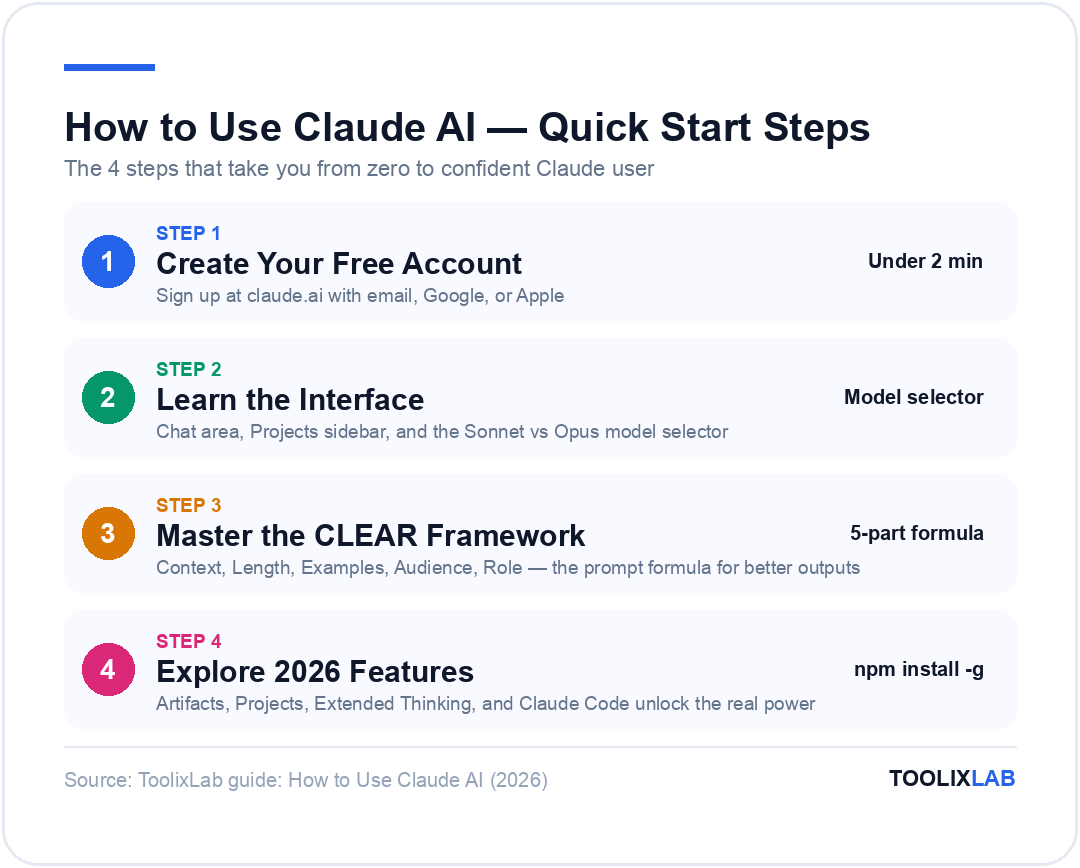
Getting started with Claude takes about two minutes. Here's the exact process:
Create Your Free Account
- Go to claude.ai
- Click "Sign up" (or "Log in" if you already have an account)
- Sign up with your email, Google, or Apple account
- Verify your email if prompted
💡 Pro tip: Using Google sign-in is fastest and saves you from remembering another password.
Download the App (Optional but Recommended)
Claude is available on iOS and Android. The mobile app is particularly useful for voice-to-text prompting and on-the-go brainstorming. You can also download the desktop app for Mac and Windows for quick keyboard-shortcut access.
Start Your First Conversation
Type something—anything! Here are three good first prompts to get a feel for Claude's style:
You'll notice immediately that Claude's responses tend to be longer, more structured, and more nuanced than a quick Google search. That's intentional — Claude is designed for depth, not just quick answers.
Understanding the Claude Interface

The Claude interface is clean and deliberately simple. Here's what everything does:
- • Chat area: your conversation thread
- • Message input: type or paste your prompt here (supports file uploads)
- • New chat button: start a fresh conversation (top left)
- • Projects: organize conversations by topic, client, or workflow (left sidebar)
- • Model selector: switch between Sonnet 4.6 (fast, balanced) and Opus 4.6 (most powerful) depending on your task
⚠️ Crucial Difference From ChatGPT
Claude doesn't have persistent memory across separate chats by default. Each new conversation starts fresh. The Projects feature (available on Pro and above) solves this by letting you store documents, instructions, and context that Claude remembers within that project. More on this below.
10 Powerful Things You Can Do with Claude

Here are 10 use cases with prompts you can copy and use immediately.
📝 1. Write Long-Form Content That Doesn't Sound Like AI
Claude is widely regarded as producing the most natural-sounding AI writing available. It avoids "AI-isms" — words like "delve," "tapestry," and "unleash" — that flag ChatGPT outputs immediately to any trained eye.
Example Prompt
"Write a 600-word blog introduction for an article about productivity systems for remote workers. Tone: warm and practical, like a knowledgeable friend. Audience: freelancers and small business owners. Avoid AI clichés. Start with a specific, relatable problem."
Pro tip: Add a sentence like "Avoid words like 'delve,' 'unlock,' 'harness,' and 'tapestry'" to any writing prompt. Claude will honour it every time.
💻 2. Write and Debug Code
Claude's code quality is strong enough that many developers have switched to it as their primary coding assistant. In independent testing, Claude Sonnet 4.6 produces cleaner, better-commented code with more thoughtful architecture than comparable models.
Example Prompt
"Write a JavaScript function that takes an array of product objects (with 'name', 'price', and 'category' fields) and returns them sorted by price within each category. Include comments and a brief explanation of your logic."
Claude won't just give you the code — it will explain why each decision was made, which is invaluable for learning or reviewing before deploying. 💡 Pro tip: If Claude's first attempt misses something, say "That works but I need it to also handle empty arrays and return a message in that case." Claude builds on context across the conversation extremely well.
📄 3. Analyze Long Documents
This is where Claude genuinely has no equal at the consumer tier. With a 200,000 token context window — and near-perfect retrieval accuracy across that entire window — Claude can process entire contracts, research papers, or codebases in a single conversation.
Example Prompt
"Here is a 40-page commercial lease agreement. [paste document] Please: 1) Summarize the key terms in plain language, 2) Flag any clauses that seem unusual or unfavourable to the tenant, 3) List any missing standard protections I should ask the landlord to add."
⚠️ Important: Always consult a qualified professional for legal, financial, or medical decisions. Claude's analysis is a starting point, not a substitute.
🧠 4. Complex Research and Analysis
Claude excels at synthesizing multiple sources of information and producing structured analysis. It's particularly strong at identifying patterns, contradictions, and gaps across large amounts of text.
Example Prompt
"I'm going to paste three competitor pricing pages. Analyze them and: 1) Identify the positioning strategy each company is using, 2) Find pricing gaps we could exploit, 3) Recommend a pricing structure for a new mid-market SaaS product. [paste pages]"
📧 5. Draft Sensitive Communications
Claude's nuanced understanding of tone makes it exceptional for communications that require care — difficult feedback, sensitive customer emails, conflict resolution, and anything where the wrong word choice creates problems.
Example Prompt
"Write an email declining a client's request to extend our project deadline. The real reason is that they've already delayed approval three times and the contract doesn't allow it. I need to be firm but not burn the relationship. Tone: professional and empathetic, not apologetic."
🎭 6. Roleplay for Practice and Preparation
Whether it's preparing for a job interview, practising a difficult conversation, or rehearsing a sales call, Claude is an exceptionally realistic sparring partner.
Example Prompt
"Act as a skeptical VP of Engineering interviewing me for a senior backend role. Ask me technical questions one at a time, starting with system design. After each of my answers, give me honest feedback on what was strong and what was missing before moving to the next question."
🔢 7. Data Interpretation and Structured Thinking
Claude can't browse your databases directly (unless you connect it via MCP), but you can paste data directly into the chat for analysis, pattern-finding, or structuring.
Example Prompt
"Here is our customer churn data for the past 12 months by cohort. [paste CSV data] Identify the three most significant patterns and suggest two hypotheses for what's driving churn in the 90-day cohort."
🌐 8. Translation with Tone Preservation
Claude supports 50+ languages and, importantly, understands register — formal vs. casual, professional vs. friendly — in ways that basic translation tools miss.
Example Prompt
"Translate this customer email into formal Japanese, preserving the polite but direct tone. Add a brief note if any phrases don't translate cleanly and suggest the best equivalent."
📋 9. Build SOPs, Templates, and Frameworks
Give Claude a task you do repeatedly and ask it to build you a reusable system. This is one of the highest-ROI use cases for busy professionals.
Example Prompt
"I run client onboarding calls as a marketing consultant. Create a repeatable SOP for these calls including: a pre-call checklist, a 60-minute agenda with time allocations, the 10 questions I should always ask, and a post-call follow-up email template."
🤖 10. Agentic Tasks with Claude Code
For developers and technical users, Claude Code is a terminal-based agent that can autonomously read your codebase, write and run tests, make changes across multiple files, and submit pull requests. It's Claude's most powerful 2026 capability and what earned it the top spot on SWE-Bench Verified with a score of 72.5%.
To use Claude Code: Install it via npm install -g @anthropic-ai/claude-code and run claude in your project directory. Available on Pro, Max, and Team plans.
For a deeper breakdown of how Claude compares to ChatGPT and Gemini for coding specifically, see our full AI comparison guide.
Mastering Claude Prompts: The CLEAR Framework
Most people get mediocre results from Claude because they ask vague questions. The quality of Claude's output is directly proportional to the quality of your prompt. Use the CLEAR framework to structure every prompt:

| Letter | Stands For | What It Means | Example |
|---|---|---|---|
| C | Context | Who you are and why you're asking | "I'm a freelance UX designer pitching to enterprise clients..." |
| L | Length | How long the output should be | "Write a 400-word summary..." |
| E | Examples | Show the format or style you want | "Here's an example of the tone I'm going for: [paste]" |
| A | Audience | Who will read or use this | "Written for non-technical decision makers..." |
| R | Role | What persona Claude should adopt | "Act as a senior product manager with B2B SaaS experience..." |
❌ Without CLEAR
"Write me a LinkedIn post about AI."
Result: Generic, forgettable, could have been written by anyone.
✅ With CLEAR
"Act as a senior content marketer (R). Write a LinkedIn post (L: 150 words) about how AI is changing content workflows (C). My audience is marketing directors at mid-size companies who are skeptical of AI hype (A). Here's a post in the tone I want: [example] (E)."
Result: Specific, on-brand, ready to post.
5 Prompt Templates You Can Copy
Template 1 — General task:
"Act as [ROLE]. Your task is to [SPECIFIC ACTION]. Context: [RELEVANT DETAILS]. Output format: [FORMAT]. Length: [LENGTH]."Template 2 — Document analysis:
"Read this [DOCUMENT TYPE] carefully. Then: 1) [First thing you want], 2) [Second thing], 3) [Third thing]. Flag anything unusual. Here is the document: [PASTE]"Template 3 — Feedback and revision:
"Review this [TEXT TYPE] for [SPECIFIC ASPECT]. Keep the tone [TONE]. The audience is [AUDIENCE]. Suggest specific rewrites for any weak sections. Original text: [PASTE]"Template 4 — Brainstorming:
"Generate [NUMBER] ideas for [TOPIC]. I'm looking for [TYPE OF IDEAS: unusual / practical / beginner-friendly]. Audience: [AUDIENCE]. Constraints: [ANY LIMITS]. Format each idea as: Idea | Why it works | First step to try it."Template 5 — Chain of thought:
"Think through this step-by-step before giving me a final answer: [COMPLEX PROBLEM]. Show your reasoning at each step."💡 Claude-specific tip: Claude responds particularly well to being told what not to do. Adding "Don't use bullet points — write in paragraphs" or "Don't hedge — give me a direct recommendation" will dramatically change the output.
2026 Claude Features You Need to Know
Claude in 2026 is substantially more capable than its 2023 launch version. These are the features most beginners miss entirely.
🎨 Artifacts
Artifacts are a dedicated workspace that opens alongside your chat. When you ask Claude to write code, create a document, build a diagram, or design an HTML page, it renders the output in a separate panel where you can preview and interact with it directly — rather than just reading code in the chat window. Ask Claude to "build me a simple expense tracker in HTML" and Artifacts will render a working, interactive version instantly. It's one of the most underused Claude features.
📁 Projects
Projects solve Claude's biggest limitation for power users: lack of persistent memory across conversations. A Project is a workspace where you can:
- • Upload documents Claude should always have access to (style guides, briefs, reference docs)
- • Set persistent instructions ("Always respond in British English")
- • Organize related conversations in one place
If you're using Claude for client work, create one Project per client. Upload their brand guidelines, past work, and brief — Claude will reference all of it in every conversation within that project. Projects are available on Pro, Max, Team, and Enterprise plans.
🧠 Extended Thinking
Extended Thinking is Claude's deep reasoning mode — available on Max plans. When enabled, Claude pauses before responding and works through complex problems systematically before showing you the answer. You can see the reasoning chain, which makes it particularly useful for:
- • Complex mathematical problems
- • Multi-step strategic decisions
- • Architectural planning for large software projects
- • Evaluating arguments with many moving parts
It's noticeably slower than standard responses, but for genuinely hard problems, the quality difference is significant.
🖥️ Computer Use (Beta)
Claude can control a computer — clicking buttons, filling forms, navigating websites, and completing multi-step tasks in a browser. This is available in beta via the API and in Claude Code. It's Anthropic's answer to fully autonomous AI agents and is currently most stable for structured, repetitive web tasks.
🔍 Web Search
Claude can browse the internet in real time on all paid plans (and with limits on Free). It searches, reads pages, and synthesises findings — particularly useful when you need Claude to research current information it wouldn't have in its training data.
🔗 Google Workspace Integration (New in 2026)
Pro plan users can now connect Claude directly to Google Docs and Gmail — allowing Claude to read your documents and draft emails without copy-pasting. Available via Settings > Integrations.
🤖 Claude Code
Covered in the use cases section above, but worth emphasising: Claude Code is a separate product — a terminal-based agent installed via npm, not the web interface. It's the most powerful way to use Claude for serious development work and is included in Pro, Max, Team, and Enterprise plans.
Free vs Pro vs Max vs Team: Complete Pricing Breakdown

Here's the complete picture as of February 2026:
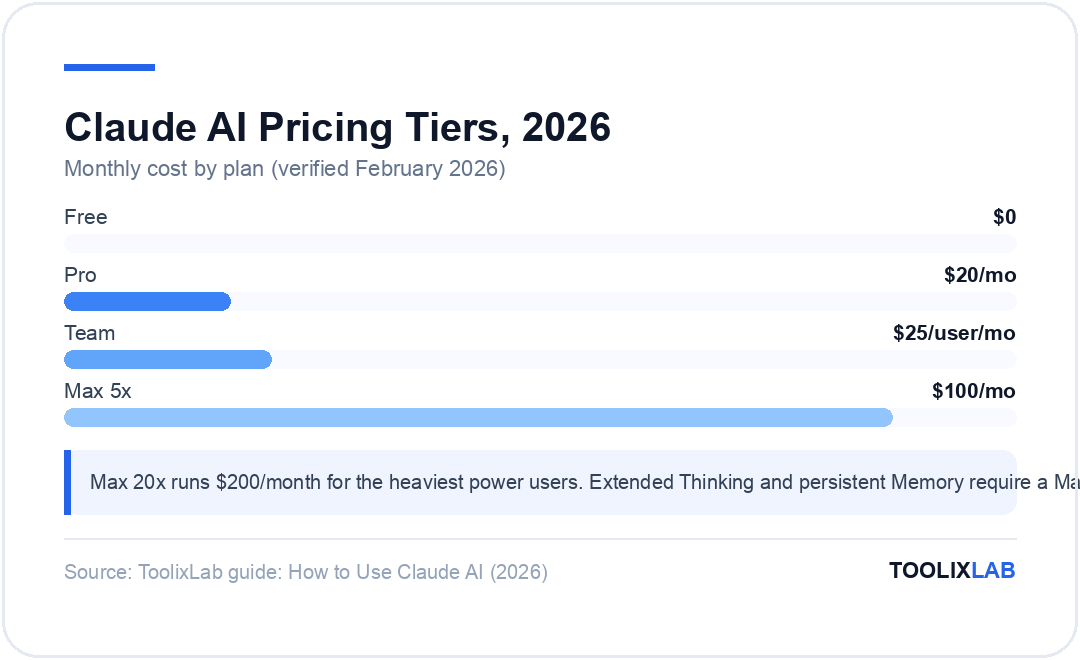
| Feature | Free | Pro ($20/mo) | Max 5x ($100/mo) | Max 20x ($200/mo) | Team ($25/user/mo) |
|---|---|---|---|---|---|
| Claude Sonnet 4.6 | ✓ (limited) | ✓ High limits | ✓ Very high limits | ✓ Highest limits | ✓ High limits |
| Claude Opus 4.6 | ✗ | ✓ | ✓ | ✓ | ✓ (Premium) |
| Artifacts | ✓ | ✓ | ✓ | ✓ | ✓ |
| Projects | ✗ | ✓ | ✓ | ✓ | ✓ |
| Extended Thinking | ✗ | ✗ | ✓ | ✓ | ✗ |
| Memory | ✗ | ✗ | ✓ | ✓ | ✗ |
| Claude Code | ✗ | ✓ | ✓ | ✓ | ✓ (Premium) |
| Web Search | Limited | ✓ | ✓ | ✓ | ✓ |
| Google Workspace | ✗ | ✓ | ✓ | ✓ | ✓ |
| Data privacy (no training) | Opt-out | Opt-out | Opt-out | Opt-out | ✓ Default |
Pricing verified February 2026. Pro is $17/month billed annually. Team is $25/user/month billed annually or $30/month. Visit claude.ai/pricing for current rates.
💡 Which plan should you choose?
- Start with Free if you're just exploring. It's genuinely capable for occasional use.
- Choose Pro ($20/mo) if you use Claude regularly for work. Projects alone are worth the upgrade.
- Choose Max ($100/mo) if you need Extended Thinking, persistent Memory, or use Claude all day as a power user.
- Choose Team if two or more people at your company need Claude. Shared Projects and admin controls make coordination much easier.
- Contact sales for Enterprise if you need SSO, audit logs, a 400K+ context window, or contractual data privacy guarantees.
5 Common Mistakes to Avoid
Even experienced Claude users make these. Avoid them and your results will improve immediately.
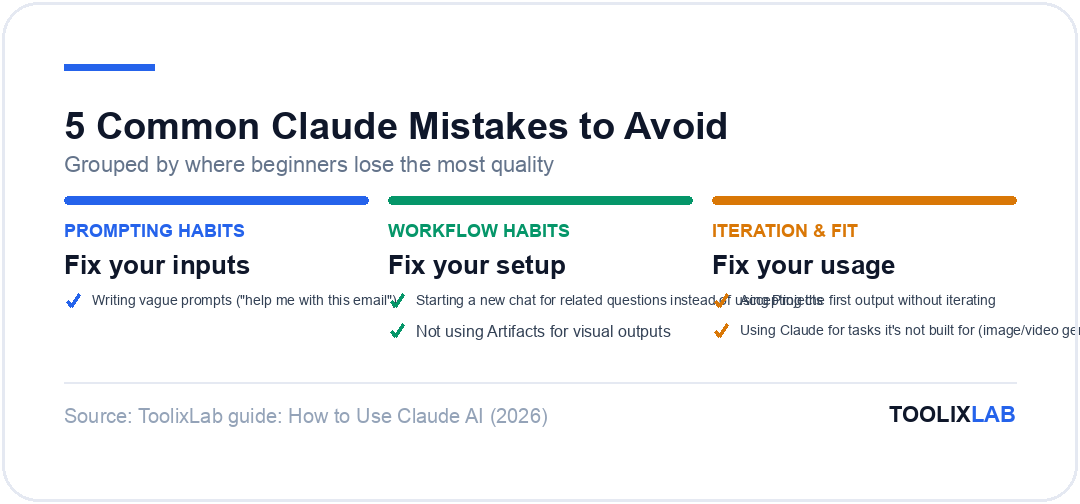
🚫 1. Writing Vague Prompts
"Help me with this email" gives Claude nothing to work with. Be specific about tone, audience, purpose, and format. The CLEAR framework above solves this entirely.
🚫 2. Starting a New Chat for Related Questions
Claude builds context across a conversation. If you're working on a project across multiple sessions, use Projects so Claude always has the relevant background. Starting a new chat every time means re-explaining everything from scratch.
🚫 3. Accepting the First Output Without Iterating
Claude is designed for conversation. If the first response is close but not quite right, say "Good, but make it 30% shorter" or "I like the structure but the tone is too formal — make it warmer." Claude iterates exceptionally well.
🚫 4. Not Using Artifacts for Visual Outputs
If you're asking Claude to build something — a webpage, a chart, a structured document — use Artifacts. The rendered preview gives you immediate feedback and you can ask Claude to modify it directly rather than reading code.
🚫 5. Using Claude for Tasks It's Not Built For
Claude doesn't generate images. It doesn't have persistent memory without Max or Projects. Its free tier is more limited than Gemini's. If you need image generation, DALL-E via ChatGPT is the right tool. If you need to process a 2-million-token document, Gemini's context window wins. Match the tool to the task.
When to Use a Different AI Instead
Claude is exceptional, but it's not the right tool for every situation. Here's a quick reference:
| If you need... | Consider instead | Why |
|---|---|---|
| Image generation | ChatGPT (DALL-E) | Claude has no image gen capability |
| Video generation | Gemini (Veo 3) | Claude has no video gen capability |
| Research with real-time citations | Perplexity AI | Purpose-built for cited research |
| Native Google Workspace integration | Gemini | Zero-setup Gmail/Docs/Drive access |
| Free-tier with high daily limits | Gemini | More generous free tier than Claude |
| Advanced voice conversation | ChatGPT | Claude voice is more limited in 2026 |
| Open-source / offline model | DeepSeek | Free, powerful reasoning, self-hostable |
For a full breakdown, see our 15 Best ChatGPT Alternatives in 2026 and our ChatGPT vs Claude vs Gemini comparison.
Pro Tips to 10x Your Claude Results
🎯 Set Project Instructions
In any Project, click "Edit project" and add a custom instruction block. Example: "I am a B2B SaaS marketer. Always write in British English. Avoid bullet points in favour of prose. My audience is non-technical decision makers." Claude will follow this in every conversation within the project.
📁 Upload Reference Documents to Projects
Don't paste the same brand guide or style document into every conversation. Upload it once to a Project and Claude will always have it. Works with PDFs, Word docs, text files, and more.
🔄 Use "Continue" to Beat Length Limits
If Claude stops mid-output on a long task, simply say "Continue" and it will pick up exactly where it left off. For very long documents, you can also ask it to work section by section.
🔍 Ask Claude to Critique Its Own Output
After Claude produces a piece of work, ask: "Now critique this as a sceptical reader. What are the three weakest points and how would you address them?" Claude's self-critique is often genuinely useful.
🧪 Use Extended Thinking for Hard Problems
If you're on Max and have a genuinely complex problem — a difficult architectural decision, a multi-variable strategy question — enable Extended Thinking. The reasoning chain it shows you is as valuable as the answer.
💬 Be Direct About What You Don't Want
Claude is unusually responsive to negative instructions. "Don't hedge. Give me a direct recommendation." or "Don't use headers — write this as flowing prose." will reliably change the output style.
Claude vs ChatGPT: A Quick Summary
If you're coming from ChatGPT and wondering how to recalibrate, here's the practical difference:
✅ Choose Claude when you need:
- • Publication-ready writing on the first pass
- • Code you'd trust in production
- • Nuanced analysis of long documents
- • An AI that explains its reasoning clearly
🤖 Stick with ChatGPT when you need:
- • Image or video generation
- • Persistent memory across all chats (not just Projects)
- • Advanced voice conversation
- • The broadest plugin and integration ecosystem
Many serious AI users run both — Claude for creation and deep work, ChatGPT for its multimedia and memory capabilities. See our How to Use ChatGPT guide if you want to run both in parallel.
Conclusion: Start Using Claude Today
Claude has earned its place as one of the two or three AI tools worth paying for in 2026. Its combination of writing quality, coding capability, long-document processing, and thoughtful design philosophy makes it the best AI assistant for professionals who value accuracy and depth over flashy features.
The learning curve is minimal — if you've used ChatGPT, you'll feel at home in minutes. The real value comes from understanding what Claude does differently: the Artifacts workspace for building things, Projects for persistent context, Extended Thinking for hard problems, and Claude Code for serious development work.
🚀 Your 5-Minute Action Plan
- Create your free account at claude.ai (takes 1 minute)
- Try one prompt using the CLEAR framework above
- Create a Project for your most important recurring workflow
- Upload a reference document (style guide, brief, or dataset) to that Project
- If you hit the free limit, upgrade to Pro — $20/month is worth it within the first week
📚 Continue Your AI Journey
- 🔗 ChatGPT vs Claude vs Gemini: Full 2026 Comparison — See how Claude stacks up against the competition
- 🔗 15 Best ChatGPT Alternatives in 2026 — Explore the full AI tool landscape
- 🔗 How to Use ChatGPT in 2026 — Master the other major AI assistant
- 🔗 Best AI Writing Tools for Content Creators — Level up your content workflow
- 🔗 Best ChatGPT Prompt Library 2026 — Tested prompt databases to get better results from any AI model