
ChatGPT Trust Snapshot
Real Free Score
80/100
Lock-In Risk
Medium
Billing Friction
Low
Commercial Use
Allowed
Data Privacy
Clear
Volatility
Medium
Last checked
2026-07-22
⚡ What You'll Learn
- 1 How to set up your ChatGPT account in under 2 minutes
- 2 10 practical use cases with real examples you can copy
- 3 The RICE prompt framework for 10x better results
- 4 Free vs Plus vs Team vs Enterprise: Which plan is right for you?
- 5 How to use 2026 features: Voice Mode, Canvas, Projects, Deep Research
ChatGPT has become the most transformative productivity tool since the smartphone. By early 2026, it's used by over 400 million people weekly—and if you're not among them, you're leaving serious productivity gains on the table.
🔗 New to AI Tools?
If you're exploring AI options beyond ChatGPT, check out our comprehensive guide to the 15 Best ChatGPT Alternatives in 2026 to find the perfect AI assistant for your needs.
The good news? You don't need to be a tech expert to use it. This guide will take you from complete beginner to confident ChatGPT user in about 20 minutes. No coding required, no prior AI experience needed—just a willingness to learn.
By the end of this guide, you'll know exactly how to use ChatGPT for writing, research, brainstorming, coding assistance, image generation, and more—with real examples you can copy and paste immediately. Ready to dive deeper into AI writing? Check out our guide to the Best AI Writing Tools to complement your ChatGPT workflow.
What is ChatGPT? (The 60-Second Explanation)

ChatGPT is an AI-powered assistant created by OpenAI. Since its launch in November 2022, it has evolved from a simple text chatbot into a multimodal AI platform that can understand and generate text, images, voice, code, and files. Think of it as an incredibly knowledgeable colleague who's available 24/7.
📊 By The Numbers (April 2026)
- • 400+ million weekly active users worldwide
- • 40% productivity increase reported by knowledge workers using AI tools
- • Available models: ChatGPT (GPT-5.4), GPT-5.4 mini, o3, and more
- • Supports 50+ languages with native-level fluency
- • Multimodal: text, voice, images, files, and code
✍️ Writing
Emails, reports, social posts, blog articles, creative stories
🧠 Research
Summarizing topics, explaining concepts, browsing the web
💡 Brainstorming
Generating ideas, solving problems, creative thinking
💻 Coding & Analysis
Writing code, debugging, data analysis, file processing
Instead of typing into a search engine and reading through multiple websites, you simply have a conversation. Ask a question, get an answer. Ask a follow-up, go deeper. It's that simple.
While ChatGPT leads the market in versatility, understanding how it compares to other AI models helps you choose the right tool. Our detailed ChatGPT vs Claude vs Gemini comparison breaks down the strengths of each platform for different use cases.
📚 Want Pre-Made Prompts?
Skip the learning curve with our curated collection of the 15 Best ChatGPT Prompt Libraries — tested and ready to use for marketing, coding, writing, and more.
⚠️ Important Limitation
ChatGPT can make mistakes and "hallucinate" incorrect information. Always verify important facts, especially for medical, legal, or financial decisions. Think of it as a brilliant assistant who occasionally needs fact-checking.
Getting Started: Your First 3 Steps
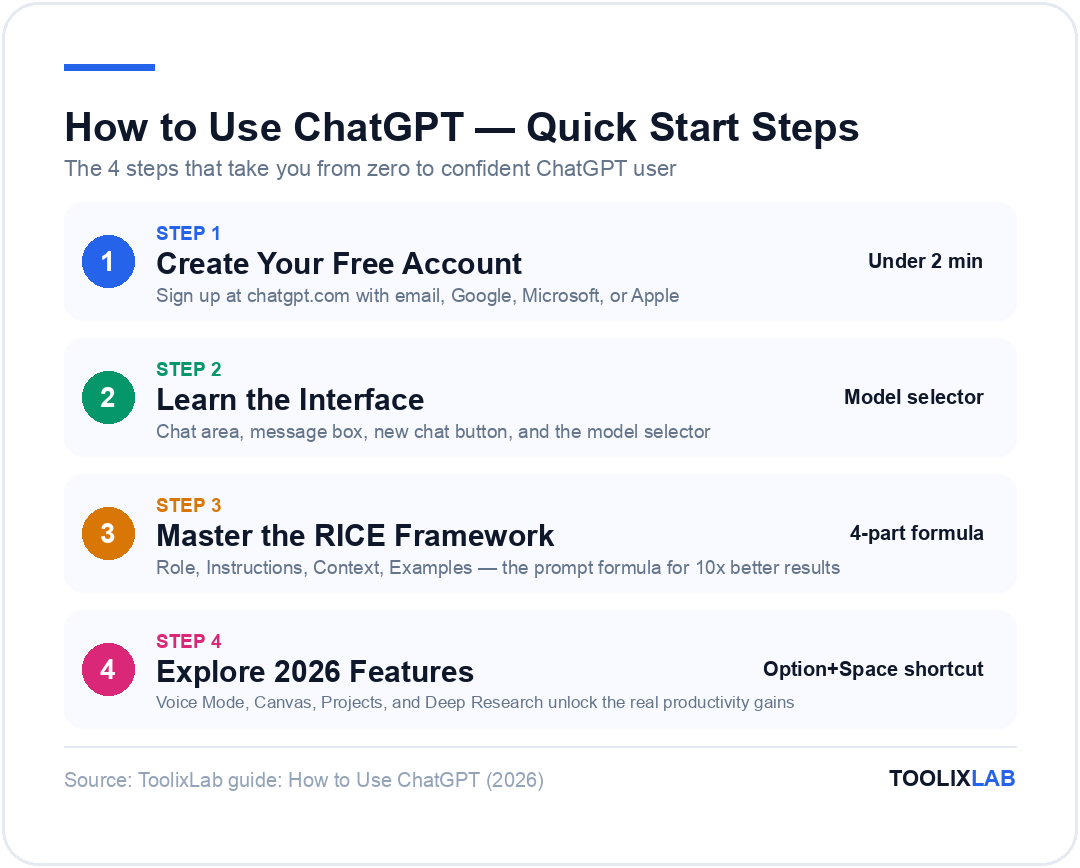
Let's get you up and running with ChatGPT. This entire process takes less than 2 minutes.
Create Your Free Account
- Go to chatgpt.com
- Click "Sign up" (or "Log in" if you already have an account)
- Sign up with your email, Google, Microsoft, or Apple account
- Verify your email if required
💡 Pro tip: Using Google sign-in is fastest and saves you from remembering another password.
Understand the Interface
The ChatGPT interface is refreshingly simple. Here's what you'll see:
- • Chat area: The main conversation window where your messages appear
- • Message box: Type your questions or prompts here (bottom of screen)
- • New chat button: Start a fresh conversation (top left)
- • Projects & History: Organize and access previous conversations (left sidebar)
- • Model selector: Choose between ChatGPT (GPT-5.4), GPT-5.4 mini, o3, and more (top of chat)
Start Your First Conversation
Type something—anything! Here are some great first prompts to try:
ChatGPT on Every Device
One of ChatGPT's biggest advantages is its availability across platforms. Here's how to access it everywhere:
🌐 Web App
Visit chatgpt.com from any browser. Full feature set, best for long sessions and file uploads.
🖥️ Desktop App
Available for Mac and Windows. Use Option+Space (Mac) or Alt+Space (Windows) for instant access from any app.
📱 Mobile App
iOS and Android. Perfect for Voice Mode—talk to ChatGPT naturally while commuting, cooking, or walking.
⌨️ Quick Access Tips
Pin ChatGPT to your taskbar/dock. Use keyboard shortcuts for instant prompting without switching apps.
10 Powerful Things You Can Do with ChatGPT
Now that you're set up, let's explore what ChatGPT can actually do for you. Here are 10 practical use cases with example prompts you can copy and use immediately.

📧 1. Write Professional Emails
Never stare at a blank email again. ChatGPT can draft emails in any tone for any situation.
Example Prompt
"Write a professional email to my boss requesting a meeting to discuss a potential promotion. Keep it confident but not pushy. My boss's name is Sarah."
Pro tip: Always specify the tone (professional, friendly, urgent) and any key details you want included.
📝 2. Summarize Long Documents
Got a 30-page report to read? Paste it into ChatGPT or upload the PDF directly, and get the key points in seconds.
Example Prompt
"Summarize the following article in 5 bullet points, focusing on the main arguments and conclusions: [paste your text here]"
💡 3. Brainstorm Ideas
ChatGPT is like having a creative partner on demand—perfect for content ideas, business names, or solving problems. For more advanced workflows, see our list of the Best AI Tools for Small Business.
Example Prompt
"Give me 15 unique YouTube video ideas for a channel about sustainable living. Make them attention-grabbing and include a mix of educational and entertaining concepts."
📚 4. Learn New Topics
ChatGPT can explain complex topics at any level—from kindergarten to PhD.
Example Prompt
"Explain blockchain technology to me like I'm a complete beginner. Use simple analogies and avoid technical jargon. Then give me 3 real-world examples of how it's used."
💻 5. Help with Coding
Whether you're a beginner or pro, ChatGPT can write code, debug issues, and explain programming concepts. Use the new Canvas feature to collaboratively edit code in a side panel. For specialized coding tasks, explore DeepSeek AI—a free alternative with exceptional reasoning for technical work.
Example Prompt
"Write a Python function that takes a list of numbers and returns only the even ones. Explain each line of code with comments."
📋 6. Create Outlines & Structures
Need to organize a presentation, essay, or project? ChatGPT creates clear, logical outlines instantly.
Example Prompt
"Create a detailed outline for a 20-minute presentation about the impact of remote work on company culture. Include an intro, 4 main sections, and a conclusion with key takeaways."
🌍 7. Translate Languages
ChatGPT supports 50+ languages and can translate while maintaining tone and context—far better than basic translation tools.
Example Prompt
"Translate this email into formal Spanish, maintaining a professional business tone: [your email text]"
🎭 8. Practice Conversations
Prepare for job interviews, difficult discussions, or language practice with realistic roleplay.
Example Prompt
"Act as a hiring manager interviewing me for a senior marketing position. Ask me challenging questions one at a time and give me feedback on my answers."
📊 9. Analyze Data & Files
Upload spreadsheets, PDFs, or CSVs directly into ChatGPT for analysis. The Advanced Data Analysis feature can create charts, run calculations, and extract insights automatically.
Example Prompt
"Analyze this sales data and tell me: 1) Which month performed best 2) The overall trend 3) Three actionable recommendations: [upload your spreadsheet]"
✨ 10. Creative Writing & Image Generation
From poetry to marketing copy to social media captions—unleash ChatGPT's creative side. Plus, use DALL-E to generate custom images directly in the chat. Marketing teams often pair this with the Best AI Marketing Tools for complete campaign automation.
Example Prompt
"Write 5 Instagram captions for a coffee shop's new seasonal pumpkin spice latte. Make them fun, include relevant emojis, and add a call-to-action. Mix different styles: some witty, some cozy."
Mastering Prompts: The RICE Framework
🎯 The RICE Prompting Framework

R — Role
"You are an expert content strategist..."
I — Instructions
"Your task is to write a 1000-word blog..."
C — Context
"The audience is B2B decision makers..."
E — Examples
"Follow the style of these 3 references..."
Here's the biggest secret to getting incredible results from ChatGPT: it's all about how you ask. Most people type vague prompts and get vague answers. Use our RICE Framework to transform every interaction:
| Letter | Stands For | What It Means | Example |
|---|---|---|---|
| R | Role | Give ChatGPT a persona or expertise area | "Act as a senior marketing strategist" |
| I | Instructions | Be specific about what you want | "Create a 30-day content calendar" |
| C | Context | Provide relevant background details | "For a B2B SaaS startup targeting HR execs" |
| E | Examples | Show the format or style you expect | "Format: Topic | Platform | Hook | CTA" |
❌ Without RICE
"Write me a marketing plan"
Result: Generic, vague, unusable
✅ With RICE
"Act as a senior marketing strategist. Create a 30-day social media content calendar for a B2B SaaS startup targeting HR directors. Format each entry as: Topic | Platform | Hook | CTA"
Result: Specific, actionable, ready to use
Want Ready-to-Use Prompt Templates?
Now that you understand the RICE framework, you don't have to build every prompt from scratch. We've tested 20+ prompt libraries and compiled the best free and paid options — organized by use case (marketing, coding, writing, and more).
🚀 Faster Results with Pre-Made Prompts
Access 1,000+ verified prompts for every industry and use case.
See the 15 Best ChatGPT Prompt Libraries in 2026 →Below, we'll cover the 2026 features that make these prompts even more powerful.
2026 Features You Should Know
ChatGPT in 2026 is radically different from its 2023 launch. Here are the game-changing features that most beginners don't know about:
🎙️ Voice Mode
Have real-time voice conversations with ChatGPT—just like talking to a friend. Available on mobile and desktop. Perfect for brainstorming while walking, cooking, or commuting. Supports natural interruptions, multiple languages, and different voice personalities.
🎧 TRY THIS:
"Use Voice Mode to do a 10-minute brainstorm on your commute — say 'Let's brainstorm 10 attention-grabbing hooks for my next LinkedIn post about AI trends.'"
🖼️ Canvas
A collaborative editing space that opens alongside your chat. Write documents or code, and edit them in real-time with ChatGPT's help. Highlight specific sections to request changes. Think of it as Google Docs meets AI.
📁 Projects
Organize your conversations, files, and custom instructions by theme. Create a project for each client, course, or goal. ChatGPT remembers the project context, so you don't have to re-explain your needs every time.
🔬 Deep Research
An AI research agent that independently browses the web, synthesizes information from multiple sources, and generates comprehensive, cited reports. Ask any complex question and get a multi-page analysis—not just a summary.
🧠 Memory
ChatGPT now remembers your preferences, writing style, job role, and important details across conversations. No more repeating yourself. You can view and manage memories in Settings > Personalization.
🤖 Custom GPTs & GPT Store
Create specialized AI assistants tailored to specific tasks—no coding required. Browse thousands of community-built GPTs in the GPT Store for tasks like PDF analysis, web design, fitness coaching, and more.

🔗 Integrations
Connect ChatGPT to your tools: Google Calendar, Gmail, Google Drive, Notion, and more. Let ChatGPT check your schedule, draft emails, or search your files directly within the conversation.
Free vs Paid: Complete Pricing Breakdown
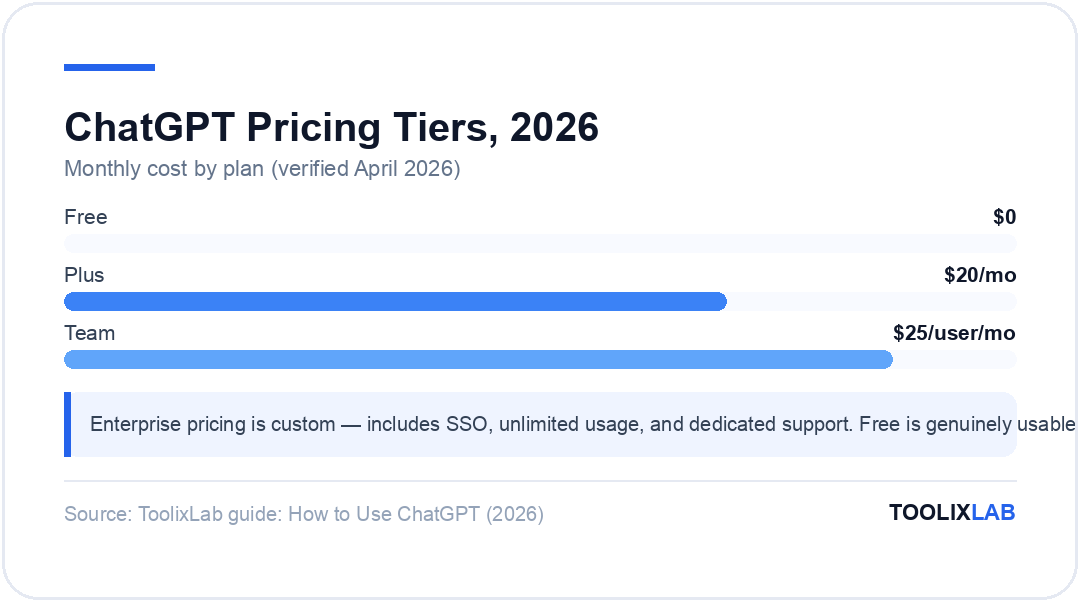
One of the most common questions: "Do I need to pay for ChatGPT?" Here's the honest answer with the full pricing breakdown as of April 2026:
| Feature | Free | Plus ($20/mo) | Team ($25/user/mo) | Enterprise (Custom) |
|---|---|---|---|---|
| ChatGPT | Limited | ✓ High limits | ✓ Higher limits | ✓ Unlimited |
| Reasoning Models (GPT-5.4 mini / nano) | Very limited | ✓ Standard limits | ✓ High limits | ✓ Unlimited |
| DALL-E Image Generation | Limited | ✓ High limits | ✓ High limits | ✓ Unlimited |
| Voice Mode | Limited | ✓ Full access | ✓ Full access | ✓ Full access |
| Deep Research | ✗ | ✓ | ✓ | ✓ |
| Canvas | Limited | ✓ Full access | ✓ Full access | ✓ Full access |
| Custom GPTs | Use only | ✓ Create & use | ✓ Shared workspace | ✓ Admin controls |
| Projects | ✗ | ✓ | ✓ | ✓ |
| Data privacy (no training) | Opt-out only | Opt-out only | ✓ Default | ✓ Default |

Pricing verified April 2026. Visit openai.com/pricing for current rates.
💡 Our Recommendation
- Start with Free — It's genuinely powerful for casual and moderate use. Most beginners won't hit the limits.
- Upgrade to Plus — If you use ChatGPT daily for work, the higher limits and Deep Research alone are worth $20/month.
- Choose Team — If 2+ people at your company use ChatGPT, you get better data privacy, shared GPTs, and admin controls.
- Enterprise — For large organizations needing SSO, unlimited usage, and dedicated support.
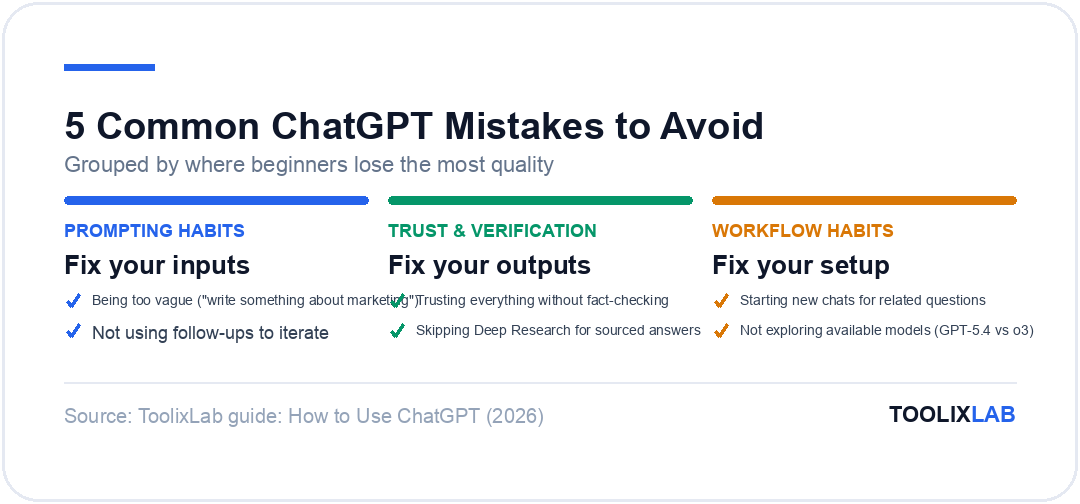
5 Common Mistakes to Avoid
Even experienced ChatGPT users make these mistakes. Avoid them and you'll immediately get better results.
🚫 1. Being Too Vague
Saying "write something about marketing" gives you generic fluff. Be specific: who's the audience? What format? What tone? The more context you provide, the better the output. Use the RICE framework every time.
🚫 2. Not Using Follow-ups
ChatGPT remembers your entire conversation. If the first response isn't perfect, say "Make it shorter," "Add more examples," or "Change the tone to be more casual." Iteration is key.
🚫 3. Trusting Everything Without Checking
ChatGPT can confidently present incorrect information. Always fact-check important claims, especially statistics, dates, and technical specifications. Use Deep Research for well-sourced answers.
🚫 4. Starting New Chats for Related Questions
Keep related questions in the same conversation. ChatGPT builds context over the chat—starting fresh means losing that context. Use Projects to organize related conversations.
🚫 5. Not Exploring Available Models
Different models excel at different tasks. Use ChatGPT (GPT-5.4) for fast, general tasks. Use o3 or GPT-5.4 mini for complex reasoning, math, and coding. Choosing the right model dramatically improves output quality.
Privacy & Security: What You Need to Know
Understanding how your data is handled is essential. Here's the straightforward breakdown:
📝 Data Retention
By default, OpenAI may use your conversations to improve their models. On Free and Plus plans, you can opt out in Settings > Data Controls > "Improve the model for everyone."
🔒 Team & Enterprise Privacy
Team and Enterprise plans do not use your data for training by default. Your conversations are isolated and protected.
👻 Temporary Chat
Enable "Temporary Chat" mode for sensitive conversations. These chats are not saved to your history and are not used for model training.
Privacy policies change frequently — always verify current terms at openai.com/policies.
🚨 What NOT to Share
- • Passwords or API keys
- • Social Security numbers or government IDs
- • Confidential business data (unless on Team/Enterprise plan)
- • Credit card or bank account numbers
- • Private medical or legal information
When to Use Another AI Instead
ChatGPT is incredibly versatile, but no single AI is the best at everything. Here's a quick guide:
| If You Need... | Consider Using | Pricing | Why |
|---|---|---|---|
| Most human-sounding writing | Claude Sonnet 4.6 | Free / $20/mo | Superior long-form content and nuanced tone |
| Microsoft 365 integration | Microsoft Copilot | Free / $20/mo | Lives inside Word, Excel, and Outlook for productivity |
| Free open-source AI | DeepSeek | Free / API Pay-as-you-go | Free, powerful reasoning, great for coding |
| Real-time Twitter/X data | Grok AI | X Premium req. | Native access to current social trends and unfiltered news |
| Real-time web research | Perplexity AI | Free / $20/mo | Purpose-built for research with source links |
| Google ecosystem integration | Gemini | Free / $20/mo | Native Docs, Gmail, Calendar integration |
For a deep dive into all available options, see our comprehensive guide to the 15 Best ChatGPT Alternatives in 2026.
How to Use ChatGPT for Business in 2026
Last updated: April 2026.
Beyond personal productivity, ChatGPT has become a core part of business workflows across every department. Here's how to use ChatGPT for work — with ready-to-use prompts for each scenario.
📈 Market Research & Competitive Analysis
Skip hours of manual research. ChatGPT can synthesize market trends, map the competitive landscape, and surface SWOT insights from a simple prompt.
Example Prompt
"You are a business analyst. Create a competitive analysis for [my SaaS product] vs [Competitor A] and [Competitor B]. Include pricing, key features, target customers, and one clear gap I could exploit."
📄 Business Reports & Proposals
Draft executive summaries, project proposals, and status reports in minutes. Upload your raw data and ChatGPT structures it into professional documents.
Example Prompt
"Write a one-page executive summary of the following Q1 performance data. Use a professional tone, lead with the headline result, and end with 3 recommended next steps: [paste data]"
📅 Meeting Prep & Follow-Up
Generate meeting agendas, talking points, and post-meeting action items automatically. Paste in call notes and get a clean summary with owners and deadlines.
Example Prompt
"Summarize these meeting notes into: 1) A 3-sentence recap, 2) Action items with owners and due dates, 3) Open questions that need follow-up: [paste notes]"
🎧 Customer Support Templates
Create entire libraries of support email templates — from refund requests to onboarding guides — in your brand's voice. Update all of them in one session.
Example Prompt
"Write 3 variations of a customer support email for [scenario: customer is frustrated their order arrived late]. Keep it empathetic, offer a solution, and end with a goodwill gesture. Tone: warm but professional."
📋 SOPs & Internal Documentation
Turn messy Slack messages and voice memos into clean Standard Operating Procedures. ChatGPT can also generate onboarding docs and internal FAQs from bullet-point notes.
Example Prompt
"Convert these rough notes into a formatted SOP document. Include: Purpose, Who it applies to, Step-by-step process, and a checklist at the end: [paste your notes]"
💼 Business Stack Tip
Pair ChatGPT with your existing business tools using workflow automation tools like Zapier or Make to trigger ChatGPT prompts automatically — for example, auto-drafting follow-up emails after every CRM deal closes.
Pro Tips to 10x Your ChatGPT Results
🎯 Use Custom Instructions
Set your job, preferences, and writing style in Settings so ChatGPT tailors every response to you.
📁 Organize with Projects
Group related chats by client, topic, or goal. Upload reference files to give ChatGPT persistent context.
🎙️ Try Voice Mode
Use voice conversations while commuting or exercising. Great for brainstorming without typing.
🔄 Iterate, Don't Restart
Tell ChatGPT "make it shorter," "add humor," or "try a different approach" instead of starting over.
📊 Upload Files for Analysis
Drag and drop spreadsheets, PDFs, or images. ChatGPT can analyze data, extract text, and generate insights.
🧪 Pick the Right Model
GPT-5.4 for speed and general tasks. GPT-5.4 mini/nano for math, coding, and complex multi-step reasoning.
Conclusion: Start Using ChatGPT Today
You've now got everything you need to use ChatGPT effectively—from account setup to advanced 2026 features like Voice Mode, Deep Research, and Canvas. The key to mastery isn't reading more guides; it's practice.
🚀 Your 5-Minute Action Plan
- Create your account at chatgpt.com (takes 1 minute)
- Set Custom Instructions in Settings with your role and preferences
- Try the RICE framework in your first prompt
- Download the mobile app and try Voice Mode
- Create a Project for your most important workflow
📚 Continue Your AI Journey
- 🔗 15 Best ChatGPT Alternatives in 2026 — Explore other powerful AI assistants
- 🔗 Best AI Writing Tools for Content Creators — Level up your content creation
- 🔗 ChatGPT vs Claude vs Gemini — See how the top AI models compare
- 🔗 DeepSeek AI Review — A powerful free alternative worth trying
"The best time to start using AI was yesterday. The second best time is right now." — Go start your first conversation. You'll be amazed at what you can accomplish.