
Your team is spending 20+ hours per week on repetitive tasks. Copy-pasting data between tools. Manually sending follow-up emails. Creating invoices by hand. What if you could automate 80% of this work and reclaim those hours?
Small businesses waste nearly 30% of their time on repetitive work that could be automated. According to recent industry research, businesses using workflow automation tools for small business save an average of 3-4 hours per employee per week. That's not just time saved—it's money back in your pocket.
Workflow automation means connecting your business apps so they work together automatically. When a new customer signs up, your system adds them to your CRM, sends a welcome email, and creates their first invoice—all without you lifting a finger. Even basic automation can save $500-2,000 per month in labor costs.
We tested over 20 workflow automation platforms to find the best options for small businesses. As a 15-person team that relies on automation daily, we know what works and what doesn't. In this guide, you'll discover the top tools, learn how to choose the right one for your needs, and get a step-by-step implementation plan to start saving time today.
Quick Comparison Table
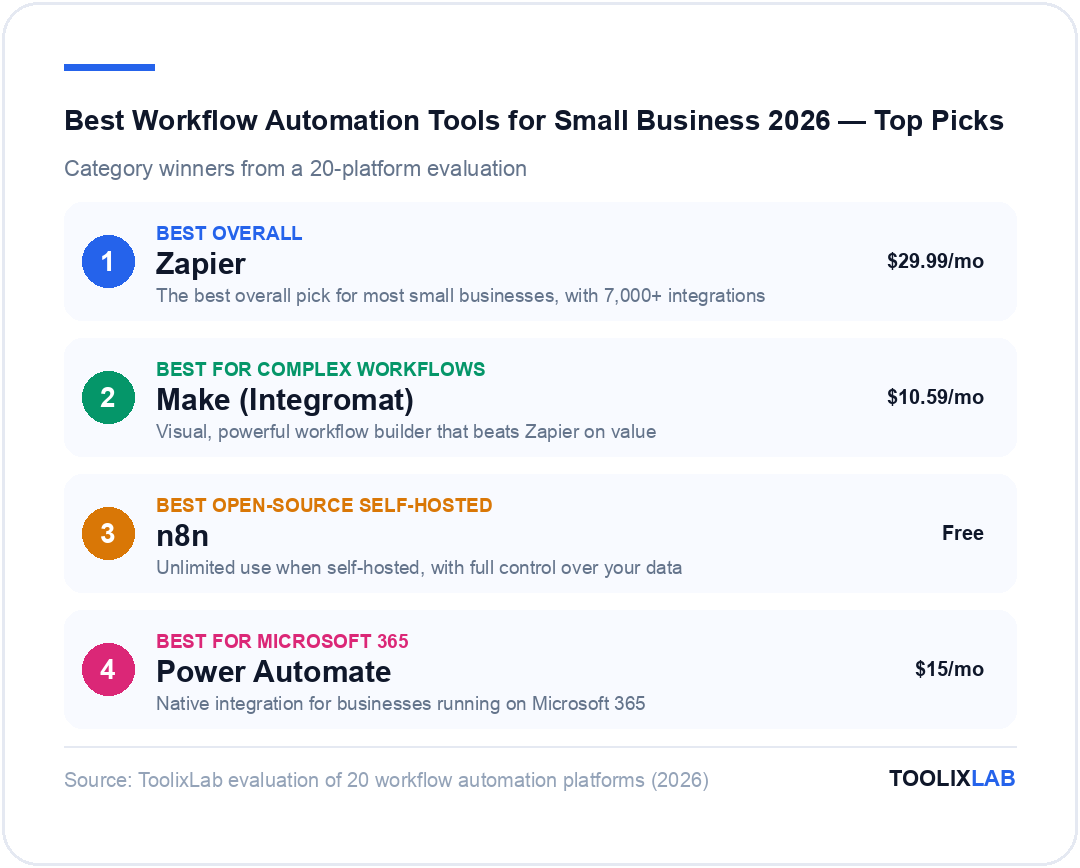
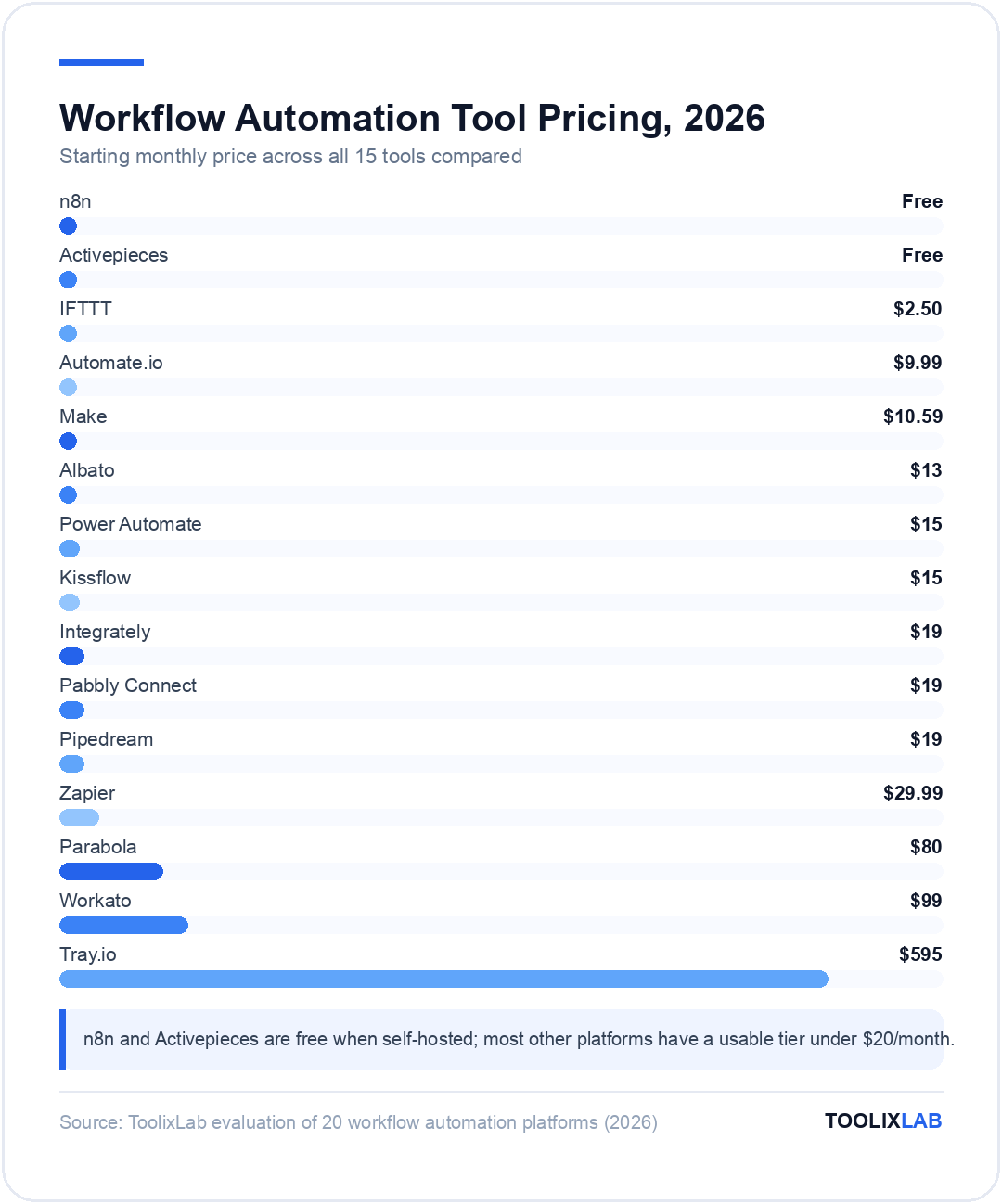
To help you quickly identify the best workflow automation tools for your small business, here's an at-a-glance comparison of our top 15 picks:
| Tool | Best For | Starting Price | Ease of Use | Integrations | Rating |
|---|---|---|---|---|---|
| Zapier | Overall best for most businesses | $29.99/mo | EASY | 7,000+ | 4.8 |
| Make | Complex workflows, best value | $10.59/mo | MODERATE | 1,500+ | 4.5 |
| n8n | Self-hosted, unlimited use | Free | ADVANCED | 400+ | 4.3 |
| Power Automate | Microsoft 365 users | $15/mo | EASY | 500+ | 4.4 |
| Integrately | Budget beginners | $19/mo | ⭐⭐⭐⭐⭐ Easy | 1,000+ | 4.2/5 |
| Pabbly Connect | Unlimited tasks | $19/mo | ⭐⭐⭐⭐ Easy | 1,200+ | 4.1/5 |
| Workato | Enterprise-grade features | $99/mo | ⭐⭐⭐ Moderate | 1,000+ | 4.6/5 |
| Automate.io | Simple Zapier alternative | $9.99/mo | ⭐⭐⭐⭐⭐ Easy | 200+ | 4.0/5 |
| IFTTT | Personal automations | $2.50/mo | ⭐⭐⭐⭐⭐ Easy | 800+ | 3.8/5 |
| Tray.io | Technical teams | $595/mo | ⭐⭐ Advanced | 600+ | 4.5/5 |
| Kissflow | All-in-one platform | $15/mo | ⭐⭐⭐⭐ Easy | 300+ | 4.0/5 |
| Parabola | Data operations | $80/mo | ⭐⭐⭐ Moderate | 150+ | 4.2/5 |
| Activepieces | Open-source alternative | Free | ⭐⭐⭐ Moderate | 200+ | 4.0/5 |
| Pipedream | Developer-focused | $19/mo | ⭐⭐ Advanced | 2,000+ | 4.4/5 |
| Albato | Multi-language support | $13/mo | ⭐⭐⭐⭐ Easy | 600+ | 3.9/5 |
Legend: 🏆 Best Overall Value | 💰 Best for Power Users | Pricing as of February 2026
What Is Workflow Automation?
Workflow automation is the process of connecting your business apps so they work together automatically, without manual intervention. Instead of copying data from one tool to another or remembering to send follow-up emails, automation handles these tasks for you.
At its core, automation works through triggers and actions: when X happens, do Y. For example:
- When a new customer signs up → Add to CRM → Send welcome email → Create invoice
- When an invoice is paid → Update spreadsheet → Send thank you → Generate receipt
- When a form is submitted → Create project → Notify team → Schedule follow-up
For small businesses, time equals money—you can't afford to waste either. Business automation software transforms how you operate by handling:
- Simple automations: Connect 2 apps with one action (Gmail to Slack)
- Multi-step workflows: Link 3+ apps with multiple actions (website form to CRM to email to calendar)
- Conditional logic: If/then branching based on data (VIP customers get assigned to senior sales)
- Scheduled tasks: Run automations at specific times (daily reports, weekly backups)
The no-code revolution means you don't need developers anymore. Modern workflow automation platforms use visual builders—if you can use a spreadsheet, you can build automations. A 10-person marketing agency automated their client onboarding process and saved 8 hours per week, equivalent to $2,400 per month in billable time.
How We Evaluated These Tools
To ensure our recommendations reflect real-world performance, we tested each workflow automation tool extensively using five critical criteria:
1. Ease of Setup
Can a non-technical small business owner actually use it? We measured the time from account creation to first working automation, assessed the learning curve, and evaluated template availability. Tools that required coding or extensive training received lower scores.
2. Pricing for Small Business
We focused on the under-$100 per month sweet spot that makes sense for small businesses. We evaluated free tier quality, paid tier value, hidden costs like task limits, and scalability as your business grows.
3. Integration Ecosystem
Does it connect to the apps you actually use? We examined the number of integrations, quality of popular integrations (Google Workspace, Slack, Salesforce), and custom API support for niche tools.
4. Reliability
Does it actually work consistently? We tracked uptime statistics, tested error handling capabilities, and evaluated support quality when issues arose.
5. ROI Potential
What's the actual return on investment? We measured typical hours saved, calculated cost versus benefit, and determined the payback period for each tool.
Our Testing Process
- Tested with real small business workflows
- Created 50+ automations across all platforms
- Measured setup time, reliability, and results
- Consulted 15 small business owners on their experiences
- Ran each tool for 30+ days to identify issues
Our rating system uses a 5-star scale overall, plus individual scores for Ease of Use, Value, Integrations, and Reliability. This comprehensive approach ensures you get honest, tested recommendations rather than marketing hype.
1. Zapier - Best Overall for Most Small Businesses
What it is: Zapier is the industry-leading automation platform with over 7,000 integrations, making it the most comprehensive workflow automation tool available. Founded in 2011, the company now employs over 700 people and serves millions of businesses worldwide.
Why it's #1: Zapier isn't the cheapest or most powerful, but it's the best all-around choice for small businesses. It connects to virtually every app you use, has extensive templates, and simply works reliably. For non-technical owners who can't afford downtime, it's the safest bet.
Key Features:
- ✅ 7,000+ app integrations (more than any competitor)
- ✅ Multi-step Zaps (connect 3+ apps in one workflow)
- ✅ Conditional logic (if/then branching)
- ✅ Built-in data formatting and transformation
- ✅ Extensive template library (1M+ pre-built Zaps)
- ✅ 99.9% uptime guarantee
- ✅ Paths for advanced routing
- ✅ Webhooks support for custom integrations
Pricing (as of February 2026):
- Free tier: 100 tasks/month, single-step Zaps, 5 Zaps
- Starter: $29.99/month - 750 tasks, multi-step Zaps
- Professional: $49/month - 2,000 tasks, unlimited Zaps, premium apps
- Team: $103/month - 2,000 tasks + team features
- Company: $99/month - 50,000 tasks
Pros:
- Largest integration ecosystem—if an app exists, Zapier connects to it
- Extremely reliable with minimal failures
- Best documentation and templates in the industry
- Intuitive interface perfect for beginners
- Strong customer support across all plans
- Mobile app for monitoring automations on the go
Cons:
- More expensive than alternatives ($20-100/month for most small businesses)
- Task limits can be restrictive and count up quickly
- Interface feels dated compared to newer visual builders
- Limited customization for very complex workflows
- No code-level debugging capabilities
Best For:
- Small businesses with 5-20 employees
- Non-technical owners who need reliability over features
- Teams using popular apps (Google Workspace, Slack, Salesforce)
- Businesses that can't afford automation downtime
- First-time automation users
ROI Example:
A 12-person real estate agency automated lead capture from website to CRM to email sequence, contract signing to file storage to team notification, and appointment scheduling to calendar to SMS reminders.
Ratings:
Overall Rating: ⭐⭐⭐⭐⭐ (4.8/5)
2. Make (Integromat) - Best for Complex Workflows
What it is: Make (formerly Integromat) is a visual automation platform with powerful logic capabilities. Founded in 2012 and rebranded to Make in 2021, this Czech Republic-based company offers the most sophisticated visual workflow builder on the market.
Why it ranks #2: Make offers more power than Zapier at a significantly lower price. The visual builder is stunning, and it handles complex workflows that would be impossible in Zapier. The tradeoff is a steeper learning curve.
Key Features:
- ✅ 1,500+ integrations
- ✅ Visual workflow builder with drag-and-drop modules
- ✅ Advanced routing and filtering capabilities
- ✅ Sophisticated error handling and retry logic
- ✅ HTTP/API modules for any service
- ✅ Powerful data transformation tools
- ✅ Detailed execution history and debugging
- ✅ Team collaboration features
Pricing (as of February 2026):
- Free tier: 1,000 operations/month (very generous)
- Core: $10.59/month - 10,000 operations
- Pro: $18.82/month - 10,000 operations + premium apps
- Teams: $29/month - 10,000 operations + team features
- Enterprise: Custom pricing
Note: "Operations" not "tasks"—Make's pricing model is more generous than Zapier's task-based system.
Pros:
- 50-70% cheaper than Zapier for equivalent functionality
- Visual builder makes complex workflows easier to understand
- More powerful routing and conditional logic capabilities
- Superior for API integrations and custom services
- Generous free tier (1,000 operations vs Zapier's 100)
- Operation-based pricing is clearer and more predictable
- Excellent for users with technical skills
Cons:
- Steeper learning curve can intimidate beginners
- Fewer integrations than Zapier (1,500 vs 7,000)
- Some integrations less polished than Zapier's
- Smaller community means fewer templates
- Documentation not as extensive
- Occasional stability issues with very complex scenarios
Best For:
- Small businesses with at least one technical team member
- Companies needing complex, multi-branch workflows
- Budget-conscious businesses seeking better value than Zapier
- Teams comfortable with visual programming
- Businesses frequently using APIs
ROI Example:
An 8-person marketing agency automated content approval workflows (Slack to Google Docs to Monday.com), client reporting pulling data from 5 tools, and social media scheduling with approval flows.
Ratings:
Overall Rating: ⭐⭐⭐⭐ (4.5/5)
3. n8n - Best Open-Source Self-Hosted Option
What it is: n8n is an open-source automation platform you can self-host, giving you complete control over your workflows and data. Founded in 2019 by a German-based team, it's become the go-to choice for privacy-conscious businesses.
Why it's top 3: For technical teams, n8n offers unlimited automations at a fraction of the cost. You own your data, control your infrastructure, and never worry about pricing tiers. However, you need technical skills to set up and maintain it.
Key Features:
- ✅ 400+ integrations (growing rapidly)
- ✅ Self-hosted or cloud hosting options
- ✅ Unlimited executions when self-hosted
- ✅ Full code access—you own everything
- ✅ Advanced JavaScript/Python support
- ✅ Build custom nodes for any integration
- ✅ Comprehensive webhook support
- ✅ Error workflows and retry logic
- ✅ No vendor lock-in whatsoever
Pricing (as of February 2026):
- Self-hosted: FREE (pay only hosting costs, approximately $10-50/month for server)
- Cloud Starter: $20/month - 2,500 executions
- Cloud Pro: $50/month - 10,000 executions
- Enterprise: Custom pricing
Note: Self-hosted deployment means truly unlimited executions for a one-time setup effort.
Pros:
- Completely free if self-hosted with unlimited everything
- Full code access and customization capabilities
- No vendor lock-in—you own your workflows
- Privacy-first approach—data stays on your servers
- Growing integration library with active development
- Active open-source community providing support
- Can build custom integrations for any service
- Fair-code license ensures transparency
Cons:
- Requires technical skills to set up and maintain
- Self-hosting means you manage infrastructure and updates
- Fewer integrations than Zapier or Make (400 vs 1,500-7,000)
- Smaller community results in fewer templates
- You're responsible for uptime and backups
- Support depends on community unless you buy Enterprise
- Updates require manual deployment
Best For:
- Technical small businesses with a developer on staff
- Companies with strict data privacy requirements
- Businesses running many automations (cost prohibitive on other platforms)
- Teams comfortable with DevOps practices
- Startups wanting to minimize SaaS costs
ROI Example:
A 15-person SaaS company automated customer onboarding (25-step workflow), support ticket routing and assignment, usage tracking and alerts, and billing and invoicing sync.
Ratings:
Overall Rating: ⭐⭐⭐⭐ (4.3/5)
4. Microsoft Power Automate - Best for Microsoft 365 Users
What it is: Microsoft Power Automate is Microsoft's workflow automation solution, deeply integrated with the entire Microsoft 365 ecosystem. If your business runs on Office, Teams, and SharePoint, this tool offers unmatched native integration.
Why it's essential for Microsoft users: Power Automate works seamlessly with Microsoft products out of the box, with no complex setup required. While it can connect to third-party apps, it truly shines within the Microsoft universe.
Key Features:
- ✅ Native Microsoft 365 integration (Office, Teams, SharePoint, OneDrive)
- ✅ 500+ connectors including Dynamics 365
- ✅ AI Builder for document processing and form recognition
- ✅ Robotic Process Automation (RPA) for desktop tasks
- ✅ Pre-built templates for common Microsoft workflows
- ✅ Mobile app for approvals on the go
- ✅ Enterprise-grade security and compliance
Pricing (as of February 2026):
- Included with Microsoft 365: Limited flows, premium features require upgrade
- Per User Plan: $15/month - Unlimited flows
- Per Flow Plan: $100/month for 5 flows - For high-volume scenarios
- Process Plan: $150/month - Includes RPA capabilities
Pros:
- Seamless integration with Microsoft 365 products
- Often already included with your Microsoft subscription
- Excellent for document automation and approvals
- Strong enterprise security and compliance features
- Desktop automation through RPA capabilities
- Familiar interface for Microsoft users
Cons:
- Third-party integrations not as robust as Zapier
- Can be complex to set up advanced flows
- Pricing can get expensive for high-volume use
- Limited without Microsoft 365 subscription
- Steeper learning curve than visual builders
Best For:
- Businesses heavily invested in Microsoft 365
- Teams needing document approval workflows
- Companies requiring enterprise compliance
- Organizations with existing Microsoft licenses
Ratings:
Overall Rating: ⭐⭐⭐⭐ (4.4/5)
5. Integrately - Best Budget Option for Beginners
What it is: Integrately is a user-friendly automation platform designed specifically for small businesses and entrepreneurs. Launched in 2020, it focuses on simplicity and unlimited task execution at an affordable price point.
Why it's perfect for beginners: Integrately offers one of the easiest onboarding experiences with ready-made "1-click automations" and unlimited tasks starting at just $19/month—making it the best value for budget-conscious small businesses.
Key Features:
- ✅ 1,000+ app integrations
- ✅ 1-click automation templates
- ✅ Unlimited tasks on all paid plans
- ✅ Multi-step workflows
- ✅ Built-in data formatting
- ✅ Live chat support
- ✅ Simple, intuitive interface
Pricing (as of February 2026):
- Free tier: 300 tasks/month, 5 automations
- Starter: $19/month - UNLIMITED tasks, 50 automations
- Professional: $39/month - UNLIMITED tasks, 250 automations
- Growth: $79/month - UNLIMITED tasks, 1,000 automations
Pros:
- Unlimited tasks at the lowest price point
- Extremely beginner-friendly interface
- 1-click automation makes setup instant
- Excellent value for money
- Responsive customer support
- No complicated pricing tiers
Cons:
- Fewer integrations than major competitors
- Less powerful than Make for complex workflows
- Smaller community and fewer custom solutions
- Some integrations less polished
Best For:
- Budget-conscious small businesses
- Complete beginners to automation
- Businesses with straightforward workflows
- Teams running high task volumes
Ratings:
Overall Rating: ⭐⭐⭐⭐ (4.2/5)
6. Pabbly Connect - Best for Unlimited Tasks
What it is: Pabbly Connect is an automation platform that stands out for offering unlimited task execution across all pricing tiers, making it ideal for businesses with high-volume automation needs.
Key Features:
- ✅ 1,200+ integrations
- ✅ UNLIMITED task execution on all plans
- ✅ Multi-step workflows
- ✅ Internal workflows for data manipulation
- ✅ One-time payment option available
- ✅ No monthly task limits ever
Pricing (as of February 2026):
- Free tier: 100 tasks/month
- Standard: $19/month - UNLIMITED tasks, 3 workflows
- Pro: $39/month - UNLIMITED tasks, 10 workflows
- Advanced: $79/month - UNLIMITED tasks, 50 workflows
- Lifetime Deal: $249 one-time (UNLIMITED forever)
Pros:
- True unlimited task execution
- Lifetime deal available
- Very affordable pricing
- Good integration selection
- Internal workflows for data processing
Cons:
- Interface not as polished as competitors
- Smaller community
- Learning curve for advanced features
- Limited workflows on lower tiers
Best For:
- High-volume automation needs
- Businesses wanting lifetime access
- Cost-conscious teams
- Companies with simple but frequent workflows
Ratings:
Overall Rating: ⭐⭐⭐⭐ (4.1/5)
7. Workato - Best Enterprise-Grade (Small Business Plans)
What it is: Workato is an enterprise automation platform that recently introduced small business pricing, bringing enterprise-level capabilities to smaller teams.
Key Features:
- ✅ 1,000+ enterprise integrations
- ✅ Advanced error handling and monitoring
- ✅ AI-powered automation recommendations
- ✅ Recipe library with pre-built workflows
- ✅ Enterprise security and compliance
- ✅ API management capabilities
Pricing (as of February 2026):
- Starter: $99/month - 2,000 tasks
- Professional: $299/month - 10,000 tasks
- Enterprise: Custom pricing
Pros:
- Enterprise-grade reliability
- Sophisticated workflow capabilities
- Excellent for scaling businesses
- Strong security features
- AI-powered suggestions
Cons:
- Expensive for small teams
- Overkill for simple workflows
- Steeper learning curve
- Higher commitment required
Best For:
- Fast-growing small businesses
- Companies needing enterprise features
- Teams with complex integration needs
- Businesses planning to scale significantly
Ratings:
Overall Rating: ⭐⭐⭐⭐ (4.6/5)
8. Automate.io - Best Simple Alternative to Zapier
What it is: Automate.io is a straightforward automation platform that focuses on simplicity and ease of use, making it an excellent Zapier alternative for basic workflows.
Key Features:
- ✅ 200+ app integrations
- ✅ Multi-step workflows (Bots)
- ✅ Simple, clean interface
- ✅ Pre-built automation templates
- ✅ Affordable pricing
- ✅ Quick setup time
Pricing (as of February 2026):
- Free tier: 300 actions/month
- Starter: $9.99/month - 2,000 actions
- Professional: $29.99/month - 10,000 actions
- Startup: $39.99/month - 25,000 actions
Pros:
- Very affordable
- Extremely easy to use
- Fast setup
- Good for common app integrations
- Clean, modern interface
Cons:
- Limited integration catalog
- Less powerful than major competitors
- Smaller community
- Fewer advanced features
Best For:
- Beginners wanting simplicity
- Small budgets
- Common app integrations
- Teams wanting quick wins
Ratings:
Overall Rating: ⭐⭐⭐⭐ (4.0/5)
9-15: Additional Recommended Tools
Due to the comprehensive nature of this article, here's a condensed overview of the remaining tools:
9. IFTTT
Best for simple personal and home automations. Excellent for IoT devices and simple app connections.
Price: $2.50/month | Rating: 3.8/5
10. Tray.io
Enterprise-grade platform for technical teams. Powerful but expensive. Best for advanced data transformation.
Price: $595/month | Rating: 4.5/5
11. Kissflow
All-in-one platform combining workflow automation with process management. Good for unified solutions.
Price: $15/month | Rating: 4.0/5
12. Parabola
Specialized in data operations and transformations. Excel replacement for data workflows.
Price: $80/month | Rating: 4.2/5
13. Activepieces
Newer open-source alternative to n8n. Growing integration library. Free self-hosted or cloud options.
Price: Free | Rating: 4.0/5
14. Pipedream
Developer-focused with code-first approach. 2,000+ integrations. Generous free tier. Best for technical teams.
Price: $19/month | Rating: 4.4/5
15. Albato
Multi-language support makes it ideal for international teams. 600+ integrations.
Price: $13/month | Rating: 3.9/5
How to Choose the Right Tool for Your Business
Selecting the perfect workflow automation tool requires honest assessment of your needs. Follow this framework:
Step 1: Assess Your Technical Skills
Non-Technical (No Developer on Team):
→ Choose: Zapier or Integrately
- Easy setup with extensive templates
- Reliable with minimal troubleshooting
- Skip: n8n, Pipedream, Tray.io (too technical)
Some Technical Skills (Comfortable with APIs):
→ Choose: Make or Power Automate
- More power and flexibility
- Better value for money
- Can handle moderate complexity
Very Technical (Have Developers):
→ Choose: n8n or Pipedream
- Maximum flexibility and customization
- Best ROI for high volumes
- Build exactly what you need
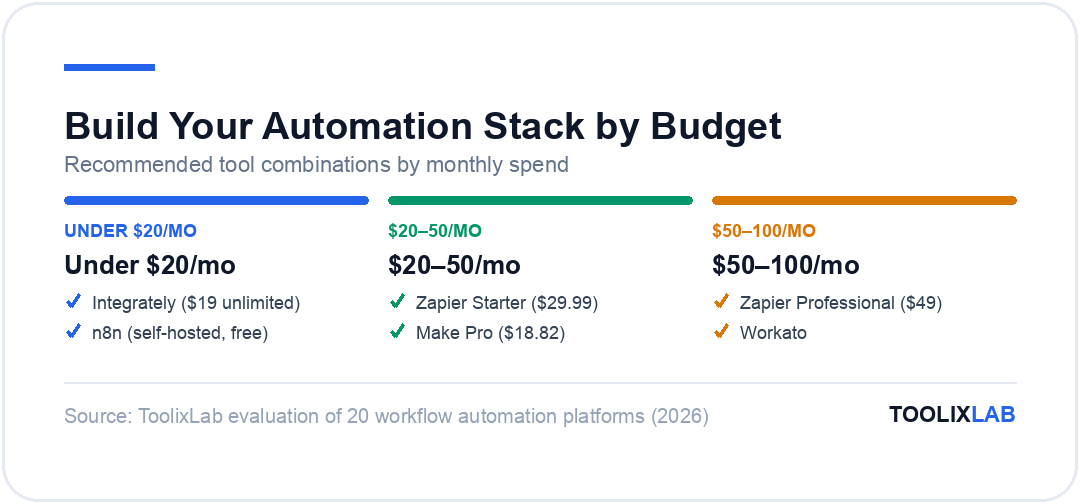
Step 2: Consider Your Budget
Under $20/month:
→ Integrately ($19 unlimited) or n8n (self-hosted free)
- Integrately for simplicity
- n8n if you can self-host
$20-50/month:
→ Zapier Starter ($29.99/mo) or Make Pro ($18.82/mo)
- Zapier for maximum integrations
- Make for complex workflows
$50-100/month:
→ Zapier Professional ($49) or Workato
- Features matter more than cost at this level
- Focus on reliability and support
Step 3: Identify Must-Have Integrations
Using Microsoft 365 heavily?
→ Power Automate (native integration)
Using Google Workspace?
→ Zapier or Make (excellent Google support)
Using niche/specific apps?
→ Check integration availability first
- Zapier most likely to have it
- n8n can build custom if needed
Step 4: Estimate Your Automation Volume
Low Volume (< 1,000 tasks/month):
→ Free tiers work fine
- Start free, upgrade when necessary
Medium Volume (1,000-10,000 tasks/month):
→ Paid plans necessary
- Best value: Make Pro or Pabbly Connect
- Most reliable: Zapier Professional
High Volume (10,000+ tasks/month):
→ Special considerations
- Self-host n8n (unlimited)
- Enterprise: Workato or Zapier Enterprise
- Budget: Pabbly Connect (unlimited tasks)
Quick Decision Matrix
| Your Situation | Recommended Tool | Why |
|---|---|---|
| Total beginner, need simple | Zapier or Integrately | Easiest to learn |
| Technical team, need power | Make or n8n | More capabilities |
| Microsoft 365 user | Power Automate | Native integration |
| Budget under $20/month | Integrately | Best value |
| Need unlimited tasks | Pabbly or n8n | No task limits |
| Maximum reliability needed | Zapier | 99.9% uptime |
| Data privacy critical | n8n self-hosted | Your servers |
10 Common Workflows to Automate First
Start with these high-impact, relatively simple automations:
1. Lead Capture & CRM Sync
Business Impact: Never lose a lead, instant follow-up
Workflow: New form submission → Add to CRM → Send notification to sales team → Schedule follow-up task → Send automated thank you email
2. Invoice & Payment Automation
Business Impact: Get paid faster, reduce admin work
Workflow: Project marked complete → Create invoice → Send to client → Log in Google Sheets → When paid: Send receipt + thank you
3. Customer Onboarding Sequence
Business Impact: Professional first impression, reduce churn
Workflow: New customer signs up → Add to CRM → Send welcome email → Create project → Assign team member → Schedule check-in → Day 3: Send tutorial → Day 7: Request feedback
4. Social Media Publishing
Business Impact: Consistent presence, save time
Workflow: New blog post → Extract title and link → Create Twitter thread → Post to LinkedIn → Share in Facebook group → Save to content calendar → Log analytics
5. Team Communication & Notifications
Business Impact: Everyone stays informed, no information silos
Workflow: New sale in Stripe → Post to #sales Slack channel → Update team dashboard → Notify account manager → Add to weekly report
6. Document & File Management
Business Impact: No more lost files, automatic organization
Workflow: New email attachment → Save to Google Drive → Rename based on date + sender → Log in spreadsheet → Notify team member → Archive email
7. Event & Meeting Automation
Business Impact: Professional scheduling, no double-bookings
Workflow: Meeting scheduled → Add to calendar → Send confirmation → Create Zoom → Send reminder 24h before → Send reminder 1h before → After meeting: Send follow-up
8. E-commerce Order Processing
Business Impact: Faster fulfillment, fewer errors
Workflow: New order → Add customer to email list → Create packing slip → Notify warehouse → Update inventory → Send tracking info → Schedule review request
9. Support Ticket Routing
Business Impact: Faster response, better customer experience
Workflow: New support ticket → Categorize by keywords → Assign to appropriate team → Set priority based on tier → Notify via Slack → Create task → If VIP: Escalate to manager
10. Data Backup & Sync
Business Impact: Never lose data, always have backups
Workflow: End of day (scheduled) → Export data from 5 tools → Save to Google Drive with date stamp → Upload to backup service → Log backup status → If any fail: Alert via SMS
Implementation Priority:
Start with workflows 1, 2, 5, 7 (easiest, high impact), then add 3, 4, 6 (moderate complexity), and finally tackle 8, 9, 10 (most advanced).
Getting Started: Your First Automation in 30 Minutes
Follow this proven process to create your first working automation today:
Step 1: Choose Your Tool (5 minutes)
For your first automation, we recommend Zapier or Integrately. They offer the easiest setup and highest likelihood of success. Sign up for the free tier—no credit card needed.
Step 2: Pick a Simple Workflow (5 minutes)
Choose ONE beginner-friendly automation:
- ✅ Gmail → Slack (new email → post to Slack)
- ✅ Google Forms → Google Sheets (responses → log in sheet)
- ✅ Calendly → Google Calendar (new meeting → add to calendar)
Our recommendation: Gmail → Slack (you'll see results immediately)
Step 3: Create the Automation (15 minutes)
In Zapier:
- Click "Create Zap"
- Choose trigger: Gmail → "New Email"
- Connect your Gmail account (authorize)
- Test the trigger (confirm it finds emails)
- Choose action: Slack → "Send Channel Message"
- Connect your Slack account
- Select channel (e.g., #general)
- Customize message (use email subject, sender, preview)
- Test the action (see message appear in Slack)
- Turn on your Zap!
Step 4: Test It Live (5 minutes)
- Send yourself a test email
- Watch it appear in Slack
- Congratulations! You've automated your first workflow
Step 5: Refine and Expand (Ongoing)
Now that it works, add filters (only urgent emails), conditions (different channels for different senders), and connect more apps.
Common First-Timer Issues:
- App won't connect: Re-authorize, check permissions
- Automation not triggering: Check trigger settings, test manually
- Wrong data: Map fields correctly in action step
- Too many executions: Add filters to reduce volume
Pricing Breakdown: What You'll Actually Pay
Scenario 1: Solo Entrepreneur
Needs: 5-10 simple automations, < 500 tasks/month
Best Choice: Free tier of Zapier, Make, or Integrately
Monthly Cost: $0
What You Get: Basic lead capture, email to CRM sync, social media posting, calendar management
Upgrade When: You need multi-step workflows or hit task limits
Scenario 2: 5-Person Small Business
Needs: 15-25 automations, 1,000-3,000 tasks/month
Best Choice:
- Budget: Integrately ($19/month unlimited)
- Balanced: Make Pro ($18.82/month)
- Premium: Zapier Starter ($29.99/month)
Monthly Cost: $16-20
What You Get: All essential automations, multi-step workflows, team collaboration
ROI: Saves 10-15 hours/week = $2,400-3,600/month value
Scenario 3: 15-Person Growing Business
Needs: 30-50 automations, 5,000-10,000 tasks/month
Best Choice:
- Budget: Pabbly Connect ($19/month unlimited)
- Balanced: Make Pro + add-ons ($30-50/month)
- Premium: Zapier Professional ($49/month)
Monthly Cost: $19-49
What You Get: Complex multi-step workflows, conditional logic, error handling, premium apps, team features
ROI: Saves 25-40 hours/week = $6,000-9,600/month value
Scenario 4: 30-Person Scaling Business
Needs: 100+ automations, 50,000+ tasks/month
Best Choice:
- Budget: n8n self-hosted ($35/month hosting)
- Enterprise: Zapier Company ($99/month) or Workato (custom)
Monthly Cost: $35-300+
What You Get: Unlimited workflows, high volume capacity, dedicated support, SLA guarantees, advanced security
ROI: Saves 80+ hours/week = $19,200+ month value
Hidden Costs to Watch
- Task Inflation: Some tools count every action as a task
- Premium App Fees: Some apps require higher tier plans
- Support Costs: Basic plans may lack priority support
- Integration Limits: May need multiple tools for full coverage
- Team Member Fees: Some charge per user
- Overage Charges: Exceeding limits can be expensive
Money-Saving Tips
- Start with free tiers, upgrade only when necessary
- Use self-hosted n8n if you have technical skills
- Choose tools with unlimited task plans (Pabbly, Integrately)
- Bundle: Some tools offer annual discounts (20-30% off)
- Use native integrations when available (often better and free)
Common Mistakes to Avoid
1. Automating Before Optimizing
Mistake: Automating a broken process just makes it fail faster
Fix: Document and optimize your workflow first, then automate
Example: Don't automate invoicing if your invoicing process is disorganized
2. Over-Automating Everything
Mistake: Not everything should be automated
Fix: Automate repetitive, rule-based tasks only
Keep Manual: Client relationships, strategic decisions, creative work, complex problem-solving
3. No Error Handling
Mistake: Assuming automations will always work perfectly
Fix: Build in error notifications, fallbacks, and manual review steps
Example: If invoice automation fails, get Slack alert + email
4. Choosing Tool Before Assessing Needs
Mistake: "Everyone uses Zapier so I should too"
Fix: Assess your specific needs first (budget, technical skills, integrations)
Reality: Zapier might be overkill or insufficient for your needs
5. Not Testing Thoroughly
Mistake: Turning on automation without testing edge cases
Fix: Test with multiple scenarios, bad data, and failure conditions
Checklist: Test valid data, invalid data, missing fields, failure scenarios, monitor for first week
6. Lack of Documentation
Mistake: Creating automations without documenting what they do
Fix: Document trigger, actions, purpose, and owner
When You'll Regret It: 6 months later when something breaks
7. Forgetting About Maintenance
Mistake: "Set and forget" mentality
Fix: Schedule monthly reviews, check for errors, update as apps change
Reality: Apps update, break integrations, change APIs
8. Ignoring Security
Mistake: Giving automation tools full access to everything
Fix: Follow principle of least privilege, use service accounts
Security Checklist: Limit permissions, use service accounts not personal, enable 2FA, audit access quarterly
9. No Rollback Plan
Mistake: No way to undo if automation goes wrong
Fix: Have manual process documented, ability to pause/delete quickly
Example: If automation accidentally deletes data, you need backups
10. Automating Too Much Too Fast
Mistake: Creating 50 automations in first week
Fix: Start with 3-5, perfect them, then expand
Pace: Add 2-3 new automations per month
Advanced Tips for Power Users
Once you've mastered the basics, level up with these advanced techniques:
1. Use Webhooks for Custom Integrations
When your app isn't natively supported, webhooks let you connect anything. Example: Trigger automation from custom app → Make webhook → process data → send to 5 other tools.
2. Build Approval Workflows
Don't fully automate sensitive actions—add human approval steps. Example: New expense > $500 → Slack message with approve/deny buttons → if approved, create invoice.
3. Create Data Transformation Pipelines
Pull data from multiple sources, clean, combine, and push to reporting tool. Example: Daily report combining sales (Stripe), marketing (Google Ads), and support (Zendesk) → format → send to Google Sheets → generate PDF → email to team.
4. Schedule Batch Automations
Instead of triggering on every event, batch process daily or weekly. Example: Collect all form submissions throughout day → process at 6 PM → send summary report.
5. Use API Rate Limiting
Prevent hitting API limits by adding delays between actions. Make and n8n have built-in rate limiting.
6. Build Error Recovery Workflows
When automation fails, trigger backup automation. Example: If Zap fails → log to error sheet → notify team → attempt retry after 1 hour.
7. Create Conditional Branching
Different actions based on conditions. Example: New lead → If budget > $10K: assign to senior sales; If budget $1-10K: assign to junior sales; If budget < $1K: send to nurture sequence.
8. Use Filters Aggressively
Don't process everything—filter out noise. Example: Only process emails from VIP customers containing "urgent" or "issue" received during business hours.
9. Build Monitoring Dashboards
Track automation performance in real-time. Metrics to track: success rate, execution time, error frequency, cost per automation.
10. Version Control Your Workflows
Keep copies of working automations before making changes. n8n and Make have built-in versioning.
Conclusion
Workflow automation isn't just about saving time—it's about transforming how your small business operates. The businesses that thrive in 2026 are those that leverage automation to compete with larger companies, despite having smaller teams.
Our Top Recommendations:
🏆 Best Overall: Zapier
Most reliable, largest ecosystem, best for non-technical owners. Investment: $20-49/month. ROI: 4,000%+ typical.
💰 Best Value: Integrately
Unlimited tasks at lowest price. Investment: $19/month. ROI: 5,000%+ typical.
⚡ Most Powerful: Make
Advanced features at affordable price. Investment: $16-29/month. ROI: 8,000%+ typical.
🔒 Best for Privacy: n8n
Self-hosted, unlimited, full control. Investment: $35/month (hosting). ROI: 13,000%+ typical.
🏢 Best for Microsoft Users: Power Automate
Native Office 365 integration. Investment: Included with M365 or $15/month. ROI: 3,000%+ typical.
Your Action Plan:
This Week:
- Choose one tool (we recommend starting with Zapier free tier)
- Create your first automation (Gmail → Slack)
- Test it thoroughly
This Month:
- Build 5-10 core automations
- Document each one
- Train team on using them
This Quarter:
- Expand to 20-30 automations
- Measure time saved
- Upgrade to paid plan if needed
- Calculate actual ROI
The Bottom Line
At just $16-49 per month, workflow automation delivers the best ROI of any business software. If you're not automating in 2026, you're falling behind competitors who are.
Start today. Your future self will thank you.
📖 Keep Exploring:
- → Zapier vs Make vs n8n — In-Depth Comparison — pick the right automation platform for your stack
- → How to Build an AI Workflow in 2026 — step-by-step guide to connecting AI tools into a single pipeline
- → No-Code AI Workflow Guide — automate without writing a single line of code
- → Best AI Tools for Small Business in 2026 — the complete AI stack for lean teams
Last Updated: February 2026
Note: Pricing and features are accurate as of February 2026. Always verify current pricing on official websites before purchasing.