
By ToolixLab Research Team · Last Updated: June 2026
Quick Answer
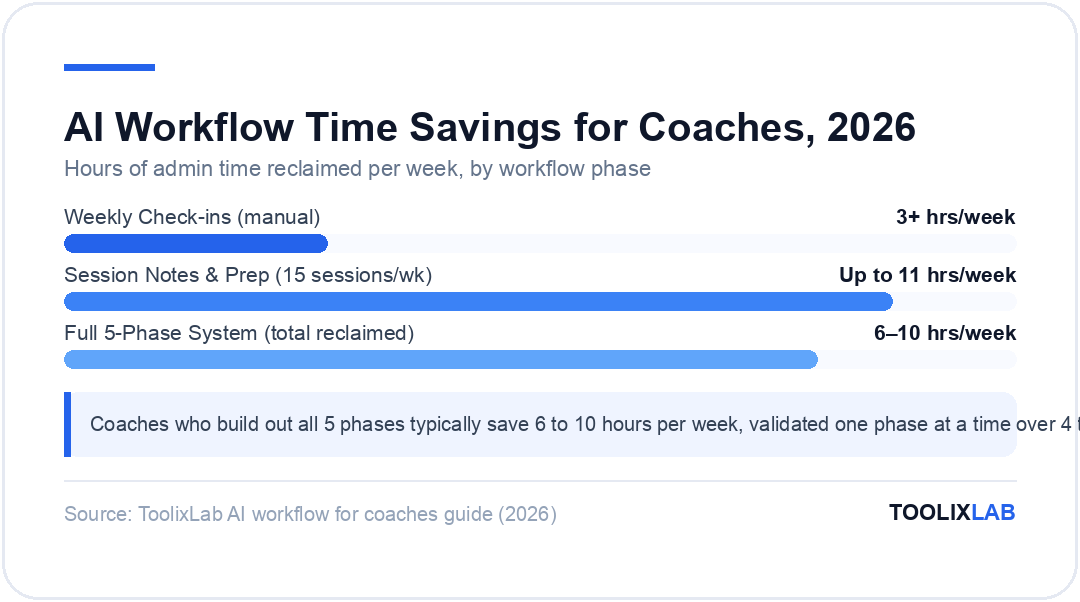
An AI workflow for coaches automates the five key phases of a coaching business: client intake, session prep, weekly check-ins, content creation, and marketing. Start by automating session notes with Fireflies.ai, then add a weekly check-in prompt template, then expand. Most coaches save 6 to 10 hours per week once all five phases are running.
Building a solid AI workflow for coaches is no longer a competitive advantage — in 2026, it is the baseline for running a sustainable coaching practice. The coaches who are growing their client roster and their income are not the ones working harder. They are the ones who identified exactly which parts of their business follow a pattern, handed those parts to AI, and redirected their human energy where it actually matters: the coaching relationship itself.
The problem is that most guides to AI for coaches either list 20 tools without explaining how they connect, or describe enterprise AI coaching platforms that cost more per month than many coaches earn per session. This guide takes a different approach: a practical, phase-by-phase system you can build yourself using tools you may already have, starting with a single 30-minute workflow this afternoon.
Whether you are a life coach, business coach, executive coach, or health coach — the underlying workflow structure is the same. (Life coaches looking for purpose-built platforms should also check our guide to the best AI tools for life coaches in 2026.) By the end of this guide, you will have a clear blueprint for automating your intake process, session documentation, client check-ins, and content pipeline, along with a firm answer to the question every coach needs to ask before they automate anything: does this task actually require my judgment?
⚡ Quick Summary
Best first workflow: Session notes + summary generation (Fireflies.ai + ChatGPT)
Highest time savings: Automated weekly check-ins (saves 2–4 hrs/week)
Best free starting point: ChatGPT free tier + a saved prompt library
Setup time: First workflow in 30 min; full 5-phase system in 1–2 weeks
Biggest mistake: Automating tasks that require human coaching judgment
What Is an AI Coaching Workflow — and Why Does It Matter in 2026?
An AI coaching workflow is a structured system where AI tools handle the predictable, pattern-based parts of your business — intake, scheduling, note-taking, follow-up, and content — while you focus on the work that requires human presence, empathy, and real-time judgment.
The distinction between tools, agents, and workflows matters here. A tool is off-the-shelf software you use manually. An agent is a custom AI model built to handle a specific job in your business. A workflow is the glue that chains tools and agents together so that a single event — a new lead form submission, a completed session, or a Monday morning — triggers a sequence of AI-powered steps without you in the middle. According to coaches who have implemented complete automation systems, 90% of the actual time savings live in workflows, not in individual tools.
If you want a deeper look at how AI is reshaping the coaching industry beyond just workflow automation, read our guide on what AI coaching is and where it is headed in 2026.
The 5-Phase AI Coaching Workflow Framework
Every coaching business — regardless of niche — operates across five repeatable phases. Each phase has both high-judgment tasks that require you and low-judgment tasks that follow a pattern. The goal is to automate the pattern-following tasks in each phase, not to replace any phase entirely.
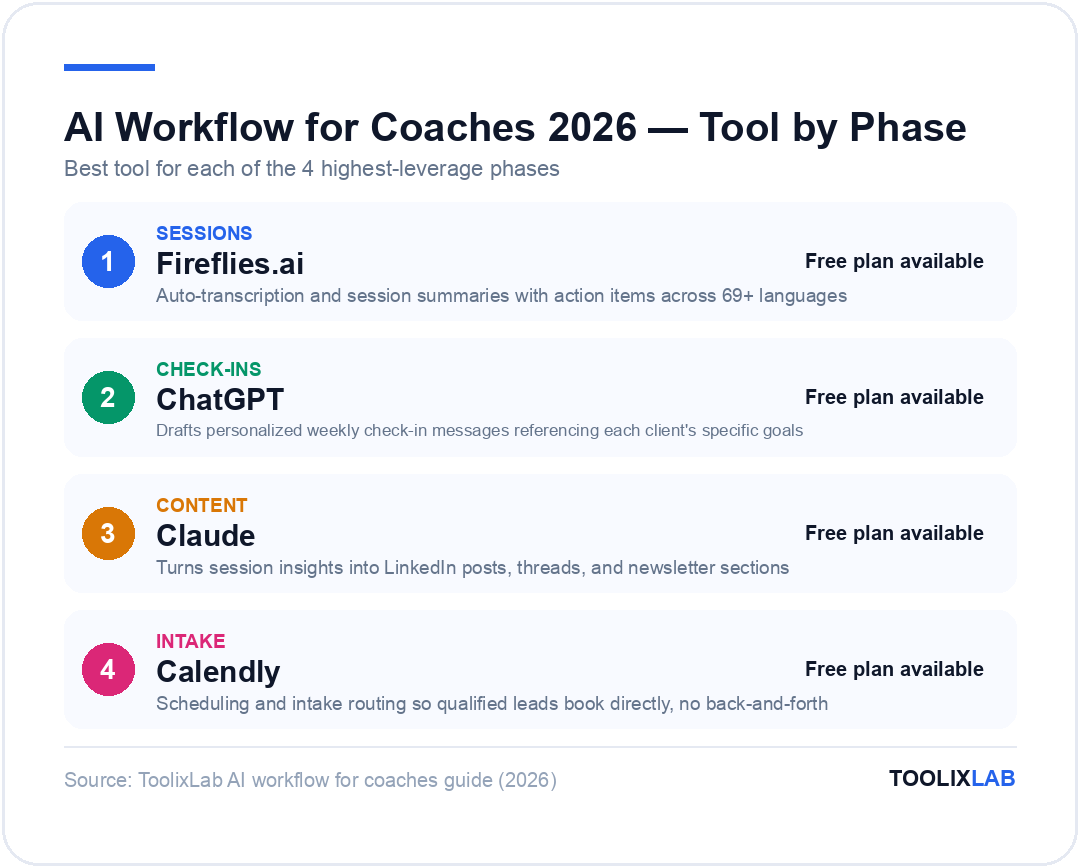
| Phase | What AI Handles | What You Handle |
|---|---|---|
| 1. Intake | Lead scoring, qualification questions, discovery call scheduling | Closing the sale, assessing fit, setting expectations |
| 2. Sessions | Transcription, session summaries, action item extraction | Listening, questioning, breakthrough facilitation |
| 3. Check-ins | Weekly check-in drafts, progress summaries, reminder sequences | Responding to emotional disclosures, adjusting strategy |
| 4. Content | First drafts, repurposing, scheduling, email sequences | Approving, adding personal experience, authentic voice |
| 5. Analytics | Progress reports, trend identification, program flags | Interpreting context, deciding on program adjustments |
Phase 1 — How Do You Automate Client Intake & Lead Qualification?
Client intake is typically the most time-consuming pre-revenue activity in any coaching business. You are spending hours on discovery calls with leads who were never going to convert, answering the same five questions via email, and manually scheduling appointments back and forth.
An AI intake workflow changes this by front-loading qualification before any calendar time is booked. The core setup involves three components:
- An intake form — hosted in your coaching platform (Paperbell, Simply.Coach, or Typeform) that asks the questions your rubric would ask: budget, timeline, what they've already tried, and what outcome they need.
- An AI scoring prompt — a ChatGPT or Claude prompt that takes intake responses and scores them against your ideal-client profile, flagging high-priority leads for immediate follow-up and routing lower-priority leads to an email nurture sequence.
- A scheduling automation — Calendly or Reclaim.ai embedded at the end of the form, so qualified leads can book directly without email back-and-forth.
The lead scoring prompt is the critical piece. Spend 30 minutes defining exactly what qualifies and disqualifies a lead for your specific program before writing the prompt. A well-defined prompt will handle 80% of qualification decisions without you. The remaining 20% — edge cases, complex situations — get flagged for your personal review.
For coaches who also do group coaching or sell digital programs, this intake workflow connects directly into your AI email marketing automation — leads who don't qualify for 1:1 coaching move automatically into a nurture funnel for group offers.
Phase 2 — How Can AI Handle Session Prep and Note-Taking?
Session documentation is where most coaches first feel the impact of AI — and where it delivers the fastest return. Writing up session notes, extracting action items, and preparing a client-facing summary after every call takes 20 to 45 minutes per session. For a coach running 15 sessions per week, that is up to 11 hours of post-session admin.
The two-tool setup that works:
- Fireflies.ai or Otter.ai — joins your Zoom, Google Meet, or Teams call automatically, transcribes in real time across 69+ languages, and generates a structured summary with action items after the call ends.
- ChatGPT or Claude — takes the raw transcript or summary and transforms it into your preferred format: a client-facing email recap, internal coaching notes, or a progress update for stakeholders (for executive coaching engagements).
The prompt that works best for session summaries: "Here is the transcript from a coaching session [paste transcript]. Write a 150-word client recap covering: (1) the main insight from today's session, (2) the two priority action items the client committed to, and (3) the focus area for our next session. Write in second person, warm and direct tone."
Pre-session prep also benefits from AI. The day before a session, an automated workflow can pull the client's last session summary, their stated goals, and any check-in responses from the past week, and consolidate them into a one-page briefing document. You arrive at each session already oriented — no scrambling through notes.
For a broader library of prompts purpose-built for coaching sessions, our guide to ChatGPT prompts for coaches in 2026 covers 50+ ready-to-use templates for session prep, client communications, and program design.
Phase 3 — Automating Weekly Check-ins Without Losing the Human Touch
Weekly check-ins are where the AI workflow for coaches pays for itself fastest. If you have 20 active 1:1 clients and send each one a personalized weekly check-in, you are writing 20 custom messages every week. At 10 minutes each, that is over three hours — every single week — for messages that follow almost the same structure every time.
The check-in automation workflow works like this:
- Trigger — Every Monday at 9am, Zapier or Make.com pulls each client's data: last session summary, goals they set, and any logs from the previous week (habit tracker, check-in form responses).
- AI draft — The data goes to ChatGPT or Claude with a prompt that generates a 120-word personalized check-in message, referencing their specific goals and last session insights.
- Your review — Drafts land in your Gmail drafts folder or Slack. You spend 2 minutes per client reviewing, adding any personal notes, and sending.
The result: 20 highly personalized check-ins in under 40 minutes instead of 3+ hours. Clients often report these messages feeling more attentive than the generic check-ins they received before, because the AI-assisted approach actually references their specific situation rather than a generic template.
This same structure powers the check-in workflows used by many of the platforms we covered in our AI sales coaching tools roundup — the underlying logic is identical whether you are coaching individuals or managing a sales team.
Phase 4 — How Do Coaches Use AI for Content Creation and Marketing?
Content marketing is a non-negotiable growth lever for most coaching businesses, but it competes directly with client delivery time. Coaches who are great at coaching often struggle to maintain consistent content output — not because they lack ideas, but because writing takes time they do not have.
The AI content workflow for coaches starts with a simple principle: your sessions are your content. Every coaching session contains insights, breakthroughs, patterns, and frameworks that your target audience wants to read about. AI's job is to extract and repurpose those insights at scale.
A practical weekly content workflow:
- Monday: Review the previous week's session summaries (already auto-generated from Phase 2). Identify one insight, framework, or client question worth sharing publicly.
- Prompt ChatGPT or Claude: "Here is an insight from a recent coaching session [paste excerpt, anonymized]. Turn this into: (1) a 300-word LinkedIn article, (2) a 5-tweet thread, and (3) a 150-word email newsletter section. Match this voice and style: [paste 2 examples of your writing]."
- Review and publish: Edit to add your personal experience and authentic perspective. Schedule via Buffer or Publer. Done in under 30 minutes.
For a complete look at automating the content pipeline end-to-end — including email sequences, social scheduling, and lead magnet creation — see our deep-dive on building an AI content creation workflow in 2026.
Phase 5 — Using AI for Analytics and Program Refinement
The fifth phase is where AI moves from saving time to actively improving your coaching outcomes. By aggregating data across sessions, check-ins, and progress tracking, AI can surface patterns that would take a human coach hours to identify manually.
Practical applications in this phase include:
- Progress reports — At the end of each month, an automated workflow pulls a client's check-in data, goal tracking, and session summaries, and generates a structured progress report you can review and share with the client (or their organizational sponsor in executive coaching).
- Pattern detection — Feeding 8 weeks of session transcripts into a prompt that identifies recurring themes, resistance patterns, or topics a client consistently avoids can reveal insights that enrich your coaching approach.
- Program adjustment flags — If a client's check-in data shows declining engagement or stalled progress across two consecutive weeks, an automated alert triggers a prompt to draft a program check-in conversation — rather than you noticing it only at the next session.
Most coaching platforms — including Simply.Coach and Delenta — have native analytics dashboards. For coaches using a lighter-weight stack, a weekly AI-generated report from Zapier + ChatGPT accomplishes the same thing with more customization.
Best AI Tools for Each Phase of Your Coaching Workflow
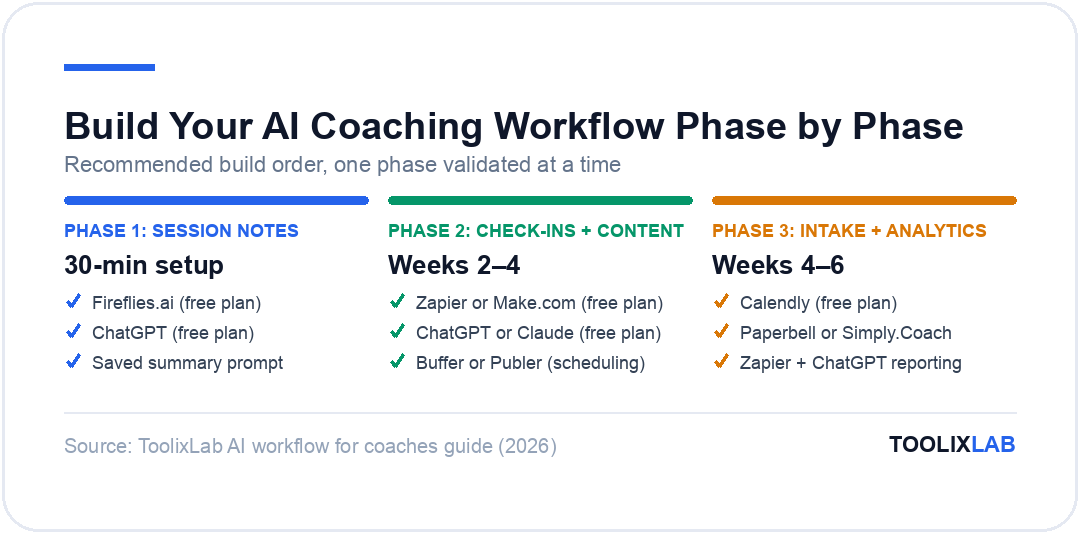
You do not need to use every tool listed below. Start with the Phase 2 column — that is where the fastest return on setup time lives. Add phases as you validate each one.
| Phase | Tool | Free Plan | Best For |
|---|---|---|---|
| 1. Intake | Calendly | ✅ | Scheduling & intake routing |
| 1. Intake | Paperbell | ❌ | All-in-one coaching platform with intake |
| 2. Sessions | Fireflies.ai | ✅ | Auto-transcription + session summaries |
| 2. Sessions | Otter.ai | ✅ | Live transcription with action items |
| 3. Check-ins | ChatGPT | ✅ | Drafting personalized client messages |
| 3–5. Automation | Zapier | ✅ | Connecting tools & triggering workflows |
| 3–5. Automation | Make.com | ✅ | Visual workflow builder, more flexible than Zapier |
| 4. Content | Claude | ✅ | Long-form content, nuanced writing tasks |
*Pricing and free plan availability verified June 2026 — check each tool's official page for current rates.
For a broader evaluation of tools including CRM and all-in-one platforms, see our full comparison of best AI tools for coaches and consultants in 2026.
How to Build Your First AI Coaching Workflow in 30 Minutes
The following step-by-step sequence gets your Phase 2 session summary workflow live in one sitting. This is the highest-return starting point for any coach.
Step 1 — Set up Fireflies.ai (5 minutes)
Create a free account at fireflies.ai. Connect your calendar and grant access to your video conferencing platform. Fireflies will join your next session automatically as a note-taker.
Step 2 — Write your summary prompt (10 minutes)
Open ChatGPT. Create a saved "Custom Instruction" or a saved prompt: "You are my coaching assistant. Take the session transcript below and write: (1) a 150-word client-facing recap (warm, direct tone), (2) a 5-bullet internal coaching note, (3) two action items the client committed to. Client's current goal: [goal]. [Paste transcript here]"
Step 3 — Run it after your next session (5 minutes)
Copy the Fireflies transcript, paste into your prompt, and review the output. Edit for accuracy and any personal touches. Send the client recap directly from your email. Paste the internal notes into your coaching platform or notes app.
Step 4 — Measure for 30 days (ongoing)
Track two numbers: hours saved per week and client response rate to recaps. If both improve, add a second workflow. If response rate drops, refine the prompt. Do not add Phase 3 until Phase 2 is running smoothly.
Coaches who have built out all five phases typically report that building them one at a time over 4 to 6 weeks results in a more reliable system than trying to automate everything at once. For a broader look at workflow automation principles that apply beyond coaching, our guide on AI tools for solopreneur coaches in 2026 covers the tech stack that supports this kind of incremental buildout.
What Should You NOT Automate? (The Judgment Rule)
The single most important principle in any AI coaching workflow: never automate a task that requires human judgment.
The coaches who stall with AI are the ones who try to automate the coaching itself — the decision about which question to ask next, the read on a client's emotional state, the instinct that tells you something important is being left unsaid. These are not automatable, and attempting to automate them will damage the coaching relationship and your reputation.
Apply this test to every task you consider automating: If AI gets this wrong, what is the consequence?
- Session note format is wrong → You spend 3 minutes fixing it. Automate this.
- Check-in draft is too generic → You edit it before sending. Automate this.
- AI misreads a client's emotional disclosure as a goal-setting problem → You miss a critical moment in the coaching relationship. Do NOT automate this.
- AI gives a client specific advice on a medical, legal, or financial issue → Serious professional liability. Do NOT automate this.
The safest heuristic: AI drafts, you send. Any client-facing message generated by AI should pass through your eyes before it reaches the client. This single rule eliminates most of the risks associated with AI automation in coaching practices.
🔑 Key Takeaways
- ✓ Build your AI workflow phase by phase — start with session notes (Phase 2) for the fastest return
- ✓ The 5 phases are: Intake, Sessions, Check-ins, Content, and Analytics — each has automatable and non-automatable tasks
- ✓ Weekly check-in automation saves most coaches 2–4 hours per week once running smoothly
- ✓ Never automate tasks that require your coaching judgment — the rule is "AI drafts, you send"
- ✓ Your first complete workflow can be live in 30 minutes using Fireflies.ai + ChatGPT + a saved prompt
- ✓ Verify all AI tools handling client data are GDPR-compliant before using them in your practice
- ✓ The free plans of ChatGPT, Fireflies.ai, Zapier, and Make.com are enough to validate your first two phases
Conclusion: Build Your AI Workflow Phase by Phase
Building an effective AI workflow for coaches is not about buying the most sophisticated software or automating every possible task. It is about identifying the specific, pattern-based tasks in each phase of your coaching business and systematically delegating them to AI — so the hours you reclaim can go back into the relationships and conversations that only you can have.
The coaches who get the most value from AI in 2026 are not the ones who built the most elaborate automation stack. They are the ones who spent 30 minutes on a Tuesday setting up a session summary prompt, validated it for a month, and then added one more workflow. Slow and deliberate outperforms fast and chaotic here — every time.
If you are not sure which tools to pair with the workflows above, start with our curated guide to the best AI tools for coaches and consultants in 2026 — it covers every category from CRM to session intelligence, with honest assessments of what is worth paying for and what is not.
Frequently Asked Questions
What is an AI workflow for coaches?
An AI workflow for coaches is a sequence of automated steps using AI tools to handle repetitive tasks — client intake, weekly check-ins, session notes, and content creation — freeing coaches to spend more time on high-value coaching rather than admin work.
How long does it take to build an AI coaching workflow?
Your first AI workflow — such as automated session summaries or a weekly check-in sequence — can be set up in 30 to 60 minutes using tools like ChatGPT and Zapier. A full 5-phase workflow covering intake to marketing typically takes one to two weeks to build, test, and refine.
What AI tools do coaches use most in 2026?
The most widely used AI tools for coaches include ChatGPT or Claude (drafting check-ins and content), Fireflies.ai or Otter.ai (session transcription), Reclaim.ai or Calendly (smart scheduling), and Zapier or Make.com (connecting tools and triggering automation sequences).
Should coaches use AI to replace human interaction?
No. AI should automate the parts of your practice that never required human judgment — scheduling, note-taking, admin, content drafts. The coaching relationship, breakthrough conversations, and emotional support must remain human. Automating judgment is the single biggest mistake coaches make with AI.
How much time can AI save coaches each week?
Coaches who implement a full AI workflow commonly report saving 6 to 10 hours per week on administrative tasks like note-taking, check-in drafting, and content creation. Results depend on client volume and how many phases of the workflow are automated.
Is it safe to use AI tools with client data?
It depends on the tool. Always verify that any AI tool handling client data is GDPR-compliant or meets your region's data protection standards. Avoid pasting sensitive client information into public AI chat interfaces without reviewing the provider's data policy first.
What should coaches automate first?
Start with session note-taking and summary generation — it delivers the highest return on setup time and poses the lowest risk to client relationships. From there, add a weekly check-in template workflow, then content repurposing, and finally lead qualification and intake automation.
Can AI help coaches with content marketing?
Yes. AI tools like ChatGPT and Claude can generate LinkedIn posts, email newsletters, and short-form video scripts from your coaching expertise. Many coaches repurpose session insights into weekly content using AI, reducing content creation time from hours to minutes without losing their authentic voice.