
TL;DR — AI Sales Funnel 2026
Every sales team has the same problem: not enough qualified leads, too many hours spent on manual outreach, and no clear way to know which prospects are actually ready to buy.
AI doesn't just speed up the same broken process — it replaces the entire logic of how a sales funnel works. Instead of blasting the same message to a cold list and hoping someone replies, an AI sales funnel identifies your highest-probability prospects, enriches their data automatically, sends hyper-personalized outreach at the right moment, scores their engagement in real time, and routes hot leads directly to your calendar — while nurturing everyone else automatically until they're ready.
According to HubSpot's State of Sales report, sales reps spend only 28% of their week actually selling — the rest is eaten by admin, research, follow-ups, and data entry. An AI sales funnel reclaims most of that wasted time.
This guide walks through every stage of an AI-powered sales funnel, the specific tools to use at each stage, and a step-by-step setup process you can start this week — regardless of your team size or technical background.
What Is an AI Sales Funnel? (and Why It Outperforms Traditional Funnels)
A traditional sales funnel is a linear process: generate leads, qualify them manually, send nurture emails on a fixed schedule, hand off to sales, close, and move on. It's slow, it treats every prospect the same, and it relies on human judgment at every step — which doesn't scale.
An AI sales funnel is different in three fundamental ways:
1. It's dynamic, not static. Traditional funnels move leads through fixed stages at fixed intervals. AI funnels respond to actual behavior — a prospect who opens three emails, visits your pricing page, and watches a product demo video gets treated very differently from one who hasn't opened anything in two weeks.
2. It's personalized at scale. AI can generate personalized email copy, LinkedIn messages, and follow-up sequences tailored to each prospect's company, role, recent activity, and stated pain points — for thousands of prospects simultaneously. Personalization that used to require 20 minutes per prospect now takes 2 seconds.
3. It self-optimizes. AI systems track what's working — which subject lines get opened, which messages get replies, which sequences convert — and adjust their approach based on that data. The funnel gets better over time without manual A/B testing.
The results are measurable. Salesforce's State of Sales research found that high-performing sales teams are 4.9× more likely to be using AI than underperforming teams. Teams using AI for lead scoring and personalization see 30–50% higher conversion rates at the top of funnel and 20–30% shorter sales cycles.
The core components of an AI sales funnel are:
- AI lead generation: Automated identification and enrichment of prospects matching your ideal customer profile (ICP)
- AI lead scoring: Real-time scoring of leads based on fit, intent signals, and engagement behavior
- AI nurture sequences: Personalized multi-channel email, LinkedIn, and SMS follow-up generated and sent automatically
- AI sales enablement: Tools that help reps prepare for calls, handle objections, and draft proposals faster
- AI retention and expansion: Post-close automation that identifies upsell opportunities and prevents churn
You don't need to build all of these at once. Most businesses start with one or two stages and expand over time. But understanding the full system helps you make better decisions about where to invest first.
The 5 Stages of an AI-Powered Sales Funnel
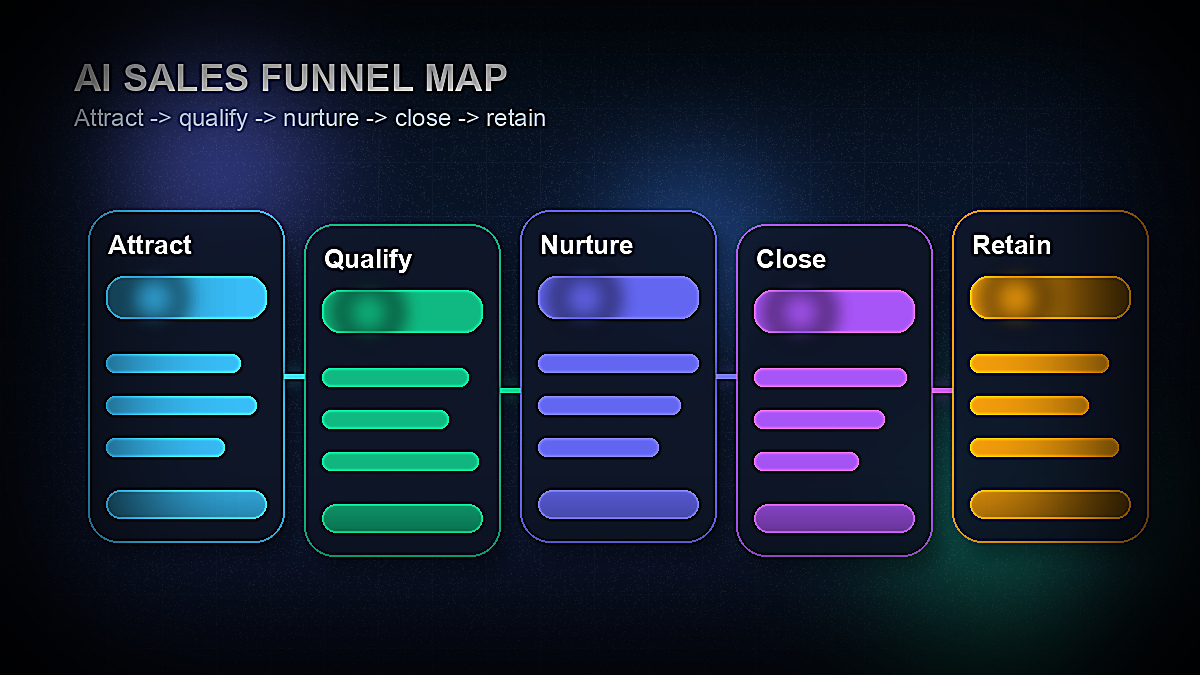
Before diving into tools and setup, it's worth mapping the five stages of a complete AI sales funnel so you can see how they connect.
| Stage | Goal | AI Role | Key Tools |
|---|---|---|---|
| 1. Attract | Identify & enrich prospects | ICP matching, data enrichment, intent signals | Clay, Apollo.io, LinkedIn Sales Nav |
| 2. Qualify | Score & prioritize leads | Predictive scoring, intent data analysis | HubSpot AI, Salesforce Einstein, 6sense |
| 3. Nurture | Build relationship & intent | Personalized sequences, behavior triggers | Instantly, Smartlead, Klaviyo, Lemlist |
| 4. Close | Convert to customer | Call prep, objection handling, proposal gen | Gong, Chorus, ChatGPT, PandaDoc AI |
| 5. Retain & Expand | Upsell, prevent churn | Health scoring, expansion triggers | Gainsight, ChurnZero, HubSpot AI |
Each stage feeds the next. The quality of your lead data in Stage 1 determines how well your scoring works in Stage 2. The accuracy of your scoring determines how relevant your nurture messages are in Stage 3. A well-nurtured prospect is dramatically easier to close in Stage 4. And customers who feel understood post-sale are far more likely to expand in Stage 5.
This interconnectedness is what makes an AI sales funnel so much more powerful than automating individual pieces in isolation — the system compounds.
Tools You Need to Build an AI Sales Funnel in 2026
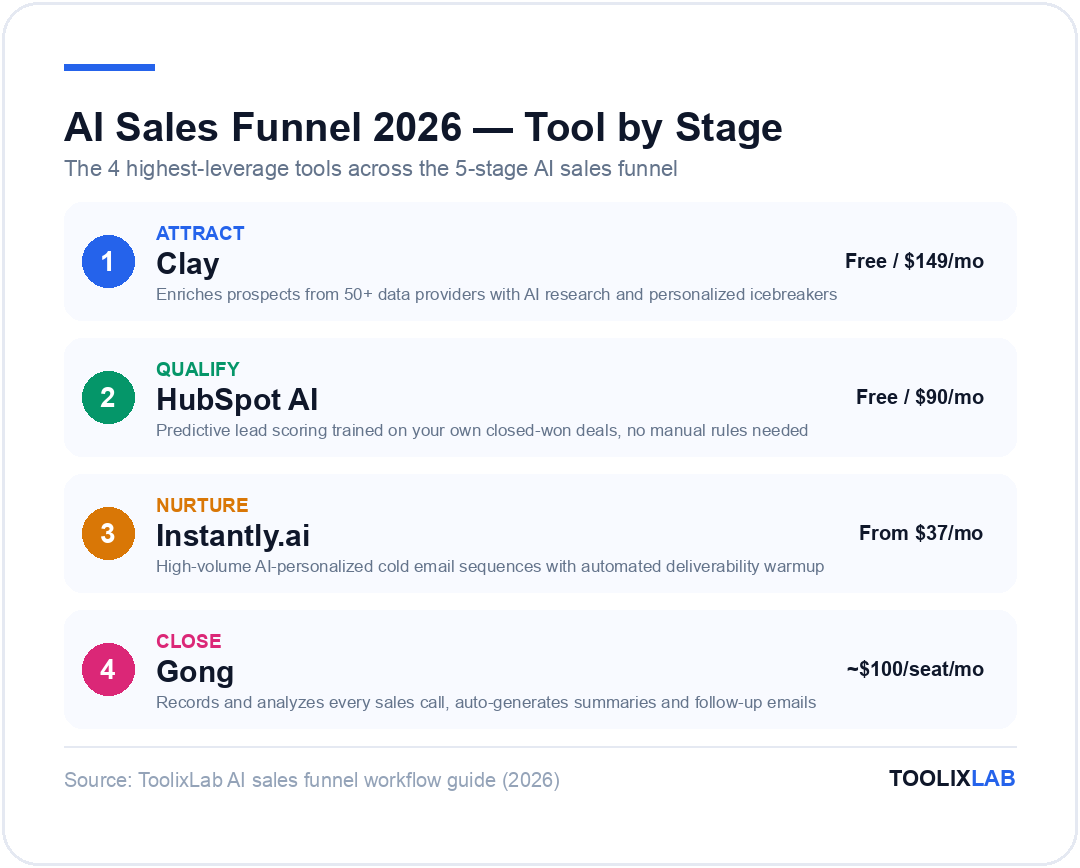
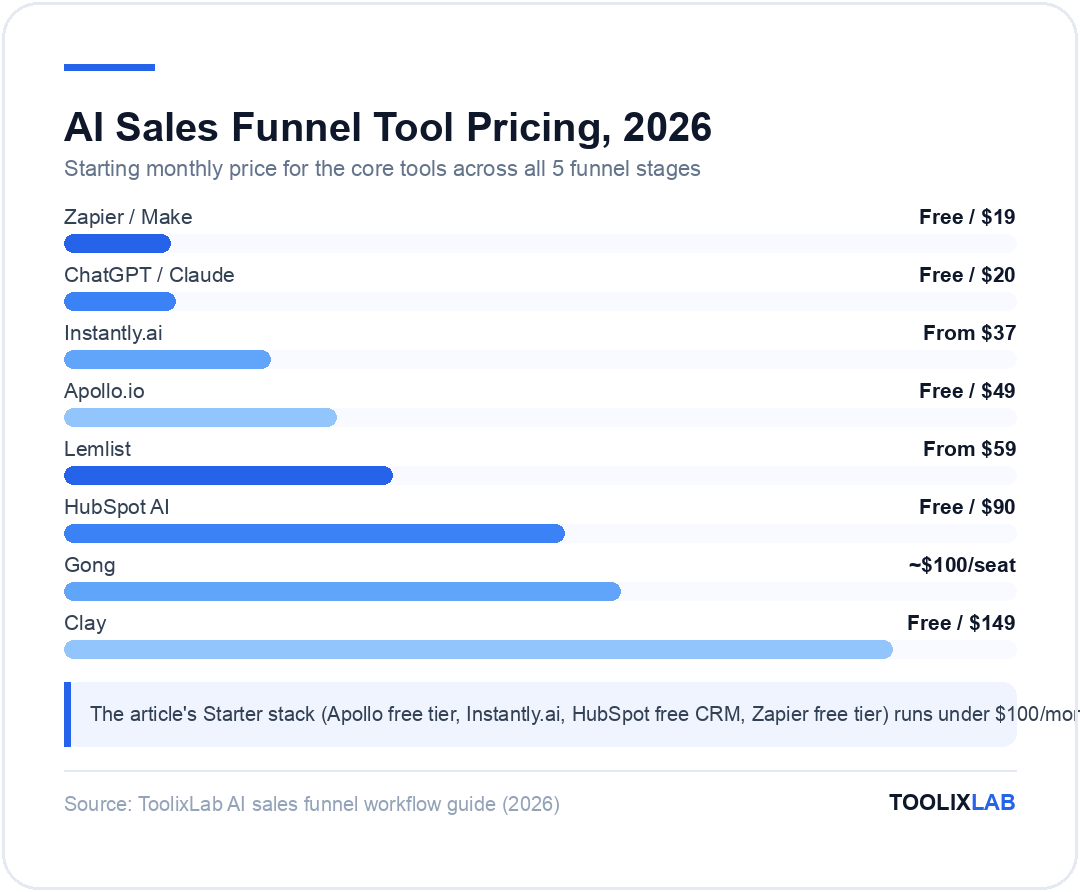
You don't need to use all of these tools. Most small businesses can build a highly effective AI funnel with three to five tools. The stack below is organized by budget tier so you can choose the right level for your current stage.
| Tool | Function | Price | Best For |
|---|---|---|---|
| Clay | Lead enrichment + AI research | Free / from $149/mo | B2B outbound personalization |
| Apollo.io | Lead database + sequencing | Free / from $49/mo | All-in-one outbound starter |
| Instantly.ai | Cold email AI sequences | From $37/mo | High-volume cold email |
| HubSpot AI | CRM + lead scoring + automation | Free CRM / Sales Hub from $90/mo | SMBs wanting one platform |
| Lemlist | Multichannel AI sequences | From $59/mo | Email + LinkedIn combined outreach |
| 6sense | Intent data + predictive scoring | Custom (enterprise) | Enterprise B2B with large TAM |
| Gong | AI call analysis + coaching | Custom (from ~$100/seat/mo) | Teams with high-touch sales calls |
| Zapier / Make | Workflow automation glue | Free / from $19/mo | Connecting tools without code |
| ChatGPT / Claude | Copy generation + research | Free / $20/mo | One-off copy and call prep |
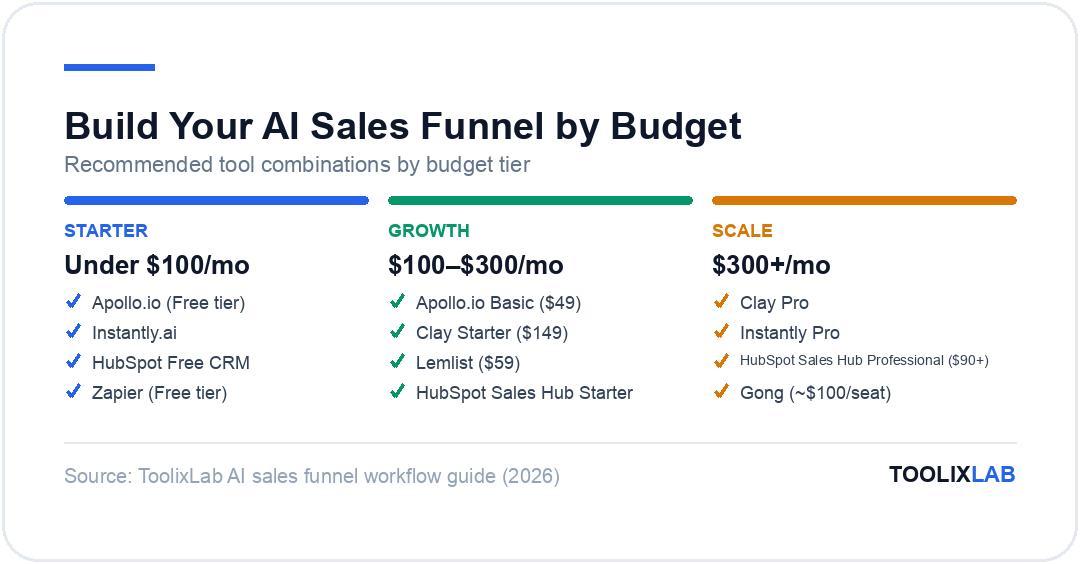
Starter stack (under $100/month): Apollo.io free tier + Instantly.ai + HubSpot free CRM + Zapier free tier. This covers lead sourcing, cold email sequencing, CRM management, and basic automation — more than enough to build and test your funnel before investing in premium tools.
Growth stack ($100–$300/month): Apollo.io Basic + Clay Starter + Lemlist + HubSpot Sales Hub Starter. Adds significant personalization capability through Clay's AI enrichment and multi-channel outreach via Lemlist.
Scale stack ($300+/month): Clay Pro + Instantly Pro + HubSpot Sales Hub Professional + Gong. Full AI personalization at scale, advanced lead scoring, and call intelligence.
Stage 1: AI-Powered Lead Generation & Top-of-Funnel
The top of your funnel is where most teams waste the most time — manually researching prospects, building lists, and verifying contact information. AI turns this from a 10-hour-per-week task into a 30-minute setup.
There are two approaches to AI-powered lead generation: inbound (capturing people who come to you) and outbound (proactively identifying and reaching people who match your ICP).
Outbound: ICP-Matched List Building
Start by defining your Ideal Customer Profile with as much specificity as possible. "B2B SaaS companies" is not an ICP. "Series A–B SaaS companies with 20–150 employees, US-based, in the HR tech or fintech vertical, who have posted a Head of Revenue or VP Sales job in the last 90 days" — that's an ICP you can build a targeted list around.
Apollo.io is the easiest starting point. Its database of 275M+ contacts lets you filter by company size, industry, technology stack, job title, geography, revenue range, and dozens of other signals. The free tier gives 50 email credits/month — enough to test your ICP targeting before upgrading.
Clay takes this further. Clay connects to 50+ data providers (Apollo, LinkedIn, Clearbit, Hunter, People Data Labs) and lets you use AI to enrich each prospect with custom research — pulling recent news about their company, identifying their tech stack, finding relevant LinkedIn activity, and generating personalized icebreakers automatically. A Clay workflow that used to require a human researcher can run overnight and deliver a list of 500 prospects, each with 15+ enrichment fields and a personalized first line for outreach.
For more detail on building the lead generation layer, see our full guide on AI lead generation workflows in 2026.
Inbound: AI-Enhanced Lead Capture
For inbound leads — people who find you through search, content, or referrals — AI improves capture rates and speeds up qualification. Key tools:
- AI chatbots (Drift, Intercom): Engage website visitors in real time, qualify them against your ICP criteria, and book demos automatically — even at 2am when no rep is available.
- Form enrichment (Clearbit Reveal): Identify anonymous website visitors by their company IP address, so you can trigger outbound outreach to companies researching your solution even if they never fill out a form.
- Intent data (Bombora, 6sense): Identify companies that are actively researching topics related to your product across the web — and prioritize outreach to them before they ever land on your site.
The combination of intent data and AI-enriched outreach is one of the highest-leverage moves in modern sales. You're not reaching out cold — you're reaching out to companies who are already in a buying cycle for solutions like yours, before your competitors do.
Stage 2: AI Lead Scoring & Qualification
Not all leads are equal. The problem with traditional sales is that reps spend equal time on every lead, which means they're spending a lot of time on leads that will never convert — and not enough time on the ones that will. AI lead scoring fixes this by ranking every lead by their likelihood to close, so reps always know exactly where to focus.
Two Types of Lead Scoring
Demographic/firmographic scoring rates leads based on how well they match your ICP: company size, industry, job title, technology stack, funding stage, location. These are static attributes. A Series B SaaS company with 80 employees scores higher than a solo freelancer if your product targets SMB SaaS teams.
Behavioral/intent scoring rates leads based on what they do: opening emails, clicking links, visiting your pricing page, watching a product demo, downloading a resource, engaging with LinkedIn content. These are dynamic signals that indicate purchase intent — and they're far more predictive than static attributes alone.
The most powerful scoring models combine both, weighting behavioral signals heavily because they capture where a prospect is in their buying journey right now.
Setting Up AI Lead Scoring in HubSpot
HubSpot's predictive lead scoring (available on Sales Hub Professional) automatically calculates a score for each contact based on hundreds of data points in your CRM — email engagement, page visits, form submissions, deal history, company attributes, and more. The model trains on your own closed-won deals, so it learns what your best customers actually looked like before they converted.
To set it up:
- Navigate to Contacts → Lead Scoring in HubSpot
- Enable predictive scoring — HubSpot needs at least 100 contacts with associated deal outcomes to build an accurate model
- Create a contact list filtered by score ≥70 (adjust threshold based on your volume)
- Set up a workflow that automatically assigns high-scoring contacts to your top reps and sends them a Slack notification
- Review the scoring model monthly and add custom score adjustments for signals specific to your business
For teams not yet on HubSpot Professional, you can build a manual scoring model in a free CRM using a simple point system: +10 for opening an email, +20 for clicking a link, +30 for visiting the pricing page, +50 for requesting a demo, -10 for unsubscribing or marking as spam. Even a simple behavioral scoring model dramatically improves rep prioritization.
Intent Data for Predictive Qualification
For B2B teams, layering in third-party intent data from platforms like 6sense or Bombora can be transformative. These tools track which companies are consuming content related to your category across thousands of publisher sites — giving you a signal that a company is in-market before they ever interact with you directly.
When a prospect company spikes in intent for your category, their score should automatically jump regardless of whether they've visited your site. That's the kind of proactive prioritization that turns sales teams from reactive order-takers into proactive revenue generators.
Stage 3: AI-Personalized Nurture Sequences
Most leads aren't ready to buy the first time they hear from you. Research from McKinsey's B2B research suggests that B2B buyers are more than 70% of the way through their decision process before they engage with a sales rep. That means the nurture phase — the period between first contact and sales conversation — is where buying decisions are actually made.
AI transforms nurture from a generic drip sequence to a dynamic, personalized experience that adapts to each prospect's behavior and moves them down the funnel faster.
Building an AI Cold Email Sequence with Instantly.ai
Instantly.ai is one of the best tools for high-volume cold email outreach with AI personalization. Here's how to build a 5-touch sequence:
Email 1 — Personalized Cold Open (Day 1): Lead with something specific about their company or role. Clay can auto-generate first lines like "Saw you recently expanded your sales team to 15 reps — congrats on the growth." Then connect that to a relevant pain point: "Companies at that stage usually start hitting lead quality issues as volume scales." Then offer a clear value prop and a low-commitment CTA: "Happy to share how [Company X] solved this. Worth a 15-minute call?"
Email 2 — Social Proof (Day 3): Reference a customer similar to them. "We helped [similar company] increase qualified pipeline by 40% in their first 90 days. Happy to share exactly what they did." Keep it short — three sentences maximum.
Email 3 — Value Add (Day 7): Send something genuinely useful with no ask. A relevant article, a short checklist, a data point from your industry. This builds credibility and goodwill without pushing for a meeting.
Email 4 — Direct Ask (Day 12): Be direct. "I've reached out a few times — I want to respect your time. If this isn't relevant right now, just let me know and I'll stop following up. If there's any interest, here's my calendar link." Directness is underrated in email sequences.
Email 5 — Break-up (Day 21): The "break-up" email consistently generates the highest reply rates of any sequence email. "I'm going to stop reaching out — I don't want to clutter your inbox. But before I do, I wanted to share one thing: [quick insight]. If the timing ever changes, my calendar is at [link]. All the best." The finality creates urgency and prompts replies from people who were interested but never responded.
For the full strategy on AI email marketing automation, see our guide on automating email marketing with AI in 2026.
LinkedIn Outreach Integration
Cold email alone leaves significant pipeline on the table. Multichannel sequences that combine email with LinkedIn touchpoints consistently outperform single-channel outreach by 50–100% in reply rates. Lemlist's AI sequence builder lets you build sequences that alternate between email steps and LinkedIn steps — connection requests, profile visits, LinkedIn messages — in a coordinated timeline.
The key is sequencing the channels correctly. Generally: LinkedIn connection request first (Day 1), first email on Day 2 after connection, LinkedIn message on Day 5, second email on Day 8. The LinkedIn visibility primes the prospect to recognize your email, dramatically improving open and reply rates.
Behavior-Triggered Nurture Automation
Beyond scheduled sequences, the most powerful nurture automation is behavior-triggered: when a prospect takes a specific action, a specific message fires immediately.
Key triggers to set up in your CRM or marketing automation tool:
- Pricing page visit: Send a personalized email within 1 hour referencing their visit and offering to answer pricing questions
- Demo video watched (>50%): Follow up the same day with a case study from a similar company and a demo booking link
- Lead score crosses 70: Automatically assign to a rep and trigger a personalized "hot lead" email from the rep's account
- Email replied: Pause all automated sequences immediately and route to rep for manual response
- No engagement for 45 days: Move to a long-term nurture list and reduce frequency to one email per month
These triggers ensure that your outreach is always contextually relevant — arriving at exactly the moment when the prospect is most receptive.
Stage 4: AI Sales Enablement & Closing
When a prospect is ready to have a conversation, the quality of that conversation determines whether they buy. AI sales enablement tools help reps prepare better, present more effectively, and follow up faster — without spending hours on admin after every call.
Pre-Call Research Automation
Before any sales call, a rep needs to understand: Who is this person? What does their company do? What are their likely pain points? What's happened recently at their company? What did they engage with in our nurture sequence?
Manually researching this takes 20–30 minutes per call. With AI, it takes 2 minutes. Build a simple Zapier workflow that runs 1 hour before each scheduled meeting:
- Pull the contact's CRM record (company, role, sequence history, score, page visits)
- Run a Clay or Perplexity API lookup for recent news about their company
- Send a brief to the rep via Slack: company overview, pain points, recent news, what they engaged with, suggested opening and discovery questions
Reps who walk into calls with this brief close at significantly higher rates — not because of the AI, but because preparation shows, and prospects can tell when a rep has done their homework.
AI Call Intelligence with Gong
For teams with a high volume of sales calls, Gong is the gold-standard AI tool for call intelligence. Gong records, transcribes, and analyzes every call, surfacing:
- Talk/listen ratio (the best reps listen more than they talk — Gong benchmarks show top performers at 43% talk time vs 57% listen time)
- Competitor mentions and how reps handled them
- Common objections and whether they were addressed effectively
- Next steps committed to and whether they were logged in CRM
- Deal risk signals: lack of multi-threading, single-threaded deals, pricing conversations that didn't move forward
Gong's AI also generates call summaries and next-step emails automatically after each call, saving each rep 15–20 minutes per call in post-call admin.
AI Proposal and Contract Generation
The gap between a verbal "yes" and a signed contract is where many deals stall. AI-powered proposal tools like PandaDoc AI and Proposify AI generate customized proposals from templates in minutes, pulling in relevant pricing, case studies, and scope details from your CRM automatically. The result: faster time from handshake to signature, which meaningfully reduces deal slippage.
Use ChatGPT or Claude to draft personalized follow-up emails after each call. A simple prompt like "Write a follow-up email summarizing our call with [Company]. They're a 50-person SaaS company trying to solve [pain point]. We discussed [solution]. Next steps are [X]. Keep it concise and warm." takes 10 seconds and produces a better follow-up than most reps write manually.
Stage 5: AI Retention, Upsell & Referral Loops
The most overlooked part of any sales funnel is what happens after the close. Acquiring a new customer costs 5–7× more than retaining an existing one. AI tools for customer success and retention turn your closed customers into a compounding asset rather than a one-time transaction.
Customer Health Scoring
Customer health scoring is the post-sale equivalent of lead scoring. Tools like Gainsight, ChurnZero, and Totango monitor product usage, support ticket frequency, NPS responses, billing events, and stakeholder engagement to generate a health score for every customer account.
When a customer's health score drops below a threshold — they stop logging in, they submit multiple support tickets, their champion leaves the company — an automated alert fires to their customer success manager with context on what changed and a suggested intervention playbook.
This proactive churn prevention is far more effective than reactive win-back campaigns. By the time a customer cancels, it's usually too late. Health scoring gives you a 30–90 day window to intervene before the decision is made.
AI-Driven Expansion and Upsell
HubSpot's AI and Salesforce Einstein can identify customers who are most likely to upgrade or expand based on usage patterns, company growth signals, and engagement data. When a customer's usage approaches a plan limit, an automated expansion email fires from their account manager. When a company using your tool grows their headcount by 30%, an expansion opportunity is automatically created in your CRM for their account manager to follow up on.
Automated Referral Loops
Happy customers are your best salespeople — but most businesses fail to systematically activate them. Build a simple referral automation:
- At 90 days post-onboarding, trigger an NPS survey (Delighted or Typeform)
- For NPS scores 9–10 (promoters): automatically send a referral request email with a clear incentive and a one-click referral link
- For NPS scores 7–8 (passives): enroll in an automated case study interview sequence
- For NPS scores 0–6 (detractors): immediately flag to customer success for a proactive check-in call
This single automation running in the background consistently generates 10–20% of new pipeline for businesses that implement it properly — from customers who are already sold on your product.
How to Build Your AI Sales Funnel (Step-by-Step Setup)
Now that you understand each stage, here's a practical implementation sequence. This assumes you're starting from scratch with a modest budget. You can complete this setup in 3–5 days.
For more on automating business workflows broadly, see our guide to the best workflow automation tools for small businesses.
Week 1: Foundation (Days 1–3)
Day 1 — Define your ICP precisely. Write out your ideal customer in specific terms: industry, company size, job title, technology stack, key pain points, and the specific trigger events that make them likely to buy now (new funding, new hire, recent expansion, competitor displeasure). The sharper your ICP, the better every downstream AI tool performs.
Day 2 — Set up your CRM. Start with HubSpot's free CRM. Create custom properties for the signals you care about: ICP match, lead source, intent signal, sequence status, lead score. Import any existing contacts. Set up your pipeline stages to match your actual sales process — don't use the default stages unless they fit.
Day 3 — Build your first lead list. Use Apollo.io's free tier to build a list of 200–300 prospects matching your ICP. Export to CSV, import into HubSpot. Manually review the first 20 to verify quality — if they don't match your ICP, refine your Apollo.io filters before scaling.
Week 1: Outreach (Days 4–7)
Day 4 — Write your email sequences. Draft your 5-touch cold email sequence (as outlined above). Use ChatGPT to help generate variations: "Write 3 alternative subject lines for a cold email targeting VP Sales at Series B SaaS companies, focusing on the pain point of lead quality at scale." Test 2–3 subject line variants.
Day 5 — Set up your outreach tool. Create an Instantly.ai account and connect your sending email address (use a secondary domain, not your primary, to protect deliverability). Warm up the mailbox for 7 days before sending — Instantly has a built-in warmup feature. While it warms up, configure your sequences.
Day 6 — Connect your CRM to your outreach tool. Use Zapier to connect Instantly.ai or Apollo.io to HubSpot: when a prospect replies to a sequence, create a task in HubSpot for follow-up. When a deal is won in HubSpot, remove the contact from all active sequences. When a contact is marked as unqualified, suppress from all sequences.
Day 7 — Set up basic lead scoring. In HubSpot, create a manual scoring rule set: +10 for each email opened, +20 for each link clicked, +30 for visiting your website, +50 for visiting a pricing or demo page. Create a view filtered by score ≥60 and check it every morning.
Week 2: Activate & Optimize
Day 8 — Launch your first sequence. Start with 20–30 prospects per day maximum. Monitor deliverability (open rates >40% = good, >0.3% spam = bad). Check reply rates after the first 50 sends — if you're below 2%, your ICP or offer needs work before scaling.
Day 10 — Add behavior triggers. Set up your first behavior-triggered automation: when a contact visits your pricing page (tracked via HubSpot tracking script), send them a personalized email within 2 hours. This single automation typically generates 3–5× the reply rate of standard sequence emails.
Day 14 — Review and optimize. After 2 weeks of data: Which subject lines have the best open rates? Which email steps have the best click rates? Which prospects have the highest scores? Optimize your sequence based on what you've learned — drop what isn't working, double down on what is.
Common Mistakes to Avoid
Building an AI sales funnel is straightforward — but there are predictable mistakes that slow teams down or produce poor results. Here are the most common ones and how to avoid them.
Mistake 1: Automating a broken offer
The most common mistake is building an elaborate AI funnel around an offer that doesn't resonate. AI amplifies what's already working — it doesn't fix a broken value proposition. If your manual outreach isn't generating replies, automating it at scale will just generate more non-replies, faster, while burning your email domain.
Before automating, validate your offer manually: send 50 hyper-personalized emails yourself, have 10 sales conversations, and identify why people buy and why they don't. Then automate the winning approach.
Mistake 2: Buying too many tools too early
There's no shortage of compelling AI sales tools, and it's tempting to build out the full stack from day one. But each new tool adds integration complexity, monthly cost, and a learning curve. Start with the minimum viable stack (free CRM + one outreach tool + Zapier free tier) and add tools only when you've outgrown the current setup.
The best sales funnels are often the simplest ones — three tools that work together reliably beat six tools that are half-configured.
Mistake 3: Over-automating too early in the relationship
AI automation is powerful in the early stages of outreach — where personalization at scale beats generic manual outreach. But once a prospect has replied and shown genuine interest, they deserve real human attention. Nothing kills a warm lead faster than an obviously automated follow-up to a personal reply.
Set a clear rule: once a prospect replies, they exit all automated sequences immediately and go into a manual follow-up queue. The AI got them interested — now a human closes them.
Mistake 4: Neglecting email deliverability
Cold email only works if it lands in the inbox. Email deliverability is a technical and behavioral issue that most teams underinvest in. Key rules: use a secondary domain for cold outreach, warm up new inboxes for at least 2–3 weeks before sending at volume, keep daily send volume under 50 emails per inbox (scale gradually), maintain list hygiene by removing bounces and unsubscribes promptly, and monitor spam complaint rates (anything above 0.1% requires immediate action).
For a full breakdown of AI tools for the sales function, see our guide to the best AI tools for sales teams in 2026.
Mistake 5: Not closing the loop with data
An AI funnel that doesn't measure itself can't improve itself. Set up basic reporting from day one: leads entered vs. leads contacted vs. replies vs. meetings booked vs. deals closed. Track these weekly. If your reply rate is 5% but meeting conversion is 80%, your bottleneck is getting replies (top-of-funnel problem). If reply rate is 10% but meeting conversion is 20%, your bottleneck is what happens on the call (qualification or pitch problem). Data tells you exactly where to invest your optimization effort.
Putting It All Together: Your AI Funnel in Production
A fully functional AI sales funnel, once built, operates largely on autopilot. Here's what a typical day looks like when the system is running:
6am: Overnight, Clay enriched 50 new leads from your Apollo.io list with personalized first lines, recent company news, and technology stack data. They've been automatically uploaded to Instantly and enrolled in your 5-touch sequence.
8am: Your lead score dashboard shows 7 contacts who crossed the 70-point threshold overnight — they visited your pricing page, opened two emails, and clicked your demo link. A Slack notification was sent to your top rep with a brief on each one and a direct link to book a call.
10am: Three sequence replies came in overnight. They've been automatically paused from all sequences and flagged for manual follow-up. Two are interested, one is unsubscribing. The unsubscribe is automatically suppressed across all lists.
2pm: A prospect who attended your webinar last week (tracked via HubSpot integration) just visited your case studies page for 8 minutes. A behavior-triggered email from their account rep fired automatically 30 minutes after the visit.
5pm: Your rep had three sales calls today. Gong auto-generated summaries and drafted follow-up emails for all three. Post-call, the deals are updated in HubSpot automatically via Gong's CRM integration.
This is the power of an AI sales funnel: not that AI does the selling, but that AI handles everything around the selling so your reps spend their time where it actually matters — having great conversations with qualified, well-prepared prospects.
The technology is accessible, the tools are affordable, and the competitive advantage for teams who build this system versus those who don't is only growing. The best time to start was last year. The second-best time is this week.