
By ToolixLab Research Team · Last updated: July 2026
Quick Answer
To automate email marketing with AI in 2026: pick a platform with native AI (Klaviyo for e-commerce, ActiveCampaign for B2B, Mailchimp/Brevo to start free), let AI handle segmentation, subject-line testing, and send-time optimization, use an AI assistant like Claude or ChatGPT to draft campaign copy you then edit, and keep a human on strategy, offers, and anything sensitive. Done right, the six-step workflow in this guide cuts email production time by 60–80% while raising open and conversion rates.
Email marketing generates $42 for every $1 spent. Add AI-powered automation to that equation, and teams are reporting double the open rates, 3x the click-through rates, and a 70% reduction in time spent writing and testing campaigns.
⚡ TL;DR — Automate Email Marketing with AI in 2026
- Best all-in-one platform: Klaviyo (e-commerce) or ActiveCampaign (B2B)
- Best for AI copywriting: ChatGPT (GPT-5.4) or Claude Sonnet 4.6
- Best for subject line testing: Mailchimp AI or Phrasee
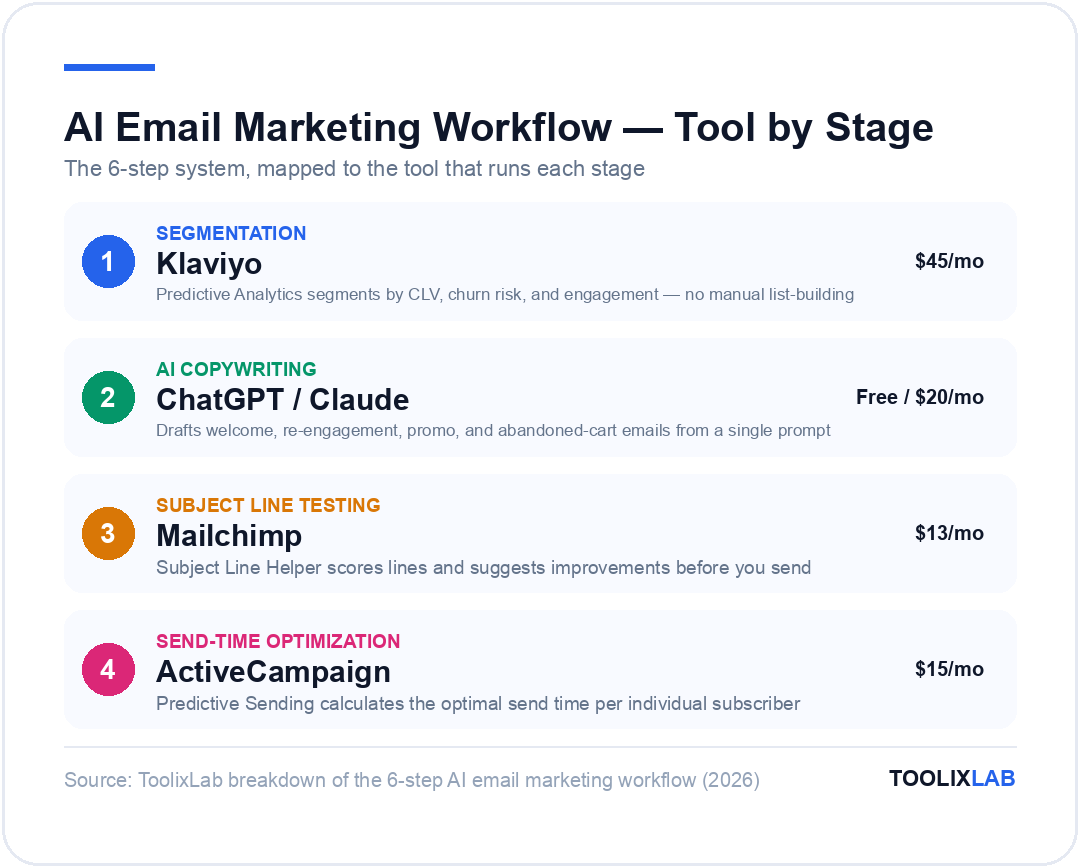
- Best for segmentation: Klaviyo Segments or HubSpot AI
- Best for send-time optimization: ActiveCampaign Predictive Sending
- Best workflow connector: Zapier or Make
- Best for analytics: Litmus or built-in platform reporting
- Time saved: 6–12 hours/week for most marketers
In 2026, the marketers winning in email aren't writing better copy — they're building better systems. AI handles segmentation, drafts the emails, tests subject lines, determines the optimal send time, and surfaces which subscribers are about to churn. The human's job is strategy, brand voice, and review.
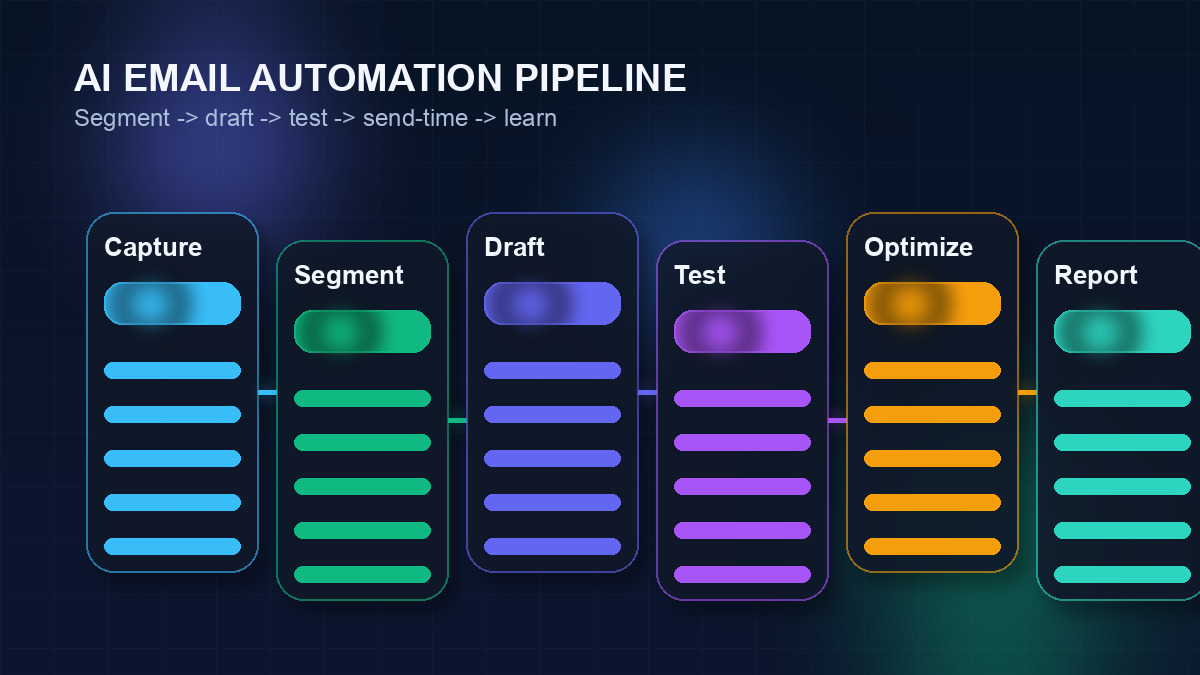
This guide gives you a complete 6-step system to automate your email marketing with AI — from list segmentation to post-campaign analytics. You'll get exact tools, real prompts to use, a platform comparison table, and an honest breakdown of what you should never fully automate.
🔗 Related reading: See our Best AI Marketing Tools guide for a broader toolkit, and our Social Media Automation guide to build a connected content system.
Why AI Changes Everything for Email Marketing
Email marketing has always been about sending the right message, to the right person, at the right time. For most of its history, "right" was a manual approximation — a single segment, a manually written email blast, a gut-feel send time.
AI makes "right" mean something completely different in 2026:
| Traditional Email Marketing | AI-Powered Email Marketing (2026) |
|---|---|
| Broad demographic segments (age, location) | Behavioral segments (purchase intent, churn risk, engagement score) |
| Manually written one-size-fits-all copy | AI-generated variations personalized by segment |
| A/B test 2 subject lines over 2 weeks | Multivariate AI testing of 5–20 variants in hours |
| Fixed send time for all subscribers | Predictive send-time optimization per subscriber |
| Reactive churn management (after unsubscribe) | Predictive churn detection 30–60 days in advance |
| Post-send manual reporting | Real-time AI attribution and revenue forecasting |
The result is a compounding advantage. Teams using full AI email automation don't just save time — they consistently outperform manual teams on every key metric because they're iterating faster and personalizing deeper.
Step 1: AI-Powered List Segmentation
Segmentation is where most email programs leave 60–70% of their potential on the table. Sending the same email to your entire list is the email equivalent of running a single TV ad and hoping it converts everyone who sees it.
AI-powered segmentation in 2026 goes far beyond demographics. The most effective segments are built on behavioral signals:
- Purchase intent signals: Subscribers who visited a pricing page 3+ times in 14 days
- Engagement scoring: Last open date, click frequency, time spent reading emails
- Churn risk: Declining engagement over 30, 60, or 90-day windows
- Content affinity: Which topics a subscriber clicks most (products, tutorials, deals)
- Purchase history: First-time buyers, repeat buyers, high-LTV customers, lapsed buyers
- Website behavior: Pages visited, forms abandoned, products viewed
How to Build AI Segments in Klaviyo
- 1 Go to Segments → Create Segment and choose "Predictive Analytics" as the condition type
- 2 Set conditions like "Predicted CLV is high" + "Expected date of next order is within 30 days"
- 3 Layer in engagement data: "Has opened email in the last 30 days" to keep your segment warm
- 4 Use Klaviyo's Segment Insights tab to see revenue attributed to each segment before sending
For B2B teams using ActiveCampaign or HubSpot, the same logic applies using lead scoring. HubSpot's AI can automatically score contacts based on website activity, email engagement, CRM interactions, and firmographic fit — and route high-score leads directly into tailored email sequences without manual review.
Step 2: Writing Email Copy with AI
This is where most marketers start with AI, and it's still one of the highest-leverage activities. A well-prompted LLM can generate a solid email draft in under 60 seconds — a first draft that usually takes a human 20–45 minutes to write and edit.
The key to getting great AI email copy is specificity in the prompt. Vague prompts produce generic output. Specific prompts produce emails that sound like your brand.
Proven Email Copywriting Prompts for 2026
Write a welcome email for new subscribers to [Brand Name], a [description]. Tone: [conversational/professional/friendly]. The subscriber joined via [lead magnet name]. Goal: build trust, introduce our core value, and drive them to [specific next action]. Keep it under 250 words. No filler phrases like "I hope this email finds you well."
Write a re-engagement email for subscribers who haven't opened in 60 days. Brand: [Name]. Don't beg or be dramatic. Acknowledge the gap briefly, offer something genuinely useful ([specific offer or content], and give them a clear way to stay or unsubscribe. Max 180 words. Include a subject line that sparks curiosity without being clickbait.
Write a promotional email for [product/service] at [price/discount]. Audience: [segment description — e.g., "existing customers who haven't purchased in 90 days"]. Lead with the outcome they get, not the product features. Include one social proof element. CTA: [button text]. Under 220 words. Write 3 subject line options — one curiosity, one benefit-led, one urgency-based.
Write a 3-email abandoned cart sequence. Email 1 (1 hour after abandonment): gentle reminder, no discount. Email 2 (24 hours): add a social proof element and a soft incentive. Email 3 (72 hours): final urgency message with stronger incentive. Brand voice: [description]. Product: [name + key benefit]. Each email under 150 words.
Once you have your drafts, run them through a brand-voice check. Tools like Jasper let you train a brand voice profile so AI outputs match your style guide automatically. For teams that prefer full control, keeping a short brand-voice briefing document to paste into your ChatGPT or Claude prompt works equally well.
🔗 Tip: See our 50 Best ChatGPT Prompts for Marketers for a full library of copy prompts you can use across campaigns, sequences, and drip flows.
Step 3: AI Subject Line Testing & Optimization
Subject lines determine whether any of the email copy you wrote actually gets read. In 2026, testing subject lines manually — writing two variants, waiting 4 hours, picking the winner — is a baseline, not a best practice.
AI subject line tools do something more sophisticated: they predict open rate probability before you send, based on models trained on billions of email sends across your industry.
The 3-Layer Subject Line System
Example: "The email strategy we didn't want to share" · "This one change doubled our open rate"
Example: "Cut your email writing time by 70%" · "5 AI prompts your competitors aren't using yet"
Example: "Last 24 hours — [offer]" · "Only 12 spots left for [event/offer]"
Use AI to generate 5–10 subject lines across these three categories, then run them through a prediction tool before selecting your test winners. Mailchimp's Subject Line Helper scores lines and suggests improvements in real time. Phrasee goes further — it generates brand-specific subject lines using its own NLP models trained on your historical data, and can run fully automated multivariate tests with statistical confidence reporting.
Don't forget the preview text. The subject line and preview text together form your "open headline" — they should work as a unit, not repeat the same information.
Step 4: Smart Automation Sequences
Automation sequences (also called flows or drips) are the backbone of scalable email marketing. In 2026, the best sequences are not just automated — they're conditional and adaptive, changing path based on subscriber behavior in real time.
The 6 Sequences Every Serious Email Program Needs
Introduce the brand, deliver the lead magnet, set expectations, drive first conversion. AI writes each email to match the subscriber's source (ad vs. organic vs. referral).
Recover lost revenue from subscribers who didn't complete a purchase. AI personalizes the email with the exact product name and image. Typically recovers 5–15% of abandoned carts.
Order confirmation, onboarding/usage tips, social proof, review request, upsell/cross-sell. AI segments by product category to ensure recommendations are relevant.
Triggered when engagement score drops below threshold. AI identifies the best offer based on previous purchase history. Includes a sunset option to keep list clean.
Long-form educational content for leads not ready to buy. AI selects content topics based on what the subscriber has clicked previously, serving a personalized learning path toward conversion.
Exclusive offers, early access, and content for high-LTV subscribers identified by AI predictive scoring. Keeps your best customers feeling valued without a loyalty program infrastructure.
To connect these sequences with the rest of your marketing stack, use Zapier or Make to trigger flows based on events happening outside your email platform — a CRM stage change, a product purchase, a form submission, or a support ticket close.
Step 5: Personalization at Scale
There's a difference between segmentation (sending the same email to a group) and personalization (sending a unique email to each individual). AI in 2026 makes true 1:1 personalization feasible at any list size.
4 Levels of AI Email Personalization
| Level | What Gets Personalized | Tool Required | Complexity |
|---|---|---|---|
| 1 — Basic | First name, company name | Any ESP | Low |
| 2 — Segment | Entire email content by segment | Klaviyo, ActiveCampaign | Medium |
| 3 — Dynamic | Content blocks swap based on subscriber data | Klaviyo, Litmus Personalize | Medium-High |
| 4 — AI-Generated | Subject line, body copy, product recs — all AI-generated per subscriber | Phrasee, Salesforce Einstein | High |
For most teams, Level 3 (dynamic content blocks) is the best ROI trade-off. You create one email template with conditional blocks — different product recommendations, different CTAs, different imagery — and the platform populates the right block for each subscriber automatically.
Level 4 full AI personalization is the frontier. Platforms like Salesforce Marketing Cloud with Einstein and tools like Persado generate unique copy for each individual based on that person's predicted response to different messaging styles (emotional, rational, urgency-driven, etc.).
Step 6: Analytics & Continuous Optimization with AI
Most email programs optimize backwards — they look at what happened last send and make manual adjustments for the next one. AI flips this to a continuous, forward-looking loop.
The Metrics That Actually Matter in 2026
Open rate is now nearly meaningless as a primary metric — Apple Mail Privacy Protection (MPP) inflates open rates across most lists by 30–60%. Track these instead:
- Click-to-open rate (CTOR): Clicks ÷ opens. Measures email body quality, not deliverability.
- Revenue per email (RPE): Total revenue attributed to a campaign ÷ emails delivered.
- List growth rate: Net new subscribers as a % of total list per month.
- Churn rate: % of subscribers unsubscribing or going inactive per send.
- Deliverability rate: % of emails reaching inbox vs. spam vs. promotional tab.
- Conversion rate: % of email recipients completing the goal action (purchase, sign-up, download).
AI Analytics Workflow: What to Automate
- → Weekly automated digest: Klaviyo or ActiveCampaign sends you a performance summary every Monday — no manual reporting required
- → Anomaly alerts: Set up AI alerts for drops in deliverability, unusual unsubscribe spikes, or revenue per email falling below threshold
- → Automated list cleaning: Flag and sunset contacts who haven't engaged in 90 days — keep list hygiene running without manual review
- → Cross-channel attribution: Tools like Litmus can attribute email revenue across the full purchase journey, not just last-click
Best AI Email Marketing Platforms Compared (2026)
| Platform | Best For | Key AI Features | Starting Price | Free Plan? |
|---|---|---|---|---|
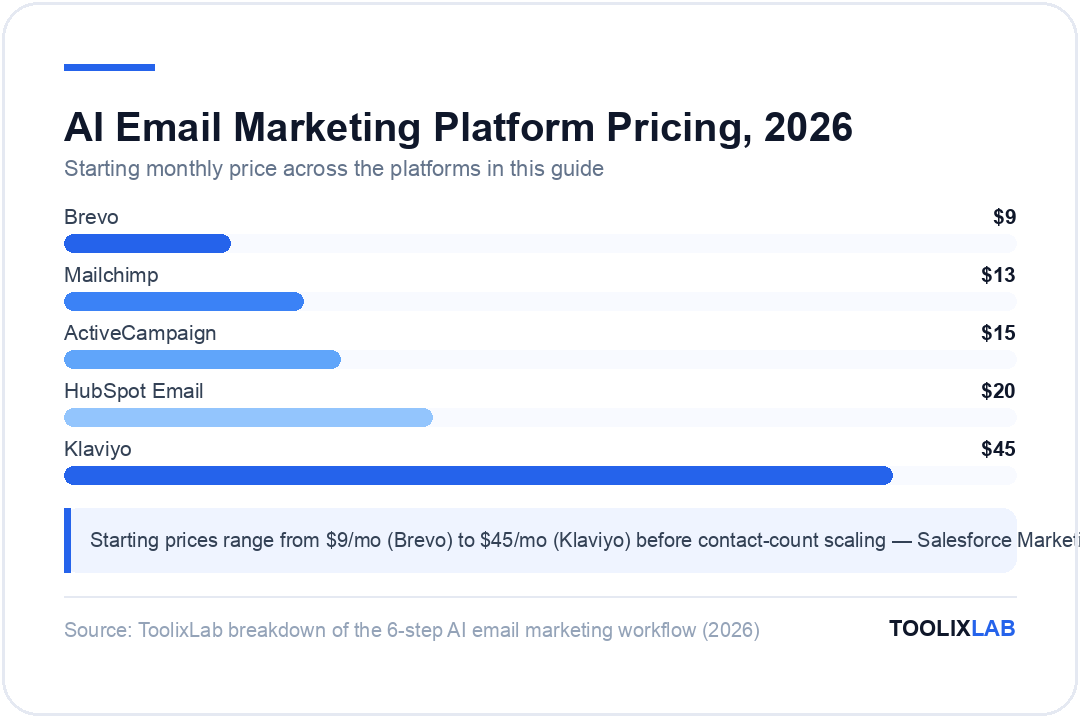
| Klaviyo | E-commerce brands | Predictive CLV, churn risk, product recommendations, send-time optimization | $45/mo (500 contacts) | Yes (250 contacts) |
| ActiveCampaign | B2B / SaaS teams | Predictive sending, AI segmentation, lead scoring, CRM integration, Win Probability | $15/mo (1,000 contacts) | No (14-day trial) |
| Mailchimp | SMBs, general use | AI content generator, subject line helper, send-time optimization, customer journey builder | $13/mo (500 contacts) | Yes (500 contacts) |
| HubSpot Email | Full-stack marketing + CRM | AI email writer, Breeze intelligence for segmentation, predictive lead scoring | $20/mo (1,000 contacts) | Yes (limited) |
| Brevo (Sendinblue) | Budget-conscious teams | AI subject line, send-time optimization, transactional email + SMS in one platform | $9/mo (unlimited contacts) | Yes (300 emails/day) |
| Salesforce Marketing Cloud | Enterprise teams | Einstein send-time optimization, full 1:1 AI personalization, Agentforce email agents | Custom (enterprise) | No |
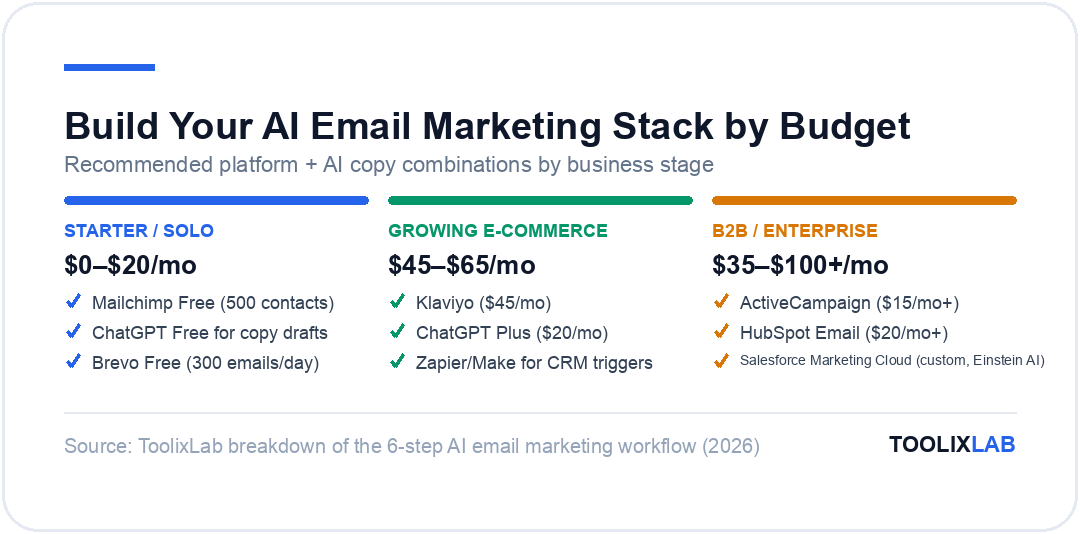
Quick picks: If you run an e-commerce brand, Klaviyo is the clear leader — its predictive analytics are unmatched at that price point. B2B teams doing lead nurturing get the most from ActiveCampaign's CRM-email integration. Teams that need a free starting point should look at Mailchimp or Brevo.
The First Five Automations to Build (In This Order)
If the six-step framework feels like a lot, start here. These five automations are ranked by return on setup time — each takes under an afternoon on any platform in the comparison table, and together they typically account for the majority of automated email revenue:
1. The welcome sequence (build this first, always). New subscribers are at peak attention; a 3–5 email sequence introducing your brand, best content, and first offer consistently outperforms every other automation on revenue-per-recipient. Have AI draft the sequence, then inject the specifics only you know: your origin story, your actual differentiators.
2. Abandoned cart / abandoned intent. For e-commerce this is the closest thing to free money in marketing — a 2–3 email nudge sequence recovering buyers who stalled at checkout. The B2B equivalent: follow-ups for demos booked but not attended, or trials started but not activated.
3. The re-engagement sequence. AI segmentation identifies subscribers going cold before they unsubscribe; a short "still interested?" sequence rescues a meaningful slice and lets you cleanly sunset the rest — protecting deliverability for everyone else.
4. Post-purchase / post-signup onboarding. The window right after conversion is where reviews, referrals, and second purchases are won. Automate the thank-you, the how-to-get-value email, and the review ask at sensible intervals.
5. The AI-assisted newsletter. Last because it's recurring work rather than set-and-forget: a standing workflow where AI drafts your weekly send from your content and you edit in fifteen minutes instead of writing for two hours. This is where the copy techniques from Step 2 compound week after week.
What You Should Never Fully Automate
AI email automation has real limits. Automating these elements without human oversight will hurt your brand:
- Crisis or sensitive communications: If your company is dealing with a public issue, an automated promotional campaign running in the background is a reputation risk. Always have a kill-switch process.
- High-stakes sales outreach: For enterprise deals, a human-written, highly personalized email significantly outperforms any AI template. Use AI to research and draft, but always review before sending to high-value prospects.
- Brand voice for new initiatives: When launching a new product or campaign with a different tone, AI templates trained on your old voice will feel off. Write the first 2–3 emails manually to establish the pattern, then let AI extend it.
- Automated unsubscribe responses: The moment a subscriber opts out, they should leave your list — not get a "We'll miss you!" autoresponder that creates friction or legal risk.
🔗 Related: Want to automate the rest of your marketing stack, not just email? Read our No-Code AI Workflow guide and our Best AI Tools for Sales to build a full revenue automation system.
Building Your AI Email Stack: A Quick-Start Checklist
Week 1: Foundation
- Choose your platform (Klaviyo / ActiveCampaign / Mailchimp)
- Clean your list — remove invalid addresses, hard bounces, and 12-month inactives
- Set up 3 core segments: Active, At-Risk, Inactive
- Write and publish your welcome sequence using AI prompts above
Week 2–3: Automation
- Build abandoned cart flow (3 emails)
- Build re-engagement flow for your Inactive segment
- Enable send-time optimization in your platform settings
- Set up Zapier/Make triggers to route CRM events into email flows
Week 4: Optimization
- Run AI subject line tests on your next 3 campaigns
- Set up weekly automated analytics digest
- Add dynamic content blocks to your campaign template
- Review CTOR and RPE — set benchmarks for ongoing measurement
Frequently Asked Questions
Can AI write my entire email campaign?
It can draft all of it, and it shouldn't send any of it unreviewed. The reliable division of labor: AI produces structure, variants, and first drafts; you supply the offer, the specifics only your business knows, and final judgment. Fully hands-off campaigns drift generic fast — and generic is what subscribers unsubscribe from.
Will AI-generated emails hurt my deliverability?
Inbox providers filter on engagement signals and sending reputation, not on whether copy was AI-written. What does hurt deliverability is what lazy automation produces: over-mailing cold segments and irrelevant blasts. Used as this guide describes — better segmentation, fewer, more relevant sends — AI typically improves deliverability metrics.
How long until AI email automation pays off?
The copy-drafting time savings are immediate. Automated sequences (welcome, abandoned cart) typically show measurable revenue within their first month live. Predictive features like churn risk and send-time optimization need a few months of list data before their recommendations are trustworthy.
Do I need a big list before AI features are worth it?
No for copy and subject-line help — those pay off from subscriber one. Yes for predictive segmentation, which needs enough behavioral data to find patterns; under roughly a few thousand engaged subscribers, keep segments simple and manual and let AI earn its keep on the writing side.
🔑 Key Takeaways
- ✓AI's biggest email wins are segmentation, subject-line testing, and send-time optimization — features already built into Klaviyo, ActiveCampaign, and Mailchimp plans you may have
- ✓Build automations in ROI order: welcome sequence → abandoned cart → re-engagement → post-purchase → AI-assisted newsletter
- ✓AI drafts, humans send — keep strategy, offers, apologies, and anything sensitive under human control
- ✓Judge success on click-to-open rate and revenue per email, not open rates, which privacy features have made unreliable