
ChatGPT Trust Snapshot
Real Free Score
80/100
Lock-In Risk
Medium
Billing Friction
Low
Commercial Use
Allowed
Data Privacy
Clear
Volatility
Medium
Last checked
2026-07-22
Most content teams in 2026 produce 3x more content than in 2023. This is the exact 5-stage workflow they use to scale without sacrificing quality.

⚡ TL;DR — AI Content Creation Workflow in 2026
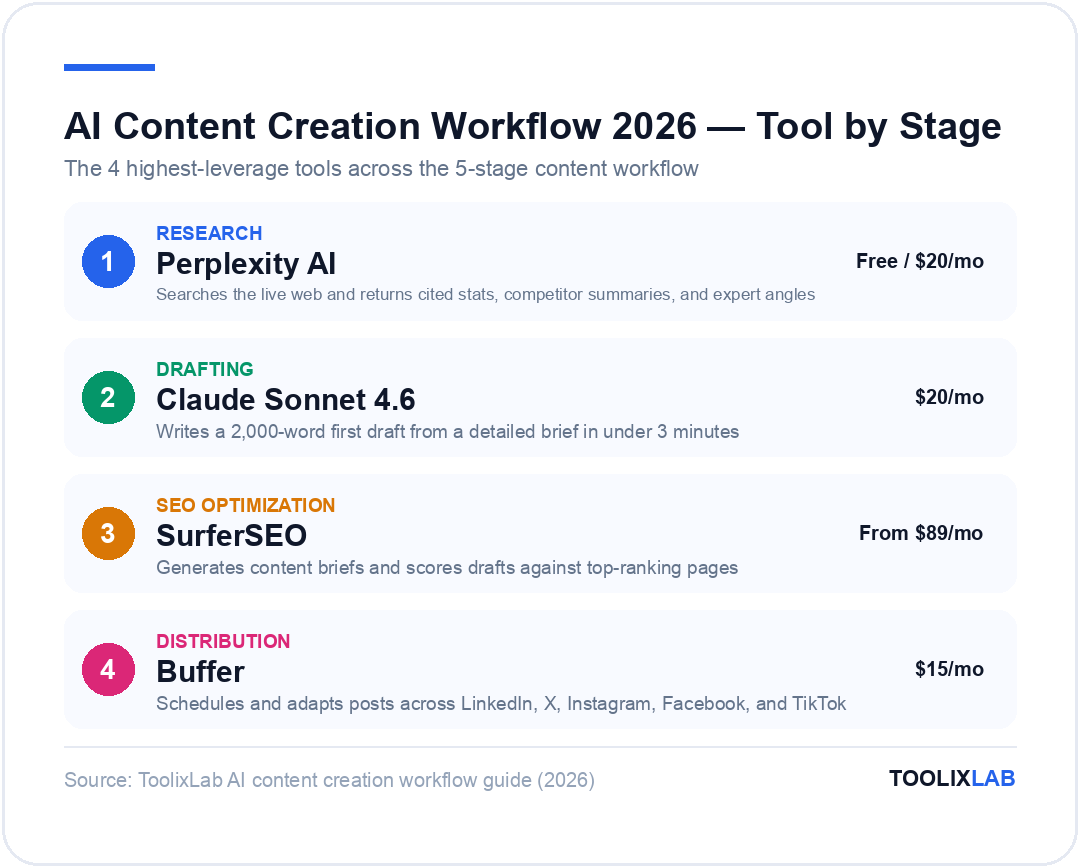
- Best for research: Perplexity AI + Claude
- Best for drafting: Claude Sonnet 4.6 / ChatGPT (GPT-5.4)
- Best for SEO optimization: SurferSEO + Clearscope
- Best for editing: Grammarly Business
- Best for distribution: Buffer + Zapier
- Best for visuals: Midjourney + Canva AI
- Workflow automation: Zapier or Make
- Time saved: 60–75% vs manual process
The average content team in 2026 produces 3× more content than in 2023 — with the same headcount. That's not because people are working harder. It's because they've built AI content creation workflows that handle the grunt work while humans focus on strategy, judgment, and creativity.
But here's what most guides get wrong: they treat "use AI for content" as if dropping ChatGPT into your process is a workflow. It's not. A workflow is a repeatable system with defined stages, the right tools at each stage, and clear handoff points between AI and human judgment.
This guide gives you exactly that — a complete, stage-by-stage AI content creation workflow you can implement this week, whether you're a solo creator or a content team of 20. We cover the best tools for each stage, how to connect them, what to automate, and the critical mistakes that produce generic, low-quality AI content.
🔗 Related reading: See our guide to How to Build an AI Workflow for the broader automation picture, and Best AI Writing Tools for Content Creators for deep tool reviews.
What Is an AI Content Creation Workflow?
An AI content creation workflow is a structured, repeatable process that uses AI tools at specific stages of content production — from ideation to publishing — to reduce manual effort, increase output volume, and maintain consistent quality.
A true workflow is different from ad-hoc AI use. Here's the distinction:
| Ad-Hoc AI Use | AI Content Workflow |
|---|---|
| Open ChatGPT, paste a prompt, copy output | Defined stages with specific tools at each step |
| Different process every time | Repeatable system you can delegate or automate |
| Inconsistent quality and tone | Consistent brand voice and editorial standards |
| Hard to scale beyond yourself | Scales linearly — add people or budget |
| No clear human checkpoints | Explicit human review at every quality gate |
The goal isn't to remove humans from content. It's to remove humans from the low-value, repetitive parts of content — research compilation, first drafts, formatting, scheduling — so they can focus on the high-value parts: strategy, original insight, relationships, and final editorial judgment.
The 5-Stage AI Content Creation Workflow
A complete content workflow has five stages. AI tools can accelerate all five, but in different ways — and the mistake most teams make is throwing the same tool (usually ChatGPT) at every stage, when specialized tools exist for each one.
Research & Ideation
Find topics, validate demand, research competitors, gather facts and data. AI reduces this from hours to minutes.
Brief & Outline
Create a content brief with target keywords, structure, talking points, and internal link opportunities. AI generates this in minutes; humans refine it.
Drafting
Write the first draft. AI writes it fast; humans inject original experience, data, quotes, and personality before the piece is usable.
Editing & Optimization
Polish grammar, optimize for SEO, check readability, add images. AI tools handle the technical; humans make the creative calls.
Publishing & Distribution
Schedule, publish, repurpose across channels (social, email, video). Automation tools eliminate repetitive distribution tasks entirely.
Stage 1: Research & Ideation — The Best AI Tools
Research is where most content workflows lose time. Writers spend hours reading competitor posts, compiling data, and brainstorming angles. AI compresses this dramatically.
Perplexity AI — Best for Real-Time Research
Perplexity searches the real-time web and returns synthesized answers with source citations. For content research, this is faster and more trustworthy than asking a training-data-only model. Use it to get current stats, competitor summaries, and expert perspectives — all cited, all verifiable.
Research workflow with Perplexity:
- Ask: "What are the latest statistics on [topic] in 2026?" → get cited data for your article
- Ask: "What are the top 5 articles ranking for [keyword]? Summarize each." → competitor gap analysis
- Ask: "What questions do people ask about [topic] on Reddit and Quora?" → FAQ and angle discovery
🔗 See our full Perplexity AI review for a deep dive into its research capabilities.
Claude — Best for Topic Brainstorming and Angle Ideation
Claude (by Anthropic) excels at generative ideation tasks where you want varied, creative angles rather than factual lookup. Give Claude your target audience, content pillars, and 3 published articles, and it will generate 20+ distinct topic angles with rationale for each.
Claude ideation prompt:
// Ideation prompt
You are a content strategist for [brand], targeting [audience]. Our content pillars are: [list pillars]. We've already published: [list 3-5 recent titles]. Generate 15 unique article ideas we haven't covered, each with a working title, target keyword, and a one-sentence hook that explains why a reader would click this over a generic article.
Google Trends + ChatGPT — Validation Pair
Google Trends tells you what's rising in search volume. ChatGPT helps you interpret the trend and identify the content angle. Use them in sequence: check Trends first, then ask ChatGPT to explain the trend and suggest content angles before investing in a piece nobody searches for.
Stage 2: Brief & Outline — The High-Leverage Step Most Teams Skip
The brief is the most underrated step in AI content creation. Teams that skip to drafting get generic output. Teams that invest 15–20 minutes in a solid brief get AI drafts that need 30% less editing.
A strong AI content brief includes:
- Primary keyword + 3–5 secondary keywords
- Target reader persona (job title, pain point, sophistication level)
- H2 structure (the outline)
- Talking points per section (specific facts, angles, examples to include)
- Internal links to include (specific URLs)
- Tone and voice notes (conversational, authoritative, data-driven)
- What NOT to include (things competitors say that are wrong/overdone)
Using SurferSEO for Brief Generation
SurferSEO analyzes the top 10–20 ranking pages for your target keyword and generates an SEO-optimized content brief automatically. It tells you: recommended word count, headings to include, semantic keywords to use, and questions to answer. This turns an hour of SERP research into a 5-minute brief review.
SurferSEO's Content Editor gives you a real-time content score as you write (or paste AI output), highlighting which semantic terms you're missing. Its brief generation saves 45–60 minutes per article for SEO-focused teams.
Claude or ChatGPT for Outline Generation
Once you have your brief, use Claude or ChatGPT to generate the full H2/H3 outline with talking points per section. This is the prompt that does the heavy lifting:
// Outline generation prompt
Create a detailed article outline for the following brief. Format it as H2s with 3-5 H3 bullet points under each. For each bullet point, note one specific fact, example, or angle to include — not generic advice.
Brief:
- Target keyword: [keyword]
- Reader: [persona]
- Word count: [target]
- Key talking points: [list]
- Must include sections: [list any required sections]
- Tone: [conversational/authoritative/etc]
Stage 3: Drafting — Getting AI to Write Like a Human Expert

This is where most people start, which is why most AI content feels generic. The draft is only as good as everything that came before it — research, brief, outline. With proper setup, Claude or ChatGPT (GPT-5.4) can write a solid 2,000-word draft in under 3 minutes.
Choosing the Right Drafting Tool
| Tool | Best For | Weakness | Price |
|---|---|---|---|
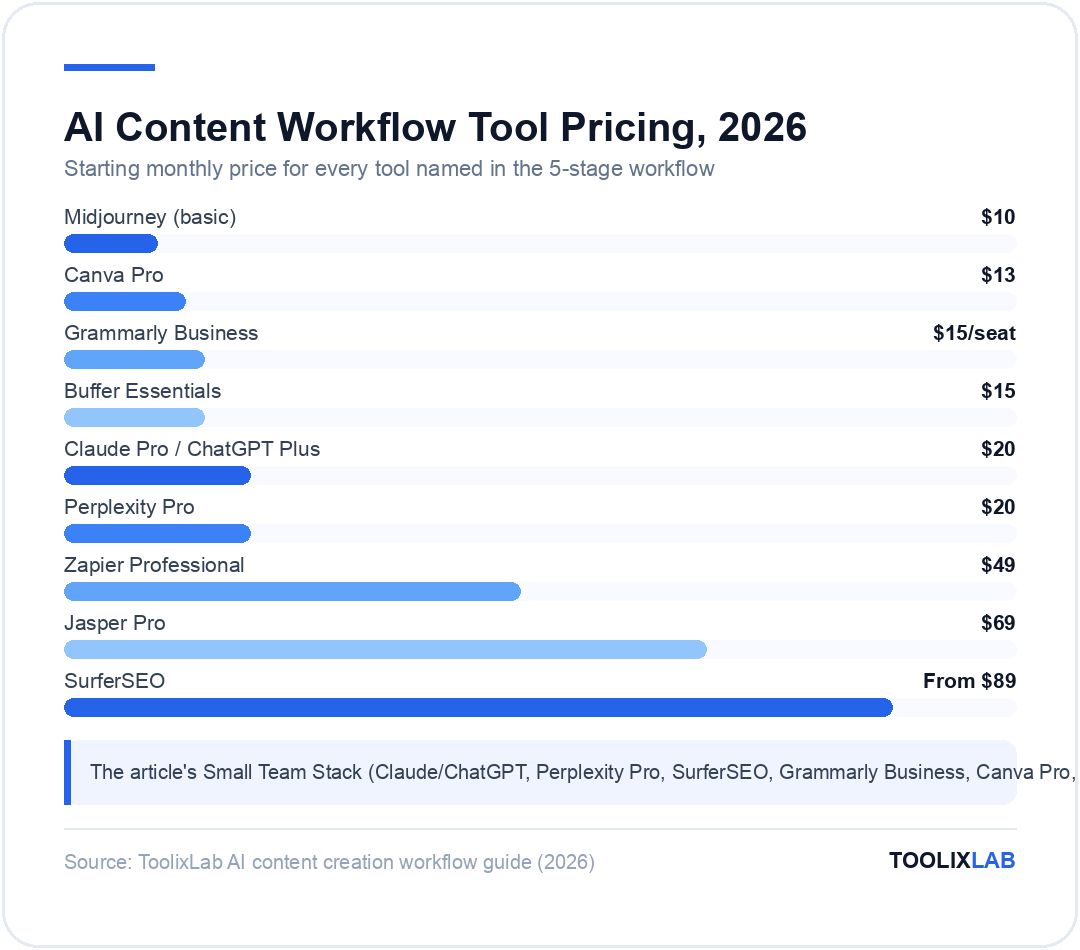
| Claude Sonnet 4.6 | Long-form, nuanced content; minimal hallucination | Slightly cautious tone | $20/month |
| ChatGPT (GPT-5.4) | Versatile; strong at following style guides | Can be more verbose | $20/month |
| Jasper AI | Marketing copy; brand voice training; team use | Expensive for solo creators | From $69/month |
| Google Gemini 2.5 Pro | Very long context; document-based drafting | Less distinctive voice | Free / $20/month |
| Copy.ai | Short-form content; social posts; email copy | Weak on long-form articles | Free / $49/month |
The Master Drafting Prompt
The quality of your AI draft depends entirely on your system prompt. Here's a battle-tested drafting prompt for long-form content:
// Master drafting prompt (paste into Claude or ChatGPT)
You are a senior content writer for [Brand], a [description]. Write in a [tone] voice — [2-3 specific voice characteristics, e.g., "direct and data-driven, never fluffy, uses specific examples over generalizations"].
Write a full-length article following this outline exactly. For each section:
- Use the specific talking points provided
- Include concrete examples, data, or tool names — never generic advice
- Vary sentence length for readability (mix short punchy sentences with longer ones)
- Do not start sections with "In this section" or similar filler phrases
- Do not use the word "delve" or "navigate" or "tapestry"
[PASTE FULL OUTLINE HERE]
Target length: [word count]. Write the full draft now.
⚠️ Critical: Never publish an AI draft as-is. The draft needs a human to inject: original experience, proprietary data, specific customer stories, authentic opinions, and fact-checking. The AI draft is a starting point, not a finished piece.
What to Add After the AI Draft
Before the editing stage, a human must add:
- Original statistics or proprietary data your brand has collected
- First-person experience — "We tested this for 30 days and found..."
- Direct quotes from real customers, experts, or your team
- Contrarian opinions — the AI will hedge; you make the strong claim
- Specific examples from real companies or real results
- Internal links to your published content (AI doesn't know your site)
Stage 4: Editing & Optimization — Making It Publish-Ready
Editing AI content requires a different mindset than editing human writing. Human editors remove bad writing. With AI, you're removing generic writing and injecting specificity. The tools that help most are different from traditional editing tools.
Grammarly Business — Grammar and Clarity
Grammarly's AI flags grammar issues, but more importantly its tone detection tells you when sections are too passive, too formal, or inconsistent with your brand voice. The Business plan adds brand voice guidelines so the entire team writes in the same voice.
Grammarly Business is the standard for professional content teams. Its Style Guide feature lets you define banned words, required terminology, and tone — ensuring AI-generated content doesn't use phrases like "leverage" or "utilize" if your brand voice forbids them.
Hemingway Editor — Readability
Paste your AI draft into Hemingway Editor (free web app) and it highlights sentences that are too long, passive voice, and adverb overuse — all common AI writing patterns. Aim for Grade 8 or below for general audiences, Grade 10–11 for technical content.
SurferSEO Content Editor — SEO Scoring
Paste your draft into SurferSEO's Content Editor and get a real-time SEO score with specific term recommendations. It shows which semantically-related keywords your draft is missing and how many times to use them. This is the difference between content that ranks and content that doesn't.
AI Image Generation — Visuals at Scale
Every article needs a featured image and supporting visuals. AI image generation means you never need stock photos again:
- Midjourney — best quality for editorial, conceptual, and hero images. $10/month for basic. Use Discord or the web app.
- DALL-E 3 — included in ChatGPT Plus. Best for quick illustrations and diagrams. Great for conceptual visuals.
- Adobe Firefly — commercially safe (trained on licensed content). Best choice for brands with IP concerns. Included in Adobe Creative Cloud.
- Canva AI — best for teams who need social graphics, thumbnails, and feature images fast. Drag-and-drop interface with AI generation built in.
Stage 5: Publishing & Distribution — Automate the Repetitive
Publishing is where most creators leave ROI on the table. They spend hours manually posting to social media, writing email teasers, repurposing blog content for LinkedIn and Twitter — tasks that are 90% automatable with the right tools.
Content Repurposing with AI
One long-form article can become 10+ pieces of content with minimal effort:
LinkedIn post
Prompt Claude: "Turn this article into a 200-word LinkedIn post with a hook, 3 key insights, and a CTA."
Twitter/X thread
Prompt: "Convert this article into a 10-tweet thread. Tweet 1 = hook. Tweets 2-9 = one insight each. Tweet 10 = CTA."
Email newsletter
Prompt: "Write a 150-word email newsletter teaser for this article. Include the top insight, why it matters now, and a link CTA."
Video script
Prompt: "Rewrite this article as a 5-minute YouTube video script. Use a conversational tone and include scene notes for B-roll."
Short-form video captions
Prompt: "Write 5 TikTok/Reels caption variants for this article, each starting with a different hook style."
Buffer — Best for Scheduling and Distribution
Buffer lets you schedule content across LinkedIn, Twitter/X, Instagram, Facebook, TikTok, and YouTube from one dashboard. The AI assistant helps adapt your post copy for each platform's native style automatically. At $15/month for the Essentials plan, it pays for itself in saved scheduling time within days.
Zapier — Automating the Hand-offs
Zapier is the glue between your content tools. Common content workflow automations:
- New blog post published → auto-tweet + LinkedIn post (using Zapier + Buffer)
- New article drafted in Notion → auto-brief generated via OpenAI
- Form submission → add to content calendar in Airtable
- Published post → notify team in Slack → add to email newsletter queue
🔗 See our detailed Zapier vs Make vs n8n comparison to choose the right automation tool for your content workflow.
AI Content Workflows for Different Content Types
The 5-stage workflow above applies to all content, but each content type has specific AI optimizations worth knowing.
Blog Posts & Long-Form Articles
Best stack: Perplexity (research) → SurferSEO (brief) → Claude (draft) → Grammarly (edit) → Midjourney (images) → Buffer (distribute)
Time with workflow: 2–4 hours for a 2,500-word article (vs. 8–12 hours without AI)
The key for blog posts: never skip the brief step, always add original data or personal experience to the draft, and run the SurferSEO score before publishing.
Social Media Content
Best stack: ChatGPT or Claude (variations) → Canva AI (visuals) → Buffer (scheduling)
Social media is where batch creation shines. Write one article, generate 30 days of social posts from it in one session, schedule everything in Buffer. One hour of work → a month of social content.
Prompt for batch social: "This article covers [topic]. Generate 20 social post variations: 5 for LinkedIn (professional, data-focused), 5 for Twitter/X (punchy, hook-first), 5 for Instagram captions (visual storytelling), and 5 for Facebook (conversational). Each must be distinct — different angle, different hook."
Email Newsletters
Best stack: Claude (drafting) → Grammarly (editing) → Mailchimp/Beehiiv (sending)
AI is exceptional at generating multiple subject line options (critical for open rates). Always generate 10 subject line variants, A/B test 2–3, and let your audience data guide future choices.
Video Scripts
Best stack: ChatGPT (script) → Descript (editing with AI) → ElevenLabs (AI voiceover, if needed)
AI video scripts need more human editing than written content — the rhythm needs to sound natural when spoken. Read every AI script aloud before recording. Descript's AI can also transcribe your video and suggest edits based on filler words and pacing.
Building Your AI Content Tech Stack
Here's how to build a practical AI content stack at different budget levels:
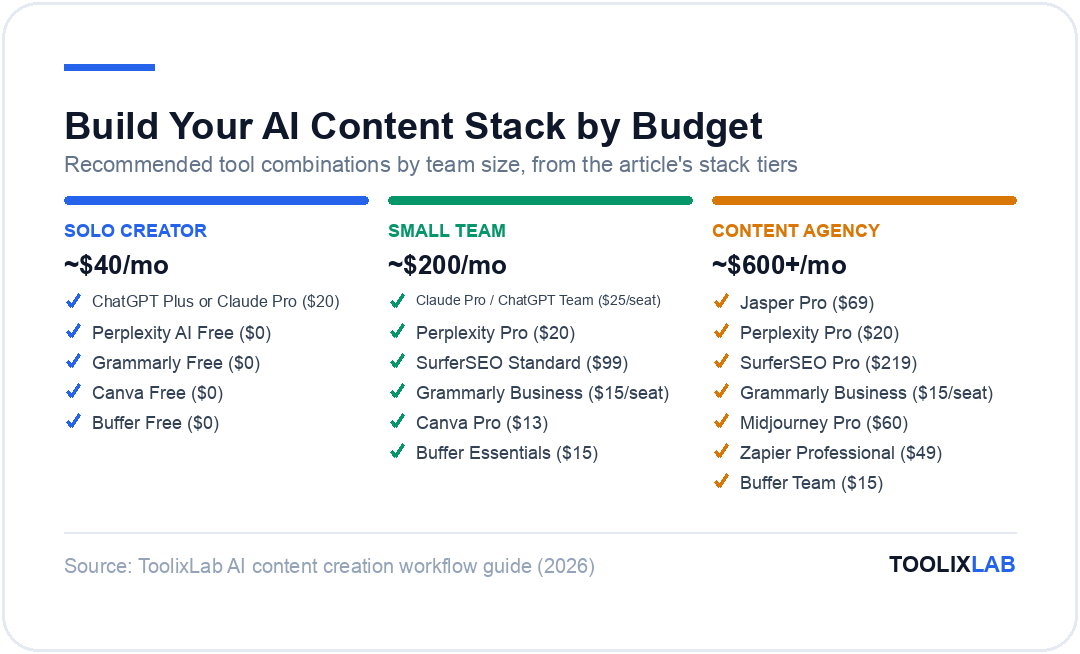
Solo Creator Stack (~$40/month)
- ChatGPT Plus or Claude Pro — $20/month (research + drafting)
- Perplexity AI Free — $0 (supplemental research)
- Grammarly Free — $0 (editing)
- Canva Free — $0 (visuals)
- Buffer Free — $0 (up to 3 channels, 10 scheduled posts)
- Hemingway Editor — free web app (readability)
Small Team Stack (~$200/month)
- Claude Pro or ChatGPT Team — $25/seat (drafting)
- Perplexity Pro — $20/month (research)
- SurferSEO Standard — $99/month (brief + SEO scoring)
- Grammarly Business — $15/seat (editing + brand voice)
- Canva Pro — $13/month (visuals)
- Buffer Essentials — $15/month (scheduling)
Content Agency Stack (~$600+/month)
- Jasper Pro — $69/month (brand voice training, multi-user workflows)
- Perplexity Pro — $20/month (research)
- SurferSEO Pro — $219/month (200 docs/month)
- Grammarly Business — $15/seat (editing)
- Midjourney Pro — $60/month (editorial images)
- Zapier Professional — $49/month (automation)
- Buffer Team — $15/month (multi-channel scheduling)
5 Common AI Content Workflow Mistakes (And How to Fix Them)
❌ Mistake 1: Publishing without a human editing pass
Fix: Every AI draft must have at least one human read-through before publishing. Not for grammar — for accuracy, tone, and the injection of original insight. Set this as a non-negotiable step in your workflow SOP.
❌ Mistake 2: No fact-checking step
Fix: AI confidently states outdated statistics and sometimes invents data entirely. Build a fact-check step into Stage 4: verify every specific number, study citation, and named statistic before publishing. Perplexity AI helps here — paste the claim, ask it to verify with current sources.
❌ Mistake 3: Using generic prompts
Fix: "Write a blog post about AI tools" produces generic garbage. Specific prompts with persona, outline, voice guidelines, and length targets produce usable drafts. Invest in building a prompt library your team reuses. See our best ChatGPT prompt libraries for resources.
❌ Mistake 4: Skipping the brief
Fix: The brief is the most valuable 20 minutes in the entire workflow. It determines whether your AI draft is 60% usable or 90% usable. Never skip it to save time — you'll spend that time (and more) fixing a bad draft.
❌ Mistake 5: One tool for everything
Fix: ChatGPT is not the best tool for research (Perplexity is), or SEO briefing (SurferSEO is), or image generation (Midjourney is), or scheduling (Buffer is). Use specialized tools at each stage. Yes, it's more tools — but it's meaningfully better output at each stage.
Measuring Your AI Content Workflow's ROI
You need to measure your workflow's performance to improve it. Track these KPIs:
| KPI | What It Tells You | Target |
|---|---|---|
| Time per article | Workflow efficiency | <4 hours for 2,500 words |
| Articles per month | Output volume | 3–5× your pre-AI baseline |
| Organic traffic per article (90 days) | Content quality + SEO | Compare to pre-AI articles |
| Editing time as % of drafting | Prompt quality | <40% (if higher, improve your prompts) |
| Content cost per article | Efficiency vs freelance | Compare to previous cost |
Most teams implementing a structured AI workflow report: 60–70% reduction in time-per-article, 2–4× increase in monthly content volume, and roughly equivalent or slightly improved SEO performance (because more content + consistent quality = more indexed pages and ranking opportunities).
🔗 Next steps: See our guide on Best AI Tools for Marketing in 2026 to extend this workflow into the broader marketing function. Or explore How to Build an AI Workflow for automation beyond content.
Frequently Asked Questions
How long does it take to build an AI content creation workflow?
You can have a basic AI content workflow running in a single afternoon. Start with one tool at each of the five stages (e.g., Perplexity for research, Claude for drafting, Grammarly for editing, Canva for images, Buffer for scheduling). It takes 2–4 weeks of using this workflow consistently before it becomes second nature and before you've optimized your prompts for your specific voice and topics.
Will Google penalize AI-generated content?
Google's official position is that it rewards high-quality, helpful content regardless of whether AI was involved in its creation. What it penalizes is low-quality, thin, or manipulative content — which happens to be what you get when you publish AI drafts without human editing. The safeguard is the same as it's always been: produce content that genuinely helps your reader. A well-edited AI draft with original insights, accurate data, and genuine expertise will rank. Unedited AI slop won't.
What is the best free AI content creation tool?
The best free stack: ChatGPT Free (drafting, limited), Perplexity Free (research), Grammarly Free (editing), Hemingway Editor (readability), Canva Free (visuals), Buffer Free (scheduling). This free stack covers all five workflow stages and is genuinely capable — you'll just hit usage limits faster and lack some advanced features. Upgrade Claude or ChatGPT to paid first ($20/month) as it has the highest workflow leverage.
How many AI tools do I actually need for content creation?
You can run an effective AI content workflow with 3–4 tools: one AI writing model (Claude or ChatGPT), one SEO tool (SurferSEO or even just Google Search Console + Ahrefs free), one editing tool (Grammarly), and one scheduler (Buffer). You don't need 15 tools. Start minimal, add tools only when you hit a clear bottleneck in a specific stage.
Can I use AI to repurpose my old content?
Absolutely — and this is one of the highest-ROI AI content use cases. Give Claude or ChatGPT your old blog post and ask it to: update all statistics to 2026, rewrite the introduction with a stronger hook, generate a LinkedIn post from the key takeaways, and write a Twitter thread of the top 5 insights. One hour of AI-assisted updating can revive a piece that's been losing traffic for years.
How do I keep AI content from sounding generic?
The three most effective techniques: (1) Train the AI on your voice — paste 3–5 examples of your best writing and ask it to match the style. (2) Add specificity to your prompts — never ask for "tips," ask for "the 5 most underrated tactics that most articles about this topic miss." (3) Inject human experience after the draft — add a first-person anecdote, a real customer example, or a contrarian opinion that AI wouldn't generate. Specificity and original experience are the antidotes to generic AI content.