
TL;DR — Surfer SEO Review 2026
Surfer SEO is the leading on-page optimization platform in 2026. The Content Editor is best-in-class. But at $99–$182/mo (annual), it's priced for teams, not solo bloggers — and the AI writing features are still catching up to dedicated tools.
Bottom line: If organic traffic is a primary revenue channel for your business, Surfer SEO's Content Editor alone justifies the Standard plan. If you're a solo blogger publishing fewer than 4 articles per month, the Discovery plan or a cheaper alternative (Frase, NeuronWriter) will serve you just as well.
Surfer SEO has become the default tool that serious content teams reach for when they want to rank. The Content Editor has a near-cult following among SEO professionals, and for good reason — it's the most precise real-time NLP optimization tool available for content writers.
But Surfer has also raised prices, rebranded plans, and added AI features that haven't fully delivered on their promise. In 2026, with a Discovery plan starting at $49/month and the recommended Pro plan at $182/month, the "is it worth it?" question is more pointed than ever.
This review is based on hands-on use across the Standard and Pro plans, including the Content Editor, SERP Analyzer, Topical Map, Keyword Research tool, and Surfy AI. I tested Surfer against Frase, Clearscope, and MarketMuse across 12 different content categories. Here's what I found.

What Is Surfer SEO? (Quick Overview)
Surfer SEO is a cloud-based on-page SEO optimization platform. Its core function is telling you exactly what to write to have the best statistical chance of ranking for a given keyword — based on NLP analysis of the top-ranking pages in Google's SERPs.
Surfer launched in 2017 and has grown into one of the most widely used SEO content tools globally, with over 150,000 companies using the platform. Its customer base spans individual bloggers, freelance SEO writers, in-house content teams, digital marketing agencies, and enterprise SEO operations.
The platform has four main components:
- Content Editor — Real-time NLP scoring and keyword recommendations while you write
- SERP Analyzer — Deep structural analysis of the top 20+ ranking pages for any keyword
- Audit — On-page optimization analysis for existing published pages
- Keyword Research / Topical Map — Keyword clustering and content gap analysis
- Surfy — Surfer's built-in AI writing assistant
- AI Tracker (Beta) — Brand presence monitoring across AI platforms (Google AI, Gemini, ChatGPT, Perplexity)
Surfer's key insight — and the reason it outperforms generic writing advice — is that its recommendations are derived from what's already ranking for your specific keyword in your specific SERP. It's not prescribing universal rules. It's reverse-engineering what the top pages for your exact query have in common, then quantifying those patterns into actionable writing guidance.
That specificity is what separates Surfer from a general-purpose AI writing tool. An AI writing tool can draft content. Surfer tells you whether that content has the statistical characteristics to rank.
Surfer SEO Pricing 2026: Plans & Value Breakdown
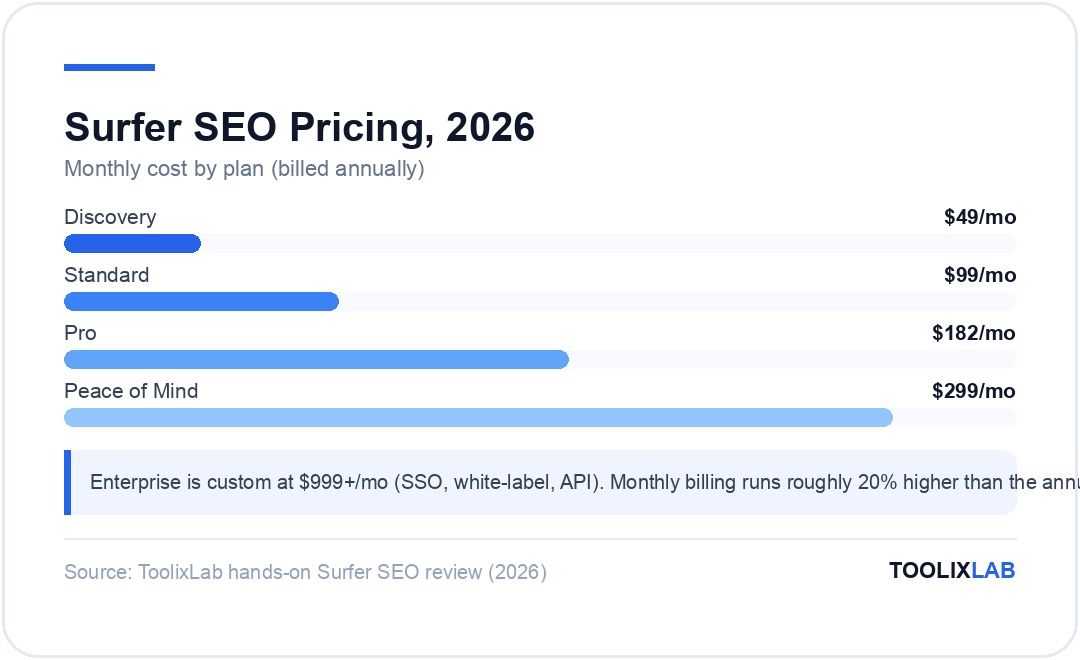
Surfer's plans were rebranded in 2025–2026. The old Essential/Scale/Scale AI naming is gone. Current plans (verified April 2026 against the official Surfer pricing page):
| Plan | Monthly | Annual | Documents | Best For |
|---|---|---|---|---|
| Discovery | ~$59/mo | $49/mo | 120 docs | Solo bloggers, testing the platform |
| Standard | ~$119/mo | $99/mo | 360 docs | Freelancers, small agencies |
| Pro ⭐ | ~$219/mo | $182/mo | 360 docs | Content teams, agencies with multiple clients |
| Peace of Mind | ~$359/mo | $299/mo | Unlimited | Agencies, unlimited publishing volume |
| Enterprise | $999+/mo (custom) — SSO, white-label, API, dedicated success manager | |||
The key differentiator between Standard and Pro is not the document count (both are 360) but AI credits and brand workspaces. Pro gives you daily-refreshing AI prompt credits (Standard refreshes weekly), and 5 brand workspaces vs. 1. For agencies juggling multiple clients with different brand voices and topical strategies, Pro's workspace structure matters. For a single-brand content team, Standard is typically sufficient.
Discovery at $49/mo is a meaningful price point — this is Surfer's nod to solo operators and smaller blogs. But 120 documents per month still includes your SERP analyses, audits, and keyword research queries, not just Content Editor documents. Heavy users of the full platform can burn through 120 documents faster than expected.
The honest pricing verdict: Surfer is not cheap. At $99–$182/mo, it's priced for businesses where content drives revenue. The question isn't whether Surfer is expensive — it is — but whether organic traffic returns justify the cost. For most content-led businesses, a single article that ranks #1 for a 2,000-search/month keyword generates more than $99/month in measurable value.
Core Feature Deep Dive: The Content Editor
The Content Editor is the centerpiece of Surfer SEO and the reason most users subscribe. Here's how it works: you enter your target keyword, Surfer analyzes the top 20 SERP results, and the editor presents a set of NLP-based content guidelines — recommended word count, keyword usage targets, heading structures, and NLP terms to include — in real time as you write.
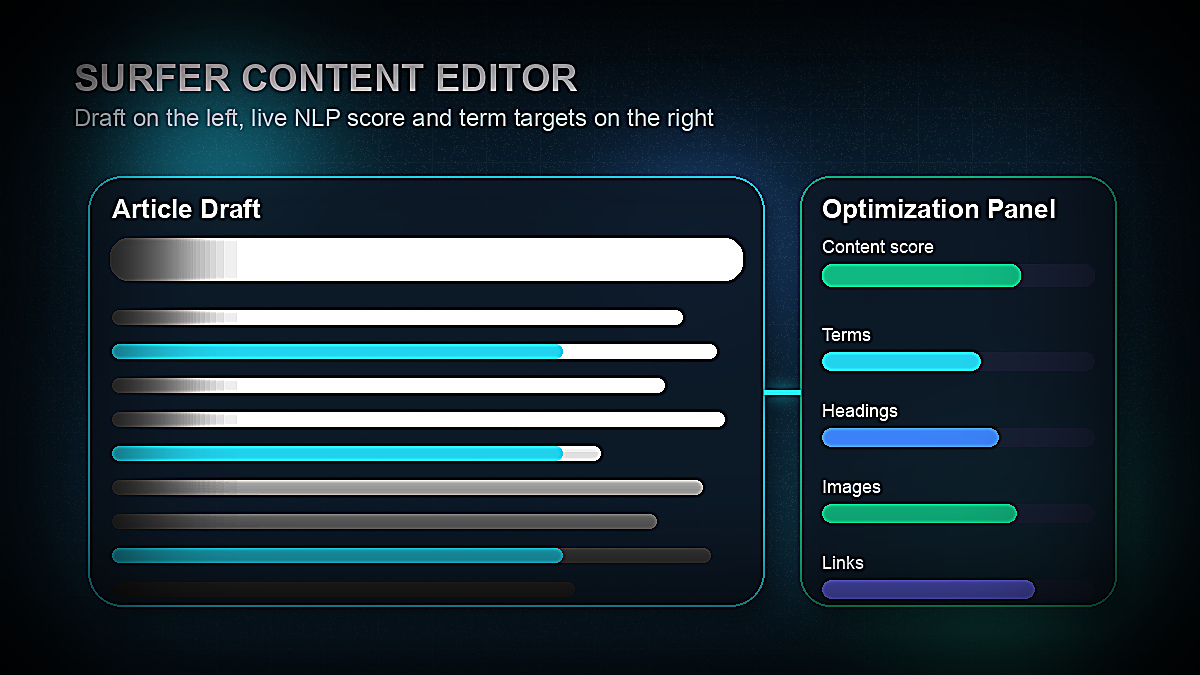
The interface is clean and writer-friendly. On the left is a standard document editor (similar to Google Docs). On the right is the guidelines panel: a content score from 0–100, keyword frequency targets (shown as progress bars), a term list organized by priority, and structural recommendations including heading count and image count.
What makes it genuinely useful:
- NLP term recommendations are precise. Surfer doesn't just tell you to include "coffee" in a coffee article. It identifies semantically related terms that high-ranking pages use — "brewing temperature," "extraction ratio," "grind size" — that signal topical authority to Google's NLP systems.
- Real-time scoring is motivating. Watching your content score climb as you hit term targets creates a game-like feedback loop. Writers report finishing articles faster because the score gives them a clear definition of "done."
- Competitor structure is visible inline. You can browse the top-ranking pages' outlines directly in the editor, which surfaces H2 patterns you may have missed in your own outline.
- The guidelines update as you change keyword variants. If you discover mid-draft that you want to target a slightly different keyword, Surfer's guidelines update in near real-time.
Where the Content Editor falls short:
- Keyword stuffing risk for inexperienced writers. Chasing a 90+ content score can lead writers to force keyword terms into sentences where they don't read naturally. Surfer's score rewards frequency — it doesn't evaluate whether the usage is contextually appropriate. The score is a starting point, not the final arbiter of quality.
- It doesn't replace your editorial judgment. Surfer tells you what terms to include and at what frequency. It doesn't tell you which angle to take, what your unique insight is, or whether your argument is coherent. Writers who lean too heavily on the score produce hollow, technically optimized but intellectually thin content.
- SERP volatility isn't reflected in real time. The guidelines are generated from a SERP snapshot. If Google shuffles rankings significantly between when you generate guidelines and when you publish, some recommendations become less relevant.
Despite these limitations, the Content Editor remains the most sophisticated and practically useful real-time on-page optimization tool available. No competitor in 2026 matches its term-level specificity and editorial integration. If the Content Editor alone is your use case, Surfer is worth the subscription.
SERP Analyzer: Understanding What Actually Ranks
The SERP Analyzer is Surfer's research layer underneath the Content Editor. While the Content Editor gives you writing guidelines derived from the analysis, the SERP Analyzer lets you drill into the data directly.
Enter a keyword and Surfer returns a detailed breakdown of the top 20+ ranking pages, including:
- Word count distribution across all ranking pages (with a histogram showing the range)
- Exact keyword densities and NLP term frequencies
- Heading count and structure patterns
- Number of images, paragraphs, and lists
- Page speed and backlink data (pulled from integrated tools)
- Domain Authority distribution across SERP positions
The SERP Analyzer is most useful for two scenarios. First, planning a new article where you want to understand the competitive landscape before investing time in production. Second, diagnosing why a published page isn't ranking — if your page has 1,200 words and the top three results have 3,800+ words each, the content gap is immediately visible.
One notable SERP Analyzer feature is the "True Density" chart, which visualizes exactly how often the most important terms appear relative to total word count. This is more precise than raw frequency counts and helps you calibrate term usage without mechanical repetition.
The SERP Analyzer's limitation is that it's a structural and textual analysis tool — it doesn't tell you about intent matching, user satisfaction signals, or topical depth beyond term frequency. Pages rank for complex reasons. Surfer captures a significant slice of the on-page signal, not the full picture.
Surfer's AI Writing Feature: Surfy
Surfer's AI writing assistant, Surfy, is built directly into the Content Editor and can generate outlines, write sections, and produce full article drafts from within Surfer's interface. The advantage is clear: Surfy generates SEO-optimized content that is simultaneously informed by Surfer's SERP analysis, so it's aiming for topical coverage as it drafts.
In practice, Surfy's output quality is solid for factual, informational content categories — how-to guides, product category roundups, and definition-style content. The generated text hits keyword targets, uses appropriate H2 structures, and produces readable prose. For a first draft that an experienced editor will then refine, Surfy does the job.
However, Surfy lags behind dedicated AI writing tools in several important ways:
- Output depth and originality. Tools like Jasper (with specific knowledge integration) and Writesonic (with real-time web research) can produce more distinctive and well-sourced content. Surfy generates competent but often generic drafts that require significant human editing to add perspective and authority.
- Credit limits. Surfy usage is governed by AI credits. Standard plan users get a weekly credit refresh; Pro users get daily. Heavy AI users will find these limits constraining during high-volume publishing periods.
- No real-time web research. Surfy's knowledge is static — it cannot pull current data, recent news, or live pricing information. For time-sensitive content categories, this is a meaningful limitation.
The most effective workflow is to use Surfer for structural guidance (Content Editor guidelines, SERP analysis, topical map) and a dedicated writing tool like Jasper or Writesonic for actual drafting — then optimize the draft inside Surfer's Content Editor. Jasper and Writesonic both have native Surfer SEO integrations that make this hybrid workflow seamless.
Keyword Research and Topical Map: Planning Your Content Cluster
Beyond individual article optimization, Surfer has developed meaningful content planning capabilities through its Keyword Research tool and Topical Map feature.
Keyword Research in Surfer clusters related keywords together based on topical similarity and SERP overlap, showing you which terms can be targeted in a single piece of content vs. which warrant their own articles. This clustering logic prevents keyword cannibalization and helps you plan content architecture efficiently. Search volume, keyword difficulty, and SERP data are all surfaced within the same interface, reducing the need to cross-reference with separate keyword research tools.
That said, Surfer's keyword data lacks the depth of dedicated research platforms. For comprehensive keyword gap analysis, search intent classification, or competitor organic traffic analysis, you'll still reach for a dedicated SEO tool like Semrush or Ahrefs. Surfer's keyword research is best used as a content planning supplement, not a primary keyword research tool.
Topical Maps are Surfer's answer to the topical authority model of SEO. Enter a seed topic and Surfer generates a suggested cluster of 10–50+ articles covering the topic comprehensively. Each cluster is organized around pillar content and supporting articles. The Topical Map helps you build the content coverage that Google associates with topical authority — which is increasingly important as Google's Helpful Content System rewards sites that comprehensively cover a subject area.
Topical Maps are one of Surfer's most strategically valuable features. Knowing which articles to write in what order is often a harder problem than knowing how to optimize any individual article. Surfer's Topical Map provides a research-backed answer to both. Combine this with the keyword research and internal linking guidance, and Surfer becomes a genuine content strategy tool rather than just an optimization tool.
For a deeper dive into SEO content strategies beyond optimization tools, see our guide to the best AI prompts for SEO content writing.
Surfer Integrations: Fitting Into Your Stack
Surfer's integrations are a significant part of its value proposition for teams who don't want to copy-paste content between tools.
Google Docs integration is Surfer's most-used integration and one of its best features. Install the Surfer Chrome extension, open any Google Doc, and the Content Editor guidelines panel appears as a sidebar — identical to the in-app experience. Writers who live in Google Docs can now use Surfer without ever opening a new tab. For teams with established Google Workspace workflows, this is frictionless.
WordPress integration allows you to publish directly from Surfer's Content Editor to WordPress, skipping the copy-paste step entirely. The integration handles basic formatting and images.
Jasper integration is one of Surfer's marquee partnerships. Jasper users can open Surfer's Content Editor guidelines directly within Jasper's interface — meaning you can use Jasper's superior AI drafting while simultaneously hitting Surfer's NLP targets. If you're already paying for Jasper, this integration makes Surfer's cost easier to justify.
Writesonic integration works similarly — Writesonic's Article Writer has a native Surfer SEO connection that lets you import guidelines directly into Writesonic's editor, combining web-research-backed drafting with Surfer's optimization framework.
Contentful and other CMS integrations are available on Pro and above, making Surfer viable for engineering-heavy content operations using headless CMS platforms.
The integration ecosystem reflects where Surfer has positioned itself: not as a standalone content creation platform, but as the optimization layer in a broader content production stack. If your stack already includes Jasper, Writesonic, or a similar AI writing tool, Surfer adds surgical SEO precision that those tools alone can't provide.
Surfer SEO vs. Competitors: How It Stacks Up
Surfer operates in a competitive market. The main alternatives in 2026 are Clearscope, MarketMuse, Frase, and NeuronWriter. Here's how they compare on the factors that matter most:
| Tool | Starting Price | Content Editor | Topical Planning | AI Writing | Best For |
|---|---|---|---|---|---|
| Surfer SEO | $49/mo | ⭐⭐⭐⭐⭐ | ⭐⭐⭐⭐ | ⭐⭐⭐ | Teams optimizing at scale |
| Clearscope | $189/mo | ⭐⭐⭐⭐⭐ | ⭐⭐ | ⭐⭐ | Enterprise editorial teams |
| MarketMuse | $149/mo | ⭐⭐⭐⭐ | ⭐⭐⭐⭐⭐ | ⭐⭐⭐ | Content strategy & gap analysis |
| Frase | $45/mo | ⭐⭐⭐ | ⭐⭐⭐ | ⭐⭐⭐⭐ | Budget-conscious content teams |
| NeuronWriter | $23/mo | ⭐⭐⭐ | ⭐⭐ | ⭐⭐⭐ | Solo bloggers on a tight budget |
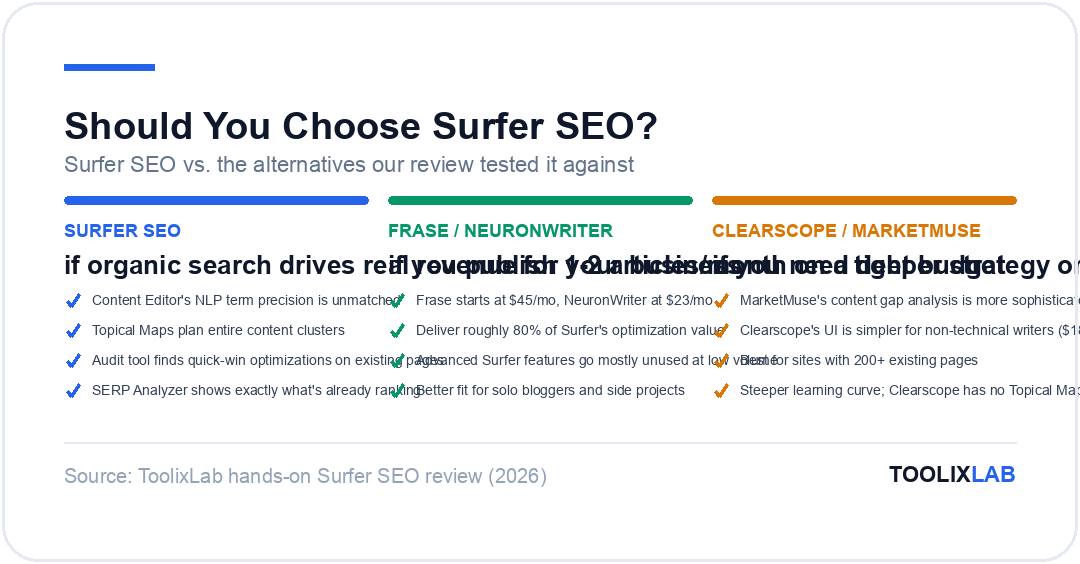
Surfer vs. Clearscope: Both excel at Content Editor quality. Clearscope's recommendations are cleaner and the UI is marginally simpler, making it preferred in large enterprise editorial teams where writers have varying technical SEO knowledge. But Clearscope starts at $189/mo with no Topical Map and limited keyword research. Surfer wins on breadth and price at comparable quality levels.
Surfer vs. MarketMuse: MarketMuse beats Surfer on topical planning depth — its content gap analysis and first-draft automation features are more sophisticated. But MarketMuse at $149/mo has a notoriously steep learning curve and delivers maximum value at scale (sites with 200+ existing pages). For content teams in growth mode producing 15–30 new articles per month, Surfer's combination of real-time optimization and Topical Map is often more practically actionable.
Surfer vs. Frase: Frase is the value-play alternative. At $45/mo, it includes a decent Content Editor, SERP research, and AI writing features. For individual freelancers, solo creators, or small blogs where budget is the primary constraint, Frase is an entirely defensible choice. Surfer's Content Editor quality, NLP precision, and integration depth are meaningfully better — but those advantages matter most at scale. Publishing 2 articles/month? Frase is fine. Publishing 20 articles/month where rank improvements have measurable revenue impact? Surfer's accuracy advantage compounds.
AI Tracker Beta: Surfer Moves into Answer Engine Optimization
One of Surfer's newest features in 2026 is the AI Tracker beta — a brand presence monitoring tool that tracks whether and how your brand and content appear in AI-generated answers from Google AI Overviews, Gemini, ChatGPT, and Perplexity.
This represents Surfer's bet on Answer Engine Optimization (AEO) as the next frontier after traditional SEO. As AI-generated answers increasingly intercept search traffic before users click through to a website, knowing when your brand is cited (or not cited) in AI responses becomes strategically valuable.
The AI Tracker is still in beta as of April 2026, and the feature set is developing. But the directional signal is right: platforms that help content teams optimize for AI citation will have a significant advantage as the search landscape continues to fragment between traditional blue-link results and AI-generated summaries. Surfer is early to this space, which is worth noting if you're evaluating a long-term platform investment.
If AI-generated search is a concern for your content strategy, see our coverage of the full SEO toolstack built for 2026's AI-dominated search landscape.
Surfer SEO Audit Tool: Optimizing Existing Content
The Audit tool is Surfer's answer to the question "why isn't this page ranking?" — and it's one of the platform's most underutilized features. Enter the URL of any published page and the keyword you want it to rank for, and Surfer runs the same NLP analysis as the Content Editor but applied to your existing content.
The Audit delivers:
- A content score for your current page vs. the top-ranking pages
- Missing NLP terms that high-ranking pages include but yours doesn't
- Structural gaps — sections or headings your page lacks that competitors have
- Internal linking suggestions from other pages on your site to the audited URL
- Page speed and Core Web Vitals data (via Google PageSpeed integration)
Content audits are often one of the highest-ROI SEO activities — optimizing an existing page that already has some ranking history is frequently faster and cheaper than publishing a new article. Surfer's Audit tool systematizes what was previously a manual SERP analysis process, reducing a 2-hour optimization research task to 20 minutes.
For content teams managing 100+ published pages, the Audit tool alone can justify a Surfer subscription by surfacing pages where a 30-minute optimization session could meaningfully improve ranking and traffic. Pair Audit data with a systematic content refresh schedule, and the compounding returns can be substantial. This aligns well with the broader AI content creation workflow approach many teams use in 2026.
Real Results: What Happens to Content Scores and Rankings?
The million-dollar question about any SEO tool is whether it actually moves rankings. Surfer's content score optimization is a means to an end — the end being a higher-ranking page that drives more organic traffic.
The evidence across the SEO community is consistently positive, with important nuances:
Pages with content scores below 50 almost universally underperform their potential. When Surfer-optimized content raises a page score from 40 to 70+, rankings typically improve within 2–6 weeks — though the timeline depends heavily on domain authority, backlink profile, and competition level.
Pages going from score 70 to 90+ see diminishing ranking returns. The score is not a ranking guarantee. Scoring 95 doesn't beat a lower-scored page with significantly better backlinks or a more authoritative domain. The content score optimizes the on-page signal, which is one of multiple ranking factors.
New content with Surfer optimization from day one ranks faster. Multiple agency case studies report that Surfer-optimized content reaches first-page rankings in 60–90 days for moderate-competition keywords, compared to 4–6 months for equivalent content published without optimization. The accelerated indexing and ranking reflects Google's ability to recognize topically comprehensive content earlier in its evaluation window.
E-E-A-T signals still matter beyond the score. Surfer optimizes for content structure and term coverage — it doesn't help you build author credibility, acquire backlinks, or establish domain authority. For competitive queries where E-E-A-T (Experience, Expertise, Authoritativeness, Trustworthiness) is a primary ranking signal, Surfer is necessary but not sufficient.
Who Should Use Surfer SEO? (And Who Shouldn't)
After extensive testing, here's a clear-eyed breakdown of who Surfer SEO is genuinely worth it for — and where it's overkill or underfit.
Surfer is worth it for:
- Content marketing agencies managing multiple client SEO programs. The multi-workspace structure, team collaboration features, and volume of document credits (360/mo on Standard) match agency production demands. Surfer's consistency across writers — everyone targeting the same score for the same keyword — is operationally valuable for agencies.
- In-house content teams at growth-stage companies where organic traffic is a primary acquisition channel. If a blog ranking page 3 for a 5,000-search/month keyword costs you $50K/year in lost traffic value, spending $1,200/year on Surfer Standard is an obvious investment.
- Freelance SEO writers who bill clients and want to differentiate. Writers who produce Surfer-optimized content can charge meaningfully more per article and win client retainers more easily. The tool pays for itself quickly for writers billing $150+/article.
- Sites with 50+ existing pages that haven't been systematically optimized. The Audit tool can surface quick wins on existing content that generate ranking improvements with minimal new content investment.
Surfer may be overkill for:
- Solo bloggers publishing 1–2 articles per month as a side project. At that publishing cadence, Frase or NeuronWriter deliver 80% of Surfer's optimization value at 30–50% of the cost. The advanced features you're paying for in Surfer go mostly unused.
- Businesses in low-competition niches with high domain authority. If you're ranking well already and competition is thin, the precision of Surfer's optimization layer produces marginal returns. Basic on-page practices are sufficient.
- Content teams focused on social, paid, or newsletter channels. Surfer is an organic search tool. If your acquisition model doesn't depend on Google rankings, the investment isn't relevant.
- Writers producing primarily opinion, editorial, or personality-driven content. Content that ranks based on brand, voice, and unique perspective (journalism, thought leadership, personal essays) isn't optimized well by NLP term-frequency analysis. Surfer is built for informational and commercial-intent content.
Getting Started with Surfer: Learning Curve and Onboarding
Surfer has improved its onboarding significantly, but there's still a meaningful learning curve for users unfamiliar with NLP-based SEO. First-time users often make two mistakes: chasing a 90+ content score mechanically (producing keyword-stuffed drafts) and generating guidelines before they've defined their content angle (leading to misaligned structure).
The correct workflow for new Surfer users:
- Run the SERP Analyzer first for your target keyword. Understand the competitive landscape before opening the Content Editor.
- Generate a Topical Map or keyword cluster to confirm you're targeting the right keyword before spending a document credit on the Content Editor.
- Create your outline based on competitive heading patterns visible in the SERP Analyzer and your own editorial judgment — not just Surfer's auto-generated outline.
- Open the Content Editor with your outline in place. Write first, optimize second. Hit term targets as you draft, but prioritize readable prose over score maximization in the first pass.
- After your first draft is complete, review the Content Editor score and add missing high-priority terms contextually in a revision pass.
- Use the Audit tool on previously published pages to find optimization opportunities while you build new content.
Surfer's onboarding academy and YouTube channel are genuinely good resources. Budget 3–5 hours of learning time before expecting professional-level outputs from the tool. The investment in understanding the workflow pays back in consistently better-scoring, faster-to-rank content.
Pairing Surfer with a clear AI prompt library for SEO tasks — brief writing, title testing, FAQ generation — significantly accelerates the content production workflow.
Surfer SEO in 2026: What's New and What's Next
Surfer has continued to evolve meaningfully in 2025–2026. Beyond the plan renaming and AI Tracker beta, the platform added:
- Improved internal linking suggestions — Surfer now analyzes your existing published content and recommends specific internal links to add to new articles, strengthening topical cluster architecture automatically.
- Surfy model improvements — The underlying AI for Surfy has been updated, producing more cohesive long-form drafts than earlier versions. Still not Jasper or Writesonic quality for narrative content, but meaningfully better for structured informational articles.
- Content Ideas feature — Available on Pro and above, this surfaces trending topic opportunities within your topical clusters based on rising search demand signals.
- Expanded integration library — New CMS and workflow integrations continue to expand, reflecting Surfer's strategy of embedding into existing production stacks rather than competing with them.
The roadmap signals Surfer is doubling down on its position as the optimization intelligence layer — the tool that makes whatever AI content production platform you're using produce better-ranking output. As AI writing tools proliferate, Surfer's value proposition sharpens: anyone can produce AI-generated content in 2026, but not everyone knows how to make it rank. Surfer's brand promise is that optimization expertise gap.
Final Verdict: Is Surfer SEO Worth the Price in 2026?
After years of competing tools claiming to replicate Surfer's results at lower cost, Surfer's Content Editor remains the standard against which others are measured. No competitor in 2026 has closed the gap in NLP term precision, real-time scoring feedback, or integration breadth.
The price point question breaks down clearly by use case:
If organic search drives meaningful revenue for your business: Yes, Surfer SEO is worth the price. The Standard plan at $99/mo (annual) is priced below what a single ranking improvement on a competitive keyword typically returns. The ROI math is favorable for almost any business where content-driven search is a core acquisition channel.
If you're a freelance SEO writer: Surfer SEO is worth it — likely at the Standard plan. One premium client retainer secured partly because you deliver Surfer-optimized content covers the annual subscription cost. The tool differentiates your service and justifies higher rates.
If you're a solo blogger or hobbyist publishing occasionally: The Discovery plan at $49/mo may be worth testing, but Frase or NeuronWriter deliver competitive optimization quality at lower cost. Surfer's advanced features are mostly overkill at low publishing volumes.
If you're evaluating Surfer specifically for AI writing: Look elsewhere first. Jasper, Writesonic, and Copy.ai are purpose-built writing tools with stronger AI drafting capabilities. Surfer's AI (Surfy) is best used as a complement to your primary writing tool, not as a replacement.
Surfer SEO earns a strong recommendation for content marketing professionals and teams. It's the most precisely calibrated SEO optimization tool available, and its growing platform — Topical Maps, AI Tracker, internal linking automation — makes it increasingly valuable beyond the Content Editor alone. For the right user profile, $99–$182/month is not an expense. It's a competitive advantage.
🔬 How We Reviewed This Tool
This review is based on hands-on use, not a feature-list rewrite. Our process:
- Real workflows: we used the tool on genuine work tasks over an extended period and compared its output directly against its closest competitors.
- Verified claims: pricing, plan limits, and feature availability were checked against the vendor's official pages at the time of writing.
- Documented downsides: we report where the tool failed or frustrated us, not just where it shone — check the cons and "skip if" sections.
- Kept current: this review is re-verified on our refresh cycle; the "Last updated" date reflects the most recent check.
ToolixLab is reader-supported: some links may earn us a commission, which never affects our verdicts.