
TL;DR — Best AI Tools for Architects & Designers 2026
The architecture and design industry is undergoing its most significant transformation since CAD replaced drafting boards. In 2026, AI is no longer a curiosity reserved for tech-forward studios — it is actively reshaping how buildings get conceived, rendered, analyzed, documented, and sold.
The shift is measurable. A 2025 survey by the American Institute of Architects found that 61% of architecture firms now use AI tools in at least one phase of the design process, up from just 19% in 2023. Rendering times that used to take overnight now take minutes. Hundreds of feasibility studies that used to require a junior team working all week now run in an afternoon. Client presentations that required expensive physical models now use photorealistic AI-generated visualizations that clients can explore in real time.
But the tools are not equal, and the landscape changes fast. This guide covers the 12 best AI tools for architects and designers in 2026 — tested and evaluated across concept design, visualization, floor planning, structural optimization, interior design, and business workflows. Each tool review includes honest pricing, the specific workflow it fits, and which firm sizes benefit most.
Why AI Is Transforming Architecture & Design in 2026
Architecture has always been a profession defined by iteration. A design moves through schematic design, design development, construction documents, bidding, and construction administration — each phase generating dozens of revised drawings, specifications, reports, and client communications. Historically, that iteration was bottlenecked by the time it takes skilled humans to manually produce each variation.
AI tools attack that bottleneck from multiple angles:
Generative design tools like Autodesk Forma and Finch3D can explore thousands of spatial configurations in the time it takes a human to explore five. They optimize across multiple constraints simultaneously — daylight access, structural efficiency, program requirements, zoning envelopes — generating options that human designers would never have time to produce manually.
AI rendering tools like Veras have collapsed the cost of photorealistic visualization. What previously required a dedicated visualization specialist, licensed rendering software, and overnight computation can now happen in minutes from within the architect's native BIM environment. This democratizes high-quality presentation materials for smaller firms and solo practitioners who couldn't previously afford specialized renderers.
AI-assisted documentation tools (including well-prompted ChatGPT or Claude) can draft specifications, write project narratives, generate RFI responses, and produce meeting minutes from notes — reducing the administrative burden that eats into design time.
The net effect: firms that adopt AI are completing more design iterations, producing higher-quality presentations, and winning more proposals — at the same or lower staffing cost. Firms that don't are finding it increasingly difficult to compete on turnaround times and presentation quality.
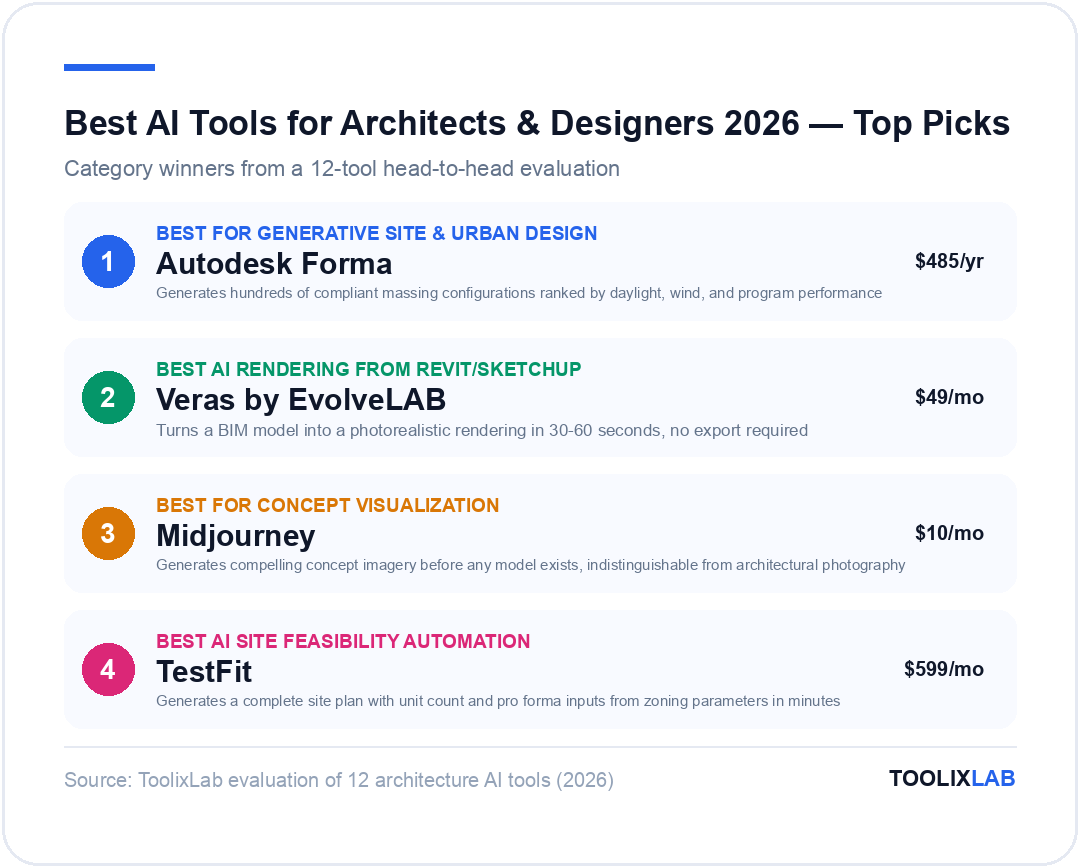
1. Autodesk Forma — Best for Generative Site & Urban Design
Best for: Urban designers, large-scale residential developers, planning consultants
Pricing: Included with AEC Collection ($3,115/year) or standalone Forma subscription from $485/year
Platform: Web-based; integrates with Revit, AutoCAD
Autodesk Forma (formerly Spacemaker) is the most fully realized AI platform for early-stage architectural and urban design in 2026. It operates as a cloud-based design environment where teams can rapidly test massing options, site configurations, and urban layouts while the AI simultaneously runs environmental analysis — daylight, solar access, wind comfort, noise levels, and green area ratios — on every iteration.
The workflow that makes Forma transformative is its generative massing capability. Upload a site boundary and program requirements (residential units, commercial square footage, parking), set zoning constraints, and Forma generates hundreds of compliant massing configurations ranked by performance metrics. You explore a solution space rather than designing a single option. Teams report that this process surfaces configurations they would never have considered manually — often finding solutions that outperform their initial instincts on multiple metrics simultaneously.
Standout features:
- Real-time environmental analysis: Every design change immediately updates solar, daylight, and wind calculations. No waiting for analysis to run — it's live feedback as you design.
- Multi-criteria optimization: Forma evaluates massing options across daylight, viewsheds, green area requirements, and program compliance simultaneously.
- Revit integration: Export winning massing options directly into Revit for design development without remodeling.
- Collaborative cloud environment: Multiple designers can work in the same Forma project simultaneously, seeing each other's changes in real time.
Limitations: Forma is most powerful at the early-concept and massing stage. It doesn't replace detailed BIM authoring in Revit or ArchiCAD. It's also enterprise-priced — meaningful for firms doing multiple large-scale projects but harder to justify for smaller residential practices. Solo architects and small firms will find better ROI in more accessible tools.
Verdict: The most powerful AI design tool in the industry for early-stage massing and site analysis. If your firm works on multifamily, mixed-use, or urban design projects at any scale, Forma will change how you approach the schematic design phase.
2. Veras by EvolveLAB — Best AI Rendering from Your Existing BIM Model
Best for: Revit users, SketchUp users, firms wanting to eliminate the rendering bottleneck
Pricing: From $49/month per seat; Pro at $99/month
Platform: Revit plugin, SketchUp plugin, Rhino plugin
Veras solves one of the most persistent pain points in architectural practice: the gap between a working BIM model and a client-ready visualization. Traditional rendering workflows require exporting geometry, setting up lighting and materials in a dedicated rendering engine (Lumion, V-Ray, Enscape), and waiting for render times that can range from minutes to hours. This makes it expensive to produce visualizations during the design process — visualizations typically happen at milestone presentations, not iteratively.
Veras collapses this workflow. Install the plugin in Revit or SketchUp, set a camera view, choose a visual style (photorealistic exterior, interior, watercolor, sketch, night scene, and dozens more), and generate a photorealistic rendering in 30–60 seconds. The AI uses your existing model geometry as the structural framework and generates surrounding context, materials, landscaping, sky, and atmospheric effects around it.
The practical impact: Architects using Veras report producing 10–20x more renderings per project than before, because the marginal cost of generating a new view dropped from 30 minutes to 60 seconds. This means renderings can now happen at every client meeting, every design review, and every internal discussion — not just at formal milestone presentations.
Standout features:
- Runs directly in your BIM environment: No export, no context switching. Generate a rendering without leaving Revit.
- Style library: 100+ visual styles including photorealistic, sketch, watercolor, Bauhaus, brutalist, and more. Match your presentation aesthetic to the project character.
- Seed image control: Lock elements of a rendering (the building massing) while varying others (the surroundings, time of day, season) to show design options without re-rendering from scratch.
- Team management: Studio accounts allow multiple architects to share styles and rendering credits across a firm.
Limitations: Veras generates suggestive visualizations, not technically accurate construction renderings. Material accuracy and exact lighting conditions are AI-generated approximations, not physically simulated. For final client presentations requiring precise material specification, traditional rendering engines still have the advantage. Veras is unbeatable for design exploration and early presentations — not for final deliverables where exact material representation matters.
Verdict: The highest-ROI AI tool for working architects in 2026. If you use Revit or SketchUp, Veras will immediately change your client presentation workflow. The free trial is worth testing on any current project.
3. Midjourney — Best for Concept Visualization & Mood Boards
Best for: All architects and designers; concept phase and client presentations
Pricing: Basic $10/month, Standard $30/month, Pro $60/month
Platform: Web app (midjourney.com)
Midjourney remains the gold standard for architectural concept visualization in 2026. While newer tools like Veras have taken over the rendering-from-model workflow, Midjourney excels at a different and equally important task: generating compelling design imagery at the earliest stages of a project, before any model exists.
Architects use Midjourney to rapidly explore design directions during initial conceptual work. A prompt describing the building program, desired aesthetic, site context, and precedent references can generate dozens of concept images in minutes — images that communicate design intent to clients more effectively than any verbal description or rough sketch. Early client conversations shift from abstract discussions to reactions to concrete visual proposals.
The quality ceiling for architectural imagery in Midjourney v7 is exceptional. With a well-constructed prompt, Midjourney produces images that are indistinguishable from professional architectural photography or high-end hand renderings. Interior designers use it extensively for mood boards, material studies, and spatial concepts that guide the design direction before any detailed work begins.
Effective architecture prompts for Midjourney:
Scandinavian minimal mountain retreat, timber and glass, snow-dusted pine forest, late afternoon golden light, exterior, architectural photography, Dezeen editorial quality --ar 16:9Open-plan loft interior, exposed concrete, industrial steel windows, warm evening light from west-facing glazing, residential, photorealistic interior rendering --ar 3:2Urban mixed-use tower, ground floor retail activation, public plaza, people, contemporary European street context, dusk, architectural visualization --ar 16:9
For a deeper dive into getting the most from Midjourney for architectural work, see our guide on how to use Midjourney in 2026. For a comparison of image generation tools across architectural use cases, our Midjourney vs DALL-E vs Firefly comparison covers the tradeoffs in depth.
Limitations: Midjourney generates suggestive imagery, not technically accurate architectural drawings. It has no 3D model behind the image — you can't adjust the building geometry or rotate the view. It's a visualization tool for communication and exploration, not a design tool in the technical sense.
Verdict: Essential for every architect's toolkit. The low monthly cost and the speed at which it generates concept imagery make it one of the highest-value AI subscriptions available. Every architectural practice, regardless of size, should have at least one Midjourney license.
4. TestFit — Best AI Site Planning & Feasibility Automation
Best for: Multifamily developers, residential site planners, feasibility consultants
Pricing: From $599/month per seat; enterprise pricing available
Platform: Desktop application (Windows), integrates with AutoCAD and Revit
TestFit is purpose-built for one of the most time-consuming tasks in residential and multifamily development: site feasibility analysis and unit count optimization. The question "how many units can we put on this site while meeting parking, setback, height, and FAR requirements?" used to require days of manual layout work. TestFit answers it in minutes.
Import a site boundary with zoning parameters and program inputs (target unit mix, parking ratio, building type — podium, tuck-under, garden apartment, townhouse), and TestFit's AI generates a complete site plan with unit layouts, parking, amenity spaces, and circulation — instantly calculating unit count, gross square footage, efficiency ratios, and pro forma inputs. Developers use it to evaluate dozens of sites or program scenarios in the time it used to take to study one.
The business case is direct: Developers acquiring land need rapid feasibility answers before committing to purchase. TestFit gives development teams and their architects the ability to evaluate site potential in hours rather than weeks, reducing the cost of due diligence and enabling faster decision-making in competitive acquisition markets.
Standout features:
- Parametric massing: Adjust unit mix, parking ratio, building setbacks, and floor plate size with sliders and watch the site plan update instantly.
- Pro forma integration: TestFit outputs directly populate financial models in Excel — revenue projections, construction cost estimates, and return metrics update as you adjust the design.
- Building type library: Pre-configured building types for every residential product type (Type I podium, Type III wrap, Type V tuck-under, etc.) with realistic structural bays and unit depth assumptions.
- Revit/AutoCAD export: Export the AI-generated site plan directly into your design software to begin design development.
Limitations: TestFit is expensive for its narrow use case and is primarily relevant to firms doing multifamily or commercial development feasibility. Residential design firms, interior designers, and architects working in commercial interiors will find limited application. The learning curve for setting up custom building types is also significant.
Verdict: An exceptional specialist tool for multifamily and mixed-use development. If your firm does development feasibility work, TestFit pays for itself in reduced analysis time on the first or second project.
5. Maket.ai — Best AI Floor Plan Generator
Best for: Residential architects, home designers, real estate developers
Pricing: Free (5 renders/month), Pro $29/month, Business $99/month
Platform: Web-based
Maket.ai addresses one of the most common early-design challenges in residential architecture: generating multiple floor plan options quickly for client review. Input room types, desired square footage, number of floors, and architectural style preferences, and Maket generates multiple floor plan configurations within seconds. Each plan includes room labeling, dimension guidelines, and can be exported in formats suitable for further development in CAD tools.
The tool is particularly useful in two scenarios. First, for initial client consultations, where being able to show three or four preliminary layout options in the meeting — rather than waiting two weeks to produce them manually — dramatically accelerates the design conversation. Second, for feasibility studies on new residential developments, where quickly testing how many different unit types and configurations can fit within a given footprint provides essential early input.
Standout features:
- Style variants: Generate floor plans in open plan, traditional, contemporary, minimalist, or custom configurations from the same brief.
- 3D visualization: Automatically generates a basic 3D view of any floor plan for client communication.
- Room relationship control: Specify adjacency requirements (master suite away from street, kitchen adjacent to dining, home office near entrance) and the AI respects them.
- Export: Download floor plans as PNG, SVG, or DXF for import into AutoCAD or Revit.
Limitations: Maket.ai generates planning-level floor plans, not construction-document-ready drawings. The output is a starting point for design development, not a deliverable. Structural, mechanical, and code compliance elements are not addressed by the AI. For custom residential work, a skilled architect still needs to take the AI-generated plan and develop it into a buildable design.
Verdict: Excellent value, especially at the free or Pro tier. Every residential architect should try it as a starting point for new project briefs — even if the final design diverges significantly from the AI output, having multiple spatial options to react to is a productive way to begin any design conversation.
6. Finch3D — Best Structural & Space Layout Optimization
Best for: Architects working on repetitive residential buildings (multifamily, hotels, student housing)
Pricing: From $200/month; contact for enterprise pricing
Platform: Revit plugin
Finch3D takes a different approach to AI-assisted design than most tools on this list. Rather than generating concept images or massing options, Finch3D focuses on a specific structural optimization problem: how to lay out a repetitive residential building — apartment units, hotel rooms, student housing suites — so that structural columns, load-bearing walls, and mechanical shafts align vertically across floors, minimizing structural cost and maximizing interior flexibility.
This problem is harder than it sounds. Architects working on multifamily buildings spend significant time manually coordinating structural grids across floors, trying to stack bathrooms and kitchens to minimize mechanical runs and ensure columns don't land in the middle of unit living spaces. Finch3D's AI automates this coordination, evaluating thousands of possible unit layout and structural grid combinations to find solutions that optimize for structural efficiency, program compliance, and apartment quality simultaneously.
Practical results: Firms using Finch3D report identifying structural optimization opportunities that reduce construction costs by 8–15% on mid-rise residential buildings. The tool is most valuable on projects with 50+ units where the structural coordination problem is complex enough to benefit from automated optimization.
Standout features:
- Automatic column stacking: AI ensures vertical structural alignment across all floors while maintaining design intent for each unit type.
- Unit variant generation: Creates multiple unit layout options (1-bed, 2-bed, accessible variants) that all share the same structural grid.
- Building code compliance: Checks generated layouts against ADA accessibility requirements and fire egress paths.
- Revit integration: Runs natively in Revit and outputs directly to a BIM-ready model.
Limitations: Highly specialized — primarily valuable for multifamily residential and hospitality. Limited application in commercial interiors, institutional design, or single-family residential work. The structural optimization focus also means it doesn't address design aesthetics, material choices, or client-facing visualization.
Verdict: A powerful specialist tool for firms with a multifamily or hospitality practice. If structural coordination across floors is a persistent time cost in your project workflow, Finch3D delivers clear ROI.
7. Interior AI — Best for Instant Interior Design Rendering
Best for: Interior designers, home stagers, real estate agents, residential architects
Pricing: Free (limited renders), Pro $29/month, Unlimited $99/month
Platform: Web-based (interiorai.com)
Interior AI has become the go-to tool for one specific but very common task: taking a photo of an empty or existing interior space and rendering it in a new design style. Upload a room photo, select a style (Scandinavian, Industrial, Japandi, Art Deco, Coastal, Contemporary, etc.) and Interior AI generates a photorealistic rendering of the space transformed to that aesthetic in under 30 seconds.
The primary use cases span several professional contexts. Interior designers use it to show clients what a proposed design direction would look like in their actual space before committing to purchases or construction. Real estate agents use it for vacant property staging — showing potential buyers what furnished and designed spaces could look like. Home builders use it for pre-sale visualization of model units in multiple design packages. Renovation contractors use it to show homeowners the before/after potential of proposed renovations.
Standout features:
- Style library: 35+ interior design styles, plus the ability to describe custom aesthetic directions.
- Room type recognition: AI correctly identifies room type (bedroom, kitchen, living room, bathroom) and applies design elements appropriate to that space.
- Preserve structure option: Keep existing architectural elements (window placement, floor type, ceiling height) while changing furnishings and finishes.
- Bulk generation: Generate multiple style variations of the same space simultaneously for client comparison.
Limitations: Interior AI generates mood-board-quality visualizations, not technically precise specifications. Furniture shown is AI-generated and doesn't correspond to actual purchasable products. The images are excellent for client direction-setting but cannot substitute for a detailed FF&E specification. Dimensions and spatial scale can also be distorted, particularly in complex room geometries.
Verdict: Extremely accessible and immediately useful. At $29/month, it's affordable for solo practitioners and small design firms. The ability to show any client what their actual space could look like in minutes is genuinely transformative for early client conversations.
8. Adobe Firefly — Best for Material Mood Boards & Presentations
Best for: Interior designers, commercial designers, anyone creating client presentations
Pricing: Included with Adobe Creative Cloud ($59.99/month); standalone Firefly free tier available
Platform: Web, Photoshop, Illustrator, InDesign integration
Adobe Firefly has become the preferred AI image generation tool for design professionals already embedded in the Adobe Creative Cloud ecosystem. For architects and interior designers, its most relevant capabilities are material and texture generation, background replacement in rendered images, and the generative fill feature in Photoshop that allows instant manipulation of existing architectural renders.
Where Midjourney excels at generating complete architectural concept images from scratch, Firefly excels at manipulating and enhancing existing design imagery. Need to show the same exterior rendering with four different cladding materials? Firefly's generative fill can replace the material region in a Photoshop file in seconds. Need to change the landscaping in a site rendering to show a summer vs. winter condition? Firefly handles it. Need to generate a seamless tile texture for a specific stone pattern? Firefly's texture generation produces production-ready tiling textures.
For a broader comparison of AI image generation tools including Firefly, DALL-E, and Midjourney, our guide to the best AI image generation tools in 2026 covers each tool's strengths in depth.
Standout features:
- Generative fill in Photoshop: Select any region of an architectural render and replace it with AI-generated content that matches the surrounding context.
- Commercial safety: All Firefly-generated content is trained on Adobe Stock and licensed content, making it safe for commercial client deliverables without IP concerns.
- Texture and material generation: Generate seamless textures for specific materials (wood grain, stone, fabric, concrete) at any resolution.
- Brand integration: Upload brand color palettes and style references to keep AI-generated content consistent with client brand guidelines.
Limitations: Firefly's output quality for complete architectural scene generation doesn't match Midjourney. It's significantly stronger as an editing and manipulation tool than as a from-scratch generation tool. If you're not already in the Adobe ecosystem, the subscription cost is harder to justify for Firefly alone.
Verdict: If you're already paying for Adobe Creative Cloud, Firefly is an immediate capability upgrade for presentation work and rendered image manipulation. For standalone AI generation of concept imagery, Midjourney remains the better choice.
9. ChatGPT & Claude — Best for Proposals, Specifications & Documentation
Best for: All architects; particularly solo practitioners and small firms
Pricing: ChatGPT Plus $20/month; Claude Pro $20/month
Platform: Web, API, mobile apps
No AI tools roundup for architecture professionals would be complete without addressing the general-purpose language models that have quietly become productivity multipliers across the administrative and written dimensions of architectural practice.
The documentation burden in architecture is enormous. Project narratives, design intent statements, specification sections, RFI responses, meeting minutes, client emails, contractor correspondence, grant applications, award submissions, and planning committee presentations all require clear, professional writing that takes significant time to produce. Architects who have integrated ChatGPT or Claude into this workflow report saving 5–10 hours per week on written deliverables.
Highest-value use cases for architects:
- Specification writing: Provide a product name and performance requirements, and AI generates draft specification language in CSI MasterFormat structure. Still requires architect review and technical validation, but starting from an AI draft rather than a blank page is dramatically faster.
- Design narratives: Describe the design concept, site context, program, and key moves — AI produces a polished narrative suitable for planning submissions, competition entries, or client presentations.
- RFI responses: Draft responses to contractor RFIs from your technical notes. AI structures and formalizes the language while you focus on the technical content.
- Client email drafting: Communicate complex technical information clearly to non-technical clients. AI can translate technical language into accessible explanations.
- Meeting minutes: Paste rough notes from a site meeting and AI structures them into professional minutes with action items and responsible parties.
For architects managing their own business development, AI tools are particularly valuable for proposal writing. Structure your firm's qualifications, project descriptions, and approach into reusable templates, then use AI to customize each proposal to a specific RFP in a fraction of the time manual customization requires. Firms report that AI-assisted proposal writing allows them to respond to more RFPs, increasing opportunities without proportionally increasing administrative time.
If you're a solo practitioner or managing a small firm, our guide to best AI tools for freelancers covers broader workflow integration strategies that apply directly to independent architecture practice. For business operations, our best AI tools for small businesses guide is also worth reviewing.
10. Canva AI & Presentation Tools — Best for Client-Ready Deliverables
Best for: All architects who create client presentations, marketing materials, or competition submissions
Pricing: Canva Free (limited AI features), Canva Pro $15/month
Platform: Web, desktop app, mobile
Client presentations are a persistent time cost in architectural practice. Building boards, presentation decks, competition submissions, and planning documents all require design layout work that falls outside the core competency of most architects — and outside the scope of BIM and CAD tools. Many architects spend hours in PowerPoint or InDesign producing materials that are technically accurate but visually unpolished.
Canva's AI-powered design tools have made professional-quality presentations accessible to non-designers. The Magic Design feature generates complete presentation templates from a text description and uploaded project images. The background removal tool instantly isolates building renderings from their backgrounds for clean collage compositions. The AI text generator helps write concise slide copy from longer design narratives. And the Magic Resize feature allows any design to be instantly reformatted for different output sizes — A0 exhibition board to letter-size handout without manual reformatting.
Particularly valuable workflow: Generate your architectural renderings and diagrams in your preferred tools, then bring them into Canva for final layout and presentation design. The combination of high-quality architectural visualization from BIM/AI rendering tools with Canva's accessible layout environment produces client-ready presentations faster than any other workflow for most small and mid-size firms.
11. Planner 5D — Best Accessible Tool for Residential Interior Layout
Best for: Residential designers, home renovators, small interior design practices
Pricing: Free (limited), Pro $7.99/month, Expert $14.99/month
Platform: Web, iOS, Android, Mac, Windows
Planner 5D occupies an accessible entry point in the AI-assisted interior design space, offering floor plan creation, furniture placement, and 3D visualization in a consumer-friendly interface that doesn't require CAD training. Its AI features include an automatic design suggestion engine that populates a floor plan with furniture, lighting, and decor based on room type, style preference, and budget range — providing instant furnished visualizations from a bare floor plan outline.
For smaller interior design practices, the tool serves as an efficient client communication platform. Clients can view and interact with 3D models of their space on any device, providing meaningful feedback on layout and furniture placement before finalization. The AI's automatic furnishing capability also provides a useful starting point for discussion — even when the final design diverges from the AI suggestions, having a furnished baseline accelerates the feedback conversation significantly.
Standout features:
- AI Interior Design feature: Generates a fully furnished and decorated room from a description of style, color palette, and room type.
- Product library: 5,000+ real furniture products from global brands, with accurate dimensions and pricing.
- HD rendering: Produces photorealistic renders directly in the platform without external rendering software.
- Client sharing: Share interactive 3D models with clients via link — no software installation required.
Verdict: At under $15/month, it's excellent value for residential interior designers needing a client-communication tool. Not suitable for complex commercial interior projects requiring precision dimensioning and technical specification.
How to Build an AI-Augmented Architecture Workflow in 2026
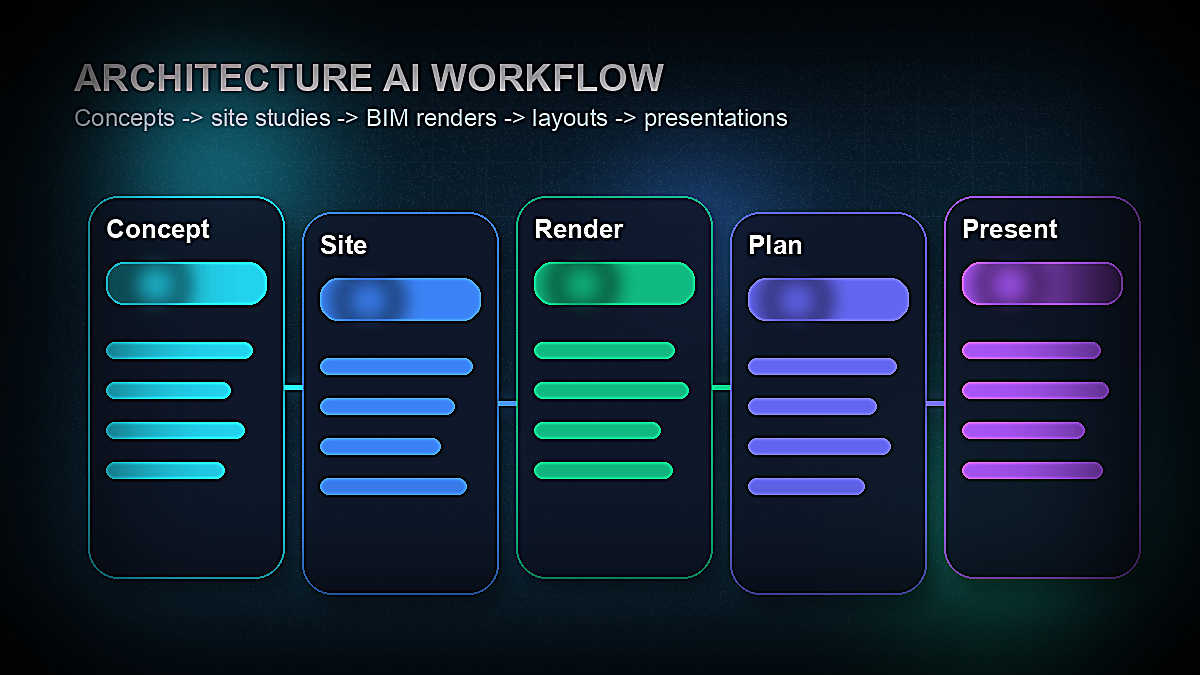
The most effective approach is not to replace your existing workflow with AI but to insert AI tools at specific high-leverage points where they compress time without compromising design quality. Here's how leading firms are structuring their AI-augmented practice:
Phase 1 — Pre-Design & Feasibility:
Use TestFit (multifamily) or Autodesk Forma (urban/mixed-use) for site feasibility analysis. Use Midjourney to explore aesthetic precedents and generate concept imagery for initial client alignment conversations. Use ChatGPT/Claude to draft the project brief, program summary, and early client communications.
Phase 2 — Schematic Design:
Use Maket.ai to rapidly generate floor plan options for residential projects. Use Autodesk Forma for generative massing exploration on larger projects. Use Veras to produce quick rendered views directly from early-stage Revit models for internal design reviews.
Phase 3 — Design Development:
Use Veras for ongoing rendering throughout design development — produce a new render for every meaningful design change to maintain a visual record of the design evolution. Use Adobe Firefly to manipulate rendered images for material studies. Use Interior AI for interior concept visualization before detailed FF&E work begins.
Phase 4 — Construction Documents & Contract Administration:
Use ChatGPT/Claude for specification drafting, RFI responses, and project communication. Use Canva AI for project close-out reports, lessons-learned documents, and project photography presentations.
Business Development (ongoing):
Use ChatGPT/Claude for proposal writing and RFP responses. Use Midjourney for portfolio imagery that illustrates design capability beyond completed projects. Use Canva AI for marketing materials, award submissions, and conference presentations.
AI Tools for Architects — Quick Comparison Table
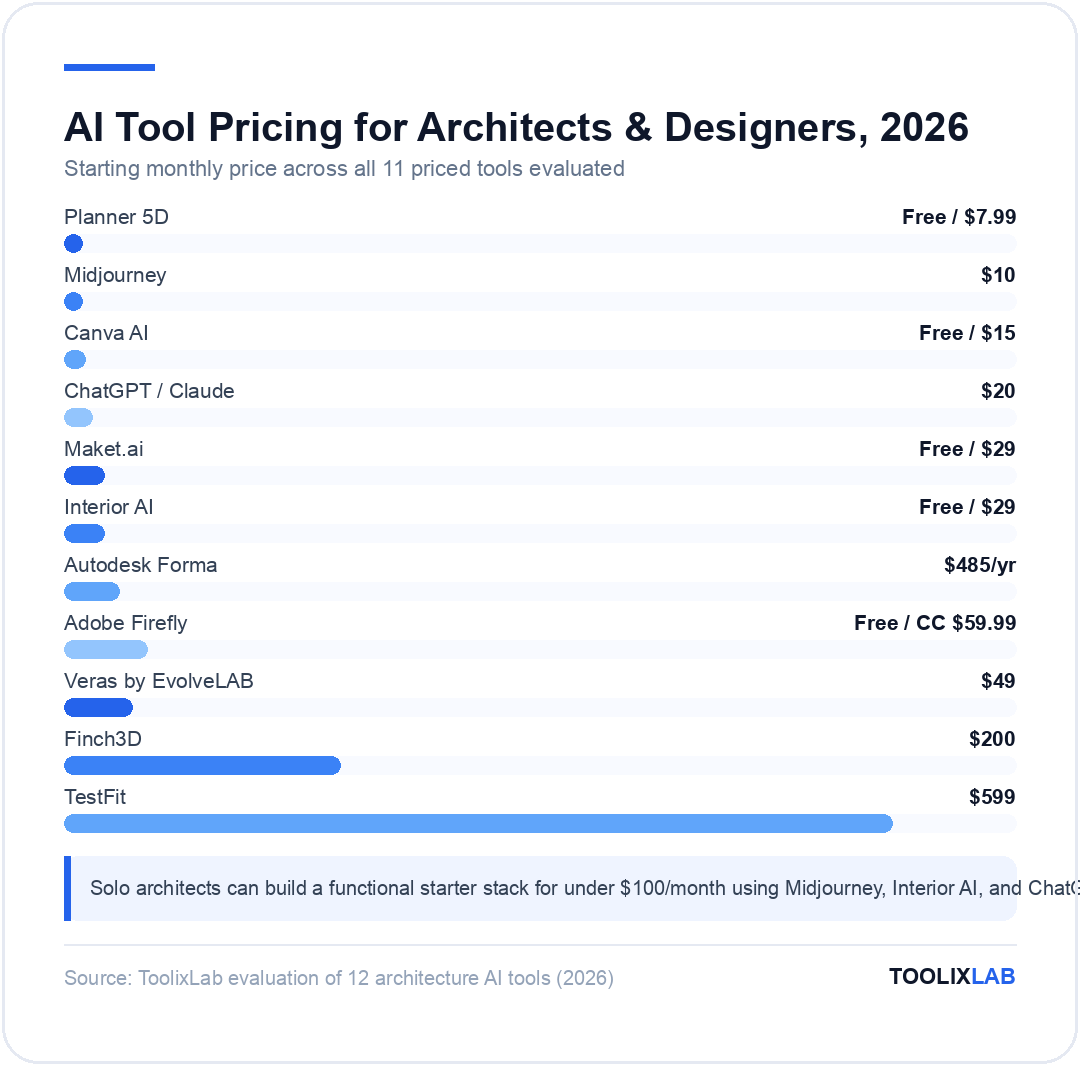
| Tool | Best Use Case | Starting Price | Best For | Free Tier? |
|---|---|---|---|---|
| Autodesk Forma | Generative massing, site analysis | $485/year | Urban/multifamily design | Trial only |
| Veras by EvolveLAB | AI rendering from Revit/SketchUp | $49/month | All BIM users | Limited trial |
| Midjourney | Concept visualization, mood boards | $10/month | All architects & designers | No |
| TestFit | Multifamily site feasibility | $599/month | Multifamily developers/architects | Demo only |
| Maket.ai | AI floor plan generation | Free / $29/month | Residential architects | Yes (5 renders) |
| Finch3D | Structural layout optimization | $200/month | Multifamily/hospitality architects | Trial only |
| Interior AI | Interior design rendering from photos | Free / $29/month | Interior designers, real estate | Yes (limited) |
| Adobe Firefly | Material boards, render manipulation | Included with CC / Free tier | Adobe Creative Cloud users | Yes |
| ChatGPT / Claude | Proposals, specs, documentation | $20/month | All architects | Yes (limited) |
| Canva AI | Client presentations, marketing | Free / $15/month | All architects & designers | Yes |
| Planner 5D | Residential interior layout & visualization | Free / $7.99/month | Residential interior design | Yes |
Choosing the Right AI Tools for Your Architecture Practice
The right AI toolkit depends on your project type, firm size, and where you experience the most friction in your current workflow. Here's a practical framework:
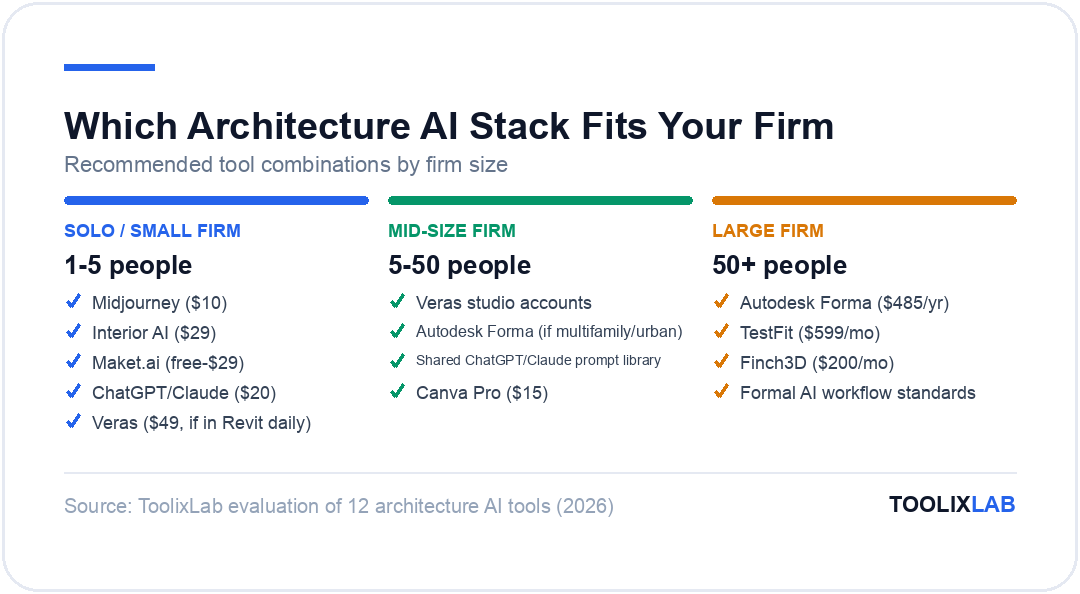
Solo practitioners and small firms (1–5 people): Focus on tools with the best ROI per dollar spent. Midjourney ($10–30/month), Interior AI ($29/month), Maket.ai (free–$29/month), and ChatGPT/Claude ($20/month) give the highest productivity gain for the lowest cost. Veras is worth the $49/month if you're in Revit daily. Avoid enterprise tools (Autodesk Forma, TestFit) unless your project type specifically requires them.
Mid-size firms (5–50 people): Add Veras studio accounts for the full team if Revit is your primary BIM tool. Evaluate Autodesk Forma if you do any multifamily or urban-scale work. Establish a shared prompt library for ChatGPT/Claude across the team to standardize documentation outputs. Invest in Canva Pro for consistent client presentation quality.
Large firms (50+ people): Enterprise tools become justifiable. Autodesk Forma, TestFit, and Finch3D all deliver clearer ROI at project volumes where the productivity gains multiply across many simultaneous projects. Integrate AI into formal workflow standards rather than allowing ad-hoc individual use — this is where firms see the biggest compounding benefit.
Interior designers specifically: Interior AI and Planner 5D address your core visualization workflow. Canva AI handles presentation. ChatGPT/Claude manages client communications, proposals, and specification notes. Adobe Firefly (within Creative Cloud) is excellent for material board creation and render enhancement. Midjourney remains the best tool for exploring design directions and creating mood board imagery. For a broader resource on free tools across the design workflow, our guide to the best free AI tools in 2026 is worth bookmarking.
What AI Tools Cannot (Yet) Do for Architects
Being clear about AI's current limitations is as important as being enthusiastic about its capabilities. In 2026, AI cannot:
Perform building code compliance analysis: AI tools can draft code-related language and help you research code requirements, but no current tool reliably performs automated code compliance checking across the full complexity of a jurisdiction's building code. This remains a professional responsibility requiring architect judgment.
Replace structural engineering: Finch3D and Forma can optimize structural grid layouts, but they do not replace the calculations and professional judgment of a licensed structural engineer. AI-generated structural suggestions require engineering validation before any structural element is specified.
Generate legally defensible construction documents: AI can assist in drafting, organizing, and communicating design intent in documents, but construction documents require architect stamp and professional responsibility. AI-generated content in CDs requires thorough review, not just proofreading.
Understand local context at the detail level: AI doesn't know that the neighbor across the street will object to a certain mass, that a specific planning officer prefers traditional materials, or that a client's previous architect had a contentious relationship with the local planning board. Professional judgment about local context, stakeholder relationships, and site history remains irreplaceable.
The value of AI in architecture is as a force multiplier for skilled professionals, not as a replacement for architectural expertise. Firms that understand this distinction — using AI to compress time on technical tasks while applying more professional time to the design thinking, client relationship management, and judgment-dependent decisions that define excellent architecture — are the ones seeing the greatest benefit in 2026.