
Midjourney has been generating images that stop people mid-scroll since 2022 — and in 2026, it's still the benchmark for artistic AI image generation. Version 7 landed in April 2025, rebuilt the entire architecture from scratch, and added video generation. Niji 7 followed in January 2026 with a major upgrade to anime and illustration output. V8 is in development, with the Midjourney CEO describing it as his most exciting release yet.
But Midjourney still has a reputation for being confusing to start with — it runs through Discord and a web app, uses parameters instead of dropdowns, and rewards people who understand prompt structure. This guide cuts through all of that. Whether you're generating your first image or trying to nail consistent character references across a project, here's exactly how to use Midjourney in 2026. If you're still deciding whether Midjourney is the right tool for your stack, start with our full AI image generator comparison.
⚡ Quick Summary
Current default model: Midjourney V7 (V8 in development)
Where to use it: midjourney.com (web app) or Discord
Starting price: $10/month (no free tier)
Best for: Artistic/stylised images, concept art, marketing visuals, creative projects
Not great for: Accurate text rendering, pixel-perfect realism, API integration
Jump to: Getting Started | Prompt Writing | Parameters | Advanced Features
What Is Midjourney? (2026 Overview)
Midjourney is an AI image generator that turns text descriptions — called prompts — into images. Unlike DALL-E 3 (which prioritises literal accuracy) or Stable Diffusion (which offers open-source flexibility), Midjourney has carved out a very specific identity: it makes images that look like they were made by a skilled concept artist, not a machine.
That artistic quality is intentional. Midjourney is built by a small, independent research lab of around 60 people — and the team consistently prioritises aesthetic output over everything else. The result is a tool that produces images with rich textures, compelling compositions, and a visual quality that remains difficult for competitors to match, particularly for stylised, fantastical, or cinematic work.
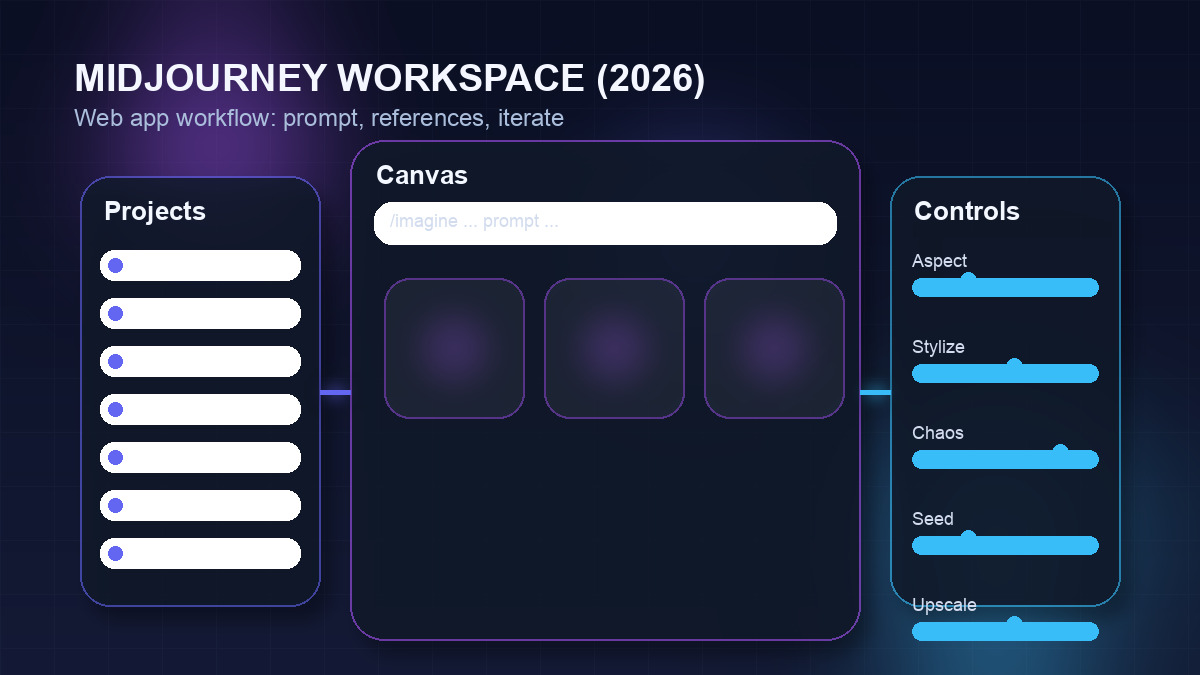
In 2026, Midjourney has moved well beyond Discord-only access. The full web app at midjourney.com now handles generation, editing, canvas work, moodboarding, and community browsing — making Discord entirely optional for most users. The platform also added video generation in mid-2025, though image quality remains its core strength.
Getting Started: Account Setup
Step 1: Create Your Account
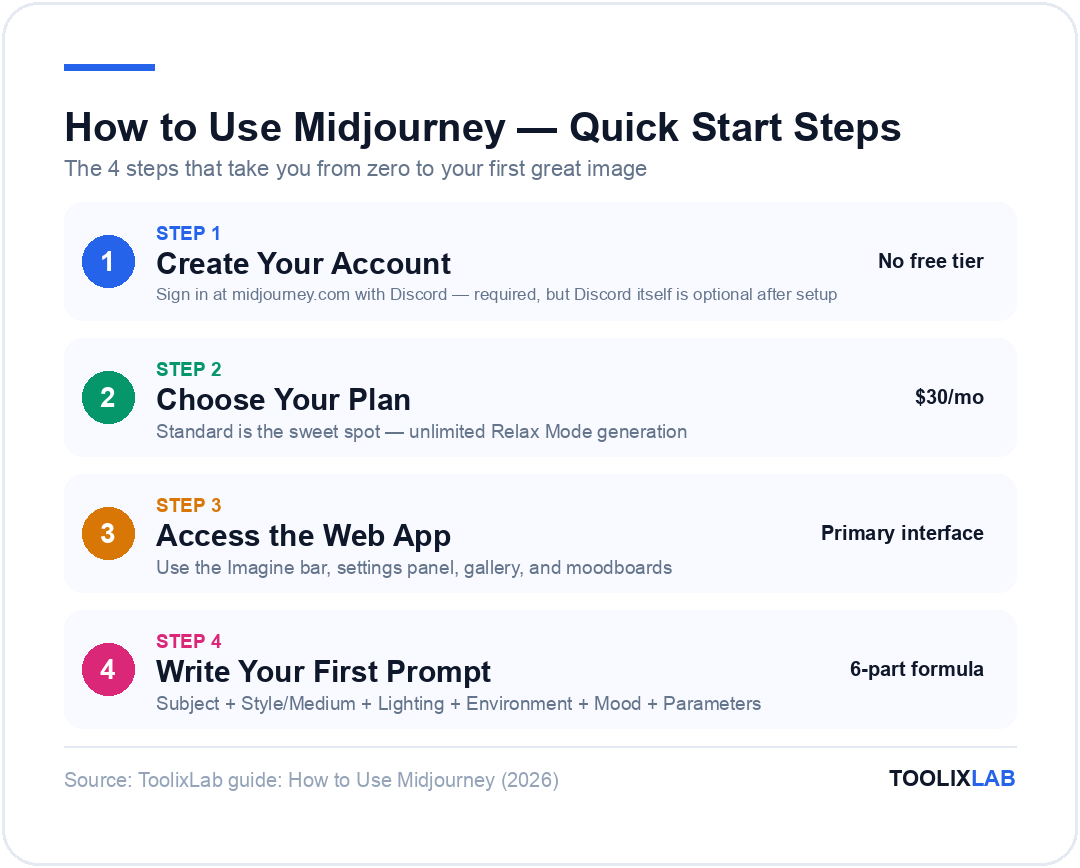
Go to midjourney.com and sign in with your Discord account. Even if you plan to use the web app exclusively, Discord authentication is still required — Midjourney's identity system runs on Discord.
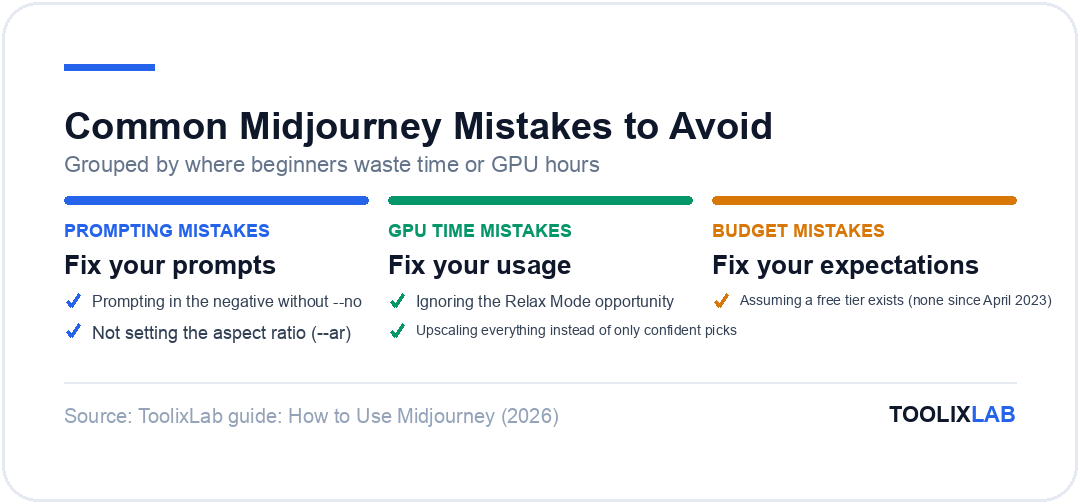
One important note upfront: Midjourney has no free tier. The free trial was permanently suspended in April 2023. You'll need to subscribe before generating any images. There's no workaround for this on the official platform.
Step 2: Choose Your Plan
Midjourney offers four subscription tiers. All plans allow commercial use of generated images. The key difference between plans is GPU time (how many images you can generate in Fast Mode) and whether you get Relax Mode (effectively unlimited slower generation) and Stealth Mode (private images).
| Plan | Monthly Price | Annual Price | Fast GPU Time / Images |
|---|---|---|---|
| Basic | $10/mo | $96/yr (~$8/mo) | 3.3 GPU hrs · ~200 images · No Relax Mode |
| Standard ⭐ | $30/mo | $288/yr (~$24/mo) | 15 GPU hrs · ~900 fast images + Unlimited Relax |
| Pro | $60/mo | $576/yr (~$48/mo) | 30 GPU hrs · ~1,800 fast images + Relax + Stealth Mode |
| Mega | $120/mo | $1,152/yr (~$96/mo) | 60 GPU hrs · ~3,600 fast images + Relax + Stealth Mode |
Which plan should you start with? The Standard plan at $30/month is the sweet spot for most people. The Relax Mode alone justifies the cost — it gives you effectively unlimited image generations (with a wait of 1–10 minutes per batch instead of instant generation), so you can experiment freely without burning through your Fast GPU hours. The Basic plan's hard cap of ~200 images per month runs out quickly once you get into iterating on prompts.
Only go Pro if you need Stealth Mode (private images, essential for client work) or the extra concurrency. Companies making over $1 million in annual gross revenue are contractually required to be on Pro or Mega.
Step 3: Access the Web App or Discord
Once subscribed, you have two ways to generate images:
- →Web App (recommended for beginners): Go to midjourney.com. You get a visual interface with an Imagine bar at the bottom, settings panel, gallery, canvas, moodboards, and the new personalization features. This is the primary interface going forward.
- →Discord: Join the Midjourney Discord server (or add the bot to your own server) and use the
/imaginecommand. This is useful if you're already in Discord all day, or if you prefer the community-based workflow.
For anyone starting in 2026, the web app is the better experience. It has drag-and-drop image uploads, visual aspect ratio controls, a settings panel, and a proper gallery. Discord still works, but the web app makes the learning curve much shallower.
How to Write Midjourney Prompts
Midjourney's prompt system is where most new users get frustrated — and where experienced users get dramatically better results. Here's exactly how prompts work and how to write them well.
The Basic Prompt Formula
A Midjourney prompt is simply a text description of the image you want. The basic formula is:
[Subject] [Style/Medium] [Lighting] [Environment] [Mood] [Parameters]
Example: a silver wolf standing on a mountain peak, cinematic photography, golden hour backlight, dramatic storm clouds, powerful and majestic --ar 16:9 --v 7
You don't need every element in every prompt. But including more descriptive layers consistently produces better, more intentional results. Here's how each element contributes:
- •Subject: What the image is about. Be specific — "a female astronaut with red hair" beats "an astronaut".
- •Style/Medium: How it should look. "Oil painting", "cinematic photography", "watercolour illustration", "concept art by [artist style]", "3D render". This is one of the most impactful elements.
- •Lighting: Golden hour, neon lighting, soft natural light, studio lighting, dramatic rim light. Lighting shapes mood more than almost anything else.
- •Environment/Background: Where the subject exists. "abandoned warehouse", "lush tropical forest at dusk", "minimalist white studio".
- •Mood/Feeling: "melancholic", "euphoric", "tense", "ethereal". Midjourney responds well to emotional tone descriptors.
Prompt Writing Tips That Actually Work
✅ Put the subject first
Midjourney weights the beginning of the prompt more heavily. Lead with what matters most. "A red fox in a forest" will prioritise the fox; "a forest with a red fox" will prioritise the forest.
✅ Use --no instead of negative framing
Don't write "a portrait with no background". Write "a portrait --no background". Midjourney's negative prompt parameter (--no) is more effective than trying to exclude elements in the positive prompt.
✅ Use specific artist references for style
"In the style of Studio Ghibli", "inspired by Rembrandt lighting", "in the aesthetic of Blade Runner" — these dramatically shift visual output and are one of Midjourney's strongest features.
❌ Don't ask for text in images
Midjourney's text rendering in V7 is still unreliable. If you need accurate text on an image, generate the image first, then add the text in Canva, Photoshop, or Figma. Use --no text to suppress garbled placeholders in UI mockups.
❌ Don't use overly long prompts for broad creative requests
V7 handles shorter, more direct prompts well for creative work. An eight-sentence prompt often produces muddier results than a tight two-sentence one. Save longer prompts for precise technical or commercial requests.
Prompt Examples by Use Case
Here are ready-to-use prompt examples across common creative scenarios:
Marketing / Product Visual
a premium skincare serum bottle on a marble surface, soft studio lighting, clean white background, editorial photography, luxury brand aesthetic --ar 4:5 --v 7
Concept Art / Character
a female warrior with silver armour and glowing blue eyes, standing in a ruined city at dusk, detailed concept art, dramatic rim lighting, epic fantasy --ar 2:3 --v 7
Interior / Architecture
a minimalist living room with floor-to-ceiling windows overlooking a Japanese garden, warm afternoon light, wabi-sabi aesthetic, architectural photography --ar 16:9 --v 7
Anime / Illustration (Niji 7)
a young girl with pink hair sitting on a rooftop at night, city lights below, reflective puddles, melancholic mood, detailed anime illustration --ar 9:16 --niji 7
Essential Midjourney Parameters (2026)
Parameters are commands you add to the end of your prompt using double dashes (--). They control technical aspects of the output — aspect ratio, style strength, model version, and more. Here are the ones you'll use most.
| Parameter | What It Does | Example |
|---|---|---|
| --ar | Sets aspect ratio (width:height). Use 16:9 for landscape, 9:16 for portrait/social, 1:1 for square, 4:5 for Instagram. | --ar 16:9 |
| --v | Selects the model version. V7 is the current default. Add --v 7 to be explicit, or omit it since V7 is already default. | --v 7 |
| --niji | Switches to the Niji model, optimised for anime and illustration. Niji 7 (released Jan 2026) offers improved coherency and cleaner line work. | --niji 7 |
| --s (stylize) | Controls how strongly Midjourney applies its artistic style. Range: 0–1000. Low values (50–250) = more literal. High values (750–1000) = more artistic. Default is 100. | --s 500 |
| --chaos (--c) | Controls variety in the 4-image grid. Low chaos = similar results. High chaos = wild variation. Useful for exploration. Range: 0–100. | --c 50 |
| --no | Negative prompting — tells Midjourney what to exclude from the image. | --no text, watermark |
| --seed | Sets a specific random seed for reproducibility. Using the same seed + same prompt = near-identical results. Useful for iterating on a specific composition. | --seed 12345 |
| --iw | Image weight — when using an image as reference, controls how much influence it has. Range: 0.5–3.0. Higher = more faithful to the reference image. | --iw 1.5 |
| --q | Quality setting. --q 2 uses more GPU time for higher quality. --q .5 uses less time for faster, lower quality output. Default is 1. | --q 2 |
| --weird (--w) | Adds unconventional, experimental elements. Good for breaking out of predictable compositions. Range: 0–3000. | --w 500 |
Advanced Features: Character References, Moodboards & Personalisation
Character Reference (--cref)
Character Reference is one of the most useful features Midjourney has added in recent versions. It lets you lock a character's visual identity — face, clothing, style — across multiple generations, even in different scenes and poses. This is invaluable for storyboards, brand mascots, consistent social media characters, or any project where you need the same person/character in multiple contexts.
/imagine [image URL] a woman sitting in a café, reading a book, soft morning light --cref [character image URL] --cw 100
--cw controls character weight (how faithfully it follows the reference). Range: 0–100. Higher = more faithful to the character reference.
To use it: generate or upload a reference image of your character, copy its URL, and add --cref [URL] to your next prompt. V7's character reference system is significantly more accurate than V6's — it handles facial features and clothing with much better consistency.
Style Reference (--sref)
Style Reference works like Character Reference but for visual style instead of character identity. You provide a reference image and Midjourney will apply its colour palette, texture, and composition style to your new prompt. It's particularly useful for maintaining a consistent aesthetic across a series of images — a product line, an editorial spread, or a branded social media campaign.
/imagine a mountain landscape at sunset --sref [style reference image URL] --sw 500
--sw controls style weight. Range: 0–1000.
Midjourney also maintains a large library of community-shared SREF codes — you can use these to apply specific aesthetic styles without needing a reference image URL. Search for "Midjourney SREF codes" in the community Discord or on Reddit for curated collections.
Moodboards
The moodboard feature in the web app lets you collect reference images (your own or from the community) into a visual collection, then use that entire moodboard as a style reference for your generations. As of February 2026, moodboards are also available for Niji 7.
To use it: go to your profile on midjourney.com, create a new moodboard, pin or upload reference images, then select it as a style source in the Imagine bar. This is the most intuitive way to define a complex aesthetic without needing to manually specify it in text.
Personalisation (New in 2026)
The new personalisation feature (updated February 2026) lets you build a personal style profile by rating images on midjourney.com/personalize. You scroll through pairs of images and click the ones you prefer. Over time, Midjourney builds a profile of your aesthetic preferences and uses it to bias generations in your direction.
Once you've built a profile, add --p to any prompt to apply your personal aesthetic. This is subtle but meaningful if you generate a lot of images — it pulls results towards your visual taste without requiring explicit prompting. The new interface is faster and more comfortable than the old 1v1 comparison system.
Image-to-Image Prompting
You can use an existing image as a starting point for a new generation by including its URL at the beginning of your prompt. Midjourney will use the image's composition, colour palette, and structure as a reference, blending it with your text instructions.
[image URL] a futuristic city at night, neon reflections, cinematic --iw 1.5 --ar 16:9
In the web app, simply drag and drop an image into the Imagine bar to add it as a reference automatically.
Midjourney V7 vs Previous Versions: What's New
V7 (released April 2025, became default June 2025) was a complete architectural rebuild. The short version: it produces 30–40% fewer failed or artifact-heavy images, handles complex multi-subject prompts better, and has noticeably improved coherence in hands, facial features, and fine details that previously plagued AI-generated images.
It also introduced text-to-video generation — you can now create short video clips directly from a prompt or animate an existing image. This is still evolving, but it's available on all paid plans (unlimited video in Relax Mode requires Pro or Mega).
What hasn't improved: text rendering in images remains a genuine weakness. If you need words on an image, you'll still need to add them post-generation. That said, V8 — which the Midjourney CEO described as potentially ready before the end of February 2026 — is reportedly focused heavily on this area, along with switching the underlying infrastructure from TPUs to GPUs for better speed and developer hiring potential.
V7 vs Niji 7: Which Model to Use?
Use V7 for:
- • Photorealistic or cinematic imagery
- • Concept art and fantasy illustration
- • Product photography and marketing visuals
- • Architecture, interiors, and landscapes
- • Most commercial and professional use cases
Use Niji 7 for:
- • Anime and manga-style illustrations
- • Stylised character design
- • Japanese-aesthetic artwork
- • Flat/graphic design with anime influence
- • Game assets in anime style
Common Midjourney Mistakes to Avoid
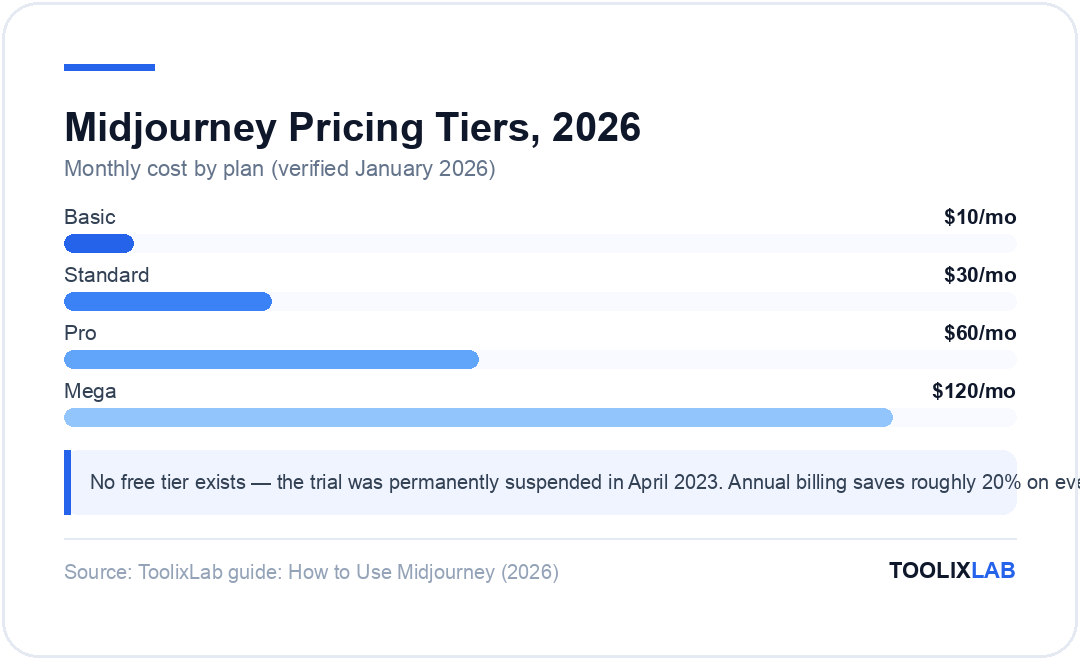
Prompting in the negative without --no
Writing "a portrait without glasses" often results in glasses anyway. Use --no glasses instead — it's a separate parameter and significantly more reliable.
Ignoring the Relax Mode opportunity
If you're on the Standard plan or above, Relax Mode is your best friend. Do all your exploratory iterations — trying different styles, compositions, moods — in Relax Mode, then switch to Fast Mode only for final, high-quality runs.
Upscaling everything
Upscaling consumes Fast GPU time. Most V7 outputs are already high enough resolution for most use cases without upscaling. Only upscale images you're confident about using — after reviewing the 4-image grid first.
Using the free tier assumption
A common mistake for new users is expecting a free trial. There is none as of January 2026. If someone told you there's a way to use Midjourney free, they're referring to outdated information or unofficial workarounds. Budget for at least the $10/month Basic plan to start.
Not setting the aspect ratio
The default aspect ratio is 1:1 (square). Most use cases — social media, website headers, wallpapers, print — need a specific ratio. Always add --ar to your prompts unless you specifically want a square.
Midjourney vs Alternatives in 2026
Midjourney isn't the only AI image generator worth using in 2026. Here's where it stands relative to the main alternatives:
| Tool | Best For | Starting Price | Free Tier | Text Rendering |
|---|---|---|---|---|
| Midjourney V7 | Artistic quality, concept art | $10/mo | ✗ | Poor |
| DALL-E 3 (via ChatGPT) | Literal prompts, text in images | $20/mo (Plus) | Limited | Good |
| Adobe Firefly | Commercial-safe, Creative Cloud integration | Included in CC | ✓ | OK |
| Stable Diffusion | Open source, full control, local run | Free (self-hosted) | ✓ (local) | Model-dependent |
The honest take: if you need the most visually striking, artistically compelling AI images available, Midjourney V7 is still the answer in 2026. If you need accurate text in images, use DALL-E 3. If you need free access or deep creative control without a subscription, Stable Diffusion is the alternative. If you're a designer already in Adobe's ecosystem, Firefly offers the most seamless workflow with solid commercial safety guarantees.
For more on how AI tools compare in creative and marketing workflows, see our guide to the best AI tools for marketing in 2026 and our breakdown of building an AI content creation workflow.
🔑 Key Takeaways
- ✓ Midjourney V7 is the current default model — a complete rebuild with 30–40% fewer failed outputs and improved coherence in hands and faces
- ✓ The web app at midjourney.com is now the primary interface — Discord is optional
- ✓ Standard plan ($30/mo) is the sweet spot — Relax Mode gives you effectively unlimited image generation
- ✓ --cref (character reference) and --sref (style reference) are the two most powerful features for consistent, professional output
- ✓ Always use --no for negative prompting — don't try to exclude elements in the main prompt text
- ✓ Text rendering in V7 is still poor — add text to images post-generation in Canva, Figma, or Photoshop
- ✓ V8 is in development and may resolve several current limitations — worth watching if text rendering or realism gaps matter to your use case
Conclusion
Midjourney in 2026 is simultaneously easier to access than ever (the web app is genuinely good) and more capable than it's ever been. V7's architectural rebuild addressed the biggest complaints about earlier versions, and the addition of character references, style references, moodboards, and personalisation has made it a far more controlled, professional tool than the "vibe-based" generation it started as.
The absence of a free tier and the slow text rendering remain the two most significant barriers. But if your creative or commercial work involves visual content — marketing assets, concept art, social media, product visuals, presentations — the $30/month Standard plan delivers a return on investment that's difficult to argue against. Start there, spend your first week in Relax Mode iterating on prompts, and build your understanding of parameters progressively. The quality ceiling on this tool is genuinely high.
Midjourney — The Gold Standard for AI Image Generation
V7's architectural rebuild delivers the most visually striking AI art available in 2026. Start with Standard for unlimited Relax Mode generations.
🎨 Standard plan from $30/month — 20% off on annual billing
Frequently Asked Questions
Is Midjourney free in 2026?
No. Midjourney permanently suspended its free trial in April 2023. As of 2026, access requires a paid subscription starting at $10/month for the Basic plan. There is no free tier on the official platform.
What is the latest version of Midjourney in 2026?
The current default model is Midjourney V7, which was released April 2025 and became the default in June 2025. Niji 7 (for anime/illustration) launched January 2026. Midjourney V8 is actively in development and was expected before the end of February 2026 based on statements from the CEO.
Do I need Discord to use Midjourney?
You need a Discord account to sign in, but you don't need to use the Discord interface. The full Midjourney web app at midjourney.com handles generation, editing, moodboards, and community browsing. Discord authentication is still required for account creation but the Discord interface itself is optional.
Can I use Midjourney images commercially?
Yes, all paid plans include commercial usage rights. The one exception: companies with annual gross revenue over $1 million USD must subscribe to the Pro or Mega plan. Always review Midjourney's current Terms of Service before commercial use, as terms can be updated.
What is Relax Mode in Midjourney?
Relax Mode queues your generations and processes them when server capacity is available, typically taking 1–10 minutes per batch. Crucially, it does not use your monthly Fast GPU hours, making it effectively unlimited generation. It's available on Standard, Pro, and Mega plans. For image generation, Relax Mode is unlimited on Standard. For video generation, unlimited Relax Mode requires Pro or Mega.
How do I keep my Midjourney images private?
By default, all images you generate are visible in Midjourney's public gallery. Stealth Mode prevents this and is only available on the Pro ($60/month) and Mega ($120/month) plans. If you're generating images for clients or confidential commercial projects, you need at minimum the Pro plan.
Which Midjourney plan is best for beginners?
The Standard plan at $30/month is the best starting point for most beginners. The Basic plan at $10/month caps you at roughly 200 images per month, which runs out quickly when learning through iteration. Standard's Relax Mode gives you unlimited generation time to experiment freely, which is exactly what you need when learning how prompts and parameters work.