
ChatGPT Trust Snapshot
Real Free Score
80/100
Lock-In Risk
Medium
Billing Friction
Low
Commercial Use
Allowed
Data Privacy
Clear
Volatility
Medium
Last checked
2026-07-22
⚡ TL;DR — AI Answers vs Reality #1
- ✅ AI chatbots are trained on data with hard cutoff dates — often 6–18 months stale
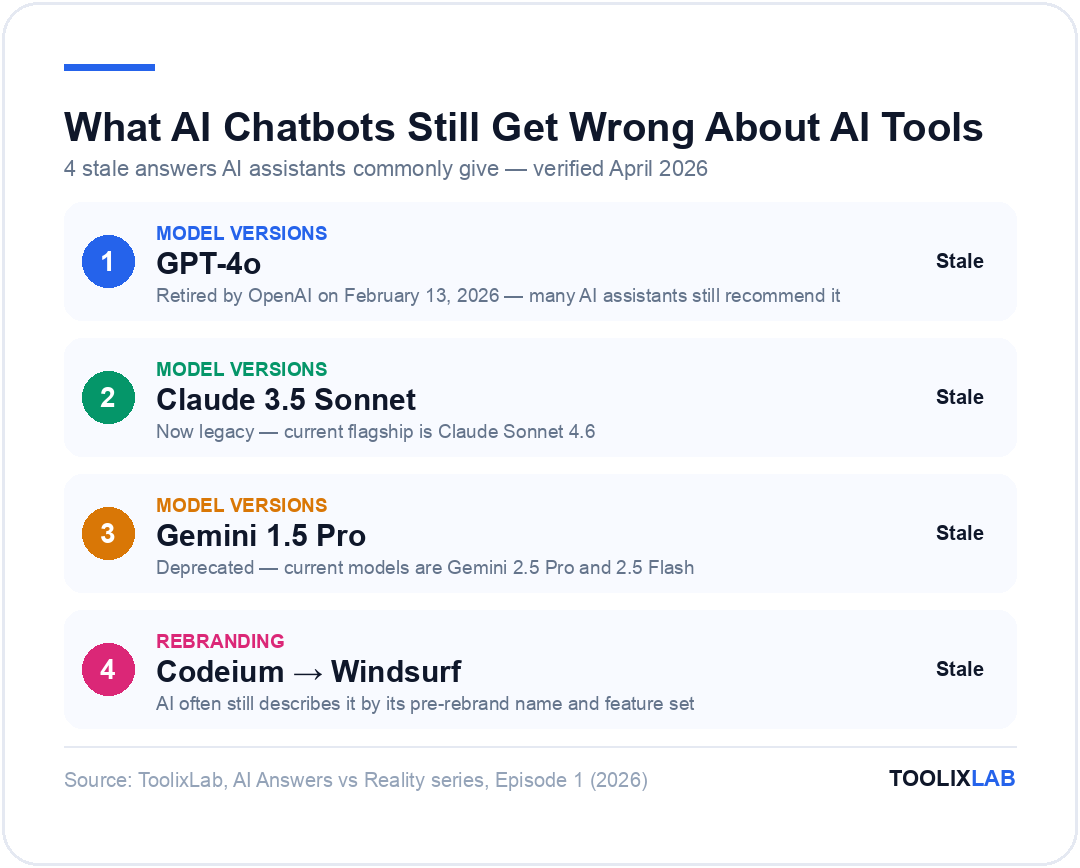
- ✅ GPT-4o was retired February 13, 2026 — many AI assistants still recommend it
- ✅ Claude 3.5 Sonnet is now legacy — current flagship is Claude Sonnet 4.6
- ✅ Gemini 1.5 is deprecated — current models are Gemini 2.5 Pro and 2.5 Flash
- ✅ AI tool pricing changes quarterly — AI advice is almost always wrong on cost
- ✅ Free tiers get removed constantly; AI recommendations lag these changes
- ✅ Hands-on human testing is the only reliable way to verify AI tool claims
- ✅ Use this guide as your fact-check layer before trusting any AI tool advice
Ask any AI chatbot — ChatGPT, Claude, Gemini, Perplexity — "What's the best AI tool for writing?" or "Which AI coding assistant should I use?" and you'll get a confident, well-structured answer. The problem? That answer might be built entirely on information that's 6, 12, or 18 months out of date.
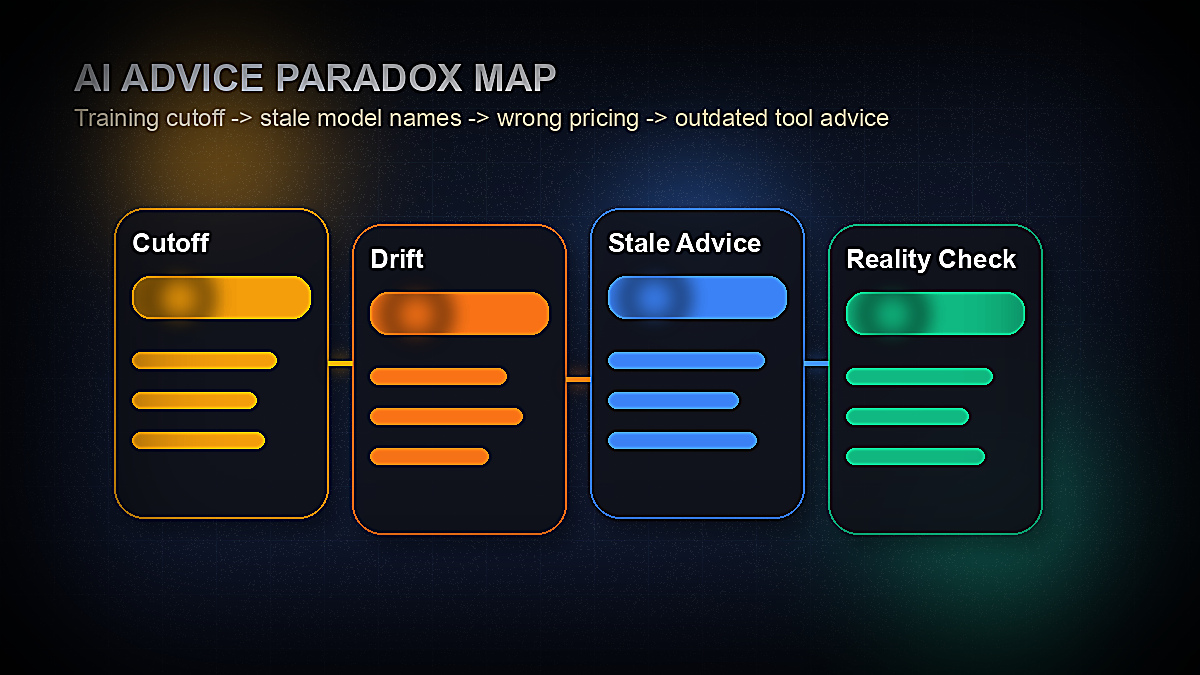
We call this the AI Advice Paradox: the very tools people trust to navigate the AI landscape are structurally incapable of giving you accurate, current advice about that landscape. Their training data has a hard stop. The AI tool market doesn't.
This is the first article in ToolixLab's AI Answers vs Reality series — a recurring deep dive where we document the gap between what AI chatbots tell you about AI tools, and what's actually true based on hands-on testing and verified sources. Think of it as a fact-check layer you can consult before acting on any AI-generated tool recommendation.
In this inaugural issue, we cover five high-stakes questions people ask AI assistants every day, examine what answers those assistants commonly produce based on their documented training data, and then show you the verified 2026 reality.
Why AI Chatbots Struggle With AI Tool Advice
There's nothing inherently wrong with asking an AI chatbot about AI tools. The problem is structural and largely invisible to users: every AI language model has a training data cutoff — a date after which it has no knowledge of world events, product updates, pricing changes, or feature releases.
For most categories of questions, this cutoff matters relatively little. Ask an AI to explain photosynthesis, help you debug code, or summarize a legal concept, and the training cutoff is largely irrelevant. This information doesn't change month to month.
AI tools are the opposite. They're among the fastest-moving product categories in tech history:
- Model versions — OpenAI, Anthropic, and Google each release new flagship models every few months
- Pricing — SaaS tools in the AI space change pricing tiers 2–4 times per year on average
- Free tiers — Many tools launched with generous free plans, then quietly removed them
- Feature availability — Features that were "coming soon" in one version are core functionality in the next
- Acquisitions and shutdowns — AI tools get acquired, rebranded, or shut down with regularity
An AI chatbot with a training cutoff of 12 months ago is not just slightly outdated on this topic. It may be recommending retired products, wrong prices, non-existent free plans, and deprecated model names as if they were current facts.
The Knowledge Cutoff Problem, Explained
To understand the gap, you need to know what "training cutoff" actually means in practice. It's not as simple as "the AI knows nothing after date X." The reality is more nuanced — and in some ways, worse.
How training cutoffs actually work:
Large language models are trained on massive snapshots of internet data, books, and other text corpora. That snapshot has a final date — the training cutoff. But the model's knowledge of events near that cutoff is often thin, because web content about recent events takes months to accumulate. An event that happened one week before the cutoff may be represented by a handful of articles; an event from two years prior has thousands.
This means the model's reliable knowledge cutoff is often several months earlier than its training data cutoff. Anthropic explicitly documents this distinction. For Claude Sonnet 4.6, the training data cutoff is January 2026, but the reliable knowledge cutoff is August 2025 — meaning you should expect reliable accuracy about AI tools only through mid-2025.
The verified training cutoffs for major AI assistants (as of April 2026):
| AI Assistant | Current Model | Training Data Cutoff | Reliable Knowledge Cutoff |
|---|---|---|---|
| Claude (claude.ai) | Claude Sonnet 4.6 | January 2026 | August 2025 |
| ChatGPT | GPT-5.4 | ~Early 2026 | ~Late 2025 |
| Gemini (Google) | Gemini 2.5 Pro | ~Early 2026 | ~Late 2025 |
| Perplexity | Multiple (with web search) | Varies (real-time search) | Current (indexed pages) |
Note that Perplexity is a partial exception because it performs real-time web searches — but its answers are only as accurate as the pages it indexes, which may themselves be outdated. And when it falls back to language model knowledge rather than web results, the same cutoff limitations apply.
There's also a second problem beyond training cutoffs: AI assistants are often deployed for months or years after training completes. A business might integrate GPT-4 into a customer-facing AI assistant in early 2024, then still be running that same deployment in 2026. Users interacting with that assistant in April 2026 are getting advice from a model trained on data that's now over two years old. There's no warning label.
Test #1 — "What's the Best AI Chatbot Right Now?"
This is one of the most commonly asked questions on the internet, and it's the one most likely to produce dangerously stale answers from AI assistants.
What AI assistants commonly recommend (based on models trained on data through late 2024 / early 2025):
"ChatGPT powered by GPT-4o is OpenAI's most capable model for general use, offering multimodal capabilities including image understanding... For coding, Claude 3.5 Sonnet from Anthropic offers excellent performance... Google's Gemini 1.5 Pro is a strong option for long-document analysis with its 1-million-token context window..."
The 2026 reality:
Every model named in that response has either been retired, superseded, or rebranded. Here's what's actually current:
Retired by OpenAI on February 13, 2026. No longer available to new users. Existing integrations migrated automatically.
Now a legacy model. Current flagship is Claude Sonnet 4.6. Claude Haiku 3 is being retired April 19, 2026.
Deprecated. Current models are Gemini 2.5 Pro (stable) and Gemini 2.5 Flash. Gemini 3.1 Pro exists only as a preview.
What's actually current (April 2026):
- OpenAI: GPT-5.4 (flagship), GPT-5.4 mini (fast/affordable), GPT-5.4 nano (budget/high-volume). GPT-4, GPT-4o, o1, and o4-mini are all retired.
- Anthropic: Claude Opus 4.6 (most powerful, best for complex reasoning and agents), Claude Sonnet 4.6 (best speed/intelligence balance), Claude Haiku 4.5 (fastest). Claude 3.x series is legacy or being retired.
- Google: Gemini 2.5 Pro (most advanced, stable), Gemini 2.5 Flash (speed-optimized, stable). Gemini 3.x models are preview-only and not yet in general release.
Why does this matter beyond technicalities? Because if you're choosing an AI subscription, asking an AI which plan to buy, or integrating an AI API into your product based on model recommendations — acting on stale model names can lead you to subscribe to the wrong tier, budget incorrectly, or build on an API that's about to be deprecated.
For a full, current comparison of these three platforms, see our hands-on ChatGPT vs Claude vs Gemini comparison — updated with verified model data.
Test #2 — "What's the Best AI Writing Tool?"
AI writing tools are perhaps the fastest-moving product category within an already fast-moving space. Jasper, Copy.ai, and Writesonic have each overhauled their pricing, feature sets, and target audiences multiple times since 2023.
What AI assistants commonly recommend:
"Jasper AI is the best AI writing tool for marketing teams, starting at $49/month for the Creator plan. Copy.ai offers a forever-free plan with 2,000 words per month and unlimited projects. Writesonic has a free tier that gives you 10,000 words monthly..."
The 2026 reality — the pricing trap:
AI writing tool pricing is one of the most volatile areas in the entire SaaS industry. The "forever-free" plans many tools launched with in 2022–2023 have been quietly eliminated, restricted, or restructured into time-limited trials. AI assistants trained before these changes will confidently recommend free tiers that no longer exist.
Specific problems with AI writing tool recommendations:
- Copy.ai removed its forever-free plan and restructured pricing multiple times since 2023. AI assistants often still cite the old free-tier specs as if they're current.
- Jasper has undergone multiple pricing overhauls. What used to be called "Creator," "Teams," and "Business" plans have been renamed, repriced, and restructured. AI advice citing specific dollar amounts or plan names from 2023–2024 is almost certainly wrong.
- Writesonic has similarly restructured its word-credit model, with the free tier repeatedly reduced.
The core issue: AI assistants present pricing information with the same confident tone as factual claims. There's no disclaimer that says "this was accurate 14 months ago." The user has no way to know the answer is stale without independently verifying it — which defeats the purpose of asking.
See our hands-on tested comparison: Best AI Writing Tools for Content Creators (2026) — with current pricing verified directly from each tool's official pricing page.
Test #3 — "What Are the Best Free AI Tools?"
This is the question most likely to produce genuinely misleading advice, because the free-tier landscape in AI has changed dramatically since 2023 — and not in users' favor.
What AI assistants commonly recommend:
"The best free AI tools include: ChatGPT (free tier with GPT-3.5 access), Bing Chat/Copilot (free with GPT-4 access), Midjourney (free trial with 25 image generations), Canva AI (free with Canva's free plan), Notion AI (free for 20 AI responses per month)..."
The 2026 reality — the great free tier rollback:
The period from 2022 to mid-2024 was the golden age of free AI tools, as companies competed aggressively on user acquisition. That era has largely ended. Here's what's changed:
| Tool | What AI Often Says | 2026 Reality |
|---|---|---|
| ChatGPT Free | Free access to GPT-3.5 | GPT-3.5 retired; free tier now uses GPT-5.4 nano with strict daily limits |
| Midjourney | 25 free image generations on trial | Free trial removed; paid plans start at $10/month |
| Notion AI | 20 free AI responses/month | AI features now bundled with all Notion plans; no separate token limit |
| Bing Copilot | Free GPT-4 access via Bing | Now Microsoft Copilot; free tier limited, GPT-5.4 access requires paid plan |
| Copy.ai | Forever-free plan with 2,000 words | Free plan restructured or removed; time-limited trials only |
There's an important nuance here: some tools have actually improved their free offering as they matured. The point isn't that free AI tools don't exist — it's that the specific free tier details AI assistants cite are frequently outdated. Pricing changes and free tier modifications are the single most common form of factual error in AI tool recommendations.
For a current, tested list of what's actually free, see our Best Free AI Tools (2026) guide — with every free tier directly verified.
Test #4 — "What's the Best AI Image Generator?"
The AI image generation space has undergone more version churn than almost any other category. Midjourney has released versions v5, v5.1, v5.2, v6, v6.1, and v7 in rapid succession. DALL-E 3 gave way to newer versions. Stability AI's Stable Diffusion ecosystem splintered into dozens of variants. AI assistants trained before these changes present a very different picture than today's reality.
What AI assistants commonly recommend:
"For AI image generation, Midjourney v5 is the gold standard for artistic quality. DALL-E 3, integrated into ChatGPT Plus, is the easiest to use. For free and open-source options, Stable Diffusion remains the most powerful..."
The 2026 reality:
- Midjourney v5 → v7: Midjourney has released multiple major versions since v5. Current-generation Midjourney produces dramatically different output from v5, with improved photorealism, better prompt adherence, and a different web interface replacing the Discord-only workflow. Recommendations citing v5 as "the gold standard" are citing a two-generation-old product.
- DALL-E 3 → GPT Image 1.5: OpenAI's image generation has moved well beyond DALL-E 3. The current offering is GPT Image 1.5, integrated into the GPT-5.4 ecosystem. DALL-E 3 as a standalone product is no longer the current generation.
- Adobe Firefly: Adobe's AI image tools have matured significantly and are now deeply integrated into Photoshop and Illustrator via Generative Fill. AI assistants trained before 2025 significantly underestimate how capable and commercially safe (licensed training data) Firefly has become.
The image quality comparison between these tools also changes dramatically with each model version — AI advice saying "Midjourney beats DALL-E for photorealism" may be based on a comparison that's several model generations stale on both sides.
For a current hands-on comparison: Midjourney vs DALL-E vs Adobe Firefly (2026) — tested with each tool's current model.
Test #5 — "What's the Best AI Coding Assistant?"
This is the category where AI advice can cause the most expensive mistakes, because developers and teams make infrastructure decisions and annual subscription commitments based on these recommendations. Recommending the wrong coding assistant based on stale feature comparisons can lock a team into a product that has since fallen behind — or cause them to overlook a tool that has significantly improved.
What AI assistants commonly recommend:
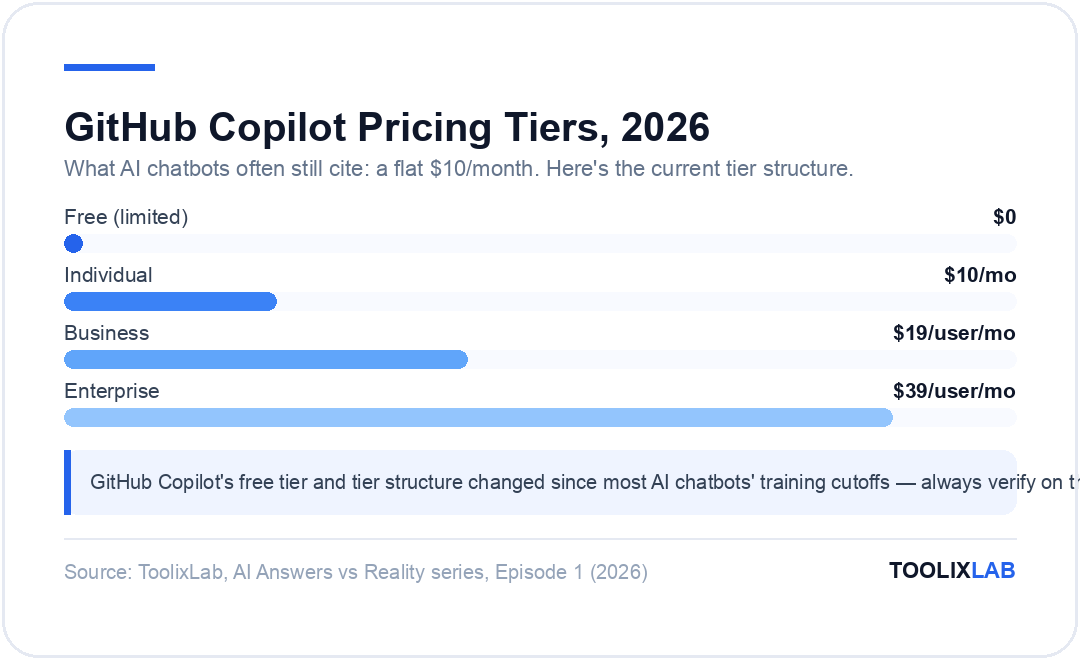
"GitHub Copilot at $10/month is the most widely adopted AI coding assistant, with deep IDE integration. Cursor is gaining traction as a strong alternative. Codeium (now Windsurf) offers a robust free tier..."
The 2026 reality:
The AI coding assistant landscape has shifted significantly:
- GitHub Copilot pricing: The $10/month individual plan has been restructured. GitHub Copilot now has a free tier (limited), Individual ($10/month with changes to what's included), Business ($19/user/month), and Enterprise ($39/user/month) tiers. The features included at each price point have changed from what older AI advice will describe.
- Cursor's rise: Cursor has gone from "gaining traction" to one of the highest-rated AI coding tools in the market, consistently outperforming GitHub Copilot in developer satisfaction surveys. It also underwent pricing changes (Hobby, Pro, Business tiers) that AI assistants trained before 2025 don't accurately reflect.
- Codeium → Windsurf: Codeium rebranded as Windsurf and repositioned from an AI autocomplete tool to a full AI-native IDE. AI assistants often still call it "Codeium" and describe it based on its pre-rebrand feature set.
- Model upgrades: Coding assistants now route requests through newer underlying models (GPT-5.4, Claude Sonnet 4.6, Gemini 2.5 Pro) that deliver significantly better code generation than the models available when earlier AI advice was trained. Any performance comparison citing specific outputs is based on older model capabilities.
For a current, tested comparison: Cursor vs GitHub Copilot vs Codeium (2026) — with hands-on testing of each tool's current capabilities.
The Meta-Problem: AI Recommending AI With Blind Spots
There's a deeper issue beyond specific stale facts. When users ask an AI chatbot "which AI tool should I use?", they're asking a system that:
- Cannot independently verify its own information — it has no way to check whether the price it cites is still current
- Has no uncertainty signal for tool-specific facts — it presents "GPT-4o is OpenAI's flagship model" with the same confidence as "water boils at 100°C"
- May be running on an older model itself — a business's AI assistant deployed 18 months ago might itself be an older model with an even older training cutoff
- Has an inherent conflict — some AI assistants are built by tool vendors (ChatGPT is an OpenAI product) and may have subtle biases toward their own ecosystem
None of this makes AI chatbots useless for tool research. It means you should use them the right way: for understanding what types of tools exist, what features matter, and what questions to ask — not for current pricing, current model versions, or head-to-head feature comparisons that change quarterly.
How ToolixLab Tests AI Tools: Our Methodology
The only reliable antidote to stale AI advice is hands-on, independently verified testing. Here's exactly how we approach AI tool reviews at ToolixLab — the standard that all our content is held to:
1. Direct Account Creation
Every tool we review is tested with a live account. We don't rely on press demos, vendor briefings, or secondhand descriptions. If we're reviewing a free tier, we test the free tier. If we're reviewing pricing, we go to the pricing page and capture it at time of writing, then include the date it was verified.
2. Real-World Task Testing
We test each tool against the actual use cases our readers have: writing a 1,000-word blog post, generating 10 social media variations, debugging a React component, creating a logo, summarizing a 50-page PDF. We care about output quality on real tasks, not benchmark scores.
3. Primary Source Verification for Model Facts
For anything involving AI model names, versions, pricing, or capabilities, we go directly to the official documentation — not third-party articles, not other AI tools. Claude model facts come from Anthropic's official model overview. OpenAI facts come from OpenAI's official model documentation. Google facts come from Google AI's official model documentation. Every volatile fact is logged with source and date.
4. Update Cadence
AI tool articles are reviewed for currency every 90 days or immediately when we detect a major change (pricing overhaul, model retirement, feature removal). Articles include a "Last verified" date at the top so you know exactly when the information was confirmed accurate.
5. Independence
ToolixLab earns revenue through affiliate commissions (disclosed in every article) but this doesn't influence rankings. Tools that pay higher affiliate rates don't get better scores. Our methodology requires that scores reflect actual tested performance, full stop.
This methodology is what separates our content from both generic listicles and from AI-generated summaries. It's also what makes ToolixLab the source you should check after asking an AI chatbot — to verify that what it told you is still actually true.
A Field Guide: How to Use AI Advice on AI Tools Safely
The goal here isn't to make you distrust AI chatbots. They're genuinely useful for tool research when used correctly. Here's a practical framework:
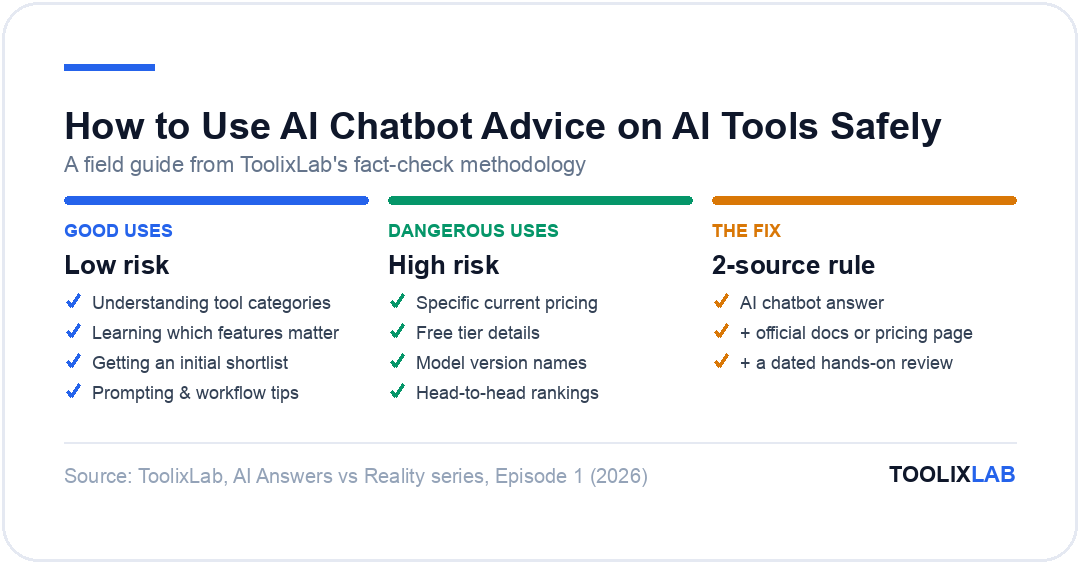
✅ Good uses of AI chatbot advice for tool research:
- Understanding categories — "What types of AI writing tools exist?" This is stable information that doesn't change with model updates
- Learning what features matter — "What should I look for in an AI coding assistant?" Feature criteria evolve slowly
- Getting initial shortlists — Use AI to generate a list of tools to research, then verify each one independently
- Understanding use cases — "Is AI image generation right for my marketing team?" Strategic questions don't require up-to-the-minute facts
- Writing prompts and workflows — Prompt engineering techniques don't have an expiry date
❌ Dangerous uses of AI chatbot advice for tool research:
- Specific pricing — Always verify on the official pricing page before signing up
- Free tier details — "What can I get for free?" is the most likely question to get a stale answer
- Model version comparisons — Always check official documentation for current model names
- Feature availability — "Does [tool] have [feature]?" requires direct verification
- Head-to-head performance rankings — These change with every model update
The two-source rule:
Before making any decision based on AI tool advice, apply the two-source rule: AI chatbot + one independent, recently-updated source. That independent source should be either the tool's official documentation, a hands-on review with a clearly stated "verified date," or a community forum discussing current user experience.
ToolixLab is built specifically to be that second source. Our Best ChatGPT Alternatives guide, our AI writing tools comparison, and our free AI tools guide are all maintained with current pricing and features verified at publication.
What's Coming in the AI Answers vs Reality Series
This is the first of an ongoing series. Future issues will tackle:
- Episode 2: "Best AI tools for marketing" — where AI advice on automation tools consistently gets integrations and pricing wrong
- Episode 3: "Best AI tools for students" — where AI recommends tools that have restricted student plans or removed academic discounts
- Episode 4: "Best AI SEO tools" — a rapidly changing space where new players have overtaken established names that AI still recommends
- Episode 5: The hallucination category — AI tool features that were announced but never shipped, which AI confidently describes as available
For current statistics on how AI adoption is actually trending — separate from what AI tools themselves claim — see our State of AI Tools 2026: 50+ Key Statistics resource, built from primary sources including McKinsey, PwC, and DataReportal.
Summary: The 6 Things AI Chatbots Most Commonly Get Wrong About AI Tools
| What AI Gets Wrong | Why It Happens | How to Verify |
|---|---|---|
| Model version names | Models release every 3–6 months; training cutoffs lag | Check official model documentation pages directly |
| Pricing and plan tiers | SaaS pricing changes 2–4x/year on average | Visit official pricing page; look for "last updated" date |
| Free tier availability | Free plans removed post-2023 growth-hack era | Test creating a free account; don't trust AI descriptions |
| Feature availability | Features added/removed constantly; cutoffs miss these | Check tool's changelog or official feature list |
| Tool names and branding | Tools rebrand (Codeium → Windsurf, Bing Chat → Copilot) | Search current name; check official website |
| Performance rankings | Rankings change with each model update | Find reviews with dated testing; check recent benchmarks |
⚖️ Our Verdict
AI chatbots are excellent thinking partners for understanding tool categories, clarifying use cases, and generating initial shortlists. They are structurally unreliable for current pricing, model versions, free tier details, and feature comparisons — the exact details that most people need to make actual purchasing decisions. The gap between AI advice and reality on AI tools is not a flaw that will be fixed; it's an inherent consequence of training cutoffs in a category that moves faster than any other.
- Understanding what category of tool you need
- Learning which features to prioritize
- Getting an initial shortlist of tools to research
- Understanding strategic use cases
- Specific pricing and plan details
- Current model version names
- Free tier availability and limits
- Head-to-head performance claims