
ChatGPT Trust Snapshot
Real Free Score
80/100
Lock-In Risk
Medium
Billing Friction
Low
Commercial Use
Allowed
Data Privacy
Clear
Volatility
Medium
Last checked
2026-07-22
Our standard: Every tool here is genuinely free — no credit card required, no 14-day countdown, no feature set so limited it's unusable. Free tier limits are listed honestly for every tool.
Most "best free AI tools" lists are freemium traps. You sign up excited, and discover the "free" tier is either a 7-day trial, requires a credit card to activate, or locks away the features that made the tool interesting. That's not free — that's a sales funnel with extra steps.
Free AI in 2026 is better than most people realise. The competitive pressure between OpenAI, Google, Anthropic, and dozens of challengers has pushed free tiers to a level that would have cost $50–100/month just two years ago. You can build real workflows — real output, real automation, real results — without spending a dollar.
Twenty tools. Seven categories. Zero credit cards required.
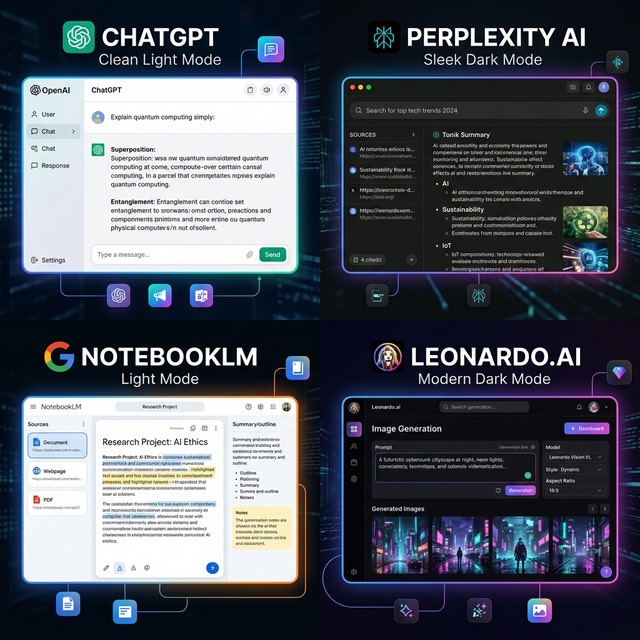
Best Free AI Chatbots & Assistants
AI chatbots are the most versatile free tools available — one interface that handles writing, research, analysis, summarisation, coding help, and more.
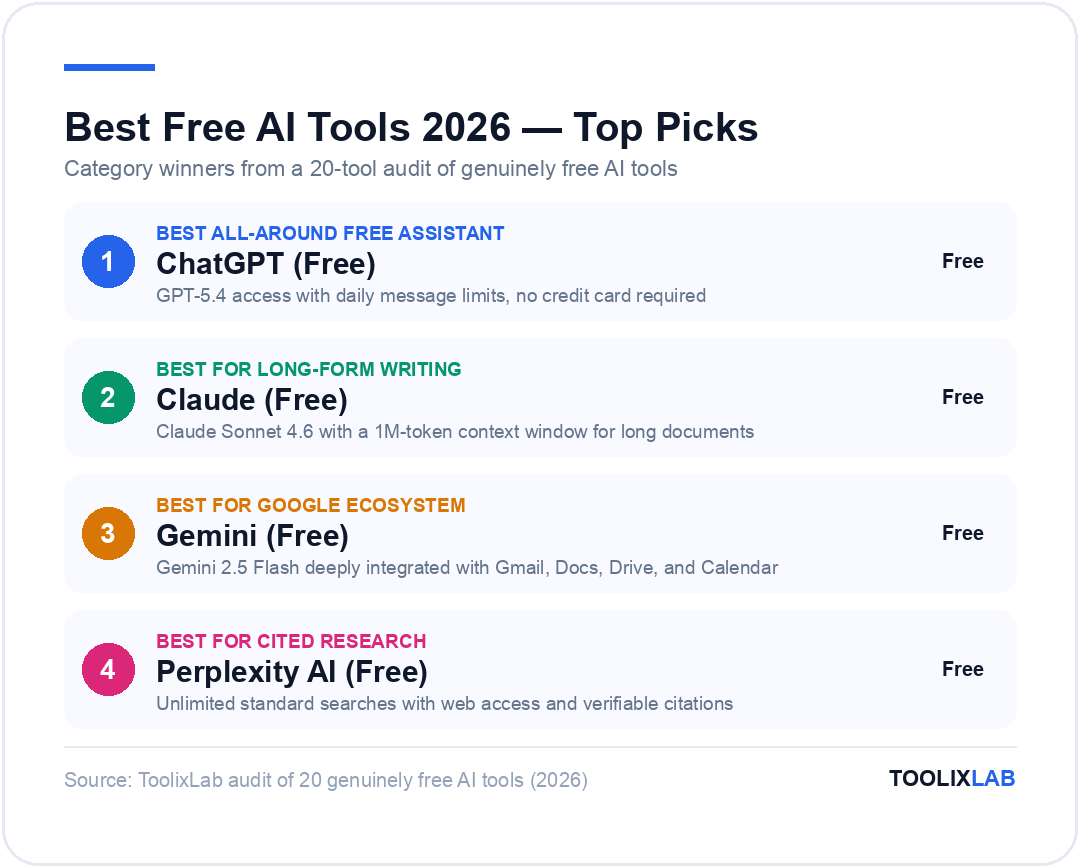
1. ChatGPT (Free) — Best All-Around Free AI Assistant
ChatGPT's free tier runs on GPT-5.4, OpenAI's most capable standard model, with daily usage limits that reset every 24 hours. When you hit the cap, the interface switches to GPT-5.4 mini for the remainder of the day — still usable, but noticeably less capable for complex tasks.
- What's free: GPT-5.4 access with daily message limits, basic web browsing, limited file uploads
- Free tier limits: Daily GPT-5.4 message cap — typically runs out after moderate daily use
- Honest limitation: No memory on free tier (each conversation starts from scratch), no image generation, no Code Interpreter
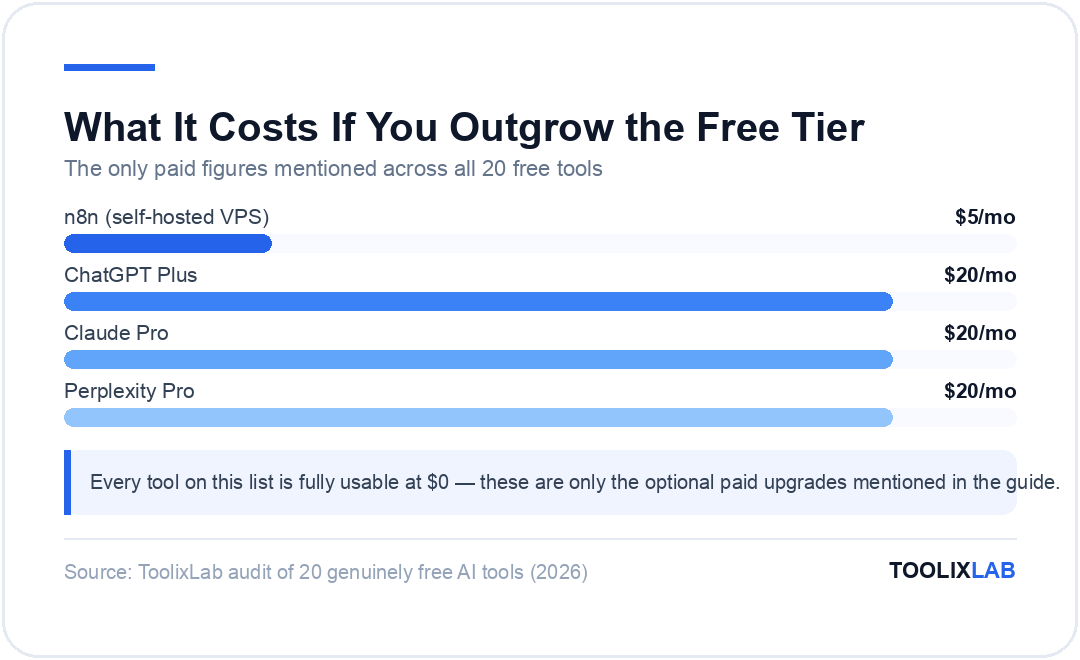
- Worth upgrading? ChatGPT Plus at $20/month if you hit daily limits consistently or need DALL-E, memory, or Code Interpreter
Pro tip: Use ChatGPT free for tasks that don't require context from previous sessions — one-off writing tasks, quick research questions, and document summarisation work well within the daily limit.
For a full walkthrough of what ChatGPT can do, see our How to Use ChatGPT in 2026 guide. Or skip the blank-page problem entirely with a free ChatGPT prompt library — pre-built for marketing, writing, coding, and more.
2. Claude (Free) — Best for Long-Form Writing & Analysis
Claude's free tier gives you access to Claude Sonnet 4.6 — a genuinely capable model that excels at nuanced writing, document analysis, and tasks that require careful, structured reasoning. The free tier is more conservative with limits than ChatGPT's, which means heavy users will hit the wall faster — but the quality per interaction is excellent.
- What's free: Claude Sonnet 4.6 with daily usage limits; 1M token context window (handles very long documents)
- Free tier limits: Daily message cap — resets every 24 hours
- Honest limitation: Hits limits faster than ChatGPT for heavy users; no image generation; no web browsing
- Worth upgrading? Claude Pro at $20/month for heavy daily use or access to Claude Opus 4.6
For a full comparison of Claude, ChatGPT, and Gemini side by side, see our ChatGPT vs Claude vs Gemini: Full 2026 Comparison.
3. Gemini (Free) — Best for Google Ecosystem Users
Google's Gemini is the most underrated free AI chatbot for anyone who lives inside Google's ecosystem. The free tier runs on Gemini 2.5 Flash — fast, capable, and deeply integrated with Gmail, Google Docs, Google Drive, and Google Calendar at no charge.
- What's free: Gemini 2.5 Flash on web and mobile; Google Workspace integration (Gmail, Docs, Drive, Calendar)
- Free tier limits: Advanced features (Google AI Pro) require a paid subscription; free tier model is capable but not the most powerful
- Standout feature: Google ecosystem integration is genuinely useful for free — summarise your emails, draft in Docs, search Drive — without paying a cent
For a complete tutorial on making the most of Gemini, see our How to Use Gemini AI in 2026 guide.
4. Perplexity AI (Free) — Best for Research with Cited Sources
Perplexity is what happens when you combine a search engine with an AI that actually synthesises what it finds. Every answer comes with cited sources you can verify — invaluable for research, fact-checking, and staying current on fast-moving topics. The free tier gives you unlimited searches on the standard model, with 5 Pro searches per day that access better models.
- What's free: Unlimited standard searches with web access and citations; 5 Pro searches/day with more powerful models
- Honest limitation: Free model quality is noticeably below Pro for complex multi-step research questions
- Worth upgrading? Perplexity Pro at $20/month for researchers who need unlimited Pro searches daily
For our full breakdown, see our Perplexity AI Review 2026.
Best Free AI Writing & Content Tools
Beyond general-purpose chatbots, these tools are purpose-built for writing, presentations, and content creation — with free tiers that cover genuine daily use.
5. Grammarly (Free) — Best AI Writing Assistant for Everyday Use
Grammarly is the most widely used AI writing assistant in the world, and its free tier has stayed genuinely useful. Grammar checking, spelling correction, tone detection, and clarity suggestions all work without paying — across your browser, Google Docs, and desktop apps.
- What's free: Grammar and spelling checks, tone detection, clarity and conciseness suggestions, browser extension and desktop app
- Free tier limits: No plagiarism detection, no full-sentence AI rewrites, no style guide enforcement, no team features
- Honest assessment: The free tier is genuinely useful and not designed to frustrate you into upgrading. Grammarly's paid features are meaningful additions, not the free tier being deliberately broken.
6. Gamma (Free) — Best for AI-Generated Presentations
Gamma creates complete, designed presentations from a text prompt. Type "create a presentation on the impact of AI on small business hiring" and within 60 seconds you have a structured, visually designed deck — not a blank template with placeholder text, but actual content organised into coherent slides.
- What's free: 400 AI credits on signup (enough for several complete presentations); view and present for free; basic themes
- Free tier limits: Watermark on exports; limited themes and customisation options; credits refresh monthly
- Standout feature: For internal presentations where polish matters less than speed, the free tier is more than enough.
7. Napkin AI (Free) — Best for Text-to-Visual Diagrams
Napkin AI converts written text into visual diagrams automatically. Paste a paragraph explaining a process, a framework, or a concept — Napkin identifies the structure and generates a clean visual: flowchart, mind map, timeline, or comparison diagram. No dragging boxes, no alignment frustration, no design skills required.
- What's free: Approximately 500 AI visual generations per week; PNG, SVG, and PDF exports; full web access with account signup
- Best for: Visual thinkers, consultants, and educators who need to turn written frameworks into shareable diagrams quickly

Best Free AI Image Generation Tools
AI image generation used to cost money. In 2026, three genuinely free options produce professional-quality results without a credit card.
8. Leonardo.ai (Free) — Best for High-Quality AI Image Generation
Leonardo.ai offers 150 daily tokens — enough for 6–12 high-quality images per day depending on which model you select. The platform runs multiple models including their own PhotoReal and Alchemy systems, producing images consistently among the best available on any free tier.
- What's free: 150 daily tokens that reset every 24 hours; access to multiple generation models; community gallery
- Free tier limits: Daily token reset — premium models cost more tokens per image; some advanced features consume tokens faster
- Best for: Content creators, marketers, and social media managers who need custom visuals regularly
Pro tip: Leonardo's "PhotoReal" model gives the most realistic results for product and lifestyle imagery. Use "Alchemy" for artistic styles — each consumes a different token amount, so check before generating.
9. Canva AI (Free) — Best for Non-Designers Who Need Everything in One Place
Canva's free tier is one of the most complete design + AI combinations available. Beyond templates, the free tier includes Magic Write (AI text generation), background remover, basic AI image generation, and the full Canva design library. For social media graphics, presentations, thumbnails, and simple marketing assets, the free tier covers most of what non-designers actually need.
- What's free: Full Canva design editor, Magic Write (limited monthly uses), background remover, basic AI image generation, 5GB storage
- Free tier limits: Magic Write capped at 50 uses/month; premium templates, brand kit, and some AI features require Canva Pro
10. Microsoft Designer (Free) — Best for Quick AI Visuals Without a New Account
Microsoft Designer is powered by DALL-E and completely free with a Microsoft account — which a significant portion of users already have through Outlook, Teams, or Xbox. No new account, no credit card, no setup beyond signing in. For Office users who occasionally need AI-generated visuals, this is the path of least resistance.
- What's free: AI image generation via DALL-E, design templates, basic editing tools — all free with a Microsoft account
- Best for: Office ecosystem users who want quick AI-generated visuals without adding a new tool to their stack
Best Free AI Research Tools
These tools go beyond chatbots to help you work with your own documents, sources, and knowledge — without paying for the privilege.
11. NotebookLM (Free) — Best for AI That Knows Your Documents
NotebookLM is Google's research AI — and it might be the most underrated free tool in this entire list. Upload your own PDFs, audio files, Google Docs, or website links, and NotebookLM creates an AI trained exclusively on your material. Ask questions about your uploaded documents, request summaries, generate study guides, or explore connections between sources — all based on your content, not a generic training dataset.
The Audio Overview feature generates a podcast-style conversation between two AI hosts discussing your uploaded material — an unexpectedly effective way to absorb dense documents.
- What's free: 100 notebooks, 50 sources per notebook, up to 500,000 words per source — completely free with a Google account
- Standout feature: The privacy model — NotebookLM only knows what you give it. It won't hallucinate facts from outside your uploaded sources.
- Best for: Researchers, students, analysts, lawyers, and anyone who needs to deeply understand large document sets
12. DeepSeek (Free) — Best Free AI for Technical Reasoning
DeepSeek's R1 model matches or exceeds frontier-level performance on reasoning benchmarks — and the web interface is completely free. No account required for basic use, no credit card, no usage cap that activates after a few questions. For technical tasks — coding, math, logical reasoning — DeepSeek R1 is one of the best free options available.
- What's free: Full web access to DeepSeek R1 and V3; basic use requires no account; account signup unlocks conversation history
- Free tier limits: Server load can cause slowdowns during peak hours; API access requires a paid account
- Honest limitation: DeepSeek is a Chinese company and has faced scrutiny over data privacy practices. For sensitive business or personal data, review the current privacy policy carefully before use.
For a full breakdown of DeepSeek's capabilities, see our DeepSeek AI Review 2026.
Best Free AI Productivity & Automation Tools
Free AI doesn't stop at content generation. These tools let you automate workflows, connect apps, and build systems — without a monthly bill.
13. Zapier (Free) — Best for Testing Automation Concepts
Zapier's free tier is restrictive — 5 Zaps (automations) and 100 tasks per month — but it's the easiest entry point into workflow automation for non-technical users. The interface is intuitive, the app library is the largest in the industry (6,000+ apps), and 5 Zaps is enough to automate your most repetitive single-step tasks.
- What's free: 5 Zaps, 100 tasks/month, single-step automations only
- Honest limitation: No multi-step Zaps on free — which rules out most complex automations. Make.com's free tier (below) gives you significantly more for real workflows.
For a full comparison of Zapier, Make.com, and n8n, see our Zapier vs Make.com vs n8n: Automation Comparison.
14. Make.com (Free) — Best Free Automation for Real Workflows
Make.com's free tier is the most generous in the automation space: 1,000 operations per month and unlimited scenarios. Unlimited scenarios means you can build as many automations as you want — the only constraint is the total number of operations they consume per month. For most individual users and small teams running lightweight automations, 1,000 operations is enough to genuinely automate real work.
- What's free: 1,000 operations/month, unlimited scenarios, access to most app integrations, visual builder
- Standout feature: Unlimited scenarios is a real differentiator. Build as many automations as you need and manage your 1,000 operations budget across them.
15. n8n (Free — Self-Hosted) — Best for Technical Users Who Want Zero Limits
n8n is fully open-source and completely free to self-host. No usage caps, no task limits, no vendor lock-in, no monthly bill. If you have a server (a $5/month VPS works fine), you can run unlimited automations connecting hundreds of apps with full control over your data and workflows.
- What's free: Completely free when self-hosted — unlimited workflows, unlimited executions, full feature access
- Free tier limits: Requires technical setup (server, Docker, basic command line comfort); n8n cloud has a free trial but is not free indefinitely
- Honest caveat: This isn't beginner territory. If the words "Docker" and "VPS" mean nothing to you, start with Make.com and graduate to n8n when automation becomes central to your workflow.
Best Free AI Video & Audio Tools
Video creation used to require expensive software and editing skills. These tools collapse that barrier — and the free tiers are legitimately functional.
16. CapCut (Free) — Best for AI-Powered Video Creation
CapCut's Script-to-Video feature is the standout: paste a script, select a style, and CapCut generates a complete video with stock footage, auto-captions, background music, and transitions — in minutes. The free tier covers this feature fully on desktop and mobile, making it the most accessible AI video tool available at no cost.
- What's free: Script-to-Video generation, auto-captions, background removal, basic AI editing features, desktop and mobile apps
- Free tier limits: CapCut watermark on some exports; certain premium templates and AI effects are locked to paid plans
- Best for: Content creators, social media managers, and small business owners who need video content without video editing skills
17. Descript (Free) — Best for Podcast & Video Editing by Text
Descript is built on a simple but powerful idea: edit audio and video by editing the transcript text. Delete a word from the transcript, the word disappears from the recording. No timeline scrubbing, no waveform editing — just text editing applied to media.
- What's free: 1 hour of transcription per month, basic text-based video and audio editing, one Overdub voice clone (limited uses)
- Honest limitation: 1 hour/month transcription makes this a starter or occasional-use tool on the free tier — regular podcasters will hit the limit within their first episode.
Best Free AI Coding Tools
Free AI coding assistants have improved dramatically. The tools below are not compromised free tiers — they're genuinely capable tools that happen not to charge you.
18. Codeium / Windsurf (Free) — Best Free AI Code Completion
Codeium offers unlimited AI code completions across 70+ programming languages — completely free, no credit card, no monthly cap. This is the direct free alternative to GitHub Copilot's paid subscription. Windsurf, Codeium's AI-native IDE, adds agentic coding capabilities with some credit limitations on the free tier.
- What's free: Unlimited code completions in VS Code, JetBrains, Neovim, and other editors; Windsurf IDE with free tier access to Cascade (agentic coding)
- Standout feature: Truly unlimited completions. GitHub Copilot's free tier caps at 2,000 completions/month — Codeium doesn't cap at all.
19. Amazon Q Developer (Free) — Best Free AI for AWS Developers
Amazon Q Developer is purpose-built for developers working with AWS, and its free tier is more generous than most people realise: 50 agentic AI chat interactions per month and access to code transformation features. Q understands IAM policies, CloudFormation templates, and AWS service architecture in ways that general coding assistants don't.
- What's free: 50 AI chat interactions/month, code completions, basic code transformation, security scanning
- Standout feature: Security scanning that catches IAM permission misconfigurations and AWS-specific vulnerabilities.
20. Gemini Code Assist (Free) — Best for Sheer Volume of Free Completions
Gemini Code Assist's free tier offers up to 180,000 code completions per month — the most generous free coding AI allowance on the market by a significant margin. For developers in the Google Cloud or Firebase environment, or anyone who simply wants maximum volume from a free coding assistant, this is the easiest choice.
- What's free: Up to 180,000 code completions/month; chat assistance; full VS Code and JetBrains integration — sign in with Google account, no credit card
- Standout feature: 180,000 completions/month is not a meaningful constraint for any individual developer — you will not hit this limit in daily use.
Quick Reference — Free Tier Limits at a Glance
| Tool | Category | Free Tier Limit | Credit Card? |
|---|---|---|---|
| ChatGPT | Chatbot | Daily GPT-5.4 message cap | ❌ No |
| Claude | Chatbot | Daily message cap | ❌ No |
| Gemini | Chatbot | Generous daily limits | ❌ No |
| Perplexity AI | Research | 5 Pro searches/day | ❌ No |
| Grammarly | Writing | No AI rewrites | ❌ No |
| Gamma | Presentations | 400 credits on signup | ❌ No |
| Napkin AI | Diagrams | ~500 visuals/week | ❌ No |
| Leonardo.ai | Image gen | 150 tokens/day | ❌ No |
| Canva AI | Design | 50 Magic Write uses/mo | ❌ No |
| Microsoft Designer | Image gen | Daily generation limit | ❌ No |
| NotebookLM | Research | 100 notebooks, 50 sources | ❌ No |
| DeepSeek | Chatbot / Coding | No published cap | ❌ No |
| Zapier | Automation | 5 Zaps, 100 tasks/mo | ❌ No |
| Make.com | Automation | 1,000 operations/mo | ❌ No |
| n8n | Automation | Unlimited (self-hosted) | ❌ No |
| CapCut | Video | Watermark on some exports | ❌ No |
| Descript | Video/Audio | 1 hour transcription/mo | ❌ No |
| Codeium | Coding | Unlimited completions | ❌ No |
| Amazon Q Developer | Coding | 50 AI chats/mo | ❌ No |
| Gemini Code Assist | Coding | 180,000 completions/mo | ❌ No |
How to Build a Free AI Stack (By User Type)
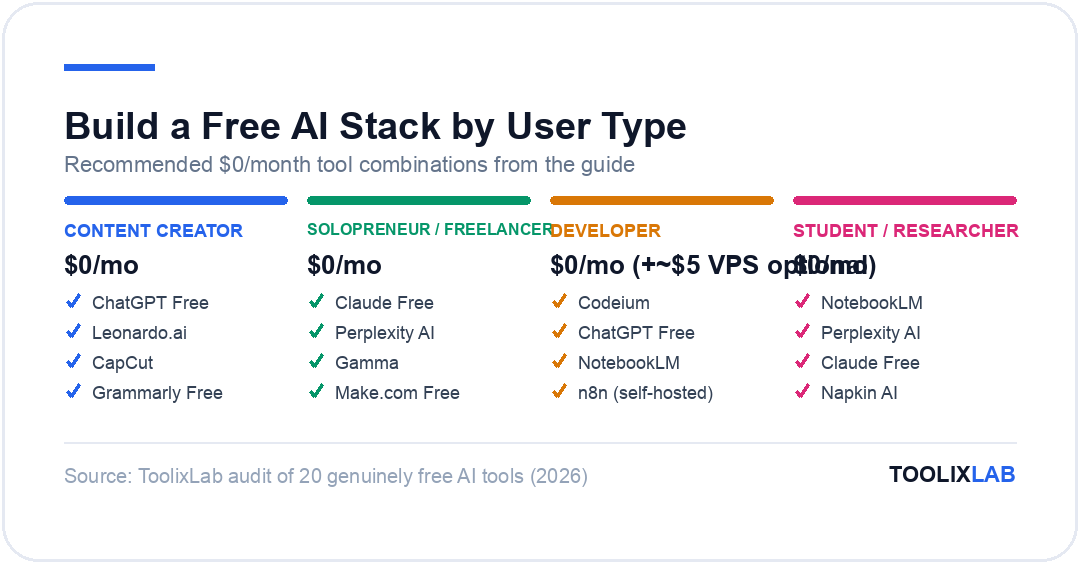
The biggest mistake people make after reading a list like this is trying all 20 tools at once. Don't. Pick a stack for your use case, commit to it for two weeks, and layer in new tools only when you have a specific gap.
🎨 Content Creator Stack
ChatGPT Free — ideas, scripts, captions, copy
Leonardo.ai — custom images (150 tokens/day)
CapCut — Script-to-Video for Reels and Shorts
Grammarly Free — proofreading before publishing
Monthly cost: $0
💼 Solopreneur / Freelancer Stack
Claude Free — writing, analysis, client documents
Perplexity AI — research with citable sources
Gamma — fast presentations for proposals
Make.com Free — automate repetitive processes
Monthly cost: $0
💻 Developer Stack
Codeium — unlimited code completions in your editor
ChatGPT Free — debugging, documentation, architecture
NotebookLM — upload internal docs and query with AI
n8n (self-hosted) — unlimited automation, no monthly bill
Monthly cost: $0 (+~$5/mo for a VPS if self-hosting)
📚 Student / Researcher Stack
NotebookLM — upload reading list, ask questions across it
Perplexity AI — find current info with citable sources
Claude Free — write, summarise, and analyse
Napkin AI — turn concepts into visual diagrams
Monthly cost: $0
When Should You Upgrade to Paid?
- Upgrade when you hit limits daily for more than a week. One limit-hit is an edge case. Seven consecutive days means the free tier isn't sized for your actual usage.
- Upgrade when your work involves sensitive data. Free tiers often have different data handling terms than paid enterprise plans. Review the privacy policy for your specific plan tier before relying on a free account.
- Upgrade when you need memory or persistent context. Most free AI tiers start every conversation from scratch. If your work requires an AI that remembers your preferences and past projects, paid tiers with memory features are worth the cost.
- Don't upgrade out of guilt. If the free tier covers your real needs, use it. That's what it's there for.
Conclusion
Free AI in 2026 is not a consolation prize. The tools in this guide — NotebookLM, Codeium, Make.com, DeepSeek, Leonardo.ai — are not watered-down versions of paid products. Several of them are the best available option in their category, full stop, regardless of price.
The practical advice: don't start with all 20. Pick the stack that matches your user type above, commit to it for two weeks, and measure what actually saves you time. Add tools when you have a specific problem they solve. Remove tools that add complexity without adding value.
For your next step, browse our category roundups to go deeper: 20 Best AI Tools for Small Business in 2026, 15 Best ChatGPT Alternatives in 2026, and How to Build an AI Workflow in 2026 for putting it all together.
🔬 How We Test AI Tools at ToolixLab
Every recommendation in this guide comes from hands-on evaluation, not spec-sheet comparison. Our process for this category:
- Real-task testing: we run each tool through the actual workflows this guide covers — the same tasks you'd use it for — and compare outputs side by side.
- Verified pricing: every price is checked against the vendor's official pricing page at review time, and re-checked on our refresh cycle.
- Free-tier reality check: we test the free tier limits ourselves so "free" claims reflect what you actually get.
- Ongoing re-evaluation: AI tools change monthly; posts carry a visible "Last updated" date and stale recommendations get replaced.
ToolixLab is reader-supported: some links may earn us a commission, which never affects rankings — several tools we rank highest have no affiliate program at all.
Frequently Asked Questions
What is the best free AI tool in 2026?
It depends on what you're doing. For general-purpose AI assistance, ChatGPT's free tier or Claude free are the strongest starting points. For research with cited sources, Perplexity AI. For coding, Codeium's unlimited completions are hard to beat. For working with your own documents, NotebookLM is the best free option in its category by a clear margin.
Is ChatGPT really free?
Yes — ChatGPT has a genuinely free tier with access to GPT-5.4, basic web browsing, and file uploads, with daily usage limits that reset every 24 hours. No credit card required. When you hit the daily limit, the interface switches to GPT-5.4 mini for the rest of the day.
Are there any truly free AI image generators?
Yes — Leonardo.ai (150 tokens/day), Canva AI (within the free Canva account), and Microsoft Designer (free with a Microsoft account) all generate AI images without a credit card. Leonardo.ai offers the best image quality; Canva AI offers the best integration with design templates; Microsoft Designer has the lowest friction for existing Office users.
Is Claude free to use?
Yes. Claude has a free tier that gives you access to Claude Sonnet 4.6 with daily usage limits — no credit card required. The free tier is usable for genuine daily tasks but has more conservative limits than ChatGPT's free tier. Claude Pro at $20/month unlocks higher limits and access to Claude Opus 4.6.
Can I build a real workflow with only free AI tools?
Yes — and the free stack framework in this guide demonstrates exactly how. Content creators, freelancers, developers, and researchers can all build functional AI-powered workflows using entirely free tools. The constraints are real (daily limits, watermarks, usage caps) but manageable with intentional tool selection.