
By ToolixLab Research Team · Last updated: July 2026
Quick Answer
The core AI stack for most freelancers in 2026 is one writing assistant (Claude or ChatGPT), one meeting note-taker, and one design tool (Canva) — roughly $20–40/month total. Add category specialists (video, development, automation) only when a paying project demands them. The mistake to avoid is subscribing to six tools before any of them has become a daily habit.
⚡ TL;DR — Best AI Tools for Freelancers by Category
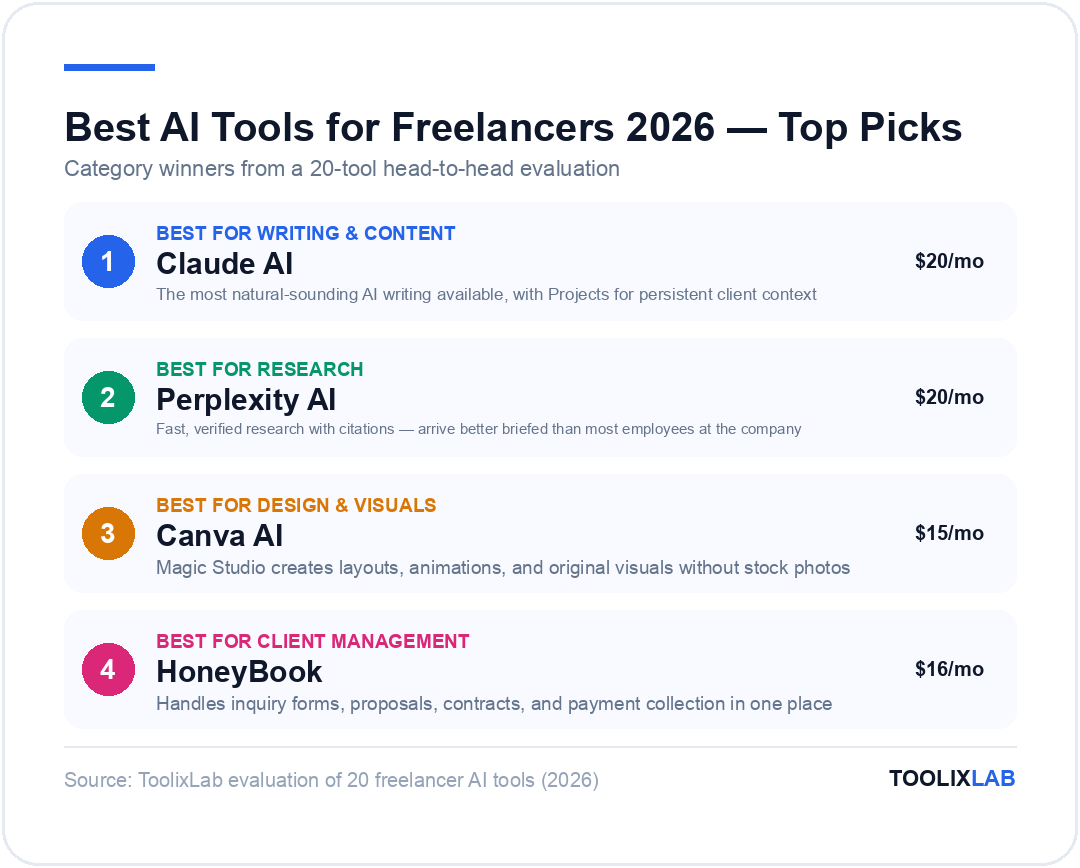
- Best for writing & content: Claude AI, Grammarly, Jasper
- Best for research: Perplexity AI
- Best for design & visuals: Canva AI, Midjourney
- Best for client management: HoneyBook, Bonsai
- Best for meetings & communication: Otter.ai, Loom
- Best for time tracking: Toggl Track, Clockify
- Best for automation: Zapier, Make
- Best for video & audio: Descript
- Best for developers: GitHub Copilot
- Best all-in-one workspace: Notion AI
Here's the honest reality of freelancing in 2026: you're running a one-person business that competes with agencies, teams, and increasingly with AI itself. The freelancers winning right now aren't the ones working harder — they're the ones who've built a lean, AI-powered stack that handles the admin, polishes the output, and frees them to do the work clients actually pay premium rates for.
The problem isn't a shortage of AI tools. It's that there are hundreds of them, most articles recommend the same generic list, and nobody explains which tools actually matter for your specific workflow as a freelancer.
This guide is different. We've organised these 20 tools not by hype, but by the job they do in a freelance business — writing, client management, meetings, invoicing, design, automation, and development. For each tool, we tell you what it's actually good for, what it costs, and which type of freelancer gets the most value from it.
By the end, you'll have a clear picture of which 5–7 tools belong in your stack — and which ones you can safely skip.
🔗 New to AI tools? Start with our How to Use Claude AI and How to Use ChatGPT guides before building your stack.
How to Build a Freelance AI Stack (Before You Buy Anything)
The biggest mistake freelancers make with AI tools is buying before they've diagnosed the problem. Before adding any tool to your stack, answer these three questions:
1. Where am I losing the most time right now?
Admin, client communication, writing first drafts, revisions, meetings, invoicing?
2. What tasks am I doing repeatedly every week?
If you do it more than 3 times a week, it's a candidate for automation.
3. Where is my output quality falling short of what I want to deliver?
Writing polish, design, research depth, code quality?
The tools in this guide are organised to answer each of those questions. A freelance writer's stack looks very different from a developer's, which looks different from a video editor's. Use the category structure below to build yours.
Industry Insight
The average freelancer's AI stack in 2026: 5–7 tools, total cost $50–$120/month, time saved: 10–15 hours per week.
✍️ Writing & Content Creation
1. Claude AI — Best for Long-Form Writing and Client Deliverables
Best for: Writers, consultants, marketers, copywriters
Free tier: Yes (limited) | Pro: $20/month
If you deliver written work to clients — articles, reports, proposals, copy, scripts — Claude AI is the most important tool in this entire list. It produces the most natural-sounding AI writing available, consistently avoids the robotic "AI-isms" that clients immediately notice, and handles long, complex briefs without losing consistency across 3,000+ words.
For freelancers specifically, Claude's Projects feature is invaluable: create one Project per client, upload their brand guidelines and brief, and Claude will reference that context in every conversation. No more re-explaining the client's voice every time you start a new piece.

Key features for freelancers:
- ✓ Long-form writing with consistent tone and voice
- ✓ Projects for persistent client context
- ✓ Artifacts workspace for drafting and editing
- ✓ Document analysis for briefs and reference docs
- ✓ Strong at proposals, case studies, and email copy
What it's not great for: Image generation, real-time research (use Perplexity for that), coding at scale (use GitHub Copilot)
Pricing: Free tier (limited), Pro $20/month, Max $100–$200/month for power users
Best for freelancers who: Write deliverables for clients and want to cut first-draft time by 60–70% without sacrificing quality.
For a full walkthrough, see our How to Use Claude AI in 2026 guide.
2. ChatGPT — Best for Versatile Day-to-Day Tasks
Best for: All freelancer types | Free tier: Yes | Plus: $20/month
Where Claude excels at depth and writing quality, ChatGPT excels at breadth and versatility. It's the best general-purpose AI assistant for the wide range of tasks that don't fit neatly into any one category — brainstorming, quick research, generating options, answering questions, drafting emails, summarising notes.
For freelancers, ChatGPT's Custom GPTs are a significant advantage. Build a custom GPT with your proposal template, your pricing structure, and your service descriptions — and generating a tailored proposal for a new lead becomes a 3-minute task instead of a 30-minute one.
Custom GPTs
DALL-E Images
Voice Mode
3. Grammarly — Best for Professional Polish on Every Communication
Best for: All freelancer types — every written communication | Pro: $12/month
Grammarly is the tool most freelancers already know but significantly underuse. The 2026 version goes well beyond spell-check: it rewrites unclear sentences, adjusts tone for different audiences, and flags communication risks before you send them.
For client-facing freelancers, the ROI is immediate. A single poorly worded email can create confusion, delay payment, or lose a client. Grammarly catches those before they leave your outbox.
Honest Verdict: Grammarly is not a content generator. It polishes your writing, it doesn't write for you. Use Claude or ChatGPT for generation, Grammarly for refinement.
4. Jasper — Best for High-Volume Marketing Copy
Best for: Content marketers, copywriters | Starting at: $49/month
Jasper is purpose-built for marketing copy at scale — specifically the formats that digital marketers and copywriters produce repeatedly: ad copy, email sequences, landing page copy, product descriptions, social media posts.
Its Brand Voice feature lets you upload examples of your clients' previous content and Jasper will match the style — saving significant revision time when you're writing for multiple clients with distinct voices.
🔬 Research
5. Perplexity AI — Best for Fast, Verified Research
Best for: Writers, consultants, analysts, researchers | Pro: $20/month
Every freelancer who delivers knowledge work — articles, reports, briefs, strategy documents — needs a fast way to research that doesn't produce confidently wrong answers. That's Perplexity's exact use case. Ask it to research your client's industry before a kick-off call and you'll arrive better briefed than most employees at the company.

Perplexity Pro: Verified citations for every claim.
Pro Feature🎨 Design & Visuals
6. Canva AI — Best for Non-Designers Who Need Professional Visuals
Best for: Content creators, marketers, consultants | Pro: $15/month
Magic Studio is the umbrella for Canva's AI tools: Magic Design creates layouts from a text prompt, Magic Animate adds motion, and the AI image generator produces original visuals without stock photos.
Magic Design
Create presentation decks and social posts from simple prompts.
Brand Kit
Store client colours and fonts for fast on-brand design.
7. Midjourney — Best for Original AI Image Creation
Best for: Designers, content creators, marketers | Price: $10–$60/month
If your work involves high-quality original imagery — editorial illustrations, concept art, marketing visuals — Midjourney produces outputs that are in a different league. The image quality is exceptional and has a distinctly professional aesthetic that clients notice.
📋 Project Management & Organisation
8. Notion AI — Best All-in-One Freelance Workspace
Best for: Managing multiple clients & projects | AI Plus: $12/month
If you're managing multiple clients and deadlines, Notion is the most flexible tool available. Notion AI can write and summarise directly inside your workspace: draft project briefs, summarise meeting notes, and generate task lists from rough ideas.
📞 Client Communication & Meetings
9. Otter.ai — Best for Meeting Transcription and Follow-Ups
Starting at: $10/month
Otter.ai automates the entire post-call workflow. It joins your Zoom, Meet, or Teams calls, transcribes in real time, generates a summary, and extracts action items. The Meeting GenAI feature answers questions about the call content without scrolling through a full transcript.
10. Loom — Best for Async Client Communication
Starting at: $12.50/month
Loom lets you record your screen with face camera to explain work, give feedback, or present deliverables asynchronously. No scheduling required, no time zone conflicts, no meeting overhead. Clients consistently rate Loom walkthroughs as more professional than email.
⏱️ Time Tracking & Admin
11. Toggl Track — Best for Accurate Billable Time Tracking
Starting at: $9/month
Accurate time tracking reveals which projects are most profitable per hour. Toggl's AI features analyse your tracked time to surface patterns: which clients take more time than they should, and when your most productive hours are.
12. HoneyBook — Best for End-to-End Client Journey
Handles inquiry forms, proposals, contracts, and payment collection in one place. AI drafts proposals and suggests follow-up timing for leads.
13. Bonsai — Best for Freelance Finance
Strongest on financial and legal: legally vetted contracts, real-time tax estimation, and automatic quarterly tax estimates with expense categorisation.
🎬 Video & Audio
14. Descript — Best for Video and Podcast Editing
Hobbyist: $12/month | Creator: $24/month
Edit video and audio by editing the transcript: delete a word from the transcript, and it's cut from the video. The Overdub feature creates a synthetic voice model to fix mistakes by simply typing new words.
⚙️ Automation & Workflow
15. Zapier — Connecting Your Tools
Connects 7,000+ apps to build automated workflows called Zaps. Use plain English to describe the automation you want, and AI builds the connection for you.
Top Freelancer Zaps:
- ✓ Contact Form lead → HoneyBook project
- ✓ Paid Invoice → Thank you email
- ✓ New Meeting → Notion project page
16. Make — Complex Workflows
Power and visual clarity for complex, multi-branch logic. More generous free tier (1,000 operations) than Zapier and overall cheaper for similar automation power.
// Multi-branch error handling
// High operation volume
💻 Development
17. GitHub Copilot — Best Code Assistant
Price: $10/month
For freelance developers, GitHub Copilot is a must-have. It generates code completions, writes functions from comments, and catches bugs directly inside your IDE. Access Claude Sonnet 4.6 and GPT-5.4 models directly within the Copilot interface.
📊 Quick Comparison: Best AI Tools for Freelancers
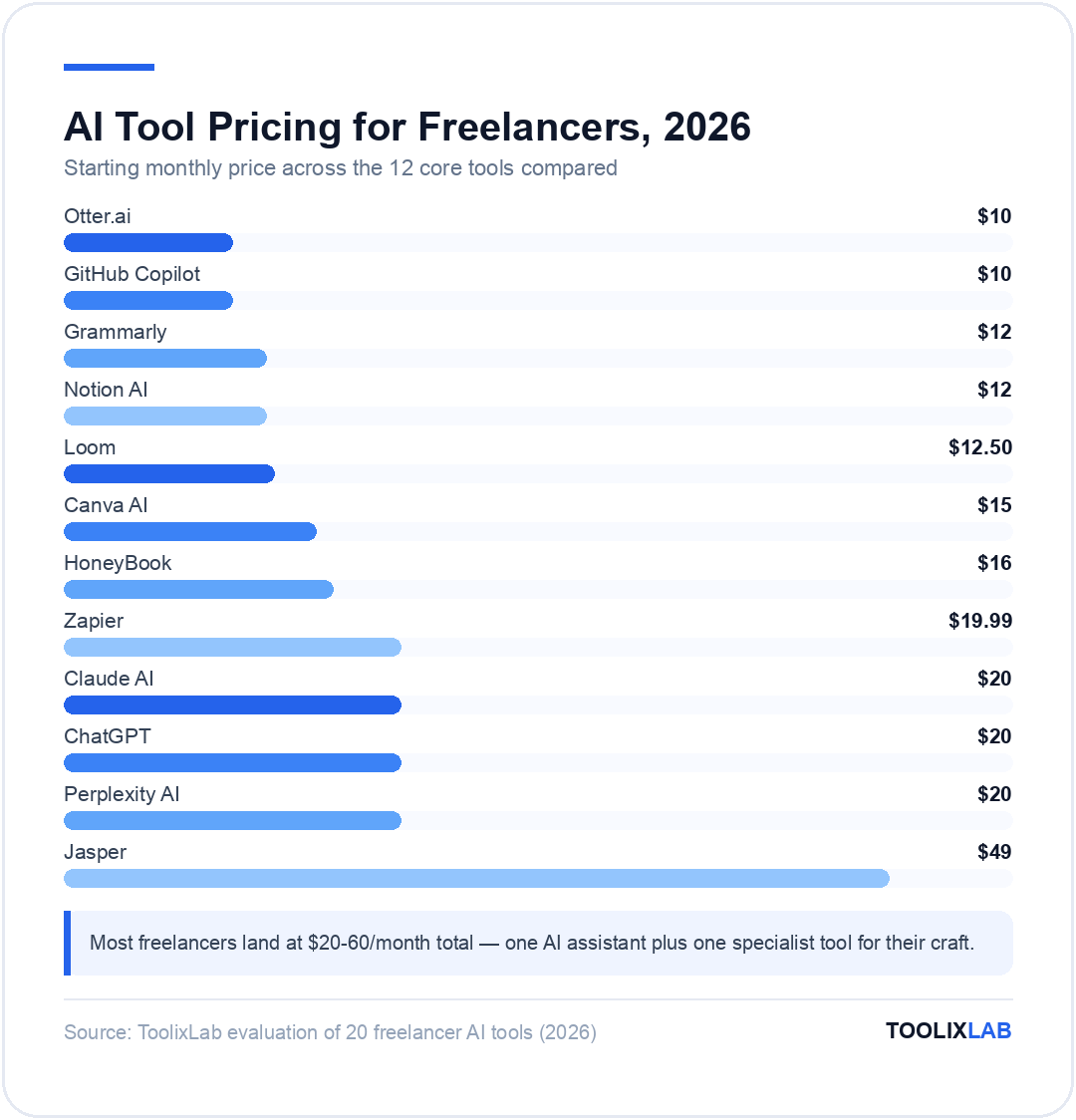
| Tool | Category | Free tier | Starting price |
|---|---|---|---|
| Claude AI | Writing | ✓ | $20/mo |
| ChatGPT | General | ✓ | $20/mo |
| Grammarly | Writing | ✓ | $12/mo |
| Jasper | Marketing | Trial | $49/mo |
| Perplexity AI | Research | ✓ | $20/mo |
| Canva AI | Design | ✓ | $15/mo |
| Notion AI | Organisation | ✓ | $12/mo |
| Otter.ai | Meetings | ✓ | $10/mo |
| Loom | Communication | ✓ | $12.50/mo |
| HoneyBook | Management | Trial | $16/mo |
| Zapier | Automation | ✓ | $19.99/mo |
| GitHub Copilot | Developer | ✓ | $10/mo |
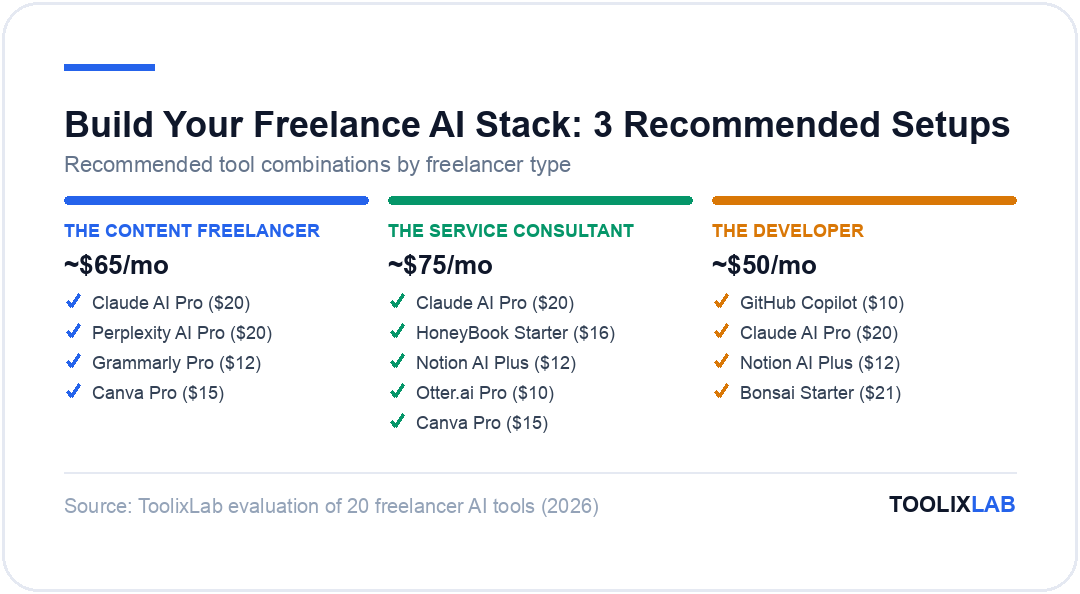
Build Your Stack: 3 Recommended Setups
🖊️ The Content Freelancer
Budget: ~$65/month
- Claude AI Pro ($20) — writing
- Perplexity AI Pro ($20) — research
- Grammarly Pro ($12) — polish
- Canva Pro ($15) — visuals
💼 The Service Consultant
Budget: ~$75/month
- Claude AI Pro ($20) — communication
- HoneyBook Starter ($16) — CRM/Invoicing
- Notion AI Plus ($12) — workspace
- Otter.ai Pro ($10) — meetings
- Canva Pro ($15) — decks/reports
💻 The Developer
Budget: ~$50/month
- GitHub Copilot ($10) — coding
- Claude AI Pro ($20) — review/docs
- Notion AI Plus ($12) — project mgmt
- Bonsai Starter ($21) — legal & taxes
5 Mistakes to Avoid When Building Your AI Stack
1. Subscribing to everything at once
Start with the tools that address your biggest time drain. Add tools one at a time so you actually learn to use each one well. A stack of 10 tools you use at 20% capacity is worse than 3 tools you use at 90%.
2. Using AI to generate and submit without reviewing
AI tools speed up production — they don't replace your judgment. Every client deliverable needs a human review pass, especially for factual accuracy. Use Perplexity to verify claims in AI-generated content before it goes to a client.
3. Choosing tools with overlapping functions
Both Zapier and Make do automation. Both HoneyBook and Bonsai do invoicing. Pick one in each category, not both. The overlap creates confusion and wasted spend.
4. Skipping automation tools because they "seem complicated"
Zapier and Make now build workflows from plain English descriptions. Even basic automation — a new inquiry automatically creating a project in Notion — saves hours per week.
5. Not tracking time
Even if you charge project rates, tracking your time reveals which projects are actually profitable per hour. Most freelancers are surprised to discover their "best clients" often pay the worst hourly rate.
Pricing AI Into Your Rates: The Part Nobody Talks About
If AI lets you deliver a project in half the time, do you halve your price? No — and getting this wrong is costing freelancers real money. Your rate reflects the value of the outcome and the expertise to judge quality, not the hours of typing. The freelancers winning in 2026 have moved from hourly billing to project and value-based pricing, precisely because AI breaks the link between hours and output. A landing page that converts is worth the same to the client whether it took you twenty hours or six.
Practically, that means three moves. First, quote projects at flat rates based on what they've historically been worth, and let AI efficiency expand your margin. Second, reinvest some saved time into visible quality — an extra revision round, a strategy note, faster turnaround — so clients experience the improvement rather than just your speed. Third, if a client pushes an hourly frame, quote a realistic-for-them hour count rather than your actual AI-assisted hours; the alternative is a race to the bottom where your efficiency gains transfer entirely to the client. Your AI stack is your capital investment; you're entitled to its returns.
🔬 How We Test AI Tools at ToolixLab
Every recommendation in this guide comes from hands-on evaluation, not spec-sheet comparison. Our process for this category:
- Real-task testing: we run each tool through the actual workflows this guide covers — the same tasks you'd use it for — and compare outputs side by side.
- Verified pricing: every price is checked against the vendor's official pricing page at review time, and re-checked on our refresh cycle.
- Free-tier reality check: we test the free tier limits ourselves so "free" claims reflect what you actually get.
- Ongoing re-evaluation: AI tools change monthly; posts carry a visible "Last updated" date and stale recommendations get replaced.
ToolixLab is reader-supported: some links may earn us a commission, which never affects rankings — several tools we rank highest have no affiliate program at all.
Frequently Asked Questions
How much should a freelancer budget for AI tools per month?
$20–60/month covers a complete stack for most freelancers: one paid AI assistant ($20), one specialist tool for your craft ($10–30), and free tiers for everything else. If your AI spend exceeds 2–3% of your monthly revenue, you're probably collecting subscriptions rather than using them.
Should I tell clients I use AI tools?
Be honest if asked, and check your contract — some clients (especially in legal, medical, and publishing) explicitly restrict AI use or feeding their materials into AI tools. A good default: use AI for drafts, research, and admin, deliver work you've personally reviewed and refined, and never paste confidential client material into consumer AI tools without permission.
Will AI tools replace freelancers?
AI is replacing tasks, not client relationships. The freelancers losing work are those selling pure execution of routine tasks; the ones raising rates are using AI to deliver faster and spending the saved hours on strategy, judgment, and client communication — the parts clients actually pay premium rates for.
What's the single best first AI tool for a new freelancer?
A general AI assistant — Claude or ChatGPT — because it covers the widest surface: proposals, client emails, research, brainstorming, and first drafts. Master one assistant with saved prompts for your recurring tasks before buying anything category-specific.
Conclusion: Build Lean, Not Loud
The best AI stack for a freelancer isn't the biggest one — it's the most targeted one. Every tool on this list exists to solve a specific problem: writing faster, getting paid reliably, managing clients professionally, or automating the admin that bleeds your hours every week.
The freelancers pulling ahead in 2026 aren't those with the longest list of subscriptions. They're the ones who've identified their three biggest time drains and deployed the right tools to address each one.
🚀 Your Action Plan
- Identify your biggest time drain right now (writing, admin, client management, meetings?)
- Start with the free tier of the tool that addresses it
- Upgrade to paid only when you consistently hit free tier limits
- Add one tool at a time — master each before adding the next
- Revisit your stack every quarter and cut what you don't use
Continue reading:
- 🔗 How to Use Claude AI in 2026 — deep dive on the best writing tool for freelancers
- 🔗 How to Use ChatGPT in 2026 — getting the most from the most versatile AI assistant
- 🔗 Perplexity AI Review 2026 — the best research tool for freelancers
- 🔗 Zapier vs Make vs n8n — full breakdown of automation options
- 🔗 20 Best AI Tools for Small Business — if your freelance business is scaling