
ChatGPT Trust Snapshot
Real Free Score
80/100
Lock-In Risk
Medium
Billing Friction
Low
Commercial Use
Allowed
Data Privacy
Clear
Volatility
Medium
Last checked
2026-07-22
By ToolixLab Research Team · Last updated: July 2026
Quick Answer
To automate social media with AI in 2026, run a 5-stage workflow: AI generates ideas from your content pillars, drafts platform-specific posts, you review and edit in a batch session, a scheduler (Buffer, Hootsuite, or Later) publishes at optimal times, and AI summarizes performance to feed the next cycle. Automate creation and scheduling; never automate community replies or crisis communication. A solo creator can realistically cut 10+ weekly hours to 3–4 with this setup.
Social media managers who still write every post manually are working 3x harder than they need to. In 2026, the gap between teams using AI-powered social media automation and those still doing it by hand is massive — and it's only growing.
⚡ TL;DR — How to Automate Social Media with AI
- Best for content generation: ChatGPT (GPT-5.4) or Claude Sonnet 4.6
- Best for scheduling: Buffer or SocialBee
- Best for LinkedIn automation: Taplio
- Best for Twitter/X threads: Typefully
- Best for visuals: Canva AI + Midjourney
- Best for workflow automation: Zapier or Make
- Best for analytics: Metricool
- Time saved: 8–15 hours/week for most teams
The average social media manager spends 10+ hours per week on tasks that AI can handle in minutes: writing captions, resizing images, scheduling posts, and reporting on performance. In 2026, there's a clear workflow that teams are using to cut that time by 70–80% — without sacrificing quality or authenticity.
This guide gives you that workflow. We cover the exact 5-stage AI social media automation system, the best tools for each platform, how to connect everything with Zapier or Make, and — critically — what you should not automate if you want to actually grow an audience.
🔗 Related reading: See our guide to How to Build an AI Workflow for a broader automation framework, and Zapier vs Make vs n8n to choose the right automation backbone.
Why Social Media Automation Is Different in 2026
Automation in social media has a bad reputation — and it deserves it. A decade of spam bots, mass-follow scripts, and copy-paste content burned audiences' trust and made "automated" synonymous with "low quality."
AI-powered social media automation in 2026 is fundamentally different. The distinction matters:
| Old-School Automation | AI-Powered Automation (2026) |
|---|---|
| Mass-post identical content across platforms | Repurpose one piece into platform-native formats |
| Scrape and copy competitor content | AI generates original angles from your own inputs |
| Bot comments and engagement pods | AI drafts replies; human approves before posting |
| Fixed posting schedules regardless of performance | Analytics-informed optimal timing per audience |
| Zero human review before publishing | Human reviews and approves all AI-generated content |
The key insight: AI handles the production work — writing, formatting, scheduling, reporting. Humans handle the judgment work — strategy, voice, community management, and crisis response. This split is what makes modern social media automation work without burning your audience.
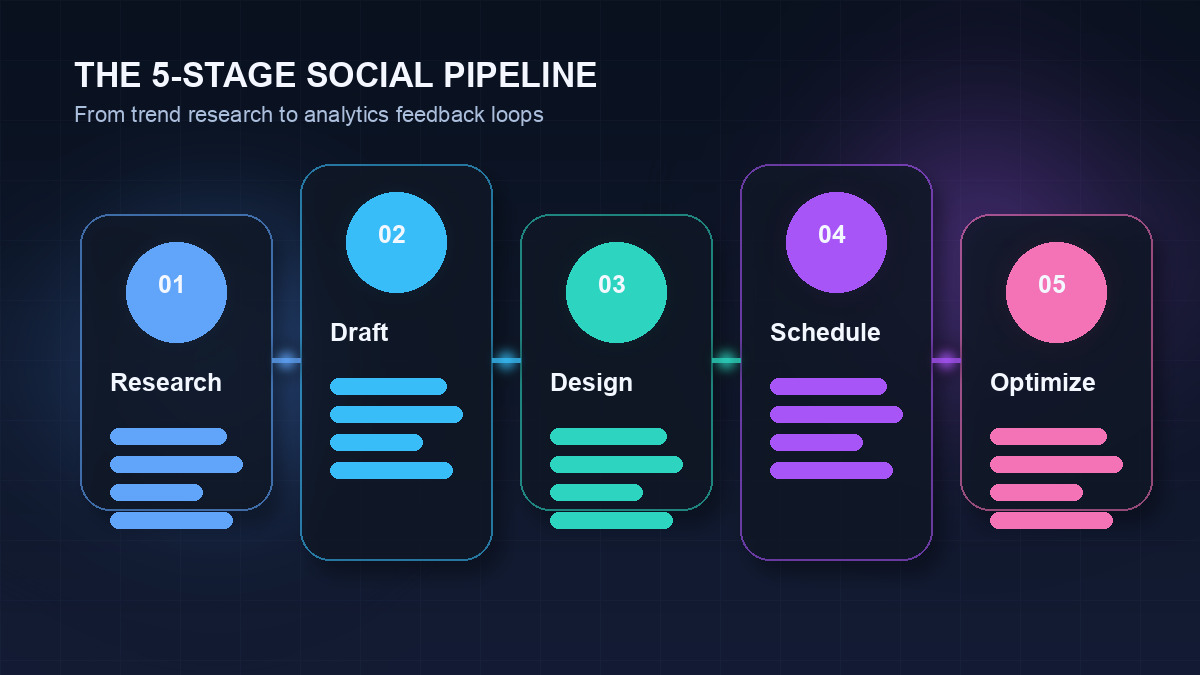
The 5-Stage AI Social Media Automation Workflow
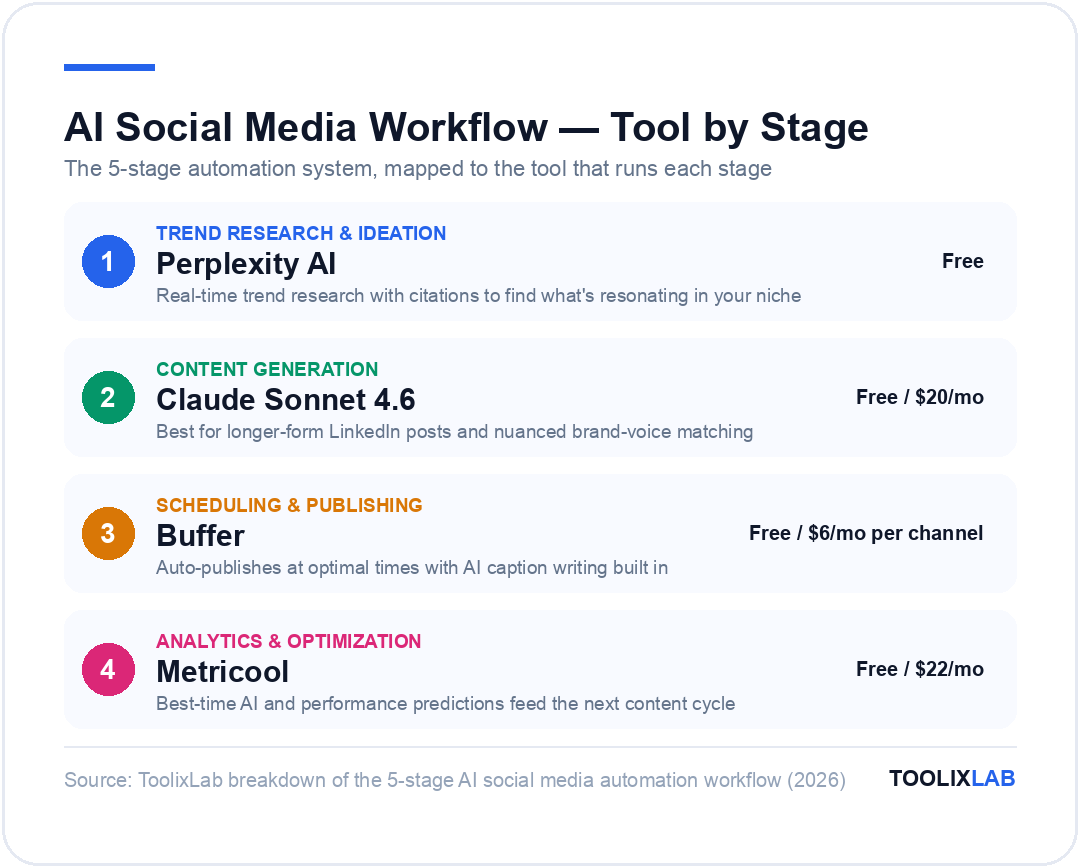
Here's the complete workflow. Each stage has specific tools and a defined boundary between AI work and human work.
Stage 1: Trend Research & Content Ideation
Before AI can write anything useful, it needs to know what to write about. This stage answers: what topics are resonating right now?
What AI automates:
- Scanning trending topics in your niche (via Perplexity AI's real-time search)
- Analyzing your past top-performing posts to identify patterns
- Generating a weekly content calendar with 15–20 post ideas based on your pillars
- Suggesting seasonal or news-reactive content angles
Tools for this stage:
- Perplexity AI — real-time trend research with citations (free tier available)
- ChatGPT or Claude — generate content calendars and topic clusters
- Metricool — analyze your own historical post performance to identify what works
- SparkToro — understand what your audience reads, watches, and follows
Human input required: Review the AI-generated content calendar, remove ideas that don't fit your brand, add any timely events or product news the AI doesn't know about. This should take 20–30 minutes per week.
📋 Content Calendar Prompt Template
Use this weekly in ChatGPT or Claude:
"I run a [describe your brand] for [target audience]. My content pillars are: [pillar 1], [pillar 2], [pillar 3]. Generate a 5-day social media content calendar with 2 posts per day. For each post include: platform, content angle, hook, and post format (image, carousel, text-only, video idea). Focus on content that drives [engagement/traffic/leads]."
Stage 2: AI Content Generation
This is where AI delivers its biggest time savings. Writing captions, threads, LinkedIn posts, and short-form video scripts is time-consuming manual work — and it's exactly what large language models do best.
What AI automates:
- Writing platform-native captions (Instagram's conversational style vs. LinkedIn's professional tone)
- Generating Twitter/X thread structures from a single idea
- Adapting blog posts into 5–10 social posts (the content repurposing multiplier)
- Writing short-form video scripts for TikTok and Instagram Reels
- Creating variations of top-performing posts for A/B testing
The content repurposing use case alone justifies the entire workflow. One 2,000-word blog post can become:
- 1 LinkedIn long-form post (key insight + takeaways)
- 5 Twitter/X thread posts (one per H2 section)
- 3 Instagram carousel slides (visual summary)
- 1 TikTok/Reels script (60-second explainer)
- 2 quote graphics (pull-quote format for Twitter/LinkedIn)
That's 12 pieces of content from one source piece — all written by AI in under 10 minutes.
Tools for this stage:
- Claude Sonnet 4.6 — best for longer-form LinkedIn posts and nuanced brand voice matching
- ChatGPT (GPT-5.4) — strong for Twitter/X threads and short punchy captions
- Typefully — specialized for Twitter/X threads with built-in AI writing and scheduling
- Taplio — LinkedIn-specific AI post generator with analytics and scheduling
- Lately AI — automatically pulls social posts from long-form content using your brand voice
🔗 Related reading: See Best AI Writing Tools for Content Creators for a full breakdown of Claude vs ChatGPT vs Jasper for content work.
Stage 3: AI Visual Creation
Social media is a visual medium. Posts with custom images get 2–3x more engagement than text-only posts on most platforms — and creating custom graphics used to mean a designer or hours in Canva. AI has changed that.
What AI automates:
- Generating unique images for posts from text prompts (Midjourney, DALL-E 3)
- Resizing one design for all platform dimensions automatically (Canva Magic Resize)
- Creating branded carousel slides from an outline (Canva AI, Beautiful.ai)
- Generating short video clips from scripts (Synthesia, HeyGen for AI avatars)
- Removing image backgrounds and applying brand overlays (remove.bg, Adobe Firefly)
Tools for this stage:
- Canva AI — all-in-one: Magic Design, Magic Write, Magic Resize, background removal. Best for non-designers.
- Midjourney — best image quality for stylized brand visuals and editorial images
- Adobe Firefly — commercially safe AI images with direct Creative Cloud integration
- HeyGen — create AI avatar videos for social (no filming required)
- Descript — edit video with AI text-based editing; auto-generate social clips from long videos
Human input required: Always review AI-generated images before publishing. AI image generation still makes errors with text, hands, and complex brand guidelines. Keep a library of pre-approved visual templates in Canva — then AI fills in the content; you choose the final image.
Stage 4: Scheduling & Publishing Automation
Scheduling is the most straightforward automation — and the most widely adopted. Every serious social media team uses a scheduler. The question in 2026 is which one fits your workflow.
What AI automates:
- Optimal post timing based on your specific audience's activity patterns
- Auto-publishing to multiple platforms simultaneously
- First-comment automation (posting hashtags in comments on Instagram)
- Content recycling — automatically re-posting evergreen content on a schedule
- Queue management — maintaining consistent posting frequency even during slow content weeks
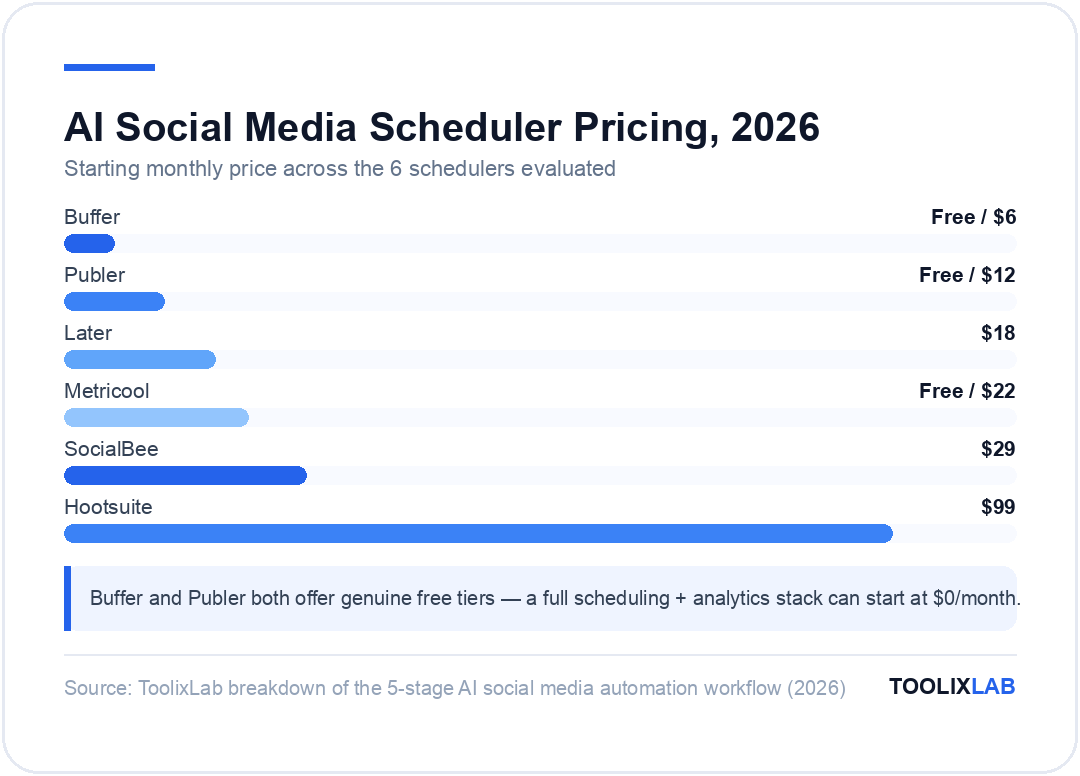
| Tool | Best For | AI Features | Starting Price |
|---|---|---|---|
| Buffer | Small teams, clean UX | AI caption writing, idea generation | Free / $6/mo per channel |
| SocialBee | Content recycling, category queues | AI post generator, content variation | $29/mo |
| Hootsuite | Enterprise teams, monitoring | OwlyWriter AI, best-time-to-post | $99/mo |
| Later | Instagram + TikTok visual planning | AI caption writer, hashtag suggestions | $18/mo |
| Publer | Best value, bulk scheduling | AI assistant, auto-hashtags, link shortener | Free / $12/mo |
| Metricool | Analytics + scheduling combined | Best-time AI, performance predictions | Free / $22/mo |
Our recommendation: Start with Buffer (clean, easy, affordable) or SocialBee if you want content recycling built in. Only upgrade to Hootsuite if you genuinely need enterprise monitoring and team workflows — its price jump is hard to justify for small teams.
Stage 5: Analytics & Continuous Optimization
Automation without measurement is just guessing at scale. The fifth stage closes the loop: use AI to analyze what's working and automatically feed those insights back into Stage 1 (content ideation).
What AI automates:
- Weekly performance reports across all platforms (Metricool auto-sends these)
- Identifying your best-performing post formats, topics, and posting times
- Competitor benchmarking — tracking share of voice and content performance
- Sentiment analysis on comments and DMs
- AI-generated recommendations for content adjustments based on performance trends
Tools for this stage:
- Metricool — best all-in-one analytics for small to mid-size teams; AI recommendations included
- Sprout Social — enterprise-grade listening, sentiment analysis, and competitive reporting
- Taplio Analytics — LinkedIn-specific performance tracking with AI insights
- Native platform analytics — Instagram Insights, LinkedIn Analytics, X Analytics are free and surprisingly detailed
Platform-Specific AI Automation Strategies
Different platforms require different approaches. Here's the playbook for each major platform:
LinkedIn Automation
LinkedIn is the highest-ROI platform for B2B brands — and also the one where low-quality automation is most obvious and damaging. The winning strategy uses AI for drafting and scheduling, with human review before every post.
Best tool: Taplio — purpose-built for LinkedIn with AI post generation, scheduling, and comment management. It learns from your top-performing posts to generate better content over time.
The LinkedIn content formula that AI handles well:
- Personal story opener (2–3 lines max)
- Main insight or contrarian take
- Numbered list breakdown (3–5 points)
- Engagement question at the end
Generate 5 LinkedIn posts per week with Claude using this template, then batch-schedule them in Taplio every Monday morning. That's your entire LinkedIn presence for the week in under an hour.
Twitter/X Automation
Twitter/X rewards volume and consistency more than any other platform. The accounts that grow fastest post 3–5 times per day. AI makes this feasible without turning into a spam account.
Best tool: Typefully — the gold standard for Twitter/X thread creation with AI writing, scheduling, and analytics built in. Write threads in a clean editor, AI suggests improvements, schedule at optimal times.
The high-performing Twitter/X content mix (which AI can generate from templates):
- 40% threads (long-form ideas broken into 5–10 tweets)
- 30% standalone insight tweets (one strong take)
- 20% repurposed stats and quotes (from your blog posts and resources)
- 10% real-time, human-only commentary on news (do not automate this)
Instagram Automation
Instagram's algorithm in 2026 still heavily favors Reels. If you're not producing short video, you're fighting the algorithm. AI can handle the caption and hashtag work — the video filming still requires a human.
Best tools: Later or Publer for visual grid planning and scheduling. Canva AI for carousel design and Reels cover images.
What to automate on Instagram:
- Caption writing (AI + human edit)
- Hashtag research and rotation (use a set of 5 hashtag groups and rotate)
- Scheduling static posts and carousels
- Story scheduling (Later and Buffer support this)
- DM welcome message for new followers (use a CRM tool like ManyChat)
TikTok Automation
TikTok is the hardest platform to automate well because its algorithm heavily rewards authentic, real-time content. You can automate the scripting and scheduling — but the performance is almost always filmed live.
What to automate: Video script generation (ChatGPT excels at 30–60 second TikTok scripts with hook, content, and CTA structure). Use Metricool or Later for TikTok scheduling. Let Descript help you edit and clip longer videos into TikTok-sized pieces.
How to Build Your First Automated Social Media Workflow
Here's the step-by-step setup for a solo creator or small team starting from scratch:
Week 1: Foundation
- Choose 2–3 platforms to focus on (not all of them)
- Define 3–5 content pillars (the topics you'll consistently create about)
- Set up a scheduler — Buffer (free for 3 channels) is the easiest starting point
- Write your brand voice document (3–5 examples of your best posts + tone guidelines) — this becomes your AI prompt system message
Week 2: AI Content Generation Setup
- Create a ChatGPT or Claude Project with your brand voice document as the system prompt
- Generate your first content calendar using the prompt template above
- Write all posts for the next 2 weeks using AI drafts + your editing
- Schedule everything in your scheduler
Week 3: Add Automation
- Set up a Zapier or Make workflow: new blog post published → automatically generate social posts via ChatGPT → add to Buffer queue
- Set up weekly analytics report delivery from Metricool
- Create a Canva template set for your most-used post formats (quote graphic, carousel, announcement)
Week 4: Optimize and Scale
- Review analytics — which post formats and topics got the most engagement?
- Update your AI content calendar prompt to prioritize what's working
- Add a second content source: turn your newsletter, podcast, or YouTube video into additional social posts automatically
🔗 Related reading: For the full automation setup, see our guide to Best Workflow Automation Tools for Small Business — including how to connect social scheduling with your broader marketing stack.
Connecting Everything with Zapier or Make
The real power of social media automation isn't any single tool — it's connecting your tools together so content flows automatically between them. This is where Zapier and Make come in.
Here are the most valuable social media automation "Zaps" or scenarios to build:
Zap 1: Blog Post → Social Queue
Trigger: New post published on your WordPress/Ghost/Webflow site
Action 1: Send post URL and title to ChatGPT — generate 5 social posts (one per platform)
Action 2: Add each post to the relevant platform queue in Buffer
Time saved: 30–45 minutes per blog post
Zap 2: RSS Feed → Twitter/X Thread Draft
Trigger: New item in your niche's RSS feed (competitor blog, industry news)
Action 1: Send the article summary to Claude — generate a Twitter thread with your perspective
Action 2: Save draft to Typefully for review before publishing
Time saved: 20 minutes per reactive post
Zap 3: New YouTube Video → Social Clips Brief
Trigger: New YouTube video published
Action 1: Generate transcript via AssemblyAI
Action 2: Send transcript to Claude — identify the 3 best short clip moments
Action 3: Create a task in Notion with timestamps and caption drafts
Time saved: 1–2 hours per video repurposing session
Zap 4: Top Post Alert → Content Duplication
Trigger: Metricool detects a post exceeding your engagement threshold
Action: Notify you in Slack with a link and prompt: "This post is outperforming — want to create 3 variations for the next 3 weeks?"
Value: Never miss a signal that a content format is working
🔗 Related reading: See our full Zapier vs Make vs n8n comparison to choose the right automation platform for your budget and technical level.
What NOT to Automate
This section might be the most important in the entire guide. Automating the wrong things is how you destroy an audience faster than you built it.
Never fully automate:
- Community engagement. Replying to comments and DMs with AI responses, without human review, is detectable and off-putting. AI can draft replies — a human should send them.
- News and current events commentary. AI doesn't know what happened in the last 24 hours with full context. Reacting to breaking news with AI-generated opinions that miss context will embarrass your brand.
- Crisis communications. If your brand is under fire, every response must be human. There is no exception.
- Personalized outreach. Automated LinkedIn connection messages and DM sequences that look personal are immediately recognized as automation. They damage your personal brand every time they're sent.
- Platform rules compliance. AI doesn't know which automations violate each platform's Terms of Service. Using bots for follows, likes, or comments violates most platforms' rules and risks account suspension.
Realistic Time Savings: What to Expect
Here's what teams actually save after implementing this workflow:
| Task | Manual Time/Week | With AI Automation | Time Saved |
|---|---|---|---|
| Content ideation | 3–4 hours | 30 minutes | ~3 hours |
| Caption writing (20 posts) | 4–6 hours | 45 minutes | ~5 hours |
| Graphic creation | 3–5 hours | 1 hour | ~3 hours |
| Scheduling | 2 hours | 20 minutes | ~1.5 hours |
| Performance reporting | 1–2 hours | 15 minutes | ~1.5 hours |
Total: 8–14 hours saved per week for a social media manager running 3–4 platforms with 20+ posts per week. For a solo creator doing less volume, expect 4–6 hours saved. The time freed up gets reinvested in community engagement, strategy, and the high-judgment work that AI can't replace.
The Minimal Viable Social Media Automation Stack
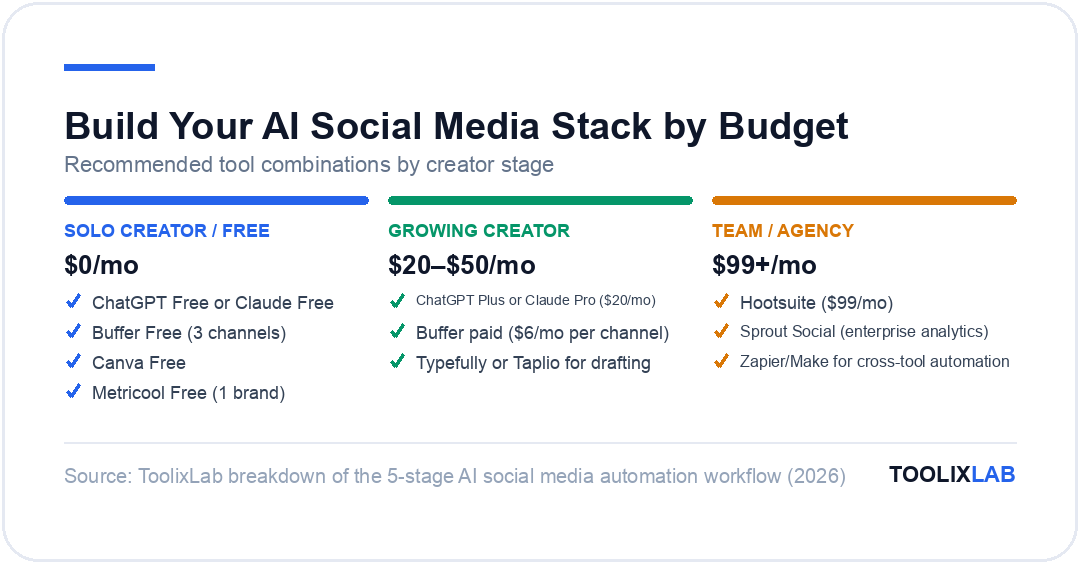
If you're just getting started and don't want to invest in multiple tools, here's the leanest setup that still delivers real results:
- ChatGPT Free or Claude Free — content generation (use the free tier until you hit limits)
- Buffer Free — scheduling for up to 3 channels
- Canva Free — graphic templates and resizing
- Metricool Free — analytics for up to 1 brand
Monthly cost: $0. This stack handles stages 2, 3, 4, and 5 of the workflow at no cost. It won't match a paid setup in efficiency or features — but it's a real automation workflow that will save you 4–6 hours per week from day one.
The single highest-ROI upgrade is a paid ChatGPT or Claude plan ($20/month). This unlocks higher message limits, better models, and the ability to save your brand voice as a persistent Project — which dramatically improves content quality consistency.
🔗 Related reading: See our guide to Best Free AI Tools in 2026 for a full breakdown of free tiers across all major AI platforms.
🔑 Key Takeaways
- ✓Automate the production line (ideation, drafting, scheduling, reporting), never the relationship (replies, DMs, community, crisis response)
- ✓Draft once, adapt per platform — the same idea needs different lengths, tones, and formats on LinkedIn, X, and Instagram, and AI handles that adaptation well
- ✓A weekly one-hour batch review of AI drafts preserves your voice while keeping the 60–70% time saving
- ✓Start with the minimal stack (one AI assistant + one scheduler) and add Zapier/Make plumbing only after the manual-review version runs smoothly for a month
Frequently Asked Questions
Let's address the questions that come up most often when teams start building social media automation workflows.