
TL;DR — AI Customer Support System 2026
Customer support is the department everyone wants to cut costs in — and the one that destroys brand loyalty when you cut it wrong. In 2026, AI gives you a third option: reduce costs and improve customer satisfaction simultaneously, by routing the right queries to AI and the right queries to humans.
The problem is that most businesses approach AI customer support backwards. They deploy a chatbot, it fails to answer anything useful, customers get frustrated, and the team concludes "AI isn't ready for support." The failure isn't AI — it's the implementation. A chatbot without a knowledge base is like hiring a new support rep and giving them zero training. They'll fail every time.
According to IBM's AI customer service research, companies that deploy AI support correctly reduce support costs by 30% while maintaining or improving CSAT scores. The operative word is "correctly" — which means building a structured system, not just adding a chat widget.
This guide walks through how to build a complete AI customer support system from the ground up in 2026 — covering the three-tier support model, the tools that power each tier, step-by-step setup, and the metrics that tell you if it's working. Whether you're a solo founder handling your own support or managing a team of 50 agents, these principles apply.
Why AI Customer Support Is No Longer Optional in 2026
The economics of traditional customer support don't work at scale. A human support agent costs $35,000–$60,000/year in salary (plus benefits, training, and management overhead), can handle 40–60 tickets per day, and is unavailable nights, weekends, and holidays. As your customer base grows, your support cost grows linearly — unless you change the model.
AI changes the model fundamentally. A well-configured AI chatbot handles unlimited simultaneous conversations, 24/7, in multiple languages, at a cost that doesn't scale with volume. When it can't resolve a query, it hands off seamlessly to a human agent with full context — so the agent doesn't ask the customer to repeat themselves.
The numbers reflect adoption: Gartner research shows that by 2026, AI handles over 80% of initial customer contact across enterprise companies. Even among SMBs, tools like Tidio, Freshdesk, and Intercom have made AI-powered support accessible without a dedicated engineering team.
The competitive pressure is real: if your competitors are resolving Tier 1 tickets in 30 seconds with AI and you're taking 4 hours to respond, that's a retention problem. Customers in 2026 expect instant responses for common queries — and they have no patience for "your ticket has been received, we'll respond in 1–2 business days" for something as simple as a password reset or order status update.
Beyond speed, AI support systems generate data that traditional support doesn't. Every resolved and unresolved query becomes a signal about product confusion, feature gaps, and UX friction. AI platforms surface these patterns automatically — your support system becomes a product intelligence tool, not just a cost center.
The question in 2026 isn't whether to adopt AI customer support. It's how to implement it correctly so it helps customers instead of frustrating them.
The 3-Tier AI Customer Support Model
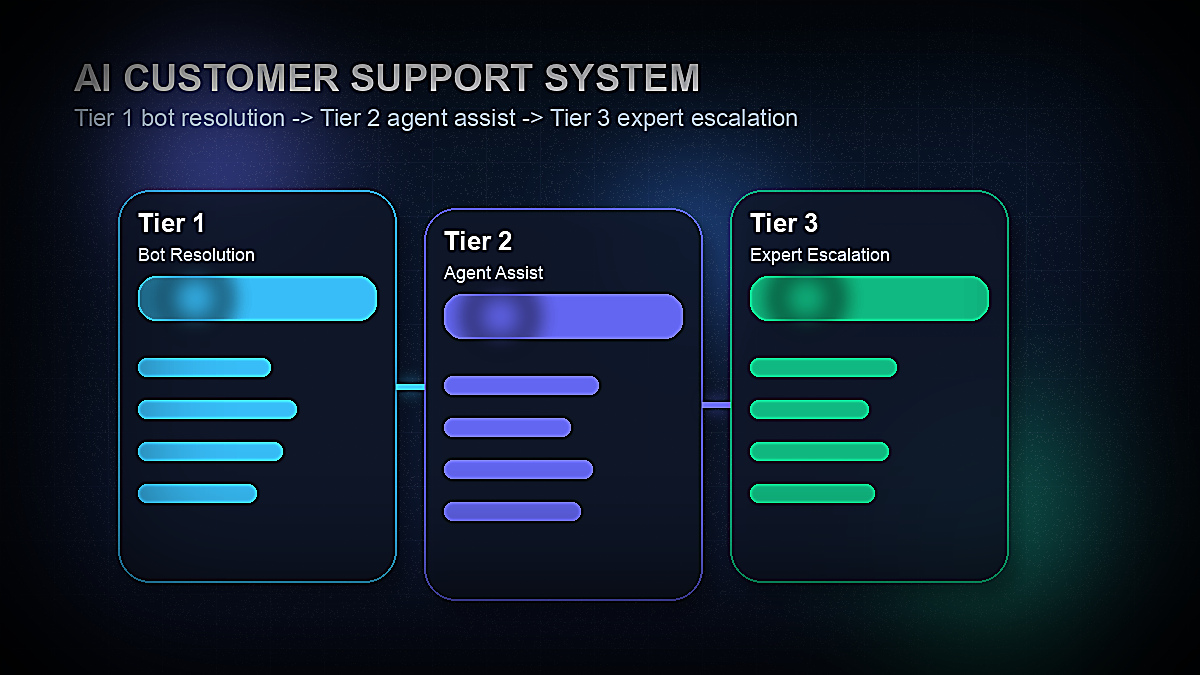
Before choosing tools or writing a single chatbot flow, you need a mental model for how your support system is structured. The three-tier model is the most effective framework for most businesses:
Tier 1 — Fully Automated (AI resolves, no human involved): These are your high-frequency, low-complexity queries. Think: "What's your return policy?", "How do I reset my password?", "Where is my order?", "Can I change my plan?" These queries have definitive answers that don't require judgment. A well-trained AI chatbot handles 40–60% of all incoming support volume at this tier — instantly, without human cost.
Tier 2 — AI-Assisted Human (human resolves, AI helps): Queries that require human judgment but where AI can dramatically speed up the resolution. The AI surfaces relevant knowledge base articles, suggests response templates, auto-translates, flags sentiment, and summarizes conversation history before the agent reads a single word. Human handles the final reply; AI cuts handle time by 20–35%. This covers the 30–40% of tickets that are too nuanced for full automation but still benefit massively from AI support.
Tier 3 — Expert Human (complex, sensitive, or high-value): Billing disputes, legal concerns, enterprise account issues, highly emotional customers, and complex technical debugging. No AI auto-resolution here — just smart routing to the right human. AI still helps by transcribing calls, suggesting talking points, and flagging churn risk signals. This is roughly 10–20% of total volume but requires your best agents.
The goal is to push as much volume as possible to Tier 1 without sacrificing satisfaction. Your CSAT score will tell you if you've pushed too far — a drop in CSAT after deploying AI means your bot is handling queries it shouldn't be, not that AI doesn't work.
The AI Customer Support Stack: Tools You'll Need
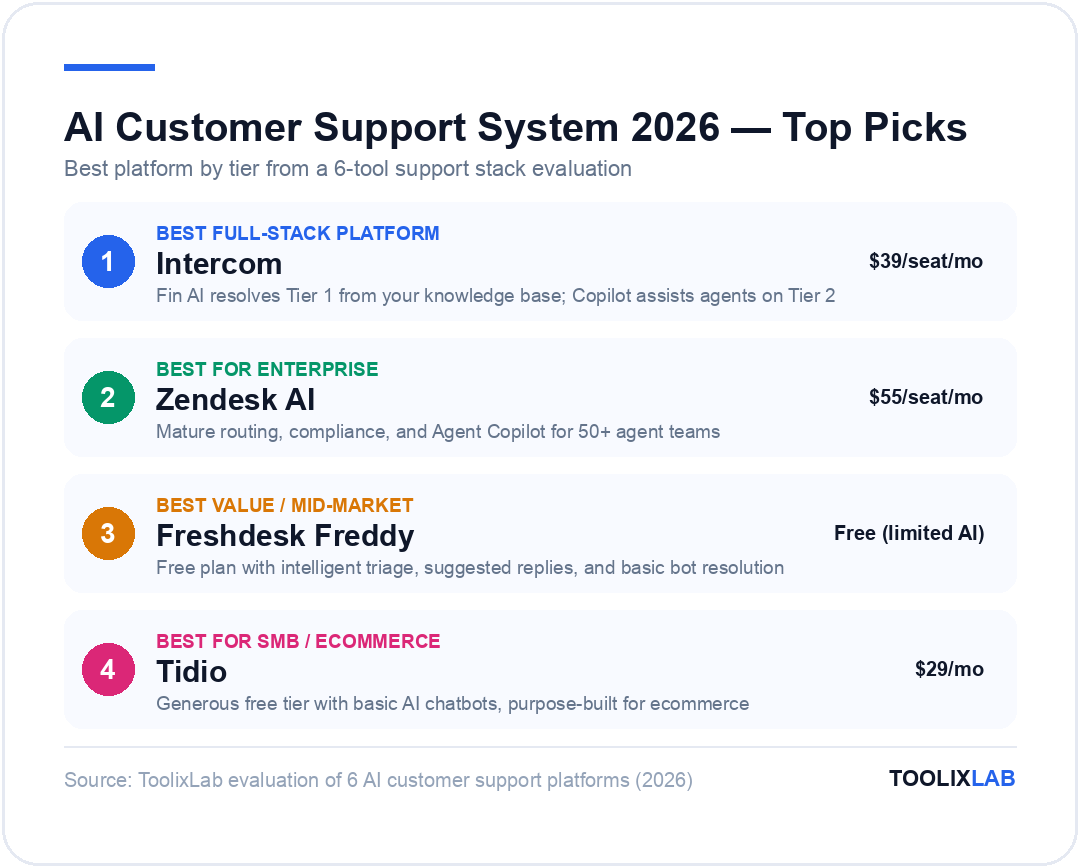
There's no single tool that handles every tier perfectly. The best AI customer support stacks combine a primary helpdesk platform (which handles tickets, routing, and agent tools) with specialized AI layers on top. Here's how the landscape breaks down in 2026:
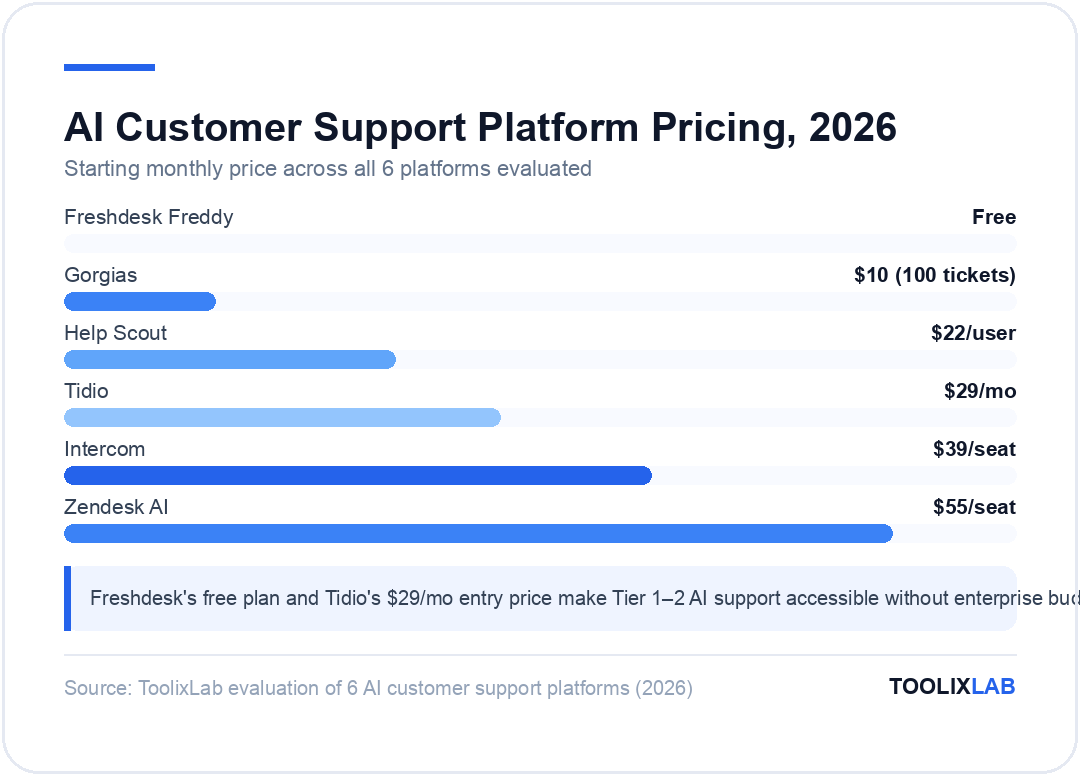
| Tool | Best For | Starting Price | Free Plan | AI Tier |
|---|---|---|---|---|
| Intercom | Full-stack B2B/SaaS support | $39/seat/mo | 14-day trial | All tiers |
| Zendesk AI | Enterprise & high-volume | $55/seat/mo | 14-day trial | All tiers |
| Freshdesk Freddy | Mid-market, value pricing | Free (limited AI) | Yes | Tier 1–2 |
| Tidio | SMB, ecommerce, live chat | $29/mo | Yes | Tier 1–2 |
| Gorgias | Shopify/ecommerce support | $10/mo (100 tickets) | No | Tier 1–2 |
| Help Scout | Email-first, small teams | $22/user/mo | No | Tier 2 |
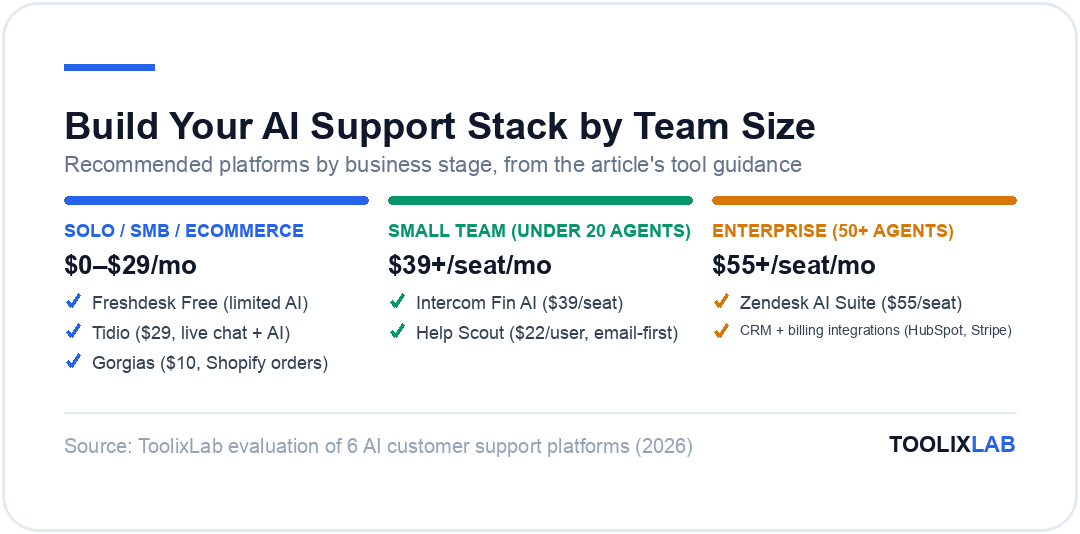
Intercom is the most capable all-in-one option. Its Fin AI agent (built on top of Claude and OpenAI models) resolves Tier 1 queries directly from your knowledge base with impressive accuracy. The Copilot feature assists human agents in real time. For B2B SaaS companies with a product-led growth motion, Intercom is the default choice.
Zendesk AI scales to high volumes and has the most mature enterprise integrations. If you have a large team (50+ agents), complex routing logic, and compliance requirements, Zendesk's AI Suite is worth the premium. Their Answer Bot and Agent Copilot are both well-developed.
Freshdesk with Freddy AI is the best value option for mid-market companies. The free plan is genuinely useful for small teams, and Freddy AI adds intelligent triage, suggested replies, and basic bot resolution at a fraction of Intercom/Zendesk pricing. The trade-off is a less polished chatbot experience.
Tidio is purpose-built for ecommerce and SMB, with a generous free tier that includes basic AI chatbots. For businesses with straightforward support flows and a limited budget, Tidio gets you 80% of the way there at a fraction of the cost.
Gorgias is the specialist choice for Shopify-first ecommerce businesses. Its deep Shopify integration means your AI can automatically answer "Where is my order?" with real order data — without any manual configuration. Pricing by ticket volume makes it cost-effective for low-volume stores.
Intercom — The Best Full-Stack AI Support Platform
Intercom's Fin AI resolves up to 50% of support queries automatically, with seamless handoff to human agents when needed. Used by 25,000+ businesses including Atlassian, Shopify, and Amazon.
🎁 14-day free trial — no credit card required
Step 1: Audit Your Current Support & Map Your Tiers
Before you configure anything, you need data on what your customers are actually asking. Skip this step and you'll build a chatbot that answers the wrong questions.
Export your last 90–180 days of support tickets from your current helpdesk (or email inbox). If you don't have a helpdesk yet, export your email thread history from Gmail or Outlook and dump it into a spreadsheet. You need at least 200–300 tickets for a meaningful analysis.
Then categorize every ticket into one of three buckets:
- Repeatable + definitive answer: The same question appears frequently and has a clear, unchanging answer. These are Tier 1 AI candidates. Examples: return policy, shipping times, password reset, plan features, billing dates.
- Requires context or judgment, but answerable: Needs account data or situational reading, but a trained agent (or AI with CRM access) can resolve it. Examples: refund disputes, subscription changes, technical errors with known solutions. These are Tier 2 candidates.
- Complex, sensitive, or high-value: Requires deep product knowledge, empathy, negotiation, or escalation authority. These stay with human specialists. Examples: data privacy requests, enterprise renewals, legal concerns, highly emotional complaints.
A realistic split for most SaaS products: 45–55% Tier 1, 30–40% Tier 2, 10–20% Tier 3. For ecommerce, Tier 1 is even higher — order status, tracking, returns, and size/product questions can constitute 60–70% of total volume.
Also note the channels where tickets arrive: email, live chat, in-app messenger, social DMs, phone? Your AI system needs to cover all channels your customers actually use — not just the ones convenient for you.
Document your findings in a simple spreadsheet: query category, tier assignment, volume, and current average resolution time. This becomes the blueprint for your chatbot flows and routing logic.
Step 2: Build Your AI Knowledge Base (The Fuel for Everything)
This is the most important — and most skipped — step. Your AI chatbot is only as good as the knowledge base it draws from. A Fin AI, Answer Bot, or Freddy AI without a quality knowledge base will hallucinate answers, apologize for not understanding, or provide outdated information. Every single customer support AI failure traces back to a knowledge base problem.
A good knowledge base for AI has three characteristics:
1. Comprehensive coverage of Tier 1 queries. Every question you identified as a Tier 1 candidate in Step 1 needs a dedicated knowledge base article. Not a long-winded FAQ page — a focused article that answers exactly one question, clearly, in 2–4 paragraphs. AI models retrieve answers at the article level; one article per topic gives them clean, unambiguous signal.
2. Accurate and current information. A knowledge base with outdated pricing, discontinued features, or wrong shipping times is worse than no knowledge base — it generates confident wrong answers. Assign a knowledge base owner whose job is to update articles within 48 hours of any product, pricing, or policy change.
3. Structured for AI retrieval. Use clear H2/H3 headings, numbered steps, and answer-first writing (put the actual answer in the first sentence, not buried at paragraph 4). Most AI retrieval systems use vector search — the more your article structure matches the natural language of the question, the more accurately it retrieves.
Start with 30–50 articles covering your most frequent Tier 1 queries. Don't aim for perfection — a decent article is ready to deploy in 20 minutes, and you can refine it based on chatbot performance data later. Most platforms (Intercom, Zendesk, Freshdesk) have built-in knowledge base tools. Use them natively rather than linking to external docs — this keeps AI retrieval in one system.
A practical shortcut: export your most common email replies from the last 90 days. The best replies your agents have already written are your knowledge base articles — they just need formatting and a proper title.
Step 3: Configure Your AI Chatbot for Tier 1 Resolution
With your knowledge base in place, you can now configure your Tier 1 AI bot. The configuration approach differs by platform, but the core logic is universal:
Choose your resolution model. Modern AI chatbots use one of two approaches: flow-based (decision trees — you design every path explicitly) or AI-driven (LLM-powered — the bot generates answers dynamically from your knowledge base). Flow-based is more predictable but doesn't scale; AI-driven is more powerful but needs better knowledge base quality. In 2026, most platforms default to AI-driven for Tier 1 with flow-based as a fallback for critical paths like billing and cancellations.
Define your bot's scope clearly. Tell your AI chatbot exactly what it can and cannot handle. The bot should confidently handle in-scope queries and immediately escalate out-of-scope ones — not try to answer everything and fail. Intercom Fin lets you configure "topics to avoid"; Zendesk Answer Bot has intent exclusions. Use them aggressively. A bot that says "I don't have information on that — let me connect you with a specialist" builds more trust than one that guesses.
Set escalation triggers. Configure the bot to immediately hand off to a human when it detects: frustration language ("this is ridiculous", "I'm cancelling"), billing keywords, legal language ("lawyer", "refund request", "chargeback"), or repeated failure to resolve. Also add a time-based escalation — if a conversation hasn't been resolved after 3–4 bot responses, escalate rather than loop endlessly.
Write a good bot introduction. The opening message sets expectations. Don't pretend the bot is human — customers find it deeply frustrating to discover they've been talking to a bot after 5 minutes. A simple "Hi! I'm Aria, [Company]'s AI assistant. I can answer most questions instantly — and if I can't, I'll connect you with a human right away" is honest, sets expectations, and reduces friction on escalation.
Deploy on your highest-volume channel first. Don't try to launch on email, chat, and social simultaneously. Pick your highest-volume channel (usually live chat), run the bot for 2–3 weeks, review the resolution rate and CSAT data, then expand to additional channels.
Step 4: Set Up Intelligent Ticket Routing & Prioritization
Not every ticket that makes it past the bot should land in the same queue. AI routing uses ticket content, customer data, and urgency signals to send each ticket to exactly the right agent — the first time, without triage bottlenecks.
Most modern helpdesks (Zendesk, Intercom, Freshdesk) offer AI routing out of the box. Here's how to configure it effectively:
Intent-based routing. The AI reads the ticket subject and body, classifies the intent (billing question, technical bug, refund request, general inquiry), and routes to the team or agent best equipped to handle that type. A billing dispute goes straight to your billing team; a technical error goes to your technical support queue. This alone eliminates the manual triage step that consumes 15–20% of agent time in unoptimized workflows.
Priority scoring. Not all tickets are equal. Configure your AI to assign higher priority to: enterprise customers (high revenue at risk), customers flagged as churned or at-risk in your CRM, any ticket mentioning competitors by name, negative sentiment language, and repeat contacts (customer has submitted more than one ticket in 48 hours — unresolved frustration building). These tickets jump the queue automatically.
Skills-based assignment. For larger teams, route tickets based on agent skills. Freshdesk and Zendesk both support skill tags — tag agents as "billing-specialist", "enterprise-accounts", "Spanish-speaker", etc. — and the routing AI matches ticket type to agent skills. This improves first-contact resolution rate significantly over round-robin assignment.
Load balancing. Prevent individual agents from being overwhelmed while others are idle. AI routing systems can monitor current queue length per agent and distribute incoming tickets based on available capacity, not just skill match. Zendesk's Intelligent Triage and Intercom's AI routing both handle this natively.
After implementing AI routing, most companies see a 20–30% improvement in first-contact resolution rate within the first month — simply because tickets reach agents with the right skills and context the first time.
Step 5: Enable AI Agent Assist for Tier 2 Resolution
AI agent assist is the highest-ROI feature most businesses underuse. While AI chatbots get all the attention, the AI tools sitting inside your agent interface — surfacing answers, suggesting replies, and summarizing context — often deliver faster payback with lower implementation risk.
Here's what agent assist looks like in practice on a modern platform:
Suggested responses. As the agent reads a ticket, the AI simultaneously searches the knowledge base and previous resolved tickets for matching content, then surfaces 2–3 suggested response snippets. The agent reads the suggestion, edits as needed, and sends — instead of searching, copying, and pasting manually. Intercom Copilot and Zendesk AI both do this. Average time saved per ticket: 45–90 seconds. Across 100 daily tickets, that's 75–150 minutes per agent per day.
Conversation summarization. For complex multi-message threads, the AI generates a concise summary before the agent reads the full conversation. This is especially valuable for escalations — the Tier 3 specialist doesn't need to read 20 back-and-forth messages to understand the situation. They get a 3-line AI summary instantly.
Real-time tone coaching. Some platforms (Intercom, Help Scout) offer AI tone analysis that flags drafts as too terse, too apologetic, or using phrases that historically correlate with low CSAT. The agent can adjust before sending. This is particularly useful for new agents who are still developing communication skills.
Auto-translation. If you serve global customers, AI translation lets your English-speaking agents handle tickets in any language without specialized staffing. The AI translates the incoming ticket to English, the agent replies in English, and the AI translates the reply back to the customer's language — all in real time. Freshdesk, Intercom, and Zendesk all offer this.
CRM data surfacing. Integrate your helpdesk with your CRM so agents see relevant customer data without switching tabs. Account value, subscription plan, previous tickets, payment history, NPS score — all visible in the ticket sidebar. AI systems can flag context automatically: "This customer has submitted 3 tickets this month and is on a monthly plan — potential churn risk."
Combined, these agent assist features reduce average handle time (AHT) by 20–35% without requiring agents to do anything differently — the AI does the heavy lifting in the background while the agent stays focused on the customer.
Step 6: Set Up Omnichannel AI Coverage
Customers don't restrict their support requests to your preferred channel. They reach out wherever is most convenient for them — live chat, email, Instagram DMs, Twitter/X, WhatsApp, or an in-app messenger. An AI support system that only covers live chat misses a large portion of your actual support volume.
The key is unified inbox routing — all channels flow into one platform where AI handles triage, classification, and Tier 1 resolution, regardless of the channel of origin. Intercom, Zendesk, and Freshdesk all offer omnichannel inboxes. Here's how to prioritize channel rollout:
Phase 1 — Core channels (Week 1–2): Live chat on your website and in-app (if applicable) + email support. These two channels typically represent 70–80% of support volume for digital businesses. Get your AI routing and Tier 1 bot running here first.
Phase 2 — Social channels (Week 3–4): Connect your Twitter/X and Instagram DMs if customers regularly reach out there. For most B2B companies, social support volume is low — don't over-invest here early. For consumer brands, social DMs can be 20–30% of total contact and deserve early attention.
Phase 3 — Messaging apps (Week 5+): WhatsApp Business (via Meta's API) is critical for businesses with significant international customer bases. SMS support is growing for US-based ecommerce. Both integrate with Intercom, Zendesk, and Gorgias via native connectors.
One important architectural decision: use a single knowledge base that all channels pull from. If your chatbot on live chat and your email AI have different knowledge bases, they give different answers — which destroys customer trust. Every channel should query the same authoritative source of truth.
Also configure consistent handoff behavior across channels. When a customer escalates from bot to human via WhatsApp, the assigned agent should see the full WhatsApp conversation history in their inbox — not start fresh. Unified inbox platforms handle this natively.
Step 7: Integrate Your AI Support System With Your CRM and Product Stack
A standalone helpdesk is useful. A helpdesk integrated with your CRM, payment processor, product analytics, and customer success tools is a revenue protection machine. In 2026, the best AI support setups use integrations to give both the AI bot and human agents full customer context — without manual lookups.
Critical integrations to configure:
CRM integration (HubSpot, Salesforce, Pipedrive): When a ticket arrives, the AI checks the customer's CRM record and surface key data in the agent sidebar — subscription plan, account value, renewal date, sales rep owner, open deals. For high-value accounts, the AI can trigger an automatic notification to the account manager. If using HubSpot, the native integrations with Intercom and Help Scout are well-documented and take under an hour to configure.
Ecommerce platform integration (Shopify, WooCommerce): If you're running ecommerce, connecting your helpdesk to your store data enables your AI to automatically answer order-specific queries: "Your order #12345 shipped via UPS on April 2nd and is estimated to arrive April 6th. Track it here: [tracking link]." This single integration resolves 25–40% of ecommerce support volume with zero agent involvement. Gorgias does this automatically; Tidio and Freshdesk both have Shopify connectors.
Subscription billing integration (Stripe, Chargebee, Recurly): Give your AI and agents real-time billing data. When a customer asks "why was I charged $X?", the agent sees the full invoice breakdown without leaving their inbox. Stripe integrates natively with Intercom and Zendesk.
Product analytics integration (Mixpanel, Amplitude, Segment): Surface relevant product usage data in the support context. An agent handling a bug report can see whether the customer has successfully completed the relevant workflow before — which immediately tells them whether this is a user error or a genuine bug. Segment's data layer connects to most major helpdesks.
Each integration you add reduces context-switching, cuts handle time, and gives the AI more signal to work with. Build the integrations methodically, starting with CRM and ecommerce (highest impact), then adding billing and product analytics as your system matures.
Step 8: Measure Performance and Continuously Optimize
Your AI support system is never "finished" — it improves continuously based on performance data. The metrics you track determine where you invest optimization effort.
The five metrics that matter most:
1. AI Resolution Rate (Bot Resolution Rate): What percentage of conversations does the bot resolve without human escalation? Target: 40–60% for a well-trained Tier 1 bot. Below 30% means your knowledge base is incomplete or your escalation logic is too aggressive. Above 70% might mean you're deflecting queries that deserve human attention — watch CSAT closely.
2. Customer Satisfaction Score (CSAT): Measured post-resolution via a 1–5 or thumbs up/down prompt. Track CSAT separately for AI-resolved vs. human-resolved tickets. If AI-resolved CSAT is significantly lower than human-resolved, your bot is handling queries it shouldn't. Increase the escalation sensitivity for the query types driving low scores.
3. Average Handle Time (AHT): Time from ticket open to resolution, for human-handled tickets. Your AI agent assist features should measurably reduce this. Track AHT before and after implementing suggested replies, conversation summarization, and CRM surfacing. A 15–20% reduction is a reasonable 90-day target.
4. First Contact Resolution Rate (FCR): Percentage of tickets resolved on the first interaction, without follow-up. Poor routing, bot failures that require human follow-up, and insufficient agent authority all hurt FCR. Target: 75%+ for most support operations.
5. Containment Rate: For channels where customers could have called you instead (phone deflection), containment rate measures how many chat/email interactions prevented a phone call. This is particularly valuable for phone-heavy operations where per-call cost is $8–$12 vs. $1–$2 for digital channels.
Review these metrics weekly for the first 90 days after launch. Common issues to look for: knowledge base articles with high retrieval but low resolution (article isn't answering the question well — rewrite it), escalation types that repeat frequently (bot keeps failing on the same query category — add a dedicated article), and CSAT drops correlated with specific bot flows (bot is answering but poorly — refine the response).
Set a recurring calendar event for knowledge base reviews every 4–6 weeks. Product updates, policy changes, and seasonal shifts (return policies around the holidays, for example) all require knowledge base updates. The health of your AI support system is directly proportional to the freshness of your knowledge base.
Real-World Example: How a B2B SaaS Company Built Their AI Support System in 3 Weeks
To make this concrete, here's a typical implementation journey for a B2B SaaS company with 2 support agents handling 300 tickets/month:
Week 1 — Foundation: Exported 90 days of support tickets from Gmail. Categorized 280 tickets: 48% Tier 1 (FAQ, billing, account settings), 38% Tier 2 (technical issues, feature questions), 14% Tier 3 (enterprise issues, cancellation requests). Built 35 knowledge base articles in Intercom covering all Tier 1 query types. Integrated HubSpot CRM and Stripe billing.
Week 2 — Chatbot launch: Configured Intercom Fin AI on live chat and in-app messenger. Set escalation triggers for billing language, frustration signals, and any mention of cancellation. Tested with 50 internal queries across all knowledge base topics. Fixed 8 articles that were generating low-confidence responses. Soft-launched to 20% of live chat traffic.
Week 3 — Full launch + optimization: Rolled out to 100% of live chat. Added AI routing (intent-based) in the inbox. Enabled Copilot suggested replies for agents. First week metrics: 44% AI resolution rate, 4.3/5 CSAT for bot-resolved tickets vs. 4.6/5 for human-resolved. Identified 3 knowledge base gaps (feature comparison questions were unresolved — added articles). Month-end target: 50%+ AI resolution rate.
The outcome after 60 days: AI resolved 51% of tickets without human involvement. Average agent handle time dropped from 8.2 minutes to 5.9 minutes (28% reduction). Total support cost per ticket dropped from $4.20 to $2.30. CSAT held steady at 4.4/5. The two agents now handle roughly the same ticket volume but spend more time on complex, high-value issues and less time copy-pasting FAQ answers.
Common AI Customer Support Mistakes to Avoid
Having watched dozens of AI support implementations fail and succeed, here are the mistakes that consistently derail rollouts:
Deploying the bot before building the knowledge base. The single most common failure. A bot with no knowledge base either says "I don't understand" to everything, or worse, hallucinates plausible-sounding but wrong answers. Build 30+ knowledge base articles before deploying any bot. No exceptions.
Trying to automate everything simultaneously. Teams that try to deploy AI on email, chat, social, and in-app in one week end up with a poorly configured system everywhere. Pick one channel, nail it, then expand. Scope creep in implementation is the enemy of quality.
Not setting clear bot scope. If your bot attempts to answer every possible question, it will fail on complex queries and erode customer trust in the bot (and your brand). Explicitly define what the bot handles and what it escalates. Customers respect a bot that acknowledges its limits; they don't forgive a bot that confidently gives wrong answers.
Measuring deflection instead of resolution. Many teams celebrate high deflection rates ("the bot handled 70% of conversations!") without checking CSAT. A bot that deflects a query by saying "I couldn't find an answer" counts as a "handled" conversation in some metrics — but the customer still doesn't have an answer. Measure bot CSAT alongside deflection, not instead of it.
Ignoring the knowledge base after launch. Product changes, pricing updates, and policy shifts need to be reflected in your knowledge base within 48 hours. A bot giving outdated information damages trust more than no bot at all. Assign a knowledge base owner and put it in their quarterly OKRs.
Not connecting your CRM. Agents handling Tier 2 queries without CRM context spend 2–3 minutes per ticket looking up account history manually. This is unnecessary friction that compounds across thousands of tickets. The Intercom/HubSpot integration takes 30 minutes to configure and saves hours per week. Do it in Week 1.
For deeper reading on the tools that power each tier, check out our guide to the best AI tools for customer support in 2026, where we test and rank the top platforms in detail.
🔑 Key Takeaways
- ✓ Build your knowledge base before deploying any chatbot — it's the fuel for every AI layer
- ✓ The 3-tier model (bot / AI-assist / expert) routes the right query to the right resource, every time
- ✓ AI agent assist (suggested replies, auto-summarization, CRM surfacing) often delivers faster ROI than the chatbot
- ✓ Integrate your helpdesk with your CRM and billing platform in Week 1 — agents need context to move fast
- ✓ Track AI resolution rate AND CSAT together — deflection without satisfaction is not success
- ✓ Review and update your knowledge base every 4–6 weeks; stale information is the #1 cause of AI failures
If you're building broader automation beyond customer support, our guides on how to build an AI workflow in 2026 and how to build an AI sales funnel cover the upstream workflows that feed into your support system — particularly for lead-to-customer hand-offs and retention automation.
You can also pair your AI support system with automation platforms to handle complex multi-step workflows. Our breakdown of Zapier vs Make vs n8n covers which automation backbone works best with popular helpdesk platforms.
Frequently Asked Questions
What is an AI customer support system?
An AI customer support system is a multi-layer support infrastructure that uses artificial intelligence to automate ticket resolution, route queries intelligently, assist human agents with suggested replies and context, and analyze support data for continuous improvement. Unlike a simple chatbot, a complete AI support system covers all channels (chat, email, social), all customer segments (SMB to enterprise), and all query types — routing each to the appropriate resolution method based on complexity, urgency, and customer value.
What percentage of support tickets can AI resolve automatically?
A well-implemented AI chatbot with a quality knowledge base resolves 40–60% of support tickets without human involvement. The exact percentage depends on your product's complexity and query distribution. Ecommerce businesses typically see higher AI resolution rates (55–70%) because order-related queries dominate volume and have definitive answers. B2B SaaS products with complex technical queries tend to see 35–50%. Resolution rate below 30% almost always indicates a knowledge base problem — not an AI problem.
Which is better for AI customer support: Intercom or Zendesk?
Intercom is better for product-led B2B SaaS companies that prioritize in-app messaging, proactive engagement, and a modern UX. Its Fin AI is one of the most capable chatbots currently available. Zendesk is better for high-volume enterprise operations with complex routing logic, compliance requirements, and existing Zendesk infrastructure. For teams under 20 agents with a modern product stack, Intercom typically wins on AI capability and ease of setup. For teams above 50 agents with complex multi-tier support operations, Zendesk's depth and integrations usually tip the balance.
How long does it take to build an AI customer support system?
A functional AI customer support system — chatbot live on one channel, AI routing active, core integrations connected — can be built in 2–3 weeks with a modern no-code platform like Intercom, Freshdesk, or Zendesk. The bottleneck is almost always the knowledge base: writing 30–50 quality articles takes 3–5 days of focused work. The technical configuration (bot setup, routing logic, integrations) typically takes 2–4 days. Expect a further 2–4 weeks of optimization after launch before metrics stabilize at their target level.
Will AI customer support replace human support agents?
AI customer support in 2026 reduces the number of agents needed for Tier 1 volume but does not eliminate the need for human agents. Complex technical queries, billing disputes, emotional escalations, enterprise relationships, and novel problems all require human judgment. What AI changes is the distribution of work — agents spend less time on repetitive FAQ responses and more time on high-value, complex interactions where their skills are genuinely needed. Companies that have deployed AI well report higher agent satisfaction (not lower) because agents handle more interesting work and less copy-pasting.
What is the best free AI customer support tool?
Freshdesk offers the most capable free plan for AI customer support — including email and live chat ticketing, basic automation rules, and access to Freddy AI features (with some limitations). Tidio has a free plan covering up to 50 live chat conversations/month with basic chatbot functionality. For ecommerce, Gorgias does not offer a free plan, but Tidio's free tier works well for small Shopify stores. If you're early-stage with under 100 tickets/month, Freshdesk free + Tidio free covers most use cases without any cost.
How do I measure if my AI customer support is actually working?
The five core metrics for AI support effectiveness are: AI Resolution Rate (% of tickets resolved without human, target 40–60%), Bot CSAT (customer satisfaction for AI-resolved tickets, target 4.0+/5), Average Handle Time (time to resolve human-handled tickets, target 15–30% reduction vs. pre-AI), First Contact Resolution Rate (% of tickets resolved on first interaction, target 75%+), and Cost Per Ticket (total support cost ÷ total tickets, target 30–50% reduction at scale). Track these weekly for the first 90 days. If AI resolution rate is high but bot CSAT is low, your bot is overstepping its scope — tighten escalation triggers.
How do I handle multilingual support with AI?
Most leading AI support platforms handle multilingual support natively. Intercom Fin AI and Zendesk AI can detect the customer's language and respond in that language using your English knowledge base as the source — no translation of the knowledge base required. For human agent interactions, Freshdesk and Intercom both offer real-time auto-translation that translates incoming messages to English and outgoing replies back to the customer's language. For high-volume non-English markets (Spanish, French, Portuguese, German), it's worth translating your top 10–15 knowledge base articles natively for best accuracy — translated from English versions, not original-language writes.