
AI image generation has transformed what's possible for designers, marketers, and creators — and in 2026, the tools have matured to the point where the best ones genuinely compete with professional photography, illustration, and graphic design. The challenge isn't capability anymore. It's choice. There are now dozens of credible tools, each with different models, pricing structures, and use case strengths, and picking the wrong one wastes both money and time.
This guide covers the 15 best AI image generation tools in 2026 — tested across artistic quality, photorealism, text rendering, commercial licensing, and pricing. Whether you need gallery-quality concept art, brand-safe marketing visuals, or free high-volume generation for social content, there's a clear answer below. If you specifically want to master Midjourney after choosing a tool, see our complete Midjourney guide for 2026.
⚡ Quick Summary
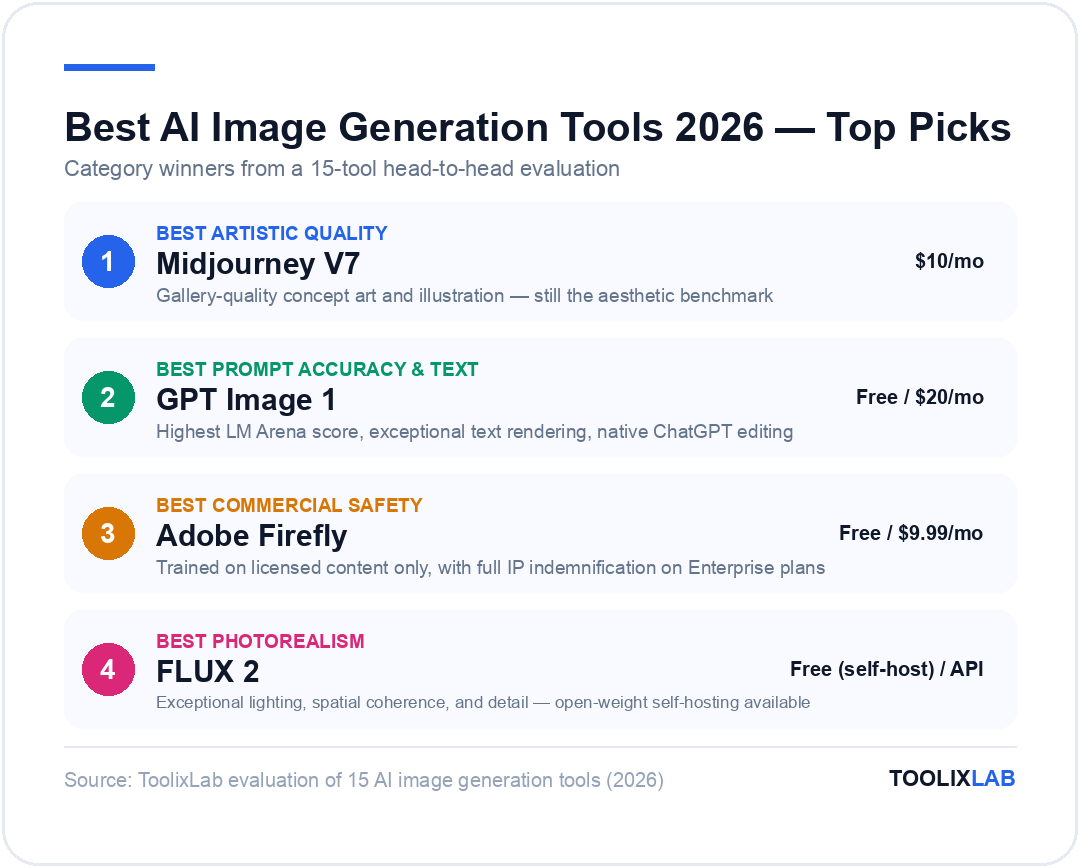
Best artistic quality: Midjourney V7
Best for prompt accuracy & text in images: GPT Image 1 (via ChatGPT)
Best for commercial safety: Adobe Firefly
Best for photorealism: FLUX 2 (Black Forest Labs)
Best free option: Leonardo AI (150 tokens/day)
Best for text in images: Ideogram V3
Best open source: Stable Diffusion 3.5
Jump to: All 15 Tools | Comparison Table | Which Tool Should You Choose?
What to Look for in an AI Image Generator
Not all AI image generators are optimised for the same tasks. Before picking a tool, be clear on which of these criteria matter most to your specific use case:
- →Output quality. Artistic quality (Midjourney) and photorealistic quality (FLUX) are different things. Pick the tool matched to your output type — concept art, product photography, social graphics, and marketing visuals each reward different strengths.
- →Prompt accuracy. How faithfully does the tool follow detailed, complex prompts? GPT Image 1 and Ideogram lead here. Midjourney is more interpretive and artistic — which is a feature, not a bug, for creative work.
- →Text rendering. Need readable text in your images (posters, banners, mockups)? Most tools still struggle here. Ideogram is the clear leader. GPT Image 1 is a strong second.
- →Commercial licensing. Are you using images for client work, advertising, or product sales? Check the terms. Adobe Firefly is the gold standard for commercial safety (trained on licensed content only). Most paid plans across the major tools include commercial rights, but free tiers often don't.
- →Pricing model. Credit-based (buy in bundles), subscription (monthly flat fee), or free with usage limits — choose based on your generation volume. High-volume users benefit most from unlimited subscription plans with Relax Mode. Occasional users often do fine on free tiers.
- →Workflow integration. Do you need the tool to work inside Photoshop (Firefly), Canva (Canva AI), or via API (Stable Diffusion, FLUX)? The most capable standalone generators are often not the most practical ones for a production workflow.
15 Best AI Image Generation Tools in 2026
1. Midjourney V7 — Best for Artistic Quality
Still the benchmark for visually striking, gallery-quality AI art in 2026
Midjourney V7 — a complete architectural rebuild released in April 2025 — remains the tool that produces images with the most compelling visual quality. It doesn't chase photorealism; it chases art. The results consistently look like concept art, editorial photography, or illustration produced by a skilled human — and that distinct aesthetic is still unmatched by competitors in 2026. V7 delivers 30–40% fewer failed outputs than V6, with dramatically improved coherence in hands, faces, and fine details.
The web app at midjourney.com is now the primary interface — Discord is optional. Character reference (--cref), style reference (--sref), moodboards, and personalisation make V7 the most controllable version yet. Niji 7 (launched January 2026) handles anime and illustration. V8 is in active development.
The two honest limitations: text rendering is still unreliable (add text post-generation in Canva or Photoshop), and there's no free tier — you need at least the $10/month Basic plan to start. For our full Midjourney tutorial, see How to Use Midjourney AI in 2026.
Key Features
- • V7 model — complete architecture rebuild with improved coherence and 30–40% fewer failed outputs
- • Character reference (--cref) for consistent characters across scenes
- • Style reference (--sref) and moodboards for visual consistency across projects
- • Personalisation system — rates images to learn your aesthetic preferences
- • Niji 7 model for anime and illustration (launched January 2026)
- • Video generation available on all plans; unlimited video Relax Mode on Pro/Mega
| Plan | Price/mo | Key Features |
|---|---|---|
| Basic | $10 | 3.3 GPU hrs/mo · ~200 fast images · No Relax Mode |
| Standard ⭐ | $30 | 15 GPU hrs + Unlimited Relax Mode images |
| Pro | $60 | 30 GPU hrs + Relax + Stealth Mode (private images) |
| Mega | $120 | 60 GPU hrs + Relax + Stealth Mode |
✅ Pros
- • Unmatched artistic quality — the benchmark for creative AI imagery
- • Standard plan ($30) + Relax Mode = effectively unlimited generation
- • Character and style reference system for project consistency
- • V8 in development — best roadmap of any tool on this list
❌ Cons
- • No free tier — minimum $10/month commitment
- • Text rendering still unreliable — add text post-generation
- • Less literal prompt following than DALL-E 3 or GPT Image 1
Midjourney — The Gold Standard for AI Art
V7's rebuilt architecture delivers the most visually compelling AI images available. Standard plan includes unlimited Relax Mode generation.
🎨 Standard plan from $30/month — 20% off annual
🎯 Best for: Concept artists, designers, marketers wanting artistic-quality visuals, anyone who has seen a Midjourney image and wanted to make one
2. GPT Image 1 (via ChatGPT) — Best for Prompt Accuracy
The highest LM Arena score of any image model in 2026, with exceptional text rendering
GPT Image 1 — OpenAI's latest image model, accessible through ChatGPT — scores highest on LM Arena benchmarks in 2026, with an estimated score of 1264 putting it ahead of competing models on prompt adherence. Unlike DALL-E 3 (which GPT Image 1 effectively replaces), it handles complex, multi-element prompts with remarkable fidelity and produces readable, accurate text within images — the long-standing Achilles heel of most AI image generators.
The ChatGPT integration makes iterative refinement natural. You describe what's wrong with an image and it adjusts in context — far more fluid than parameter-based prompting in Midjourney or FLUX. For marketing teams producing social graphics, posters with text, product mockups, or any commercial-style imagery that needs to follow a brief precisely, GPT Image 1 is the most reliable workhorse in 2026. It also offers native editing capabilities via the multimodal interface.
Key Features
- • Highest prompt accuracy of any model — follows complex, detailed briefs reliably
- • Best text rendering in AI images — readable headlines, labels, and typography
- • Native image editing via ChatGPT's multimodal interface
- • Conversational iteration — describe changes in plain language
- • API access for developers at $0.01–$0.17 per image depending on quality tier
- • Integrated with Microsoft Copilot for enterprise users
| Plan | Price/mo | Key Features |
|---|---|---|
| Free (ChatGPT) | $0 | ~2–3 images/day, standard quality, square only |
| ChatGPT Plus ⭐ | $20 | Unlimited images, high resolution (1024×1792), priority access |
| ChatGPT Pro | $200 | Extended limits, advanced editing, agency/professional use |
| API | $0.01–$0.17/img | Per-image pricing by quality tier; enterprise volume discounts available |
✅ Pros
- • Best text-in-image rendering of any tool (alongside Ideogram)
- • Highest prompt accuracy — follows complex briefs reliably
- • Included in ChatGPT Plus ($20/mo) — no separate subscription needed
- • Conversational editing is genuinely intuitive
❌ Cons
- • Less artistic flair than Midjourney — tends toward clean commercial style
- • Conservative content safety filters can frustrate creative users
- • Limited fine-grained style and parameter controls vs. specialist tools
🎯 Best for: Marketing teams, content creators, educators, anyone who values prompt accuracy and text rendering over artistic expressiveness
3. Adobe Firefly — Best for Commercial Safety
Trained exclusively on licensed content — the only major tool offering full IP indemnification
If you work for a brand, agency, or any organisation where the legal team has opinions about IP, Adobe Firefly is the answer. It's the only major AI image generator trained exclusively on licensed Adobe Stock images and public domain content — meaning every output comes with full commercial indemnification. Adobe explicitly covers Firefly Enterprise customers against copyright claims on generated images, a guarantee no other tool on this list offers.
Beyond the licensing story, Firefly's practical value is its Creative Cloud integration. Generative Fill in Photoshop, Generative Expand, Text to Vector in Illustrator, and template generation in Adobe Express — these aren't add-ons, they're native to your existing design workflow. For teams already paying for Creative Cloud, Firefly is already included. The outputs are more polished than experimental — less artistic than Midjourney, more production-ready — which is exactly what professional design work often requires.
Key Features
- • 100% commercially safe training data — licensed Adobe Stock and public domain only
- • Full IP indemnification on Enterprise plans
- • Native Photoshop integration: Generative Fill, Generative Expand
- • Text to Vector in Illustrator — creates editable SVG assets from text prompts
- • Content Credentials — embeds provenance metadata into every generated image
- • Adobe Express integration for social media and marketing templates
| Plan | Price/mo | Key Features |
|---|---|---|
| Free | $0 | Limited monthly generations, Firefly web app access |
| Firefly Standard | $9.99 | 2,000 premium credits/mo, full generation features |
| Firefly Pro | $19.99 | 4,000 premium credits/mo, advanced controls |
| Creative Cloud (All Apps) | ~$60 | All Adobe apps + Firefly credits included |
| Firefly Premium (Business) | $199.99 | 50,000 credits/mo + IP indemnification |
✅ Pros
- • Only major tool with full IP indemnification for commercial use
- • Deepest integration with professional design tools (PS, AI, Express)
- • Content Credentials embed provenance — important for brand trust
- • Included in Creative Cloud — no extra cost for existing Adobe subscribers
❌ Cons
- • Less artistically impressive than Midjourney or FLUX for pure generation
- • Credit system can run out quickly on intensive projects
- • Best value only for teams already in the Adobe ecosystem
🎯 Best for: Brand teams, agencies, designers already in Creative Cloud, any use case where IP safety is non-negotiable
4. FLUX 2 (Black Forest Labs) — Best for Photorealism
The most photorealistic open model — exceptional detail, lighting, and spatial coherence
FLUX from Black Forest Labs has emerged as the most capable model for photorealistic output among publicly accessible AI image generators. FLUX 2 (the current generation) produces images with exceptional lighting, accurate spatial reasoning, detailed textures, and convincingly realistic compositions. Where Midjourney adds an artistic layer to everything, FLUX aims for genuine photographic fidelity — and achieves it more consistently than DALL-E or Stable Diffusion.
FLUX is available through multiple platforms — Leonardo AI, Replicate, fal.ai, and others — as both a hosted model and an open-weight model you can run locally. FLUX Pro (the highest tier) is API-accessible and integrated into platforms like Leonardo for consumer-facing use. For product photography mockups, architectural visualisation, realistic portrait generation, and any use case that demands "this should look like a real photograph", FLUX 2 is the benchmark.
Key Features
- • FLUX 2 Pro — highest quality photorealistic output of any accessible model
- • FLUX Kontext — edit specific parts of an image while preserving the rest
- • Available via API (Replicate, fal.ai) and embedded in Leonardo AI
- • Open-weight model available for self-hosting (FLUX Dev / FLUX Schnell)
- • Exceptional spatial coherence — accurate perspective, depth, and physics
- • Strong prompt accuracy alongside photorealistic output quality
| Access Method | Cost | Notes |
|---|---|---|
| FLUX Schnell (open) | Free (self-host) | Fastest, lowest quality — good for prototyping |
| FLUX Dev (open) | Free (self-host) | Higher quality, non-commercial use |
| FLUX Pro (API) | ~$0.05/image | Commercial use, highest quality via Replicate/fal.ai |
| Via Leonardo AI | From $15/mo | Consumer interface with tokens; FLUX as one of many models |
✅ Pros
- • Best photorealism of any accessible model in 2026
- • Open-weight versions available for self-hosting at no API cost
- • FLUX Kontext enables powerful inpainting and localised edits
- • Available via multiple platforms — no single vendor lock-in
❌ Cons
- • No dedicated consumer app — requires third-party platform access
- • Dev/Schnell versions non-commercial; Pro requires paid API access
- • Less artistically styled than Midjourney for creative/concept work
🎯 Best for: Developers, product photographers, architects, anyone needing convincingly photorealistic AI output via API
5. Leonardo AI — Best Free Tier & Character Consistency
150 free tokens daily plus access to 36+ models including FLUX, GPT Image 1, and Ideogram
Leonardo AI has evolved from a specialist game-asset tool into one of the most versatile AI image platforms in 2026. The free tier — 150 tokens per day (~15–20 images in standard quality) — remains one of the most generous no-cost options available. But what makes Leonardo genuinely compelling is breadth: it gives you access to 36+ models through a single interface, including its own proprietary Phoenix models, plus FLUX 2, GPT Image 1, Ideogram, Nano Banana Pro, and more.
Character consistency is a standout strength — Leonardo's LoRA training and reference image system allows you to maintain the same character across multiple scenes and styles, making it a top choice for game developers, comic creators, and brand mascot work. The Canvas editor supports inpainting, outpainting, and iterative refinement in a visual workspace. Third-party models (GPT Image 1, FLUX Kontext, Ideogram) always consume tokens even in Relax Mode, so plan token usage accordingly.
Key Features
- • 36+ models accessible from one platform — including FLUX, GPT Image 1, Ideogram
- • 150 free tokens daily — most generous free tier of any major platform
- • LoRA training for custom model fine-tuning on your own characters/styles
- • Canvas editor with inpainting, outpainting, and layer-based editing
- • Image-to-image, pose control, and character reference tools
- • Relaxed generation on first-party models (unlimited after tokens run out)
| Plan | Price/mo | Key Features |
|---|---|---|
| Free | $0 | 150 tokens/day · all base models · public images |
| Starter | $12 (annual) / $15 | 8,500 tokens/mo · priority queue · private images |
| Creator ⭐ | $28 (annual) / $35 | 25,000 tokens/mo · Relaxed generation · Canvas editing |
| Professional | $56 (annual) / $70 | 60,000 tokens/mo · unlimited Relax · custom LoRAs · team features |
✅ Pros
- • 150 free tokens/day — excellent for learning and light use
- • 36+ models in one platform — most model variety of any tool
- • Best character consistency tools outside of Midjourney --cref
- • Strong for game art, concept design, and iterative creative projects
❌ Cons
- • Third-party models (FLUX, GPT Image 1) always consume tokens — no free Relax
- • Free tier queue times can be 8–20 minutes during peak hours
- • Prices increased in Q4 2025 — less value than it used to be
🎯 Best for: Game developers, character designers, creators who want a multi-model platform on a budget, anyone needing character consistency at scale
6. Ideogram V3 — Best for Text in Images
~90% text rendering accuracy — the only AI tool that makes readable typography reliably
Ideogram solved the problem that has plagued AI image generation since the beginning: text rendering. While every other tool produces garbled, distorted, or hallucinated text when you ask for a poster with a headline, Ideogram V3 delivers readable, typographically accurate text with roughly 90% accuracy. For marketers, graphic designers, and social media teams who need to produce posters, banners, social graphics, and product mockups with text included — Ideogram is the clear answer.
Beyond text rendering, Ideogram's Magic Prompt feature expands brief ideas into detailed generation prompts automatically, and batch generation supports up to 500 prompts via CSV on Pro plans — making it viable for high-volume marketing asset production. Style reference via up to three images allows consistent aesthetic output across a campaign. It's not the strongest tool for artistic or photorealistic output, but for functional design assets, it's indispensable.
Key Features
- • Industry-leading text rendering — ~90% accuracy for readable typography in images
- • Magic Prompt — expands brief ideas into detailed generation prompts
- • Batch generation via CSV — up to 500 prompts on Pro plan
- • Style control via up to three reference images
- • Canvas editing for inpainting and composition adjustment
- • Freemium pricing — functional free tier available
| Plan | Price/mo | Key Features |
|---|---|---|
| Free | $0 | Limited monthly generations, slow queue |
| Plus | $20 | 1,000 priority credits/mo, commercial rights |
| Pro ⭐ | $60 | 3,500 credits/mo + batch generation (up to 500 prompts) |
| Teams | $30/user/mo | 1,500 credits/user/mo + collaboration + commercial rights |
✅ Pros
- • Best text rendering in AI images — not even close for typography work
- • Batch generation for high-volume asset production
- • Magic Prompt makes it accessible for non-expert prompt writers
- • Freemium — free tier lets you test before committing
❌ Cons
- • Not the strongest for artistic/photorealistic output
- • Narrower feature set than general-purpose generators
- • Pro plan ($60/mo) needed for batch generation access
🎯 Best for: Marketers, graphic designers, social media teams — any workflow requiring readable text in AI-generated images
Tools 7–15: More Top AI Image Generators in 2026
7. Stable Diffusion 3.5 — Best Open Source / Free Local Option
Stable Diffusion remains the go-to for developers, power users, and anyone who wants complete control without ongoing subscription costs. SD 3.5 (the current generation) is available as open weights — meaning you can run it locally on your own hardware with an 8GB+ VRAM GPU. Once set up, generation is free and unlimited. The ecosystem of custom models, LoRAs, ControlNet extensions, and fine-tunes via CivitAI is vast — you can fine-tune for virtually any style or subject matter with enough effort. The trade-off is a steep learning curve: setup takes days, not hours, and maintaining local infrastructure adds friction. For teams wanting the power without the setup, DreamStudio (Stability AI's hosted version) starts at $9/month.
✅ Pros
Completely free once set up locally · Full control over every parameter · Vast ecosystem of custom models and LoRAs · No content restrictions · Privacy — your data never leaves your machine
❌ Cons
Steep technical setup — requires GPU hardware and command-line comfort · Dev/Schnell open weights are non-commercial · Quality gap vs. hosted frontier models on some tasks
Pricing: Free (self-hosted) | DreamStudio from $9/mo | SD 3.5 weights free but non-commercial · Best for: Developers, technically proficient power users, researchers, privacy-first workflows
8. Google Imagen 3 (Nano Banana Pro) — Best Quality from Google
Google's Imagen 3 model — accessible through Google AI Pro and branded "Nano Banana Pro" in third-party interfaces — has significantly closed the quality gap with top-tier models. In direct head-to-head tests, it delivers outstanding photorealistic and artistic outputs, particularly strong on morphing and combining reference images. It's accessible via Google AI Pro ($20/month) with the Gemini interface, and also available through platforms like Leonardo AI and PostEverywhere (marketed as the best model for 4K-quality social content). Prompt adherence has some quirks, but image quality on supported prompts ranks near the top of 2026's model landscape.
Pricing: Included in Google AI Pro ($20/mo) | Also accessible via Leonardo AI tokens · Best for: Google ecosystem users, high-quality social content, reference image morphing
9. Canva AI — Best for Non-Designers and Marketing Teams
Canva's AI image generation isn't the most powerful standalone generator, but it's the most practical for non-designers and marketing teams who need to create branded visual content at speed. Text to Image generates assets directly inside your Canva design — no export/import loop. Magic Edit, Background Remover, and the AI image generator integrate seamlessly into Canva's massive template library. For marketers producing social posts, presentations, ad creatives, and email assets daily, the workflow efficiency of not leaving Canva justifies the trade-off in pure generation quality. Canva Pro includes generous AI credits alongside all design features.
Pricing: Free (limited) | Pro $15/mo · Best for: Non-designers, marketing teams, social media managers wanting AI in their existing Canva workflow
10. Recraft — Best for Vector Graphics
Recraft is the only AI image generator on this list that produces native vector graphics. While every other tool outputs raster images (PNG, JPG), Recraft generates actual SVG files you can open and edit in Illustrator or Figma. For brand designers, logo designers, and anyone working in print or scalable digital formats, this is a fundamental distinction. Recraft also handles raster images, 3D objects, and mockups from the same interface. Its proprietary model is competitive for design-oriented tasks and strong on style consistency. A solid free tier makes it easy to test. For our broader look at AI in creative workflows, see our guide to building an AI content creation workflow in 2026.
Pricing: Free tier | Pro from ~$12/mo · Best for: Brand designers, logo designers, any workflow requiring scalable vector output from AI
11. Freepik AI — Best All-in-One Creative Platform
Freepik has evolved from a stock image library into a full AI creative platform, and in 2026 it's one of the best-value tools on this list. The platform provides access to 36 AI models (including FLUX and others), allows you to combine up to four models in a single generation, and bundles AI generation with access to millions of stock assets, templates, mockups, and editing tools. The Essential plan at $9.99/month offers 2,000 AI generation credits — competitive pricing for what you get. For creators and marketing teams who also use stock imagery regularly, Freepik bundles more value than almost any standalone image generator.
Pricing: Free (limited) | Essential $9.99/mo | Premium $20/mo · Best for: Content creators and marketers who also need stock assets — the bundle value is exceptional
12. Kittl — Best for Branding and Print Design
Kittl is an AI-first design platform built around print design, branding, and merchandise — with 10,000+ premium templates, advanced text effects, a vector editor, and a library of models including GPT Image 1, FLUX, Ideogram 2.0, and Google Nano Banana all accessible within the same editor. It's particularly strong for creating logos, merch designs, posters, and apparel graphics. An AI vector generator, background remover, and image upscaler are also built in. For designers producing high volumes of branded print and merchandise assets, Kittl is more workflow-complete than any standalone generator. The Pro plan at ~$30/month includes collaboration tools and priority generation.
Pricing: Free tier | Pro ~$30/mo | Expert ~$60/mo · Best for: Graphic designers, print-on-demand sellers, brand designers creating logos and merchandise
13. Kling AI — Best Rising Creative Platform for Image + Video
Kling AI started as a video generation tool and has rapidly expanded into a full creative platform in 2026, with image generation quality improving significantly with each update. Kling O3 and Kling 3.0 are competitive with top-tier image generators on certain prompts — particularly landscape, atmospheric, and modern still-life compositions. Where Kling uniquely stands out is for video work: it remains one of the best tools for video generation with defined start and end frames, making it the top choice for creators who need both images and video in one platform. Free tier available, paid plans start from reasonable monthly rates.
Pricing: Free tier | Standard from ~$8/mo | Pro from ~$15/mo · Best for: Video-first creators who also need image generation, content teams wanting one platform for both
14. DreamStudio — Best Hosted Stable Diffusion Interface
DreamStudio is Stability AI's official hosted interface for Stable Diffusion — giving you the full power of the SD model stack through a clean web UI, without needing to set up local hardware or manage Python dependencies. It runs on a credit system, with $9 worth of initial credits included. You get access to SDXL, SD 3.5, and fine-tuned variants, with full control over steps, guidance scale, aspect ratio, and seed. For users who want Stable Diffusion's flexibility and model ecosystem without the infrastructure overhead, DreamStudio is the simplest entry point. Visit the official platform at dreamstudio.ai.
Pricing: Credit-based — starts at $9 for 1,000+ credits · Best for: Users who want Stable Diffusion's control and model flexibility without local setup
15. Playground AI — Best for High-Volume Free Generation
Playground AI offers one of the most generous free tiers in the market — up to 500 images per day on the free plan, though these are public. The platform gives you access to multiple models (Playground V3, SDXL, and others) with a clean, accessible interface. Image quality is competitive at standard settings. For creators who need high volume at low cost — social media content farms, stock image production, students learning prompt engineering — Playground AI is one of the best no-cost options. The Pro plan at $15/month removes public generation restrictions and adds priority access.
Pricing: Free (500 images/day, public) | Pro $15/mo · Best for: High-volume free generation, learners, social content teams on a budget
Comparison Table: 15 Best AI Image Generators 2026
| Tool | Best For | Starting Price | Free Plan | Text Rendering | Rating |
|---|---|---|---|---|---|
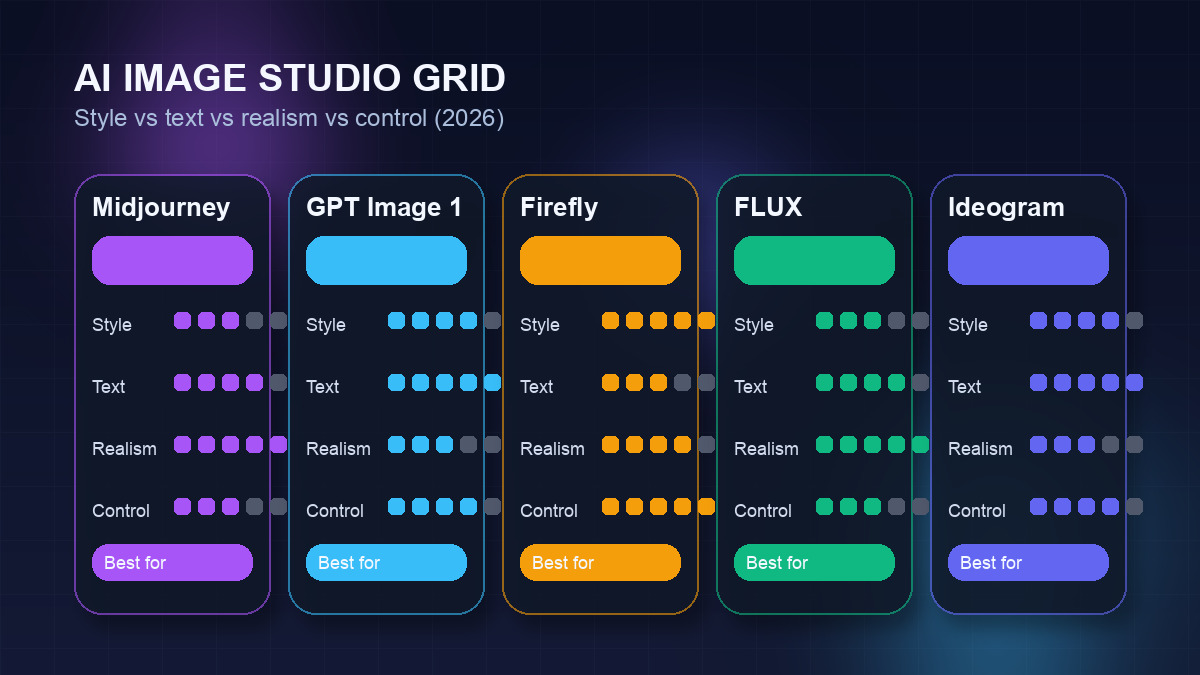
| Midjourney V7 | Artistic quality | $10/mo | ✗ | Poor | 9.5/10 |
| GPT Image 1 | Prompt accuracy + text | Free / $20 (Plus) | Limited ✓ | Excellent | 9.3/10 |
| Adobe Firefly | Commercial safety | Free / $9.99 | ✓ | Good | 9.1/10 |
| FLUX 2 | Photorealism | Free (self-host) / API | ✓ (open weights) | Moderate | 9.2/10 |
| Leonardo AI | Free tier + model variety | Free / $15/mo | ✓ (150 tokens/day) | Varies by model | 8.9/10 |
| Ideogram V3 | Text in images | Free / $20/mo | ✓ | Best (~90%) | 8.8/10 |
| Stable Diffusion 3.5 | Open source / local | Free (self-host) | ✓ (local) | Model-dependent | 8.7/10 |
| Google Imagen 3 | 4K quality / Google ecosystem | Free / $20/mo (AI Pro) | Limited ✓ | Good | 8.8/10 |
| Canva AI | Non-designers / workflow | Free / $15/mo (Pro) | ✓ | Moderate | 8.4/10 |
| Recraft | Vector graphics | Free / ~$12/mo | ✓ | Good | 8.5/10 |
| Freepik AI | All-in-one + stock assets | Free / $9.99/mo | ✓ | Moderate | 8.6/10 |
| Kittl | Branding + print design | Free / ~$30/mo | ✓ | Good (Ideogram model) | 8.5/10 |
| Kling AI | Image + video creation | Free / ~$8/mo | ✓ | Moderate | 8.3/10 |
| DreamStudio | Hosted Stable Diffusion | $9 credit starter | Trial credits ✓ | Moderate | 8.1/10 |
| Playground AI | High-volume free generation | Free / $15/mo | ✓ (500/day) | Moderate | 7.9/10 |
Which AI Image Generator Should You Choose?
The right answer depends almost entirely on what you're trying to make and how you work. Here's a direct decision guide.
Our Verdict by Use Case
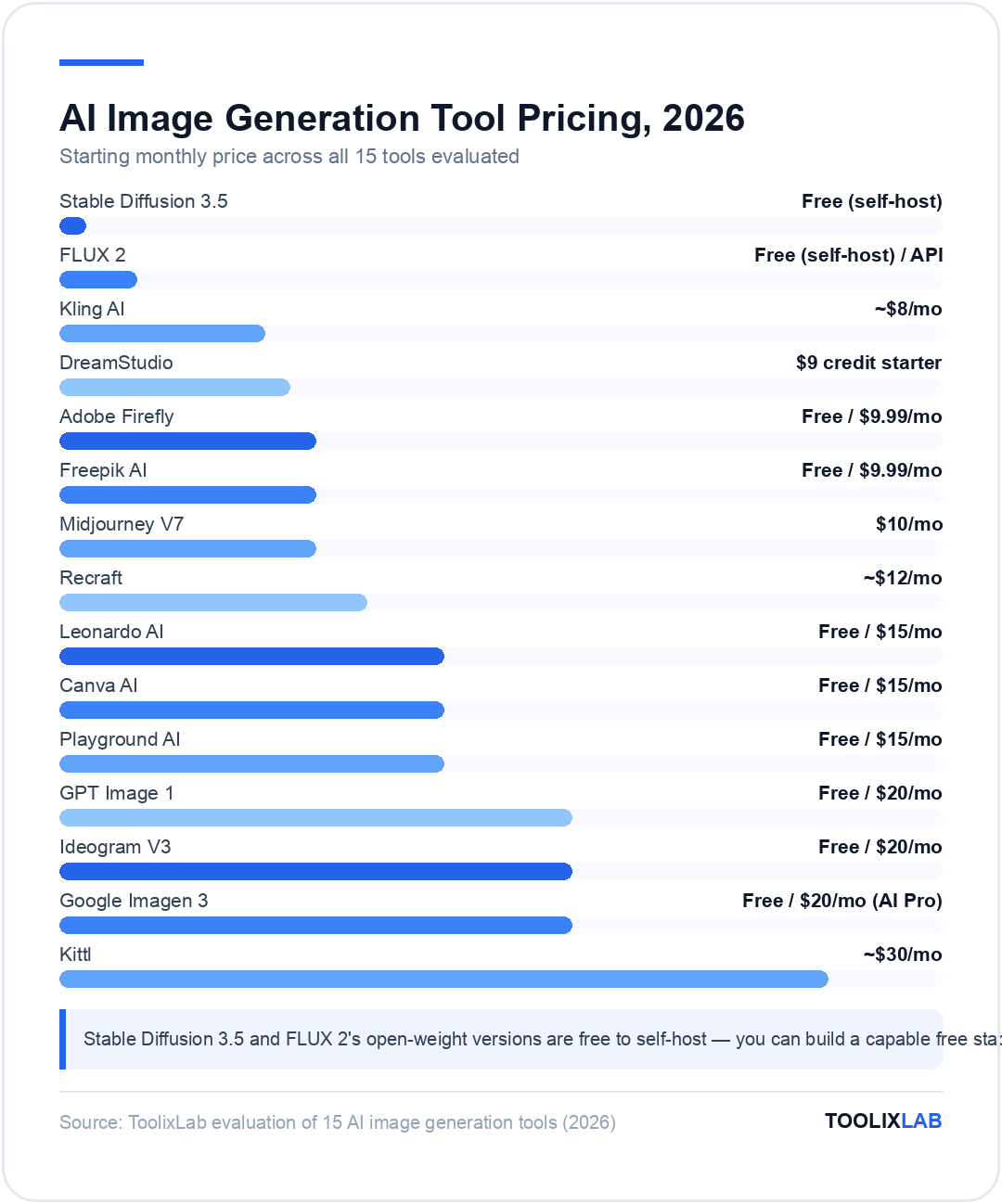
There's no single best AI image generator. The right pick depends on what you're making, who it's for, and how you work. Here's the clearest decision framework.
🎨 Concept art / creative visuals
- → Midjourney V7 — still the aesthetic benchmark
- → Leonardo AI if budget is a constraint
📢 Marketing assets with text
- → Ideogram V3 — best text rendering, period
- → GPT Image 1 as a strong second
📷 Photorealistic images
- → FLUX 2 Pro — best photorealistic model available
- → Google Imagen 3 for Google ecosystem users
⚖️ Commercial safety priority
- → Adobe Firefly — the only tool with full IP indemnification
💰 Free / budget option
- → Leonardo AI (150 tokens/day free)
- → Playground AI (500 images/day free)
- → GPT Image 1 via free ChatGPT (2–3/day)
🛠️ Developer / API / local
- → Stable Diffusion 3.5 (open weights, free, full control)
- → FLUX 2 API for photorealistic production use
AI Image Generation Pricing Models: What You Need to Know
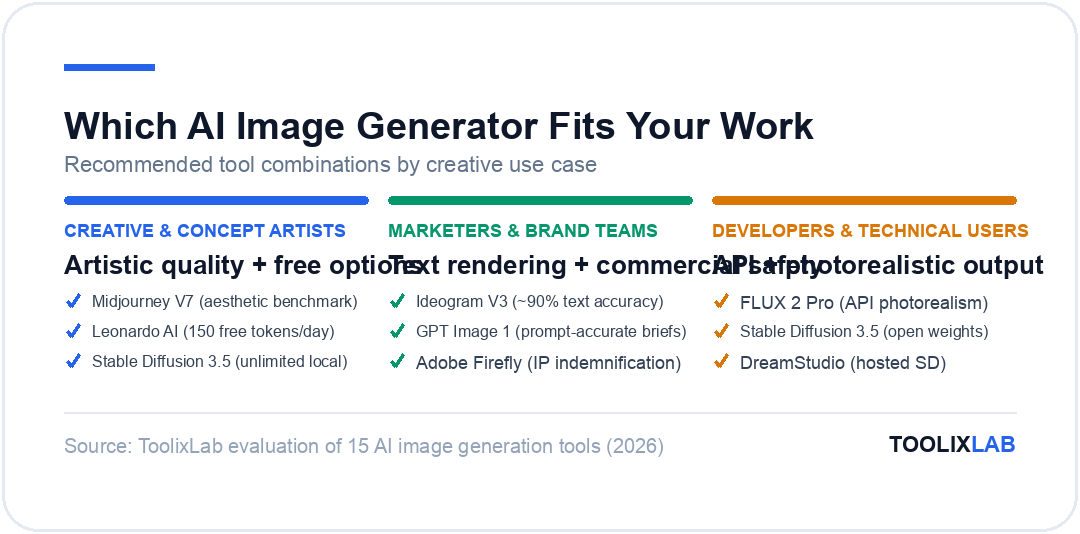
Understanding how you'll be billed prevents nasty surprises. Three main models exist in 2026:
Subscription + GPU time (Midjourney) charges a flat monthly fee for a block of fast generation time, with optional Relax Mode providing unlimited slower generation. The most predictable model for regular creative use.
Token/credit-based (Leonardo, Ideogram, Freepik) gives you a monthly credit allowance with additional credits purchasable. Suitable for moderate use, but can run out quickly on intensive projects. Third-party model access on platforms like Leonardo always consumes credits, even in Relax Mode — worth noting before committing.
API / per-image billing (FLUX, GPT Image 1 API, Stable Diffusion hosted) charges per generated image, typically $0.01–$0.17 depending on quality and resolution. Most cost-efficient at scale when you know exactly what you're generating. Self-hosted Stable Diffusion eliminates ongoing costs entirely once hardware is set up. For more on building AI into production workflows, see our guide to the best AI tools for marketing in 2026.
🔑 Key Takeaways
- ✓ Midjourney V7 remains the benchmark for artistic quality — nothing else produces the same visual impact for creative and concept work
- ✓ GPT Image 1 leads on prompt accuracy and text rendering — the best tool for marketing assets that need to follow a brief precisely
- ✓ Adobe Firefly is the only tool with full commercial IP indemnification — essential for brand and agency work where legal exposure matters
- ✓ FLUX 2 is the top photorealism model — available via API or self-hosted for developers and technical users
- ✓ Ideogram V3 solves the text rendering problem — ~90% accuracy makes it the only viable choice for posters, banners, and designs with typography
- ✓ Leonardo AI's 150 free tokens/day is the best free tier for regular use; Playground AI offers 500 free images/day for high-volume experimenting
- ✓ Stable Diffusion 3.5 is free and unlimited once self-hosted — the right choice for developers, power users, and privacy-first workflows
Conclusion
The AI image generation market in 2026 has diversified to the point where specialist tools genuinely outperform generalists at specific tasks. You don't need one tool — you need the right tool for each use case in your workflow. Start with what you actually need to make: artistic visuals (Midjourney), prompt-accurate commercial assets (GPT Image 1), text in images (Ideogram), photorealistic output (FLUX), or designs inside Photoshop (Firefly). Then test on a free tier or trial before committing to a subscription.
For our full walkthrough of how to get the most out of the leading platform, see our complete guide to how to use Midjourney AI in 2026. And for broader AI tooling strategy, read our overview of the best AI tools for developers in 2026.
🔬 How We Test AI Tools at ToolixLab
Every recommendation in this guide comes from hands-on evaluation, not spec-sheet comparison. Our process for this category:
- Real-task testing: we run each tool through the actual workflows this guide covers — the same tasks you'd use it for — and compare outputs side by side.
- Verified pricing: every price is checked against the vendor's official pricing page at review time, and re-checked on our refresh cycle.
- Free-tier reality check: we test the free tier limits ourselves so "free" claims reflect what you actually get.
- Ongoing re-evaluation: AI tools change monthly; posts carry a visible "Last updated" date and stale recommendations get replaced.
ToolixLab is reader-supported: some links may earn us a commission, which never affects rankings — several tools we rank highest have no affiliate program at all.
Frequently Asked Questions
What is the best AI image generator in 2026?
The best AI image generator depends on your use case. Midjourney V7 leads for artistic quality and visual impact. GPT Image 1 (via ChatGPT) leads on prompt accuracy and text rendering. Adobe Firefly is best for commercial licensing safety. FLUX 2 is best for photorealism. Ideogram V3 is the top choice when readable text in images is required. For the best free option, Leonardo AI offers 150 tokens daily with no payment required.
Which AI image generator is free in 2026?
Several AI image generators offer free tiers: Leonardo AI (150 tokens/day), Playground AI (up to 500 images/day publicly), Ideogram (limited monthly generations), Adobe Firefly (limited), Canva AI (limited in free plan), Recraft (free tier), and Stable Diffusion (fully free if self-hosted locally). GPT Image 1 offers 2–3 free images/day via ChatGPT. Midjourney remains the most notable tool without a free tier.
Can I use AI-generated images commercially?
Most paid plans include commercial usage rights — this applies to Midjourney (all paid plans), DALL-E 3/GPT Image 1 (ChatGPT Plus), Adobe Firefly (all paid plans), Leonardo AI (paid plans), and Ideogram (paid plans). Free tiers often restrict commercial use or require attribution. Adobe Firefly is the only major tool offering full IP indemnification on enterprise plans. Always verify the current Terms of Service for your specific tool and plan before commercial use.
Which AI image generator is best for marketing?
For marketing visuals requiring text (banners, social graphics, posters), Ideogram V3 is the clear leader with ~90% text rendering accuracy. GPT Image 1 is an excellent second for prompt-accurate commercial-style images. Adobe Firefly is the safest choice for brand teams where IP compliance is a priority. Canva AI is best if you want generation integrated directly into your design workflow without switching tools.
What is FLUX AI and how does it compare to Midjourney?
FLUX is an AI image generation model created by Black Forest Labs (founded by former Stable Diffusion researchers). FLUX 2 is the current generation and leads for photorealistic output — more accurate spatial reasoning, lighting, and texture than Midjourney. However, Midjourney V7 produces more artistically compelling, stylised images. They serve different use cases: FLUX for photorealism and developer/API workflows; Midjourney for artistic, concept, and editorial work. FLUX open-weight models are also free to self-host, unlike Midjourney which requires a subscription.
Why do most AI image generators struggle with text in images?
Most AI image generators are trained to understand visual patterns, not typography. Text requires precise spatial understanding — the model must render specific letterforms in sequence with correct spacing, consistent style, and accurate glyphs. Most diffusion models don't learn this reliably from training data alone. Ideogram was specifically designed to solve this, using a model architecture that treats text rendering as a first-class output requirement. GPT Image 1 also handles text well due to its multimodal training. For most other tools, the workaround is to generate the image without text and add typography manually in Canva or Photoshop.
Is Stable Diffusion still worth using in 2026?
Yes, for the right user. Stable Diffusion 3.5 remains the best option for developers, technical power users, and anyone who wants complete control without ongoing subscription costs. Running it locally is genuinely free (after hardware investment) and gives you access to an enormous ecosystem of custom models, LoRAs, and extensions via CivitAI. The trade-off is setup complexity — it takes days rather than hours to get running well, and the learning curve is steep. For non-technical users, hosted alternatives like Leonardo AI or DreamStudio offer comparable flexibility with significantly less friction.