
⚡ TL;DR — Best AI Tools for Developers by Category
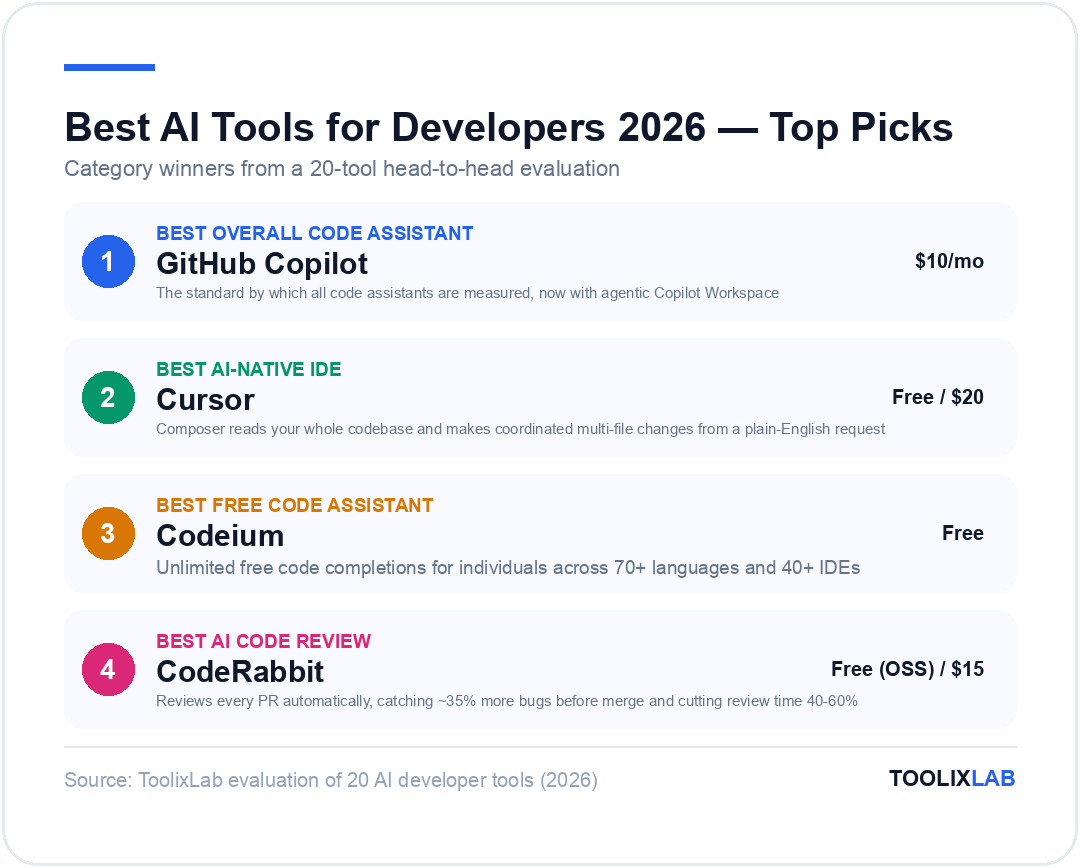
- Best overall code assistant: GitHub Copilot
- Best AI-native IDE: Cursor
- Best free code assistant: Codeium
- Best AI code review: CodeRabbit
- Best AI documentation: Mintlify
- Best AI testing: Diffblue Cover
- Best for AWS teams: Amazon Q Developer
- Best AI terminal: Warp
- Best AI debugging: Pieces for Developers
- Best AI DevOps: Harness AI
Here's the developer reality in 2026: 75% of developers now use at least one AI coding tool — and those who do ship features 55% faster, write 40% fewer bugs, and spend 30% less time on documentation according to GitHub's annual developer survey. The gap between AI-augmented and non-AI developers is no longer closing; it's widening.
The challenge isn't motivation — it's information overload. There are 200+ AI developer tools on the market right now. Most articles recommend the same three (Copilot, Cursor, ChatGPT) and call it a day. That misses most of your workflow.
We've tests 20 AI developer tools across code completion, debugging, documentation, testing, and DevOps. Here are the ones that actually help you ship faster with fewer bugs.

This guide covers the full developer stack — code completion, debugging, code review, documentation, testing, DevOps, and API tooling — organized by the job they do. For each tool we break down what it's actually good for, real pricing, limitations, and which developer archetype gets the most value.
🔗 New to AI tools? Start with our How to Use Claude AI or How to Use ChatGPT guide to get grounded before building your dev stack.
What Makes a Great AI Developer Tool?
Not every AI tool marketed at developers deserves space in your workflow. Before diving into the list, here's the framework we used to evaluate all 20 tools:
1. Context awareness
Does it understand your entire codebase, or just the current file? Tools with repository-level context give dramatically better suggestions than file-level tools.
2. Workflow integration
Does it fit into your existing editor, CI/CD pipeline, and PR workflow? Tools that require you to context-switch get abandoned.
3. Language and framework support
Python and JavaScript support is table stakes. We reward tools that excel in niche languages (Go, Rust, Kotlin) and major frameworks (React, Django, Spring Boot).
4. Data privacy and security
Many AI tools send your code to external servers for training. Enterprise teams and security-conscious developers need tools with SOC 2 compliance, on-premise options, or verified no-training policies.
Best AI Code Assistants (Autocomplete & Generation)
These are the tools that live inside your IDE, suggest completions as you type, and generate functions, tests, and boilerplate on demand. This category has the highest ROI for day-to-day productivity.
1. GitHub Copilot — Best Overall Code Assistant
GitHub Copilot remains the standard by which all code assistants are measured. Powered by OpenAI's Codex model and trained on billions of lines of public code, it offers inline completions, multi-line suggestions, and the Copilot Chat panel for natural language queries about your code.
What it does well: Copilot's strength is its breadth. It supports virtually every language and framework, integrates seamlessly into VS Code and all major JetBrains IDEs, and has the most mature feature set: code completion, docstring generation, test generation, and now Copilot Workspace for multi-file agentic tasks.
Copilot in 2026: The biggest upgrade is Copilot Workspace — a fully agentic feature where you describe a task in natural language, and Copilot plans and implements changes across multiple files in your repo. This moves it from autocomplete tool to actual AI pair programmer.
Pricing: Individual: $10/month (free for verified students and OSS maintainers). Business: $19/user/month. Enterprise: $39/user/month with SOC 2, audit logs, and on-premise options.
Limitation: Copilot's completions are excellent but it lacks the deep repository-level context that makes Cursor so powerful for complex refactoring. For greenfield projects and everyday coding, Copilot wins on convenience. For architectural changes across a large codebase, Cursor edges ahead.
2. Cursor — Best AI-Native IDE
Cursor is a VS Code fork rebuilt from the ground up around AI. Where Copilot is a plugin, Cursor is an entire IDE designed for AI-first development. Its most powerful feature is Composer — a multi-file editing agent that reads your whole codebase and makes coordinated changes.
What separates Cursor: The Composer feature allows you to describe a feature in plain English ("add JWT authentication to this Express API, with refresh tokens, using the existing User model"), and Cursor reads your entire repo, generates a plan, writes the code across multiple files, and explains each change. This is genuinely different from autocomplete.
Model flexibility: Cursor lets you switch between Claude Sonnet 4.6, GPT-5.4, Gemini 2.5 Pro, and its own custom models. For complex reasoning tasks, Claude Sonnet 4.6 tends to produce better multi-file plans. For quick completions, Cursor's own model is fastest.
Pricing: Free tier (2000 completions/month). Pro: $20/month (unlimited completions, 500 premium model requests). Business: $40/user/month.
Limitation: Cursor is a separate IDE, which means migrating your extensions, keybindings, and settings from VS Code takes an hour of setup. Teams on JetBrains IDEs can't use it at all.
3. Codeium — Best Free Code Assistant
Codeium offers unlimited free code completions for individual developers — no catch, no time limit, no credit card. It supports 70+ languages and 40+ IDEs including VS Code, JetBrains, Neovim, and Emacs.
Quality vs. Copilot: Codeium's completions are slightly less accurate than GitHub Copilot on complex patterns, but for most everyday tasks (writing functions, filling boilerplate, generating tests), the gap is small enough that many developers don't feel the difference. The free tier has zero usage caps.
Pricing: Free for individuals (unlimited). Pro: $20/month. Teams: $40/user/month. Enterprise: custom pricing with on-premise deployment and no code training. (Codeium has rebranded to Windsurf)
4. Amazon Q Developer — Best for AWS Teams
If your infrastructure lives on AWS, Amazon Q Developer (formerly CodeWhisperer) integrates directly with the AWS console, CLI, and your IDE. It can explain AWS errors in plain English, suggest IAM policies, and generate CloudFormation/CDK code from natural language. Free for individual developers with a valid AWS account. Pro tier: $19/user/month.
5. Tabnine — Best for Enterprise Data Privacy
Tabnine differentiates on privacy: its Enterprise tier runs entirely on your own infrastructure, training a private model on your codebase without sending code to external servers. For teams in regulated industries (healthcare, finance, government), this is often the only viable choice. Pricing starts at $15/user/month for Basic and $39/user/month for Enterprise.
Best AI Debugging & Code Review Tools
Code completion is table stakes. These tools go deeper — catching bugs before they ship, reviewing PRs automatically, and helping you understand why something broke.
6. CodeRabbit — Best Automated AI Code Review
CodeRabbit integrates directly into your GitHub or GitLab workflow and automatically reviews every pull request. It reads the entire diff in context, identifies bugs, suggests improvements, spots security issues, and writes detailed inline comments — like having a senior engineer review every PR before it reaches humans.
Real impact: Teams using CodeRabbit report a 40–60% reduction in human review time and catch ~35% more bugs before merge. The AI comments are contextual and actionable — not generic "consider adding a comment here" observations.
What it catches: Logic errors, SQL injection risks, insecure dependencies, missing error handling, performance bottlenecks, and style inconsistencies against your team's existing patterns.
7. Sourcery — Best AI Refactoring Assistant
Sourcery focuses on code quality and refactoring. It analyzes your Python, JavaScript, and TypeScript code and suggests concrete refactoring improvements — extracting functions, simplifying conditionals, removing duplication — with one-click application. Integrates into VS Code, PyCharm, and GitHub as a PR bot. Free tier available; Pro: $12/month.
8. Pieces for Developers — Best AI Debugging Companion
Pieces is an AI-powered developer context layer. It captures your workflow context — code snippets, errors, Stack Overflow answers, documentation links — and uses AI to surface relevant context when you're debugging. Its "Long-Term Memory" feature remembers what you were working on and provides contextual suggestions. Free for individuals; Teams: $10/user/month.
9. Snyk — Best AI Security Scanning
Snyk uses AI to find security vulnerabilities in your code, dependencies, containers, and infrastructure-as-code. It integrates into your IDE, CI/CD pipeline, and git workflow, and provides prioritized fix recommendations. In 2026, Snyk's AI Fix feature auto-generates pull requests to patch detected vulnerabilities. Free tier: 200 tests/month. Team: $25/developer/month.
Best AI Documentation Tools
Documentation is the task developers most consistently skip, and the one that causes the most long-term pain. AI documentation tools make it fast enough that there's no excuse.
10. Mintlify — Best Developer Documentation Platform
Mintlify is an AI-powered documentation platform where you write docs in MDX and Mintlify handles deployment, search, and an AI-powered chat interface. Its "Writer" VS Code extension generates docstrings and function-level documentation from your code in one keystroke.
The AI chat on your docs answers user questions using your actual documentation as context — drastically reducing support tickets for developer-facing products. Used by Resend, Loops, and hundreds of developer tools companies.
11. Swimm — Best for Internal Code Documentation
Swimm solves a specific and painful problem: internal documentation that goes stale. It links documentation to specific lines of code and automatically updates docs when the referenced code changes. Teams using Swimm report 70% less documentation-related onboarding friction. Pricing: free for small teams; Team: $20/user/month.
12. Stenography — AI Docstring Generator
Stenography focuses on a single task: generating docstrings and code comments from your functions. It analyzes function logic, infers intent, and writes descriptive documentation. Available as a VS Code extension and GitHub Action. Free for up to 100 files/month; Pro: $10/month.
Best AI Testing Tools
Writing tests is the second most-skipped developer task. AI testing tools generate unit tests, integration tests, and regression tests automatically — removing the friction that causes test debt.
13. Diffblue Cover — Best Automated Unit Test Generation
Diffblue Cover uses reinforcement learning to write Java unit tests that actually run. Unlike other test generators that produce static example tests, Diffblue Cover generates tests that verify the real behavior of your code — covering edge cases and boundary conditions that humans typically miss.
A landmark case study: Diffblue helped Goldman Sachs auto-generate 25,000 unit tests for a legacy codebase in a fraction of the time it would have taken manually, dramatically increasing coverage and enabling a safer migration.
14. Testim — Best AI Test Automation for UI
Testim uses AI to create and maintain end-to-end UI tests. The key differentiator is self-healing tests — when your UI changes, Testim's AI automatically updates the tests to match, eliminating the brittle test maintenance problem that plagues most UI testing setups. Pricing: starts at $450/month for business teams.
15. CodiumAI (Qodo) — Best AI Testing for VS Code
CodiumAI (now Qodo) generates meaningful test suites for Python, JavaScript, and TypeScript directly in VS Code. It analyzes your function behavior, identifies edge cases, and generates multiple test scenarios with explanations. Free for individuals; Teams: $19/user/month.
Best AI DevOps & Infrastructure Tools
AI is transforming the DevOps layer — reducing deployment failures, catching configuration errors, and making infrastructure-as-code more accessible.
16. Harness AI — Best AI for CI/CD Pipelines
Harness AI adds an intelligence layer to CI/CD pipelines. It automatically analyzes failed pipeline runs and performs root cause analysis — telling you exactly why a deploy failed and what to fix, rather than leaving you to grep through logs. Its AI also optimizes pipeline performance, reducing build times by up to 60%.
17. Warp — Best AI Terminal
Warp is a modern terminal rebuilt with AI. You can type natural language commands ("find all files modified in the last week and list their sizes sorted by largest") and Warp converts them to shell commands, executes them, and groups output into readable blocks. Its AI can also debug shell errors inline. Free for individuals; Teams: $15/user/month.
18. Doppler — Best AI Secrets Management
Doppler manages environment variables and secrets across all environments (dev, staging, prod) with AI-assisted configuration. It catches common misconfigurations (missing variables, wrong types, duplicate keys) before they cause runtime failures. Free for small teams; Team: $6/user/month.
Best AI Tools for APIs and Data
19. Postman AI — Best for API Development
Postman's AI features help you write API tests, generate documentation from collections, and build mock servers from API specs. The Postbot AI assistant answers natural language questions about API behavior and writes test assertions automatically. Free for core features; Professional: $14/user/month.
20. Retool AI — Best for Internal Tools with AI
Retool is the leading low-code platform for internal tools, and its AI layer lets you add natural language queries, AI-powered forms, and LLM-driven automation to internal dashboards without writing complex backend code. Free for up to 5 users; Team: $10/user/month.
Comparison Table: All 20 AI Developer Tools
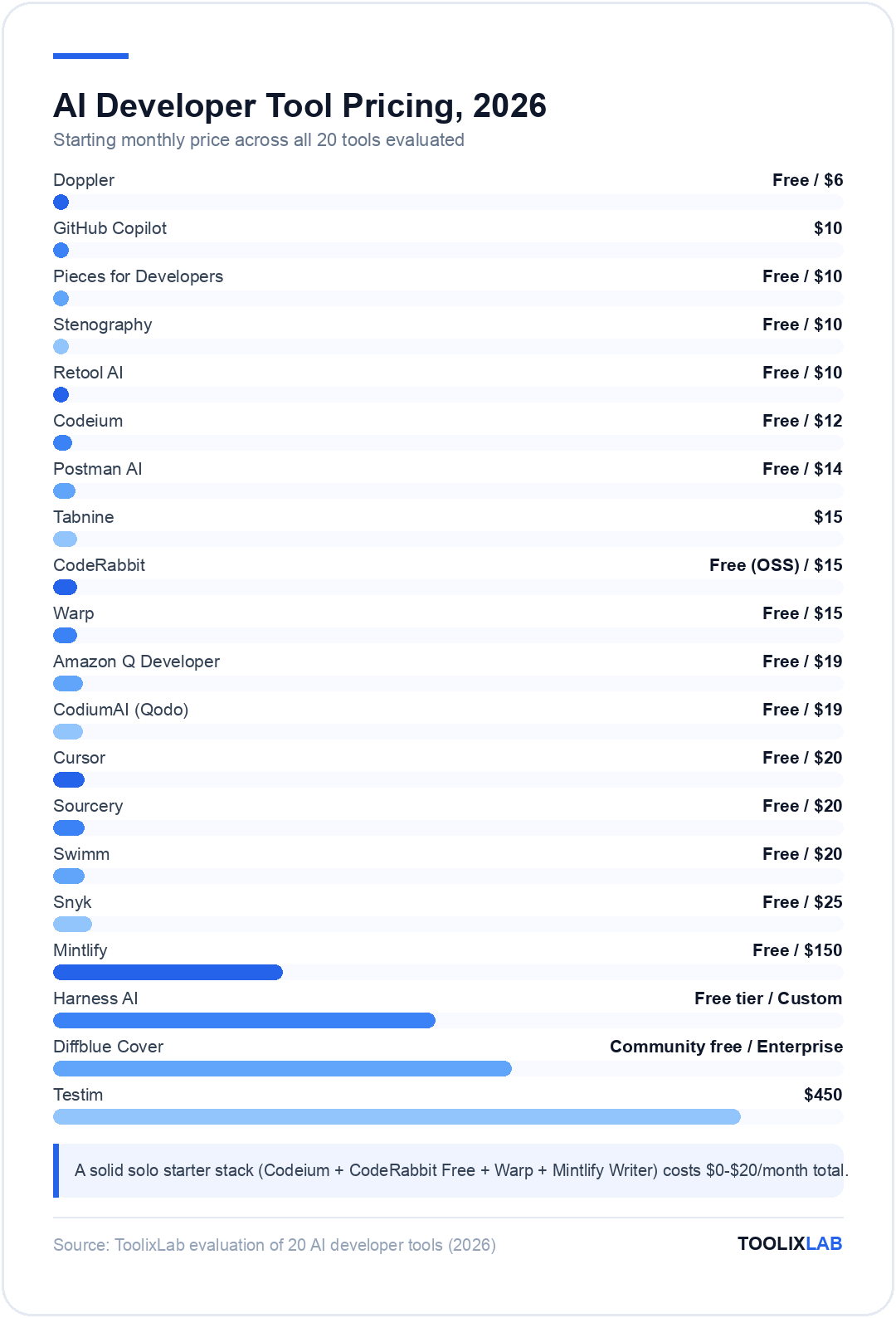
| Tool | Category | Best For | Free Tier | Paid From |
|---|---|---|---|---|
| GitHub Copilot | Code assistant | Most developers | Yes (students) | $10/mo |
| Cursor | AI IDE | Large codebases | Yes (2000 completions) | $20/mo |
| Codeium | Code assistant | Budget-conscious devs | Yes (unlimited) | $12/mo (teams) |
| Amazon Q Developer | Code assistant | AWS teams | Yes | $19/mo |
| Tabnine | Code assistant | Enterprise privacy | Limited | $15/mo |
| CodeRabbit | Code review | High PR volume teams | Yes (OSS) | $15/mo |
| Sourcery | Refactoring | Python developers | Yes | $20/mo (Pro) |
| Pieces for Developers | Context/debugging | All developers | Yes | $10/mo |
| Snyk | Security | Security-conscious teams | Yes (200 tests) | $25/mo |
| Mintlify | Documentation | Developer products | Yes | $150/mo |
| Swimm | Documentation | Large teams | Yes (small teams) | $20/mo |
| Stenography | Docstrings | Any developer | Yes (100 files) | $10/mo |
| Diffblue Cover | Test generation | Java teams | Community free | Enterprise |
| Testim | UI testing | Frontend teams | Trial only | $450/mo |
| CodiumAI (Qodo) | Test generation | JS/TS/Python devs | Yes | $19/mo |
| Harness AI | CI/CD | DevOps teams | Yes | Custom |
| Warp | Terminal | All developers | Yes | $15/mo |
| Doppler | DevOps/Config | All teams | Yes (small teams) | $6/mo |
| Postman AI | API development | Backend developers | Yes | $14/mo |
| Retool AI | Internal tools | Full-stack teams | Yes (5 users) | $10/mo |
How to Build Your AI Developer Stack
Don't try to adopt all 20 tools at once. Build your stack in layers, starting with the highest-ROI category for your current workflow:
Layer 1: Code completion (Week 1)
Start with one code assistant. If you're in VS Code: GitHub Copilot (paid) or Codeium (free). If you work on large codebases or complex refactors: Cursor. If you're on AWS: Amazon Q Developer.
Layer 2: Code review automation (Week 2–3)
Add CodeRabbit to your GitHub or GitLab repos. Free for open-source projects. Catch bugs and security issues before human review.
Layer 3: Documentation (Month 2)
Install the Mintlify VS Code extension for instant docstring generation. Add Swimm if your team has a documentation debt problem.
Layer 4: Testing (Month 2–3)
Add CodiumAI (Qodo) for unit test generation in your language. Java teams: evaluate Diffblue Cover. Frontend teams with flaky UI tests: evaluate Testim.
Layer 5: DevOps & security (Month 3+)
Integrate Snyk into your CI pipeline for security scanning. Add Warp as your daily terminal. Evaluate Harness AI if you have CI/CD reliability issues.
AI Developer Tools for Different Roles
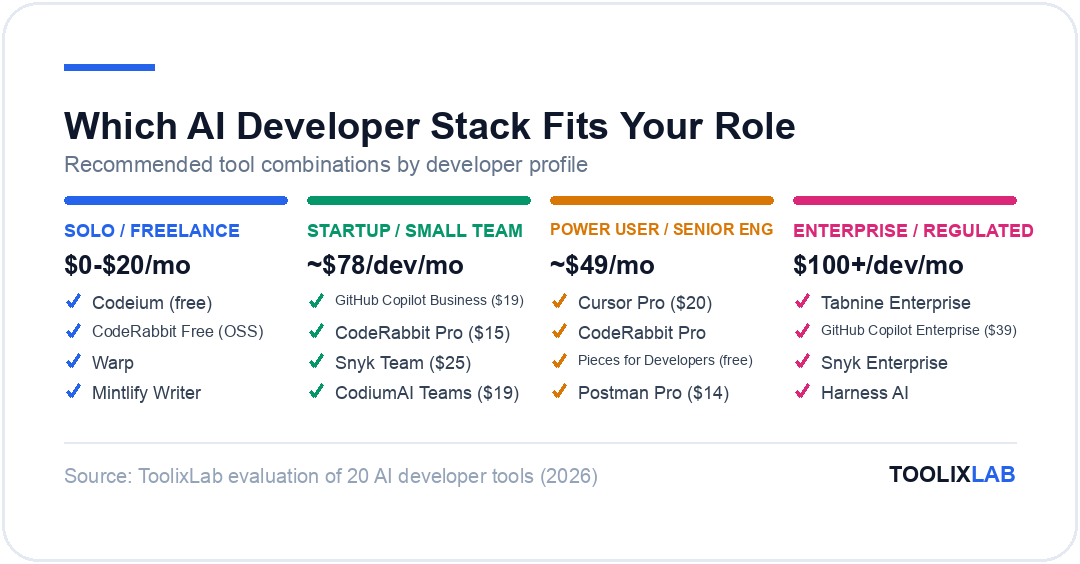
Solo / Freelance Developer
- ✓ Codeium (free completions)
- ✓ CodeRabbit Free (OSS projects)
- ✓ Warp (AI terminal)
- ✓ Mintlify Writer (VS Code extension)
- Estimated cost: $0–$20/month
Startup / Small Team (5–20 devs)
- ✓ GitHub Copilot Business ($19/user)
- ✓ CodeRabbit Pro ($15/user)
- ✓ Snyk Team ($25/user)
- ✓ CodiumAI Teams ($19/user)
- Estimated cost: $78/dev/month
Power User / Senior Engineer
- ✓ Cursor Pro ($20/month)
- ✓ CodeRabbit Pro
- ✓ Pieces for Developers (free)
- ✓ Postman Pro ($14/month)
- Estimated cost: $49/month
Enterprise / Regulated Industry
- ✓ Tabnine Enterprise (on-premise)
- ✓ GitHub Copilot Enterprise ($39/user)
- ✓ Snyk Enterprise
- ✓ Harness AI
- Estimated cost: $100+/dev/month
🔗 Going further: Once your dev stack is set, check out our guide to Building an AI Workflow to automate the rest of your development pipeline — from issue triage to deployment notifications.
Key Takeaways
- Start with one code assistant — Copilot for most developers, Cursor for power users working on complex codebases, Codeium if budget is the constraint.
- Add AI code review next — CodeRabbit catches real bugs and is free for open-source. The ROI on code quality alone justifies the cost for private repos.
- Documentation and testing tools compound — they feel optional until you inherit a codebase with neither, at which point you'd pay anything for them.
- Privacy matters — if you're working with proprietary code, verify whether your AI tool trains on your input. Tabnine Enterprise and GitHub Copilot Enterprise both offer contractual no-training guarantees.
- Build layered, not all-at-once — three well-adopted tools outperform ten underused ones every time.
Further Reading & Sources
🔬 How We Test AI Tools at ToolixLab
Every recommendation in this guide comes from hands-on evaluation, not spec-sheet comparison. Our process for this category:
- Real-task testing: we run each tool through the actual workflows this guide covers — the same tasks you'd use it for — and compare outputs side by side.
- Verified pricing: every price is checked against the vendor's official pricing page at review time, and re-checked on our refresh cycle.
- Free-tier reality check: we test the free tier limits ourselves so "free" claims reflect what you actually get.
- Ongoing re-evaluation: AI tools change monthly; posts carry a visible "Last updated" date and stale recommendations get replaced.
ToolixLab is reader-supported: some links may earn us a commission, which never affects rankings — several tools we rank highest have no affiliate program at all.
Frequently Asked Questions
What is the best AI coding assistant for developers in 2026? ▾
Cursor leads for most developers — it's an AI-native IDE with Claude Sonnet and GPT-4o built in, offering superior multi-file editing and codebase context. GitHub Copilot is the best choice if you prefer staying in VS Code or JetBrains. Codeium is the strongest free option with no usage caps. Choose Cursor if you want an AI-first IDE; choose Copilot if you want AI as a plugin for your existing workflow.
Is GitHub Copilot or Cursor better for professional developers? ▾
Cursor wins on raw capability — especially for large codebases, multi-file refactoring, and agentic tasks. GitHub Copilot wins on integration — it lives inside VS Code, JetBrains, and the GitHub web editor without changing your workflow. In practice, many senior developers run both: Copilot for day-to-day autocomplete, Cursor for complex feature work. The $30/month combined cost is negligible against developer hourly rates.
Are AI coding tools safe to use with proprietary enterprise code? ▾
Security varies significantly. GitHub Copilot Business/Enterprise and Cursor Business both offer data isolation — your code isn't used for training and isn't stored beyond the active session. Amazon CodeWhisperer Professional and Codeium Enterprise support self-hosted deployments. Always review the vendor's data processing agreement before using any AI tool on sensitive codebases. Never use free consumer tiers for proprietary enterprise code.
How much do AI developer tools cost in 2026? ▾
A full professional AI developer stack runs roughly $30–$80/month: Cursor Pro at $20/month, GitHub Copilot Individual at $10/month, plus optional specialty tools. Compared to the alternative — a junior developer at $60–80k/year — the productivity multiplier of 2–4x (commonly reported in engineering teams) means these tools pay back in hours, not months. Most engineering orgs see $5–$15 return per $1 spent on AI tooling.
Can AI generate entire production-ready applications in 2026? ▾
AI can generate complete, working prototypes surprisingly fast — Cursor with Claude Sonnet can scaffold a full-stack app in minutes. But production-ready requires security hardening, edge-case handling, performance optimization, and integration with existing systems — all areas needing human judgment. The realistic 2026 model: AI writes 60–80% of net-new code, experienced developers review, refactor, and ship. "AI writes, humans ship" is the dominant pattern at high-performing engineering teams.