
⚡ TL;DR — Quick Verdict
Nonprofits are asked to do the impossible: deliver transformative community impact with skeleton budgets, volunteer-heavy teams, and administrative overhead that consumes resources meant for mission delivery. The average nonprofit spends 20–30% of its operational budget on administrative tasks — grant writing, donor communication, volunteer coordination, social media, and reporting — that don't directly serve beneficiaries.
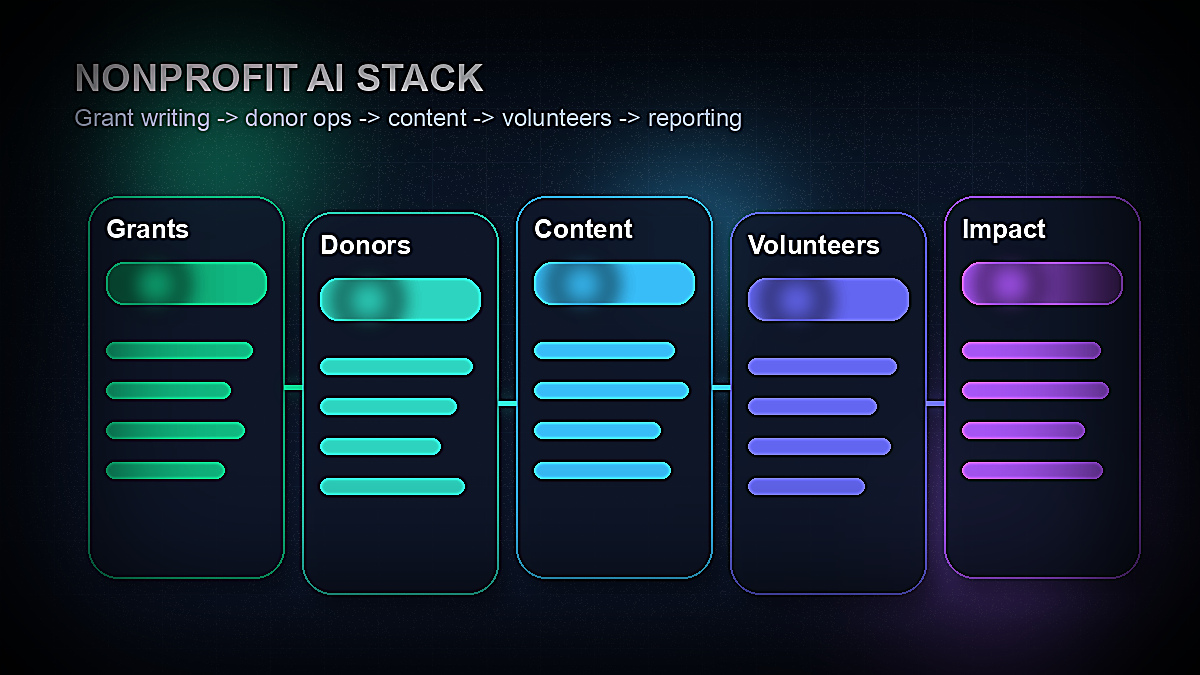
AI tools are changing this equation in 2026. For the first time, a small nonprofit with two full-time staff members can produce the grant proposals, donor communications, social media content, and operational workflows of an organization three times its size. And critically, many of the most powerful AI tools offer robust free tiers specifically designed to help resource-constrained organizations.
This guide covers the 12 best AI tools for nonprofits in 2026 — with specific emphasis on free options and nonprofit discount programs. Each tool is evaluated for nonprofit-specific use cases: grant writing, donor management, volunteer coordination, content creation, and operational efficiency. We cover both the free tools that belong in every nonprofit's stack immediately, and the paid tools worth the investment when budget allows.
Why Nonprofits Need AI More Than Any Other Sector
The case for AI adoption in nonprofits isn't about efficiency for efficiency's sake — it's about mission capacity. Every hour a program director spends writing a grant application is an hour not spent serving the people the organization exists to help. Every evening a development officer spends manually composing donor thank-you emails is time extracted from family life or burnout recovery. Nonprofit staff retention is at crisis levels precisely because the operational burden is unsustainable at current resourcing levels.
Several factors make nonprofits uniquely positioned to benefit from AI tools in 2026:
- →Grant writing is structured and template-driven — Grants follow predictable formats: problem statement, theory of change, target population, activities, outputs, outcomes, evaluation plan, budget narrative. This structure makes grant writing one of the highest-value AI applications for nonprofits — AI can produce a draft that requires editing rather than creation from scratch.
- →Donor communications are repetitive and volume-intensive — Year-end appeals, monthly donor acknowledgments, impact reports, event invitations, and stewardship touchpoints follow repeatable patterns. AI can generate personalized-feeling communications at scale that would be impossible for a two-person development team to write individually.
- →Social media demand outpaces nonprofit capacity — A consistent social media presence requires 15–20 pieces of content per week across platforms. Most nonprofits post irregularly because they can't sustain that volume with existing staff. AI writing and design tools can produce a week's content in a two-hour session.
- →Volunteer management is operationally complex — Onboarding, scheduling, training, recognition, and retention of volunteers involves significant communication and documentation overhead. AI can systematize these workflows in ways that smaller teams couldn't otherwise manage.
- →The free tier ecosystem is stronger than ever — In 2026, Google for Nonprofits, HubSpot, Mailchimp, Canva, and multiple AI writing tools all offer free or deeply discounted access to nonprofits. The cost barrier to building a capable AI stack is lower than it has ever been.
According to a TechSoup 2025 Nonprofit Technology Survey, only 31% of nonprofits are currently using AI tools in any systematic way — despite 78% reporting that staff capacity is their primary operational constraint. This gap between the problem and the available solution is striking, and it represents a significant opportunity for organizations willing to invest the time to build an AI-assisted workflow.
📊 Key Stat
Nonprofits that systematically use AI tools for grant writing report a 40–60% reduction in time spent on grant application drafting, with no measurable reduction in award rates — and in many cases, improved narrative quality. — Nonprofit Tech for Good, 2025
What to Look for in AI Tools for Nonprofits
Not every AI tool is well-suited to the nonprofit context. Before spending time evaluating specific products, five criteria should drive the selection process:
- 1.Free tier quality: For nonprofits, the free tier isn't a trial — it's the intended deployment model for most use cases. Evaluate tools on what you can actually do for free, not just on features available in the paid plans. The best nonprofit AI tools offer substantial free functionality, not just token access designed to upsell.
- 2.Nonprofit discount programs: Many SaaS companies offer 50–85% discounts for registered nonprofits, often through TechSoup or direct nonprofit pricing. Always check before paying full price — the difference between list price and nonprofit price can be enormous.
- 3.Data privacy and confidentiality: Grant applications often contain sensitive program data, beneficiary information, and proprietary organizational details. Verify that any AI tool you use for grant writing has appropriate data handling policies — particularly important for tools using data to train future models.
- 4.Ease of use for volunteer staff: Many nonprofit operations rely on part-time staff and volunteers with varying technical comfort levels. The best tools for nonprofits have intuitive interfaces that don't require technical training to use effectively.
- 5.Integration with existing tools: Nonprofits often have legacy systems for donor management, accounting, and program tracking. Tools that integrate with your existing stack via Zapier or native APIs reduce implementation friction and adoption resistance.
With those criteria in mind, here are the 12 best AI tools for nonprofits in 2026, organized by primary use case.
Best AI Tools for Grant Writing
Grant writing is the highest-leverage AI application for most nonprofits. A well-crafted grant application can take 20–40 hours to produce; an AI-assisted draft can reduce that to 6–10 hours of editing and refinement. Over the course of a year, this difference compounds dramatically — a development director who previously managed 8 grant applications per year can potentially manage 20–25 with AI assistance.
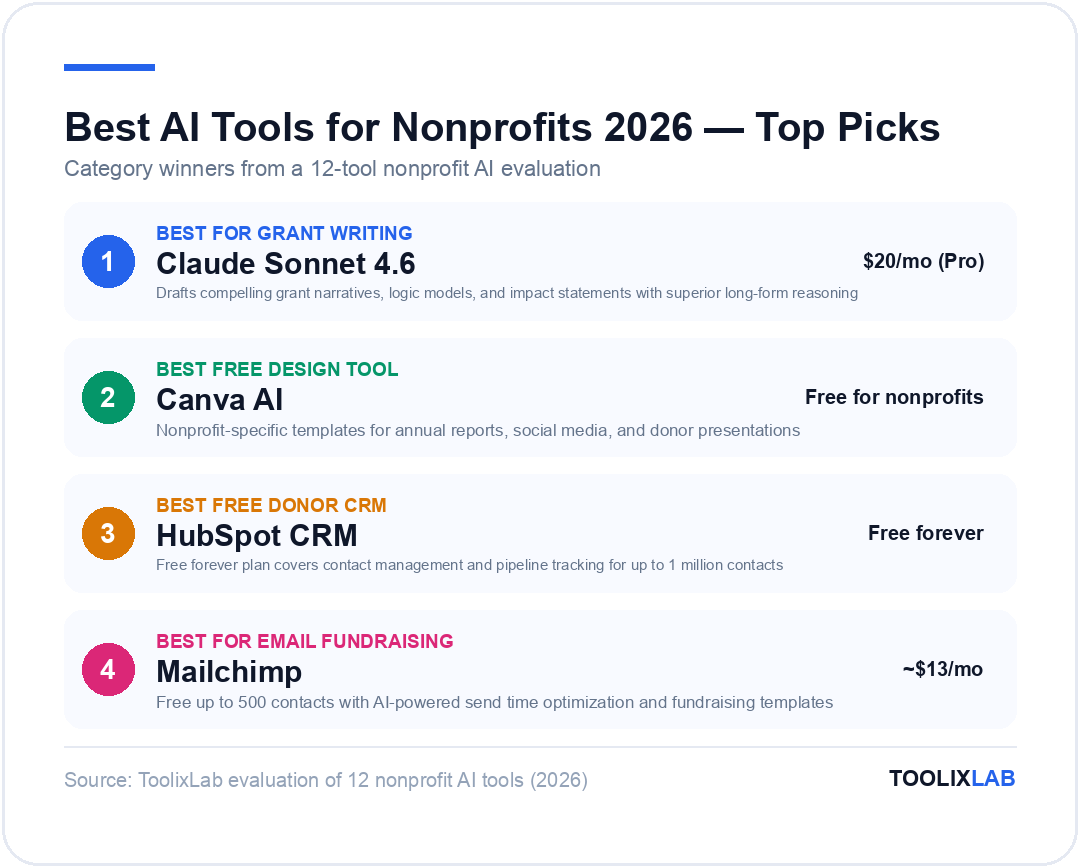
1. Claude Sonnet 4.6 — Best Overall for Grant Writing
Claude Sonnet 4.6, developed by Anthropic, has become the preferred AI writing assistant for professional grant writers in 2026 for a specific reason: its reasoning depth and long-form coherence are superior to alternatives for complex, structured documents. Grant applications require holding multiple threads simultaneously — the problem statement must echo in the evaluation plan; the theory of change must be consistent with the activities section; the budget narrative must align with staffing descriptions elsewhere in the document. Claude maintains these coherences across long documents in a way that other models struggle to match consistently.
Nonprofit-specific use cases:
- Draft complete grant narrative sections from a single brief
- Develop logic models and theories of change from program descriptions
- Write outcome statements and SMART objectives from program data
- Edit and strengthen existing grant narratives for clarity and impact
- Adapt a single master grant narrative for multiple funders with different requirements
- Draft budget justification narratives from spreadsheet data
- Write evaluation plans and data collection methodologies
How to use it for grant writing: The most effective workflow is to provide Claude with your organization's one-page fact sheet, the specific RFP requirements, and a bullet-point brief of your program activities. From this input, Claude can produce a first-draft narrative that requires substantive editing rather than creation from scratch. For complex federal applications, working section by section — submitting the problem statement for Claude to refine before moving to the project narrative — produces better results than trying to generate the entire document at once.
Pricing: Claude.ai offers a free tier with access to Claude Sonnet 4.6. The Pro plan ($20/month) removes usage limits and provides priority access — worth the investment for any development director spending more than 10 hours per month on grant writing. There is currently no specific nonprofit discount for Claude.ai, but the free tier is genuinely functional for most grant writing tasks.
Limitation: Claude does not have real-time internet access in its base form, which means it cannot look up current funder priorities, recent grants awarded, or live program statistics. You'll need to provide current data and funder research yourself.
2. ChatGPT (GPT-5.4) — Best for Iterative Grant Drafting
OpenAI's ChatGPT, running on the GPT-5.4 model family in 2026, is the most widely adopted AI writing tool globally and offers strong grant writing capabilities with a particularly smooth iterative drafting experience. While Claude edges ahead for complex long-form coherence, ChatGPT's conversational interface makes it excellent for organizations new to AI-assisted writing — the back-and-forth refinement feels natural and requires less prompt engineering expertise to produce good results.
Nonprofit-specific use cases:
- Brainstorm program narrative frameworks and section structures
- Write and refine donor thank-you letters and acknowledgment templates
- Draft board meeting agendas and staff communications
- Create volunteer training materials and onboarding guides
- Generate multiple versions of program descriptions for different audiences
- Summarize lengthy program evaluation reports for board presentations
Pricing: ChatGPT offers a free tier with access to GPT-5.4 mini. The Plus plan ($20/month) provides access to the full GPT-5.4 flagship model. OpenAI does not offer a specific nonprofit discount at the organizational level, though Teams pricing at $30/user/month may be relevant for larger development departments.
💡 Grant Writing Tip
Build a "grant brief" template for your organization — a 1-page document with your mission, target population demographics, signature programs, key outcomes data, and recent awards. Attach this to every AI grant writing prompt. Consistent organizational context dramatically improves AI output quality and reduces the editing required to bring drafts up to submission quality.
3. Copy.ai — Best Dedicated Grant Writing Tool
Unlike general-purpose AI assistants, Copy.ai has developed specific grant writing workflows designed for nonprofits, including structured templates for common grant types (community foundation, corporate foundation, federal CFDA programs). Its nonprofit-specific prompts and workflows are the most polished of any dedicated writing AI in 2026, making it a strong choice for development staff who want guided grant writing assistance rather than an open-ended AI canvas.
Nonprofit-specific use cases:
- Structured grant application workflows with section-by-section prompts
- Donor impact story generation from case data
- Annual appeal letter drafting and A/B variant generation
- Corporate sponsorship proposal templates
Pricing: Copy.ai offers a free tier (limited monthly credits). The Pro plan runs approximately $36–$49/month at current pricing. Nonprofit discounts are available through TechSoup — always check there before paying full price.
Best AI Tools for Donor Communications & Fundraising
Donor retention is the most underinvested area of nonprofit fundraising. Research consistently shows that the cost of acquiring a new donor is 5–10x higher than the cost of retaining an existing one — yet most nonprofits spend the majority of their development resources on acquisition rather than stewardship. AI tools make systematic donor stewardship scalable for the first time.
For a deeper look at how to pair these tools with your overall content workflow, see our guide to building an AI content creation workflow.
4. HubSpot CRM — Best Free Donor CRM
HubSpot's free CRM is the most capable no-cost donor relationship management tool available in 2026. While purpose-built nonprofit CRMs like Bloomerang and DonorPerfect offer features specifically designed for fundraising (soft credits, tribute giving, pledge management), HubSpot's free tier covers the core CRM needs of most small-to-medium nonprofits without any payment required.
Nonprofit-specific use cases:
- Contact management for up to 1 million donors and prospects
- Email sequence automation for donor onboarding, lapsed donor re-engagement
- Pipeline management for major gift prospects
- AI-generated email templates for donor communications
- Meeting scheduling links for major donor meetings
- Reporting dashboards for board presentations
Pricing: HubSpot CRM is free forever for core features. HubSpot for Nonprofits offers 40% off paid Marketing, Sales, and Service Hub plans for registered nonprofits — significantly reducing the cost if you need advanced features like marketing automation, chatbots, or custom reporting.
Limitation: HubSpot's free CRM lacks soft credit tracking, recurring gift management, and fundraising-specific reporting that purpose-built nonprofit CRMs provide. If your organization has a major gifts program or significant recurring donor base, Bloomerang or DonorPerfect may be worth the investment despite higher cost.
5. Mailchimp — Best for Email Fundraising Campaigns
Mailchimp remains the go-to email marketing platform for small nonprofits in 2026 for a simple reason: its free tier is genuinely functional. Up to 500 contacts and 1,000 sends per month is sufficient for a small nonprofit's email fundraising and communication needs, and the AI features built into the platform — send time optimization, subject line recommendations, and content suggestions — are included without payment.
Nonprofit-specific use cases:
- Year-end giving campaign emails with AI-generated subject line variants
- Monthly donor impact newsletters with automated send scheduling
- Event invitations and follow-up sequences
- Welcome series for new donors
- Lapsed donor re-engagement campaigns
- Volunteer recruitment and communication emails
Pricing: Free up to 500 contacts (1,000 monthly sends). Essentials plan starts around $13/month. Mailchimp offers a 15% nonprofit discount on paid plans — verify current discount availability through their nonprofit program page.
6. Bloomerang — Best Purpose-Built Nonprofit Fundraising CRM
For nonprofits with established major gifts programs and recurring giving portfolios, Bloomerang is the highest-rated purpose-built fundraising CRM of 2026. Its AI-powered retention score — which assigns each donor a likelihood-to-lapse score based on giving history, engagement, and communication patterns — helps development teams prioritize stewardship outreach where it will have the greatest retention impact.
Nonprofit-specific use cases:
- Donor retention scoring and at-risk donor identification
- Soft credit and tribute gift tracking
- Recurring gift management with automated payment failure follow-up
- Integrated email with fundraising-specific templates
- Grant tracking and deadline management
- Board dashboard with key fundraising KPIs
Pricing: Bloomerang pricing is based on database size, starting around $119/month for up to 1,000 contacts. It's a meaningful investment for small nonprofits but the donor retention ROI typically justifies the cost for organizations with active major gifts programs. There is no widely publicized free tier.
Best AI Tools for Content Creation & Social Media
A consistent social media and content presence is increasingly essential for donor acquisition, volunteer recruitment, and community awareness — yet it represents one of the biggest capacity drains on small nonprofit teams. AI tools have dramatically reduced the time required to produce quality social content, making a consistent presence achievable for organizations with no dedicated communications staff.
If you're building out a broader nonprofit marketing toolkit, our roundup of the best AI tools for marketing covers additional platforms worth considering.
7. Canva AI — Best for Nonprofit Visual Content
Canva is the most widely used design tool in the nonprofit sector, and its AI features in 2026 have made it dramatically more powerful for organizations without dedicated graphic designers. Magic Studio — Canva's AI suite — includes text-to-image generation, background removal, AI-powered layout suggestions, and a Magic Write feature for generating copy directly within designs. The free tier for nonprofits is among the most generous of any professional design tool.
Nonprofit-specific use cases:
- Annual report design with AI-generated data visualizations
- Social media content batches with brand-consistent templates
- Event promotional materials and flyers
- Donor impact infographics and statistics cards
- Grant funder presentations and program snapshots
- Volunteer recruitment posters and materials
- Email header graphics and newsletter banners
Pricing: Canva Free provides access to a large template library and basic AI features. Canva for Nonprofits offers Canva Pro ($15/month/user at standard pricing) completely free for registered nonprofits — this is one of the most valuable nonprofit discount programs available. Apply through Canva's official nonprofit program; most 501(c)(3) organizations qualify.
8. Grammarly — Best for Polishing Donor Communications
Grammarly's AI editing assistant has evolved significantly in 2026 beyond basic grammar correction. Its tone detection, audience-specific style suggestions, and clarity rewrites make it particularly valuable for nonprofits whose communications need to resonate with multiple audiences simultaneously — donors, funders, volunteers, program staff, and community members often require different tones and vocabulary for the same underlying message.
Nonprofit-specific use cases:
- Proofread and polish grant applications before submission
- Ensure consistent tone in donor thank-you letters
- Edit volunteer communications for clarity and warmth
- Rewrite technical program descriptions for lay audiences
- Check board reports and annual reports for professional clarity
Pricing: Grammarly Free covers basic grammar and spell-check. Grammarly Business (approximately $15/user/month) includes the AI rewrite and tone features most valuable for nonprofit communications. Grammarly offers nonprofit discounts through TechSoup — check current availability before purchasing at standard rates.
Best AI Tools for Operations & Productivity
Operational efficiency directly translates to mission capacity. Time saved on administrative workflows, documentation, and internal communications is time redirected to program delivery. AI productivity tools are among the highest-ROI investments nonprofits can make because they benefit every function across the organization simultaneously.
9. Notion AI — Best for Nonprofit Knowledge Management
Notion AI transforms a well-organized Notion workspace into an intelligent organizational knowledge base. For nonprofits — where institutional knowledge often lives in the heads of individual staff members and organizational memory is lost to turnover — this is a significant capability. Notion AI can summarize documents, extract action items from meeting notes, draft SOPs from verbal descriptions, and answer questions from your organization's existing documentation.
Nonprofit-specific use cases:
- Volunteer onboarding documentation and training materials
- Program Standard Operating Procedures (SOPs) that update over time
- Board meeting minutes with AI-extracted action items
- Grant application tracking database with deadline management
- Donor stewardship playbooks for major gift officers
- Staff knowledge base to reduce onboarding time for new hires
Pricing: Notion Free tier is functional for small teams. The Plus plan ($10/user/month) adds unlimited pages and history. Notion AI is an add-on at $10/user/month. Notion offers nonprofit discounts — apply through their nonprofit program for significant pricing reductions.
See how leading organizations are using tools like Notion as part of an AI-powered small business or small organization stack for additional productivity ideas.
10. Zapier — Best for Workflow Automation
Zapier connects your disparate nonprofit tools — CRM, email platform, donation processor, social media, Google Workspace — into automated workflows that eliminate manual data entry and ensure nothing falls through the operational cracks. For a two-person development operation managing donor acknowledgments, volunteer onboarding, social media posting, and grant deadlines simultaneously, automation is not a luxury — it's a survival tool.
Nonprofit-specific automation workflows:
- New donation in payment processor → auto-add to CRM → trigger thank-you email within 24 hours
- New volunteer registration → send onboarding email sequence → add to scheduling system
- Board meeting notes uploaded to Google Drive → notify all board members → create action item tasks
- Grant deadline approaching (from Notion database) → alert development director → create Google Calendar reminder
- New social media post scheduled → auto-publish to Facebook, Instagram, LinkedIn simultaneously
- Website contact form submission → add to CRM → assign follow-up task to staff member
Pricing: Zapier Free includes 5 automated workflows (Zaps) with 100 tasks per month — sufficient for many small nonprofit automation needs. The Starter plan (approximately $19.99/month) provides 20 Zaps and 750 tasks. Zapier offers a 15% nonprofit discount through TechSoup.
For more complex automation workflows beyond Zapier's capabilities, our comparison of AI tools for HR and volunteer management covers additional options suited to nonprofit operational needs.
Best AI Tools for Volunteer Management
Volunteer management is the operational area where many nonprofits feel the greatest pain from inadequate tooling. Coordinating dozens or hundreds of volunteers — recruiting, screening, scheduling, training, recognizing, and retaining them — at scale requires systematic tools that most nonprofits have historically managed with spreadsheets and email. AI tools are finally making scalable volunteer management accessible.
11. Loom — Best for Volunteer Training Communications
Loom's AI-powered video messaging platform has become an essential tool for volunteer training and organizational communication in resource-constrained organizations. Recording a 10-minute training video that AI automatically transcribes, summarizes, and makes searchable is dramatically more scalable than scheduling synchronous training sessions for every cohort of new volunteers.
Nonprofit-specific use cases:
- Volunteer orientation and training videos with AI-generated transcripts
- Executive Director updates to board members and staff
- Donor impact updates that feel personal without requiring individual calls
- Program training videos for seasonal volunteers
- Virtual event recordings with AI-generated summary and timestamps
Pricing: Loom's Starter plan is free (up to 25 videos, 5 minutes each). The Business plan (approximately $15/creator/month) removes limits. Nonprofits should verify current discount availability — Loom has offered nonprofit pricing in the past.
12. Google for Nonprofits — Best Complete Free Platform
Google for Nonprofits is the single most valuable program available to registered nonprofits in 2026, and it's completely free for eligible organizations. The program bundles Google Workspace for Nonprofits (Gmail, Drive, Docs, Sheets, Meet, and Calendar for up to 2,000 users at no cost), Google Ad Grants ($10,000 per month in Google Search advertising), and the YouTube Nonprofit Program (fundraising features on YouTube).
What's included:
- Google Workspace for Nonprofits: Professional email, unlimited Google Drive storage, Google Meet video conferencing, collaborative document editing — equivalent to a $6–$12/user/month productivity suite, free for eligible organizations
- Google Ad Grants: $10,000/month in Google Search advertising to drive website traffic, volunteer recruitment, and event promotion — requires ongoing campaign management but represents enormous value for mission-aligned search terms
- YouTube Nonprofit Program: Fundraising cards, donation links in videos, and access to YouTube's Creator Academy resources
- Google AI features: Gemini AI integrated throughout Google Workspace — AI drafting in Gmail, AI summarization in Docs, AI-powered meeting notes in Meet
Eligibility: US-based 501(c)(3) organizations (excluding government entities, hospitals, and schools) generally qualify. Application is straightforward through the Google for Nonprofits portal and typically processes within a few weeks.
🎯 Priority #1 Action
If your nonprofit has not applied to Google for Nonprofits, do this before anything else. The Google Workspace and Google Ad Grants alone represent $10,000–$15,000 per year in value for most nonprofits, entirely free. Most eligible organizations underutilize or have never applied for this program. Visit google.com/nonprofits to apply.
The Free AI Stack for Zero-Budget Nonprofits
If your organization has no budget for software tools, the following stack provides substantial AI capability at zero cost. This isn't a stripped-down compromise — it's a genuinely powerful set of tools that can transform nonprofit operations when used systematically.
| Use Case | Free Tool | Free Tier Limit |
|---|---|---|
| Grant writing & content | Claude.ai (free tier) | Daily usage limits; no integrations |
| Email & productivity | Google Workspace (via Google for Nonprofits) | Up to 2,000 users; some storage limits |
| Graphic design | Canva Pro (via Canva for Nonprofits) | Full Pro — free for eligible nonprofits |
| Email marketing | Mailchimp (free tier) | 500 contacts, 1,000 sends/month |
| Donor CRM | HubSpot CRM (free forever) | 1M contacts; no marketing automation |
| Workflow automation | Zapier (free tier) | 5 Zaps, 100 tasks/month |
| Search advertising | Google Ad Grants | $10,000/month in Google Search ads |
| Video training | Loom (Starter) | 25 videos, 5 min each |
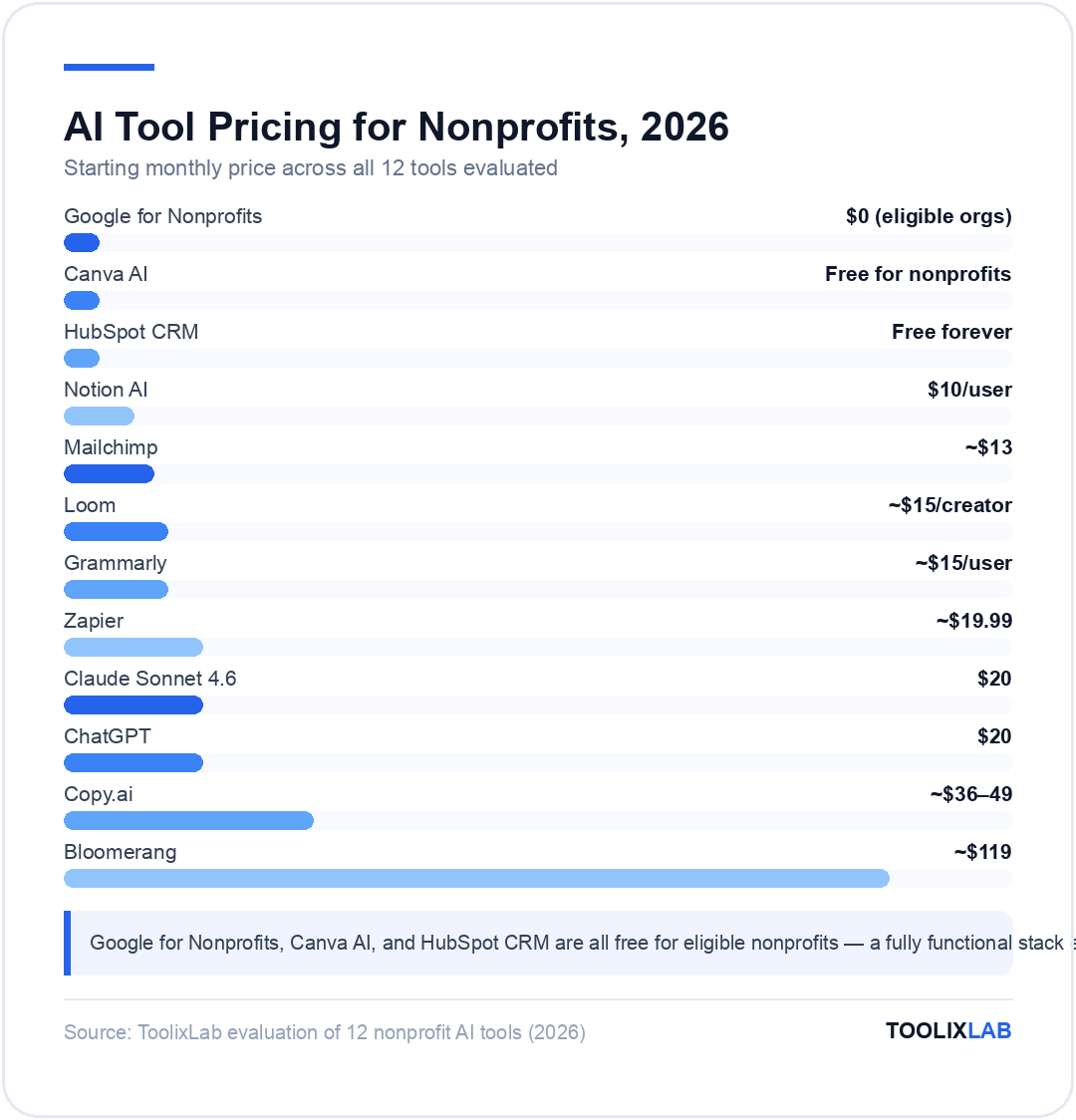
Full Comparison: All 12 Tools at a Glance
| Tool | Primary Use | Free Tier? | Nonprofit Discount | Starting Paid Price |
|---|---|---|---|---|
| Claude Sonnet 4.6 | Grant writing, content | Yes | None known | $20/month (Pro) |
| ChatGPT | Writing, strategy | Yes | None known | $20/month (Plus) |
| Copy.ai | Grant writing, fundraising copy | Yes (limited) | TechSoup | ~$36–$49/month |
| HubSpot CRM | Donor relationship management | Yes (robust) | 40% off paid tiers | Free forever (core) |
| Mailchimp | Email fundraising | Yes (500 contacts) | 15% off paid plans | ~$13/month |
| Bloomerang | Nonprofit-specific CRM | No | Check directly | ~$119/month |
| Canva AI | Design, social media | Yes | Canva Pro FREE | Free for nonprofits |
| Grammarly | Writing quality, tone | Yes (basic) | TechSoup | ~$15/user/month |
| Notion AI | Knowledge management, SOPs | Yes (limited) | Nonprofit discount | $10/user/month+ |
| Zapier | Workflow automation | Yes (5 Zaps) | 15% via TechSoup | ~$19.99/month |
| Loom | Video training, communication | Yes (25 videos) | Check directly | ~$15/creator/month |
| Google for Nonprofits | Full productivity suite + ads | Completely FREE | N/A — it's free | $0 for eligible orgs |
How to Access Nonprofit Discounts on AI Tools
The nonprofit discount ecosystem is more developed than most organizations realize. Beyond the individual tool programs mentioned above, two centralized resources can unlock significant savings:
TechSoup
TechSoup is the nonprofit sector's primary technology donation and discount clearinghouse. Eligible nonprofits can access deeply discounted or donated software from Microsoft, Adobe, Cisco, Intuit, and dozens of other vendors — often at 80–95% off standard commercial pricing. For AI tools specifically, TechSoup has partnerships with multiple vendors that provide nonprofit access at a fraction of commercial rates.
The TechSoup registration process requires proof of nonprofit status (typically your 501(c)(3) determination letter) and takes 2–5 business days. Once registered, the discount catalog is available immediately. Every nonprofit should be TechSoup-registered as a baseline operational practice.
Dedicated Nonprofit Programs
Beyond TechSoup, many major technology companies run their own nonprofit programs with direct application:
- Google for Nonprofits: Google Workspace + Ad Grants + YouTube — free for eligible organizations
- Microsoft for Nonprofits: Microsoft 365 Business Basic free for up to 10 users, discounted beyond that; Azure credits available
- Salesforce.org: Up to 10 free Salesforce licenses for qualifying nonprofits via the Power of Us program
- Canva for Nonprofits: Full Canva Pro free for registered nonprofits
- HubSpot for Nonprofits: 40% off paid Marketing, Sales, and Service Hub plans
- Slack for Nonprofits: Pro plan free for eligible nonprofits
- Zoom for Nonprofits: 50% off Zoom Business plans
The combined value of these programs — if systematically claimed — can represent $15,000–$30,000 or more in annual software savings for a mid-sized nonprofit. Most organizations leave a significant portion of this value unclaimed simply because staff aren't aware of what's available.
📋 Nonprofit AI Discount Checklist
- □Register with TechSoup (techsoup.org) — unlocks 50+ vendor discounts
- □Apply for Google for Nonprofits (google.com/nonprofits) — free Workspace + $10k/month ads
- □Apply for Canva for Nonprofits — free Canva Pro
- □Apply for Microsoft for Nonprofits — free/discounted Microsoft 365
- □Apply for HubSpot for Nonprofits — 40% off paid plans
- □Apply for Slack for Nonprofits — free Pro plan
- □Check Mailchimp nonprofit pricing — 15% discount on paid plans
Building Your Nonprofit AI Stack: A Phased Approach
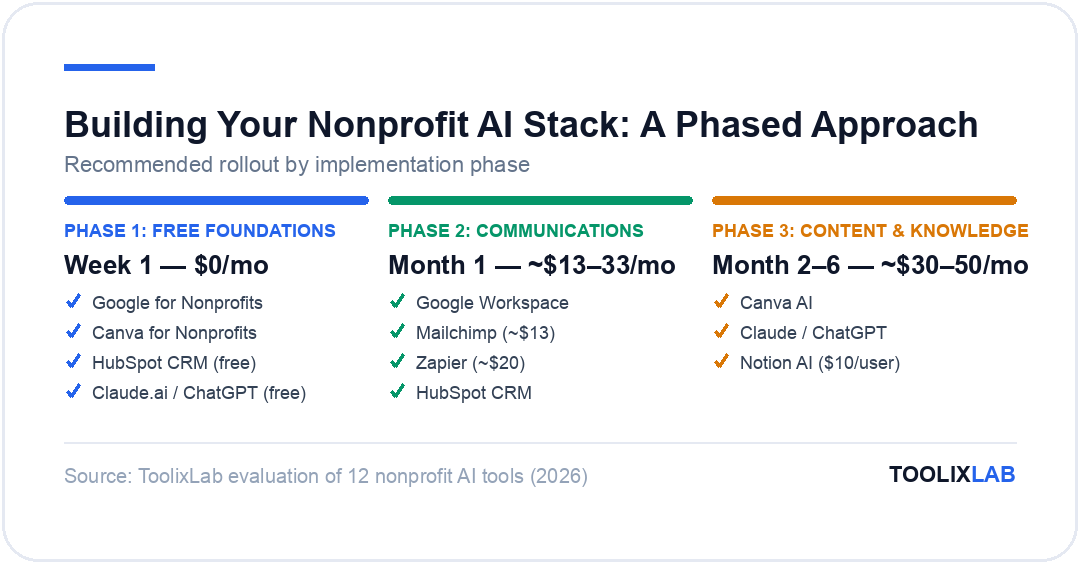
The biggest implementation mistake nonprofits make with AI tools is trying to adopt everything at once. Tool adoption without workflow integration produces shelf-ware — software that's installed but not used, generating subscription costs without mission impact. A phased approach works significantly better.
Phase 1 — Free foundations (do this week):
Start with the tools that cost nothing: Apply for Google for Nonprofits and Canva for Nonprofits immediately. Both applications take under 30 minutes and can process within days. Set up a HubSpot free CRM account for donor contacts if you're currently using spreadsheets. Start using Claude.ai or ChatGPT free tier for a single high-value task — grant narrative drafting is the best starting point because the ROI is immediately measurable.
Phase 2 — Communication infrastructure (Month 1):
Once Google Workspace is active, configure Gmail with a professional organizational domain. Set up Mailchimp for email fundraising if you don't have an email platform. Build a basic Zapier workflow connecting your donation processor to HubSpot — a new donation automatically creating a CRM contact and triggering a thank-you email is the highest-value automation for most nonprofits.
Phase 3 — Content systems (Month 2–3):
Establish a weekly content creation workflow using Canva AI for social media graphics and Claude or ChatGPT for post copy. A single two-hour session each week producing 7–10 pieces of social content — images, captions, hashtag sets — can sustain a consistent presence on multiple platforms without ongoing daily time investment.
Phase 4 — Knowledge management (Month 3–6):
Build out Notion as your organizational knowledge base. Document grant application templates, donor stewardship playbooks, volunteer onboarding processes, and program SOPs. Once documented, Notion AI makes these resources searchable and allows new staff to onboard more quickly than the institutional memory model previously allowed.
For additional workflow ideas applicable to small organizations, see our guide to the best free AI tools in 2026, which covers several additional no-cost options suitable for mission-driven organizations.
Frequently Asked Questions
What is the best free AI tool for nonprofit grant writing?
Claude Sonnet 4.6 (via Claude.ai free tier) is the best free AI tool for grant writing in 2026. Its long-form reasoning and structural coherence are superior to alternatives for complex grant narratives — the free tier allows daily grant writing tasks with daily usage limits. For organizations that need unlimited access, the Pro plan at $20/month has an immediate ROI if it saves even a few hours of development staff time per month.
Does Google give free tools to nonprofits?
Yes — Google for Nonprofits provides Google Workspace (professional Gmail, Drive, Docs, Meet, and Calendar for up to 2,000 users), Google Ad Grants ($10,000/month in Google Search advertising), and the YouTube Nonprofit Program completely free for eligible registered nonprofits. US-based 501(c)(3) organizations excluding government entities, hospitals, and schools generally qualify. Application takes under 30 minutes at google.com/nonprofits and processes within a few weeks.
Can AI write grant applications for nonprofits?
AI can draft grant application sections — problem statements, project narratives, logic models, evaluation plans, and budget justifications — from organizational briefs and RFP requirements. The quality of AI-generated grant drafts has improved dramatically in 2026, and most development professionals using AI report that AI produces a workable first draft that requires substantive editing rather than creation from scratch. What AI cannot do is research funders, access real-time statistics, or substitute for programmatic expertise. The most effective approach treats AI as a highly capable first-draft writer that a human expert then refines and strengthens.
What is TechSoup and how does it help nonprofits access AI tools?
TechSoup (techsoup.org) is a nonprofit organization that acts as a technology donation and discount clearinghouse for the nonprofit sector. By registering with TechSoup (free, requires proof of 501(c)(3) status), nonprofits gain access to deeply discounted or donated software from dozens of vendors including Microsoft, Adobe, Cisco, and many others — often at 80–95% off standard commercial pricing. Several AI writing and productivity tool vendors offer nonprofit discounts through TechSoup. Every nonprofit should be registered with TechSoup as a baseline practice, even if you don't immediately need a specific product — registration is a one-time process that unlocks ongoing access to the full catalog.
Is it ethical for nonprofits to use AI for donor communications?
Yes, using AI to draft or enhance donor communications is ethically sound and increasingly standard practice, provided the organization reviews and personalizes the content before sending. Donors expect professional, timely communication — AI helps small nonprofits meet those expectations without requiring resources the organization doesn't have. The ethical consideration is transparency in major gift contexts, where donors forming personal relationships with your organization may have different expectations than mass email recipients. For individual major donor stewardship, AI-drafted letters should be reviewed and meaningfully personalized. For mass communications like newsletters and appeals, AI assistance is entirely appropriate.
How much can nonprofits save by using AI tools?
The savings vary significantly by organization size and how systematically AI is adopted, but the potential is substantial. On the direct cost side: Google for Nonprofits saves $6–$12/user/month on productivity software; Canva for Nonprofits saves $15/user/month; HubSpot free CRM saves $50–$800/month over commercial CRM alternatives; and TechSoup discounts on various tools can collectively save thousands per year. On the staff capacity side — which is typically the larger number — development professionals report saving 10–20 hours per month on grant writing, donor communications, and content creation. At average nonprofit program staff compensation rates, that represents $500–$1,500/month in labor value redirected from administrative tasks to mission delivery.
What AI tool is best for nonprofit social media management?
The most effective combination for nonprofit social media in 2026 is Canva AI for visual content creation paired with Claude or ChatGPT for caption and copy writing. Canva's free-to-nonprofits Pro tier provides social media templates, brand kit management, and Magic Studio AI features for image generation and background removal. Claude or ChatGPT can generate a week's worth of social media captions and hashtag sets from a simple brief in under 20 minutes. For scheduling and publishing across platforms simultaneously, Buffer's free tier (3 channels, 10 scheduled posts) or Zapier automation workflows can distribute content without manual posting on each platform.