
⚡ TL;DR — Quick Verdict
Finance teams in 2026 are navigating a paradox: more data than ever before, yet the same fundamental shortage of analyst hours to extract insight from it. The average finance team spends 60–70% of its time on data collection, validation, and report formatting — work that is necessary but not where trained financial professionals add their highest value.
AI is beginning to break this cycle. According to Deloitte's CFO Signals Survey, 74% of CFOs expect AI to significantly transform finance functions within two years, with the highest-impact areas being financial planning and analysis (FP&A), management reporting, and accounts payable automation. McKinsey estimates that AI and automation could handle 42% of the hours finance professionals currently spend on operational tasks — freeing capacity for the strategic advisory work that actually moves the business forward.
This guide covers the 12 best AI tools for finance teams in 2026 — tested and evaluated across the workflows that consume the most time: budgeting and forecasting, financial reporting, expense management, accounts payable, variance analysis, and financial modeling. For each tool you'll find current pricing tiers, genuine strengths and limitations, and a clear verdict on which teams it's built for.
How AI Is Transforming Finance Teams in 2026
The transformation of corporate finance by AI isn't a single event — it's happening workflow by workflow, tool by tool. The areas with the clearest measurable impact in 2026 are:
- →Financial planning and analysis (FP&A) — AI-native planning platforms now generate rolling forecasts, scenario models, and budget variance analyses that previously required days of manual spreadsheet work. Driver-based planning models update automatically as underlying data changes.
- →Management reporting — AI can generate first-draft narrative commentary for management packs, board presentations, and investor updates by analyzing financial data and producing written variance analysis in minutes rather than hours.
- →Accounts payable automation — AI invoice processing tools read, validate, code, and route supplier invoices with 95%+ accuracy, eliminating manual data entry and dramatically cutting days payable outstanding (DPO) processing time.
- →Expense management — AI-powered spend platforms categorize transactions in real time, flag policy violations automatically, and provide CFOs with live spend visibility across the entire organization without waiting for monthly reconciliation.
- →Financial consolidation — Multi-entity consolidation, intercompany elimination, and currency translation that previously required dedicated software and days of manual work are now handled by AI-native platforms in hours.
- →Anomaly detection and fraud prevention — Machine learning models monitoring transaction data can surface unusual patterns, duplicate payments, and potential fraud indicators far more reliably than periodic sampling-based audits.
- →Cash flow forecasting — AI models analyzing accounts receivable aging, payment behavior patterns, and revenue pipeline data are delivering rolling cash flow forecasts with meaningfully better accuracy than static historical models.
The through-line across all of these is the same: AI is not replacing financial judgment. It is eliminating the manual assembly and formatting work that has always prevented finance professionals from applying their judgment more often and more strategically.
📊 Key Stat
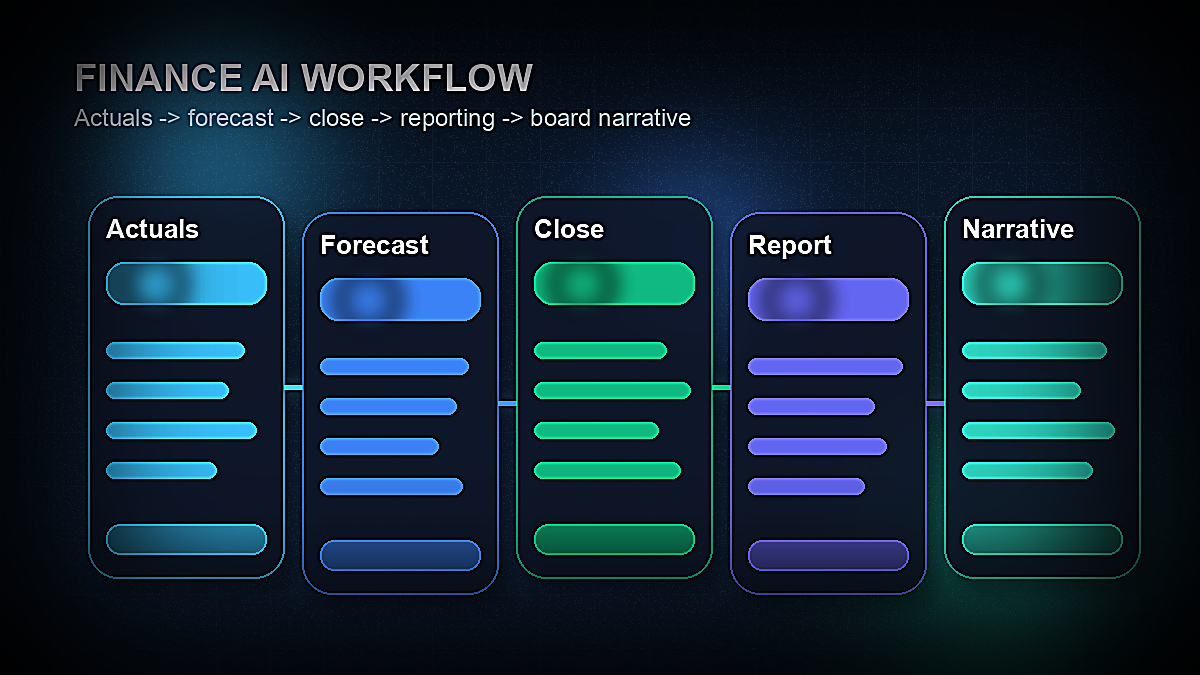
Finance teams that have systematically adopted AI tools report reducing month-end close cycles from 10+ days to 5–7 days on average, with the biggest time savings in reconciliation, variance commentary, and reporting pack assembly. — McKinsey State of AI Report 2025
What Finance Teams Should Look for in AI Tools
Finance operates under requirements that most other business functions don't face: regulatory compliance, audit trails, data confidentiality, and a professional responsibility for accuracy that carries real consequences. Before evaluating specific tools, five criteria matter most:
1. Data security and compliance architecture. Finance data includes the most sensitive information in the organization — payroll, banking credentials, board-level financials, M&A information. Any AI tool handling finance data must provide SOC 2 Type II certification, encryption at rest and in transit, clear data processing agreements, and explicit assurances that your data is not used to train AI models. Do not use consumer AI tools (free ChatGPT, consumer AI assistants) to process real financial data.
2. ERP and accounting system integration. AI finance tools that don't connect natively to your ERP (SAP, Oracle, NetSuite, Dynamics 365, QuickBooks) create manual data export/import workflows that negate much of their value. Integration depth — not just connection availability — is critical: look for bidirectional sync, not just one-way data pulls.
3. Audit trails and version control. Finance outputs are reviewed by auditors, boards, and regulators. Any AI tool affecting financial statements, forecasts, or reports must maintain complete audit trails showing what changed, who changed it, when, and on what basis. This is non-negotiable for public companies and increasingly expected even in private company audits.
4. Forecasting model transparency. Black-box AI forecasts that cannot explain their assumptions are not useful in finance. Look for tools that can show which drivers are influencing a forecast, what historical patterns the model is drawing on, and where confidence intervals are wider. Finance teams need to defend their numbers.
5. Change management and adoption realism. The finance tools that deliver the most value are not necessarily the most sophisticated — they're the ones that integrate into workflows your team will actually use. A tool that requires replacing your entire Excel-based planning process with a new interface will face adoption resistance. Tools that enhance existing workflows (Excel add-ins, ERP plugins) often deliver faster time-to-value.
The 12 Best AI Tools for Finance Teams in 2026
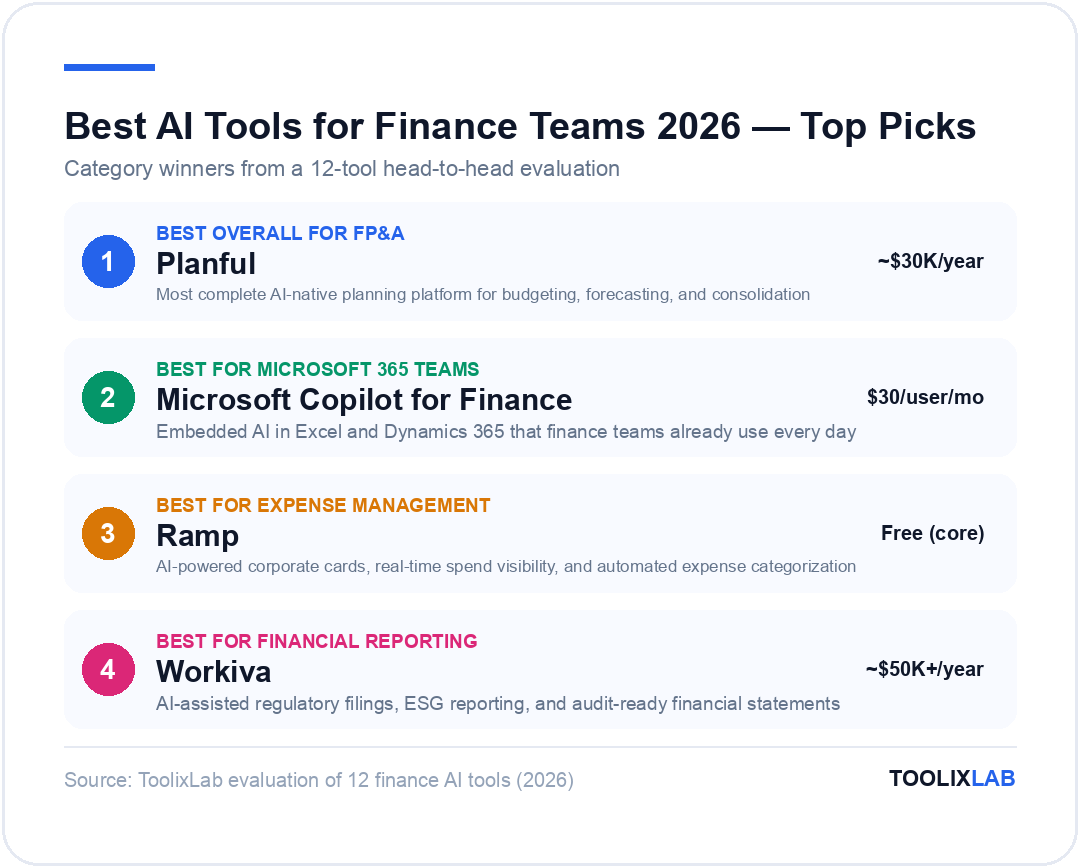
1. Planful — Best AI FP&A Platform for Mid-Market Finance Teams
Planful is the most complete AI-native financial planning and analysis platform on the market for mid-market companies that have outgrown spreadsheet-based budgeting but aren't ready for the complexity and cost of enterprise platforms like Anaplan or IBM Planning Analytics. It covers the full FP&A workflow: budgeting, multi-scenario forecasting, consolidation, and management reporting — with AI woven throughout rather than bolted on.
The standout AI feature in Planful is its Predict capability, which uses machine learning to generate AI-assisted forecasts based on historical patterns, seasonal trends, and driver relationships. Instead of finance analysts manually building and maintaining rolling forecast models, Planful Predict generates baseline forecasts that analysts review and adjust rather than build from scratch. For companies running monthly rolling forecasts across dozens of cost centers, this can cut forecasting cycle time by 60–70%.
Planful's Signals feature automatically flags budget variances above defined thresholds, generates written commentary explaining likely drivers of those variances, and routes exceptions to the appropriate budget owner for review. This transforms variance analysis from a labor-intensive manual process into an exception-management workflow — finance only reviews what needs attention.
The platform integrates with NetSuite, Salesforce, Workday, ADP, and major ERP systems, with data sync that updates planning models as actuals are posted. Dashboards update automatically when source data changes, eliminating the manual refresh cycles that plague spreadsheet-based reporting.
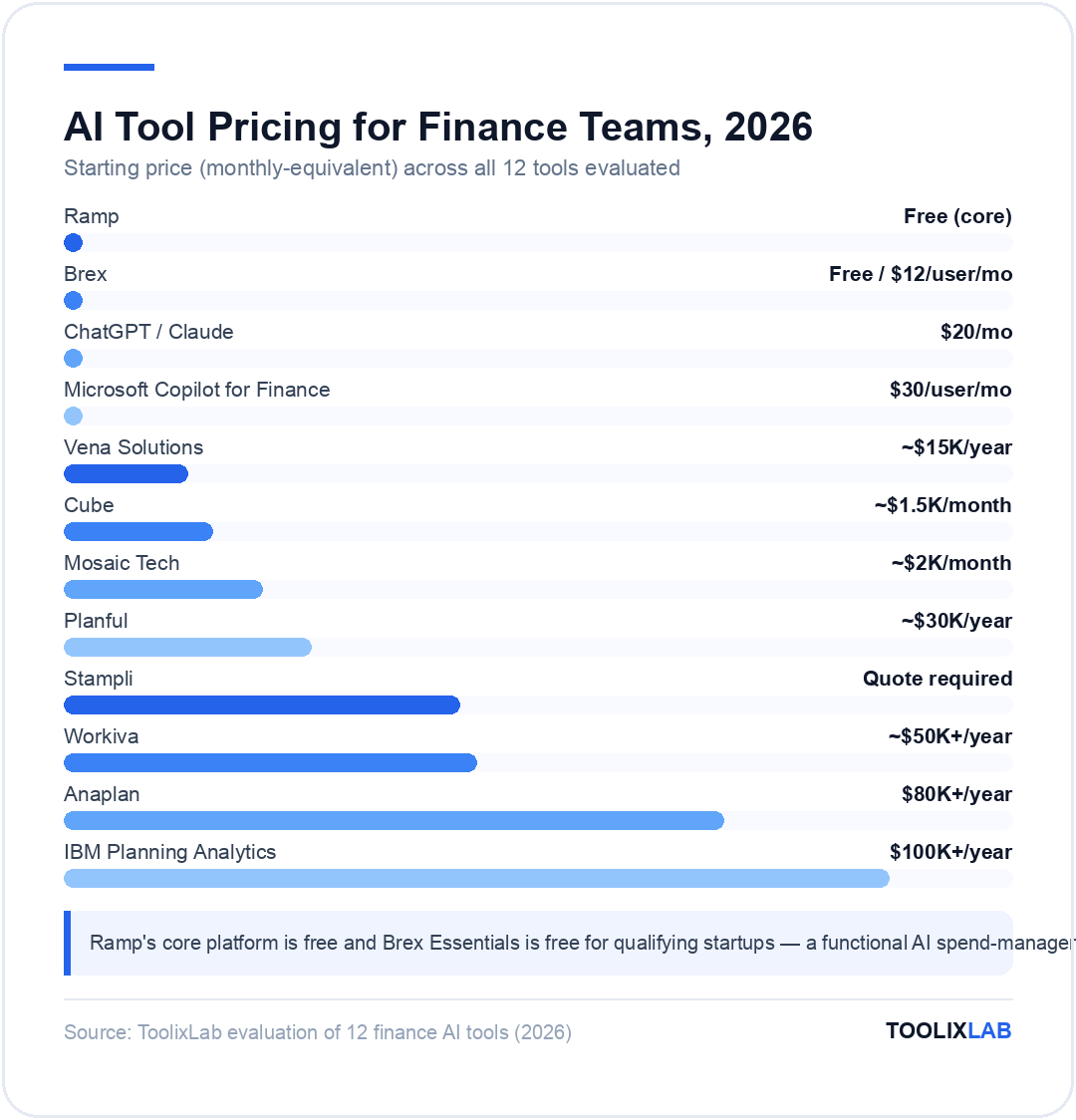
Pricing: Planful does not publish pricing publicly; it is sold through enterprise contracts typically starting around $30,000–$50,000 per year for mid-market implementations, scaling with company size and module requirements. Demos are available on request.
Best for: Mid-market companies (100–5,000 employees) with dedicated FP&A functions running complex planning cycles. Not ideal for companies under 50 employees or those with very simple budgeting needs.
Limitations: Implementation requires significant setup investment (typically 3–6 months for full deployment). The Excel-based interface some users prefer for granular modeling isn't as flexible as working directly in Excel.
2. Microsoft Copilot for Finance — Best for Microsoft 365 Finance Teams
For the majority of finance teams that live in Excel, Outlook, and Teams, Microsoft Copilot for Finance offers the lowest adoption friction of any AI tool on this list. Rather than replacing familiar tools, Copilot embeds AI directly into the workflows finance professionals already use every day.
In Excel, Copilot for Finance can analyze financial data, generate formula suggestions, build pivot tables, identify anomalies, and produce variance commentary — all through natural language prompts in the sidebar. Finance analysts can ask questions like "what are the top 5 cost categories driving the Q1 overspend?" and receive both the analysis and the Excel formula to recreate it. For teams whose financial modeling happens primarily in Excel, this is genuinely transformative.
In Outlook, Copilot drafts responses to finance-related emails, summarizes long email threads (useful for audit correspondence and vendor negotiations), and can generate AP-related follow-ups. In Teams, Copilot provides meeting summaries and action item extraction for finance team meetings and budget review sessions.
The deeper finance-specific features are in Copilot for Finance as a distinct module (available as an add-on to Microsoft 365): it connects to Dynamics 365 Finance and Operations for direct ERP integration, generates reconciliation reports by comparing data across sources, and provides AI-assisted collections management with suggested customer communication drafts.
Pricing: Microsoft 365 Copilot costs $30/user/month added to an eligible Microsoft 365 Business or Enterprise subscription. Copilot for Finance (the finance-specific module) is an additional add-on; pricing varies by enterprise agreement. For organizations already paying for Microsoft 365, the incremental cost is straightforward to evaluate.
Best for: Finance teams heavily embedded in Microsoft 365 (Excel power users, Dynamics 365 customers, organizations using Teams for financial review cycles). The ROI is highest when the team is already living in Microsoft tools.
Limitations: Copilot for Finance delivers the deepest value for Dynamics 365 customers — teams using SAP, Oracle, or NetSuite get less integrated functionality. The AI analysis is strong for Excel tasks but less specialized than dedicated FP&A platforms for complex planning cycles.
💡 Pro Tip
Finance teams adopting Microsoft Copilot should start with three high-ROI use cases: (1) variance commentary drafting in Excel using natural language prompts, (2) financial email summarization in Outlook during month-end close, and (3) budget meeting summary generation in Teams. Mastering these three before expanding reduces adoption friction significantly.
3. Workiva — Best for Financial Reporting and Regulatory Compliance
Workiva is the dominant platform for financial reporting, ESG reporting, and SEC filing preparation for public companies and large enterprises. Its AI capabilities are specifically designed for the high-stakes world of regulatory disclosure — where a single error in a 10-K or XBRL filing can trigger regulatory scrutiny and reputational damage.
The core value proposition of Workiva is a single connected platform where financial data, narrative, and regulatory filings live together. When an underlying financial figure changes, the change propagates automatically through the connected document — updating the financial statements, the MD&A narrative references, and the XBRL tagging simultaneously. For companies filing quarterly with the SEC, this single-source-of-truth architecture prevents the disclosure inconsistencies that create material weakness findings.
Workiva's AI features focus on three areas: narrative drafting assistance (the AI suggests variance commentary and section updates based on changes in the underlying data), XBRL tagging assistance (AI recommends appropriate taxonomy tags based on the content and context of each disclosure), and compliance checks (automated cross-referencing to flag potential inconsistencies within a filing before it's submitted).
The platform also handles ESG reporting, sustainability disclosures, and the expanding global ESG regulatory landscape (CSRD, TCFD, SEC climate disclosure rules). For companies managing both financial and ESG reporting obligations, having both in a single platform with shared data connections reduces duplicated effort significantly.
Pricing: Workiva is enterprise-priced and requires a custom quote. Annual contracts typically start in the range of $50,000–$100,000 for mid-size public companies, scaling with the number of users, entities, and filings managed.
Best for: Public companies, large private companies preparing for IPO, and any organization with significant regulatory reporting obligations (SEC filings, banking regulators, ESG disclosure requirements). Essential for companies managing multi-entity consolidations with disclosure requirements.
Limitations: Significant cost and implementation investment makes it impractical for small companies without active regulatory filing requirements. The platform is purpose-built for reporting — it doesn't replace FP&A tools for budgeting and forecasting.
4. Vena Solutions — Best AI Budgeting and Forecasting Tool for Excel Users
Vena Solutions occupies a unique position in the FP&A market: it delivers enterprise-grade planning capabilities through an Excel-native interface rather than replacing Excel with a proprietary tool. For finance teams where Excel fluency is high and where switching to a new planning UI would face resistance, Vena is often the fastest path to serious FP&A AI without the change management battle.
The Vena platform stores financial data in a central database but surfaces it through Excel templates that look and feel like the spreadsheets finance teams already use. Budget templates, forecast models, and consolidation worksheets all operate in Excel — but the data flows through Vena's central engine, enabling real-time aggregation, multi-user collaboration, and audit trails that spreadsheet files can't provide.
Vena's AI features include intelligent variance analysis (the system identifies which budget line items and cost centers are most significantly off plan and generates initial commentary explaining likely drivers), AI-assisted driver-based forecasting (the platform suggests statistical relationships between business drivers and financial outcomes based on historical data), and anomaly detection (flagging unusual entries or patterns that deviate from expected ranges before they become errors in the financial close).
The Copilot feature embedded in Vena allows finance users to ask natural-language questions about their financial data — "which departments are tracking over budget this quarter?" or "what's our forecast accuracy rate on headcount versus actuals over the past 12 months?" — and receive answers directly within the Excel interface.
Pricing: Vena is enterprise-contracted with pricing typically starting around $15,000–$25,000 annually for smaller implementations, scaling with user count and complexity.
Best for: Finance teams that are highly proficient in Excel and resistant to replacing it with new planning interfaces. Companies with 50–1,000 employees running structured budgeting cycles where Excel familiarity is a core team competency.
Limitations: The Excel-native approach means some of the more sophisticated planning scenarios that native-web platforms handle elegantly require careful template design. The platform is less suitable for companies that want to move away from Excel entirely.
5. Ramp — Best AI Expense Management Platform
Ramp has built what is arguably the most complete AI-powered spend management platform available in 2026, combining corporate cards, expense management, accounts payable, and procurement into a single system with AI running throughout. For finance teams that currently spend significant time managing expense reports, chasing receipts, and manually reconciling corporate card statements, Ramp delivers some of the fastest and most measurable time savings of any tool in this list.
The AI core of Ramp is its real-time spend intelligence. Every transaction made on a Ramp card is automatically categorized, policy-checked, and matched to a GL code — the moment the charge occurs, not weeks later when the expense report is submitted. Finance teams have live visibility into organizational spend by department, vendor, and category without waiting for the monthly close cycle. Policy violations (spend at unapproved vendors, over-limit transactions, personal purchases on corporate cards) are flagged automatically.
Ramp's AI also powers its vendor intelligence features. The platform analyzes spending patterns across its large network of customers to identify duplicate subscriptions, underutilized software licenses, and opportunities to consolidate vendor relationships or renegotiate pricing. Many finance teams report that Ramp's vendor insights have paid for the platform multiple times over in identified savings.
For accounts payable, Ramp Bill Pay uses AI to extract invoice data, code invoices to the correct GL accounts, and route them for approval — reducing the manual processing time per invoice from 10–15 minutes to under 2 minutes on average. The system learns your specific GL coding preferences and approval workflows over time, improving accuracy with use.
Pricing: Ramp's core platform (corporate cards, expense management, and basic AP) is free for U.S. companies — Ramp earns interchange fees on card transactions. Advanced features (Ramp Plus, including advanced analytics, custom roles, and additional controls) start at $15/user/month. Ramp is currently only available to U.S.-based businesses.
Best for: U.S.-based companies of all sizes looking to replace manual expense report workflows and gain real-time spend visibility. Particularly high ROI for companies with high card spend volume, multiple departments, and frequent vendor subscriptions that need visibility and control.
Limitations: U.S.-only availability limits use for global organizations. Deep integration with major ERPs (NetSuite, QuickBooks, Xero) is available but SAP and Oracle integrations require additional configuration. Ramp is best for companies moving to a card-first spend model — teams with large amounts of employee-reimbursed cash expenses face a different workflow transition.
6. Mosaic Tech — Best for SaaS and High-Growth Finance Teams
Mosaic Tech is a strategic finance platform designed specifically for the workflows of high-growth technology and SaaS companies. Where traditional FP&A tools are built around manufacturing-era budgeting concepts (line-item cost budgets, static annual plans), Mosaic is architected around the financial drivers that matter most for SaaS businesses: ARR, MRR, churn, CAC, LTV, net revenue retention, and unit economics.
The platform connects directly to your CRM (Salesforce, HubSpot), HRIS (Workday, Rippling), ERP (NetSuite, QuickBooks), and billing systems (Stripe, Chargebee) to pull real-time data into a unified financial model. The AI layer then generates forward-looking forecasts of SaaS metrics, performs what-if scenario modeling, and automatically updates financial models as pipeline and headcount data changes in source systems.
Mosaic's AI-generated management reporting produces board-ready financial presentations and investor reporting packages that pull directly from live data — eliminating the several days of manual data assembly and formatting that typically precede every board meeting. Finance teams report cutting board preparation time from 3–5 days to under half a day after implementing Mosaic.
The platform's scenario planning capabilities are particularly well-suited to high-growth environments where plans change frequently. Finance teams can build multiple growth scenarios (base case, upside, downside), model the financial implications of hiring changes or go-to-market pivots, and present clean scenario comparisons to the executive team — all within the platform rather than across a tangle of disconnected Excel models.
Pricing: Mosaic is priced through enterprise contracts typically starting around $2,000–$3,000/month for early-stage companies, scaling with company ARR and complexity. Pricing is available by demo request.
Best for: Series A and above SaaS and technology companies with at least one dedicated finance professional. Particularly strong for companies raising growth capital that need clean, investor-ready financial reporting and scenario models.
Limitations: Designed specifically for SaaS financial models — less applicable to services businesses, manufacturing, or companies with non-recurring revenue. Requires some FP&A expertise to configure and interpret the platform effectively.
7. Cube — Best Spreadsheet-Native FP&A for Smaller Finance Teams
Cube occupies similar territory to Vena Solutions but is oriented more toward smaller finance teams (typically 1–5 finance professionals) that need more power than a shared Excel workbook but less infrastructure than a full enterprise FP&A deployment. The platform functions as a central data hub that connects to accounting systems and pushes data into Google Sheets and Excel — maintaining the spreadsheet interface your team uses while enabling real-time data sync and multi-user collaboration.
The AI features in Cube include AI-assisted formula suggestions in connected spreadsheets, automated variance flagging that identifies budget-versus-actual differences above defined thresholds, and natural-language data queries that let non-technical team members ask questions about financial data without needing to know which formula to write.
For finance teams that have outgrown spreadsheet chaos (version control nightmares, emailed Excel files, manual consolidations) but aren't ready to invest in a full FP&A platform, Cube provides a practical middle ground. Implementation typically takes days rather than months, and the spreadsheet-native interface means adoption is faster than tools that require learning a new interface.
Pricing: Cube starts at approximately $1,500/month for small teams, scaling with users and connected entities. Annual contracts are available with discounts.
Best for: Small to mid-size companies with 1–3 finance staff that are managing budgeting and reporting primarily in Excel or Google Sheets and experiencing the collaboration and version control limitations of that approach.
Limitations: Less powerful than Planful or Vena for complex multi-entity consolidations or large-scale planning cycles. Reporting customization is more limited than dedicated FP&A platforms.
8. Stampli — Best AI Accounts Payable Automation
Accounts payable is one of the highest-ROI areas for AI automation in finance — and Stampli is the most impressive specialist AP platform available in 2026. The tool uses AI to read incoming invoices, extract line-item data, suggest GL coding based on vendor history and invoice content, route invoices to the correct approvers, and sync approved invoices to the ERP — all with minimal human intervention on the majority of invoices.
What distinguishes Stampli from generic AP automation tools is its communication-centric design. Rather than creating a separate AP workflow system that sits apart from how your team communicates, Stampli centers the invoice record as the communication hub — all questions, approvals, and notes about a specific invoice happen in a threaded conversation attached directly to that invoice. This eliminates the endless email chains about invoice status that consume AP team time and creates a clean audit trail of every discussion and decision.
Stampli's AI learns your organization's coding preferences and approval patterns over time. After the initial learning period, the system correctly codes and routes 80–90% of invoices with zero human involvement — AP staff only review exceptions, answer vendor questions, and handle invoices that require judgment. Finance teams using Stampli consistently report cutting AP processing time per invoice from 10–15 minutes to 2–3 minutes after the system is trained.
The ERP integration list is extensive: Stampli connects to NetSuite, QuickBooks, Sage Intacct, Microsoft Dynamics, SAP, Oracle, and most other major ERP systems without requiring custom development. Critically, Stampli sits on top of your existing ERP rather than replacing it — all finalized invoice data syncs back to your existing system of record.
Pricing: Stampli is priced by invoice volume and number of users; pricing is available by quote. Most mid-size companies pay in the range of $2,000–$6,000/month depending on invoice volume. A free pilot is available for evaluation.
Best for: Companies processing 100+ invoices per month that have significant AP staff time consumed by invoice coding, routing, and follow-up. The higher the invoice volume and number of vendors, the faster the ROI.
Limitations: AP automation is Stampli's specialty — it's not an FP&A tool, expense management platform, or financial reporting system. Organizations need to evaluate AP separately from their planning and reporting needs.
9. Brex — Best AI Spend Management for Startups and Scaleups
Brex offers a spend management platform similar in positioning to Ramp, but with more flexibility for global operations and companies that need combined expense management, corporate cards, and business accounts in a single platform. Brex is particularly strong for venture-backed startups and scaling companies that need enterprise-grade financial controls without enterprise-grade implementation overhead.
Brex's AI features center on spend intelligence: real-time transaction categorization, policy compliance enforcement at the point of purchase, and AI-powered receipt matching that automatically reconciles transactions to scanned receipts — eliminating the manual receipt chasing that consumes finance team time every month. The platform's AI also surfaces spend insights and cost reduction recommendations based on analysis of the company's spending patterns.
One feature that differentiates Brex from Ramp is its international capabilities — Brex supports multi-currency accounts, global corporate cards, and expense management across multiple countries, making it more practical for companies with significant operations outside the United States. Integration with NetSuite, QuickBooks, Xero, and Sage is built-in.
Pricing: Brex Essentials is free for qualifying startups. Brex Premium starts at $12/user/month with advanced controls and reporting features. Enterprise pricing is available for larger organizations.
Best for: Venture-backed startups and scaling companies, particularly those with global operations or employees in multiple countries. Companies that value real-time spend visibility and automated policy enforcement over heavy customization.
Limitations: Less established in large enterprise deployments than Ramp for purely domestic U.S. companies. Some users report that customer support responsiveness can be slower than preferred during high-volume periods.
💡 Pro Tip
For companies choosing between Ramp and Brex: Ramp tends to win on domestic U.S. spend analytics and vendor intelligence features. Brex tends to win for companies with global teams, multi-currency requirements, or those that want integrated business banking alongside spend management. Request demos of both before deciding — the pricing difference is minimal and the right fit depends heavily on your international footprint.
10. IBM Planning Analytics (TM1) — Best for Complex Enterprise Finance Planning
IBM Planning Analytics, built on the TM1 calculation engine, is the established enterprise standard for organizations with extremely complex planning requirements: multi-dimensional financial models, large-scale workforce planning, complex allocations across hundreds of cost centers, and planning cycles involving hundreds of simultaneous users. Banks, insurance companies, large manufacturers, and healthcare systems that need the raw calculation power and flexibility of TM1 still deploy IBM Planning Analytics as their planning backbone.
The AI augmentation in IBM Planning Analytics focuses on forecasting assistance (ML-generated baseline forecasts that planners adjust rather than build), anomaly detection across large datasets, and natural-language query capabilities that allow business users to ask questions about planning data without needing to understand the underlying multi-dimensional model structure.
IBM has invested heavily in a modern web-based interface (Planning Analytics Workspace) that sits on top of the TM1 engine, making the platform more accessible to business users than the traditional Excel-heavy interface. This has helped IBM maintain its relevance in enterprise finance even as newer cloud-native FP&A platforms have challenged it in the mid-market.
Pricing: IBM Planning Analytics is enterprise-priced with annual license costs typically in the range of $100,000–$500,000+ depending on organizational size and deployment scale. Implementation costs are additional and typically significant.
Best for: Large enterprises (5,000+ employees) with complex multi-dimensional planning requirements, large finance teams, and existing IBM technology infrastructure. Not practical or cost-justified for companies that don't need its scale and complexity.
Limitations: High cost and implementation complexity. The traditional interface has a steep learning curve that newer platforms don't. Mid-market companies rarely need this level of power and are better served by Planful, Vena, or Cube.
11. Anaplan — Best for Enterprise Connected Planning
Anaplan is one of the most sophisticated enterprise planning platforms available, used by Fortune 500 companies for connected planning across finance, supply chain, sales, and HR. Its Hyperblock calculation engine allows multi-dimensional models of a complexity and scale that Excel-based approaches simply cannot handle, and its AI capabilities (primarily through its PlanIQ forecasting module) add machine-learning-generated forecasts to the planning workflow.
The distinctive positioning of Anaplan is "connected planning" — the idea that financial plans, sales plans, supply chain plans, and workforce plans should be linked in real time rather than managed as separate processes that are reconciled manually each month. A change in the sales forecast in Anaplan's revenue planning module propagates automatically to the headcount plan, the capacity plan, and the financial model — keeping all plans in sync without manual reconciliation effort.
Anaplan's PlanIQ uses machine learning to generate automated forecasts for revenue, demand, and key financial metrics, drawing on historical data to identify patterns and produce baseline predictions. Finance planners use these as starting points, adjusting for business context the model doesn't know — strategy changes, new market entries, pricing actions — rather than building forecasts from scratch.
Pricing: Anaplan is enterprise-priced with annual contracts typically starting in the range of $80,000–$200,000 for mid-large enterprise deployments. Full enterprise implementations at large multinationals can reach seven figures.
Best for: Large enterprises that need connected planning across multiple business functions — not just finance FP&A but supply chain, workforce, and commercial planning in a single integrated model. Organizations currently managing complex planning in Excel at scale and experiencing data integrity, consolidation, and cycle time problems.
Limitations: Very high implementation cost and significant ongoing administration requirements. Anaplan requires dedicated model builders ("Anaplanners") who understand both the business and the platform. Mid-market companies are typically better served by Planful or Mosaic.
12. ChatGPT / Claude — Best General-Purpose AI for Finance Analysts
For individual finance professionals and smaller teams that don't yet need (or can't yet justify) a dedicated FP&A platform, general-purpose AI assistants like ChatGPT and Claude deliver substantial productivity gains on the analytical and communication tasks that consume finance analyst time every day.
The highest-value use cases for general AI in finance work include: drafting variance analysis narrative for management packs and board presentations (feed in the numbers, get draft commentary), writing complex Excel formulas and VBA macros without needing to know the syntax, explaining financial concepts to non-finance stakeholders in plain language, drafting policy documents and procedure manuals, preparing interview questions for budget review conversations, summarizing long financial reports and analyst notes, and building financial model templates from scratch.
Finance teams often find that using AI for these communication and drafting tasks — even when the financial analysis itself is done in Excel — saves 5–10 hours per analyst per week. That compounding time savings at no incremental cost (ChatGPT Plus costs $20/month; Claude Pro costs $20/month) is difficult to argue against as a starting point for AI adoption in finance.
Critical caveat on data security: Do not input real client or company financial data — actual revenue figures, customer names, transaction data, or any sensitive financial information — into free or consumer tiers of ChatGPT or Claude. For use with real financial data, only ChatGPT Enterprise ($30/user/month) or Claude for Enterprise provides appropriate data processing agreements and security controls for professional use.
Best for: Individual finance analysts and small teams looking for immediate productivity gains on writing, formula building, and financial concept explanation tasks. Also useful as a complement to specialized FP&A tools for the communication layer of finance work.
Limitations: General AI cannot replace specialized finance tools for planning, forecasting, or AP automation. These tools have no accounting system integrations, no audit trails, and no financial calculation engine — they are productivity tools for knowledge work, not platforms for financial operations.
AI Finance Tools by Use Case — Comparison Table
| Tool | Primary Use Case | Best Company Size | Starting Price | Key AI Feature |
|---|---|---|---|---|
| Planful | FP&A / Budgeting / Forecasting | Mid-market (100–5,000 employees) | ~$30K/year | Predict ML forecasting + Signals variance alerts |
| Microsoft Copilot for Finance | Excel / Dynamics 365 enhancement | Any (Microsoft 365 users) | $30/user/month | Natural-language Excel analysis + ERP integration |
| Workiva | Financial reporting / SEC filings / ESG | Public companies, large enterprises | ~$50K+/year | AI narrative drafting + XBRL tagging assistance |
| Vena Solutions | FP&A (Excel-native) | Mid-market (Excel-heavy teams) | ~$15K/year | AI variance analysis + Excel Copilot queries |
| Ramp | Expense management / AP / Corporate cards | SMB to mid-market (U.S. only) | Free (core) | Real-time AI spend categorization + vendor intelligence |
| Mosaic Tech | SaaS financial planning + board reporting | Series A–D SaaS companies | ~$2K/month | Automated board pack generation + SaaS metric forecasting |
| Cube | FP&A (spreadsheet-native, small teams) | SMB / small finance teams | ~$1.5K/month | AI variance flagging + natural-language queries |
| Stampli | Accounts payable automation | Mid-market (100+ invoices/month) | Quote required | AI invoice coding + approval routing + ERP sync |
| Brex | Spend management (global-ready) | Startups to scaleups | Free / $12/user/month | AI spend intelligence + multi-currency support |
| IBM Planning Analytics | Enterprise FP&A (complex models) | Large enterprise (5,000+ employees) | $100K+/year | ML forecasting + multi-dimensional calculation engine |
| Anaplan | Enterprise connected planning | Large enterprise (Fortune 500) | $80K+/year | PlanIQ ML forecasting + connected multi-function planning |
| ChatGPT / Claude | Analyst productivity / drafting / formulas | Any (individual productivity) | $20/month | Narrative drafting + formula writing + concept explanation |
How to Choose the Right AI Tool for Your Finance Team
The right choice depends more on your team's specific bottleneck than on any general ranking. Three questions narrow the field significantly:
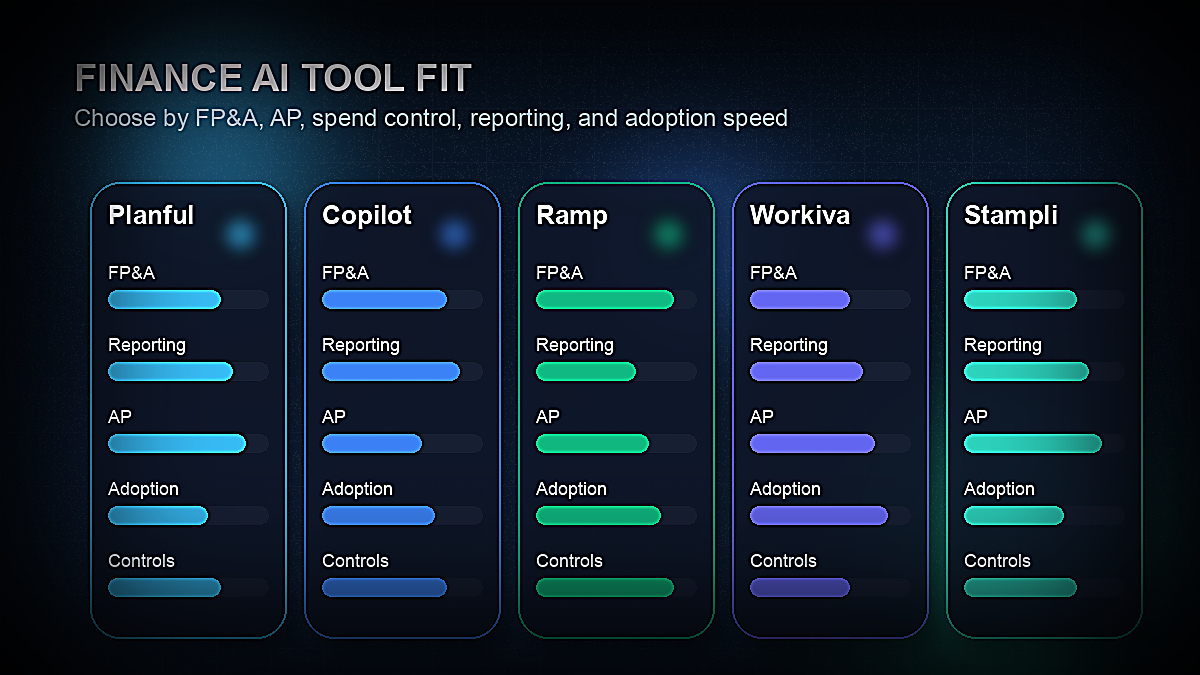
Where is your team losing the most time? Identify the workflows that consume the highest proportion of finance team hours that don't require expert judgment. Common answers: (1) budget collection and consolidation — points to Planful, Vena, or Cube; (2) invoice processing and AP — points to Stampli; (3) expense reports and spend reconciliation — points to Ramp or Brex; (4) financial report formatting and narrative — points to Workiva (for regulatory filings) or Mosaic (for management reporting); (5) Excel analysis and ad-hoc financial modeling — points to Microsoft Copilot for Finance.
What existing systems do you need to integrate with? A brilliant standalone AI tool that doesn't connect to your ERP delivers a fraction of its potential value. Confirm integration compatibility — and integration depth — before shortlisting. If you're a Microsoft Dynamics 365 shop, Copilot for Finance's integration will beat anything else. If you're on NetSuite, confirm that your shortlisted FP&A tool has a native NetSuite connector with bidirectional sync.
What's your team's AI adoption starting point? A finance team that has never used AI tools should not start with an enterprise FP&A platform deployment that takes six months to implement. Start with the tools that deliver value fastest: Ramp or Brex for immediate spend visibility, ChatGPT Enterprise for analyst productivity tasks, or Microsoft Copilot if you're already in Microsoft 365. Build evidence of ROI with lower-friction tools before committing to major platform implementations.
For readers exploring accounting-specific AI tools in more depth, our guide to best AI tools for accountants and CPAs in 2026 covers the accounting software side of the stack — including document extraction, tax research AI, and bookkeeping automation — with the same level of detail. Finance teams with significant HR and headcount planning needs should also review the best AI tools for HR and recruiting, since workforce planning and financial planning are increasingly connected in AI-native FP&A platforms.
Finance AI Implementation: Getting Started Without the Risk
The most common mistake finance teams make with AI adoption is trying to solve everything at once. An enterprise FP&A platform, an AP automation tool, a spend management platform, and a reporting solution implemented simultaneously will overwhelm any finance team regardless of size. The risk isn't just implementation complexity — it's that failed implementations create organizational skepticism about AI that makes future adoption harder.
A more effective sequence for most mid-market finance teams:
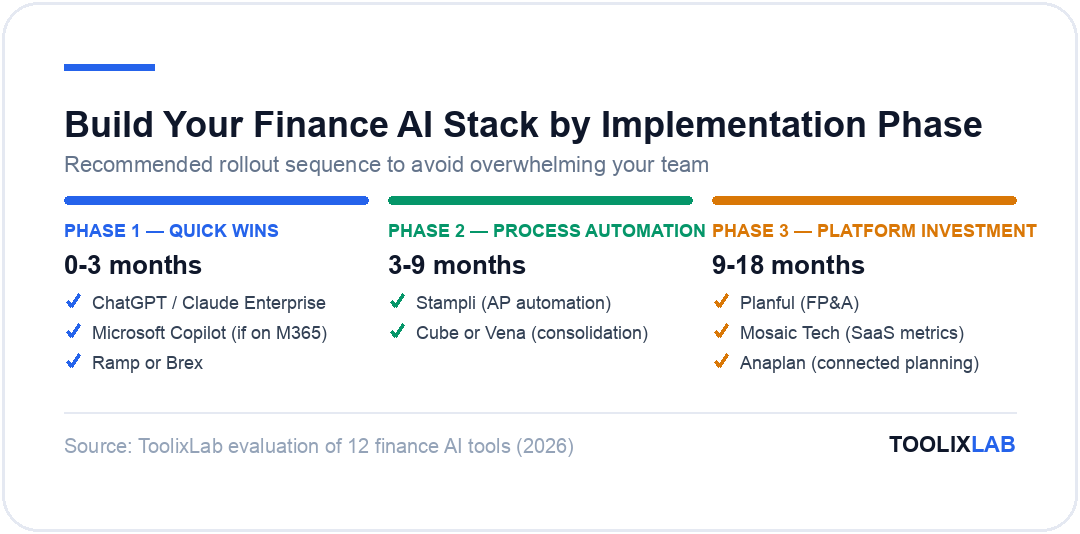
Phase 1 — Quick wins (0–3 months): Deploy tools that deliver immediate individual productivity gains without requiring IT infrastructure changes. ChatGPT Enterprise or Claude for Enterprise for analyst drafting tasks. Microsoft Copilot if the team is on Microsoft 365. Ramp or Brex to replace manual expense reports. These tools can be live within days and typically deliver clear, measurable time savings within the first month.
Phase 2 — Process automation (3–9 months): Target the single highest-volume manual workflow in finance operations. For most mid-market companies, this is either AP (Stampli) or budget consolidation (Cube or Vena). Implement one tool, measure the time savings, and build the internal case for further investment.
Phase 3 — Platform investment (9–18 months): Once Phase 2 has demonstrated ROI and built organizational confidence in AI-assisted finance, evaluate full FP&A platform deployment (Planful, Mosaic, Anaplan) with the institutional knowledge of what your team actually needs and uses.
This phased approach also manages the risk that your team's AI tool needs will clarify significantly once staff start using Phase 1 and 2 tools. Teams consistently discover that their most painful bottleneck is not the one they anticipated before starting.
For finance teams exploring AI in adjacent areas of the business, our guides to best AI tools for small business and building an AI sales funnel workflow cover complementary AI adoption strategies across the organization. For the accounts payable and procurement intersection, AI tools for accountants covers the detailed accounting workflow side that finance teams managing the GL will find directly relevant.
💡 Pro Tip
Before any AI finance tool purchase, run a structured pilot evaluation using your own historical data. Most enterprise finance tools offer 30-day pilots. Test specifically against your top-3 bottleneck workflows — not the demo scenarios the vendor prepares. The questions to answer: Does it integrate cleanly with your actual ERP? Does the AI output quality on your specific data meet your accuracy threshold? Can your team's least technical members use it without constant IT support?
The Future of AI in Finance: What's Coming in 2026 and Beyond
Several trends are shaping where AI in finance is heading over the next 12–24 months, and finance leaders who understand them now can make better platform investment decisions:
AI agents in finance workflows. The next generation of finance AI is moving from AI-assisted tasks (a human reviews AI suggestions) to AI agents that complete multi-step financial workflows autonomously. Early examples include AP agents that handle the full invoice lifecycle from receipt to payment authorization, and FP&A agents that compile variance reports, draft commentary, and send management pack drafts to reviewers — without human initiation of each step. Most major FP&A vendors have announced AI agent roadmaps for 2026–2027.
Continuous accounting replacing periodic close. AI-powered transaction processing and reconciliation are enabling some forward-thinking finance teams to move toward continuous accounting — where the financial books are always substantially current rather than being closed once per month. This represents a fundamental shift in how the finance function operates, from a backward-looking monthly reporting function to a real-time financial intelligence capability.
Generative AI for regulatory compliance. The application of large language models to regulatory filings, tax positions, and compliance documentation is accelerating. Tools like Workiva are already delivering AI narrative assistance for SEC filings; the next evolution is AI that proactively identifies compliance gaps, drafts responses to regulatory inquiries, and keeps disclosure documentation current as regulations change.
Predictive cash flow with higher accuracy. ML models that combine accounts receivable aging, customer payment behavior patterns, sales pipeline data, and macroeconomic indicators are delivering cash flow forecasts significantly more accurate than traditional historical models. For companies managing treasury and working capital actively, this improved forecast accuracy has direct financial value.
Conclusion
The 12 tools covered in this guide represent the most impactful AI capabilities available to finance teams in 2026 — from the FP&A platforms that are remaking how budgets are built and forecasts are generated, to the AP automation tools cutting invoice processing time by 70%, to the spend management platforms giving CFOs real-time visibility into organizational spend that previously arrived weeks after the fact.
The right starting point isn't the most sophisticated tool — it's the tool that addresses your team's highest-value bottleneck with the least adoption friction. For most finance teams, that means starting with Microsoft Copilot (if you're on Microsoft 365), Ramp or Brex (if expense management is the pain point), or Stampli (if AP processing time is the biggest drain). Build from quick wins.
The finance function that deploys AI thoughtfully — with an eye on data security, audit trail requirements, and the judgment work that must remain human — will operate meaningfully more efficiently, and more strategically, than one that waits for the perfect tool or the perfect moment to start.
Related reading: