
⚡ TL;DR — Quick Verdict
Accounting has always been a profession built on precision — but the manual effort required to maintain that precision has historically consumed enormous amounts of billable time. Data entry, document reconciliation, tax research, report formatting, client communication — the average CPA spends well over 40% of their working hours on tasks that don't require expert judgment. They require thoroughness, accuracy, and time.
In 2026, AI tools for accountants are changing this calculus meaningfully. According to the AICPA's Technology and Transformation initiative, firms that have adopted AI tools report cutting routine compliance work time by 30–50%, with the most impactful gains coming from document processing, tax research, and client communication automation.
This guide covers the 10 best AI tools for accountants and CPAs in 2026 — tested across the most time-intensive accounting workflows: bookkeeping, tax research, audit preparation, document processing, client communications, and financial analysis. For each tool you'll find current pricing, honest pros and cons, and a clear verdict on who it's actually built for.
How AI Is Changing Accounting in 2026
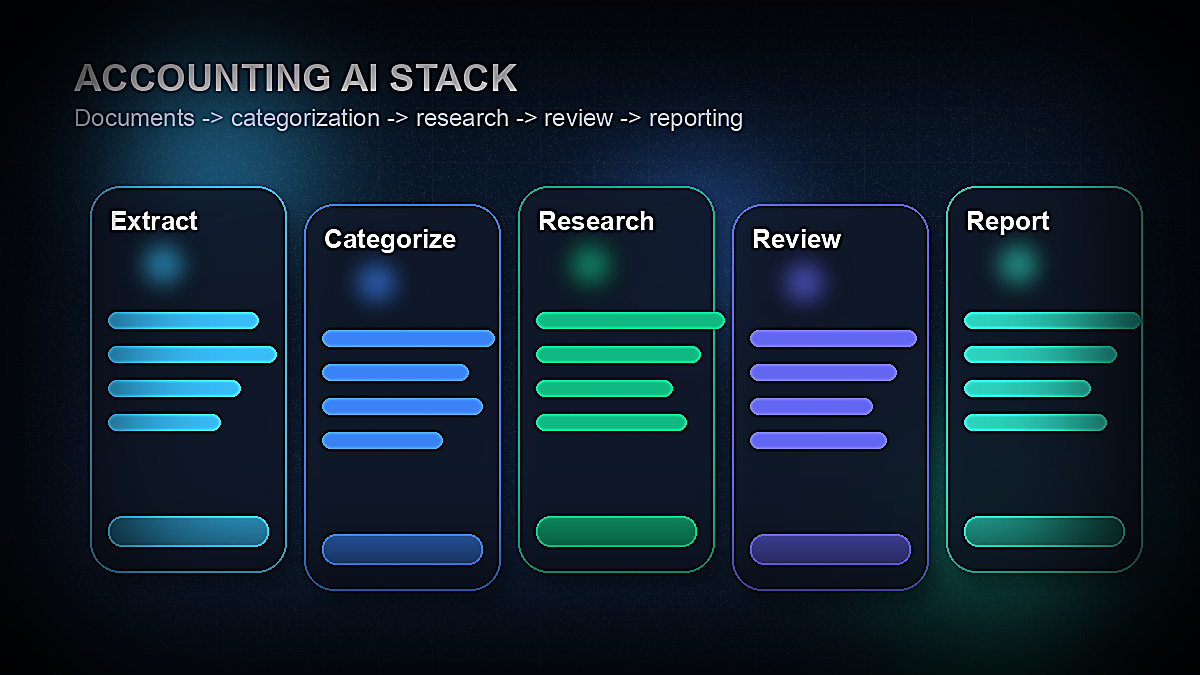
The transformation of accounting by AI isn't arriving as a single disruptive event — it's happening tool by tool, workflow by workflow. The areas where AI is having the clearest impact right now are:
- →Document processing and data extraction — AI can read invoices, receipts, bank statements, and financial documents and extract structured data with accuracy that rivals manual entry, at a fraction of the time
- →Tax research — AI trained on tax law can answer complex tax questions, find relevant code sections and cases, and surface regulatory updates in seconds rather than hours of manual research
- →Transaction categorization — Machine learning models now categorize bank transactions with 95%+ accuracy after a short learning period, dramatically reducing bookkeeping time
- →Anomaly detection — AI can flag unusual transactions, duplicate entries, and potential errors across large datasets far more reliably than sampling-based manual review
- →Client communication — AI drafts engagement letters, follow-up emails, tax planning memos, and explanatory client communications in minutes rather than 30–60 minutes each
- →Financial analysis and reporting — AI can analyze financial statements, compute ratios, identify trends, and generate narrative commentary for management reports automatically
The key insight for CPAs and accounting firms in 2026: AI doesn't replace accountant judgment. It eliminates the administrative burden that prevents accountants from applying their judgment more often. The result is more advisory capacity per accountant, higher client satisfaction, and improved firm profitability.
What to Look for in Accounting AI Tools
Before evaluating specific tools, five criteria matter most for accountants considering AI:
1. Data security and compliance. Accounting involves some of the most sensitive client data in existence — tax returns, payroll, banking information, financial statements. Any AI tool handling this data must provide SOC 2 Type II certification, data encryption at rest and in transit, and clear data retention and deletion policies. Never use a consumer AI tool (like the free version of ChatGPT) to process actual client financial data.
2. Integration with existing accounting software. AI tools that connect natively to QuickBooks, Xero, Sage, or your practice management software deliver far more value than standalone tools that require manual data export/import. Always check the integration list before purchasing.
3. Accuracy and auditability. Unlike marketing copy, accounting outputs have legal and financial consequences. Look for AI tools that provide source citations (for tax research), confidence scores, and clear audit trails showing what the AI did and on what basis.
4. Regulatory coverage. Tax law varies by jurisdiction and changes constantly. Verify that any tax AI tool you use covers your specific jurisdictions (federal, state, international) and is updated promptly when regulations change.
5. Professional liability implications. The work product still carries your professional signature. Understand where the AI's recommendations end and your professional judgment begins — and ensure your engagement letters appropriately address AI-assisted work.
The 10 Best AI Tools for Accountants & CPAs in 2026
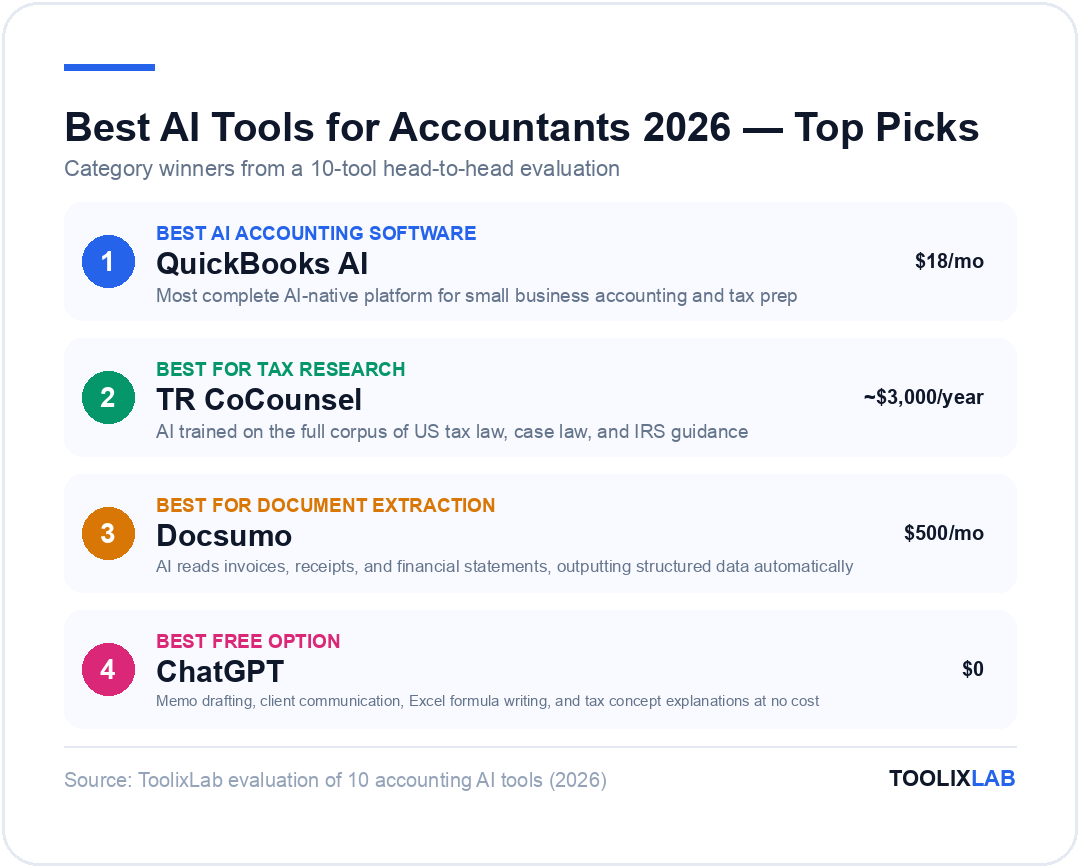
1. Intuit QuickBooks AI — Best All-in-One AI Accounting Platform
QuickBooks has been the dominant small business accounting platform for decades, and its 2025–2026 AI upgrades have transformed it from a bookkeeping tool into a genuinely intelligent financial management system. The AI features embedded throughout QuickBooks now handle transaction categorization, anomaly detection, cash flow forecasting, and report generation — without requiring any separate tool or additional setup.
The most impactful feature for accountants serving small business clients is QuickBooks AI's automated transaction categorization engine. After processing a few months of transactions, the AI learns each business's spending patterns and categorizes new transactions with over 95% accuracy. For bookkeepers maintaining multiple client accounts, this alone eliminates hours of manual categorization work per month.
QuickBooks AI's Ask QuickBooks feature — a natural language interface for querying financial data — is genuinely useful for both accountants and their clients. Questions like "What were our top 5 expense categories last quarter?" or "Which invoices are more than 30 days overdue?" generate instant, accurate responses with drill-down capability, without any manual report building.
| Plan | Price | Key Features |
|---|---|---|
| Simple Start | $18/month | Basic AI categorization, invoicing, 1 user |
| Plus | $45/month | Full AI features, project tracking, up to 5 users |
| Advanced | $100/month | AI insights, custom reporting, batch invoicing, 25 users |
| Accountant | Free for accountants | Multi-client management, ProAdvisor portal, all AI features |
- • AI features built-in — no extra tools or integrations
- • Free ProAdvisor account for accountants managing clients
- • Best-in-class transaction categorization accuracy
- • Natural language financial queries (Ask QuickBooks)
- • Cash flow forecasting and anomaly detection included
- • Best AI features locked to Plus/Advanced plans
- • Not suitable for complex multi-entity consolidations
- • AI categorization still needs periodic human review
- • Pricing increases significantly after promotional period
Best for: Accountants and bookkeepers serving small-to-mid-size business clients, and solo CPAs managing their own firm's finances. The free ProAdvisor account makes it a no-brainer starting point for any CPA practice.
2. Thomson Reuters CoCounsel — Best AI for Tax Research
Thomson Reuters CoCounsel (formerly Checkpoint Edge with AI) is the gold standard for AI-assisted tax research in 2026. Built on top of Thomson Reuters' Checkpoint database — which contains the full text of the Internal Revenue Code, Treasury regulations, IRS guidance, revenue rulings, private letter rulings, court decisions, and practitioner commentary — CoCounsel can answer complex federal and state tax questions with citations to primary sources.
The practical difference CoCounsel makes in tax research is dramatic. A question like "What are the passive activity loss rules for real estate professionals and how does the 750-hour test apply when the taxpayer has multiple rental properties?" — which might require 2–3 hours of manual Checkpoint research — returns a comprehensive, source-cited answer in under 30 seconds. The AI cites specific code sections, regulations, and relevant cases, and provides the level of nuance required for actual tax planning work.
CoCounsel also handles tax document drafting — it can produce draft tax memos, client advisory letters, and research summaries that serve as strong starting points for the polished documents your clients receive. The output quality reflects the quality of the underlying Checkpoint database rather than general internet training data, which is critical for tax accuracy.
| Plan | Price | Key Features |
|---|---|---|
| Checkpoint + CoCounsel | ~$3,000–$6,000/year | Full federal + state tax research, AI Q&A, document drafting |
| Enterprise | Custom pricing | Firm-wide access, international coverage, admin controls |
- • Built on the most comprehensive tax database available
- • Every answer cites primary sources — IRS, courts, regulations
- • Dramatically reduces time on complex tax research questions
- • Trusted by the majority of large CPA firms
- • Regular updates when tax law changes
- • High cost — solo practitioners may find it hard to justify
- • Steep annual contract commitment
- • International coverage varies — strongest on US federal tax
- • Output still requires professional review before use
Best for: Tax CPAs and firms handling complex compliance and advisory work who need a research tool that cites primary sources and stays current with regulatory changes. The cost is justified if it saves even 5–10 hours of research time per month.
3. Docsumo — Best AI Tool for Document Processing & Data Extraction
Document processing is one of the most time-intensive workflows in accounting — entering data from invoices, receipts, bank statements, purchase orders, and financial documents into accounting systems manually. Docsumo is an AI-powered document intelligence platform that automates this extraction using computer vision and machine learning trained specifically on financial documents.
Docsumo reads incoming documents — regardless of format (PDF, image, scan, email attachment) — and extracts structured data: vendor name, date, invoice number, line items, totals, tax amounts, payment terms. The extracted data is validated against business rules you configure, flagged for exceptions, and exported directly to QuickBooks, Xero, or your ERP via API integration. For firms processing high volumes of vendor invoices or client expense receipts, the time savings are substantial.
The accuracy rate for trained document types runs 95–99% depending on document quality and consistency. Human review is still required for exceptions, but the volume of documents requiring manual attention drops from 100% to 2–5% after initial training.
| Plan | Price | Key Features |
|---|---|---|
| Starter | $500/month | Up to 1,000 pages/month, standard document types |
| Business | Custom | Custom document types, API access, ERP integrations |
- • Handles PDFs, scans, images — any document format
- • 95–99% extraction accuracy on trained document types
- • Direct integrations with QuickBooks, Xero, SAP, Oracle
- • Dramatically reduces manual data entry volume
- • Exception-based review — only flagged docs need human time
- • High starting price — best suited for mid-volume operations
- • Requires initial training period for custom document types
- • Quality degrades on poor-quality scans or handwritten docs
- • Implementation requires technical setup for API integrations
Best for: Accounting firms and finance departments processing 500+ financial documents per month (invoices, receipts, bank statements). The price is justified when it replaces 1–2 full-time data entry roles or frees up equivalent staff time.
4. Xero AI — Best AI Accounting Platform for Growing Businesses
Xero has positioned itself as QuickBooks' primary challenger by building AI deeply into its platform, with particular strength in bank reconciliation, expense management, and cash flow intelligence. For accounting firms serving growth-stage businesses and SMEs, Xero's AI features offer a compelling alternative that many clients — particularly in the UK, Australia, and New Zealand — find more intuitive.
Xero's AI-powered bank reconciliation is its standout feature: the system learns from your past reconciliation decisions and suggests matches with increasing accuracy over time, turning a task that might take 2–3 hours per month into a 20-minute review and approval session. The AI also auto-generates purchase order matches, detects duplicate transactions, and flags irregular patterns for review.
For accountants using Xero's Practice Manager, the AI integration allows automated client data requests, deadline tracking, and workflow management that reduces administrative overhead across multi-client practices significantly.
| Plan | Price | Key Features |
|---|---|---|
| Starter | $15/month | 5 invoices, 20 bills, bank reconciliation AI |
| Standard | $42/month | Unlimited invoices/bills, full AI features, payroll (1 employee) |
| Premium | $78/month | Multi-currency, full payroll, analytics plus |
Best for: Accounting practices serving international clients, UK/AU/NZ-based firms, and businesses that find QuickBooks overly complex for their needs. Xero's AI reconciliation is genuinely best-in-class for the mid-market segment.
5. Vic.ai — Best AI Tool for Accounts Payable Automation
Vic.ai is an AI-native accounts payable platform that uses deep learning — not just OCR or rule-based extraction — to process vendor invoices end-to-end. Unlike traditional AP automation tools that require extensive template configuration, Vic.ai's AI learns from your approval patterns and coding decisions and applies them autonomously to new invoices without requiring rules to be pre-programmed.
For accounting firms managing accounts payable for clients, or for controllers at mid-size companies handling hundreds of vendor invoices monthly, Vic.ai's ability to autonomously code, route for approval, and post invoices to the GL is a significant time recapture. The platform integrates with Microsoft Dynamics, SAP, Oracle, and other ERP systems natively.
The AI achieves autonomous processing (no human touch required) on approximately 80% of invoices after the learning period. The remaining 20% — unusual vendors, split coding decisions, flagged amounts — are routed for human review with AI-suggested coding already populated, reducing review time significantly even for exceptions.
| Plan | Price | Key Features |
|---|---|---|
| Enterprise | Custom (typically $1,500–$5,000+/month) | AI invoice processing, ERP integration, audit trail, approval workflows |
Best for: Mid-to-large companies and accounting firms processing 500+ vendor invoices per month who want AP automation that actually learns and improves rather than requiring constant template maintenance. ROI is typically achieved within 6–12 months through labor cost reduction.
6. Caseware — Best AI Tool for Audit & Assurance Work
Caseware is the leading practice management and audit software platform for mid-size accounting firms, and its AI capabilities added in 2025–2026 have made it a significantly more powerful tool for audit efficiency. Caseware's IDEA AI module automates the most labor-intensive parts of audit fieldwork: data import and normalization, analytics and testing of full populations (not just samples), anomaly detection, and working paper generation.
The shift from sample-based testing to full-population testing is perhaps the most significant efficiency gain Caseware AI enables. Instead of sampling 25% of transactions and extrapolating, auditors can now have the AI test 100% of transactions for specific audit assertions — stratification, duplicates, round numbers, timing, related-party indicators — in the time it previously took to pull and test a sample. This improves audit quality while reducing the time spent on testing procedures.
| Plan | Price | Key Features |
|---|---|---|
| Caseware Cloud + IDEA AI | Custom (per-firm pricing) | Full-population audit analytics, working paper AI, anomaly detection |
Best for: CPA firms conducting financial statement audits, reviews, and compilations. The AI analytics capabilities justify the investment for any firm doing more than 5–10 audits per year.
7. ChatGPT / Claude — Best General-Purpose AI for Accountants
While specialized accounting AI tools dominate specific workflows, general-purpose AI models like ChatGPT and Claude deliver exceptional value for the non-specialized tasks that consume accountant time: drafting client communications, explaining complex tax concepts in plain English, writing Excel formulas, creating templates, summarizing research documents, and preparing internal memos.
For accountants, the highest-value ChatGPT and Claude use cases include: drafting engagement letters and management representation letters from templates, writing client-friendly explanations of tax adjustments, generating Excel or Google Sheets formulas for financial models, summarizing long regulatory guidance documents, preparing talking points for client meetings, and creating educational content about tax law changes for client newsletters.
Important security note: Never input actual client financial data, tax identification numbers, account numbers, or personally identifiable information into the free or consumer versions of ChatGPT or Claude. For tasks involving real client data, use only enterprise-tier plans with data processing agreements in place, or use AI tools with built-in data security like those covered elsewhere in this guide.
| Tool | Price | Best Accounting Use Cases |
|---|---|---|
| ChatGPT Free | $0 | Client email drafts, Excel formulas, tax concept explanations |
| ChatGPT Plus | $20/month | All above + data analysis (CSV upload), web search for current regulations |
| Claude Pro | $20/month | Long document analysis, memo drafting, complex reasoning on tax scenarios |
| ChatGPT Enterprise | ~$60/user/month | Safe for client data — data not used for training, SOC 2 compliant |
Best for: Every accountant, at every stage. Start with the free tier for non-sensitive drafting tasks. Upgrade to Plus or Enterprise as usage scales. For detailed guidance on using ChatGPT in professional workflows, see our guide on how to use ChatGPT effectively.
8. Dext (formerly Receipt Bank) — Best AI Tool for Receipt & Expense Capture
Dext is the leading AI tool for receipt, invoice, and expense document capture and processing. Clients photograph paper receipts with the Dext mobile app; Dext's AI extracts the relevant data (merchant, date, amount, category, tax amount) and pushes it directly to QuickBooks or Xero — eliminating the receipt collection and manual entry workflow that bookkeepers have managed for decades.
For accounting firms, Dext's value is in shifting document collection burden to clients in a frictionless way. Instead of clients mailing or emailing packets of receipts at month-end, they capture them in real time. Accountants receive clean, structured, already-categorized expense data rather than a pile of paper. The AI categorization accuracy runs consistently above 90% for trained document types, with easy correction workflows for the exceptions.
| Plan | Price | Key Features |
|---|---|---|
| Sole Trader | $12/month | 200 items/month, receipt capture, QuickBooks/Xero sync |
| Business | $45/month | Unlimited items, multiple users, bank statement processing |
| Partner (for firms) | $50+/month per client | Multi-client dashboard, practice management integration |
- • Eliminates the receipt pile problem entirely
- • Mobile app makes real-time capture easy for clients
- • Direct sync to QuickBooks and Xero
- • Also processes bank statements and supplier invoices
- • Practice dashboard for managing multiple clients
- • Value depends on clients actually using the app consistently
- • Per-client pricing adds up quickly for large practices
- • Limited functionality beyond document capture and categorization
- • Some clients resist adopting new apps
Best for: Bookkeepers and accounting firms whose clients generate high volumes of receipts and expenses (retail, hospitality, contractors, sales teams). The ROI is immediate once clients are onboarded and capturing receipts in real time.
9. Botkeeper — Best AI Tool for Automated Bookkeeping
Botkeeper is an AI-powered bookkeeping platform designed specifically for accounting firms that want to offer scalable bookkeeping services to clients without proportionally scaling headcount. The platform combines AI automation with a human-in-the-loop quality layer: the AI handles transaction categorization, reconciliation, and data entry; human bookkeepers review and handle exceptions; the result is delivered to the accounting firm as clean, reviewed books.
For CPA firms looking to build or expand a bookkeeping service line without hiring large teams, Botkeeper offers a compelling model. The AI layer handles the volume work, the platform's human team handles exceptions, and the CPA firm maintains the client relationship and provides advisory services on top of clean financials.
| Plan | Price | Key Features |
|---|---|---|
| Partner Platform | ~$69–$299/month per client | AI + human bookkeeping, QBO/Xero sync, monthly close support |
Best for: CPA firms wanting to scale bookkeeping services or transition existing bookkeeping clients to a more automated, lower-cost delivery model while maintaining quality and the client relationship. Also useful for firms wanting to free up staff time for higher-value advisory work.
10. Zapier — Best AI Workflow Automation Tool for Accounting Practices
As with real estate, Zapier delivers disproportionate value to accounting practices by automating the manual handoffs between the many tools in a typical accounting tech stack — client portals, document management systems, practice management software, accounting platforms, email, and CRMs. Without automation, information moving between these systems requires manual export, reformatting, and import. With Zapier, these handoffs are instant and error-free.
High-value accounting automations in Zapier include: new client onboarding — when a new engagement is signed in your CRM, automatically create the client in QuickBooks, create a folder in your document management system, and send a welcome email sequence. Deadline reminders — when a tax filing deadline approaches in your practice management system, automatically send a reminder email to the client and create a task for the responsible staff member. Document received — when a client uploads a document to your portal, automatically notify the assigned accountant and log the receipt.
Building these automations requires no coding, and the time investment in setup (typically 1–2 hours per workflow) pays back within the first week of operation. For AI workflow principles applicable to accounting practices, see our guide to workflow automation tools for small business.
| Plan | Price | Key Features |
|---|---|---|
| Free | $0 | 100 tasks/month, 5 Zaps, single-step automations |
| Professional | $19.99/month | 750 tasks/month, multi-step Zaps, AI actions, filters |
| Team | $69/month | 2,000 tasks/month, shared workspace, premium apps |
Best for: Any accounting practice using 3 or more software tools that currently requires manual data transfer between them. Start free, identify your most time-consuming manual handoff, automate it, and expand from there.
Complete Comparison: All 10 AI Tools for Accountants
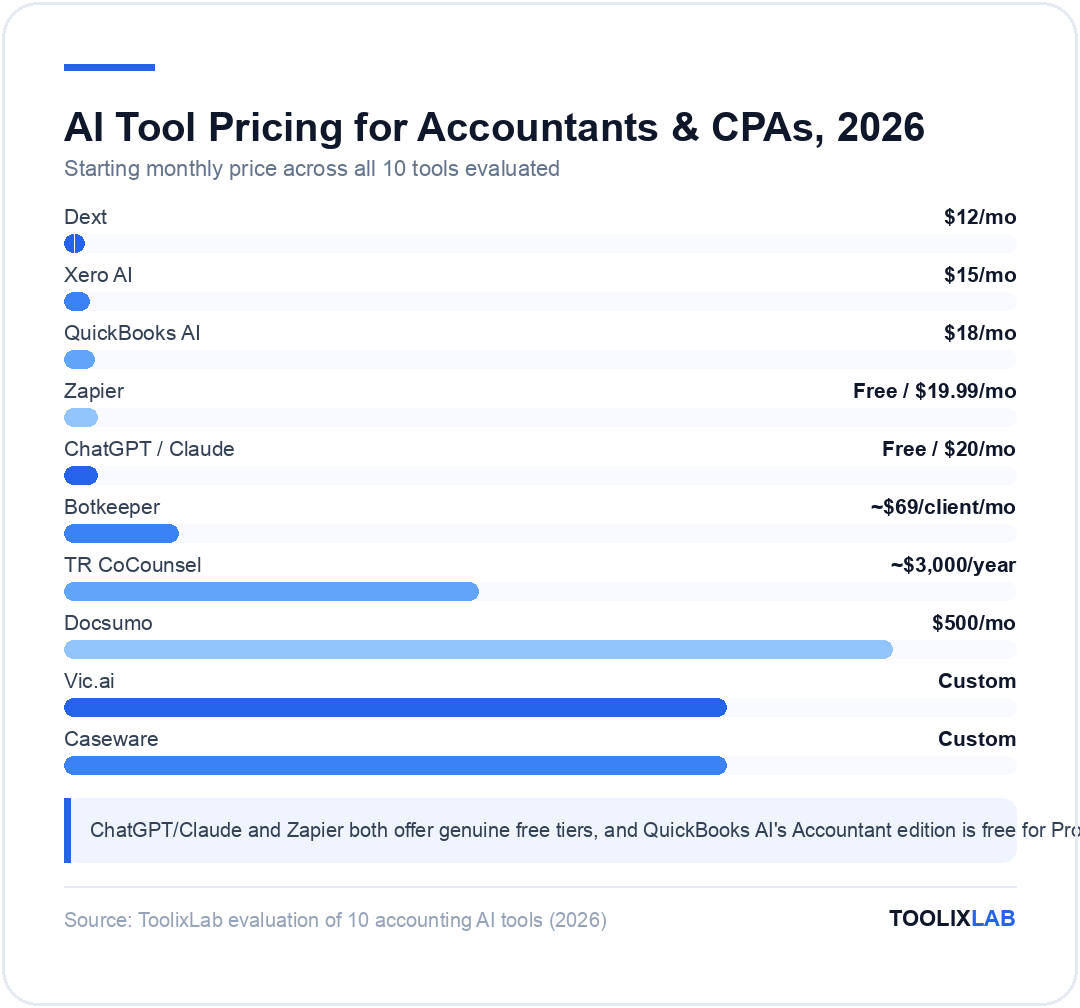
| Tool | Primary Use Case | Starting Price | Free Plan | Best For |
|---|---|---|---|---|
| QuickBooks AI | All-in-one accounting | $18/month | ✅ (Accountant) | SMB accountants & bookkeepers |
| TR CoCounsel | Tax research | ~$3,000/year | ❌ | Tax CPAs & firms |
| Docsumo | Document extraction | $500/month | ❌ | High-volume doc processing |
| Xero AI | AI accounting platform | $15/month | ❌ | UK/AU/NZ firms, growing SMEs |
| Vic.ai | AP automation | Custom | ❌ | Mid-market AP teams |
| Caseware | Audit & assurance | Custom | ❌ | Audit-focused CPA firms |
| ChatGPT/Claude | General AI writing | Free / $20/month | ✅ | All accountants |
| Dext | Receipt capture | $12/month | ❌ | Bookkeepers & SMB clients |
| Botkeeper | AI bookkeeping service | ~$69/client/month | ❌ | CPA firms scaling bookkeeping |
| Zapier | Workflow automation | Free / $19.99/month | ✅ | Multi-tool practices |
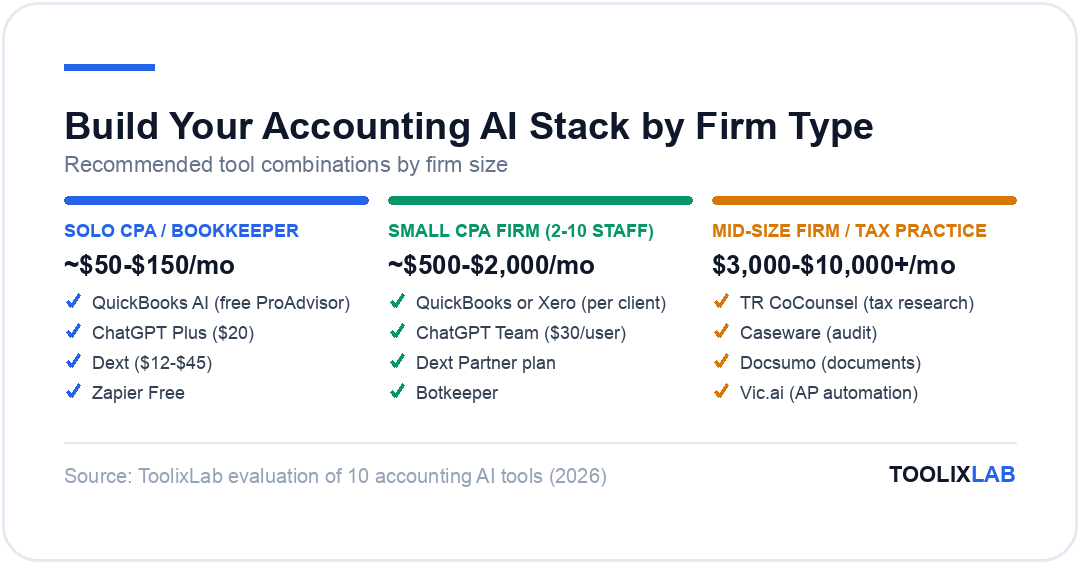
Building Your Accounting AI Stack: Recommendations by Firm Type
- ✓ QuickBooks AI (free ProAdvisor)
- ✓ ChatGPT Plus ($20)
- ✓ Dext ($12–$45)
- ✓ Zapier Free
- ✓ QuickBooks or Xero (per client)
- ✓ ChatGPT Team ($30/user)
- ✓ Dext Partner plan
- ✓ Zapier Team ($69)
- ✓ Botkeeper (for bookkeeping scale)
- ✓ TR CoCounsel (tax research)
- ✓ Caseware (audit)
- ✓ Docsumo (document processing)
- ✓ Vic.ai (AP automation)
- ✓ ChatGPT Enterprise
AI and Professional Liability: What CPAs Need to Know
The adoption of AI tools in accounting practice raises important professional liability questions that every CPA should understand before deploying AI on client work.
Responsibility remains with the licensed professional. AI tools produce outputs, not opinions. The CPA who signs the return, issues the audit opinion, or provides the advisory recommendation is responsible for the accuracy and appropriateness of that work — regardless of whether AI was used to assist in its preparation. AI-generated tax research, financial analysis, or client advice must be reviewed and verified by the responsible professional before delivery.
Engagement letter disclosure. Many state CPA societies and the AICPA are developing guidance on AI disclosure in engagement letters. Check current guidance from your state board and consider proactively disclosing the use of AI tools in your engagement documentation, particularly for tax compliance and advisory engagements.
Data security obligations. CPAs are subject to IRC Section 7216 restrictions on disclosure of client tax information and broader state privacy laws. Using consumer AI tools that may use inputs for model training is potentially a violation of these obligations when actual client data is involved. Use only enterprise-tier AI tools with appropriate data processing agreements for any client-specific data processing.
The AICPA's resources on technology and practice management include updated guidance on AI adoption — reviewing these before rolling out AI tools firm-wide is strongly recommended.
For a broader view of how AI is transforming professional service workflows across industries, see our overview of the best AI tools for marketing teams — many of the workflow automation principles apply directly to accounting practice operations.
Which AI Tool Should Accountants Start With?
Our Recommendation by Use Case
The accountants and CPAs who build AI fluency now — understanding which tools apply to which workflows, how to prompt AI effectively, and where human judgment is non-negotiable — will have a significant competitive advantage as AI capabilities in accounting continue to accelerate through 2026 and beyond.
For a broader look at how AI is transforming professional workflows across business functions, our roundup of best AI tools for small business covers cross-functional tools useful to accounting practice owners and finance leaders.
🔑 Key Takeaways
- ✓The highest AI ROI in accounting comes from document processing, tax research, and bookkeeping automation — these are repetitive, high-volume tasks ideal for AI
- ✓Never input actual client financial data into consumer AI tools — use enterprise-tier tools with proper data processing agreements for any client-specific work
- ✓AI outputs in accounting require professional review — the licensed CPA remains responsible for all work product regardless of how it was prepared
- ✓Start with ChatGPT free + QuickBooks ProAdvisor free — meaningful productivity gains at zero cost
- ✓The firms building AI-assisted workflows now are capturing capacity for higher-value advisory services that AI cannot provide
Related Guides
- Best AI Tools for Finance Teams in 2026 — the in-house finance counterpart to this guide: FP&A, close automation, and reporting.
- AI Prompt Engineering Guide — get more reliable output from ChatGPT and Claude for tax research and client communication.
- Best Free AI Tools in 2026 — zero-cost tools worth adding alongside your firm's paid stack.