
🗂️ TL;DR — Best AI Tools for Project Management 2026
The average knowledge worker spends 58% of their time on coordination work — status updates, scheduling, chasing approvals, and figuring out what to do next. In 2026, AI project management tools are finally starting to eat into that number in ways that weren't possible two years ago.
This isn't about tools that slap a chatbot onto an existing task list. The best AI project management platforms in 2026 can generate project plans from a one-line brief, automatically reschedule tasks when timelines slip, surface blockers before they become crises, and write the status update that nobody had time to write. That's a qualitatively different class of tool from the project management software you might have used in 2022.
This guide covers the 12 best AI project management tools for 2026, with honest assessments of which teams each tool actually fits. We've tested these platforms across real project workflows — not just the demo features.
Why AI Project Management Tools Are Different in 2026
Project management software has been around for decades, but the AI capabilities that shipped in 2025–2026 represent a genuine step change. Here's what's actually new:
Natural language task creation. You can now describe a project outcome in plain English and have the tool generate a full task breakdown with assignees, dependencies, and due dates. ClickUp AI, Asana AI, and Monday.com AI all do this reasonably well. Two years ago, none of them could.
Automatic status reports. Instead of chasing team members for weekly updates, AI tools can synthesize task completion data, flag overdue items, and generate a draft status report in the format your stakeholders expect. This alone saves project managers 2–4 hours per week in most organizations.
Smart scheduling and rescheduling. When a task slips, AI tools like Motion can automatically rebalance the rest of the schedule based on priority, deadlines, and calendar availability. This is the hardest problem in project management — and it's now partially automated.
AI-assisted retrospectives and risk identification. Tools can now analyze past project patterns to flag tasks that historically run late, team members who are over-allocated, and projects that are trending toward missed deadlines before the deadline arrives.
The result: teams that fully adopt AI project management tools consistently report 20–35% reductions in time spent on coordination overhead, based on published case studies from vendors. Independent productivity research puts the number closer to 15–25% for teams with good existing PM practices — still meaningful.
The 12 Best AI Project Management Tools for 2026
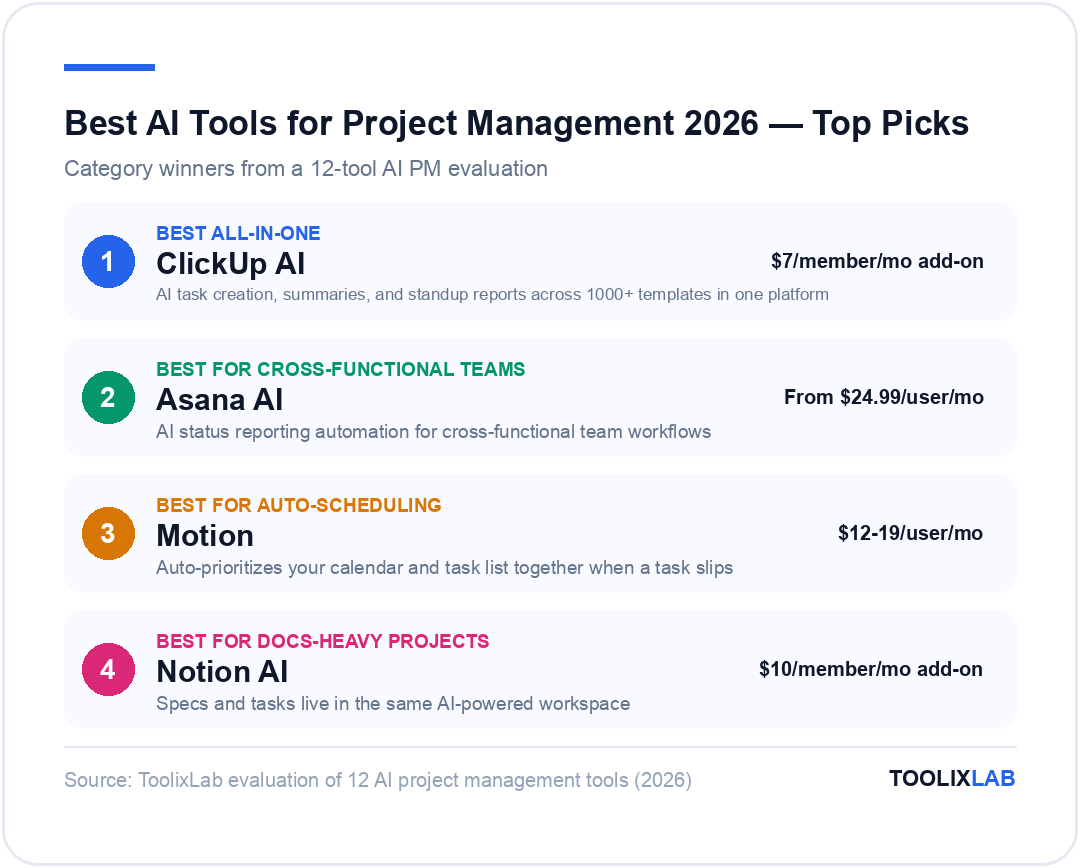
Before the deep dives, here's the ranked overview:
| Tool | Best For | AI Tier Price | Rating |
|---|---|---|---|
| ClickUp AI | All-in-one teams | $7/member/month add-on | ⭐ 4.7/5 |
| Asana AI | Cross-functional workflows | Included from Advanced ($24.99/user/month) | ⭐ 4.6/5 |
| Monday.com AI | Visual project tracking | Included from Pro ($19/seat/month) | ⭐ 4.5/5 |
| Notion AI | Docs + tasks in one workspace | $10/member/month add-on | ⭐ 4.5/5 |
| Motion | AI auto-scheduling | $19/month individual, $12/user/month teams | ⭐ 4.4/5 |
| Linear | Engineering teams | Free tier available; Business $16/user/month | ⭐ 4.6/5 |
| Wrike AI | Marketing & creative teams | From $9.80/user/month (AI in Business+) | ⭐ 4.3/5 |
| Smartsheet AI | Spreadsheet-heavy enterprises | From $9/user/month (AI in Business+) | ⭐ 4.2/5 |
| Taskade AI | Small teams & startups | Free tier; Pro $8/month | ⭐ 4.2/5 |
| Microsoft Project + Copilot | Enterprise Microsoft shops | $10/user/month + M365 Copilot $30/user/month | ⭐ 4.1/5 |
| Basecamp + AI | Remote-first teams | $15/user/month (flat rate) | ⭐ 3.9/5 |
| Todoist AI | Individual task management | Free tier; Pro $4/month | ⭐ 4.0/5 |
1. ClickUp AI — Best All-in-One AI Project Management Tool
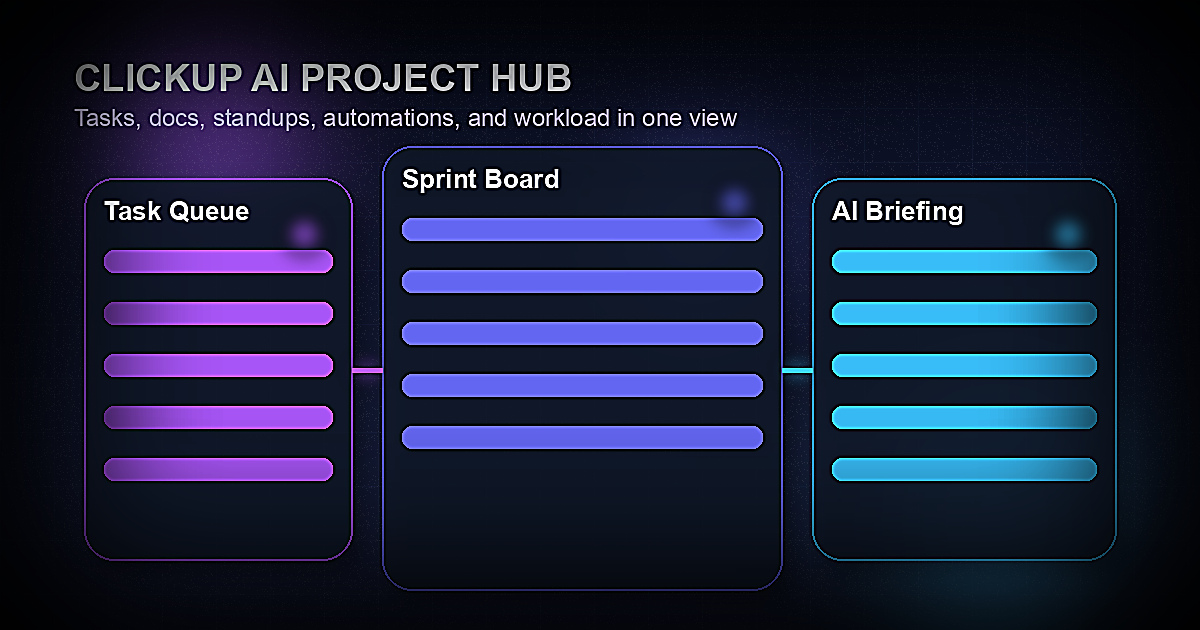
ClickUp has positioned itself as the most feature-complete AI project management platform in 2026, and for most teams, that claim holds up. The platform combines tasks, docs, goals, whiteboards, time tracking, and chat in a single workspace — and the AI layer sits across all of it.
What ClickUp AI does well:
The AI task creation is the standout feature. You can type "Launch Q3 marketing campaign for our SaaS product targeting mid-market finance teams" and ClickUp AI will generate a project with tasks, subtasks, dependencies, and suggested assignees in roughly 20 seconds. The output quality is good enough to use as a working starting point rather than a demo — which is the real test.
The AI writing tools for project documentation are genuinely useful: briefings, project summaries, meeting notes, and status reports can all be generated from task data. ClickUp's "Catch Me Up" feature — which reads through a task thread and summarizes what's happened since you last looked — saves real time in large team environments where context-switching is expensive.
The standup report generator pulls from each team member's task completions and creates a formatted standup summary, which managers can review rather than run a synchronous meeting. Teams that switch from daily standups to AI-generated async updates typically report getting 30–45 minutes per day back per person.
What to watch out for: ClickUp's feature depth is both its strength and its weakness. New users face a steep learning curve, and many teams only use 20–30% of the available capabilities. The AI features cost an additional $7/member/month on top of base plan pricing, which adds up for larger teams. The interface has improved significantly in 2025 but can still feel overwhelming at first.
Pricing: Free tier available. Unlimited plan $7/member/month. Business plan $12/member/month. ClickUp AI is an add-on at $7/member/month across all paid plans.
Best for: Operations teams, marketing teams, agencies, and any team that wants a single workspace for all work — not just task tracking.
ClickUp AI Verdict: 4.7/5
The most capable all-in-one AI project management platform. Worth the AI add-on cost if your team will actually use the writing and reporting features. Don't adopt it expecting a simple task list — it's a full work OS.
2. Asana AI (Asana Intelligence) — Best for Cross-Functional Team Workflows
Asana has been the enterprise-grade choice for cross-functional workflow management for years, and the Asana Intelligence features added in 2025–2026 extend that lead for large team environments. If you're managing complex programs with multiple workstreams, dependencies across departments, and stakeholders who need regular status visibility, Asana AI is the strongest option.
What Asana Intelligence does well:
Asana's AI Smart Goals feature helps teams set better objectives by suggesting measurable key results based on the goal description and connecting them to existing tasks and projects. This sounds like a minor feature, but in practice it closes the gap between strategy and execution that causes most program management failures.
The Smart Summaries feature is the most polished AI status reporting in the category. It can generate project health summaries, highlight overdue tasks, flag dependency risks, and produce stakeholder-ready updates that don't need significant editing. Teams doing bi-weekly business reviews report cutting report preparation time from 2–3 hours to 20–30 minutes.
Asana AI's workflow suggestions are impressive: based on your current project structure and past workflows, it proactively suggests automation rules ("when a task in QA Review is marked complete, move the parent to Ready for Launch and notify the deployment team"). This kind of pattern recognition across your workspace activity is genuinely useful.
What to watch out for: Asana AI is locked behind the Advanced plan at $24.99/user/month (billed annually), which is expensive for smaller teams. The feature set is optimized for structured programs — agile teams doing sprints or creative teams with fluid workflows will find ClickUp or Linear more natural. Asana's task management model is also strictly hierarchical (goals → portfolios → projects → tasks → subtasks), which some teams find constraining.
Pricing: Starter $10.99/user/month. Advanced $24.99/user/month (AI included). Enterprise pricing on request.
Best for: Enterprises, operations teams, program managers, and any organization running cross-departmental initiatives where stakeholder visibility is a primary concern.
3. Monday.com AI — Best for Visual Project Tracking
Monday.com's strength has always been its visual flexibility — the ability to see work as a board, timeline, Gantt, calendar, or chart without changing the underlying data. The monday AI features added in 2025 extend this visual-first philosophy with AI that generates and populates boards rather than just managing existing ones.
What monday AI does well:
The AI board generator is the most accessible entry point to AI project management on this list. Describe your project in a sentence ("product launch for a B2B SaaS feature going live in 8 weeks") and monday AI generates a complete board with phases, tasks, status columns, and due date ranges. Non-technical users who've never used a PM tool before can get a working project board in under 2 minutes.
The monday AI writing assistant can summarize board activity, draft update posts for stakeholders, and generate task descriptions from brief notes. The integration with monday's automation recipes means you can chain AI actions into workflows: "when a task is flagged as blocked, use AI to generate a summary of the blocker and notify the project lead via Slack."
Monday's analytics layer, combined with AI-generated insights, makes it particularly strong for tracking project metrics over time. The AI can identify trends ("your sprints have been running 15–20% over estimate for the past 4 cycles") and surface patterns that would take a program manager hours to spot manually.
What to watch out for: Monday.com can get expensive as you scale — seat costs add up quickly for larger teams. The AI features, while strong in breadth, are shallower than ClickUp or Asana in some areas. Monday is better at generating and visualizing project structures than at the nuanced AI writing and summarization work where ClickUp leads.
Pricing: Basic $9/seat/month. Standard $12/seat/month. Pro $19/seat/month (AI included). Enterprise on request.
Best for: Sales ops, marketing campaigns, client-facing agencies, and teams where visual project tracking and stakeholder reporting are the core use case.
4. Notion AI — Best for Documentation-Heavy Projects
If your team's work lives in documents — product specs, research, meeting notes, decision logs — and you need tasks and projects connected to that documentation context, Notion AI remains the strongest choice in 2026. No other tool handles the docs-and-tasks integration as well.
What Notion AI does well:
Notion AI's core strength is context-aware writing across your entire workspace. When you're drafting a project brief, it can pull in relevant information from existing database pages, meeting notes, and previous specs without you having to manually search and cross-reference. For product teams, research teams, and agencies where the documentation context is as important as the tasks themselves, this is a significant advantage.
The Notion AI Q&A feature — which can answer questions about the content in your workspace ("what did we decide about the pricing model in Q1 planning?") — has improved dramatically. Response accuracy on well-structured workspaces is now reliable enough to use as a first-pass research tool before digging into documents yourself.
Notion Projects (Notion's task management layer) has matured considerably, and with AI task generation connected to your documentation workspace, it now handles moderate project complexity well. You can convert a product spec into a set of tasks, generate sub-task breakdowns from feature descriptions, and create project timelines from milestone lists.
What to watch out for: Notion is still not the right choice if task management depth is your primary need. For complex programs with resource management, portfolio views, and detailed progress reporting, ClickUp or Asana will serve you better. Notion AI is also an add-on at $10/member/month, which brings the cost for a team of 10 to $200+/month before base plan pricing.
Pricing: Free tier available. Plus plan $10/member/month. Business plan $15/member/month. Notion AI add-on $10/member/month across all plans.
Best for: Product teams, research teams, agencies, and startups where documentation and project management need to live in a unified workspace.
5. Motion — Best AI-Powered Auto-Scheduling
Motion is the most purpose-built AI scheduling tool on this list, and if your primary project management problem is "there's too much to do and not enough time to figure out what to do next," it's worth serious consideration.
What Motion does well:
Motion's core innovation is treating your tasks and calendar as a single scheduling problem rather than two separate systems. When you add a task with a deadline and estimated duration, Motion automatically blocks time on your calendar to complete it, prioritizing based on deadlines, importance, and your actual calendar availability. When meetings are added or tasks run long, it rebalances the entire schedule automatically.
For individuals and small teams managing heavy workloads, this auto-scheduling eliminates the daily "what should I work on now?" decision fatigue that consumes significant mental energy. Users who switch to Motion consistently report better focus and fewer missed deadlines — not because the tool is magic, but because it handles the cognitive overhead of scheduling so they don't have to.
The project planning view shows how long a project will actually take given current workload and constraints — something most project managers do manually in their heads and get wrong. Motion's "realistic timeline" feature surfaces over-commitment problems before they become crises.
What to watch out for: Motion is fundamentally a scheduling and task management tool, not a full project management platform. It lacks the collaboration features, stakeholder reporting, and program-level views that ClickUp or Asana provide. It's best used as a personal productivity layer alongside a team PM tool, or as the primary tool for very small teams (2–5 people) with relatively contained project scopes.
Pricing: Individual $19/month or $12/month annually. Team $12/user/month. 7-day free trial.
Best for: Individuals and small teams where scheduling overload is the core problem. Particularly effective for consultants, freelancers, and managers with heavy meeting loads who struggle to protect deep work time.
6. Linear — Best AI Project Management for Engineering Teams
Linear has become the default choice for software engineering teams in 2026, and its AI features are built entirely around the engineering workflow rather than bolted on from a generic PM platform. If you're running sprints, managing backlogs, and tracking engineering work, Linear is in a different class.
What Linear does well:
Linear's AI issue triage is the standout engineering-specific feature. When new issues arrive (from bug reports, user feedback, or team submissions), AI automatically suggests the right team, label, priority, and cycle assignment based on patterns in your existing issue history. For teams handling high-volume issue flows, this eliminates significant triage overhead.
The AI-powered issue descriptions help engineers write better bug reports and feature tickets. The system can detect duplicate issues, suggest related issues that provide context, and flag when a reported bug matches a known issue in the backlog. This kind of intelligent deduplication saves real time during sprint planning.
Linear's velocity tracking and cycle analytics use AI to identify patterns: team members who are consistently over-allocated, issue types that routinely take longer than estimated, and sprints that are likely to overrun based on current completion rates. The data quality is excellent because Linear's design philosophy enforces discipline in how work is tracked.
What to watch out for: Linear is purpose-built for software teams. Non-technical teams will find the conceptual model (issues, cycles, roadmaps, workspaces) unfamiliar and the feature set not optimized for their workflows. Linear also has less document and knowledge management capability than Notion or ClickUp, so product teams that need deep documentation context may want to pair it with another tool.
Pricing: Free tier (up to 250 issues). Starter $8/user/month. Business $16/user/month. Enterprise on request.
Best for: Software engineering teams, product engineering organizations, and any technical team that needs a disciplined, high-signal project management tool optimized for code-adjacent workflows.
7. Wrike AI — Best for Marketing and Creative Teams
Wrike occupies a strong middle ground for teams that need more structure than Monday.com but a more flexible workflow model than Asana's strict hierarchy. Its AI features are particularly well-developed for marketing and creative production workflows.
What Wrike AI does well:
Wrike's AI content generation features are tightly integrated with its creative workflow management. You can generate creative briefs, campaign plans, and content calendars from project parameters. For marketing teams managing multiple campaigns simultaneously, the AI brief generation reduces the time from "new campaign request" to "brief in the team's hands" from days to minutes.
The AI risk prediction feature analyzes project data and flags projects that are trending toward problems — late task completion rates, scope creep patterns, and resource over-allocation signals. This is particularly valuable for agency environments managing multiple client projects simultaneously.
Wrike's integration ecosystem is one of the strongest in the category, with native AI-powered connectors to Adobe Creative Cloud, Salesforce, HubSpot, and major DAM (digital asset management) platforms. For marketing operations teams that need their PM tool to work across the full creative-to-delivery stack, this integration depth matters.
Pricing: Free tier. Team $9.80/user/month. Business $24.80/user/month (AI included). Enterprise and Pinnacle tiers on request.
Best for: Marketing teams, creative agencies, and organizations managing high-volume content and campaign production workflows.
8. Smartsheet AI — Best for Enterprise Spreadsheet Workflows
Smartsheet occupies a specific and important niche: organizations that have built their project management processes in spreadsheets and need a tool that feels familiar but adds real PM structure and AI capability on top. If your current PM tool is Excel or Google Sheets, Smartsheet is the natural migration path.
What Smartsheet AI does well:
Smartsheet's AI formula builder is genuinely impressive — you can describe what you want to calculate in plain English ("show me the total budget remaining for tasks assigned to Sarah that are due this quarter") and it generates the correct Smartsheet formula. For users with spreadsheet experience but limited formula expertise, this dramatically expands what they can build.
The AI summary feature generates executive-ready project summaries from sheet data, and the AI text generation can draft content directly within cells — particularly useful for automated status reporting in grid views that feed into dashboard reports.
Smartsheet's enterprise governance features — approval workflows, audit trails, and permission management — are best-in-class, and the AI layer respects these governance structures. For regulated industries where project documentation needs to meet compliance requirements, Smartsheet's combination of AI productivity and governance rigor is unique.
Pricing: Pro $9/user/month. Business $19/user/month. Enterprise on request. AI features available from Business tier.
Best for: Enterprises with spreadsheet-heavy PM workflows, regulated industries, and organizations where governance and audit trail requirements are non-negotiable.
9. Taskade AI — Best for Small Teams and Startups
Taskade is the most accessible AI project management tool for small teams and individuals who want genuine AI capability without enterprise pricing or complexity. The platform combines task management, docs, video calls, and AI agents in a lightweight package.
What Taskade AI does well:
Taskade's AI agents are the most distinctive feature in the category. You can create custom AI agents with specific roles (a "research agent," a "project planning agent," a "copywriting agent") that can be assigned to tasks and operate within your workspace context. For small teams that can't afford specialized tools for every function, a configurable AI agent that understands your project context is a genuinely useful capability.
The project generation is fast and well-structured. Describe an outcome, choose from dozens of AI-generated templates (OKR planning, product launches, content calendars, hiring pipelines), and get a populated project workspace in seconds. For teams that are just getting started with structured project management, Taskade's AI templates significantly lower the barrier to adoption.
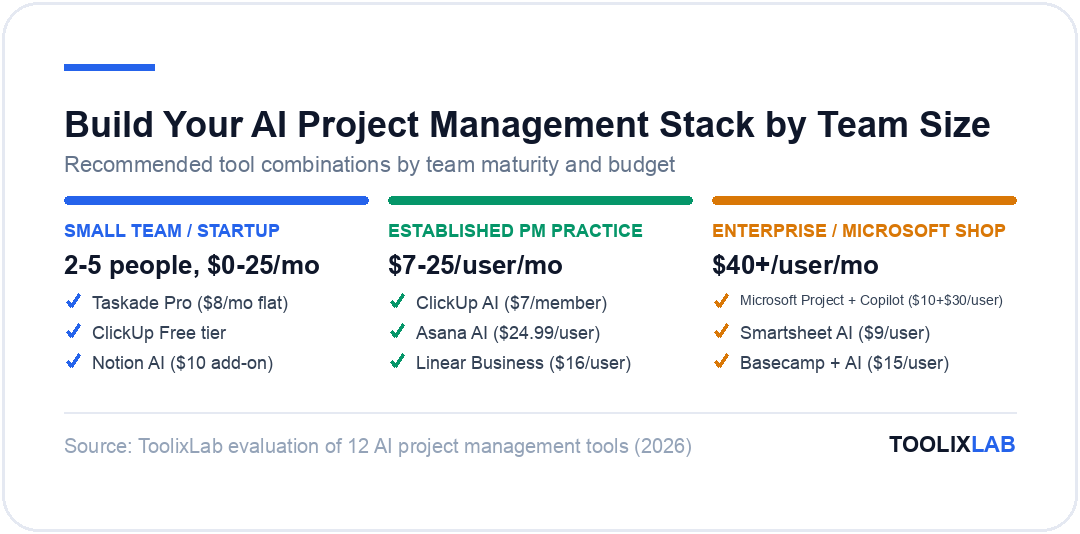
Taskade's pricing is the most startup-friendly in the category — the free tier is genuinely functional, and the Pro plan at $8/month (flat rate per workspace, not per user) makes it viable for cash-constrained early-stage teams. This is the tool we'd recommend for a team of 2–5 people who want serious AI PM capability on a bootstrap budget.
Pricing: Free tier. Pro $8/month (workspace, not per user). Business $16/month. Enterprise $49/month.
Best for: Startups, freelancers, small agencies, and any team that wants modern AI project management capabilities without enterprise pricing. Also worth considering as a personal productivity tool alongside a team platform.
10. Microsoft Project + Copilot — Best for Enterprise Microsoft Organizations
If your organization runs on Microsoft 365, the combination of Microsoft Project and Microsoft Copilot is worth evaluating — not because it's the best standalone PM tool, but because the integration depth with Teams, Outlook, SharePoint, and the rest of the M365 ecosystem creates leverage that standalone tools can't replicate.
What Microsoft Project + Copilot does well:
Copilot's integration with Microsoft Project allows natural language project plan generation, resource allocation suggestions, and timeline adjustments through a conversational interface. More importantly, the integration means project data is accessible from within Teams meetings, Outlook task management, and Excel analysis — which is where most enterprise employees actually spend their time.
Microsoft's enterprise-grade security, compliance, and data residency guarantees make this combination the only realistic choice for heavily regulated industries (financial services, healthcare, government) where data sovereignty requirements rule out many SaaS alternatives.
The AI-powered risk assessments in Project Premium use Microsoft's organizational graph data to identify resource conflicts across projects — something that's nearly impossible to manage manually in large organizations where dozens of projects share the same pool of specialized staff.
What to watch out for: Microsoft Project has a steep learning curve and is significantly more complex than modern PM tools. The AI features require an M365 Copilot license ($30/user/month) on top of Project licensing — which is expensive. For most organizations, ClickUp or Asana will deliver better value. Microsoft Project is really only the right choice if enterprise compliance requirements or deep M365 integration are hard constraints.
Pricing: Microsoft Project Plan 1 $10/user/month. Plan 3 $30/user/month. Plan 5 $55/user/month. M365 Copilot $30/user/month add-on for AI features.
Best for: Large enterprises, regulated industries, and organizations with deep M365 investment where integration across the Microsoft stack is a hard requirement.
11. Basecamp + AI Integrations — Best for Remote-First Teams
Basecamp's philosophy has always been simplicity and async-first communication, and its 2025 AI features maintain that philosophy. Rather than building AI deeply into the product, Basecamp focuses on AI that reduces noise and helps remote teams stay aligned without synchronous meetings.
What Basecamp does well with AI:
The Hill Charts AI annotations can automatically generate progress commentary based on task completion rates, helping remote teams communicate project momentum without writing manual updates. For teams spread across time zones where communication overhead is a real cost, the async-first AI features save meaningful coordination time.
Basecamp's flat pricing model ($15/user/month with all features included) is straightforward compared to the per-tier, per-add-on pricing of most competitors. For remote teams that want a known, predictable cost, this matters.
What to watch out for: Basecamp's AI features are significantly less advanced than ClickUp, Asana, or Monday.com. If AI-powered task generation, smart scheduling, or detailed analytics are priorities, Basecamp isn't the right choice. It's the best tool for what it is — a clean, async-first team communication and project tool — but the AI capabilities are not the reason to choose it.
Pricing: Basecamp $15/user/month. Basecamp Pro Unlimited $299/month flat rate (any number of users).
Best for: Remote-first companies with 5–25 people that prioritize simplicity and async communication over advanced AI features and analytics.
12. Todoist AI — Best for Individual Task Management
Todoist is the best-in-class personal task manager, and its AI features are focused on making individual productivity simpler rather than adding enterprise complexity. If you need a personal layer on top of a team PM tool — or you're an individual contributor who doesn't need team collaboration features — Todoist's AI is worth knowing about.
What Todoist AI does well:
The AI task clarification feature catches vague tasks ("follow up on the project") and prompts you to add the specific action, deadline, and context that makes tasks actionable. This sounds like a minor UX feature, but it addresses one of the core reasons personal task systems fail — tasks that are too vague to execute on.
Natural language task entry has been a Todoist strength for years ("Review marketing brief every Monday at 9am" creates a recurring task automatically), and the AI layer has extended this to understand more complex task relationships and scheduling logic.
Pricing: Free tier. Pro $4/month. Business $6/user/month.
Best for: Individuals, freelancers, and team members who want a personal task management layer that integrates with (rather than replaces) a team PM platform.
How to Choose the Right AI Project Management Tool in 2026
With 12 strong options, the choice comes down to four key questions:
1. What is your team's primary bottleneck?
If the problem is scheduling and prioritization overload, start with Motion. If it's status reporting and stakeholder visibility, look at Asana AI. If it's generating project structure from scratch, ClickUp AI or Monday.com AI will serve you. If it's documentation context getting disconnected from tasks, Notion AI is the answer. Matching the tool to the actual bottleneck is more important than picking the "best" tool by category rankings.
2. What is your team's technical sophistication and PM maturity?
Teams new to structured project management should start with Monday.com or Taskade — lower complexity, faster time to value. Teams with established PM practices and technical users can unlock more from ClickUp, Asana, or Linear. Microsoft Project is only appropriate for organizations with dedicated PM function and IT support.
3. What does the AI actually do in your workflow?
Before signing up, identify 2–3 specific workflows where you expect AI to save time. Test those workflows specifically during the trial period. "This tool has AI" is not a justification for paying $15–25/user/month more than a simpler alternative. The AI needs to save more time than it costs — and that's tool-specific and team-specific.
4. What's already in your stack?
If you're a Microsoft 365 shop, Copilot integration matters. If your team already uses Notion for documentation, adding Notion Projects and Notion AI to an existing workspace is faster than migrating everything to ClickUp. If your team runs on Slack and Google Workspace, ClickUp and Asana both integrate well. Tool compatibility is underrated in PM tool selection.
This same framework applies when selecting AI tools for other parts of your business. Our guide to the best AI tools for HR and recruiting covers how to apply similar criteria to hiring workflow automation, and the AI sales funnel workflow guide addresses cross-tool stack selection for revenue teams.
Integrating AI Project Management with the Rest of Your AI Stack
AI project management tools work best when they're connected to the other AI tools your team uses, rather than operating in isolation. A few high-value integrations worth considering:
AI project management + AI writing tools. Connecting your PM tool to your content workflow means project briefs, client reports, and documentation can be generated from task data rather than written from scratch. If your team uses AI writing tools as part of an AI content creation workflow, the project management layer should feed briefs and deadlines directly into that workflow.
AI project management + email automation. Many teams use their PM tool to track project communications but still process project-related emails manually. Connecting your PM tool to email automation workflows means project status updates, client notifications, and internal handoffs can trigger automatically from task state changes.
AI project management + free AI tools. If you're budget-constrained, it's worth knowing that many of the best free AI tools integrate with paid PM platforms. You don't necessarily need to pay for AI features in every tool — using a free AI assistant alongside a lower-cost PM tool can match the output of an expensive all-in-one platform for many team sizes.
What AI Project Management Tools Can't Do (Yet)
It's worth being honest about current limitations before adopting any of these tools:
AI can't replace project management judgment. The most critical PM skills — stakeholder management, risk assessment, team dynamics, scope negotiation — are not automated by any tool in this list. AI handles coordination overhead, not the leadership and judgment layer of project management. Teams that expect AI to replace PM thinking will be disappointed.
AI-generated project plans need human review. Task breakdowns and timelines generated from a one-line brief are starting points, not finished plans. Teams that use AI-generated plans without critical review tend to ship plans that lack important dependencies, underestimate complexity in the wrong places, and miss project-specific context that the AI couldn't know.
AI insights require quality input data. AI-powered analytics and risk prediction are only as good as the task data they're analyzing. If your team doesn't consistently update task statuses, log time accurately, and maintain clean project data, the AI insights will be unreliable. Garbage in, garbage out applies to AI PM just as much as traditional analytics.
Most teams use less than 30% of available AI features. The tools on this list have impressive feature sets, but adoption is the real challenge. A team that deeply integrates 3–4 AI features into daily habits will outperform a team that has access to 15 AI features but uses them sporadically. Focus on the 2–3 highest-value AI workflows for your team before trying to use everything.
Frequently Asked Questions
What is the best AI tool for project management in 2026?
ClickUp AI is the best all-in-one AI project management tool for most teams in 2026. It combines the deepest AI feature set (task generation, standup reports, AI writing, smart summaries) with a flexible workspace model that handles tasks, docs, goals, and time tracking in a single platform. For engineering-specific teams, Linear is the stronger choice. For documentation-heavy teams, Notion AI. For scheduling-primary problems, Motion.
Does AI replace project managers?
AI does not replace project managers in 2026 — it handles the coordination overhead (status updates, scheduling, report generation) so project managers can focus on the judgment-intensive work: stakeholder relationships, risk assessment, scope management, and cross-team alignment. The PMs who will be most at risk over the next 5–10 years are those whose primary value is coordination and status reporting, not judgment and leadership.
How much do AI project management tools cost?
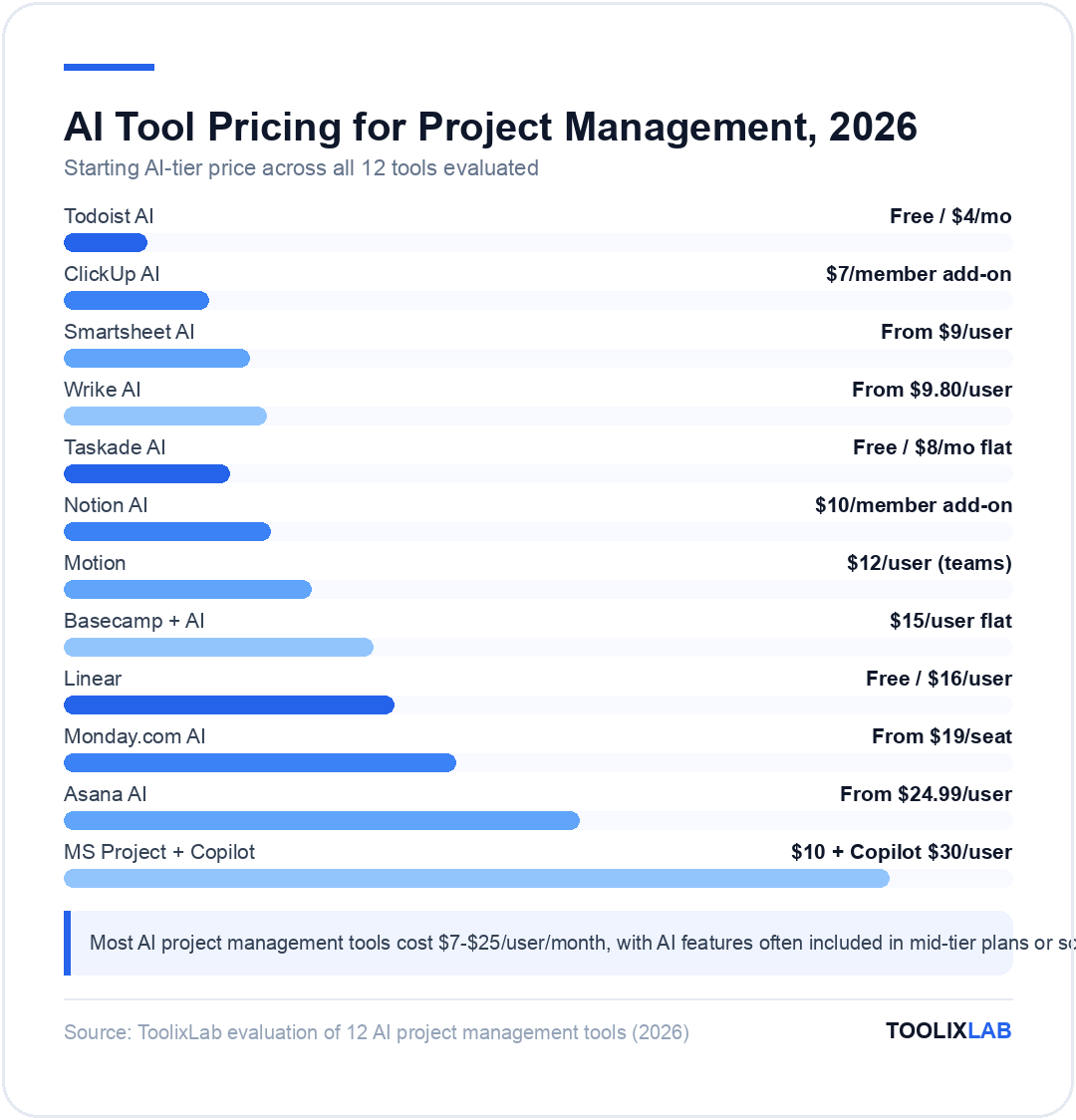
Most AI project management tools cost $7–$25/user/month, with AI features often included in mid-tier plans or available as add-ons. ClickUp AI is $7/user/month add-on. Asana AI is included from $24.99/user/month. Monday.com AI from $19/seat/month. Notion AI $10/member/month add-on. Motion $12/user/month (all-in). Linear free tier available; $16/user/month for Business. Taskade is the most budget-friendly at $8/month flat (not per user) for the Pro plan.
Can AI create a project plan automatically?
Yes — ClickUp AI, Asana AI, Monday.com AI, Taskade, and Motion can all generate project plans from natural language descriptions. You describe the project outcome, and the tool generates a task breakdown with phases, dependencies, and estimated timelines. The quality of AI-generated plans has improved significantly in 2025–2026, but they should be reviewed and adjusted by a human who understands the project context before being used as a working plan.
What's the best AI project management tool for small teams?
For teams of 2–5 people on a budget, Taskade is the best choice — it has genuine AI capabilities and a flat $8/month Pro pricing that makes it accessible for startups and freelancers. For small teams with slightly more budget who want a more full-featured tool, ClickUp's free tier or Notion AI offer excellent value. Motion is worth considering specifically if scheduling overload (too many tasks, not enough time to prioritize) is the primary problem.
Is ClickUp AI worth it?
ClickUp AI is worth the $7/member/month add-on cost if your team will actively use the AI writing, task generation, and standup reporting features. The ROI break-even is roughly 30 minutes of saved coordination time per person per week — which most teams using the features actively report hitting within the first month. It's not worth it if your team doesn't have established ClickUp usage habits, because the AI features require consistent task data quality and platform engagement to deliver value.
What AI project management tool is best for remote teams?
Asana AI and ClickUp AI both work well for remote teams, with AI-generated status summaries and async-friendly update workflows reducing the need for synchronous status meetings. Basecamp is the best choice specifically for teams that prioritize simplicity and async communication philosophy over advanced AI features. For engineering-focused remote teams, Linear's design around async code review and issue tracking makes it a natural fit. For the full picture beyond project management — communication, meeting notes, and scheduling — see our best AI tools for remote teams guide.
Can I use ChatGPT for project management?
ChatGPT can be useful for specific project management tasks — generating project plans, writing status updates, drafting meeting agendas, and brainstorming project structures. However, it doesn't integrate with task data, can't track progress, and has no persistent project context between sessions. Most teams end up using dedicated AI PM tools for ongoing project management and ChatGPT as an ad-hoc productivity layer for writing and planning tasks. The best use case for ChatGPT in project management is generating the first draft of documents (briefs, plans, agendas) that are then imported into your actual PM tool.