
AI coding assistants have fundamentally changed how software gets built. In 2026, developers who use AI tools write code up to 55% faster than those who don't — and the three tools at the center of that shift are Cursor, GitHub Copilot, and Codeium. But they're not the same tool, and picking the wrong one can slow you down instead of speeding you up. This guide cuts through the marketing and gives you a direct, honest comparison based on real-world developer use.
⚡ TL;DR — Cursor vs GitHub Copilot vs Codeium 2026
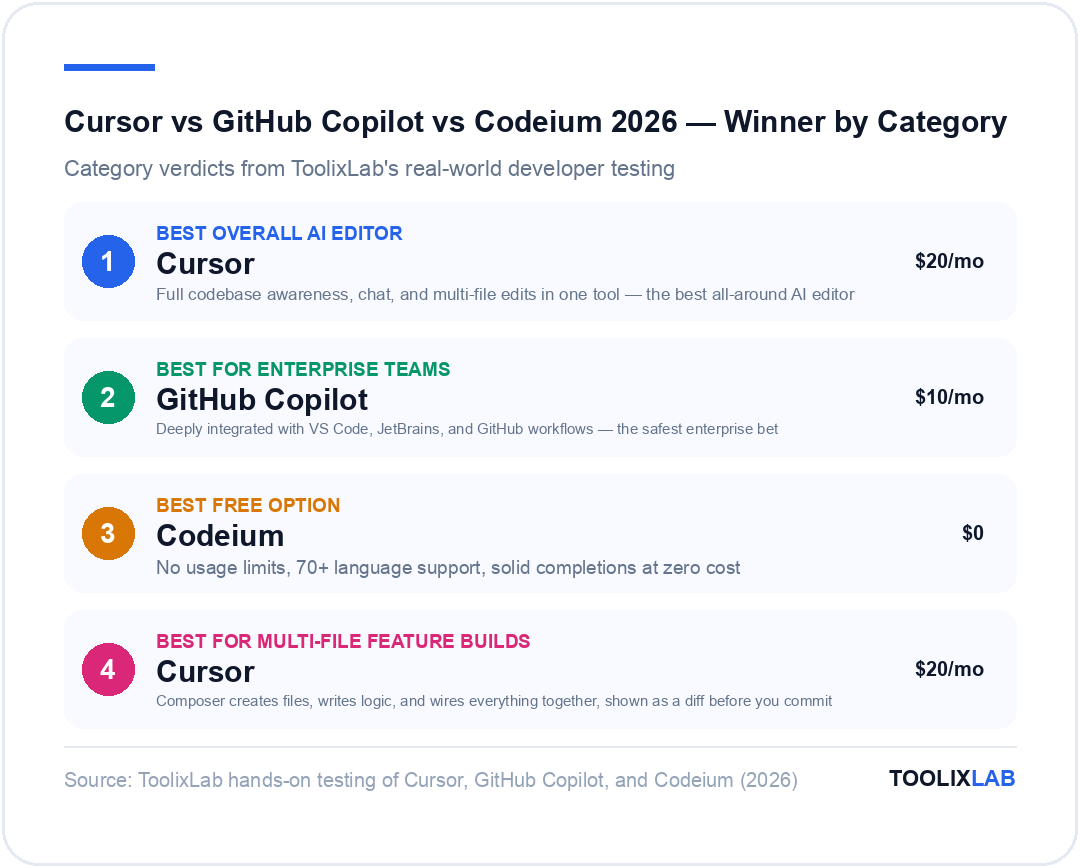
- ✦Cursor is the best all-around AI editor — full codebase awareness, chat, and multi-file edits in one tool
- ✦GitHub Copilot is the safest enterprise bet — deeply integrated with VS Code, JetBrains, and GitHub workflows
- ✦Codeium is the best free option — no usage limits, 70+ language support, solid completions at zero cost
- ✦All three support major IDEs, but Cursor requires you to switch editors entirely
- ✦Cursor starts at $20/month, Copilot at $10/month, Codeium has a generous free tier
- ✦For solo developers and freelancers, Cursor delivers the highest ROI
- ✦For teams on GitHub already, Copilot Enterprise is the seamless upgrade
- ✦Students and budget developers should start with Codeium — it's genuinely competitive
Why AI Coding Assistants Are Dominating Developer Workflows in 2026
The 2025 Stack Overflow Developer Survey found that over 76% of professional developers now use AI tools in their daily workflow — up from 44% just two years prior. That number isn't surprising when you consider what these tools can do: they autocomplete entire functions, explain unfamiliar codebases, catch bugs before they ship, and generate boilerplate so fast that junior devs can keep pace with seniors on straightforward features.
But the landscape is no longer monolithic. What started with GitHub Copilot as the only serious player has evolved into a rich ecosystem of competing tools — each with a distinct philosophy. Cursor bets on turning the entire editor into an AI workspace. GitHub Copilot bets on deep ecosystem integration. Codeium bets on accessibility and zero cost. Understanding those philosophies helps you make the right call for your situation.
If you're already using AI in your development workflow but want to expand beyond code, check out our guide on the best AI tools for developers in 2026 — it covers testing, documentation, deployment, and more. But for now, let's dig into the three biggest names in AI code assistance.
Cursor AI: The Full-Stack AI Code Editor
Cursor isn't a plugin — it's a fork of VS Code rebuilt from the ground up with AI as the primary interface. If you open Cursor for the first time expecting it to feel like a familiar IDE with some extra autocomplete, you'll be surprised. The whole editing experience is restructured around the assumption that you'll be talking to the AI constantly, asking it to generate, modify, debug, and explain code throughout your session.
Key Features
- ▸Codebase-aware chat (Cmd+K / Ctrl+K): Ask questions about your entire project. Cursor indexes your repo and lets the AI pull relevant context from across files automatically — not just the file you're looking at.
- ▸Multi-file edit mode (Composer): Tell Cursor to "add a login route, create the auth middleware, and update the user schema" — and it makes changes across multiple files simultaneously. This is the feature that sets Cursor apart most clearly.
- ▸Inline code generation: Select any block of code, hit Ctrl+K, describe what you want, and watch Cursor rewrite or extend it. The diff view lets you accept or reject changes before they land.
- ▸Model flexibility: Cursor supports GPT-5.4, Claude Sonnet 4.6, and Gemini 2.5 Pro under the hood. You can switch models per task, which is powerful for cost or quality optimization.
- ▸Terminal AI: The integrated terminal can receive AI suggestions. Type a command, ask what it does, or ask for the right command for a task you describe in plain English.
- ▸.cursorrules: Define project-specific instructions — coding style, framework conventions, naming rules — that the AI applies to every interaction in your repo. This is invaluable for team consistency.
What Cursor Does Well
The multi-file Composer feature is genuinely transformative. Ask Cursor to implement a feature from scratch, and it will create the files, write the logic, import dependencies, and wire everything together — then show you a diff of every change before you commit to it. For building new features or refactoring large modules, this beats autocomplete-based tools by a wide margin.
The codebase indexing is also excellent. If you're dropped into an unfamiliar repo (common for freelancers or open-source contributors), you can ask Cursor "how does authentication work in this project?" and get a coherent answer grounded in the actual code — not a generic explanation of JWT or sessions, but a walkthrough of how this specific codebase handles it.
Cursor's Limitations
The biggest trade-off is that Cursor requires you to switch editors. If you're a JetBrains user (IntelliJ, PyCharm, WebStorm), or if your team has standardized on a different environment, Cursor is a hard sell. The onboarding friction is real, especially for teams mid-project.
Fast requests per day on the Pro plan are also capped — heavy users report hitting limits during intense coding sessions. The Business plan removes those caps but jumps to $40/month per seat, which adds up for larger teams.
GitHub Copilot: Microsoft's Industry-Standard AI Pair Programmer
GitHub Copilot was the tool that started the AI coding revolution in 2021, and Microsoft has invested heavily to make sure it stays competitive. Powered by OpenAI's Codex and later GPT-4o models, Copilot works as a plugin in VS Code, Visual Studio, JetBrains IDEs, Neovim, and now Xcode — meaning it fits into your existing workflow rather than replacing it.
Key Features
- ▸Inline completions: Copilot's bread and butter. As you type, it suggests completions ranging from a single token to entire function implementations. The suggestion quality has improved significantly with GPT-5.4 and Claude Opus 4.6 integration.
- ▸Copilot Chat: An AI chat panel embedded in VS Code and JetBrains. Ask questions, generate code, debug, and explain — all without leaving your editor. The interface is clean and context-aware.
- ▸Copilot Workspace: GitHub's answer to Cursor's Composer. Describe a task in natural language, and Copilot Workspace plans and executes multi-file changes within the GitHub interface — great for PRs and issue-based workflows.
- ▸Pull Request summaries: Copilot automatically generates PR descriptions based on your changes. For teams pushing dozens of PRs a week, this saves real time and improves review quality.
- ▸Code review assistance: Copilot Enterprise includes AI-powered code review suggestions directly on PRs, catching potential issues before human reviewers even look.
- ▸Knowledge bases (Enterprise): Index internal documentation, wikis, and private repos so Copilot Chat can reference your company's proprietary context when answering questions.
What GitHub Copilot Does Well
No tool integrates more seamlessly with existing enterprise workflows. If your team is already on GitHub, Copilot becomes an extension of everything you already do — issues, PRs, code reviews, Actions — rather than a separate product you need to manage. For CTOs and engineering leads evaluating AI tooling, that coherence is difficult to put a price on.
Copilot also has the largest dataset to draw from. GitHub has trained its models on more public code than any other AI coding tool, which gives it an edge on obscure framework syntax, legacy language support, and niche API usage patterns. If you're working in an unusual tech stack, Copilot is often the most knowledgeable option.
GitHub Copilot's Limitations
Copilot Chat, while useful, doesn't have the same depth of codebase reasoning that Cursor delivers out of the box. Unless you're on the Enterprise plan with Knowledge Bases configured, Copilot's context window is more limited — it works best at the file level rather than across a whole project.
The Copilot Workspace multi-file feature is promising but still more suited to GitHub-based workflows than local development. If you do most of your work in the IDE rather than through GitHub's web interface, you may not get as much value from it as the marketing suggests.
Codeium: The Free AI Coding Assistant That Punches Above Its Weight
Codeium entered the market by making a simple bet: if you offer a genuinely capable AI coding assistant for free, developers will flock to it. That bet paid off. As of early 2026, Codeium has over 500,000 active users, many of whom are students, indie developers, and professionals at companies that don't have budget for paid AI tools.
What's impressive isn't just the free tier — it's how competitive Codeium's code quality is. The company has built its own models specifically for code, rather than licensing access to OpenAI's APIs. That means faster inference, lower costs, and the ability to offer completions without metering users.
Key Features
- ▸Unlimited free completions: Unlike Copilot's limited trial or Cursor's capped free tier, Codeium's free plan has no usage limits on autocomplete. Write as much code as you want, zero cost.
- ▸70+ language support: Python, JavaScript, TypeScript, Go, Rust, Java, C++, Ruby, PHP, Swift, Kotlin, and dozens more. Coverage is on par with Copilot for mainstream languages.
- ▸Codeium Chat: The free plan includes AI chat for code explanation, debugging, and generation. On the Pro plan you get access to more capable models with larger context windows.
- ▸Wide IDE support: VS Code, JetBrains suite, Vim/Neovim, Emacs, Eclipse, Sublime Text, and more. The plugin ecosystem is comparable to Copilot's.
- ▸Windsurf (Codeium's AI Editor): Similar to Cursor's model, Codeium now offers Windsurf — a full AI-native editor built on VS Code with cascade-style multi-step AI agents. This is their direct Cursor competitor.
- ▸On-premise deployment (Teams/Enterprise): Organizations with strict data security requirements can run Codeium on their own infrastructure. This is a rare offering at this price point.
What Codeium Does Well
The value proposition is unmatched for individual developers. Getting unlimited AI completions, chat support, and multi-IDE coverage at zero cost is genuinely remarkable. For students learning to code, bootcamp graduates building their portfolio, or freelancers working on thin margins, Codeium removes a meaningful financial barrier.
The Windsurf editor launch also significantly changed the competitive picture. Windsurf's Cascade agent can execute multi-step changes across files, run terminal commands, and iterate on its own output — putting it in direct competition with Cursor's Composer for a fraction of the price.
Codeium's Limitations
The free tier is powerful, but the ceiling is lower than Cursor's Pro tier. Complex reasoning tasks, large-context refactoring, and multi-file planning work best on Cursor or Copilot Enterprise. If you're building a large production system and need the AI to hold a lot of context simultaneously, Codeium's free models will occasionally fall short.
Brand recognition and ecosystem maturity are also factors. Copilot integrates with GitHub Actions, PR reviews, and the broader Microsoft ecosystem. Cursor has built a developer community with extensive YouTube tutorials and community-built .cursorrules repositories. Codeium is growing fast, but the support resources are thinner.
Cursor vs GitHub Copilot vs Codeium: Feature-by-Feature Comparison
Here's a direct side-by-side breakdown across the dimensions that matter most to working developers:
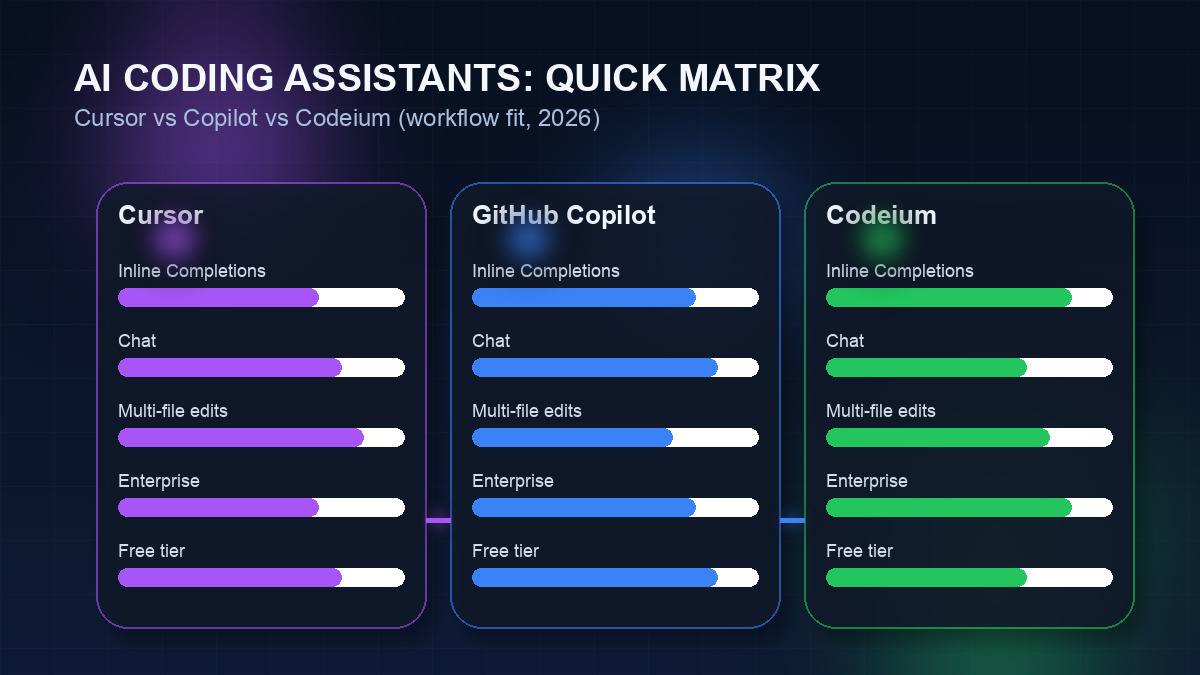
| Feature | Cursor | GitHub Copilot | Codeium |
|---|---|---|---|
| Inline Completions | ✅ Excellent | ✅ Excellent | ✅ Very Good |
| AI Chat | ✅ Built-in | ✅ Built-in | ✅ Built-in (limited free) |
| Multi-File Editing | ✅ Composer (best-in-class) | ⚠️ Workspace (GitHub only) | ✅ Cascade (Windsurf) |
| Codebase Indexing | ✅ Full project context | ⚠️ Enterprise only | ⚠️ Limited |
| IDE Support | VS Code only (fork) | VS Code, JetBrains, Neovim, Xcode | VS Code, JetBrains, Vim, Emacs, 40+ |
| Language Support | All major languages | All major + legacy | 70+ languages |
| Model Choice | GPT-5.4, Claude Sonnet 4.6, Gemini 2.5 Pro | Claude Opus 4.6, GPT-5.4, Gemini 2.5 Pro | Windsurf SWE-1.5 + premium models |
| Free Tier | Limited (2-week trial) | Limited (30-day trial) | ✅ Unlimited completions |
| PR Integration | ❌ Not built-in | ✅ Auto-summaries, reviews | ❌ Not built-in |
| On-Premise Option | ❌ Cloud only | ❌ Cloud only | ✅ Enterprise self-hosted |
| Data Privacy | Privacy mode available | No code training on Business+ | No training on user code |
Pricing Breakdown: Which AI Coding Tool Fits Your Budget?
Pricing is often the deciding factor for individuals, and it matters enormously at scale for teams. Here's what each tool costs in 2026:
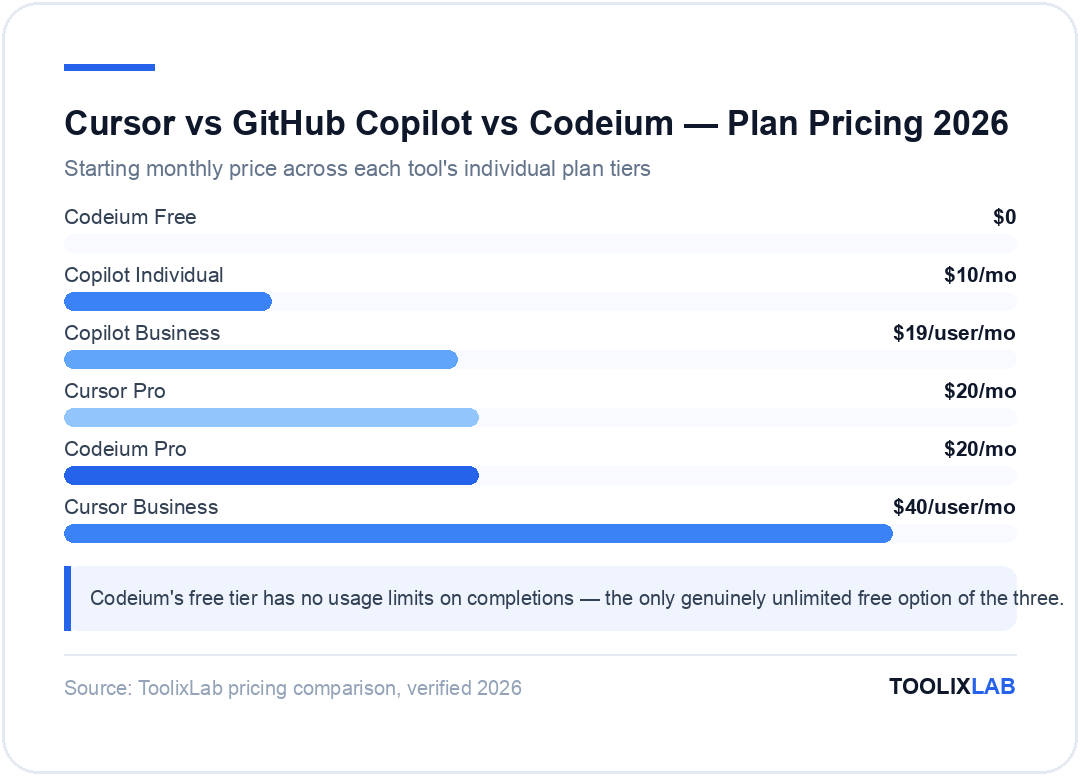
Cursor Pricing
- •Free: 2-week trial with limited premium requests
- •Pro — $20/month: Extended limits on Agent requests, access to GPT-5.4, Claude Sonnet 4.6, and Gemini 2.5 Pro
- •Business — $40/month/user: Unlimited fast requests, admin controls, SSO, no data training
GitHub Copilot Pricing
- •Free: Limited monthly completions and chat messages (introduced late 2024)
- •Individual — $10/month ($100/year): Unlimited completions, Copilot Chat, PR summaries
- •Business — $19/month/user: All Individual features + organization management, audit logs, IP exclusions
- •Enterprise — $39/month/user: Knowledge bases, advanced code review, fine-tuned models, enterprise security
Codeium Pricing
- •Free (Individual): Unlimited completions, basic chat, all IDE plugins — permanently free
- •Pro — $20/month: Access to all premium models, SWE-1.5 Fast Agent, Tab, Previews, Deploys
- •Teams — $40/month/user: Centralized billing, admin dashboard, SSO, RBAC, priority support
- •Enterprise — Custom pricing: On-premise deployment, SLA, dedicated support, fine-tuning
Budget verdict: Codeium wins for individuals and small teams. For companies on GitHub with 10+ developers, Copilot Business offers the best total value. Cursor Pro at $20/month is worth it for power users who want the deepest AI editor experience, but it's not the most cost-effective at scale.
Performance & Code Quality: Real Developer Results
Benchmarks for AI coding tools are tricky — they depend heavily on language, task complexity, codebase size, and the individual developer's prompting skill. That said, community feedback, independent evaluations, and our own testing reveal consistent patterns.
Completion Accuracy
For line-by-line autocomplete, all three tools are strong in popular languages like JavaScript/TypeScript, Python, and Go. The gap narrows considerably at this level. Where differences emerge:
- ▸Copilot tends to produce more conservative, idiomatic completions — it suggests code that "looks right" in a given language's style. It's less likely to produce weird or inconsistent suggestions.
- ▸Cursor is more aggressive — it'll complete larger blocks and try to predict more of your intent. This means higher highs (a whole function written correctly) and more frequent misses (suggestions that need significant editing).
- ▸Codeium is competitive with both at the function level. Users report it occasionally falls behind on complex algorithmic tasks or heavily typed TypeScript code, but it's excellent for most everyday work.
Complex Task Performance
When you move beyond completions to full-feature implementation, the gap widens. Cursor's Composer handles multi-file tasks (like "implement OAuth2 login with refresh tokens across auth service and API middleware") better than any other tool in this category. It holds context across more files, executes changes more reliably, and handles failure cases more gracefully.
Codeium's Windsurf Cascade is catching up quickly. For projects that are primarily frontend (React/Vue/Svelte) or Python backend, Cascade delivers results comparable to Cursor's Composer. It falls behind on architecturally complex tasks involving many interdependent modules.
Copilot Workspace is powerful but it's designed for a different flow — task-to-PR within GitHub. If you're thinking about implementation while actively coding in your editor, it's less immediately useful than Cursor or Windsurf's in-editor agents.
Debugging & Explanation Quality
All three have solid chat interfaces for explaining code and suggesting bug fixes. Cursor's advantage here is that you can ask it to explain code while it also has context on the broader project — "why does this function behave differently when called from the payment service vs. the user service?" is a question it can actually answer because it knows both files. Copilot and Codeium (outside Windsurf) are limited to the context in your current file or what you paste into chat.
IDE Integration & Workflow Compatibility
One of the most practical factors — often underweighted in comparisons — is how much disruption the tool introduces to your existing workflow. Let's be honest: most developers are deeply habitual about their editors. Switching costs are real.
Cursor: High Value, High Friction
Cursor requires a complete editor switch. For solo developers or small teams where everyone already uses VS Code, this is relatively painless — Cursor is a VS Code fork, so your extensions, themes, and keyboard shortcuts carry over. For teams using JetBrains (IntelliJ, WebStorm, PyCharm), or for companies with standardized environments, it's a bigger ask.
The payoff is that once you're in Cursor, the AI integration is the most seamless of any tool. There's no mental model-switching — the AI is just part of how the editor works, not an add-on you invoke separately.
GitHub Copilot: Zero Disruption
Install the extension. Log in with your GitHub account. That's it. Copilot works in whatever editor you already use. For team deployments, IT can push the extension organization-wide without requiring anyone to change their setup. This zero-friction adoption model is why Copilot remains the dominant choice in enterprise environments.
Codeium: Near-Zero Disruption
Like Copilot, Codeium installs as a plugin. The plugin catalog is extensive — 40+ editors including some (like Emacs and Eclipse) that Copilot doesn't officially support. If your team uses an unusual editor, Codeium is often the only serious AI option that works in it.
Windsurf requires an editor switch like Cursor, but since Windsurf is also VS Code-based, migration from VS Code is easy. Windsurf is worth considering if you want Codeium's pricing with Cursor-like AI editor capabilities.
For a broader look at how to integrate AI into your full software development lifecycle, our guide on building AI workflows in 2026 walks through connecting AI coding tools with testing, CI/CD, and deployment automation. And if you're evaluating more AI tools across categories, see our roundup of the best free AI tools in 2026.
Which AI Coding Assistant Is Right for You?
No single tool is "the best" in every situation. Here's how to make the right call based on your context:
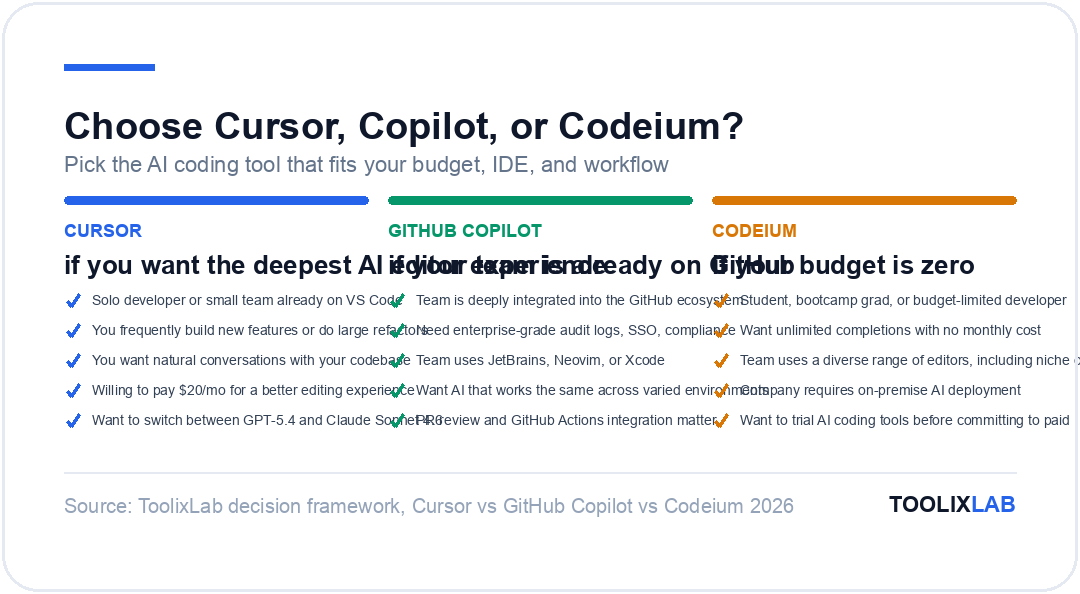
Choose Cursor if…
- ✓ You're a solo developer or work in a small team already on VS Code
- ✓ You frequently build new features or do large refactoring tasks
- ✓ You want to have natural conversations with your codebase as you work
- ✓ You're willing to pay $20/month for a significantly improved editing experience
- ✓ You want flexibility to switch between GPT-5.4 and Claude Sonnet 4.6 based on task type
Choose GitHub Copilot if…
- ✓ Your team is already deeply integrated into the GitHub ecosystem
- ✓ You need an enterprise-grade solution with audit logs, SSO, and compliance features
- ✓ You or your team uses JetBrains, Neovim, or Xcode — editors Cursor doesn't support
- ✓ You want AI assistance that works the same way across your entire team's varied environments
- ✓ PR review, PR summaries, and GitHub Actions integration matter to your workflow
Choose Codeium if…
- ✓ You're a student, bootcamp graduate, or developer working with a limited budget
- ✓ You want unlimited completions with no monthly cost
- ✓ Your team uses a diverse range of editors (including some niche ones)
- ✓ Your company requires on-premise AI deployment for data security reasons
- ✓ You want to trial AI coding tools before committing to a paid tool
One nuance worth mentioning: these tools aren't mutually exclusive. Many developers use Cursor for focused development sessions while Copilot or Codeium handles lighter IDE usage across the day. The right answer might be a combination, especially if your team uses multiple editors.
If you're curious how these tools compare to broader AI assistants for non-coding work, check out our detailed breakdown of ChatGPT vs Claude vs Gemini for business and content tasks. And if you're building AI into a no-code or low-code workflow, our no-code AI workflow guide covers Zapier, Make, and n8n integrations for automating around your code.
Final Verdict: Our 2026 Recommendation
After extensive testing across all three tools, here's where we land:
Cursor is the best AI coding tool for most individual developers in 2026. The combination of codebase-level context, multi-file editing through Composer, and model flexibility creates a development experience that simply doesn't exist elsewhere. If you spend 4+ hours a day writing code and you're on VS Code, the $20/month Pro plan will pay for itself in productivity within days.
GitHub Copilot is the best choice for teams and enterprises. It's not just an AI coding tool — it's an AI layer across the entire GitHub development lifecycle. For organizations already using GitHub at scale, Copilot Business or Enterprise is the natural, lowest-friction upgrade that touches code writing, PR reviews, and collaboration simultaneously.
Codeium is the best free option, and it's genuinely competitive. The unlimited free tier gives you real, professional-grade AI completions with no strings attached. If you're evaluating AI coding tools and aren't ready to commit a budget, start here. And with Windsurf's Cascade feature, Codeium is increasingly a serious alternative to Cursor even at the premium tier — for significantly less money.
The AI coding landscape will continue to evolve rapidly through 2026. These rankings may shift as Codeium's Cascade matures, as Copilot continues to add IDE-level features, and as Cursor's Business plan becomes more competitive. But for where things stand today, this is the clearest path to the right tool for your situation.
Ready to Level Up Your Development Workflow?
AI coding tools are just the start. Explore our full suite of resources for developers building with AI in 2026.
Explore All Developer AI Tools →⚖️ Our Verdict
Cursor, GitHub Copilot, and Codeium each win in a different category — maximum AI power, enterprise integration, and zero cost respectively. The right choice is not the "best" tool in the abstract; it's the one that fits your budget, IDE, and workflow complexity. All three are genuinely good in 2026, which means there is no wrong answer — only a suboptimal one for your specific situation.
✅ Choose Cursor if...
- • You want the most powerful AI-native coding environment
- • Full-stack VS Code development is your daily workflow
- • Multi-file editing and codebase-level AI context matter to you
✅ Choose GitHub Copilot if...
- • You need enterprise compliance and audit trails
- • You use multiple IDEs (JetBrains, VS Code, Visual Studio)
- • Your team is already on GitHub and wants AI across the lifecycle
✅ Choose Codeium if...
- • Budget is zero and you still want a solid AI coding tool
- • You're just starting with AI-assisted development
- • The free unlimited tier is sufficient for your current volume