
⚡ TL;DR — Perplexity AI vs Google Gemini 2026
Perplexity AI and Google Gemini are two of the most-used AI tools in 2026 — and they're frequently compared despite being built for completely different jobs. One is a research engine designed to answer questions with cited sources. The other is a multimodal AI assistant woven into the world's largest productivity ecosystem. Calling it a fair fight is like comparing a scalpel to a Swiss Army knife.
That said, there's genuine overlap: both can answer questions, both have web access, both offer free and paid tiers at nearly identical price points ($20/mo), and both are competing for the same slot in your daily AI toolkit. Understanding where each excels — and where each falls flat — determines whether you need one, both, or neither.
This Perplexity AI vs Google Gemini comparison covers every dimension that matters: search and research quality, multimodal capabilities, integrations, pricing, and the use cases where each tool is genuinely superior.
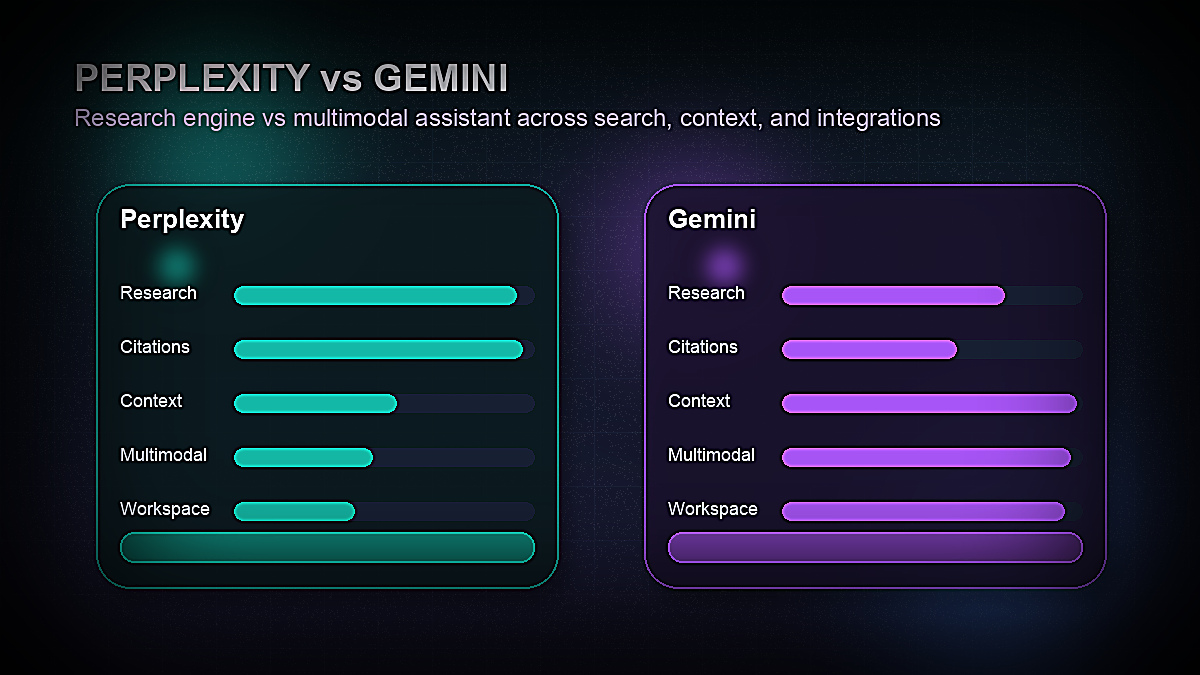
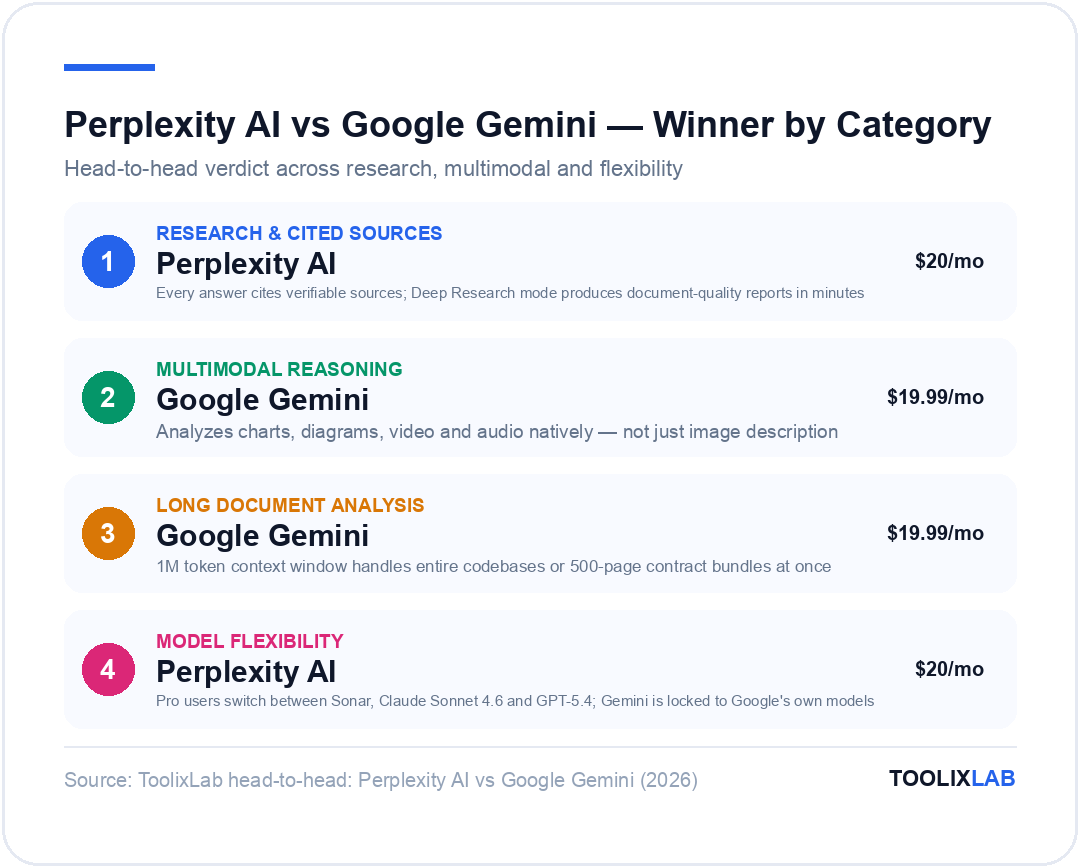
Perplexity AI vs Google Gemini: Key Differences at a Glance
| Category | Perplexity AI | Google Gemini |
|---|---|---|
| Primary use case | AI-powered research & search | Multimodal AI assistant |
| Underlying model | Sonar (own) + GPT-5.4, Claude Sonnet 4.6 (Pro) | Gemini 2.5 Flash (free) / Gemini 2.5 Pro (Advanced) |
| Web search | Always on, cited sources | Available, Google Search powered |
| Context window | Up to 127K tokens | 1M tokens (2.5 Pro) |
| Image understanding | Basic (upload & query) | Advanced multimodal reasoning |
| Document analysis | Good (PDF upload, web pages) | Excellent (1M context handles entire books) |
| Integrations | Spaces, API, limited ecosystem | Full Google Workspace, Android, Chrome |
| Free plan | Yes (5 Pro searches/day) | Yes (Gemini 2.5 Flash) |
| Paid plan | $20/mo (Perplexity Pro) | $19.99/mo (Gemini Advanced) |
What Is Perplexity AI?
Perplexity AI launched in 2022 with a deceptively simple idea: what if an AI could answer your questions the way a brilliant research assistant would — by actually reading current sources and citing them, rather than generating plausible-sounding text from training data alone?
In 2026, Perplexity has grown into the leading AI search engine, processing hundreds of millions of queries per month. Its core architecture is fundamentally different from chat-first AI tools: every query triggers a live web search, the AI synthesizes results from multiple sources, and every factual claim is linked to a numbered citation. You can verify every answer.
What makes Perplexity distinctive isn't just the citations — it's the quality of synthesis. Where Google Search returns ten blue links and expects you to do the reading, and where ChatGPT generates fluent text that may or may not be accurate, Perplexity reads the relevant pages, extracts the key information, and presents a structured answer that's both readable and verifiable. For research-heavy workflows, this is a genuinely transformative experience.
Perplexity Pro ($20/mo) upgrades the experience substantially: unlimited Pro searches (powered by more capable models), the ability to switch between Perplexity's own Sonar model, Claude Sonnet 4.6, and GPT-5.4 for different query types, file upload analysis, and Spaces (shareable research workspaces for teams).
For a deeper look at Perplexity's individual feature set, see our full Perplexity AI review.
What Is Google Gemini?
Google Gemini is Google's flagship AI assistant — a multimodal model built from the ground up to understand text, images, audio, video, and code simultaneously. In 2026, Gemini is available in two primary tiers: the free Gemini (powered by Gemini 2.5 Flash) and Gemini Advanced ($19.99/mo, powered by Gemini 2.5 Pro, Google's most capable consumer model).
Gemini 2.5 Pro's headline capability is its 1 million token context window — the largest of any mainstream consumer AI tool. To put that in perspective: 1M tokens is roughly 750,000 words, or the equivalent of 5–7 average-length novels. You can upload an entire codebase, a year of company emails, a complete legal document library, or hours of transcribed meeting recordings — and Gemini can reason across all of it simultaneously.
Beyond raw context, Gemini's multimodal reasoning is genuinely best-in-class. It can analyse charts and extract data, read handwritten notes in photos, understand diagrams and flowcharts, transcribe and summarize audio/video, and generate images. For users already in Google's ecosystem — Gmail, Drive, Docs, Sheets, Meet — Gemini integrates natively, reading your emails, searching your Drive, and helping you draft in Docs without switching tools.
According to Google DeepMind, Gemini 2.5 Pro leads on complex reasoning benchmarks, particularly in mathematics, science, and multi-step coding tasks. For a broader comparison that includes Claude and ChatGPT, our ChatGPT vs Claude vs Gemini comparison covers the full AI model landscape.
Search & Research Quality Compared
This is Perplexity's home turf — and it wins clearly.
Perplexity AI's search experience is built around one principle: every answer must be verifiable. When you ask "What's the current state of AI regulation in the EU?" Perplexity reads the latest news sources, EU official documents, and analysis pieces, synthesizes a structured answer covering the key points, and cites each claim with a clickable source number. The interface shows you exactly which websites were searched and what was extracted from each. For journalists, researchers, analysts, and anyone making decisions based on current information, this transparency is invaluable.
The depth of Perplexity's research mode goes further: Pro users can initiate "Deep Research" queries that spawn multiple sub-queries, cross-reference dozens of sources, and produce a comprehensive research report on complex topics — similar to what a research assistant might produce after spending hours on Google Scholar and primary sources. The quality is impressive for a tool that completes the research in 2–5 minutes.
Google Gemini's search integration is powered by Google's own search index — arguably the world's best — but the experience is different. Gemini uses web search as one of many inputs rather than as the foundation of every response. For straightforward factual queries, Gemini with Google Search grounding is accurate and up-to-date. But it doesn't provide the systematic citation structure that Perplexity does, and for complex multi-source research synthesis, Perplexity's purpose-built architecture produces cleaner, more trustworthy outputs.
Where Gemini's search advantage kicks in: real-time Google data. If you're asking about yesterday's stock prices, live sports scores, or breaking news in the last hour, Gemini's direct Google Search integration sometimes surfaces more current information than Perplexity's web crawler. For most research use cases, this distinction doesn't matter — but for finance professionals or journalists tracking breaking developments, it's worth noting.
Verdict on search: Perplexity wins convincingly for research and fact-finding. Gemini is competitive for simple current-events queries but doesn't match Perplexity's citation structure and research depth.
Multimodal Capabilities Compared
This is Gemini's home turf — and it wins decisively.
Google Gemini 2.5 Pro was designed from the ground up as a multimodal model. Its image understanding goes well beyond "describe what's in this photo." Gemini can extract data from charts and graphs, analyse engineering diagrams, read and interpret complex infographics, understand spatial relationships in images, compare multiple images simultaneously, and reason about changes between image versions. For professionals who work with visual data — data analysts, designers, engineers, scientists — this capability is genuinely useful in ways that text-only AI cannot replicate.
Gemini also handles video: upload a meeting recording, a product demo, or a lecture video, and Gemini can summarize it, extract key decisions, identify action items, or answer specific questions about specific timestamps. The audio and video understanding runs natively — not as a transcription step followed by text analysis, but as genuine multimodal reasoning over the full input.
Perplexity AI supports image uploads and can describe and query images, but its multimodal capabilities are significantly more limited. It excels at searching for information about an image (identify this product, find similar items, research this topic based on this visual) rather than deep visual reasoning. Perplexity is a text-centric research tool that has added image support, not a multimodal AI that was built for visual reasoning from day one.
Verdict on multimodal: Gemini wins by a wide margin. If your work involves images, video, audio, or complex visual documents, Gemini 2.5 Pro is categorically more capable.
Long Document Analysis Compared
Gemini's 1M token context window creates a capability gap that no other consumer AI tool has closed in 2026.
Practical use cases for Gemini's long context:
- Legal document review: Upload a 500-page contract bundle and ask Gemini to identify all indemnification clauses, flag unusual terms, or compare against a standard template
- Codebase analysis: Upload an entire software repository and ask Gemini to explain the architecture, identify security vulnerabilities, or suggest refactoring approaches
- Research synthesis: Upload 20 academic papers on a topic and ask Gemini to synthesize the key findings, identify consensus and disagreements, and highlight research gaps
- Business intelligence: Upload a year of earnings call transcripts, analyst reports, and news coverage for a company and ask Gemini to identify strategic trends
Perplexity Pro supports file uploads (PDFs, text files) and can analyse documents, but its context window (up to 127K tokens) limits it to single documents or small document sets rather than entire libraries. For the type of deep document analysis that Gemini's 1M context enables, Perplexity simply cannot compete on scope.
Verdict on document analysis: Gemini wins clearly for large document sets. Perplexity is competitive for single document analysis but can't match Gemini's full-library context capability.
Integrations & Ecosystem Compared
Google Gemini's ecosystem integration is its most powerful structural advantage for users already in Google's orbit.
Gemini in Google Workspace (included with Gemini Advanced) means AI assistance is woven into the tools you already use daily:
- Gmail: Summarize threads, draft replies, find emails with natural language search
- Google Drive: Ask questions about documents stored in Drive without opening them
- Google Docs: Write, edit, and reformat in context — Gemini can see what you're working on
- Google Sheets: Generate formulas, analyse data, create charts from natural language instructions
- Google Meet: Real-time transcription, meeting summaries, action item extraction
For individuals and businesses using Google Workspace as their primary productivity stack, this integration eliminates significant context-switching. You're not copying information between a chat AI and your work tools — the AI lives inside the tools you already use.
Perplexity's integrations are more limited but include Spaces (collaborative research environments that can be shared with teams), a well-documented API for developers building research-enhanced applications, and browser extensions for in-context web research. Perplexity also integrates with Notion and other knowledge management tools for saving and organizing research outputs.
For Android users specifically, Gemini replaces Google Assistant as the device-level AI — accessible via button or voice from any screen, able to understand what's on your display and take actions in apps. This device-level integration is something Perplexity cannot replicate.
Verdict on integrations: Gemini wins substantially for users in the Google ecosystem. Perplexity is competitive for research-specific workflows but doesn't have Gemini's depth of platform integration.
Coding Capabilities Compared
Both tools can write and explain code, but they approach it differently.
Google Gemini 2.5 Pro is one of the strongest coding models available in any consumer AI product. It scores highly on HumanEval and MBPP coding benchmarks, handles complex multi-file code generation, debugs non-obvious errors, explains existing code architectures, and writes tests. For developers, Gemini's combination of strong coding ability, long context (entire codebases), and Google Search integration (for documentation lookup) makes it a capable coding assistant.
Perplexity AI can write and explain code competently, particularly when the task involves researching current library versions, finding recent Stack Overflow solutions, or checking the latest API documentation. Its strength isn't pure code generation — it's research-backed coding, where the context of what's currently best practice matters as much as the raw code quality.
Neither tool, however, replaces a dedicated coding assistant like Cursor or GitHub Copilot for serious software development. For developers, we'd recommend supplementing either tool with a purpose-built coding AI. Our comparison of Cursor vs GitHub Copilot vs Codeium covers the dedicated coding AI landscape in detail.
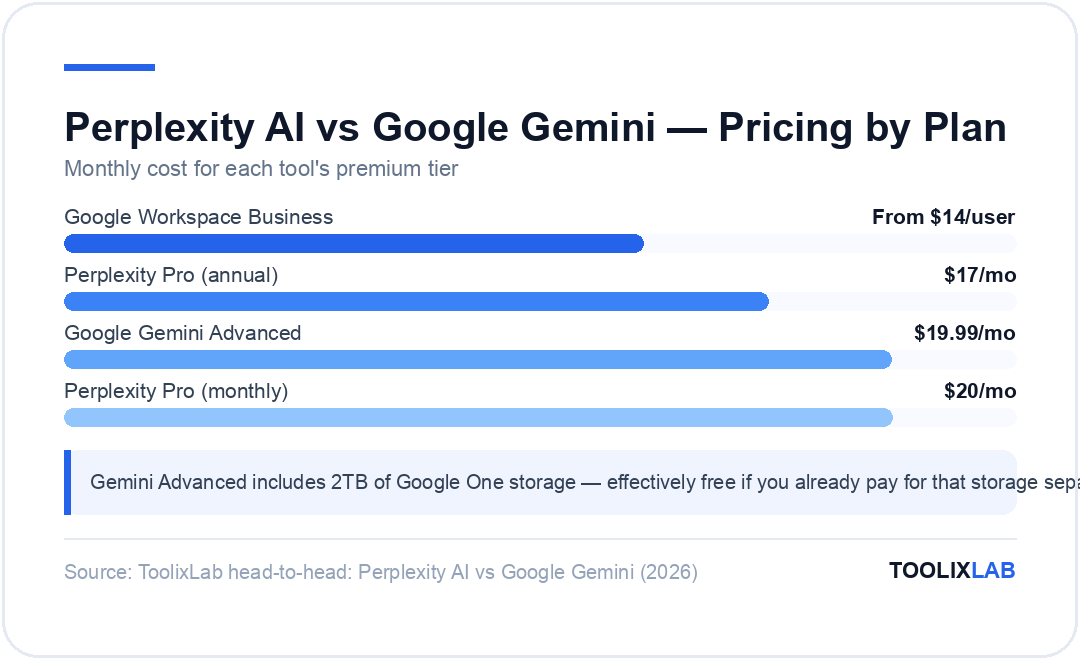
Pricing Comparison
Perplexity AI Pricing (2026)
Google Gemini Pricing (2026)
Pricing as of April 2026. Verify current pricing at Perplexity.ai and Google One.
The pricing reality: At $20/mo vs $19.99/mo, these tools are effectively identically priced for their premium tiers. The decision is never about cost — it's about capability fit. One notable advantage of Gemini Advanced: the $19.99/mo includes 2TB of Google One storage, which many users would pay for independently anyway, effectively making Gemini Advanced free if you're already a Google One subscriber.
Perplexity AI: Pros & Cons
✅ Pros
- • Best-in-class research with cited, verifiable sources
- • Deep Research mode for comprehensive topic reports
- • Model switching in Pro (Claude Sonnet 4.6, GPT-5.4)
- • Spaces for team-shared research environments
- • Clean, focused interface — no feature bloat
- • Strong free tier (5 Pro searches/day is genuinely useful)
- • Excellent for academic and professional research
❌ Cons
- • Limited multimodal capabilities vs Gemini
- • Smaller context window (127K vs 1M tokens)
- • No deep productivity app integrations
- • Weaker for creative writing and content generation
- • No device-level AI integration (mobile, desktop)
- • Research focus limits general-purpose versatility
Google Gemini: Pros & Cons
✅ Pros
- • 1M token context window — industry-leading
- • Best multimodal reasoning for images, video, audio
- • Deep Google Workspace integration (Gmail, Drive, Docs)
- • Gemini Advanced includes 2TB Google One storage
- • Device-level AI on Android — accessible everywhere
- • Strong coding capabilities with Gemini 2.5 Pro
- • Free tier (2.5 Flash) is genuinely capable
❌ Cons
- • Citations less systematic than Perplexity for research
- • Research synthesis less rigorous than Perplexity Pro
- • Full value requires Google ecosystem buy-in
- • Privacy concerns for users cautious of Google data usage
- • No model switching — locked to Gemini models
- • Can feel overwhelming for users who just want quick answers
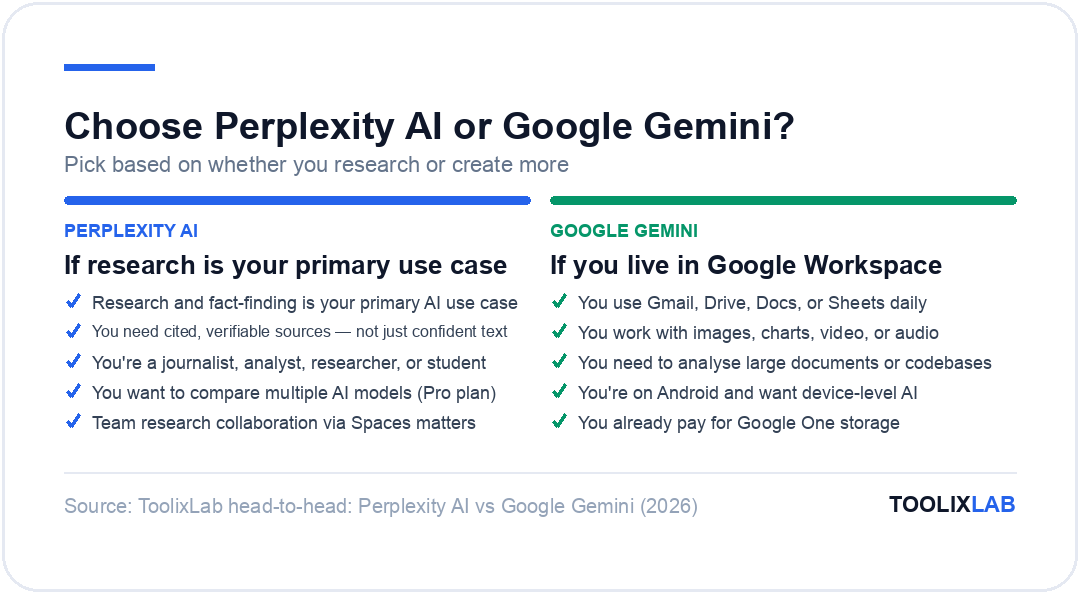
Which Should You Choose?
Our Verdict
These tools are better framed as complements than competitors. Perplexity AI is the best AI research tool available — nothing matches its citation quality, research depth, or the trustworthiness of its sourced answers. Google Gemini is the best AI assistant for multimodal tasks, long document analysis, and deep Google ecosystem integration. If you can only choose one and you spend more time researching than creating, choose Perplexity. If you spend more time creating and working across Google tools, choose Gemini. Many power users subscribe to both — at a combined $40/mo, the productivity gains justify it.
✅ Choose Perplexity if...
- • Research and fact-finding is your primary AI use case
- • You need cited, verifiable sources — not just confident text
- • You're a journalist, analyst, researcher, or student
- • You want to compare multiple AI models (Pro plan)
- • Team research collaboration via Spaces matters
- • You're not deeply embedded in Google's ecosystem
✅ Choose Gemini if...
- • You use Gmail, Drive, Docs, or Sheets daily
- • You work with images, charts, video, or audio
- • You need to analyse large documents or codebases
- • You're on Android and want device-level AI
- • You already pay for Google One storage
- • Coding and technical tasks are a major use case
For users evaluating the broader AI assistant landscape, our comparison of ChatGPT vs Perplexity AI covers how these two tools compare specifically for everyday productivity use, and our guide to the best ChatGPT alternatives in 2026 maps the full landscape of AI tools competing for your daily workflow.
If you use Gemini primarily for its Google Workspace integration and want to go deeper on the full Gemini feature set, our dedicated guide to how to use Google Gemini AI covers advanced features and tips in detail.
🔑 Key Takeaways
- ✓ Perplexity wins for research — cited sources, Deep Research mode, and model switching make it the best AI search tool
- ✓ Gemini wins for multimodal tasks — 1M context window, image/video reasoning, and Google Workspace integration are unmatched
- ✓ Pricing is nearly identical ($20/mo each) — the decision is capability fit, not cost
- ✓ Gemini Advanced's 2TB Google One storage inclusion makes it essentially free for existing Google One subscribers
- ✓ Most power users find value in both — they solve different problems in the same workflow
- ✓ Neither replaces a dedicated coding AI (Cursor, Copilot) or writing AI (Jasper, Writesonic) for specialist tasks
Frequently Asked Questions
Is Perplexity AI better than Google Gemini?
Perplexity AI is better than Google Gemini for research and fact-finding — its cited sources, Deep Research mode, and research-focused interface produce more trustworthy, verifiable answers for factual queries. Google Gemini is better for multimodal tasks (images, video, large documents), coding, and users embedded in Google Workspace. Neither is categorically "better" — they excel at different use cases, and many power users subscribe to both at $20/mo each.
What AI model does Perplexity use in 2026?
Perplexity uses its own Sonar model (based on Llama architecture) for standard searches on the free tier. Perplexity Pro subscribers can switch between Sonar, Claude Sonnet 4.6, and GPT-5.4 for different query types. This model flexibility is one of Perplexity Pro's key advantages — you can choose the model best suited to each research task rather than being locked into a single provider's output.
What Gemini model does Google Gemini Advanced use in 2026?
Google Gemini Advanced uses Gemini 2.5 Pro — Google's most capable consumer model as of early 2026. The free Gemini tier uses Gemini 2.5 Flash, which is faster and more efficient but less capable than Pro on complex reasoning tasks. Gemini 2.5 Pro's headline features include a 1 million token context window, advanced multimodal reasoning, and top benchmark scores on mathematics and coding tasks. Always check Google's official Gemini documentation for the most current model information, as Google updates models regularly.
Can Perplexity AI access real-time information?
Yes — real-time web access is the foundation of Perplexity AI's entire product. Every query (including on the free tier) triggers a live web search, and the AI synthesizes current information from across multiple sources. This is what distinguishes Perplexity from training-data-only AI tools and why it's particularly valuable for research on fast-moving topics like current events, market conditions, regulatory changes, and technology updates. Every response includes numbered citations linking to the sources used.
Is Google Gemini free?
Yes, Google Gemini has a free tier powered by Gemini 2.5 Flash — Google's fast, efficient model that handles most everyday AI tasks well. The free tier includes web search integration, basic image understanding, and standard AI assistant capabilities. Gemini Advanced ($19.99/mo) unlocks Gemini 2.5 Pro with the 1M token context window, full Google Workspace integration, and 2TB Google One storage. For users who want the most capable Gemini experience, Advanced is worth the upgrade — particularly if you already pay for Google One storage separately.
What is Perplexity Deep Research?
Perplexity Deep Research is a Pro feature that conducts multi-stage research on complex topics — spawning multiple sub-queries, cross-referencing dozens of sources, and synthesizing findings into a comprehensive research report. Unlike a standard Perplexity search (which takes seconds), Deep Research can take 2–5 minutes but produces a document-quality output with structured sections, cited statistics, and synthesized conclusions. It's particularly useful for market research, competitive analysis, academic topic exploration, and any research task that would normally require hours of manual web browsing and reading.
Does Google Gemini work with Gmail and Google Drive?
Yes — Google Gemini Advanced integrates natively with Gmail, Google Drive, Google Docs, Google Sheets, Google Slides, and Google Meet. Within Gmail, Gemini can summarize email threads, draft replies, and help you find specific emails using natural language. In Drive, you can ask questions about files without opening them. In Docs and Sheets, Gemini assists with writing and formula generation in context. These integrations require the Gemini Advanced subscription ($19.99/mo) or a Google Workspace Business plan with Gemini included.
Should I use Perplexity AI or Google Gemini for students?
For students, Perplexity AI is the stronger choice for academic research — its citation-first approach helps students find and verify primary sources rather than relying on AI-generated text that may not be accurate. The free tier's 5 Pro searches per day is sufficient for most study sessions, and the Pro plan ($20/mo) is affordable for serious research needs. Google Gemini is better for students who need to analyse lecture PDFs, process long reading lists, or work within Google Classroom and Google Workspace. Many students use Perplexity for research and Gemini for document analysis and writing assistance — the two tools complement each other well in an academic workflow.