
⚡ TL;DR — Quick Verdict
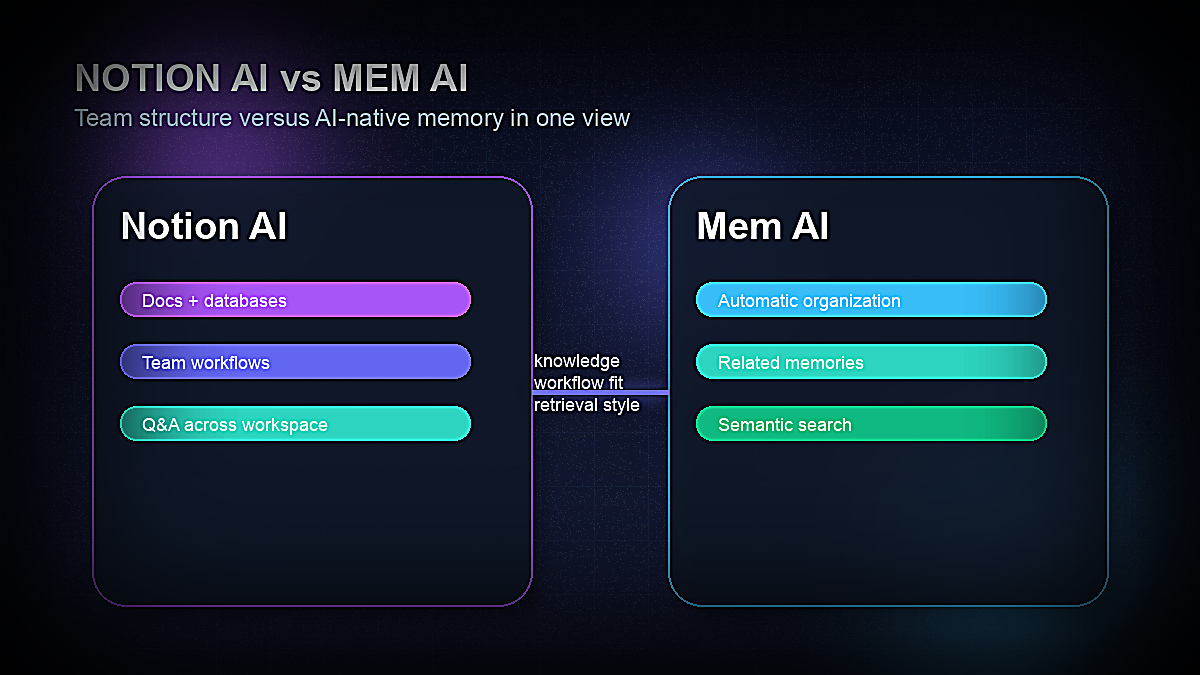
The AI workspace wars have a clear frontrunner on each side. Notion AI is the established productivity giant bolted onto the most popular all-in-one workspace in the world. Mem AI is the scrappy challenger building the first truly AI-native note-taking app — one that organizes itself, surfaces connections automatically, and treats your notes like a living knowledge graph.
In 2026, both tools have matured significantly. Notion AI has deepened its AI capabilities with better summarization, multi-page Q&A, and tighter database integration. Mem has shipped a redesigned interface, smarter search, and a more compelling vision of what AI-first knowledge management actually looks like in practice.
This comparison is based on hands-on testing of both tools across real knowledge management scenarios: research capture, meeting notes, project tracking, writing drafts, and retrieving information weeks after saving it. Here's what we found.
The 2026 AI Workspace Landscape
The category these tools compete in has a new name: the AI second brain. For decades, knowledge management meant folders, tags, and manual organization. You built systems. You maintained them. You inevitably abandoned them.
The promise of AI-native knowledge tools is different: the AI does the organizing, connecting, and retrieving so you can focus on capturing and using information. Both Notion AI and Mem AI are chasing this vision, but from opposite directions.
Notion AI's approach: Take the most popular structured workspace tool ever built and add a capable AI layer on top. The structure (databases, pages, wikis) is already there. AI enhances it — writes within it, summarizes it, answers questions about it.
Mem AI's approach: Start from scratch with AI at the core. No folders. No tags required. The AI surfaces connections, resurfaces relevant memories, and organizes your notes automatically. The structure emerges from the AI's understanding of your content, not from your manual filing decisions.
These are fundamentally different philosophies, and understanding them is key to choosing the right tool. Let's look at each in detail.
What Is Notion AI? Features, Pricing & Use Cases
Notion AI is the artificial intelligence layer built into Notion — the all-in-one workspace used by millions of teams for docs, databases, wikis, project tracking, and more. Launched in 2023 and significantly upgraded through 2025 and 2026, Notion AI is now a core part of the Notion experience rather than a bolt-on feature.
Core Notion AI Features in 2026
| Feature | What It Does |
|---|---|
| AI Writing Assistant | Draft, edit, summarize, translate, and improve any text within Notion pages |
| Q&A (Ask AI) | Ask natural language questions across your entire Notion workspace and get answers with source citations |
| Summarization | Summarize pages, meeting notes, databases, and linked documents instantly |
| Action Items | Extract tasks and action items from meeting notes or long documents automatically |
| AI Fill (Databases) | Auto-populate database properties based on page content (e.g., sentiment, category, priority) |
| Translate | Translate content into 30+ languages directly within Notion |
| AI Connectors | Connect to Google Drive, Slack, GitHub, Jira and query content from those tools inside Notion |
The AI Q&A feature — which lets you ask "What did we decide about the pricing strategy last month?" and get an answer pulled from across all your Notion pages — is genuinely impressive when your workspace is well-maintained. It's powered by a combination of vector search and LLM inference across your entire workspace, with citations showing exactly which pages the answer came from.
The AI Fill feature for databases is one of Notion AI's most underrated capabilities. You can create a property like "Sentiment" on a CRM database and have Notion AI automatically categorize every note as Positive, Neutral, or Negative based on the note content. Or create a "Priority" property and let AI assess urgency based on the text. This kind of structured AI augmentation is something Mem AI simply doesn't offer.
Notion AI Pricing in 2026
Notion operates a two-layer pricing model: a base Notion plan plus an AI add-on.
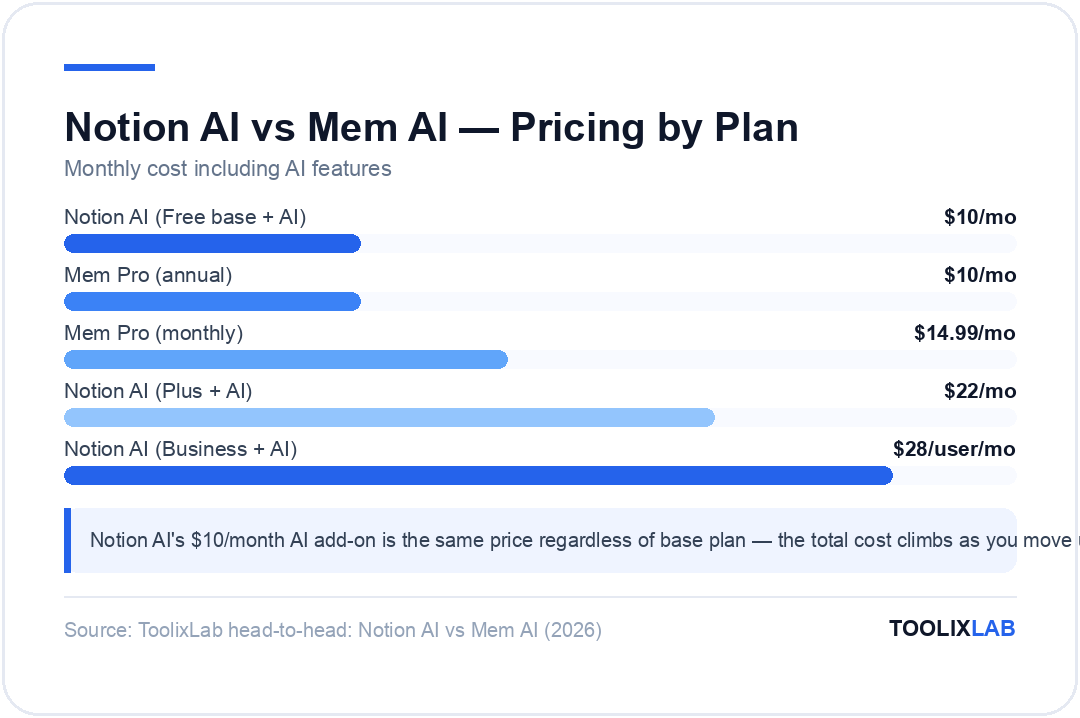
| Plan | Base Price | AI Add-On | Total |
|---|---|---|---|
| Free | $0 | $10/month | $10/month |
| Plus | $12/month (monthly) | $10/month | $22/month |
| Business | $20/user/month (annual) | $8/user/month (annual) | $28/user/month |
The AI add-on is the same $10/month regardless of which base plan you're on. If you're a solo user on the free Notion plan, you pay $10/month for AI — the same as if you were a team member on the Business plan. This is important context when comparing to Mem AI's all-in-one pricing.
Best Use Cases for Notion AI
- →Teams managing projects, wikis, and documentation in a shared workspace
- →Content teams using AI to draft, edit, and repurpose content at scale
- →Product teams maintaining structured databases with AI-enhanced properties
- →Anyone who already lives in Notion and wants AI within their existing workflow
- →Operations teams needing to query large knowledge bases with natural language
What Is Mem AI? Features, Pricing & Use Cases
Mem AI is an AI-first note-taking and knowledge management app built on the premise that manual organization is the enemy of good knowledge management. Founded in 2019 and significantly evolved through 2025–2026, Mem positions itself as the note-taking app that organizes itself — no folders, no tags required (though you can use them if you want).
The core idea: every note you save in Mem becomes part of a knowledge graph. As you write new notes or ask questions, Mem surfaces relevant memories from your past notes automatically. The AI understands semantic meaning — not just keywords — so it can surface a note about "Q3 sales targets" when you're writing about "revenue goals," even if you never explicitly connected them.
Core Mem AI Features in 2026
| Feature | What It Does |
|---|---|
| AI Organization | Automatically groups, links, and surfaces related notes without manual tagging or folders |
| Mem Chat | Chat with your entire knowledge base using natural language — ask questions, get answers with citations |
| Smart Search | Semantic search that understands meaning, not just keywords — finds notes even when you don't remember exact words |
| Related Memories | Automatically surfaces notes from your past that are relevant to what you're currently writing or reading |
| AI Writing | Draft and edit content with AI assistance, with awareness of your past notes as context |
| Daily Notes | Automatic daily note creation with AI-powered surfacing of relevant past memories at the start of each day |
| Web Clipper | Save articles, web pages, and highlights directly to Mem with automatic AI summarization |
The "Related Memories" feature is Mem's standout differentiator. When you open a note about a client meeting, Mem automatically surfaces 3–5 related notes from your past — previous meetings, relevant research, earlier decisions — without you having to search for anything. This ambient knowledge surfacing is something Notion AI doesn't do at all.
Mem Chat — their conversational interface for querying your knowledge base — is comparable to Notion AI's Q&A feature, but with one meaningful difference: Mem's entire architecture is built around this use case. The vector index, the semantic clustering, the knowledge graph — all of it feeds into making Mem Chat more accurate on personal knowledge retrieval tasks.
Mem AI Pricing in 2026
| Plan | Price | What's Included |
|---|---|---|
| Free | $0 | Basic notes, limited AI features, up to 1,000 notes |
| Mem Pro | $14.99/month ($10/mo annual) | Unlimited notes, full AI features, Mem Chat, related memories, priority sync |
Mem's pricing is simpler than Notion's. At $14.99/month (or $10/month billed annually), you get everything in a single package — no base plan + add-on stacking. For a solo knowledge worker, Mem Pro is actually cheaper than Notion Plus + AI add-on ($26/month), and slightly more expensive than just the Notion AI add-on on the free base plan ($10/month).
Best Use Cases for Mem AI
- →Solo knowledge workers, researchers, and writers who capture a lot of information
- →Anyone who has failed at maintaining Notion/Roam/Obsidian systems because organization was too manual
- →Consultants and advisors managing knowledge across many different clients
- →Journalists, analysts, and researchers who need to find connections across large note archives
- →People who prefer fluid, frictionless capture over structured systems
Head-to-Head Feature Comparison
| Feature | Notion AI | Mem AI |
|---|---|---|
| AI Writing Assistant | ✅ Excellent | ✅ Good |
| Q&A / Chat with Notes | ✅ Very Good | ✅ Excellent |
| Auto-Organization | ❌ Manual | ✅ AI-Native |
| Related Memory Surfacing | ❌ Not available | ✅ Core Feature |
| Databases / Structured Data | ✅ Best in class | ❌ Not available |
| Team Collaboration | ✅ Excellent | ⚠️ Limited |
| Semantic Search | ✅ Good | ✅ Excellent |
| Web Clipper | ✅ Yes | ✅ Yes (with AI summary) |
| Third-party Integrations | ✅ 50+ integrations | ⚠️ Limited (Gmail, Slack) |
| Mobile App | ✅ iOS + Android | ✅ iOS + Android |
| Offline Access | ⚠️ Partial | ⚠️ Partial |
| AI-Powered Database Fill | ✅ Yes | ❌ No |
| Starting Price (with AI) | $10/month | $14.99/month |
AI Writing & Summarization Quality
We tested both tools on the same set of tasks: drafting a meeting recap from bullet points, summarizing a 3,000-word research document, expanding a short note into a full section, and improving the clarity of a dense paragraph.
Notion AI writing quality: Excellent. Notion AI produces clean, professional prose with good structural awareness. The "Improve writing" command is particularly strong — it enhances clarity without radically changing your voice. The ability to select any portion of text and run AI commands on just that selection gives you very fine-grained control. For content teams, Notion AI's writing assistance is genuinely production-ready.
Mem AI writing quality: Good, but with a meaningful edge case advantage. Because Mem AI writes with awareness of your existing notes, when you ask it to draft content it can pull relevant facts, quotes, and context from your personal knowledge base automatically. If you've been saving research on a topic for months, Mem AI can synthesize that accumulated knowledge into a draft in a way that Notion AI can't match — because Notion AI doesn't automatically draw from your past notes while writing.
Summarization: Both tools summarize effectively. Notion AI has a slight edge on long-document summarization because it's better at maintaining structure (turning a long doc into a bulleted executive summary with headers). Mem AI's summarization is strong for meeting notes and articles, and it saves the summary alongside your note automatically.
For teams producing marketing content, blog posts, or documentation, Notion AI's writing tools are more polished and more feature-rich. For solo researchers who want AI that synthesizes their accumulated notes, Mem AI's context-awareness gives it a unique edge. See our full Notion AI review for a deeper look at its writing capabilities.
Knowledge Management & Semantic Search
This is where the philosophical difference between the two tools becomes most visible — and where your choice will likely be decided.
Notion AI Knowledge Management
Notion's knowledge management is structure-first. Your information is organized into pages, databases, and wikis that you design. The AI then operates on top of that structure. If your workspace is well-organized, Notion AI's Q&A is remarkably capable — it can answer questions like "What were the three main risks we identified in the Q2 risk assessment?" with accurate citations.
The limitation is that Notion AI's knowledge capabilities are only as good as your workspace organization. If your notes are scattered across disorganized pages, or if you haven't built proper databases, the AI struggles. Notion AI is an intelligence layer on a structure you create — if the structure is messy, the AI is less useful.
Mem AI Knowledge Management
Mem's approach is fundamentally different. You capture anything, anytime — a fleeting thought, a meeting note, a clipped article — and Mem builds the knowledge graph for you. The "Related Memories" feature surfaces connections automatically. When you open a note about a new client, Mem shows you previous notes about that client, related industry research you saved, and relevant conversations — all without any manual linking.
In testing, Mem's semantic search was noticeably superior to Notion AI's keyword-based search. Searching for "pricing discussion" in Notion returned only pages that contained those exact words. The same search in Mem surfaced notes about "cost conversations," "budget negotiations," and "subscription model debates" — all semantically related but lexically different.
For researchers, journalists, and consultants who deal with large, unstructured knowledge archives, Mem's semantic retrieval is a genuine productivity advantage. The AI finds what you need even when you don't remember exactly how you phrased it.
Team Collaboration vs Solo Use
This is perhaps the clearest decision point in the Notion AI vs Mem AI comparison.
Notion AI for Teams
Notion was built for teams from the ground up. Shared workspaces, permission levels, real-time collaboration, comment threads, mentions, task assignments — all of these are core features, not afterthoughts. When you add Notion AI to a team workspace, every team member can query the shared knowledge base, AI-fill databases collaboratively, and work on documents together with AI assistance.
For a team of 5 content creators, a product team maintaining a shared wiki, or a startup where everyone needs access to the company knowledge base, Notion AI is the clear choice. There is simply no equivalent in Mem AI for shared team workspaces.
Mem AI for Solo Work
Mem is currently optimized for individual use. While Mem has added some sharing features, the core product experience is designed around a personal knowledge base — your notes, your memories, your knowledge graph. The AI's power comes from knowing your context, your past notes, your thinking — which is inherently personal.
If you're a solo founder, a freelance researcher, or a consultant managing your own knowledge, Mem AI's individual-first design is a strength. If you need your whole team to share and contribute to a single knowledge base, Notion AI is the practical choice.
Many sophisticated users run both: Mem for personal capture and thinking, Notion for team-facing documentation and project management. This combination sidesteps the choice entirely, though it does mean managing two subscription costs.
Integrations & Ecosystem
Notion AI benefits from Notion's massive integration ecosystem. You can connect Notion to Slack (automatically create Notion pages from Slack messages), GitHub (sync pull requests to project databases), Jira, Google Calendar, Figma, and dozens more tools via native integrations. The AI Connectors feature — which lets you query Google Drive and Slack content from within Notion AI — is particularly powerful for teams that spread information across multiple tools.
Mem AI has a smaller integration footprint. The web clipper is excellent. Gmail integration allows forwarding emails to Mem directly. Slack integration lets you save Slack messages as Mem notes. But compared to Notion's ecosystem, Mem's integrations are limited. This is a meaningful gap if you live in a multi-tool workflow.
For workflows involving Zapier or Make automation, Notion has a robust API and widely-supported Zapier actions. Mem's API access is limited. If you're building automated workflows that pipe data into your workspace, Notion is significantly more capable. Learn more about building these kinds of systems in our guide to AI workflow automation.
Pricing & Value for Money
Let's be direct about the total cost of each tool for the most common user types.
| User Type | Notion AI Cost | Mem AI Cost | Winner |
|---|---|---|---|
| Solo (AI only, Free base) | $10/month | $14.99/month | Notion AI |
| Solo (Full workspace + AI) | $26/month (Plus + AI) | $10/month (annual) | Mem AI |
| Team of 5 (with AI) | $125/month | $75/month (limited collab) | Mem (price) / Notion (features) |
The value calculation depends on what you need. If all you want is AI on top of a free Notion workspace, Notion AI at $10/month is the better deal. If you want a full-featured workspace with AI, Mem Pro at $10/month (annual) offers more AI-first capabilities per dollar for solo users. For teams, Notion wins outright on collaborative features despite higher cost.
Real-World Testing: Where Each Tool Surprised Us
After weeks of using both tools for actual work — not contrived test scenarios — here are the moments that stood out:
Notion AI surprised us with: The AI Fill database feature. We set up a CRM with a "Next Action" property and had Notion AI analyze each customer note to suggest the next step. For a sales or customer success team, this is a genuinely time-saving use of AI that goes beyond writing assistance.
Mem AI surprised us with: The serendipitous connection surfacing. While writing a note about a potential partnership, Mem surfaced a 6-month-old note containing a relevant research point we had completely forgotten about. That's the "second brain" promise actually working — and it's something no amount of Notion organization would have surfaced without manually linking those notes ourselves.
Notion AI disappointed us with: Q&A accuracy on messy workspaces. When we deliberately used a disorganized Notion workspace (the kind most real users have), the Q&A results were noticeably worse. The AI is only as good as your structure.
Mem AI disappointed us with: Limited formatting and structure for longer documents. Writing a structured report or a long-form document in Mem feels constrained compared to Notion. The editor is simpler, and the lack of database-style structure makes Mem unsuitable for project management or anything requiring tabular data.
For teams building AI-assisted content workflows, our guide to AI content creation workflows covers how to integrate these tools into a broader system.
Which One Should You Choose? Our 2026 Verdict
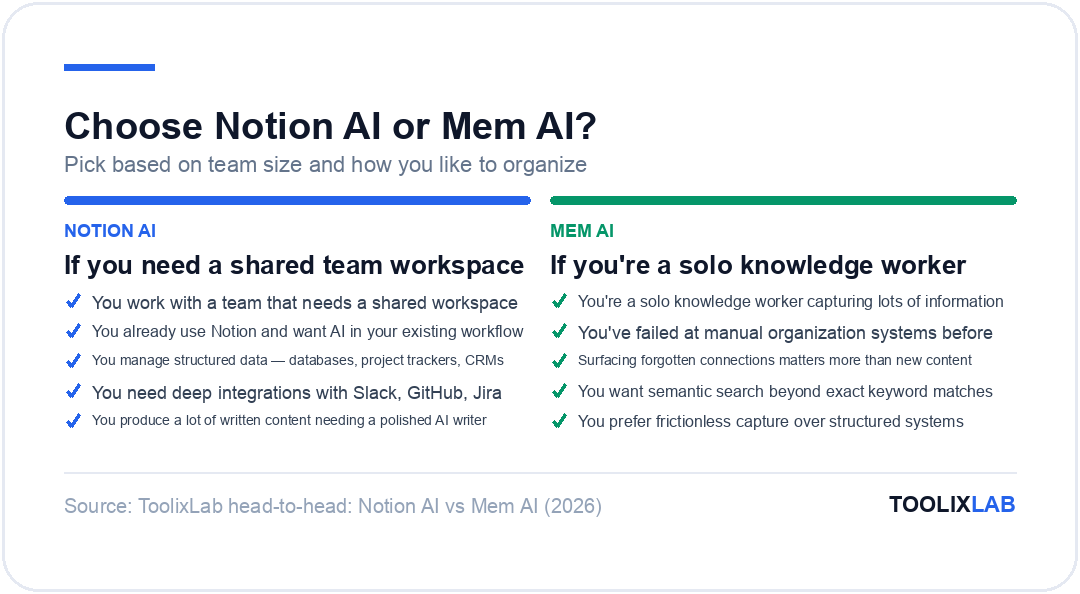
- ✓You work with a team that needs a shared workspace
- ✓You already use Notion and want AI within your existing workflow
- ✓You manage structured data — databases, project trackers, CRMs
- ✓You need deep integrations with other tools (Slack, GitHub, Jira)
- ✓You produce a lot of written content and want a polished AI writing assistant
- ✓You're a solo knowledge worker capturing lots of information
- ✓You've failed at manual organization systems before
- ✓Surfacing forgotten connections is more valuable than creating new content
- ✓You want semantic search that finds notes even without exact keyword matches
- ✓You prefer frictionless capture over building structured systems
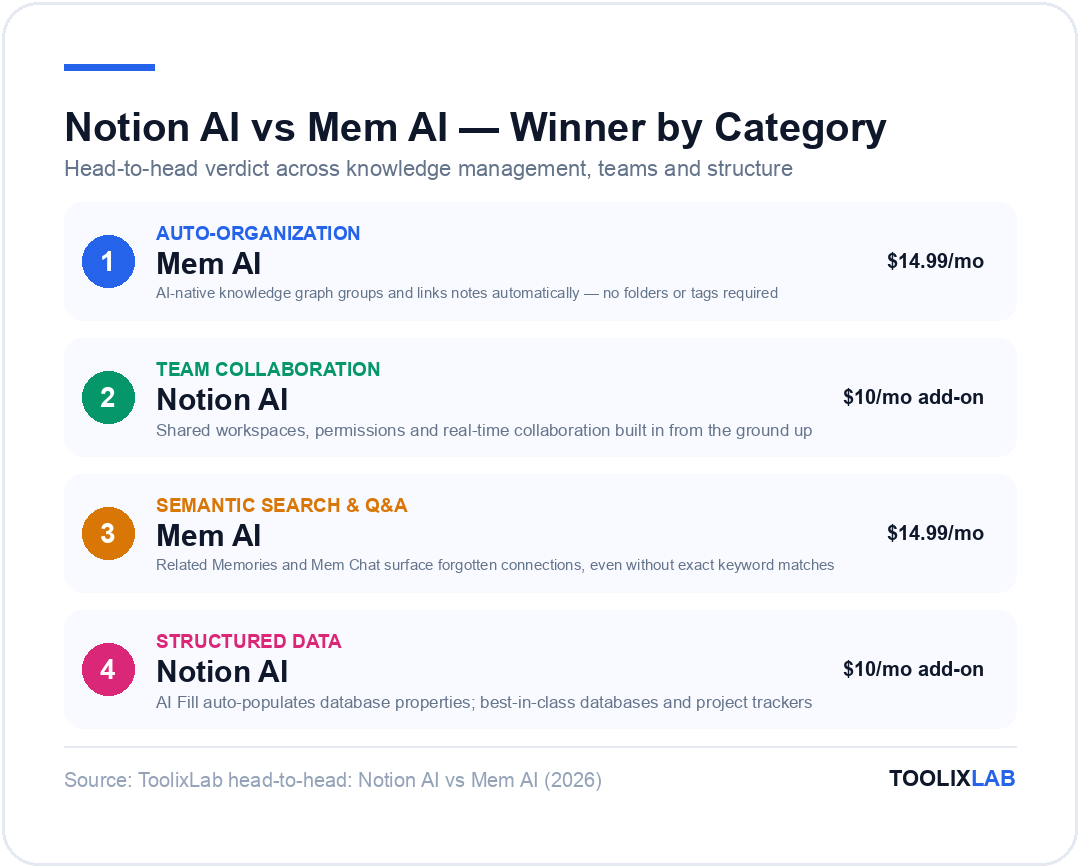
Neither tool is objectively better — they solve different problems. Notion AI is the best AI-enhanced collaborative workspace in 2026. Mem AI is the best AI-native personal knowledge management tool. The right choice depends on your workflow, your team size, and what you value most: structure and collaboration (Notion AI) or automatic organization and knowledge retrieval (Mem AI).
If you're building a broader AI toolkit, both tools can coexist alongside AI writing assistants. Our roundup of the best AI writing tools for content creators covers complementary options worth considering alongside your workspace choice. If you go the Notion route, our free Notion templates roundup gives you ready-made structures, and our Notion AI vs ChatGPT comparison answers whether you need a standalone chatbot as well.
Our Recommendation
Start with Notion AI on the free base plan ($10/month) if you have any team collaboration needs or existing Notion usage. Start with Mem Pro ($10/month billed annually) if you're a solo knowledge worker who wants automatic organization and semantic retrieval. Both have trial periods — test whichever fits your workflow before committing.
⚖️ Our Verdict
Notion AI wins for team collaboration and structured workspaces; Mem AI wins for personal knowledge management and automatic organization. These tools rarely compete for the same user — Notion AI thrives with teams who need shared docs and AI-powered project management, while Mem AI shines for solo knowledge workers who want their notes to surface connections automatically without manual tagging or folder structures.
✅ Choose Notion AI if...
- • You have team-based workflows needing shared docs and wikis
- • Structured project management with AI-powered Q&A is your goal
- • You're already using Notion and want AI built into your workspace
✅ Choose Mem AI if...
- • You're building a personal second brain and knowledge base
- • Automatic note organization without manual effort is the priority
- • You want semantic search that surfaces forgotten connections