
ChatGPT Trust Snapshot
Real Free Score
80/100
Lock-In Risk
Medium
Billing Friction
Low
Commercial Use
Allowed
Data Privacy
Clear
Volatility
Medium
Last checked
2026-07-22
The short version: Notion AI is a workspace AI — it knows your docs, projects, and team context. ChatGPT is a general-purpose AI — it can do almost anything, but knows nothing about your work unless you paste it in. They solve different problems. The question isn't which one is better — it's which one fits what you're actually trying to do.
Most comparisons of Notion AI and ChatGPT frame it as a writing tool shootout. Which one writes better? Which one is faster? Which one is worth $20 a month? That's the wrong question — and it's why most people end up disappointed with whichever one they pick.
This guide covers what each tool does best in 2026, where each one falls short, who should use which, and whether it's worth running both. By the end, you'll have a clear answer — and a practical workflow if you decide to use them together.

What Is Notion AI? (And What Changed in 2026)
Notion AI started life as a writing assistant — a way to draft, summarise, and rewrite text inside your Notion pages. That version still exists, but it's now the least interesting thing Notion AI does.
In September 2025, Notion launched Notion 3.0, which introduced autonomous AI Agents that shifted the platform from "AI that suggests" to "AI that executes." This is the biggest change to Notion AI since it launched, and most comparisons written before late 2025 are describing a product that no longer fully exists.
Notion Agent — AI That Acts, Not Just Answers
Notion Agent is an AI assistant that can take multi-step actions inside your workspace. Ask it to compile all feedback from your Q3 client calls, identify the most common themes, and draft a summary for the exec team — it does that. Without you manually pulling documents, copy-pasting content, or structuring the output yourself.
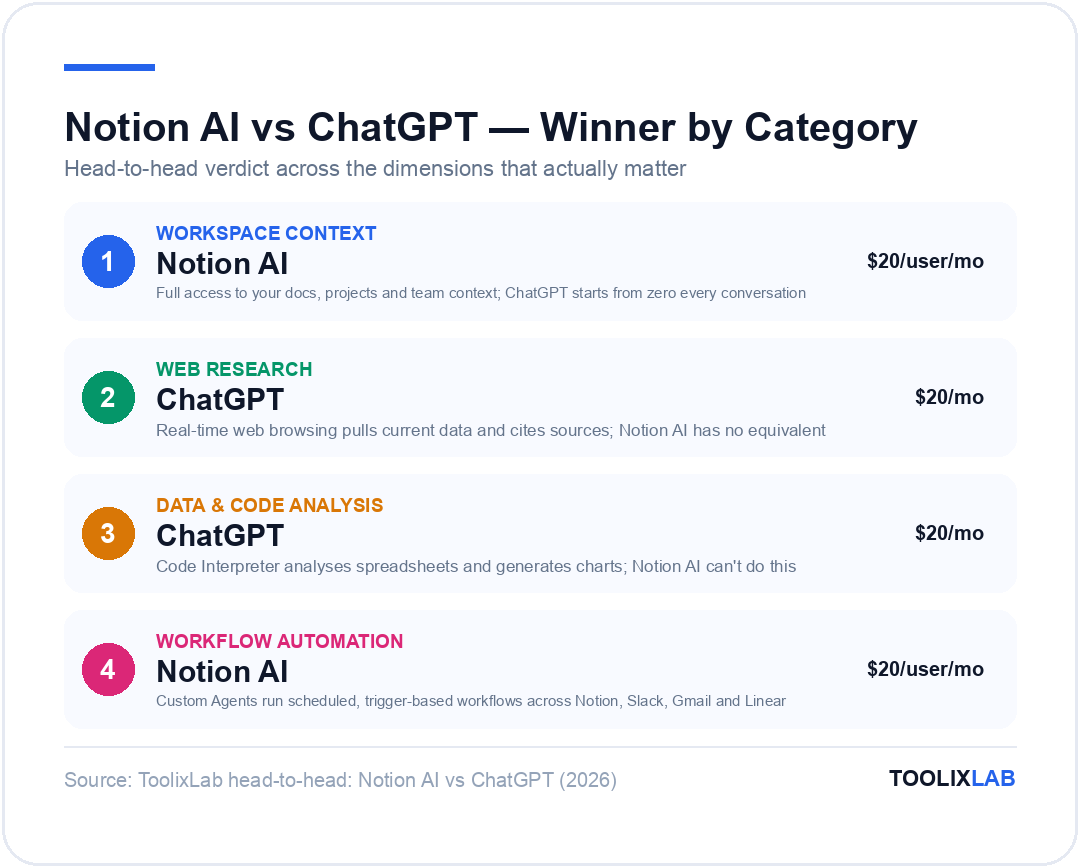
The context advantage here is significant. Because Notion Agent has access to everything in your workspace — every doc, database, task, and meeting note — it can complete tasks that would take ChatGPT five manual copy-paste cycles to even attempt.
Custom Agents — Autonomous and Always On
Custom Agents are the most powerful new feature in Notion's 2026 lineup. Unlike Notion Agent (which you prompt manually), Custom Agents run autonomously on triggers — 24 hours a day, 7 days a week.
You configure them once: "Every morning, pull updates from our Linear tasks, check Slack for unresolved threads, and create a daily standup summary in our team Notion page." Then they run without you. Custom Agents can connect across Notion, Slack, Gmail, Calendar, Figma, Linear, and custom MCP servers.
Pro tip: Custom Agents are currently in beta. Even if credits kick in later, setting up one automated workflow now will help you understand what you're getting before you start paying for it. Check notion.com for current trial details.
AI Meeting Notes — The Everyday Workhorse
AI Meeting Notes is the Notion AI feature that most teams use daily. It transcribes your meetings in real time, generates structured summaries, extracts action items, and drops everything directly into your Notion workspace — searchable and linked to the relevant project.
The underrated part: because the summaries live in Notion, your Agent can reference them later. Ask Notion AI "What did we decide about the Q2 roadmap across our last four product syncs?" and it actually knows.
Multi-Model Flexibility
Notion AI isn't just running on one model. Depending on your plan, you can choose between multiple AI models — including Claude and Gemini alongside OpenAI's models — for different tasks. ChatGPT, by contrast, is locked to OpenAI's model family exclusively.
Notion AI Pricing
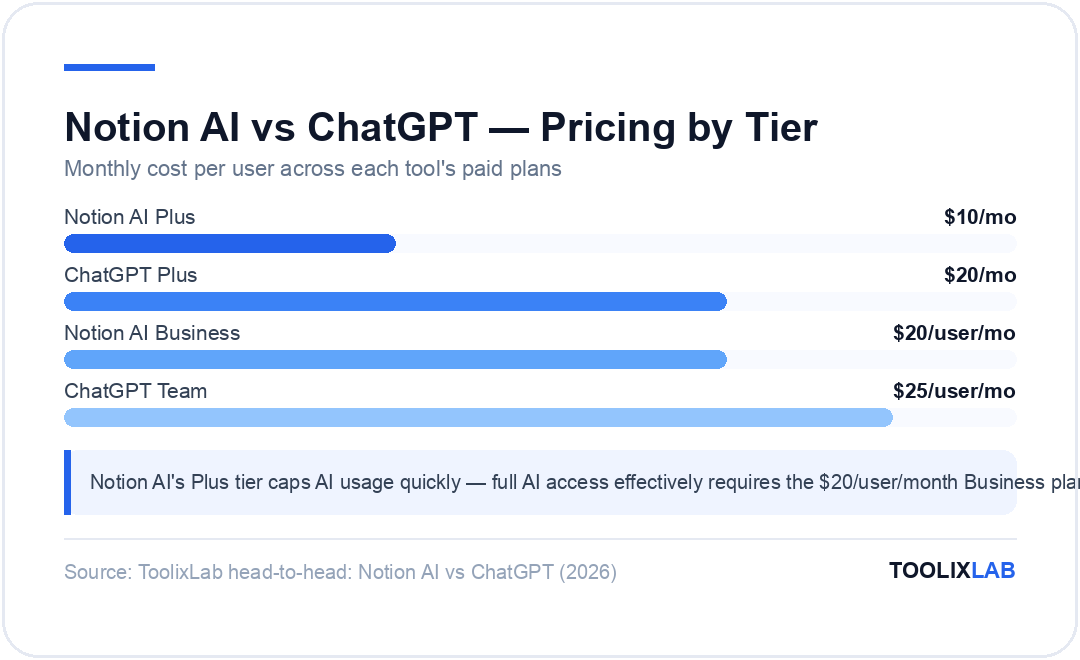
- Free: Limited AI trial — hits limits quickly
- Plus: $10/user/month (annual) — limited AI trial
- Business: $20/user/month (annual) — limited AI trial; full AI requires $10/mo add-on (or $8/mo annual) per member
- Enterprise: Custom pricing
Verify current tiers and model picker options on notion.com/pricing.
What Is ChatGPT? (Current State in 2026)
The default model for most users is GPT-5.4, with access to advanced reasoning models available on Plus and Team plans. ChatGPT's core strengths haven't changed — it's still the best general-purpose AI for open-ended tasks — but the surrounding feature set has grown significantly.
ChatGPT's Key Features in 2026
- Memory — ChatGPT can now remember facts about you across conversations: your role, your preferences, your recurring projects. This partially addresses the context gap, though it's shallow compared to Notion AI's workspace-level understanding.
- Web browsing — ChatGPT can search the internet in real time, pull current data, and cite sources. This is a major differentiator — Notion AI has no equivalent.
- Image generation — DALL-E is built directly into ChatGPT. Create visuals, edit images, generate social assets — all within the same interface. Notion AI does not generate images.
- Code Interpreter (Advanced Data Analysis) — Upload a spreadsheet or dataset and ChatGPT will analyse it, generate charts, identify patterns, and explain findings in plain English. One of the most practically useful features in the entire product.
- Custom GPTs — Build your own specialised AI assistants with custom instructions, knowledge bases, and tool access. Shareable across teams.
- Voice Mode — Real-time voice conversations with the AI. Useful for hands-free ideation and mobile use.
What ChatGPT Doesn't Have
ChatGPT knows nothing about your work. Every conversation starts from zero unless you manually provide context. There's no connection to your documents, your projects, your team's decisions, or your company's knowledge base. Memory helps at the surface level — it might remember your job title — but it has no access to the actual content you work with every day.
ChatGPT Pricing
- Free: GPT-5.4 (limited access), basic features, no memory
- Plus: $20/month — full GPT-5.4 access, advanced reasoning models, DALL-E, web browsing, memory, Code Interpreter
- Team: $25/user/month — shared workspaces, admin controls, higher limits
- Enterprise: Custom pricing with advanced security and compliance
Notion AI vs ChatGPT — Head-to-Head Comparison
| Feature | Notion AI | ChatGPT |
|---|---|---|
| Workspace context | ✅ Full workspace access | ❌ None — starts from zero |
| Writing assistance | ✅ Strong (within context) | ✅ Excellent (from scratch) |
| Autonomous agents | ✅ Custom Agents (trigger-based) | ⚠️ Limited automation |
| Meeting notes | ✅ Built-in, searchable | ❌ Not available |
| Web browsing | ❌ No | ✅ Yes (real-time) |
| Image generation | ❌ No | ✅ Yes (DALL-E) |
| Code Interpreter | ❌ No | ✅ Yes |
| Multiple AI models | ✅ Claude, GPT, Gemini | ❌ OpenAI models only |
| Memory | ⚠️ Workspace-level only | ✅ Cross-session memory |
| Free tier | ⚠️ Very limited | ✅ Genuinely useful |
| Best for | Team workflows in Notion | Open-ended tasks, research |
| Starting price | $20/user/month (Business) | $20/month (Plus) |
Where Notion AI Wins
When Your Work Lives in Notion
Context is Notion AI's killer feature — and it's not close. If your projects, documents, meeting notes, and team decisions all live in Notion, then Notion AI has access to everything you've ever worked on. ChatGPT has access to whatever you type into the prompt box right now.
In practice, this means tasks that would take significant manual effort in ChatGPT happen in seconds in Notion AI. "Summarise all feedback from our Q1 client calls and identify the three most common product complaints" — Notion AI finds the documents, reads them, and drafts the summary. ChatGPT requires you to locate every relevant document, copy the content, paste it in, and manage the context window yourself.
Automated Team Workflows with Custom Agents
Custom Agents take the context advantage and make it proactive. Instead of prompting Notion AI every morning to pull together a standup summary, a Custom Agent does it automatically — pulling from your Linear board, your Slack channels, and your Notion project pages — and posts it to the right place before your first meeting.
This is workflow automation that non-technical teams can set up without an n8n instance or a Zapier subscription. The trigger-action logic is configured in plain English inside Notion, and the Agent has native access to your workspace without additional integration overhead.
Watch out for: Custom Agents are in beta and behaviour can be inconsistent for complex multi-step workflows. Start with simple, single-outcome automations before building anything mission-critical.
AI Meeting Notes
Stop writing meeting notes manually. This is the single clearest ROI in the entire Notion AI feature set. AI Meeting Notes transcribes in real time, produces a clean structured summary, pulls out action items with owners, and saves everything to your workspace automatically.
The searchability is what makes it genuinely powerful. Six months from now, when someone asks "didn't we discuss this in a product meeting last year?" — you can ask Notion AI and it will find it. That institutional memory compounds over time in a way that manually-written notes never do.
Multi-Model Flexibility
On Business and Enterprise plans, Notion AI lets you switch between multiple AI models depending on the task — including Claude models for nuanced writing and analysis, and Gemini for research-heavy work. ChatGPT gives you OpenAI's models and nothing else. If you want to use Claude for a task in ChatGPT, you need to open a separate browser tab.
Where ChatGPT Wins
Open-Ended Research and Reasoning
When you don't know exactly what you're looking for, ChatGPT is the better starting point. Its web browsing capability means it can pull current information, scan multiple sources, and synthesise findings — all within a single conversation. Notion AI cannot browse the web. If your task requires current data, recent news, or research beyond your own documents, ChatGPT wins outright.
This makes ChatGPT significantly more useful for market research, competitive analysis, trend tracking, and any task where the relevant information lives outside your Notion workspace.
Creative and Long-Form Writing from Scratch
Notion AI's writing quality is strong when it's working with context — your own documents, your tone, your brand voice. Start it from a genuinely blank slate and it's competent but not exceptional. ChatGPT remains the stronger tool for long-form creative writing, ideation, and first-draft generation when you're starting from nothing.
Code Interpretation and Data Analysis
This is one of ChatGPT's clearest, most uncontested advantages. Upload a CSV of your sales data and ask ChatGPT to identify your top-performing products, visualise the trend, and flag anomalies — it does all of that, generates charts, and explains its reasoning in plain English. Notion AI has no equivalent.
Image Generation
DALL-E integration gives ChatGPT a capability Notion AI simply doesn't have. Generate social media graphics, product mockup concepts, presentation visuals, or illustrative images for blog posts — all within the same interface you're already using for writing and research.
The Free Tier
ChatGPT's free tier is genuinely useful. You get GPT-5.4 access (with daily limits), basic web browsing, and enough capability to accomplish meaningful work. Notion AI's free and Plus plan AI access hits limits quickly enough that it's not a realistic option for regular use. If budget is a constraint, ChatGPT's free tier gives you significantly more value.
Who Should Use Notion AI?
You should be using Notion AI if your team already organises work in Notion. This isn't a soft preference — it's the core requirement. The entire value of Notion AI comes from its access to your workspace. Without that context, it's a writing assistant that costs more than competitors.
Notion AI is particularly well-suited for:
- Project managers who want AI embedded in their workflows. The ability to ask "what are the blockers across all active projects?" and get an actual answer from live workspace data is genuinely useful.
- Operations and people teams who run recurring workflows — weekly reports, standup summaries, onboarding checklists, policy Q&A — that Custom Agents can automate without code.
- Teams that value data privacy. Notion does not train its AI models on customer workspace data. For teams handling sensitive client information, confirm directly with Notion for your specific plan tier.
Who should NOT use Notion AI as their primary AI tool: Solo users on free or Plus plans (AI limits make it impractical for daily use); teams whose work doesn't live in a structured workspace; anyone who regularly needs web research, image generation, or code analysis.
Who Should Use ChatGPT?
ChatGPT is the right primary AI tool if you need general-purpose capability without committing to a specific workspace ecosystem.
- Writers, marketers, and content creators who work across multiple platforms and need to generate content, ideas, and copy from scratch rather than from existing documents.
- Developers and analysts who use Code Interpreter regularly will find ChatGPT difficult to replace. The ability to upload data and receive analysis, visualisation, and explanation in a single workflow has no equivalent in Notion AI.
- Researchers and strategists who need current web data will hit a wall with Notion AI quickly.
- Individuals and small teams who want powerful AI without the overhead of managing a knowledge workspace — ChatGPT Plus at $20/month is one of the best-value AI subscriptions available.
Can You Use Both? (The Power User Stack)
Yes — and many high-output teams already do. The split is cleaner than most people expect.
Use Notion AI for anything that requires your workspace context: summarising docs, finding decisions, drafting from existing materials, running automated team workflows, capturing meeting notes.
Use ChatGPT for anything that starts from scratch or requires external information: research, ideation, first-draft creative writing, data analysis, image generation.
In practice, a common power user workflow looks like this: use ChatGPT to research a topic and develop initial ideas, then bring the output into Notion and use Notion AI to connect it with existing project context, refine it against your brand voice, and route it to the right team via a Custom Agent.
Pro tip: If you're deciding whether to add ChatGPT to a Notion AI workflow, the test is simple: does this task require information that lives outside your Notion workspace? If yes, ChatGPT earns its place. If no, Notion AI alone is probably enough.
Pricing — What Do You Actually Pay?
At face value, both tools cost $20/month at their main paid tier. But the comparison isn't apples-to-apples.
Notion AI at $20/user/month (Business, annual) is a per-seat cost for a team. If you have 10 people, that's $200/month — and Notion AI is included within the Business plan that you'd likely need anyway for team features. The AI isn't a separate add-on at this tier.
ChatGPT Plus at $20/month is an individual subscription. Team plan is $25/user/month. For a 10-person team, that's $250/month — on top of whatever workspace tool you're already paying for.
The practical framing: If your team is already on Notion Business, Notion AI is effectively included. If you're on Notion free or Plus and trying to decide whether to upgrade, the full $20/user/month cost applies and the calculus changes.
| Tier | Notion AI | ChatGPT |
|---|---|---|
| Free | Limited trial | Genuinely useful (GPT-4o limited) |
| Individual paid | $10/mo (Plus, limited AI) | $20/mo (Plus, full features) |
| Team paid | $20/user/mo (Business, full AI) | $25/user/mo (Team) |
| Enterprise | Custom | Custom |
Verdict — Notion AI vs ChatGPT
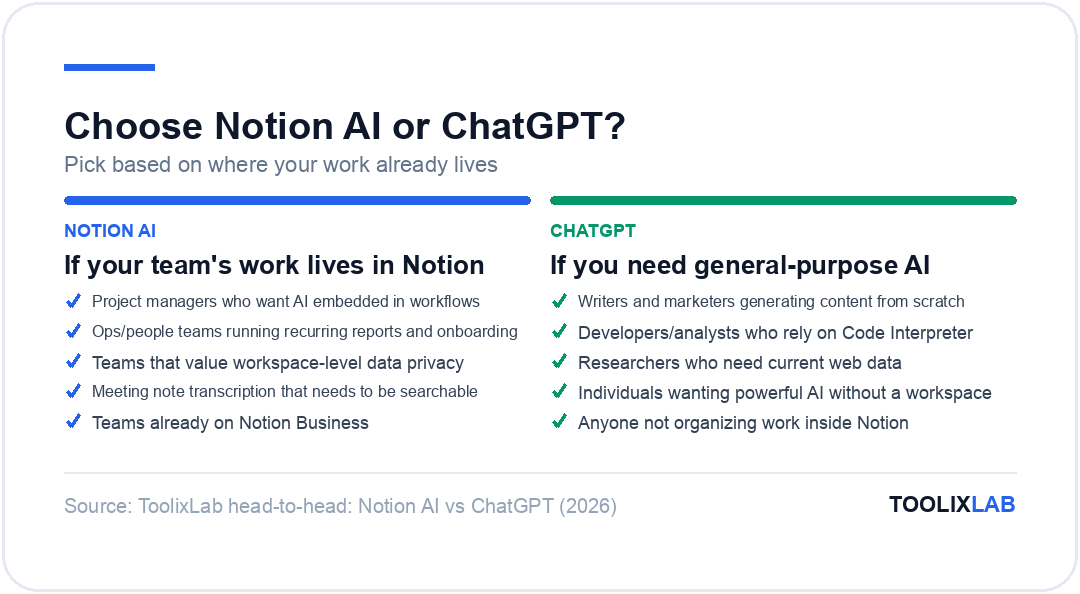
- ✅ Your team's work is organised in Notion
- ✅ You want AI that understands your projects
- ✅ You need autonomous workflow automation
- ✅ Meeting note transcription would save meaningful time
- ✅ You're already on Notion Business
- ✅ You need open-ended research with real-time web access
- ✅ Creative writing or long-form drafts from scratch
- ✅ Code Interpreter or data analysis is part of your workflow
- ✅ Image generation matters to you
- ✅ You're not a Notion user
- ✅ You want workspace-aware AI and general-purpose AI
- ✅ Your workflow involves both internal docs and external research
- ✅ You want ChatGPT for ideation, Notion AI for execution
For most teams already inside Notion, the answer is straightforward: enable Notion AI on your Business plan, set up one Custom Agent this week, and start using AI Meeting Notes from your next call. The ROI is immediate.
If you want to go deeper on how these tools fit into a broader AI productivity stack, our guide to How to Build an AI Workflow in 2026 walks through the full picture. For a broader comparison of AI assistants, ChatGPT vs Claude vs Gemini: Full 2026 Comparison covers the wider landscape.
Frequently Asked Questions
Is Notion AI better than ChatGPT?
Neither is universally better — they're designed for different jobs. Notion AI is better when your work lives in Notion and you need context-aware assistance. ChatGPT is better for open-ended tasks, research, image generation, and code analysis. For most users, the question is fit, not quality.
Can Notion AI browse the internet?
No. Notion AI does not have web browsing capability. It can only work with information inside your Notion workspace and the context you provide directly. For tasks requiring current web data, ChatGPT with browsing enabled is the better choice.
Does ChatGPT integrate with Notion?
Not natively. You can copy content between the two manually, or use Zapier/Make.com to build basic integrations. Notion's MCP support opens the door to more advanced connections, but there's no official ChatGPT ↔ Notion integration out of the box.
Is Notion AI free?
Notion AI is available on a limited trial on free and Plus plans, but the limits are restrictive enough that regular use isn't practical without a Business plan ($20/user/month annual). ChatGPT's free tier is more genuinely usable for everyday tasks.
What AI models does Notion use?
Notion AI supports multiple models depending on your plan, including models from OpenAI (GPT family), Anthropic (Claude), and Google (Gemini). You can switch between models for different tasks within the same workspace. Verify current model picker availability by plan tier on notion.com.
Which is better for writing — Notion AI or ChatGPT?
It depends on what you're writing. If you're drafting from existing documents in your workspace — a project brief based on meeting notes, an update email summarising client feedback — Notion AI is better because it has the context. If you're writing something new from scratch, ChatGPT's writing quality gives it the edge.
Further Reading & Sources
⚖️ Our Verdict
Notion AI and ChatGPT are not real competitors — they solve different problems, and the strongest knowledge workers use both. Notion AI lives inside your workspace and makes your existing docs and databases smarter; ChatGPT is a standalone general-purpose assistant for reasoning, creation, and automation. If you're already a Notion user, adding Notion AI is a near-obvious upgrade. ChatGPT is the better choice when you need an AI that works outside your workspace.
✅ Choose Notion AI if...
- • You're already using Notion for docs, projects, or team wikis
- • You want AI embedded inside your workspace, not in a separate tab
- • Team collaboration workflows and knowledge Q&A are your priority
✅ Choose ChatGPT if...
- • You need a general-purpose AI assistant for diverse tasks
- • Complex reasoning, coding, or content creation are your primary use cases
- • You want standalone conversations without a workspace dependency