![25+ Free Notion Templates for Productivity [2026 Download]](/blog-images/free-notion-templates-hero.webp)
By ToolixLab Research Team · Last updated: July 2026
Quick Answer
The fastest way to a working Notion setup in 2026 is a free template, not a blank page: duplicate a dashboard that matches your use case (personal productivity, project management, habit tracking, content planning, budgeting, or studying), delete the sample data, and customize properties over your first week of real use. This guide collects 27 free, professionally designed templates across all six categories — every one installable in under a minute with the Duplicate button.
📖 Inside This 2026 Guide
We've expanded our collection to 27 premium-grade free templates. Here's exactly what you're getting:
- 8 Personal Productivity Dashboards
- 5 Work & Project Management
- 4 Content & Creative Pipelines
- 4 Habit & Goal Trackers
- 3 Finance & Budgeting Tools
- 3 Student & Learning Hubs
In 2026, Notion has evolved from a simple note-taking app into a complete productivity operating system. But here's the problem: building an effective Notion workspace from scratch can take weeks of trial and error, countless YouTube tutorials, and frustrating template iterations.
That's why we've curated this comprehensive collection of 27 free, professionally-designed Notion templates that you can duplicate and start using in minutes. Each template has been hand-selected for its thoughtful design, practical functionality, and real-world usability. Whether you're a student managing classes, a freelancer tracking clients, or a creator planning content—there's a template here that will transform how you work.
⚡ Personal Productivity & Life Management (8 Templates)
These templates are designed to be your personal "command center"—helping you organize every aspect of your life in one interconnected system. Perfect for anyone who wants to stop juggling multiple apps and consolidate everything into Notion.
1. Ultimate Life Dashboard
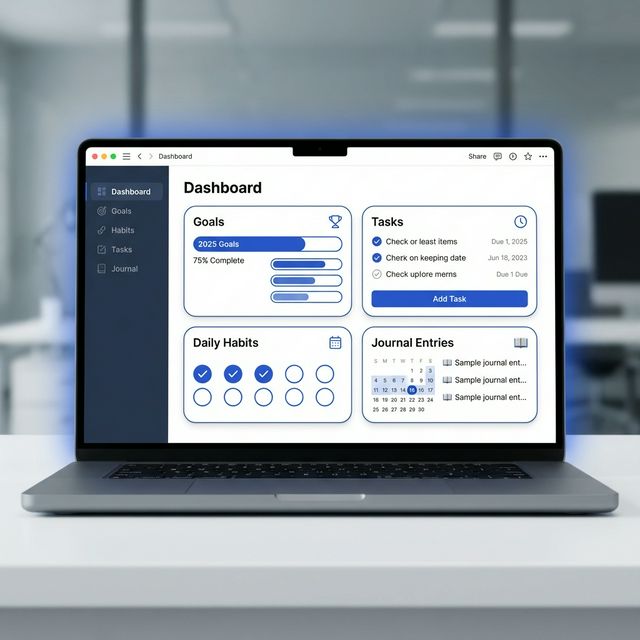
This is your personal "mission control"—a single-page dashboard that visualizes your entire life at a glance. It combines goal tracking, habit monitoring, daily task management, and journaling into one beautifully designed interface. The dashboard uses linked databases to connect your goals to your daily tasks, so every action you take is tied to your bigger vision. Perfect for people who want holistic life management without switching between dozens of apps.
What You Get: Pre-built sections for annual goals, quarterly milestones, weekly priorities, daily task lists, habit trackers with streak counters, mood logging, and a quick-capture inbox for fleeting thoughts.

2. Second Brain (PARA Method)
Based on Tiago Forte's legendary productivity system, this template organizes your entire digital life using four categories: Projects (short-term efforts), Areas (long-term responsibilities), Resources (topics of interest), and Archives (inactive items). This isn't just a folder structure—it's a complete philosophy for knowledge management that ensures everything you save has a clear purpose and location.
Best For: Knowledge workers, students, researchers, writers, and anyone who consumes a lot of information and wants a system to make it actually useful instead of just hoarding bookmarks.
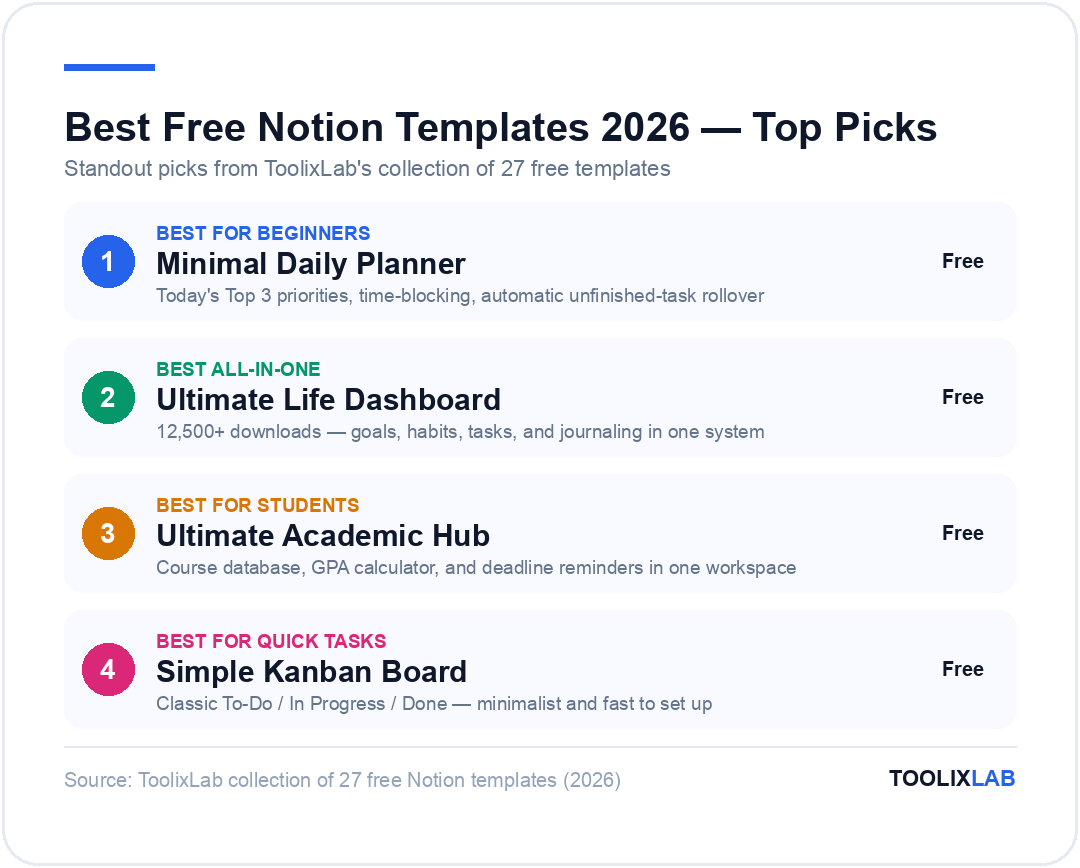
3. Minimal Daily Planner
A beautifully simple daily log for those who are overwhelmed by complex systems. Focuses on "Today's Top 3" priorities, time-blocking, and end-of-day reflection. No clutter, just clarity.
Key Feature: Automatic rollover of unfinished tasks to the next day, so nothing falls through the cracks.
Get Template4. Digital Bookshelf & Reading Tracker
Transform how you engage with books. Track your reading progress, capture key takeaways with highlights and annotations, and maintain a searchable library of everything you've read. Includes genre tags, rating system, and a "Currently Reading" dashboard.
Bonus: Pre-built template for book summaries to help you retain what you learn.
Get Template5. Digital Garden (Zettelkasten)
For deep thinkers and lifelong learners. This system uses atomic notes (one idea per page) with bi-directional linking to create a web of interconnected knowledge. Perfect for writers, researchers, and anyone building a personal knowledge base.
Philosophy: Ideas grow over time as you connect new notes to old ones, creating emergent insights.
Get Template6. Ultimate Travel Planner
Plan your dream vacation with itinerary builders, booking trackers (flights, hotels, activities), packing checklists, and budget management. Includes a "Places to Visit" wishlist with embedded maps and photos.
Includes: Pre-departure checklist so you never forget your passport again.
Get Template7. Job Hunt Command Center
Organize your job search like a pro. Track applications with status updates (Applied, Interview, Offer), store multiple resume versions, prepare for interviews with company research notes, and follow up systematically.
Smart Feature: Automatic reminders to follow up 1 week after applying.
Get Template8. Eisenhower Priority Matrix
Stop wasting time on busywork. This template implements the classic 4-quadrant system (Urgent/Important) to help you focus on what actually moves the needle. Includes quick-add buttons and a weekly priority review.
Principle: "What is important is seldom urgent, and what is urgent is seldom important."
Get Template📋 Business & Project Management (5 Templates)
Professional-grade systems for freelancers, founders, and teams. These templates help you deliver client work on time, manage complex projects, and scale your business without enterprise software costs.
9. Product Roadmap & Sprint Planner
An agile project management system for software teams and solo developers. Plan sprints, manage your feature backlog, track bugs, and visualize timelines with Gantt-style views. Includes velocity tracking to estimate future sprint capacity.
Perfect For: SaaS founders, indie hackers, product managers, and dev teams that need lightweight project management.
Download Free →10. Freelancer Client Portal
Manage client relationships professionally. Track invoices, share project status updates, store contracts, and organize deliverables in one shared workspace. Clients can view their dedicated portal page—no Notion account required.
Includes: Invoice templates, onboarding questionnaires, and scope creep protection checklists.
Download Free →11. Company Wiki & Team Onboarding
Centralize your team's knowledge. Store SOPs (Standard Operating Procedures), brand assets, employee directory, meeting notes, and onboarding checklists. Searchable, organized, and always up-to-date.
Saves: Hours of "Where's that file?" Slack messages every week.
Download Free →12. Personal CRM (Network Tracker)
Your professional network is your net worth. Track every contact, log interactions, set follow-up reminders, and categorize relationships (mentors, clients, peers). Never let a valuable connection go cold again.
Smart Detail: "Last Contact" field shows how long since you reached out—great for quarterly check-ins.
Download Free →13. Simple Kanban Board
The classic To-Do / In Progress / Done workflow. Minimalist, fast, and effective for solo workers who just need to get things done without overthinking their productivity system.
Philosophy: Complexity is the enemy of execution. This template keeps it dead simple.
Download Free →🎯 Habit & Goal Tracking (4 Templates)
Consistency beats intensity. These templates make your habits visible, trackable, and oddly satisfying to maintain.
14. Gamified Habit Tracker
Level up your life. Earn XP for completing habits, track streaks, and unlock achievements. Turns boring routines into a game you actually want to play.
Duplicate →15. Annual Goal Vision Board
Break down your yearly vision into quarterly milestones, monthly objectives, and weekly actions. Includes life areas (health, wealth, relationships, career) and visual progress tracking.
Duplicate →16. 90-Day Sprint Execution Plan
Stop overthinking and start doing. Focuses your energy on one big goal for 12 weeks with weekly sprint reviews. Based on the best-selling book "The 12 Week Year."
Duplicate →17. Meal Planner & Grocery List
A shared kitchen hub for recipe storage, weekly meal planning, and auto-generated grocery lists. Includes nutrition tracking and a "favorites" quick-add.
Duplicate →📝 Content Creation & Social Media (4 Templates)
For creators who want to turn one idea into ten pieces of content. These templates help you plan, produce, and promote across platforms.
💡 Creator Insight: Build Once, Distribute Everywhere
The secret to consistent content isn't working harder—it's working smarter. Use the Blog Manager to write your core piece, then repurpose sections into YouTube scripts via the Creator Dashboard, and schedule snippets across social media with the Social Planner.
-
18. Social Media Content Planner
Plan your presence across Instagram, Twitter, LinkedIn, and TikTok. Includes an asset library for images/videos, posting calendar, caption templates, and engagement tracking.
Download Free -
19. YouTube Creator Dashboard
The ultimate system for video ideation, scripting, production tracking, and analytics. Includes thumbnail brainstorm boards, sponsor/partnership tracking, and upload checklists.
Download Free -
20. Professional Blog Manager
From idea to published post. Manage your editorial calendar, SEO checklists (meta descriptions, keywords, internal links), draft states, and performance analytics in one workflow.
Download Free -
21. Multi-Platform Content Hub
The meta-system that connects all your content workflows. Track ideas, production status, and distribution across every channel from one central command center.
Download Free
💰 Finance & Budgeting (3 Templates)
Take control of your money without paying for budgeting apps. These templates help you track every dollar and build wealth.
22. Financial OS
Complete money management: income tracking, expense categorization, net worth calculator, and savings goal progress. Automated formulas do the math for you.
Get System23. Subscription Tracker
Stop wasting money on forgotten trials. Track every recurring charge with renewal alerts, monthly cost summaries, and "Should I Cancel?" decision framework.
Get Tracker24. Freelance Invoice Log
Track invoices by status (Sent, Paid, Overdue). Includes client tagging, income reports for taxes, and reminders to follow up on late payments.
Get Template🎓 Students & Academic Excellence (3 Templates)
Academic organization systems that help students manage the chaos of university life, track assignments, and actually retain what they learn.
25. Ultimate Academic Hub
A complete student operating system. Manage course databases with syllabus storage, assignment deadlines with automatic reminders, GPA tracking with grade calculators, class notes with tagging, and exam preparation timelines. Everything a student needs in one interconnected workspace.
"This template saved my GPA. I went from constantly missing deadlines to being ahead on everything." - Sarah, Junior @ UCLA
26. Cornell Note-Taking System
The proven note-taking method used by Ivy League students. Includes cue column for questions, notes area for details, and summary section for retention. Digital version adds tagging and search.
Research shows: Students using Cornell notes retain 34% more information than traditional note-takers.
Download Template27. Exam Prep & Revision Planner
Strategic exam preparation with spaced repetition schedules, active recall tracking, topic mastery progress bars, and exam countdown timers. Study smarter, not harder.
Based on: Evidence-based learning science principles from "Make It Stick."
Download Template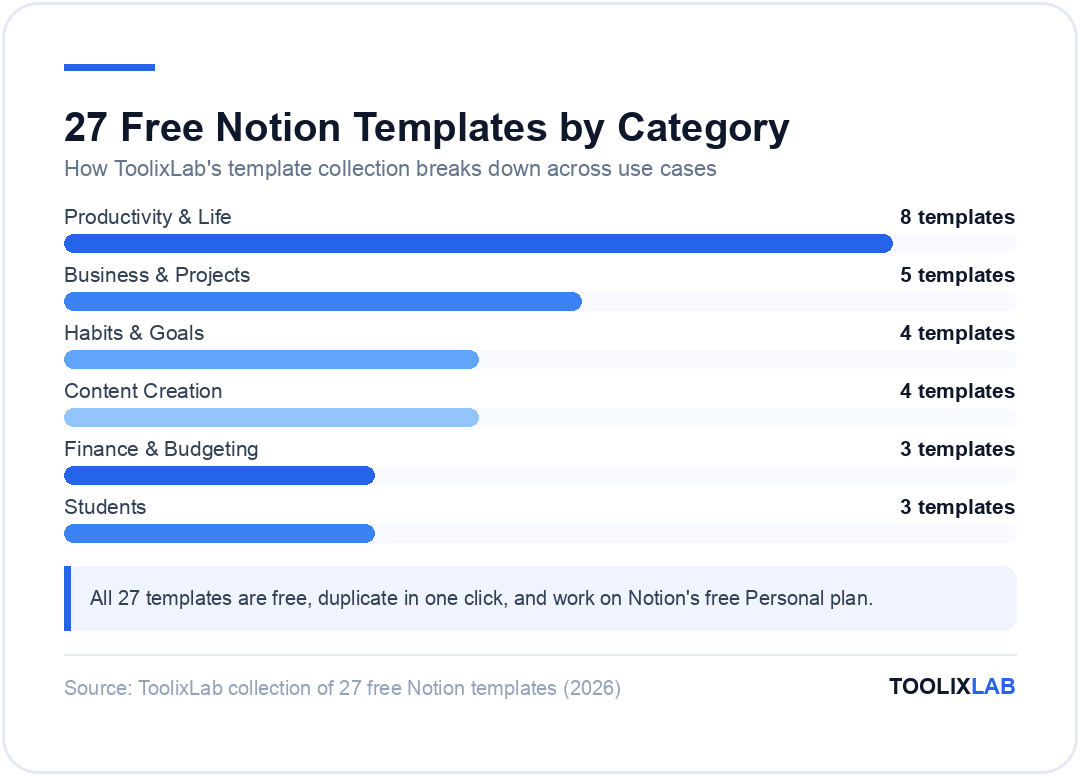
How to Install and Actually Stick With a Template
Every template in this guide installs the same way: open the template link, click Duplicate in the top-right corner, and choose the workspace to copy it into. You now own an independent copy — edits never affect the original, and there is nothing to "uninstall" beyond deleting the page. That's the easy part. The hard part is still using it in March. Three habits separate people whose dashboards thrive from those with a graveyard of abandoned setups:
Strip before you customize. Delete the demo data and any section you don't have an immediate use for. An empty "Book Tracker" gallery you never asked for is visual guilt, and visual guilt is why people quit Notion. You can always re-duplicate the original later if you want a section back.
Change nothing structural for the first week. Use the template exactly as designed for seven days before renaming properties or rebuilding views. Most "this template doesn't work for me" reactions are actually "I redesigned it before understanding it." After a week of real entries you'll know which changes you genuinely need.
One template per problem, not five at once. Duplicating an entire second-brain system on day one fails for the same reason buying five gym memberships fails. Start with the single dashboard addressing your most painful gap, make it a daily habit, then add the next.
How to Combine Templates Into One Workspace (Without Creating Chaos)
Once your first template sticks, you'll want a second — and this is where workspaces get messy. The fix is a deliberate structure: create one top-level "Home" page with links to each dashboard, rather than letting duplicated templates pile up in your sidebar. Notion's sidebar becomes unusable past about eight top-level pages; a Home hub keeps it to one.
Watch for database duplication. The most common combining mistake is running three separate task databases because three templates each shipped their own. Pick one as your canonical task database, then repoint the other templates' views at it using linked databases (type /linked and select the source). One database, many views — that's the Notion model working as intended, and it's the difference between a system and a pile of pages.
Match template complexity to your commitment level. The all-in-one "second brain" systems look impressive in screenshots but demand daily upkeep. If you're a checklist person, a heavyweight PARA implementation will fail you — not because it's bad, but because its maintenance cost exceeds your interest. The simple habit tracker you open every day beats the elaborate life OS you abandon by February.
Template, Blank Page, or Notion AI: Which Should You Start With?
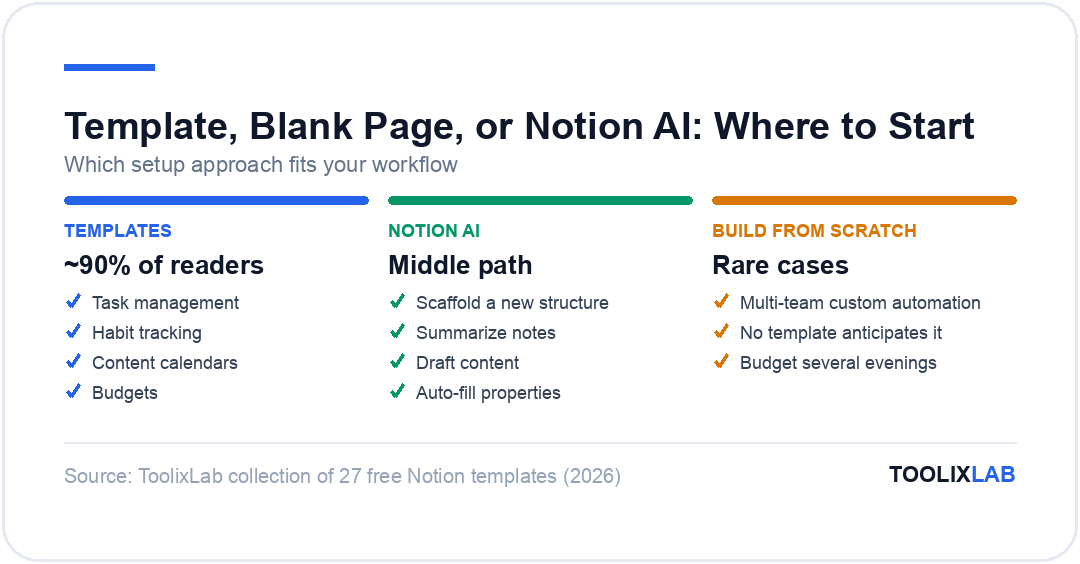
In 2026 there are genuinely three ways to set up a Notion workspace, and the right one depends on how unusual your workflow is:
Templates win for standard workflows — task management, habit tracking, content calendars, budgets. These problems are solved; a good free template embodies hundreds of hours of iteration you don't need to repeat. That's 90% of readers and 100% of beginners.
Building from scratch wins for genuinely unusual systems — a workflow spanning multiple teams with custom automation, or a database structure no template anticipates. Budget several evenings and expect to rebuild it once. Do this only after you've outgrown a template, not instead of trying one.
Notion AI is the middle path — describe the system you want and let it scaffold databases and views, then refine by hand. It's genuinely useful for generating a starting structure that's almost right, and for ongoing work inside any setup (summarizing notes, drafting content, auto-filling properties). Whether the AI add-on is worth paying for is a separate question — our full Notion AI review and Notion AI vs ChatGPT comparison break down exactly who benefits. And if your bottleneck is the broader workflow around Notion rather than Notion itself, start with our guide to building an AI workflow.
🔑 Key Takeaways
- ✓All 27 templates are free and install with one Duplicate click — no purchases or third-party accounts required
- ✓Match the template to your single most painful gap first; add more only after the first one is a daily habit
- ✓Delete sample data immediately, but wait a week before changing structure — most abandoned setups were redesigned before they were understood
- ✓Templates beat blank pages for standard workflows; Notion AI is best used to refine a template, not replace one
Frequently Asked Questions
How do I add these templates to my Notion workspace? ▼
Adding templates is simple:
- Click any "Get Template" or "Download" link in this article
- You'll be redirected to the template page in our gallery
- Click the "Duplicate" button in the top-right corner of the template
- The template will be saved to your Notion workspace and is now 100% yours to customize
Are these templates really free? What's the catch? ▼
Yes, every template in this collection is completely free. There's no hidden paywall, no "upgrade to premium" upsell, and no email gate.
We curate both community-created templates and Toolix originals. Some creators offer "pro" versions with extra features, but the free versions we've linked are fully functional and valuable on their own.
Can I edit and customize these templates? ▼
Do I need Notion Pro to use these templates? ▼
No! All 27 templates work perfectly with Notion's free Personal plan.
The only exception: If you want to share templates with teammates and collaborate in real-time, you'll need a Team plan. But for solo use, the free plan is more than enough.
Which template should I start with as a beginner? ▼
Great question! We recommend starting with one of these three:
- Minimal Daily Planner - If you want something simple and un-intimidating
- Ultimate Life Dashboard - If you want an all-in-one system from day one
- Simple Kanban Board - If you just need to organize tasks quickly
Don't try to use all 27 at once. Pick one, use it for a week, then add more as needed.