
By ToolixLab Research Team · Last Updated: June 2026
Quick Answer
The best free AI workflow templates for small businesses cover five functions: sales (lead-to-CRM routing), marketing (blog-to-social repurposing), customer service (ticket auto-classification), operations (project status reports), and finance (invoice processing). All run free on Zapier, Make, or n8n using their free tiers — no code required.
Running a small business in 2026 means competing with enterprises that have entire automation teams. The good news: free AI workflow templates put the same productivity leverage in your hands — no developers, no annual contracts, no technical degree required.
Most of what I see online are platform-specific template libraries — n8n's catalogue, Make's template browser, Zapier's workflow gallery. Useful, but they assume you already know which platform you're using and why. This guide is different. Every template below is platform-agnostic: I describe the trigger, the AI step, and the output so you can build it on whichever tool fits your budget. Then I tell you which platform gets you there fastest.
According to TrueFuture Media's 2026 small business automation report, companies running three or more AI workflow automations recover 10 or more hours per week — the equivalent of a part-time hire, at near-zero cost. The 20 templates in this guide represent the highest-ROI opportunities across five business functions, all deployable in under 30 minutes.
⚡ Quick Summary
Best for beginners (free): Zapier + AI by Zapier — easiest setup, widest app library
Best for power users (free): Make — 1,000 ops/month free, handles complex multi-step flows
Best for unlimited free runs: n8n self-hosted — no task limits, open-source, needs a VPS (~$5/month)
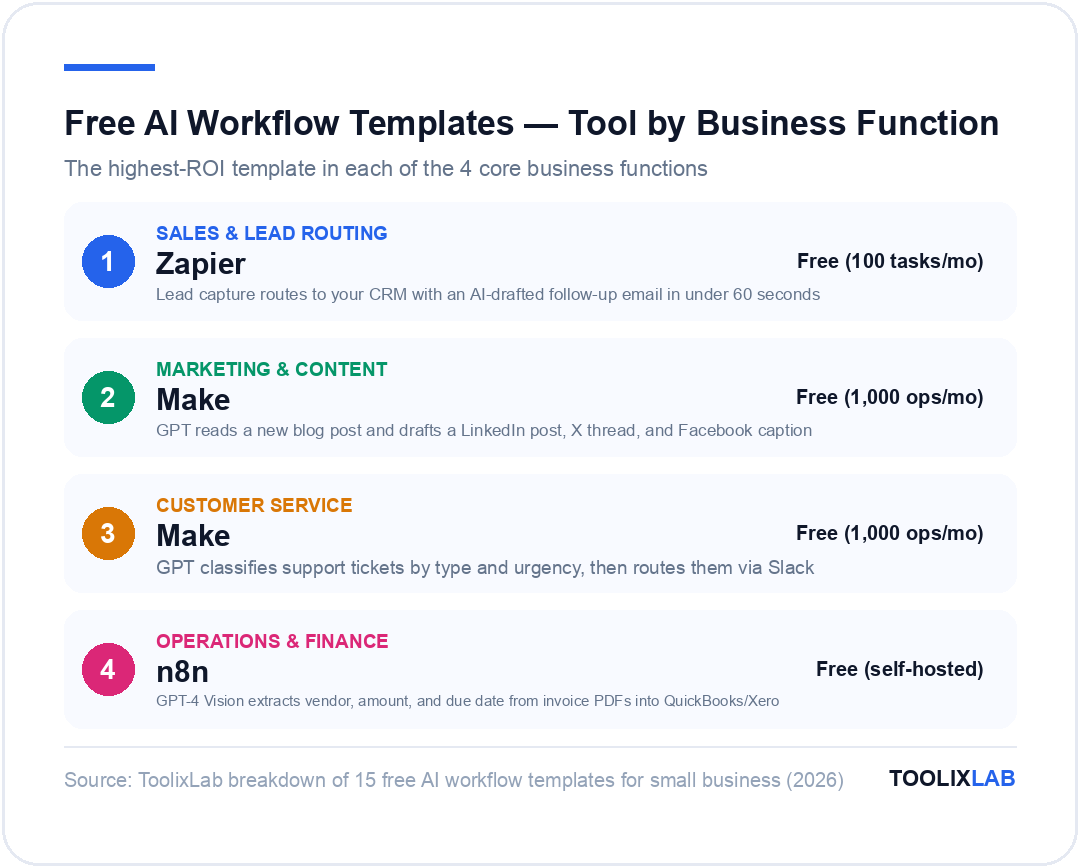
Top 3 templates by ROI: Lead-to-CRM follow-up (saves ~5 hrs/week) · Blog-to-social repurposer (saves ~3 hrs/week) · Invoice processor (saves ~2 hrs/week)
What Are AI Workflow Templates?
An AI workflow template is a pre-built automation sequence that connects two or more apps and includes at least one AI step — typically a call to a language model like GPT-4, Claude Sonnet, or Gemini Flash. Unlike a traditional automation (which applies fixed, rule-based logic), an AI workflow can handle unstructured inputs: emails written in different formats, PDFs of varying layouts, or customer messages with ambiguous intent.
The "template" part means someone has already figured out the trigger, the AI prompt, and the output action. You inherit the blueprint and customize two things: your app credentials and your specific prompt language. Most templates deploy in 15–30 minutes.
| Component | Traditional Automation | AI Workflow Template |
|---|---|---|
| Trigger | New row in spreadsheet | New email received |
| Processing | Map field A → field B | GPT classifies intent, drafts reply |
| Handles messy input | No — breaks on format change | Yes — understands context |
| Best for | Structured, predictable data | Emails, PDFs, customer text |
The most popular platforms for running these templates are Zapier, Make (formerly Integromat), and n8n. All have free tiers, and all support OpenAI / Claude API calls as mid-workflow steps. For a full comparison of these platforms, see our guide to Zapier vs Make vs n8n.
How Much Time Can These Templates Actually Save?
The honest answer depends on how much of your day involves repetitive text work. Here are realistic estimates based on typical small business use cases:
| Template Category | Avg. Time Saved/Week | Main Win |
|---|---|---|
| Sales & Lead Routing | 4–6 hrs | Instant follow-up without manual CRM entry |
| Marketing & Content | 3–4 hrs | Repurposing one blog post to 5+ formats |
| Customer Service | 2–3 hrs | Auto-routing tickets, first-reply drafts |
| Operations & Reporting | 2–3 hrs | Automated status reports and meeting notes |
| Finance & Admin | 1–2 hrs | Invoice processing, receipt categorization |
Deploy all five categories and you're looking at 12–18 hours recovered per week. Even if your business only activates two or three of these, the ROI is immediate. And unlike hiring, the automation doesn't take sick days or go on vacation.
If you're new to workflow automation and want to understand the broader landscape first, our guide to building your first AI workflow walks through the concepts before you touch a tool.
Sales & Lead Generation Workflow Templates
Sales workflows have the highest ROI of any automation category because every wasted hour is a missed conversation. These four templates handle the most time-consuming parts of a small business sales process.
Template 1: Lead Capture → CRM + Instant Follow-Up Email
Why it matters: Research from Harvard Business Review found that leads contacted within five minutes are 100× more likely to convert than those contacted after 30 minutes. This template makes 60-second follow-up the default — without you lifting a finger. The GPT prompt to use: "Draft a friendly, professional follow-up email to [lead name] at [company] who asked about [inquiry]. Keep it under 100 words. Sign as [your name]."
Template 2: Cold Email Personalizer at Scale
Template 3: Quote Request Auto-Responder
Template 4: Follow-Up Sequence on Deal Silence
These sales templates pair naturally with a broader AI sales funnel workflow if you want to automate the full pipeline from first touch to close.
Marketing & Content Creation Templates
Content is where most small business owners lose the most hours. These templates automate the distribution and repurposing work — the part after you've created the core piece.
Template 5: Blog Post → Social Media Repurposer
GPT prompt to use: "Read this blog post: [URL or full text]. Write: (1) A LinkedIn post under 150 words with one key insight and a call to read more. (2) A 3-tweet thread starting with a hook. (3) A Facebook caption under 80 words. Use an informative, direct tone. No hashtag spam." This is one of the best ways to use ChatGPT prompts for marketers in an automated context.
Template 6: Monthly Newsletter Builder
Template 7: Review Request Sequence
For a deeper look at automating your entire content production pipeline, see our guide on AI content creation workflows and our separate guide to automating social media with AI.
Customer Service & Support Templates
Customer service automation has the fastest measurable impact: faster first response times directly correlate with higher satisfaction scores. According to Activepieces' 2026 benchmark data, AI-assisted support teams handle 13.8% more tickets per hour than fully manual teams, without sacrificing quality.
Template 8: Support Ticket Auto-Classifier & Router
Template 9: First-Reply Draft Generator
To go deeper on this use case, our full guide on building an AI customer support system covers chatbots, knowledge base integration, and escalation logic.
Template 10: Post-Resolution Satisfaction Follow-Up
Operations & Finance Workflow Templates
Operations and finance workflows tend to be the most straightforward to automate because they deal with structured data (invoices, task lists, payment records) while still benefiting from AI for parsing unstructured attachments. These are the templates that eliminate your Friday afternoon admin pile.
Template 11: Invoice Processor from Email Attachments
Template 12: Weekly Project Status Report
Template 13: Receipt Categorizer
Template 14: Meeting Notes → Action Items
Template 15: New Employee Onboarding Workflow
Which AI Workflow Platform Should You Use?
Every template above works across multiple platforms, but picking the right one for your situation matters. Here's the honest breakdown:
| Platform | Free Tier | AI Steps | Best For | Learning Curve |
|---|---|---|---|---|
| Zapier | 100 tasks/mo | ✅ Native AI | Beginners, 7,000+ app integrations | ⭐ Easy |
| Make | 1,000 ops/mo | ✅ OpenAI module | Complex multi-step flows, visual builders | ⭐⭐ Medium |
| n8n (self-hosted) | Unlimited (free) | ✅ AI Agent nodes | Technical teams, high-volume runs | ⭐⭐⭐ Steep |
| Activepieces | Unlimited (open-source) | ✅ OpenAI piece | Open-source fans, privacy-conscious | ⭐⭐ Medium |
*Pricing verified June 2026 — check official pages for current rates.
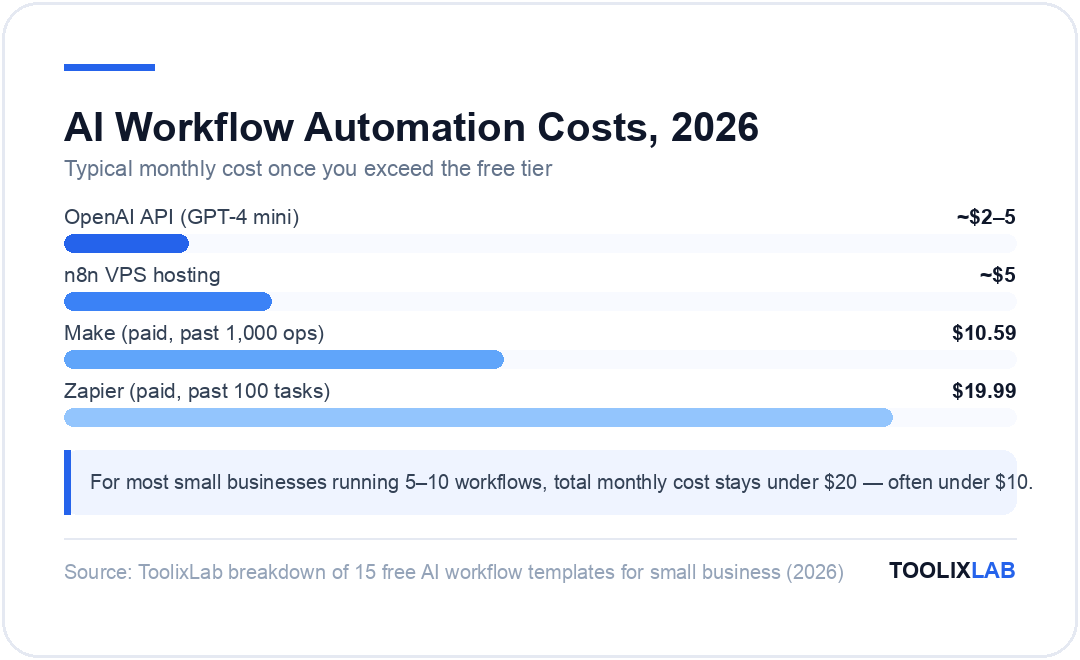
My recommendation for most small businesses: Start with Zapier for your first two templates (the easiest setup), then migrate to Make as you outgrow 100 tasks/month. If you process more than 5,000 automation steps per month, n8n's unlimited self-hosted plan will save you $50–150/month in subscription fees. For a full comparison see our in-depth Zapier vs Make vs n8n guide.
How Do You Set Up a Template in Under 30 Minutes?
Most people procrastinate on automation because they assume it's complicated. It isn't — if you follow this four-step process:
-
1
Pick one template that solves your biggest pain point
Start with the task you do most manually. If you reply to the same type of email 20 times a week, that's your first automation. Don't try to deploy all 15 templates at once.
-
2
Connect your apps (5–10 minutes)
On Zapier or Make, add your apps using OAuth (no passwords shared). This is the first thing you do when you sign up — it's just "Connect Gmail," "Connect HubSpot," etc.
-
3
Customize the AI prompt (10–15 minutes)
This is the most important step. The prompt I've included in each template above is a starting point — add your brand voice, specific context, and any constraints (e.g., "always mention our 30-day guarantee"). Test with 3 real examples before turning on.
-
4
Run it in "test mode" for one week
Don't auto-send anything for the first week. Route the output to a "drafts" folder or a review Slack channel. Once you've confirmed quality on 20+ runs, switch to live mode.
If you want a deeper walkthrough of the technical setup, our no-code AI workflow guide covers app connections, API keys, and testing in detail.
Are Free AI Workflow Templates Actually Free?
Partially. Here's the honest breakdown of costs:
✅ Genuinely Free
- • The template blueprints themselves
- • Zapier free tier: 100 tasks/month
- • Make free tier: 1,000 operations/month
- • n8n: unlimited (self-hosted on a $5 VPS)
- • Activepieces: unlimited (open-source)
- • Most app integrations (Gmail, Sheets, Notion)
⚠️ Small Costs to Know About
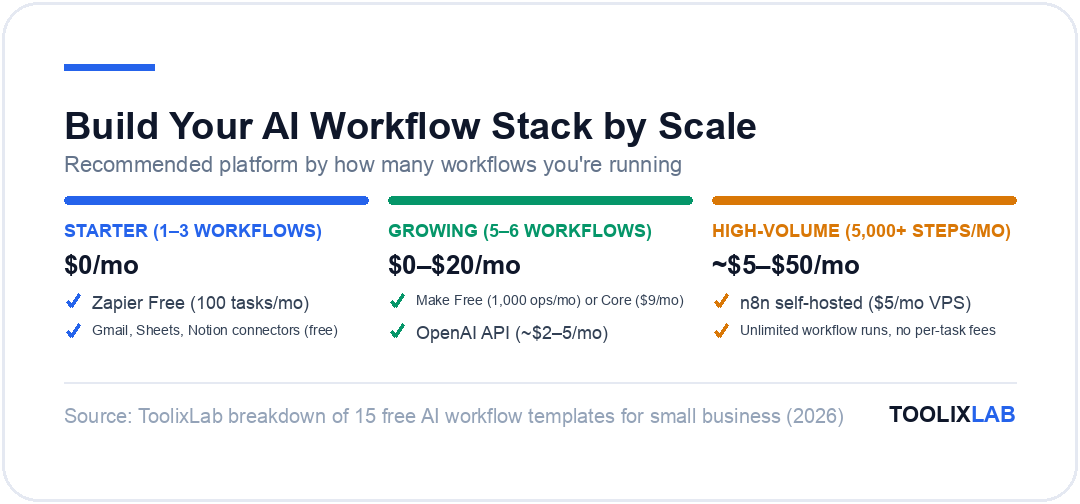
- • OpenAI API: ~$0.01–0.05 per run (GPT-4 mini)
- • n8n VPS hosting: ~$5/month (DigitalOcean)
- • Zapier paid: from $19.99/mo if you exceed 100 tasks
- • Make paid: from $10.59/mo if you exceed 1,000 ops
- • Some CRM/tool integrations require paid plans
For most small businesses running 5–10 workflows, the total monthly cost stays under $20 — often under $10. The biggest wildcard is OpenAI API costs, but GPT-4 mini at $0.15 per million input tokens makes even 500 workflow runs per month cost under $2.
If you want to explore the best workflow automation tools for small business in detail (with pricing, pros, cons, and ratings), that guide covers 15 platforms including all the ones mentioned here.
🔑 Key Takeaways
- ✓ The 15 templates above cover the five highest-ROI automation areas: sales, marketing, customer service, operations, and finance
- ✓ All templates are platform-agnostic — they work on Zapier, Make, n8n, or Activepieces
- ✓ Start with one template, run in "drafts mode" for one week, then go live
- ✓ Zapier free tier (100 tasks/mo) handles 2–3 light workflows; Make free tier (1,000 ops/mo) handles 5–6
- ✓ Total monthly cost for a typical small business setup: under $20, often under $10
- ✓ The highest single-template ROI is the lead capture → CRM + follow-up email, saving 4–6 hours/week
- ✓ Always test AI outputs in "draft mode" before enabling auto-send for customer-facing actions
Conclusion
Free AI workflow templates for small businesses aren't a future thing — they're a today thing, deployable in 30 minutes with no code and near-zero cost. The 15 templates in this guide represent the realistic starting point for most small business owners: high ROI, low setup friction, and immediate time savings.
The key insight most people miss: don't try to automate everything at once. Pick the single workflow that costs you the most time every week — usually lead follow-up or content repurposing — deploy it this week, verify the quality, and then add the next template. Within a month, you'll have a small business automation stack that would have cost a part-time hire just two years ago.
For the next step, I'd recommend reading our AI email marketing automation guide if your biggest bottleneck is outreach, or our AI content creation workflow guide if you're looking to systematize your content output. Both pair naturally with the templates above.
Frequently Asked Questions
Are AI workflow templates actually free to use?
Most platforms offer free tiers that cover light usage. Zapier gives 100 tasks/month free, Make offers 1,000 operations/month free, and n8n is completely free when self-hosted. The workflow templates themselves are always free — you only pay for platform runs once you exceed free limits, which typically costs under $20/month for small businesses.
What is the best free AI workflow automation tool for small businesses in 2026?
Zapier is the easiest starting point with the widest app library (7,000+ integrations) and the most beginner-friendly interface. Make offers more power on its free tier with 1,000 operations per month and visual multi-step flows. n8n is the best truly free option if you self-host — unlimited runs, no per-task fees, and active AI agent nodes. Activepieces is a strong open-source alternative.
How long does it take to set up an AI workflow template?
Simple single-step templates (e.g., form submission → CRM entry) take 10–20 minutes to configure on Zapier or Make. Multi-step templates with GPT steps add another 15–30 minutes for prompt tuning. Most small business teams can deploy their first template in under an hour, with no coding required. Budget an extra 30 minutes for testing before going live.
Do I need coding skills to use AI workflow templates?
No. Zapier, Make, and Activepieces are fully no-code — you configure everything through visual drag-and-drop interfaces. n8n is primarily no-code but supports JavaScript for advanced custom logic. The 15 templates in this guide are designed so any business owner can configure them without writing a single line of code.
How many hours per week can AI workflow templates save a small business?
According to TrueFuture Media's 2026 analysis, businesses running three or more AI automation workflows save 10 or more hours per week. Sales teams see the biggest gains from lead routing and follow-up templates, often recovering 5–7 hours weekly. Content teams using repurposing templates typically save 3–4 hours per week per published piece.
Can I use ChatGPT as part of an AI workflow template?
Yes. Both Zapier (via "AI by Zapier" or the OpenAI integration) and Make (via the OpenAI module) let you call GPT-4 or GPT-4 mini mid-workflow to classify, summarize, draft, or route content. You need an OpenAI API key, which costs roughly $0.01–$0.03 per 1,000 tokens — under $5/month for most small business volumes.
What are the most time-saving AI workflows for small businesses?
The five highest-ROI templates are: (1) lead capture to CRM with instant follow-up email (saves 4–6 hrs/week), (2) blog post to social media repurposer (saves 3–4 hrs/week), (3) support ticket auto-classification and routing (saves 2–3 hrs/week), (4) invoice processing from email attachments (saves 1–2 hrs/week), and (5) weekly project status report generator (saves 1–2 hrs/week).
How is an AI workflow template different from a regular automation?
Traditional automation applies fixed, rule-based logic: if X then Y. AI workflow templates insert a language model step that understands context, classifies intent, generates text, or makes routing decisions based on meaning — not just pattern matching. This lets the automation handle unstructured inputs like customer emails, PDFs, or voice transcripts that rule-based tools break on.