60+ copy-paste AI prompts for software developers in 2026, covering code generation, debugging, code review, documentation, testing, architecture, DevOps, and learning new technologies.
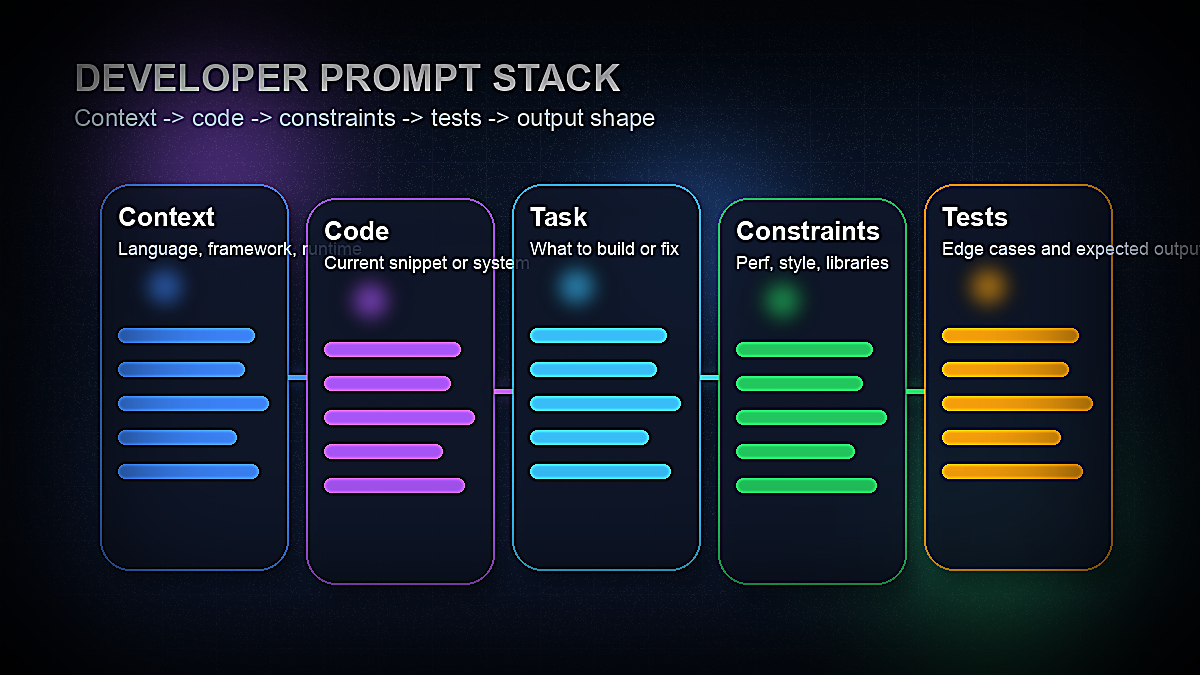
The best AI prompts for developers in 2026 aren't vague one-liners like "write me a function." They're structured, context-rich instructions that tell the model your language, framework, constraints, and expected output format — before it writes a single line of code. The difference between a generic snippet you'll rewrite anyway and production-ready code that fits your architecture almost always comes down to how much context you gave upfront.
AI coding assistants — Claude Sonnet 4.6, GPT-5.4, GitHub Copilot, and Cursor — have made enormous leaps since 2024. But even the best model produces garbage output when the prompt is lazy. Experienced engineers who have mastered prompt patterns consistently report 2–4× faster output on specific tasks: writing boilerplate, explaining unfamiliar codebases, generating test cases, and drafting technical documentation.
This guide collects 60+ of the best AI prompts for software developers and engineers in 2026, organized by use case: code generation, debugging, code review, documentation, testing, architecture, DevOps, API integration, and learning new technologies. Every prompt is copy-paste ready and annotated with what makes it work. We've also included a section on how to customize each prompt for your specific stack.
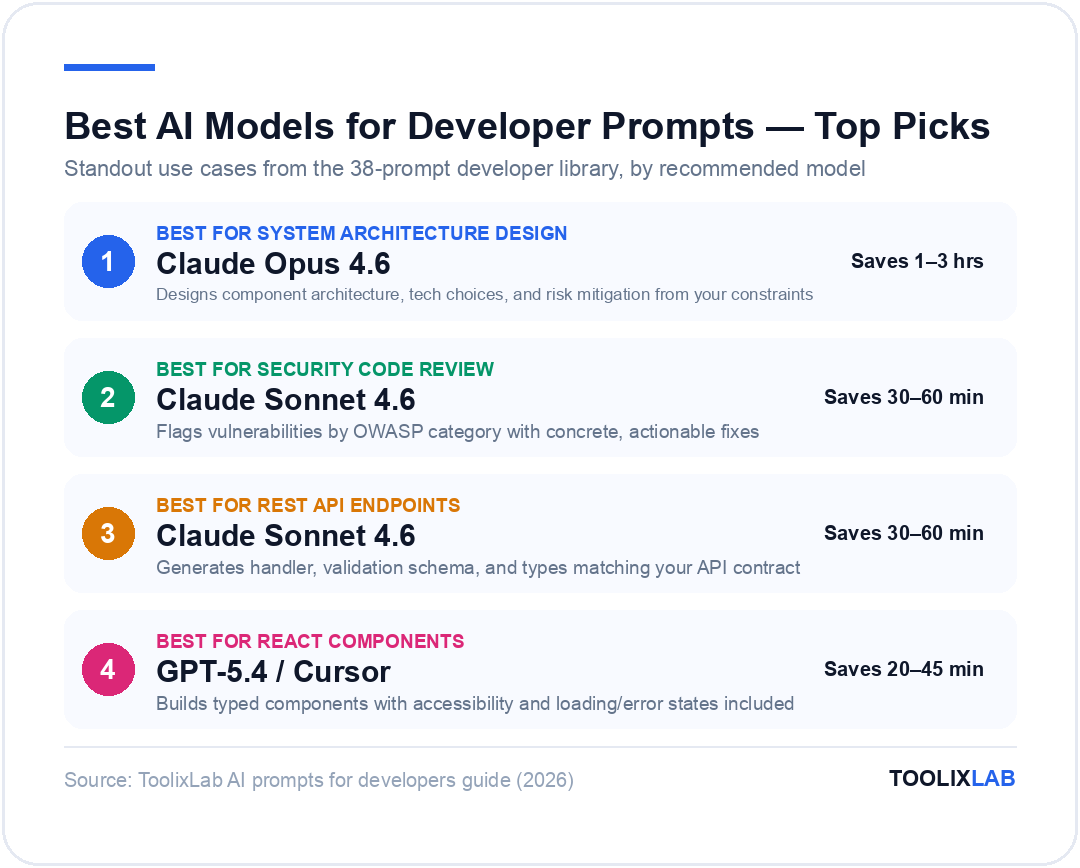
The best developer prompts combine environment context, task clarity, constraints, and explicit output requirements.Standout picks from ToolixLab's 38-prompt developer library, by recommended model.
Why Developers Need AI Prompts (Not Just Tab Completion)
GitHub Copilot, Cursor, and similar autocomplete tools are excellent at filling in the next line of code based on what you've already written. But that's a narrow slice of a developer's actual work. The majority of engineering time isn't spent typing — it's spent thinking: designing systems, reviewing pull requests, writing tests, tracking down bugs, documenting behavior, and onboarding to unfamiliar codebases.
That's where deliberate AI prompts come in. When you write a structured prompt, you're not asking the model to autocomplete — you're asking it to reason. You get different output from a model that understands your constraints, your preferred patterns, and the exact deliverable format you need than from one that's just extrapolating from your cursor position.
The developers getting the most out of AI in 2026 are the ones who treat it like a senior pair programmer, not a smart autocomplete. That means:
Giving explicit context about language, framework version, and project conventions
Specifying the output format (function signature, class structure, docstring style, etc.)
Asking for trade-off explanations, not just solutions
Requesting tests alongside implementation, not as an afterthought
The Developer Prompt Formula
Every high-performing developer prompt includes these five elements:
1. Language and environment: Specify the programming language, version, framework, and any relevant libraries. "Python 3.12 with FastAPI and SQLAlchemy" is actionable. "Python" is not.
2. The existing code or problem: Paste the relevant function, class, error message, or system description. Don't describe it abstractly — show it.
3. The specific task: Be explicit about what you want. "Refactor this function to use async/await and add error handling for network timeouts" is a task. "Make this better" is not.
4. Constraints and standards: Include style guide requirements, performance constraints, library restrictions, or team conventions the output must follow.
5. Output format: Specify what you want back. "Return the full refactored function with docstrings, no explanation needed" sets expectations clearly. Without this, you'll get a wall of explanation wrapped around three lines of code.
For a deeper dive on prompt construction principles, see our AI Prompt Engineering Guide 2026. The prompts below already follow these principles — but understanding why they're structured the way they are will help you adapt them to your specific stack.
Code Generation Prompts (Write New Code Faster)
Code generation is the most obvious AI use case for developers, but most engineers stop at "write a function that does X." The prompts below go further — they include context, constraints, and output format instructions that produce code you can actually use rather than code you have to extensively rewrite.
Prompt 1: Generate a Typed Function with Error Handling
You are a senior [LANGUAGE] engineer. Write a function that [DESCRIBE WHAT IT DOES].
Requirements:
- Language: [e.g. TypeScript 5.4]
- Framework/runtime: [e.g. Node.js 22, Express 5]
- Input: [describe parameters and their types]
- Output: [describe return value and type]
- Error handling: throw typed custom errors for [list error scenarios]
- Style: follow [e.g. Airbnb / Google / PEP 8] style guide
- No external libraries beyond [list allowed packages]
Return only the function and its types. No explanation needed.
Why it works: The explicit type and error requirements prevent the model from returning untyped code or swallowing errors silently — the two most common failure modes in AI-generated functions.
Prompt 2: Generate a REST API Endpoint
You are a backend engineer building a REST API in [FRAMEWORK, e.g. FastAPI 0.111 / Express 5 / Go + Chi].
Generate a [GET/POST/PUT/DELETE] endpoint for [RESOURCE NAME].
Spec:
- Route: [e.g. POST /api/v1/orders]
- Request body: [describe fields with types and validation rules]
- Response: [describe success and error shapes]
- Auth: [e.g. JWT bearer token required, validate with middleware]
- DB: [e.g. PostgreSQL via SQLAlchemy ORM / Prisma]
- Return 400 for validation errors, 401 for auth failures, 500 for unexpected errors with structured JSON
Include the handler, validation schema, and any required type definitions. No boilerplate setup code.
Why it works: Specifying the exact HTTP spec, error codes, and response shapes produces an endpoint that fits your API contract instead of a generic handler that breaks your client.
Prompt 3: Generate a React Component with TypeScript
Write a React 18 functional component in TypeScript for [COMPONENT NAME].
Requirements:
- Props interface with JSDoc comments
- Use [hooks needed, e.g. useState, useEffect, useMemo]
- Styling: [e.g. Tailwind CSS v4 / CSS Modules / styled-components]
- Accessibility: ARIA labels for interactive elements
- Loading state: show [e.g. skeleton / spinner] while [condition]
- Error state: show [describe error UI]
- Component should be controlled / uncontrolled [choose one]
Existing context (paste relevant types/interfaces here):
[PASTE EXISTING CODE]
Return the full component with its Props interface. No unit tests in this response.
Why it works: Accessibility and loading/error states are consistently omitted from AI-generated components unless explicitly requested. This prompt forces the model to include them upfront.
Prompt 4: Refactor for Readability and Performance
Refactor the following [LANGUAGE] code to improve readability and performance.
Goals:
- Reduce cyclomatic complexity
- Eliminate unnecessary re-computation or N+1 patterns
- Replace [e.g. nested ternaries / callback hell / raw loops] with cleaner idioms
- Keep the public API identical (same function signatures)
- Do NOT change behavior — only structure and efficiency
[PASTE CODE HERE]
Return the refactored version with a brief inline comment for each significant change. No external explanation needed.
Why it works: "Keep the public API identical" and "Do NOT change behavior" are critical guardrails. Without them, the model often helpfully renames things, changes signatures, or introduces new abstractions that break callers.
Prompt 5: Generate a Database Schema
You are a database architect. Generate a [PostgreSQL / MySQL / SQLite] schema for [DESCRIBE THE DOMAIN].
Requirements:
- Entities: [list entities, e.g. users, orders, products, line_items]
- Relationships: [describe FK relationships]
- Use UUIDs for primary keys
- Add created_at and updated_at timestamps to all tables
- Add indexes for: [list columns used in WHERE/JOIN clauses]
- Include CHECK constraints for: [list business rules, e.g. price > 0]
- ORM: [e.g. output as Prisma schema / SQLAlchemy models / raw SQL CREATE TABLE]
Return the full schema. Do not include seed data or migration scripts.
Prompt 6: Convert Synchronous Code to Async
Convert the following synchronous [LANGUAGE] code to use async/await.
Rules:
- Wrap all I/O operations (file reads, DB queries, network calls) in proper async patterns
- Add timeout handling: reject after [N] seconds with a typed TimeoutError
- Preserve error propagation — don't swallow exceptions in catch blocks
- If multiple operations are independent, run them concurrently with Promise.all / asyncio.gather
- Keep the same function signatures but make them async
[PASTE SYNCHRONOUS CODE]
Return the fully async version with no explanation.
Prompt 7: Generate Boilerplate for a New Service/Module
Generate the boilerplate structure for a new [SERVICE NAME] service in [LANGUAGE/FRAMEWORK].
Follow this project structure pattern:
[PASTE EXAMPLE FILE FROM YOUR PROJECT OR DESCRIBE CONVENTIONS]
The service should include:
- Constructor with dependency injection for: [list dependencies]
- Public methods: [list method names and brief descriptions]
- Private helper methods as needed
- Error class for service-specific errors
- Barrel export
Return all files needed for this service as separate, clearly labeled code blocks.
Pro tip: Paste an example of an existing service from your project instead of describing your conventions. The model will infer your patterns far more accurately from a real example than from a description.
Code Review & Debugging Prompts
Debugging and code review are where AI prompts save the most time per hour invested. A good debugging prompt doesn't just ask "what's wrong with this code" — it gives the model the full context it needs to reason about the problem: the error, the stack trace, the surrounding code, and what you've already tried.
Prompt 8: Diagnose a Bug from Error + Stack Trace
I'm debugging a [LANGUAGE] application. Here is the error message and stack trace:
[PASTE ERROR AND STACK TRACE]
Here is the relevant code:
[PASTE CODE]
Context:
- This error occurs when: [describe trigger condition]
- It does NOT occur when: [describe when it works]
- I have already tried: [list what you've attempted]
- Environment: [OS, runtime version, key library versions]
Diagnose the root cause. Explain why this error occurs and provide a targeted fix. If multiple causes are possible, list them in order of likelihood.
Why it works: "It does NOT occur when" and "I have already tried" are the two most valuable debugging context fields. They eliminate dead ends and force the model to reason about edge cases rather than giving you the obvious first guess.
Prompt 9: Explain a Confusing Error Message
Explain this error message to me in plain language:
[PASTE ERROR MESSAGE]
Tell me:
1. What this error means in plain English
2. The most common root causes (in order of frequency)
3. What I should look for in my code to identify which cause applies
4. The standard fix for each cause
Language/framework: [SPECIFY]
Prompt 10: Find a Memory Leak or Performance Issue
Analyze the following [LANGUAGE] code for memory leaks or performance bottlenecks.
[PASTE CODE]
Focus on:
- Objects/resources that are allocated but never released
- Unnecessary re-renders or re-computations [for frontend code]
- Inefficient data structure choices for the access pattern
- Blocking operations that should be async
- N+1 query patterns
For each issue found, explain the problem and provide a concrete fix. Prioritize issues by impact.
Prompt 11: Peer Code Review — Security Focus
Review the following [LANGUAGE] code for security vulnerabilities.
[PASTE CODE]
Check specifically for:
- Input validation and sanitization (SQL injection, XSS, command injection)
- Authentication and authorization issues
- Secrets or credentials hardcoded or logged
- Insecure deserialization
- Broken access control
- Unsafe use of cryptography
- Race conditions in concurrent code
For each vulnerability found:
- Name the vulnerability class (e.g. OWASP A03:2021 Injection)
- Explain the attack vector
- Provide the secure fix
Return as a structured list. If no vulnerabilities are found, say so explicitly.
Why it works: Naming the OWASP category forces the model to use recognized vulnerability taxonomy rather than making up issues, and makes the output directly actionable for a security audit.
Prompt 12: Review Code Against SOLID Principles
Review the following [LANGUAGE] class/module for SOLID principle violations.
[PASTE CODE]
For each principle (Single Responsibility, Open/Closed, Liskov Substitution, Interface Segregation, Dependency Inversion), identify:
- Whether this code follows or violates the principle
- The specific violation if one exists
- A refactoring suggestion to address it
Be concise. Focus on violations with practical impact, not theoretical nitpicks.
Prompt 13: Explain What This Code Does
Explain what the following [LANGUAGE] code does. I'm a [junior / mid / senior] developer familiar with [LIST LANGUAGES] but new to this codebase.
[PASTE CODE]
Your explanation should:
- Describe the overall purpose and behavior in 2–3 sentences
- Walk through the logic step by step for the most complex parts
- Explain any non-obvious patterns, idioms, or library-specific behavior
- Flag any parts that appear incorrect or potentially dangerous
- Suggest any missing context I should read (e.g. related files or dependencies)
Prompt 14: Git Blame Explanation
I'm looking at this code in a legacy codebase and trying to understand why it was written this way:
[PASTE CODE SNIPPET]
Based on the patterns you see, speculate on:
1. What problem this code was likely solving
2. Why the author might have chosen this approach over alternatives
3. What the risks or drawbacks of this approach are
4. Whether you'd recommend refactoring it, and if so, how
Acknowledge uncertainty where it exists.
Documentation Prompts
Documentation is the task most engineers delay longest and AI handles best. The prompts below generate inline docstrings, README sections, API references, and changelogs — formats that follow established standards and require minimal editing.
Prompt 15: Generate Docstrings for a Function or Class
Add comprehensive docstrings to the following [LANGUAGE] code.
[PASTE CODE]
Docstring format: [e.g. Google style / NumPy style / JSDoc / TypeDoc / reStructuredText]
For each function/method include:
- One-line summary
- Extended description if behavior is non-obvious
- Parameters with types and descriptions
- Return value with type and description
- Raises/throws: document all exceptions that can be raised
- Example usage if the API is non-trivial
Return the code with docstrings inserted. Do not modify any logic.
Prompt 16: Write a README for a New Repository
Write a README.md for a [PROJECT TYPE] project called [PROJECT NAME].
Project description: [1–2 sentences about what it does]
Tech stack: [list languages, frameworks, and key dependencies]
Target audience: [who will use this, e.g. other developers, end users, contributors]
Include these sections in this order:
1. Project name + one-line description + badges (build, license, version)
2. Features (bullet list, 5–8 items)
3. Prerequisites (versions required)
4. Installation (step-by-step with code blocks)
5. Quick Start (minimal example to get something working)
6. Configuration (environment variables table: name | description | default | required)
7. API Reference or Usage (main commands or endpoints)
8. Contributing (how to submit PRs)
9. License
Use GitHub-flavored Markdown. Keep the tone technical and concise.
Prompt 17: Generate an API Reference Doc
Generate API reference documentation for the following [REST/GraphQL/gRPC] API.
[PASTE API ROUTES, SCHEMAS, OR CODE]
For each endpoint include:
- HTTP method and URL
- Description (one sentence)
- Authentication requirements
- Request parameters (path, query, body) with types and whether required
- Request body example (JSON)
- Response schema with field descriptions
- Success response example (JSON)
- Error responses (status codes + error shapes)
Format as Markdown. Use tables for parameters.
Prompt 18: Write a CHANGELOG Entry
Write a CHANGELOG.md entry for version [VERSION NUMBER] of [PROJECT NAME].
Changes included in this release:
[PASTE GIT LOG OR DESCRIBE CHANGES]
Format: Keep a Changelog (https://keepachangelog.com)
Sections to include (only include sections with actual changes): Added, Changed, Deprecated, Removed, Fixed, Security
Keep each item to one line. Lead with the user-facing impact, not the implementation detail. Version date: [DATE]
Testing & QA Prompts
Writing tests is the task developers are most likely to skip under deadline pressure and most likely to regret skipping. These prompts generate test cases systematically — covering not just the happy path but the edge cases, error paths, and boundary conditions that catch bugs before production does.
Prompt 19: Generate Unit Tests for a Function
Write unit tests for the following [LANGUAGE] function using [TEST FRAMEWORK, e.g. Jest / pytest / Go testing package / JUnit].
[PASTE FUNCTION]
Test coverage requirements:
- Happy path: at least 2 examples with different representative inputs
- Edge cases: null/undefined/empty inputs, boundary values (0, max int, empty string, etc.)
- Error cases: test that errors are thrown/returned correctly for invalid inputs
- Side effects: verify that [external calls / state mutations] are called with the expected arguments
Mocking: [describe what should be mocked, e.g. "mock the database call using jest.fn()"]
Style: use [describe/it / test / given-when-then] naming convention
Return only test code with no explanation. Name tests clearly so failures are self-describing.
Why it works: Explicitly requesting null/empty/boundary edge cases and the failure naming convention produces tests that actually catch regressions, not just tests that pass green on commit.
Prompt 20: Generate Integration Test Cases
Generate integration test cases for the following [API ENDPOINT / WORKFLOW / SERVICE INTERACTION].
[DESCRIBE OR PASTE THE THING TO TEST]
For each test case provide:
- Test name (scenario in plain language)
- Setup: what state/data needs to exist before the test
- Action: what the test does (HTTP call, function invocation, etc.)
- Assertion: what the expected result is
- Teardown: what needs to be cleaned up
Cover: success cases, auth failures, validation errors, not-found cases, and [any domain-specific edge cases].
Format as a structured test plan. I will implement the tests from this plan.
Prompt 21: Identify What's Missing from Existing Tests
Review these existing tests and identify what's missing.
Implementation:
[PASTE IMPLEMENTATION CODE]
Existing tests:
[PASTE TEST CODE]
Identify:
1. Code paths that are not covered by any test
2. Edge cases that are likely to cause bugs in production but aren't tested
3. Tests that are testing implementation details instead of behavior (brittle tests)
4. Tests that would fail to catch a regression if the underlying logic changed
Return a prioritized list of additional tests to write, with one-line descriptions.
Prompt 22: Generate Mock / Stub Data
Generate realistic mock data for testing purposes.
Data type: [DESCRIBE THE ENTITY, e.g. User, Order, Product]
Schema/types: [PASTE THE INTERFACE OR SCHEMA]
Count: [e.g. 10 records]
Requirements:
- Use realistic values (real-looking names, valid email formats, plausible prices, proper date ranges)
- Cover edge cases in the data: [e.g. include a user with a very long name, one with special characters in email, one at the maximum age limit]
- Format: [e.g. TypeScript const array / JSON / Python list of dicts / SQL INSERT statements]
Return only the data, no explanation.
Architecture & System Design Prompts
System design is where AI provides the most leverage for senior engineers — not because AI makes architectural decisions for you, but because it's an excellent sparring partner for thinking through trade-offs. These prompts treat the AI as a technical advisor, not a decision-maker.
Prompt 23: Design a System Architecture
I need to design a system architecture for [DESCRIBE THE SYSTEM].
Context:
- Scale: [e.g. 10,000 users / 100 requests/sec / 1TB data]
- Budget constraints: [e.g. startup, must minimize infrastructure cost]
- Team size: [e.g. 2 backend engineers]
- Existing stack: [what's already in use]
- Key non-functional requirements: [e.g. 99.9% uptime, sub-200ms p95 latency, GDPR compliance]
Provide:
1. High-level component diagram description (can be text-based ASCII or described clearly)
2. Technology choices for each component with brief justification
3. Data flow for the 2–3 most critical user journeys
4. Top 3 architectural risks and how you'd mitigate them
5. What you'd revisit first as scale grows 10×
Be opinionated. Make recommendations based on the constraints given.
Why it works: "Be opinionated" and "Make recommendations based on the constraints given" counteracts the AI's tendency to hedge everything with "it depends." You already know it depends — you want a starting recommendation.
Prompt 24: Compare Two Architectural Approaches
I'm deciding between two approaches for [DESCRIBE THE TECHNICAL DECISION].
Option A: [DESCRIBE OPTION A]
Option B: [DESCRIBE OPTION B]
My context:
- [Key constraint 1, e.g. team has strong SQL expertise but no Redis experience]
- [Key constraint 2, e.g. latency is more important than throughput]
- [Key constraint 3, e.g. we need to be able to query historical data]
Compare these options across: performance, complexity, operational burden, scalability ceiling, migration path if we need to change later.
Give me your recommendation and the single most important reason to choose it.
Prompt 25: Design a Data Model
Design a data model for [DESCRIBE THE DOMAIN].
Business rules:
- [List the key business rules that the data model must enforce, e.g. "An order must have at least one line item"]
- [List cardinality rules, e.g. "A user can belong to multiple organizations"]
- [List state machine rules, e.g. "An order moves through: draft → submitted → approved → fulfilled → closed"]
Query patterns (most frequent first):
1. [Most common query, e.g. "Get all open orders for a given customer"]
2. [Second query, e.g. "Get all orders containing a specific product"]
3. [Third query, e.g. "Monthly revenue by customer segment"]
Database: [PostgreSQL / MongoDB / DynamoDB / etc.]
Provide the entity-relationship description, the schema, and which indexes are needed for the listed query patterns.
Prompt 26: Design a Caching Strategy
Help me design a caching strategy for [DESCRIBE THE SYSTEM OR ENDPOINT].
Current behavior: [describe what's slow and why]
Data characteristics:
- How often does this data change? [e.g. rarely / every few minutes / in real-time]
- How bad is stale data? [e.g. fine for 5 minutes / unacceptable / depends on user]
- Read/write ratio: [e.g. 100:1 reads to writes]
Recommend:
1. What to cache and what not to cache
2. Cache location (in-process, Redis, CDN, etc.) with justification
3. TTL strategy
4. Cache invalidation approach
5. How to handle cache stampede if relevant
Be specific about where to add caching code in [my architecture / this function].
DevOps, CI/CD & Infrastructure Prompts
Infrastructure-as-code, Docker configuration, and CI/CD pipelines are tedious to write and easy to get wrong. These prompts generate working starting configurations that follow security and reliability best practices rather than copy-pasted one-liners from Stack Overflow.
Prompt 27: Generate a Production Dockerfile
Write a production-ready Dockerfile for a [LANGUAGE/FRAMEWORK] application.
Application details:
- Language/runtime: [e.g. Node.js 22 / Python 3.12 / Go 1.22]
- Build command: [e.g. npm run build]
- Start command: [e.g. node dist/server.js]
- Port: [e.g. 3000]
- Environment variables needed at runtime: [list them]
Requirements:
- Multi-stage build: builder stage + minimal production image
- Use slim/alpine base image for production stage
- Run as non-root user
- No dev dependencies in the final image
- Layer caching optimized (dependencies installed before source copy)
- HEALTHCHECK instruction included
- .dockerignore pattern described in comments
Return the Dockerfile with comments explaining each decision.
Why it works: Asking for multi-stage build, non-root user, and layer caching by default produces a secure and efficient image rather than the single-stage root-user Dockerfiles that most examples show.
Prompt 28: Generate a GitHub Actions CI/CD Pipeline
Write a GitHub Actions workflow file for a [LANGUAGE/FRAMEWORK] project.
Pipeline requirements:
- Triggers: on push to main, on PR to main
- Jobs needed:
1. Lint and type check
2. Run unit tests (with coverage report as artifact)
3. Build Docker image and push to [ECR / Docker Hub / GHCR]
4. Deploy to [staging / production] (only on push to main, not on PRs)
- Secrets needed: [list env var names for secrets]
- Caching: cache [node_modules / pip packages / Go modules] between runs
- Fail fast: if lint fails, skip tests. If tests fail, skip build.
Return the complete .github/workflows/ci.yml file with comments.
Prompt 29: Write an Incident Runbook
Write an incident response runbook for the following scenario: [DESCRIBE THE FAILURE SCENARIO, e.g. "database connection pool exhaustion causing 503 errors on the orders API"].
The runbook should include:
1. Detection: how this incident typically manifests (symptoms, alerts, error rates)
2. Severity assessment: criteria for P1 vs P2 vs P3
3. Immediate mitigation steps (in order, numbered, actionable)
4. Root cause investigation steps (with specific commands to run)
5. Resolution steps
6. Post-incident: what to check to confirm resolution
7. Prevention: what long-term fix prevents recurrence
Format: numbered steps, use code blocks for commands. Written for an engineer who is on-call and has not seen this specific issue before.
Prompt 30: Generate Terraform / IaC for a Resource
Write Terraform / [Pulumi / CDK / Bicep] configuration to provision [DESCRIBE THE INFRASTRUCTURE].
Requirements:
- Cloud provider: [AWS / GCP / Azure]
- Resource type: [e.g. ECS service + ALB + RDS + security groups]
- Environment: [staging / production / both via workspaces]
- Tagging: include tags for environment, team, cost-center, managed-by=terraform
- Outputs: export [ARNs / connection strings / DNS names] needed by the application
- Variables: parameterize [instance type / region / db_size] with sensible defaults
Follow: use data sources for existing resources rather than hardcoding ARNs. No hardcoded credentials.
Return the full Terraform module with variables.tf, main.tf, and outputs.tf as separate code blocks.
API Integration & Database Query Prompts
Prompt 31: Generate a Third-Party API Integration
Write a [LANGUAGE] client for integrating with the [API NAME] API.
API documentation excerpt:
[PASTE RELEVANT PARTS OF THE API DOCS OR DESCRIBE THE ENDPOINTS YOU NEED]
Requirements:
- Authentication: [e.g. OAuth 2.0 client credentials / API key header / JWT]
- Methods to implement: [list the specific API endpoints you need to call]
- Retry logic: exponential backoff with jitter, max 3 retries for 429 and 5xx errors
- Timeout: [N] seconds per request
- Logging: log all requests at DEBUG level with redacted auth headers
- Types: strongly typed request/response models
Return the client class with all methods. Include a brief usage example at the top as a comment.
Prompt 32: Optimize a Slow SQL Query
Help me optimize this slow SQL query.
Query:
[PASTE QUERY]
EXPLAIN ANALYZE output (if available):
[PASTE EXPLAIN OUTPUT]
Context:
- Database: [PostgreSQL / MySQL / etc.] version [X]
- Approximate table sizes: [e.g. orders: 10M rows, customers: 500K rows]
- Existing indexes: [list relevant indexes]
- Query frequency: [e.g. called 10,000 times/hour]
- Current execution time: [e.g. 800ms p95]
- Target: [e.g. under 50ms]
Provide:
1. The bottleneck diagnosis
2. The optimized query (if the query itself can be improved)
3. Index recommendations with CREATE INDEX statements
4. Any schema changes that would help
Prompt 33: Write a Database Migration
Write a database migration for [MIGRATION FRAMEWORK, e.g. Flyway / Alembic / Knex / Prisma migrate].
Current schema (relevant part):
[PASTE CURRENT SCHEMA]
Required change: [DESCRIBE THE CHANGE, e.g. "Add a non-nullable status column to the orders table with default 'pending'"]
Requirements:
- The migration must be safe to run against a live database with existing data
- Include a rollback/down migration
- If adding a NOT NULL column, handle existing rows safely (add as nullable, backfill, then add NOT NULL constraint)
- If dropping a column, check for application code that references it first (note this as a comment)
Return the up migration and down migration.
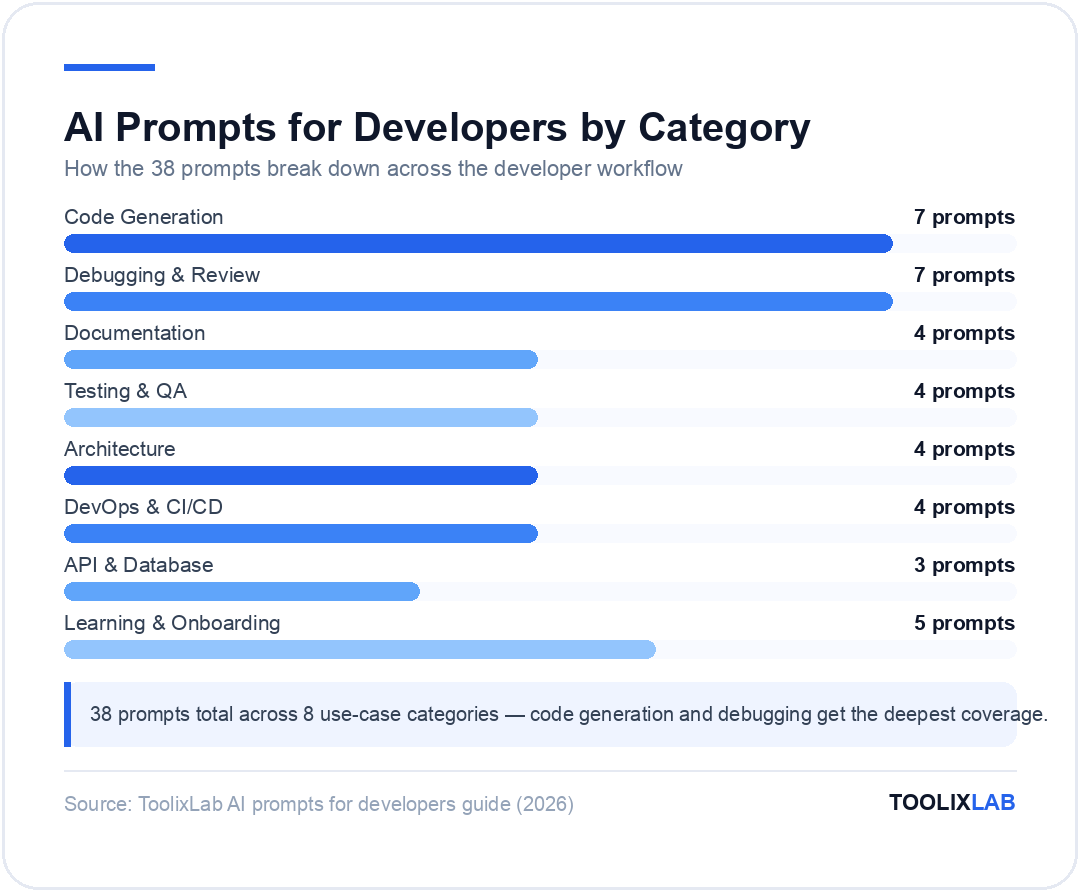
How the 38 developer prompts break down by category. Source: ToolixLab, 2026.
Learning, Onboarding & Skill Development Prompts
AI assistants are exceptional learning tools when prompted correctly. The prompts below are for onboarding to new codebases, learning new languages, preparing for technical interviews, and understanding complex concepts — using your existing knowledge as the starting point rather than starting from scratch.
Prompt 34: Learn a New Language Using What You Know
I'm an experienced [YOUR LANGUAGE] developer learning [NEW LANGUAGE]. Explain [CONCEPT] by translating it from my existing mental model.
My background: [describe your experience level and what you already know]
Show me:
1. How I would do this in [YOUR LANGUAGE]
2. How to do the equivalent in [NEW LANGUAGE]
3. What's fundamentally different (not just syntax, but the idiom or philosophy)
4. What patterns from [YOUR LANGUAGE] I should unlearn or avoid in [NEW LANGUAGE]
5. The idiomatic [NEW LANGUAGE] way to solve this same problem
Use side-by-side code examples where helpful.
Example use: "I'm an experienced Python developer learning Rust. Explain memory management by translating it from my existing mental model." The "what to unlearn" item is especially valuable — it prevents you from writing Python-flavored Rust.
Prompt 35: Onboard to an Unfamiliar Codebase
Help me onboard to this codebase. I'll share key files and you'll help me build a mental model.
My goal: I need to [describe your task, e.g. "add a new payment provider integration"]
Here are the key files:
[PASTE FILE 1 — e.g. main entry point]
[PASTE FILE 2 — e.g. routing configuration]
[PASTE FILE 3 — e.g. most relevant existing example]
Tell me:
1. What the overall architecture appears to be
2. The request lifecycle from entry to response
3. Where I should make my changes to accomplish my task
4. What conventions I should follow based on the existing code
5. What I should read next (which files or modules I haven't shown you)
Prompt 36: Explain a Complex Concept Simply
Explain [CONCEPT] to me. I understand [WHAT YOU ALREADY KNOW] but have not worked with [WHAT'S NEW].
Give me:
1. The one-sentence definition
2. The problem it solves (what was painful before it existed)
3. A concrete, runnable code example in [LANGUAGE]
4. When to use it vs. the simpler alternative
5. The most common mistake developers make when first using it
6. A 3-question self-check I can use to verify I've understood it
Keep the explanation practical. Skip the theory unless it directly helps with using it.
Prompt 37: Technical Interview Preparation
I have a technical interview at [COMPANY TYPE, e.g. a Series B SaaS startup] for a [ROLE, e.g. senior backend engineer] role. The stack is [STACK].
Generate a realistic practice interview problem in the style of this role.
Then, after I attempt it, help me improve my solution by:
1. Pointing out bugs or edge cases I missed
2. Suggesting a more optimal approach if one exists
3. Explaining the time and space complexity of my solution
4. Asking 2 follow-up questions a real interviewer would ask about my solution
Start with the problem statement. I'll reply with my attempt.
Prompt 38: Generate a Learning Roadmap
Create a structured learning roadmap for [SKILL/TECHNOLOGY] based on my current background.
My current level: [describe what you know]
My goal: [e.g. be able to build and deploy a production [X] app within 6 weeks]
Time available: [e.g. 1 hour per day on weekdays]
Structure the roadmap as:
- Week 1: Foundation (what to learn first and why)
- Week 2–3: Core skills (what to build at each stage)
- Week 4–5: Production-readiness (deployment, security, monitoring)
- Week 6: Capstone project (what to build to validate the learning)
For each week: what to learn, what to build, how to know when you're ready to move on.
Recommend specific, free resources where possible.
How to Customize These Prompts for Your Stack
Every prompt in this guide includes bracketed placeholders like [LANGUAGE] and [FRAMEWORK]. Replacing these is the minimum customization — but the developers who get the best results go further. Here's how to adapt these prompts for maximum value in your specific context.
1. Create a Context Block
Write a reusable header block describing your project, stack, and conventions. Paste this at the top of every new AI conversation:
PROJECT CONTEXT (include this at the top of every session):
- Stack: Node.js 22, TypeScript 5.4, Express 5, PostgreSQL 16 via Drizzle ORM
- Style guide: Airbnb ESLint config, no semicolons
- Testing: Vitest + Supertest for integration tests
- Conventions: all errors use our custom AppError class, all DB queries go through the repository layer
- Architecture: monorepo with src/services/, src/routes/, src/models/, src/repos/
This block prevents the model from guessing your conventions and generating code you have to rewrite to match your style.
2. Pick the Right Model for the Task
In 2026, different AI models genuinely have different strengths for developer tasks. As a general guide:
Claude Sonnet 4.6 — Best overall for complex reasoning tasks: architecture design, security review, code explanation, and multi-file refactoring. Handles very long context windows (200K tokens), which makes it excellent for pasting large codebases. Read our guide to best AI tools for developers for a full breakdown.
GPT-5.4 — Fast and reliable for repetitive code generation tasks like writing boilerplate, generating test cases, and converting formats. Good default for IDE integration.
GitHub Copilot (in-IDE) — Best for real-time autocomplete and inline suggestions where context is provided by the open file. See our GitHub Copilot review for an honest assessment.
Cursor AI — Best for multi-file edits, codebase-wide refactoring, and the "chat with your codebase" workflow. Combines model intelligence with full project context. See our Cursor AI review for details, and our Cursor vs GitHub Copilot comparison if you're still choosing between them.
3. Save Your Best Prompts in a Prompt Library
The prompts you customize and refine for your specific stack are worth saving. Store them in a shared team document, a Notion page, or a prompt management tool. For options, see our guide to best ChatGPT prompt libraries — several of the tools listed work equally well for non-ChatGPT models. For the underlying principles behind what makes a prompt work, read our AI prompt engineering guide.
4. Chain Prompts for Complex Tasks
The most powerful developer workflows combine multiple prompts in sequence. A typical chain:
Start with the architecture prompt to design the approach and agree on the structure
Generate the data model and schema
Generate the core business logic function by function
Generate unit tests for each function
Run the security review prompt on the complete implementation
Generate docstrings and README
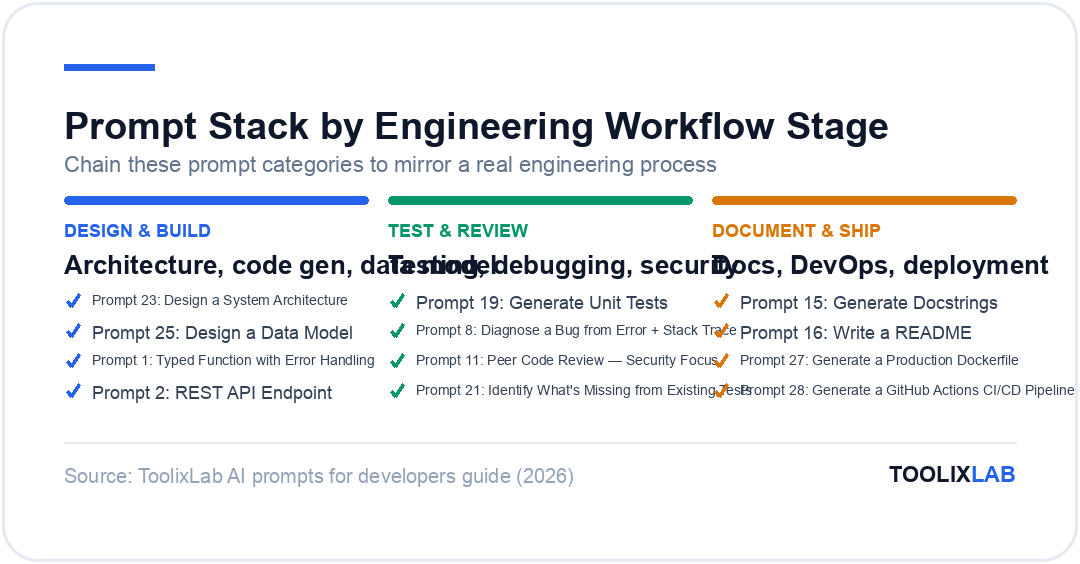
This chain — design, implement, test, review, document — mirrors a proper engineering process and produces far better results than asking for everything in one prompt.
Quick Reference: All 38 Prompts by Use Case
Use Case
Prompt #
Best Model
Time Saved
Typed function with error handling
1
GPT-5.4 / Claude Sonnet
15–30 min
REST API endpoint
2
Claude Sonnet 4.6
30–60 min
React component (TypeScript)
3
GPT-5.4 / Cursor
20–45 min
Refactor for readability/performance
4
Claude Sonnet 4.6
30–90 min
Database schema
5
Claude Sonnet 4.6
45–120 min
Debug from error + stack trace
8
Claude Sonnet 4.6
15–120 min
Security code review
11
Claude Sonnet 4.6
30–60 min
Generate docstrings
15
GPT-5.4 mini
20–40 min
Unit tests with edge cases
19
Claude Sonnet / GPT-5.4
30–60 min
System architecture design
23
Claude Opus 4.6
1–3 hours
Production Dockerfile
27
GPT-5.4 / Claude Sonnet
20–45 min
GitHub Actions CI/CD pipeline
28
Claude Sonnet 4.6
30–60 min
Optimize slow SQL query
32
Claude Sonnet 4.6
30–90 min
Learn new language from existing knowledge
34
Claude Sonnet 4.6
Ongoing
Chain these prompt categories to mirror a real engineering process.
The Bottom Line
AI prompts don't replace engineering judgment — they remove the friction between having a clear mental model of what you want and getting code that matches it. The developers who use these tools most effectively in 2026 are the ones who invest in writing better prompts rather than accepting mediocre outputs and spending the time rewriting.
The 38 prompts in this guide cover the full engineering workflow: from initial architecture through implementation, testing, documentation, and DevOps. Start with the use case where you currently spend the most time and where AI-generated output would save you the most toil. Build your context block. Refine the prompts for your specific stack. And save the versions that work — good prompts compound over time.
Q:What are the best AI prompts for software developers in 2026?
A:
The highest-value AI prompts for developers in 2026 are context-rich templates for code generation (with language, framework, and error handling specified), debugging (including the error, stack trace, and what you've already tried), security code review (mapped to OWASP categories), unit test generation (specifying edge cases and boundary values), and architecture design (with scale, constraints, and a request to be opinionated). The most important upgrade to any prompt is adding explicit language/framework context and a description of your output format requirements before asking for code.
Q:Which AI model is best for coding tasks in 2026?
A:
For complex reasoning tasks — architecture design, security review, multi-file refactoring, and code explanation — Claude Sonnet 4.6 is the strongest choice, particularly due to its 200K token context window which handles large codebases well. GPT-5.4 is fast and reliable for repetitive code generation and boilerplate. For in-IDE use, GitHub Copilot remains the leading autocomplete tool for real-time suggestions. Cursor AI is the best option for multi-file codebase-wide changes and the "chat with your repo" workflow.
Q:How do I get better code from AI prompts?
A:
The single biggest improvement you can make is to add a project context block at the top of every AI conversation: your language and version, framework, style guide, testing library, and any project-specific conventions like error classes or architectural layers. This context prevents the model from guessing your conventions and generating code that technically works but doesn't fit your project. Beyond that: paste the actual code rather than describing it, specify your output format explicitly, and include what you've already tried when debugging.
Q:Can AI replace code review?
A:
AI can handle a valuable first pass of code review — catching common security vulnerabilities (OWASP categories), SOLID principle violations, missing error handling, and performance antipatterns — but it cannot replace human review for business logic correctness, architectural context, team convention adherence, and the judgment calls that require knowing the history and goals of the project. The most effective teams use AI review as a pre-screen that catches mechanical issues so human reviewers can focus on higher-level concerns.
Q:Are AI-generated tests reliable?
A:
AI-generated tests are reliable for testing structure and coverage breadth — the model will generate tests for the happy path, null inputs, boundary values, and error cases if you request them explicitly. The risk is that the model generates tests that match the implementation rather than the intended behavior, or that test implementation details rather than observable outputs. Always review AI-generated tests to confirm they would actually fail if the logic were broken. Use the "identify what's missing" prompt to supplement existing tests rather than relying on AI to write your entire test suite from scratch.
Q:Do these prompts work with GitHub Copilot, Cursor, and Claude?
A:
Yes. These prompts are model-agnostic and work with any capable LLM — Claude Sonnet 4.6, GPT-5.4, GitHub Copilot Chat, and Cursor's AI chat interface. In-IDE tools like Copilot and Cursor benefit from these prompts in their chat or inline prompt interfaces; the inline autocomplete feature works differently (it predicts from your code context rather than from a typed prompt). For the longer, more complex prompts in this guide — architecture design, security review, onboarding — a standalone chat interface like Claude.ai or ChatGPT tends to give better results than the IDE chat panel.
Q:How do I save and reuse developer prompts across projects?
A:
The most practical system for most developers is a shared Markdown file or Notion page organized by use case, with a "project context block" at the top that you update per project and paste into every new AI session. For teams, a shared prompt library in Notion or Confluence allows everyone to contribute refinements. Tools like PromptLayer, FlowGPT, and AIPRM provide more structured prompt management with search and version history — see our best ChatGPT prompt libraries guide for a full comparison of options.
T
Written by ToolixLab Research Team
Research Team
The ToolixLab Research Team tests and reviews AI tools, automation workflows, and productivity software so you can make informed decisions without wasting time or money.
Comments
Join the discussion and share your thoughts
We Value Your Privacy
We use cookies to enhance your browsing experience, serve personalized ads or content, and analyze our traffic. By clicking "Accept All", you consent to our use of cookies. or read our Privacy Policy.