
GitHub Copilot was the first AI coding assistant to reach mass adoption — and three years later, it remains the default choice for millions of developers worldwide. Backed by Microsoft and powered by OpenAI, Copilot has grown from a simple tab-autocomplete tool into a comprehensive AI development platform with chat, CLI integration, pull request summaries, code review, and a coding agent that can handle multi-step tasks autonomously. But in 2026, it faces serious competition from Cursor AI, Codeium, and a growing field of challengers. Is GitHub Copilot still worth paying for? We spent weeks testing every feature across real Python, TypeScript, and Go projects to give you a definitive answer.
⚡ TL;DR — GitHub Copilot Review 2026
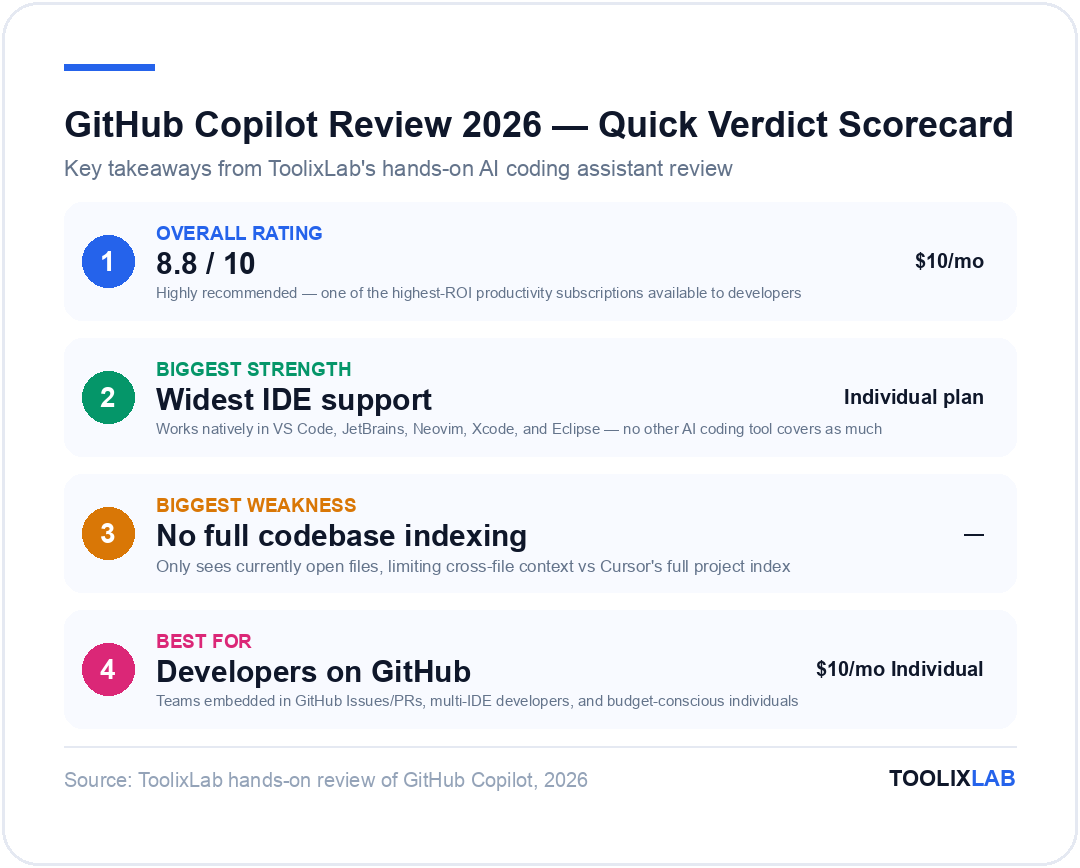
- ✓Works inside every major IDE — VS Code, JetBrains, Neovim, Xcode, Eclipse — not locked to one editor
- ✓Free plan now available with 2,000 autocomplete completions and 50 chat messages per month
- ✓Copilot Chat, CLI, pull request summaries, and code review features now bundled into one subscription
- ✓Deep GitHub integration — Copilot understands your repo context, issues, and PRs natively
- ✗No codebase indexing or multi-file composition — lags behind Cursor in deep AI integration
- ✗Copilot Workspace (agentic coding) still feels early-stage in 2026 compared to Cursor Agent Mode
- ✗Business and Enterprise plans are expensive for smaller teams at $19–39/user/month
- →Verdict: Best AI coding tool for developers who live in GitHub, use multiple IDEs, or work in enterprise environments — but Cursor wins for pure AI depth
What Is GitHub Copilot?
GitHub Copilot is an AI coding assistant developed by GitHub (owned by Microsoft) in partnership with OpenAI. It launched in June 2022 as a paid product after a technical preview, and within its first year had been adopted by over 1.5 million developers — making it by far the most widely used AI coding tool in the world. By early 2026, GitHub reports over 15 million active Copilot users across individual, business, and enterprise plans.
Copilot's original core feature was tab autocomplete — an AI that watches what you type and suggests what comes next, line by line or in multi-line blocks. This sounds simple, but in practice it transforms how fast you can code. You describe the logic in a comment, or start typing a function signature, and Copilot fills in a plausible implementation that you can accept with a single keystroke.
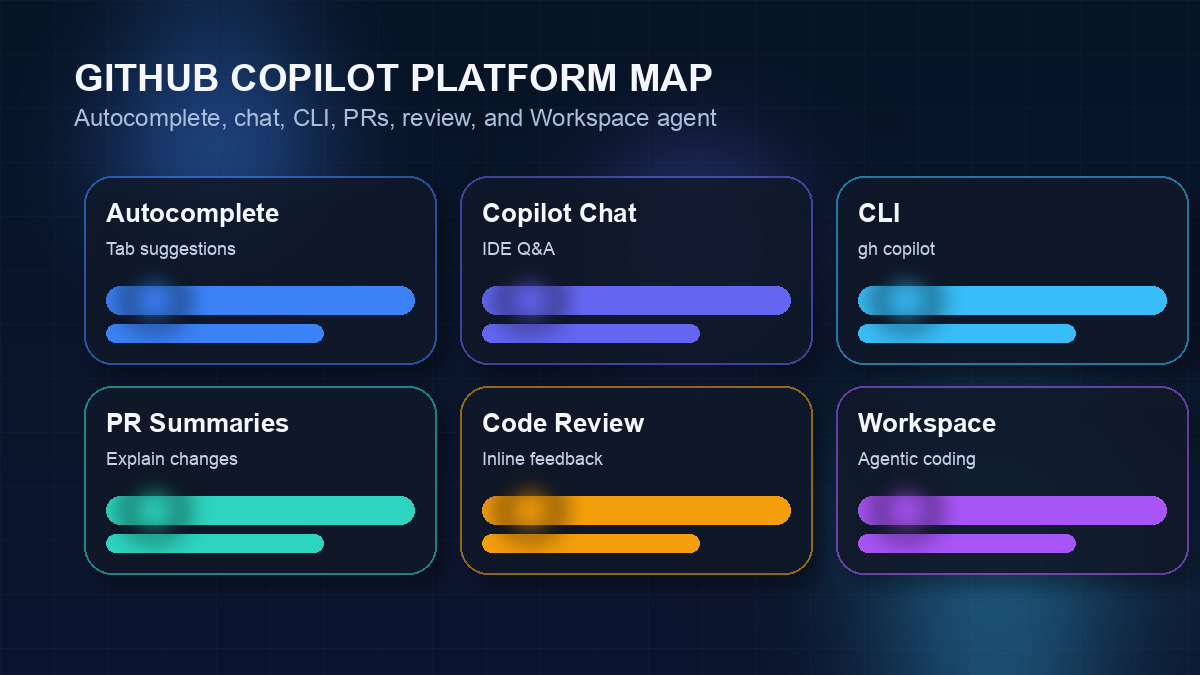
Since that initial launch, Copilot has expanded significantly. In 2023 and 2024, GitHub added Copilot Chat (a conversational AI assistant embedded in your IDE), Copilot for CLI (AI in the terminal), pull request summaries, code review, and Copilot Workspace — a more ambitious agentic feature that aims to let you complete entire development tasks from a GitHub Issue through to a deployable pull request, with the AI doing the heavy lifting.
The underlying model powering Copilot has also evolved. Early Copilot ran on Codex, OpenAI's code-specialised model. By 2025, GitHub had upgraded to GPT-4o for chat and reasoning tasks, and introduced multi-model support so users on higher plans can choose between GPT-4o, Claude 3.5 Sonnet, and Gemini 1.5 Pro depending on the task. The result is a platform that has matured considerably — though as we'll explore, that breadth now competes with more specialised rivals that go deeper in specific areas.
One of GitHub Copilot's most important structural advantages is its reach: it works natively inside VS Code, every JetBrains IDE (IntelliJ, WebStorm, PyCharm, Rider, GoLand, CLion, and others), Neovim, Visual Studio, Xcode, and Eclipse. No other AI coding tool comes close to this level of IDE coverage. If you split your time across environments, or your team uses different editors, Copilot is often the only choice that works everywhere.
GitHub Copilot Key Features in 2026
GitHub Copilot has expanded well beyond its original autocomplete capability. Here is a full breakdown of every major feature and how each performs in real-world use.
1. Tab Autocomplete — The Core Experience
GitHub Copilot's tab autocomplete is still its most-used and best-understood feature. As you type, Copilot watches your cursor position, the current file, and a rolling window of surrounding context, then generates a grey "ghost text" suggestion. Press Tab to accept the whole suggestion, use arrow keys to cycle between alternatives, or keep typing to refine.
In our testing across TypeScript React projects, Python data pipelines, and Go REST APIs, Copilot's autocomplete was consistently excellent for boilerplate-heavy patterns: React component scaffolding, API route handlers, test cases, data transformations, and standard library usage. Suggestion acceptance rate hovered around 55–65% for most sessions, which is strong — though slightly behind the 60–70% we experienced with Cursor Tab in similar conditions.
A notable improvement in 2025–2026 is Copilot's awareness of neighbouring open files. While it still does not index your entire codebase the way Cursor does, it now reads all currently open files in your editor as context, which meaningfully improves suggestion relevance when you have related files open. For a typical development session with 3–5 files open, this covers most of the context you actually need.
2. Copilot Chat — Conversational AI in Your IDE
Copilot Chat (available in VS Code, JetBrains, and Visual Studio) opens a sidebar conversation panel where you can ask questions about your code, request refactoring, get explanations, debug errors, and generate new code through natural language. It supports multiple models including Claude Opus 4.6, GPT-5.4, and Gemini 2.5 Pro, with model selection available on Pro and Business plans.
Copilot Chat integrates directly with your editor context. You can highlight a function and ask "Explain what this does", select a block of code and ask "Refactor this to be more readable", or click on an error message and ask "Fix this". The chat understands which files you have open, which code you have selected, and — in VS Code — can also reference your workspace through slash commands.
Useful slash commands in Copilot Chat include:
- ▸
/explain— Generates a detailed explanation of selected code - ▸
/fix— Proposes a fix for the selected code or current error - ▸
/tests— Generates unit tests for the selected function or file - ▸
/docs— Generates inline documentation or JSDoc comments for selected code - ▸
/new— Scaffolds a new file or project structure from a description
In practice, Copilot Chat is competent but not exceptional compared to raw ChatGPT or Claude. Where it wins is in context — it already knows what you have open and what you selected, so you skip the copy-paste step. Where it trails Cursor is that it does not have access to your full indexed codebase, so questions about cross-file architecture require you to manually reference files.
3. Copilot for CLI
Copilot for CLI brings AI assistance to your terminal via the GitHub CLI (gh copilot). Three subcommands drive most of the value:
- ▸gh copilot suggest — Describe what you want to do in plain English and get a shell command suggestion. For example: "List all Docker containers using more than 500MB of memory sorted by size" produces the correct
docker statscommand with the right filters. - ▸gh copilot explain — Paste a shell command (or a cryptic one you found on Stack Overflow) and get a plain-English breakdown of exactly what it does, flag by flag.
- ▸gh copilot alias — Creates shell aliases for frequently used Copilot commands in your bash/zsh profile.
CLI is a quietly powerful feature that many Copilot subscribers overlook. For sysadmin work, devops scripts, git operations, and one-off data transformations, having an AI that can generate and explain shell commands without leaving your terminal saves meaningful time. The explain command in particular is excellent for onboarding developers to unfamiliar codebases with complex Makefiles or build scripts.
4. Pull Request Summaries and Code Review
On GitHub.com itself (not in the IDE), Copilot integrates directly into pull request workflows. Two features stand out:
PR Summaries: When you open a pull request, Copilot automatically generates a structured summary of what changed — what files were modified, what logic was added, what was removed, and a brief plain-English description of the purpose. This is genuinely useful for reviewers who need to understand a large PR at a glance before diving into the diff. The summaries are accurate and concise, though they occasionally miss subtle architectural intent that a human would catch.
Code Review: Copilot Code Review (launched in 2025, now generally available) lets you request an AI review on any pull request. Copilot reads the entire diff and posts inline comments flagging potential bugs, security issues, style violations, missing edge case handling, and performance concerns. In our testing, it correctly caught: an off-by-one error in a loop boundary, a missing null check before an async operation, a SQL query that could produce a full table scan, and a React hook rule violation. The signal-to-noise ratio was reasonably high — it generated about 6 comments per 200-line PR, most of which were worth considering.
These GitHub.com-native features are a genuine differentiator that no other AI coding tool offers. Cursor, Codeium, and others only live in the IDE. Copilot also lives in your code review workflow.
5. Copilot Workspace — Agentic Coding
Copilot Workspace is GitHub's attempt at fully agentic development: you describe a task (or link to a GitHub Issue), and Copilot plans a step-by-step implementation, proposes specific code changes across files, lets you review and edit the plan, then executes the changes and creates a pull request — all without leaving a browser tab.
The vision is compelling: click on a bug report, watch Copilot locate the root cause, propose a fix, write the tests, and open the PR. In practice, as of early 2026, Workspace handles simple, well-scoped tasks admirably — fixing a documented bug, adding a new API endpoint with a clear spec, updating documentation. For larger, more ambiguous tasks, the plan it generates is often a starting point that requires significant editing before the implementation is worth running.
Compared to Cursor's Agent Mode — which operates inside your actual editor with access to your terminal and all files — Workspace feels more like a planning interface that creates a branch for you to review. Both approaches have merit, but Cursor's in-editor agent feels more fluid and capable for iterative development. Workspace shines for GitHub-native workflows where the Issue-to-PR pipeline matters.
6. Copilot Extensions (Third-Party Integrations)
Copilot Extensions, introduced in 2024 and now in general availability, let third-party tools integrate directly into the Copilot Chat interface. You invoke them with an @ mention — for example, @docker, @datadog, @sentry, or @mongodb — to bring context from those external services directly into your conversation.
The Docker extension, for instance, lets you ask "What's causing this container to crash?" and have Copilot pull Docker logs, analyse them, and suggest a fix — without switching windows. The Sentry extension can explain error traces from your production monitoring. The MongoDB extension can help optimise queries against your actual schema. This extensibility is an underrated strength of the Copilot platform that deepens over time as more integrations are built.
7. Multi-Model Selection
Individual and Business plan subscribers can now choose which AI model powers their Copilot Chat and completions. Options as of 2026 include:
- ▸GPT-5.4 — Strong balance of speed and reasoning quality across most tasks.
- ▸Claude Opus 4.6 — Available on Pro and above. Particularly strong for long-context reasoning, documentation generation, and complex refactoring tasks.
- ▸Gemini 2.5 Pro — Available for large-context tasks. Its 1M token context window is useful for asking questions about extremely large codebases.
- ▸Additional models from Anthropic, Google, and OpenAI — Copilot's multi-model selection lets you pick the right model per task directly from the chat interface.
This model flexibility is a significant maturity signal. Rather than locking you into one model, GitHub lets you pick the right intelligence for the right task — which is exactly how professional developers want to work.
GitHub Copilot Plans and Pricing in 2026
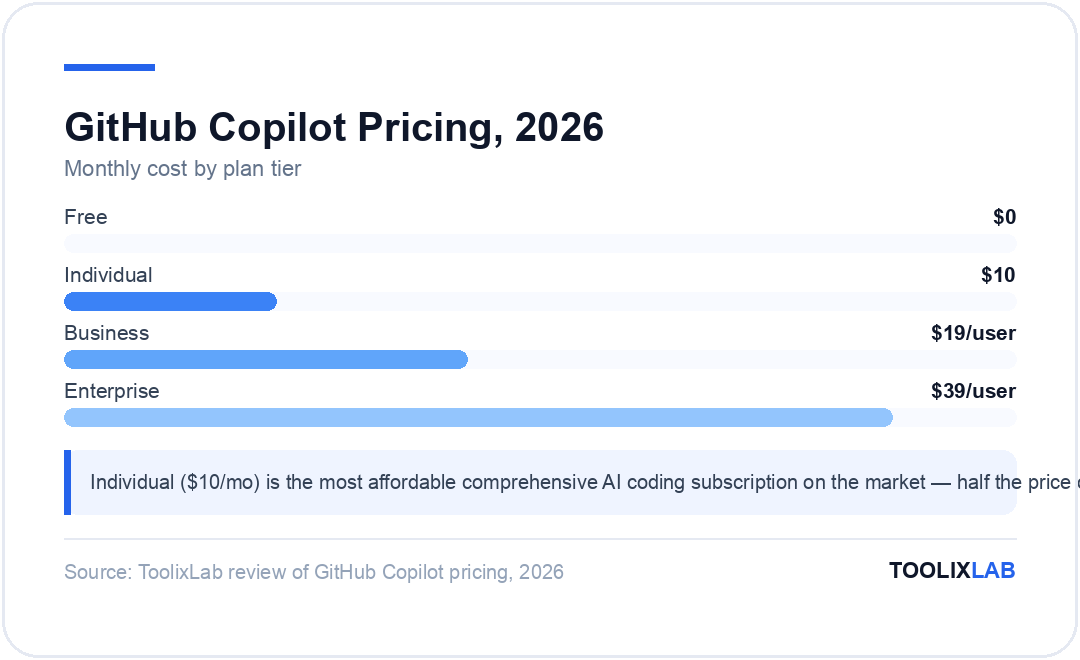
GitHub Copilot has restructured its pricing significantly over the past two years. Here is what each plan includes and who it is for:
| Plan | Price | Completions | Chat | Key Extras |
|---|---|---|---|---|
| Free | $0 | 2,000/month | 50 messages/month | VS Code + JetBrains only; GPT-5.4 + Claude Opus 4.6 + Gemini 2.5 Pro |
| Individual | $10/month or $100/year | Unlimited | Unlimited | All IDEs; multi-model; Copilot CLI; PR summaries |
| Business | $19/user/month | Unlimited | Unlimited | Policy controls; audit logs; code review; SAML SSO |
| Enterprise | $39/user/month | Unlimited | Unlimited + fine-tuned models | Custom fine-tuning; Copilot Workspace; org knowledge; GHES support |
Free plan: GitHub introduced a proper free tier in late 2024 — a meaningful shift from its "trials only" approach. The free plan is capped but real: 2,000 completions and 50 chat messages per month. For occasional use or for evaluating whether Copilot fits your workflow, this is enough. Students and open-source maintainers also qualify for free Individual plan access through GitHub's education and open-source programs.
Individual ($10/month): The sweet spot for professional developers. You get unlimited completions across all supported IDEs, unlimited chat with multi-model selection, Copilot CLI, and pull request summaries. At $10/month (or $100 billed annually), it is the most affordable comprehensive AI coding subscription on the market. Cursor Pro ($20/month) and Windsurf Teams ($40/user/month) both cost more for comparable or fewer features.
Business ($19/user/month): Adds administrative controls — usage dashboards, policy enforcement (blocking certain file types, disabling public code matching), audit logs, IP indemnity, and SAML SSO. Also includes the Copilot Code Review feature. For teams of 5 or more, this represents a significant cost jump: a 10-person team pays $190/month versus $100 for 10 Individual plans. The policy controls and centralised management justify this for most business use cases, but smaller teams should evaluate whether they actually need those controls.
Enterprise ($39/user/month): Adds custom model fine-tuning on your private codebase (letting Copilot learn your internal patterns, APIs, and conventions), Copilot Workspace, org-level knowledge bases, and support for GitHub Enterprise Server (on-premises). For large engineering organisations, the fine-tuning capability can meaningfully improve completion relevance for internal frameworks — but it requires substantial setup investment.
GitHub Copilot Performance: Real-World Testing
We put GitHub Copilot through a structured set of real-world development tasks to evaluate completion quality, chat accuracy, and CLI utility across multiple languages and project types.
TypeScript / React
TypeScript and React are where Copilot shines brightest. The training data coverage for React patterns, TypeScript generics, and modern hooks is exceptional. Copilot correctly completed complex typed component props, inferred proper TypeScript interfaces from usage context, and generated accurate async/await data fetching patterns with proper error handling. We measured a 67% tab acceptance rate across React component work — one of the highest we saw.
Where it struggled: when working across a large codebase with custom hooks and shared context providers, Copilot sometimes generated suggestions that conflicted with established patterns in files it had not seen. This is the direct limitation of not indexing the full codebase — a gap that Cursor's architecture addresses more completely.
Python
Python completion quality was excellent for data science, scripting, and API work. Pandas operations, sklearn pipelines, and FastAPI route handlers were all completed accurately and idiomatically. For more specialised libraries with less training data coverage (specific ORMs, less-common frameworks), Copilot occasionally hallucinated method names or incorrect signatures — always worth verifying when working in less-mainstream stacks.
Go
Go completion was solid for standard library usage and idiomatic patterns (error wrapping, goroutine management, channel patterns). The strict type system means Copilot's suggestions are either clearly correct or clearly wrong — there is less ambiguity than in dynamically typed languages. We found Go to be one of the better-performing languages in our testing, with suggestions that were idiomatic and correctly handling Go's explicit error return conventions.
Test Generation (/tests command)
The /tests slash command was one of the most consistently useful features we tested. Select a function, run /tests in Copilot Chat, and it generates a comprehensive test suite covering happy paths, edge cases, null inputs, and error conditions. For a 50-line TypeScript utility function, it generated 8 test cases using Jest that covered all the cases we would have written manually — saving roughly 20 minutes per function. The tests required minor adjustments for project-specific setup but were structurally correct and directly runnable.
GitHub Copilot vs Cursor vs Codeium: Feature Comparison
GitHub Copilot does not operate in a vacuum. In 2026, it competes directly with Cursor AI (the deep-integration editor), Codeium (the free alternative), and others. Here is how they compare across the dimensions that matter most for developers. For a deeper dive, see our full three-way comparison of Cursor, GitHub Copilot, and Codeium.
| Feature | GitHub Copilot | Cursor AI | Codeium |
|---|---|---|---|
| Free plan | ✅ 2,000 completions/mo | ✅ Limited (hard caps) | ✅ Unlimited completions |
| Paid price | $10/month | $20/month | $20/month Pro (Windsurf) |
| IDE support | VS Code, JetBrains, Neovim, Xcode, Eclipse, more | VS Code fork only | VS Code, JetBrains, Neovim, 40+ IDEs |
| Codebase indexing | Partial (open files only) | ✅ Full codebase index | Partial (open files) |
| Multi-file editing | Limited (via Edits) | ✅ Composer — best in class | ❌ No |
| Agentic mode | Copilot Workspace (browser) | ✅ Agent Mode (in-editor) | ❌ No |
| CLI integration | ✅ gh copilot | ✅ Terminal in-editor | Limited |
| PR summaries | ✅ Native on GitHub.com | ❌ No | ❌ No |
| Code review | ✅ GitHub.com PR review | ❌ No | ❌ No |
| Multi-model choice | Claude Opus 4.6, GPT-5.4, Gemini 2.5 Pro | GPT-5.4, Claude Sonnet 4.6, Gemini 2.5 Pro | Windsurf SWE-1.5 + premium models |
| Privacy / data training | Opt-out; Business/Enterprise default off | Opt-out Privacy Mode | Never trains on code |
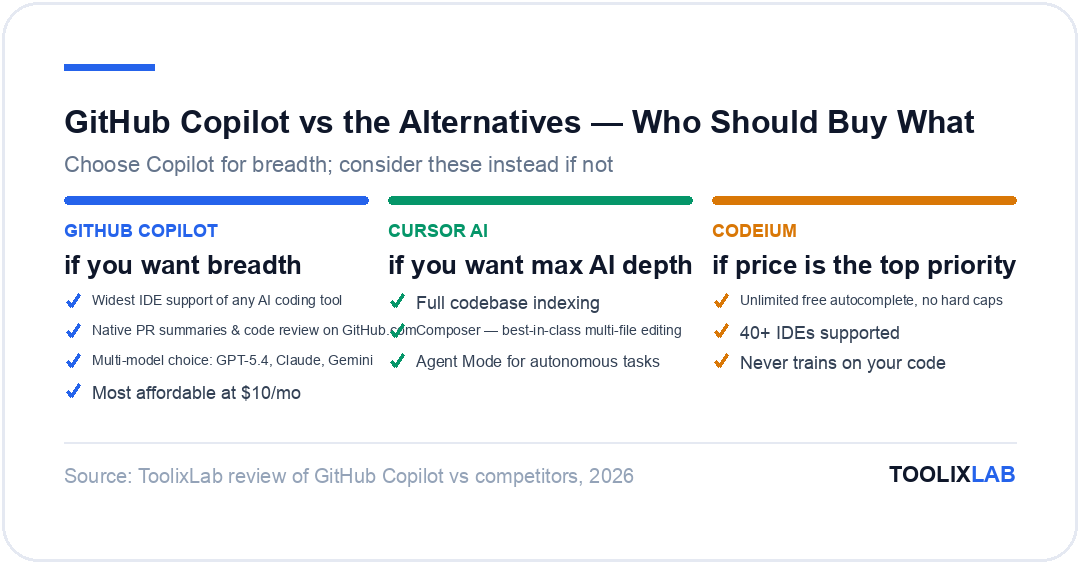
The headline takeaway: GitHub Copilot wins on breadth and ecosystem integration. Cursor wins on depth of AI capability within the editor. Codeium wins on free-tier value and IDE coverage. If you only code in VS Code and want maximum AI power for complex tasks, Cursor AI is worth the premium. If you use JetBrains or Neovim, GitHub Copilot and Codeium are your realistic options.
GitHub Copilot for Teams and Enterprise
Individual developers comparing AI coding tools often focus on autocomplete quality and chat capability — and those factors dominate our reviews. But for engineering teams and enterprises, the decision involves a broader set of considerations where GitHub Copilot has structural advantages.
Centralised Administration
The Copilot Business plan gives administrators a single dashboard to manage licenses, monitor usage per developer, set policy rules (blocking suggestions matching public code, limiting which features are available), and view audit logs. For a 50-person engineering team, having this level of visibility and control — comparable to what you'd expect from enterprise SaaS tools — is a meaningful benefit over tools that only have per-user settings.
IP Indemnification
Business and Enterprise plan subscribers receive GitHub's Copilot Copyright Commitment — a legal indemnification against IP claims arising from Copilot-generated code when the public code filter is enabled. For enterprises with legal and compliance requirements, this materially reduces risk compared to tools that offer no such protection.
Custom Fine-Tuned Models (Enterprise)
The Enterprise plan's custom model fine-tuning capability is significant for organisations with large internal codebases and proprietary frameworks. You provide a curated sample of your internal code, and GitHub fine-tunes a Copilot model on that data, producing a private model that understands your naming conventions, internal APIs, and architectural patterns. Early adopters report meaningful improvements in suggestion relevance compared to the base Copilot model on internal framework code — though the setup process requires dedicated engineering time and ongoing curation.
GitHub Enterprise Server Support
For organisations running GitHub Enterprise Server (on-premises), the Enterprise plan supports Copilot integration without requiring code to leave the corporate network. This is a unique capability — most AI coding tools are cloud-only. For financial services, healthcare, defence, or other sectors with strict data residency requirements, this opens up AI coding assistance in environments where it would otherwise be blocked entirely.
GitHub Copilot Pros and Cons
Pros
- ✓Widest IDE support of any AI coding tool — works everywhere your team already codes
- ✓Most affordable paid plan at $10/month for individuals, with a real free tier
- ✓GitHub.com-native features (PR summaries, code review) that no competitor offers
- ✓Multi-model selection including Claude Opus 4.6, GPT-5.4, and Gemini 2.5 Pro
- ✓Enterprise-grade controls, IP indemnification, and on-premises GitHub Server support
- ✓Copilot Extensions ecosystem for third-party tool integrations (Docker, Sentry, Datadog)
- ✓Excellent autocomplete quality for TypeScript, Python, Go, and other popular languages
Cons
- ✗No full codebase indexing — only sees currently open files, limiting cross-file context
- ✗Multi-file editing (via Edits) is early-stage; Cursor Composer is significantly more capable
- ✗Copilot Workspace (agentic coding) still feels incomplete compared to in-editor agent tools
- ✗Business plan at $19/user/month is expensive for teams of 10+ compared to alternatives
- ✗Code is sent to Microsoft/OpenAI servers by default — privacy mode requires opt-in
- ✗Chat quality inside IDEs trails behind raw ChatGPT or Claude for complex reasoning tasks
Who Should Use GitHub Copilot in 2026?
GitHub Copilot is not the right choice for every developer in every situation. Here is how to think about whether it is the best fit for your specific needs:
GitHub Copilot is Ideal For:
- ▸Developers who use multiple IDEs — If you split time between VS Code, IntelliJ, and Neovim, Copilot is the only AI coding tool that works seamlessly in all three.
- ▸Teams deeply embedded in GitHub — If your workflow lives in GitHub Issues, Pull Requests, and GitHub Actions, the native Copilot integration delivers value that in-editor tools cannot match.
- ▸Enterprise developers with compliance requirements — IP indemnification, audit logs, policy controls, and on-premises server support make Copilot the only realistic choice for many regulated environments.
- ▸Budget-conscious individual developers — At $10/month for individuals (or free with the new free tier), Copilot Individual is the most cost-effective way to get unlimited AI-assisted coding.
- ▸JetBrains users — If you code primarily in IntelliJ, PyCharm, WebStorm, or Rider, Cursor is not an option. Between GitHub Copilot and Windsurf, Copilot's paid plan offers a better overall feature set.
GitHub Copilot Is NOT Ideal For:
- ▸VS Code developers who want maximum AI depth — If you work exclusively in VS Code and want the deepest possible AI integration for complex projects, Cursor AI's codebase indexing, Composer, and Agent Mode deliver meaningfully more capability at $20/month.
- ▸Budget-focused users who mainly need autocomplete — If unlimited free autocomplete is your priority and you don't need chat, Windsurf's free plan covers this without any monthly cost.
- ▸Teams working on massive, complex codebases — For large-scale projects where cross-file context is critical and your own internal APIs dominate, Cursor's full codebase indexing or Copilot Enterprise's custom fine-tuning (at $39/user/month) are the options worth evaluating.
GitHub Copilot Alternatives
If you are not convinced Copilot is the right fit, here are the main alternatives worth evaluating:
Cursor AI — Best for Deep AI Integration
Cursor is the strongest competitor to GitHub Copilot for individual developers working in VS Code. Its full codebase indexing, Composer multi-file editing, and Agent Mode are capabilities that Copilot simply does not match. At $20/month — double the price of Copilot Individual — it is the right choice if you want the most capable AI development environment available today. See our full Cursor AI review for a deep dive. The main constraint: it only supports VS Code (as a fork), so JetBrains and Neovim users cannot use it.
Codeium — Best Free Alternative
Codeium offers unlimited free autocomplete with no monthly caps, works as a plugin across 40+ IDEs (including VS Code, all JetBrains IDEs, Neovim, Emacs, and more), and has a strong stated privacy policy — your code is never used for model training. For developers whose primary need is high-quality autocomplete without a subscription, Codeium is the obvious choice. It lacks Copilot's GitHub.com integration, CLI tool, multi-model selection, and enterprise controls — but for a free tool, the completion quality is genuinely impressive. We compare all three tools head-to-head in our Cursor vs Copilot vs Codeium comparison.
Tabnine — Best for Privacy-Sensitive Environments
Tabnine is an AI coding assistant with a long track record (founded in 2018) that differentiates on privacy and on-premises deployment. It runs models locally on your machine — meaning no code ever leaves your environment — which is the strictest privacy guarantee in the market. For developers at defence contractors, healthcare companies, or other organisations with strict data handling requirements where even Copilot's on-premises Server option isn't sufficient, Tabnine is often the viable choice. Its completion quality trails Copilot and Cursor, but the privacy model is genuinely differentiated.
Amazon CodeWhisperer
Amazon's AI coding tool (now branded as part of Amazon Q Developer) is most relevant for developers working heavily in AWS environments. It has deep knowledge of AWS services, CDK constructs, and CloudFormation patterns, and is free for individual use with no completion caps. For teams building on AWS infrastructure, it offers reference tracking to check completion suggestions against AWS best practices — a unique feature. Outside of AWS-heavy work, its general coding completion quality lags behind Copilot and Cursor.
Final Verdict: Is GitHub Copilot Worth $10/Month in 2026?
For most professional developers: yes, unequivocally. At $10/month for individuals, GitHub Copilot Individual is one of the highest-ROI productivity subscriptions available. Unlimited autocomplete across every major IDE, Copilot Chat with multi-model selection, CLI integration, and pull request summaries — all for the cost of two coffees a month — represents extraordinary value. If you code professionally, you should almost certainly be using it.
The more nuanced question is whether GitHub Copilot is the best AI coding tool — and here, context matters. In the hierarchy of AI coding capability, Cursor sits at the top for VS Code developers willing to pay $20/month. Copilot sits slightly below that in pure AI depth but well above Codeium in features. For breadth of IDE support, GitHub.com integration, enterprise controls, and overall value, Copilot is unmatched.
The best AI development setup in 2026 for many teams is using both: Cursor for VS Code power users doing complex feature work, and Copilot for JetBrains users and for the GitHub.com workflow layer (PR summaries, code review) that Cursor cannot replicate. They serve different enough use cases that they are more complementary than competitive.
If you're evaluating whether to start with Copilot, the new free plan removes the barrier entirely — try it with no commitment. For developers who already use it on the Individual plan: it continues to earn its subscription fee many times over, and the pace of improvement shows no sign of slowing down.
Our GitHub Copilot Ratings
To get started with GitHub Copilot, you can activate the free plan directly through your GitHub account settings — no credit card required. The Individual paid plan adds a 7-day free trial before billing begins. For teams considering the Business plan, GitHub offers a 30-day team trial. Visit GitHub Copilot's official page for current pricing and to start your trial.
⚖️ Our Verdict
GitHub Copilot is the safe, enterprise-ready AI coding choice for teams already on GitHub — and its integration across the full development lifecycle (code, PRs, code review, CLI) makes it far more than an autocomplete tool. Cursor edges it for raw coding speed in a single environment, but Copilot wins on breadth, IDE flexibility, and enterprise compliance. For individual developers on the free plan, it's a no-brainer starting point.
✅ Best for...
- • Teams on GitHub Enterprise needing audit trails and compliance
- • Developers using JetBrains, VS Code, Visual Studio, or multiple IDEs
- • Organizations wanting AI across the entire GitHub development lifecycle
❌ Skip if...
- • You're a solo developer without GitHub dependencies
- • You want the most powerful standalone AI coding experience (use Cursor instead)
- • Budget is your primary constraint (Codeium's free tier is the better starting point)
🔬 How We Reviewed This Tool
This review is based on hands-on use, not a feature-list rewrite. Our process:
- Real workflows: we used the tool on genuine work tasks over an extended period and compared its output directly against its closest competitors.
- Verified claims: pricing, plan limits, and feature availability were checked against the vendor's official pages at the time of writing.
- Documented downsides: we report where the tool failed or frustrated us, not just where it shone — check the cons and "skip if" sections.
- Kept current: this review is re-verified on our refresh cycle; the "Last updated" date reflects the most recent check.
ToolixLab is reader-supported: some links may earn us a commission, which never affects our verdicts.