
ChatGPT Trust Snapshot
Real Free Score
80/100
Lock-In Risk
Medium
Billing Friction
Low
Commercial Use
Allowed
Data Privacy
Clear
Volatility
Medium
Last checked
2026-07-22
TL;DR — Prompt Engineering 2026
Most people use AI the same way they use a search engine — they type a short, vague question and hope for a useful answer. When the output is mediocre, they assume the AI isn't capable. In almost every case, the problem isn't the AI. It's the prompt.
Prompt engineering is the practice of structuring your inputs to AI models in ways that consistently produce high-quality, accurate, and useful outputs. It's not a technical skill — you don't need to write code or understand machine learning. It's a communication skill: learning how to give clear, specific, well-structured instructions to a system that will follow them very literally.
The gap between a mediocre AI user and a power user isn't access to better tools — it's prompt quality. The same model, given a weak prompt, produces generic, shallow output. Given a well-engineered prompt, it produces work that rivals expert-level writing, analysis, and reasoning.
This guide covers every major prompt engineering technique with real examples you can use immediately across ChatGPT, Claude, and Gemini — from the basics to advanced chaining and meta-prompting strategies used by professional AI teams.
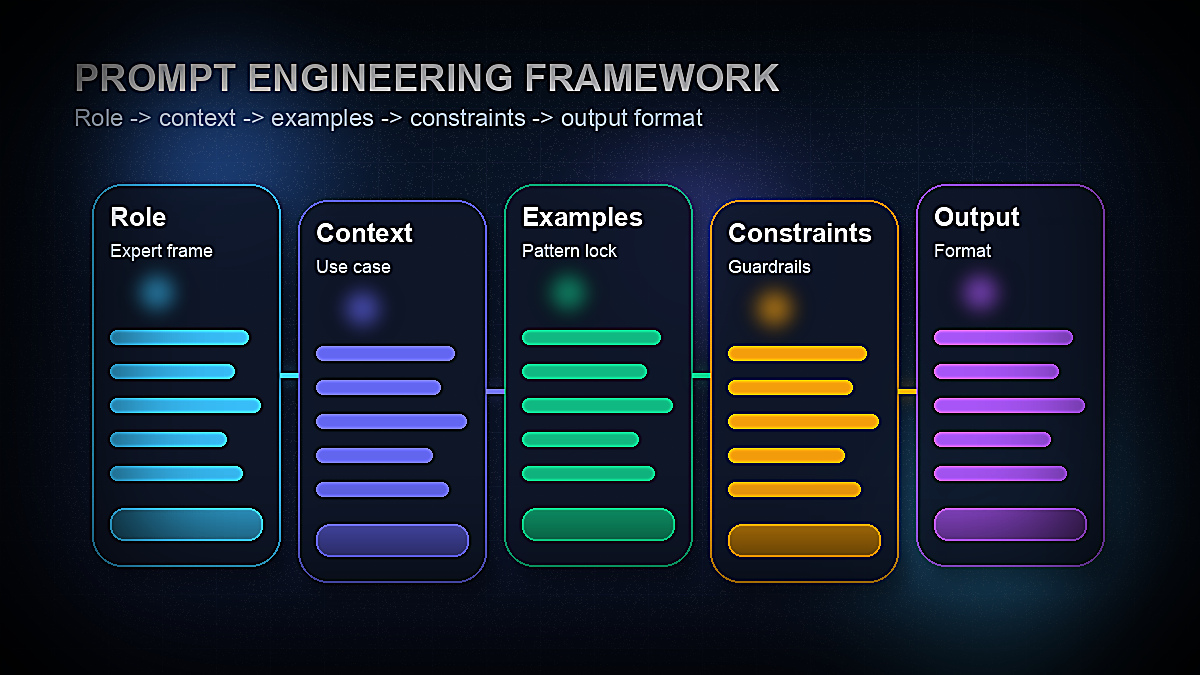
What Is Prompt Engineering? (And Why It Matters in 2026)
A prompt is any input you give to an AI language model. Prompt engineering is the systematic practice of designing those inputs to maximize the quality, relevance, and consistency of the AI's output.
The term emerged from the research community, where teams discovered that the way you phrase a question to an AI model dramatically affects the quality of the answer — even when the underlying information required is identical. A model asked "What is quantum computing?" produces a different quality of answer than a model asked "Explain quantum computing to a software engineer who understands classical computing but has no physics background, using one concrete analogy and three practical applications."
In 2026, prompt engineering matters more than ever for three reasons:
1. AI is everywhere in professional work. Writers, marketers, developers, analysts, lawyers, teachers, and executives are all using AI tools daily. The professionals who get dramatically better output from the same tools are the ones who understand how to prompt effectively.
2. The skill compounds. A good prompt template, once built, works repeatedly. A library of well-engineered prompts for your specific workflows is a productivity asset that grows in value over time.
3. Models reward specificity. Modern large language models like GPT-5.4, Claude Sonnet 4.6, and Gemini 2.5 Pro have enormous capability — but they're designed to match the apparent intent and sophistication of the input. Vague inputs produce vague outputs. Precise, well-structured inputs unlock the model's full capability.
According to OpenAI's official prompt engineering guide, six strategies consistently improve output quality: writing clear instructions, providing reference text, splitting complex tasks into simpler steps, giving the model time to "think," using external tools, and testing prompts systematically. This guide covers all of these in practical depth.
The Core Principles of Effective Prompt Design
Before diving into specific techniques, it's worth internalizing four principles that underlie every effective prompt. These aren't rules to follow mechanically — they're mental models that help you diagnose why a prompt isn't working and how to fix it.
Principle 1: Specificity beats brevity
The most common prompt mistake is being too vague. "Write me a blog post about AI" gives the model almost no information about what you actually want — length, audience, tone, perspective, structure, keywords, or purpose. The result is generic output that needs complete rewriting.
"Write a 1,500-word blog post for a non-technical small business owner audience about how AI tools can save time on customer service. Use a friendly, practical tone. Include three specific tool recommendations with real pricing. Start with a specific hook about the time cost of answering repetitive emails." — this prompt produces something you can actually use.
The rule: every detail you don't specify is a detail the model will decide for you, usually by defaulting to the most average, generic option.
Principle 2: Context shapes everything
AI models have no knowledge of your specific situation unless you tell them. They don't know your company, your audience, your brand voice, your constraints, or your goals. Providing context isn't padding — it's the instruction that orients every other part of the response.
Relevant context to include: who you are or what role you're playing, who the output is for, what the output will be used for, what constraints apply (length, format, tone, platform), and what success looks like.
Principle 3: Format is an instruction
If you want bullet points, ask for bullet points. If you want a table, ask for a table. If you want the answer in three paragraphs with headers, specify that. Models will produce whatever format seems most natural for the content — which often isn't the format most useful to you. Specifying format explicitly is one of the easiest, highest-value prompt improvements.
Principle 4: Iteration is the process
No prompt is perfect on the first try. Professional prompt engineers iterate: run the prompt, evaluate the output, identify what's missing or off, and refine the prompt. Keeping a "prompt log" — noting what worked and what didn't — dramatically accelerates your learning curve. If you'd rather skip building from scratch, a curated ChatGPT prompt library gives you battle-tested templates across every use case.
The 7 Essential Prompt Engineering Techniques
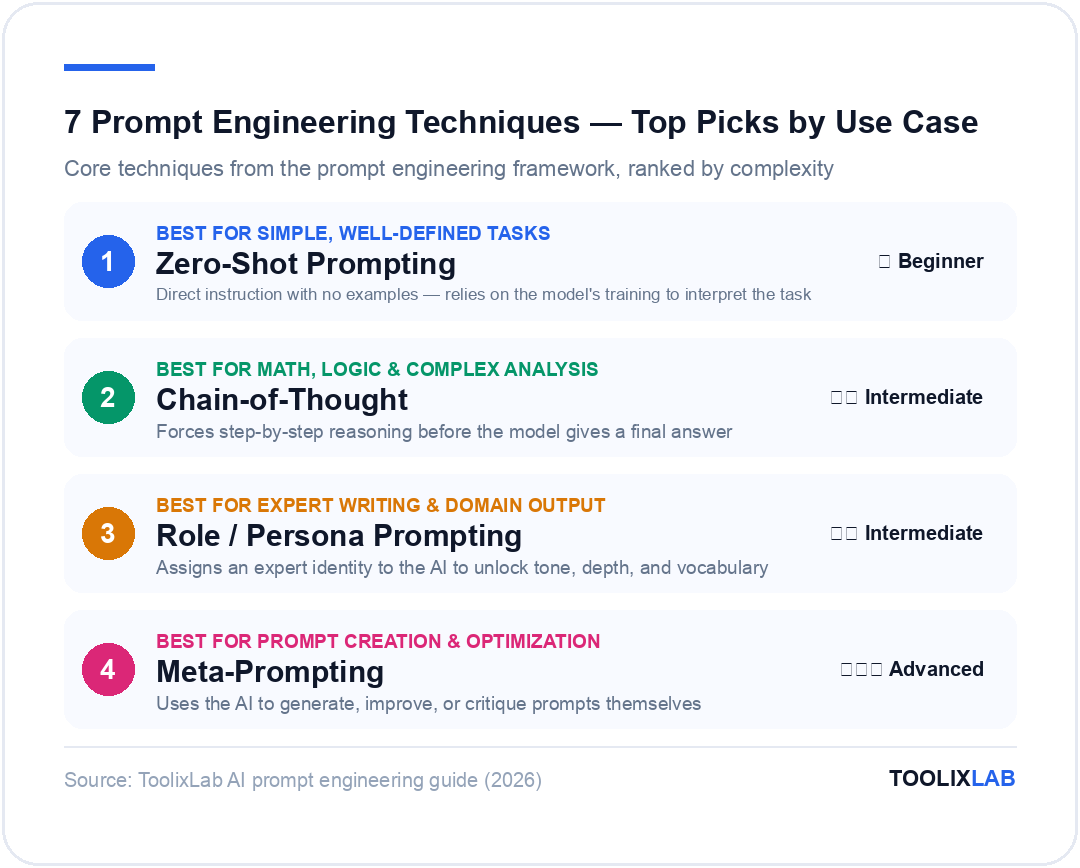
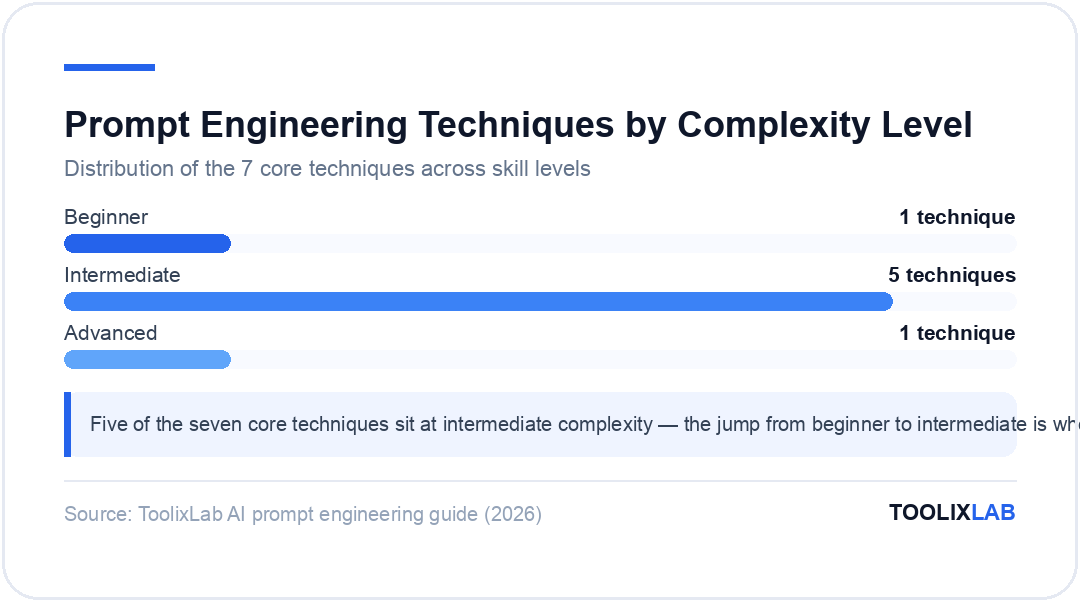
These seven techniques cover the vast majority of effective prompting scenarios. Most professional prompt engineers use a combination of two or three techniques in a single prompt.
| Technique | What It Does | Best For | Complexity |
|---|---|---|---|
| Zero-Shot | Direct instruction, no examples | Simple, well-defined tasks | ⭐ Beginner |
| Few-Shot | Provides examples to match | Tone/format matching, classification | ⭐⭐ Intermediate |
| Chain-of-Thought | Forces step-by-step reasoning | Math, logic, complex analysis | ⭐⭐ Intermediate |
| Role / Persona | Assigns expert identity to AI | Expert writing, domain-specific output | ⭐⭐ Intermediate |
| Instruction | Precise constraints and format rules | Any structured output requirement | ⭐⭐ Intermediate |
| Template | Fill-in-the-blank prompt structure | Repeatable workflows | ⭐⭐ Intermediate |
| Meta-Prompting | Ask AI to generate or improve prompts | Prompt creation and optimization | ⭐⭐⭐ Advanced |
Zero-Shot, One-Shot & Few-Shot Prompting
These three terms describe how many examples you provide alongside your instruction. Understanding when to use each is foundational to effective prompting.
Zero-Shot Prompting
Zero-shot prompting gives the model an instruction with no examples. It relies entirely on the model's training to interpret the task and produce an appropriate response. This works well for clear, common tasks the model has encountered many times during training.
Example — Zero-Shot:
"I've been using this project management tool for three months. The interface is clean and the Kanban boards work great. Customer support responded in under an hour when I had an issue. My only complaint is that the mobile app is slower than the desktop version. Overall, would recommend it to small teams."
Zero-shot works here because "summarize in one sentence" is an extremely well-defined task. The model knows exactly what to do.
Zero-shot breaks down when the task requires a specific format, voice, or judgment that isn't implicit in the instruction. For those cases, you need examples.
One-Shot Prompting
One-shot prompting provides a single example of the desired input/output pair before giving the model the actual task. This calibrates the model's understanding of format, tone, or level of detail.
Example — One-Shot:
Review: "Great product but shipping took two weeks."
Classification: Mixed
Now classify this review:
Review: "The battery dies after 4 hours and customer support never replied to my emails."
The single example shows the model exactly what "Mixed" means — a review with both positive and negative elements. Without it, the model might classify the last review as simply "Negative."
Few-Shot Prompting
Few-shot prompting provides 2–5 examples to establish a clear pattern. It's particularly powerful for tasks with a specific format, style, or classification scheme that wouldn't be obvious from the instruction alone.
Example — Few-Shot (Brand Voice Matching):
Example 1: "Monday got you? We get it. That's why we made project tracking actually enjoyable. ☕"
Example 2: "Your to-do list called. It wants to become a done list. We can help with that."
Example 3: "Small team, big goals. Sounds like our kind of people."
Now write a caption for a post announcing our new calendar integration feature.
Three examples is enough for the model to internalize the brand's tone — friendly, slightly witty, direct, empowering without being cliché. The output will match this voice far more accurately than a zero-shot instruction like "write a friendly caption for our new calendar feature."
Few-shot prompting is the single highest-leverage technique for getting AI output that matches your specific style, format, or classification criteria. Keep a library of your best examples for recurring prompt types.
Chain-of-Thought & Step-by-Step Reasoning Prompts
Chain-of-thought (CoT) prompting is one of the most important techniques in the prompt engineering toolkit — and it's remarkably simple. Instead of asking the model for an answer directly, you instruct it to reason through the problem step by step before arriving at a conclusion.
Research published by Google DeepMind demonstrated that adding "Let's think step by step" to a prompt dramatically improves accuracy on reasoning-heavy tasks — by as much as 40–50% on complex arithmetic and logical problems.
Why It Works
Language models generate text one token at a time, and each token is influenced by everything that came before it. When you ask a model to reason through a problem explicitly, each reasoning step becomes context for the next — producing a more coherent chain of logic. Without this, the model essentially jumps to the answer, which can skip important steps or introduce errors.
Simple Chain-of-Thought Trigger
Think through this step by step before giving the final answer.
With the CoT instruction, the model will work through each calculation explicitly — 6 × $0.75 = $4.50, 4 × $1.20 = $4.80, total = $9.30, change = $20 − $9.30 = $10.70 — rather than attempting to compute the answer in one step, which increases error risk.
Structured Chain-of-Thought for Complex Analysis
For more complex tasks, you can provide explicit reasoning structure:
1. Current product-market fit signals
2. Regulatory requirements (GDPR, data residency)
3. Competitive landscape in target markets
4. Required investment vs. expected timeline to breakeven
5. Your overall recommendation with key conditions
Here is our current situation: [insert context]
This structured CoT prompt forces the model to address each dimension before synthesizing a recommendation — producing far more rigorous analysis than asking "Should we expand to Europe?"
CoT for Content Strategy
Chain-of-thought isn't only for math and logic. It's equally powerful for strategic thinking tasks:
The reasoning steps produce a far more strategically sound outline than asking for an outline directly. For more SEO-specific AI prompting strategies, see our guide to the best AI prompts for SEO in 2026.
Role Prompting & Persona Assignment
Role prompting instructs the AI to adopt a specific identity, expertise, or perspective before responding. It's one of the most powerful techniques for unlocking domain-specific depth, appropriate tone, and expert-level vocabulary.
How Role Prompting Works
When you assign a role, you're doing two things: narrowing the model's response space to what an expert in that domain would say, and calibrating the level of sophistication, vocabulary, and assumptions that are appropriate for the output.
Without role prompting:
With role prompting:
The role prompt produces output with the specificity, directness, and practical orientation of actual legal advice — rather than generic caution about "consulting an attorney."
Effective Role Prompts for Common Use Cases
For marketing copy:
For data analysis:
For code review:
Audience Role Prompting
A variation of role prompting specifies not the AI's persona, but the audience. This is particularly useful for calibrating complexity and vocabulary:
Prompt Templates for Common Use Cases (With Examples)
Templates are reusable prompt structures with placeholder variables you fill in for each use. They're the practical backbone of professional prompt engineering — letting you capture what works and replicate it consistently.
The Universal Content Creation Template
Tone: [TONE — e.g., professional, conversational, witty, authoritative]
Length: [LENGTH — e.g., 300 words, 5 bullet points, 2 paragraphs]
Goal: [GOAL — e.g., persuade, inform, entertain, drive a specific action]
Key points to include: [LIST 3–5 POINTS]
Avoid: [ANYTHING TO EXCLUDE — jargon, clichés, specific claims]
Output format: [FORMAT — e.g., paragraph, numbered list, headers]
This template works for blog posts, emails, social captions, product descriptions, ad copy, and more. The specificity of each variable directly determines output quality.
The Email Writing Template
Sender: [WHO IS SENDING — role, company]
Recipient: [WHO IS RECEIVING — role, company, what they care about]
Goal of the email: [DESIRED ACTION OR OUTCOME]
Key context: [RELEVANT BACKGROUND — previous interaction, shared connection, relevant news]
Tone: [PROFESSIONAL / WARM / DIRECT / CASUAL]
Length: Under [X] words
CTA: [SPECIFIC CALL TO ACTION — book a 15-min call, reply with feedback, approve the attached]
Do not: [WHAT TO AVOID — don't be salesy, don't use "I hope this email finds you well", etc.]
The Meeting/Content Summary Template
- 3–5 key decisions or findings (bullet points)
- Action items with owners and deadlines (if mentioned)
- Open questions that need follow-up
- One-sentence executive summary
[PASTE CONTENT]
The Competitor Analysis Template
Structure your analysis as:
1. Their core value proposition and target customer
2. Key strengths vs. our product
3. Key weaknesses vs. our product
4. Where they are likely to invest next (based on recent moves)
5. Specific vulnerabilities we could exploit in our positioning
Be direct and specific. Avoid generic SWOT language.
For marketing-specific prompt templates, see our full collection of the best ChatGPT prompts for marketers in 2026.
Advanced Techniques: Prompt Chaining & Meta-Prompting
Once you've mastered the foundational techniques, two advanced strategies unlock significantly more powerful AI workflows: prompt chaining and meta-prompting.
Prompt Chaining
Prompt chaining breaks a complex task into a sequence of simpler prompts, where the output of each step becomes the input for the next. Instead of asking the AI to do everything at once (which often produces mediocre results), you architect a pipeline where each prompt does one thing well.
Example — Content creation chain:
Step 2 — Structure: "Given these 10 insights [paste Step 1 output], design an outline for a 2,000-word guide for first-time founders on hiring their first sales rep. The structure should build logically, with each section addressing the next concern a founder would naturally have."
Step 3 — Write: "Write Section 2: [paste specific section from Step 2 outline]. Maintain a direct, experienced-advisor tone. Use one concrete example. Length: 350–400 words."
Step 4 — Polish: "Review this draft [paste Step 3 output] for: (1) clarity, (2) any generic advice that should be replaced with something more specific, (3) missing transitions. Give me the revised version."
Each step in this chain does one focused job. The research step produces better insights than if you jumped straight to writing. The structure step produces a better outline because it's working from richer material. The writing step produces better prose because it's working from a thoughtful outline. The polish step improves a specific, real draft rather than imagined content.
Prompt chaining is particularly powerful for: long-form content, multi-step research and analysis, code development and review, and any workflow where quality compounds through iteration.
Meta-Prompting
Meta-prompting uses the AI to generate, improve, or optimize prompts themselves. It's a powerful shortcut for building your prompt library faster and for improving prompts that aren't producing the results you want.
Prompt generation:
Prompt improvement:
Prompt critique:
Meta-prompting is particularly useful when you're stuck on a prompt that isn't working. Rather than guessing what to change, you ask the model to diagnose the problem — and it will often identify the exact missing specification you hadn't thought of.
Prompt Engineering for Different AI Models (ChatGPT, Claude, Gemini)
Not all AI models are identical — they have different training approaches, strengths, default behaviors, and response patterns. A prompt optimized for ChatGPT won't necessarily produce the same quality from Claude or Gemini. Understanding the key differences helps you calibrate your approach.
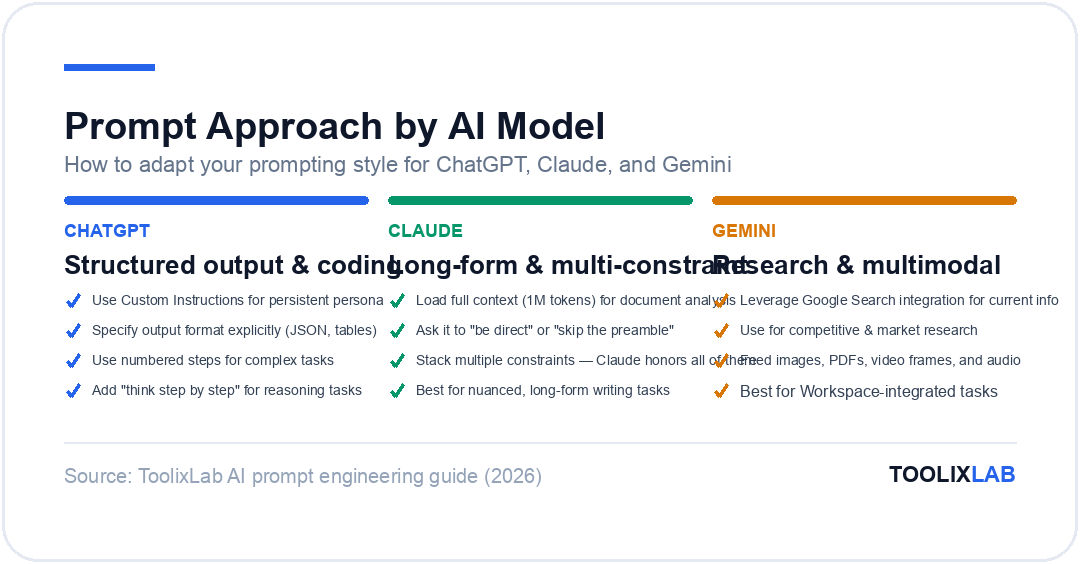
| Dimension | ChatGPT (GPT-4o) | Claude (3.7 Sonnet) | Gemini (1.5 Pro) |
|---|---|---|---|
| Default style | Helpful, structured, clear | Thoughtful, nuanced, longer | Factual, Google-integrated |
| Best at | Coding, structured output, general tasks | Long-form writing, nuanced analysis, following complex instructions | Research with citations, multimodal tasks, Google Workspace |
| Response length | Moderate by default | Longer, more thorough | Variable |
| Instruction following | Very good | Excellent — follows multi-constraint prompts closely | Good |
| Prompt tip | Use system prompts via Custom Instructions for persistent persona | More constraints = better output; Claude handles long context well | Leverage Google integration for real-time research tasks |
Prompting ChatGPT Effectively
ChatGPT responds well to clear, structured prompts with explicit format instructions. Use the Custom Instructions feature (Settings → Personalization → Custom Instructions) to set persistent context — your role, your company, your preferred output style — so you don't need to repeat it in every prompt.
ChatGPT is particularly strong at structured data output (JSON, tables, CSV), code generation and debugging, and breaking complex tasks into actionable step-by-step plans. For best results, specify the output format explicitly, use numbered steps for complex instructions, and ask it to "think step by step" for reasoning-heavy tasks.
For a deeper dive into maximizing ChatGPT, see our guide on how to use ChatGPT effectively.
Prompting Claude Effectively
Claude's standout strength is following complex, multi-constraint prompts with remarkable fidelity. Where ChatGPT may silently drop one of five instructions, Claude tends to honor all of them. This makes it particularly valuable for long-form writing, nuanced analysis, and tasks with many simultaneous requirements.
Claude also handles very long context windows (1M tokens in Claude Sonnet 4.6) better than most models — making it ideal for tasks that involve analyzing long documents, codebases, or research papers. Load the full context and ask specific questions about it.
Tip: Claude responds well to being asked to "be direct" or to "skip the preamble" — it can have a tendency toward thoroughness that sometimes produces more hedging or caveats than needed. Explicitly asking for directness produces cleaner output. For more, see our guide to using Claude AI.
Prompting Gemini Effectively
Gemini's primary advantage is its integration with Google's ecosystem — Workspace, Search, and real-time web access. For research tasks that require current information, Gemini's ability to search and synthesize is a genuine differentiator. Use it for competitive research, market analysis, and any task where up-to-date information matters.
Gemini 2.5 Pro handles multimodal inputs particularly well — analyzing images, PDFs, video frames, and audio alongside text. This makes it powerful for tasks like reviewing a product screenshot and providing UX feedback, or analyzing a competitor's marketing materials.
Common Prompt Mistakes and How to Fix Them
Even experienced AI users make the same prompt mistakes repeatedly. Here are the most common ones — and exactly how to fix them.
Mistake 1: Asking for too much at once
Problem prompt: "Write me a complete marketing strategy including target audience, competitive analysis, positioning statement, content plan, social media strategy, email marketing plan, paid advertising recommendations, and budget allocation."
Why it fails: The model produces a shallow overview of eight topics rather than deep, useful work on any of them. The output has the structure of a real marketing strategy but none of the depth.
Fix: Break it into stages. Start with "Develop a detailed target audience analysis for [product]" and use that output as context for each subsequent section. The chaining approach produces work that's 5–10× more useful.
Mistake 2: Underspecifying the audience
Problem prompt: "Explain machine learning."
Fix: "Explain machine learning to a 45-year-old marketing director who understands data and metrics but has no technical background. Use marketing analogies. Avoid math. Focus on what it means for their work, not how it works technically."
The audience specification transforms the output from a Wikipedia-style explanation to something actually useful for the intended reader.
Mistake 3: Forgetting to specify what to avoid
Telling the model what NOT to do is just as important as telling it what to do. Most prompts only specify positive instructions, which leaves the model free to include common defaults you may not want — clichés, excessive hedging, generic examples, unnecessary preamble.
Add to any prompt: "Do not include [clichés like 'In today's fast-paced world' / generic examples / lengthy preamble / bullet lists / excessive hedging]."
Mistake 4: Treating the first output as final
Professional AI users treat the first response as a draft, not a deliverable. After the first output, follow up with specific refinements: "The third section is too generic — make it more specific to [context]." "Shorten the intro by 50%." "Rewrite the conclusion to end with a specific call to action." "The tone is too formal — make it conversational."
Iterative refinement produces dramatically better output than one-shot prompting, even with an excellent initial prompt.
Mistake 5: Not providing enough context about purpose
AI models produce better output when they understand why you need something, not just what you need. "Write a product description for our project management software" is weaker than "Write a product description for our project management software that will appear on our homepage. The goal is to convert a visitor who has already scrolled past our hero section — they're interested but not yet sold. Address the main objection: they're worried it will be too complex for their non-technical team."
Purpose shapes every element of the output — what to emphasize, what objections to address, what tone to use, and what call to action makes sense.
Mistake 6: Not saving prompts that work
Every prompt that produces excellent output is an asset. Create a simple prompt library — a Notion page, a Google Doc, or a dedicated tool like PromptBase — where you save your best prompts with notes on when to use them. A library of 20–30 well-engineered prompts for your most common tasks is one of the highest-value professional tools you can build in 2026.
Building Your Personal Prompt Engineering System
Prompt engineering is not a single skill — it's a practice that improves with repetition, reflection, and a system for capturing what works. Here's how to build yours:
Start a prompt log. Every time you write a prompt, note the task, the prompt, the quality of the output (1–5), and what you'd change. After 50 entries, patterns emerge: you'll see which techniques work best for which tasks, which models suit which workflows, and which specifications you consistently forget to include.
Build templates for recurring tasks. Identify the 5–10 types of prompts you use most often — emails, summaries, content drafts, analyses, code reviews — and build a polished template for each. These templates compound in value: each use refines them slightly, and the time saved across dozens of uses dwarfs the initial investment.
Use meta-prompting for new territory. When you need to tackle a task type you haven't prompted before, start with meta-prompting: "I need to [task]. What prompt should I use, and what information would you need from me to do this well?" The model's answer often surfaces considerations you wouldn't have thought of.
Test across models. For high-value recurring tasks, run your prompt through ChatGPT, Claude, and Gemini and compare the outputs. The winner varies by task — writing quality tends to favor Claude, code favors ChatGPT, and research with current information favors Gemini. Knowing which model to use for which task is itself a form of prompt engineering.
The professionals who get the most from AI in 2026 are not necessarily the ones with the most advanced technical knowledge — they're the ones who have invested time in understanding how to communicate with AI systems clearly, specifically, and systematically. That skill is now one of the highest-leverage capabilities in professional work — and it's fully accessible to anyone willing to practice it.