
⚡ TL;DR — Quick Verdict
Concept Art · Aesthetics · Creative
Text in Images · Accuracy · ChatGPT
Licensed · Brand-Safe · Creative Cloud
Midjourney, DALL-E, and Adobe Firefly are the three most-searched AI image generators in 2026. But despite endless comparison posts treating them as interchangeable, they've diverged significantly — and picking the wrong one for your workflow wastes money, time, and creative energy.
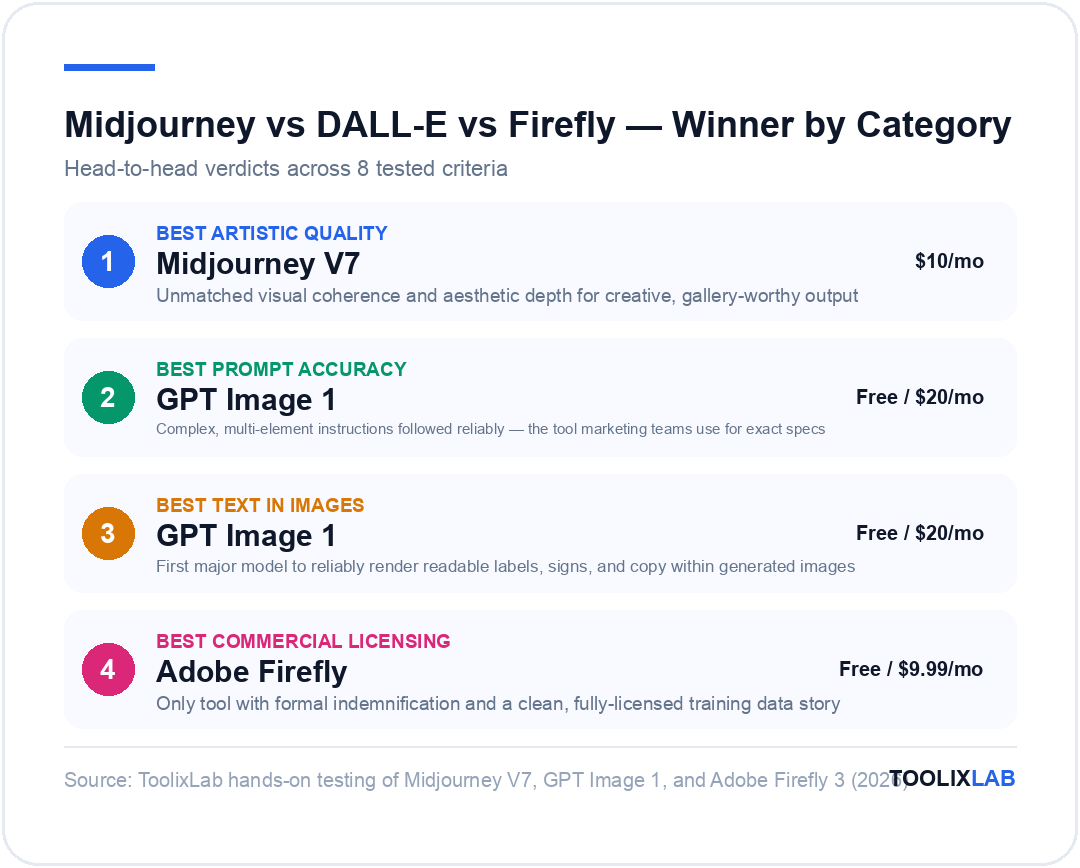
In 2026, these three tools occupy genuinely distinct positions in the market. Midjourney V7 is the undisputed benchmark for artistic quality and cinematic aesthetics. GPT Image 1 — OpenAI's latest image model available through ChatGPT — leads on prompt instruction-following and text rendering within images. Adobe Firefly 3 is the commercial-safety standard, built exclusively on licensed content and natively integrated into Photoshop, Illustrator, and Adobe Express.
This guide breaks down every meaningful dimension: image quality, prompt accuracy, text rendering, commercial licensing, pricing, workflow integration, and specific use-case fit. We tested all three platforms hands-on in early 2026 across identical creative briefs. Whether you're a solo designer, a marketing team, or a content studio, you'll leave with a clear answer — not just "it depends."
How We Tested
Over two weeks in March 2026, we ran identical prompts and creative briefs through Midjourney V7, GPT Image 1 (via ChatGPT Plus), and Adobe Firefly 3. Our testing framework covered:
Testing Framework (8 Criteria)
Test prompts included a product photography brief, a cinematic editorial concept, a social media graphic with readable text, a brand illustration, and a photorealistic headshot alternative. We scored outputs on quality, accuracy, time-to-usable-result, and editing time required.
Quick Comparison: Midjourney vs DALL-E vs Adobe Firefly
| Feature | Midjourney V7 | GPT Image 1 (DALL-E) | Adobe Firefly 3 |
|---|---|---|---|
| Starting Price | $10/mo (Basic) | Free (limited) / $20/mo (Plus) | Free credits / CC subscription |
| Artistic Quality | ⭐⭐⭐⭐⭐ Best-in-class | ⭐⭐⭐⭐ Strong, versatile | ⭐⭐⭐⭐ Polished, professional |
| Prompt Accuracy | ⭐⭐⭐ Interpretive | ⭐⭐⭐⭐⭐ Best instruction-following | ⭐⭐⭐⭐ Reliable |
| Text in Images | ⭐⭐ Unreliable | ⭐⭐⭐⭐⭐ Excellent | ⭐⭐⭐ Improving |
| Commercial Safety | ✅ (paid plans) | ✅ (paid plans) | ✅✅ Industry gold standard |
| Free Tier | ❌ No free tier | ✅ Limited (GPT Image 1) | ✅ Free credits monthly |
| Photoshop Integration | ❌ | ❌ | ✅ Native (Generative Fill) |
| API Access | ✅ Available | ✅ OpenAI API | ✅ Firefly API (enterprise) |
| Style Control | ⭐⭐⭐⭐⭐ --sref, --cref, style tuner | ⭐⭐⭐ Reference image upload | ⭐⭐⭐⭐ Style matching, structure ref |
| Editing Tools | Vary, zoom, pan, editor | In-painting, canvas, chat editing | Generative Fill, Expand, Remove |
| Best For | Creative & artistic output | Complex prompts, text in images | Commercial work, Adobe users |
Midjourney V7 — Deep Dive
Midjourney V7, released in April 2025, is a complete architectural rebuild — not an iterative update. It produces images with a visual quality that still leaves every competitor in second place for aesthetic and artistic output in 2026. The tool doesn't chase photorealism as its primary goal. It chases art. The results look like concept art, editorial photography, or illustration produced by a skilled human — and that aesthetic distinctiveness is unmatched.
What's New in V7
V7 delivers 30–40% fewer failed outputs than V6, with dramatically better coherence for hands, faces, fine details, and complex multi-subject scenes. The style reference parameter (--sref) and character reference (--cref) allow consistent characters and visual styles across a project — a workflow-critical feature that was previously a major gap. Niji 7, launched January 2026, handles anime, manga, and illustration styles within the same subscription.
The primary interface is now midjourney.com — Discord is still accessible but no longer required for day-to-day generation. The web app supports moodboards, batch upscaling, image editing (outpainting, zoom, variation), and personalisation based on your aesthetic preferences.
Midjourney V7 — Key Strengths
- →Best-in-class aesthetic and artistic quality — no other tool matches the visual "feel" of V7 output
- →Style reference system (--sref) enables consistent visual identity across a project
- →Character reference (--cref) maintains consistent faces and characters across multiple generations
- →Niji 7 model for anime, manga, and illustration-style output
- →Personalisation system that learns your visual aesthetic over time
- →Relax Mode (Standard+ plans) for unlimited slow generation — excellent for iteration
- →Strong community and prompt-sharing ecosystem via midjourney.com gallery
Midjourney V7 — Key Weaknesses
- →No free tier — minimum $10/month to start
- →Text rendering within images remains unreliable — add text post-generation in Canva or Photoshop
- →Interpretive prompt style — the model adds its own artistic judgment, which can mean unexpected results when you want precise literal output
- →No native Photoshop or design tool integration — standalone only
Midjourney Pricing
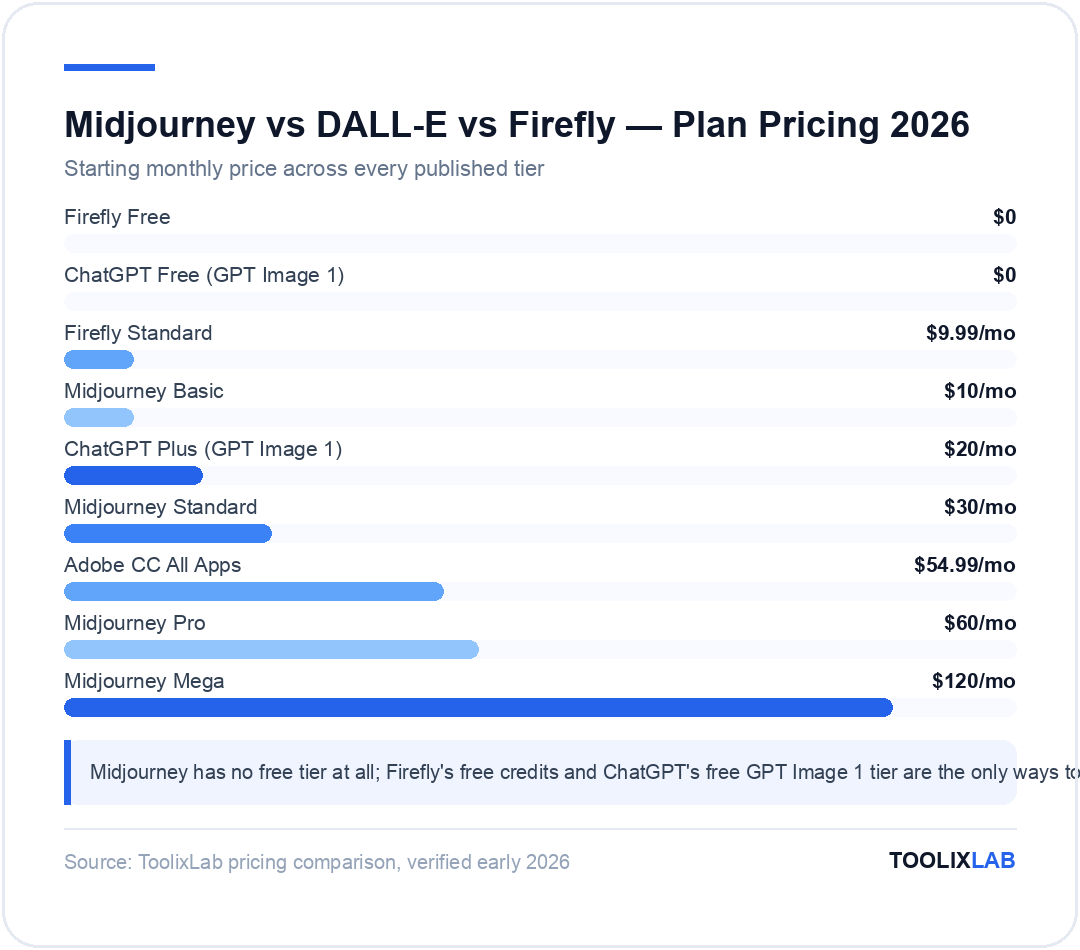
- →Basic ($10/month): 200 fast GPU minutes/month (~200 image generations), gallery access, commercial use
- →Standard ($30/month): 900 fast GPU minutes/month + unlimited Relax Mode generations — the best value plan for regular users
- →Pro ($60/month): 1,800 fast GPU minutes, 12 parallel fast jobs, Stealth Mode (private generations)
- →Mega ($120/month): 3,600 fast GPU minutes for high-volume users and studios
For creative professionals generating daily, the Standard plan at $30/month is typically the sweet spot — Relax Mode gives you essentially unlimited experimentation alongside fast credits for client delivery. For detailed prompting techniques, see our complete Midjourney guide for 2026.
GPT Image 1 (DALL-E) — Deep Dive
OpenAI's image generation history has evolved significantly: DALL-E 2 (2022) → DALL-E 3 (late 2023) → GPT Image 1 (early 2025). The current image model available through ChatGPT is GPT Image 1, which represents a meaningful leap over DALL-E 3 in prompt accuracy, text rendering, and complex scene composition. For simplicity, most users still call it "DALL-E" — but the model behind it has been substantially rebuilt.
What Makes GPT Image 1 Different
The headline capability is instruction-following accuracy. When you give GPT Image 1 a detailed, complex prompt — "a product mockup of a matte black water bottle on a wooden desk with soft window light, with the text 'HYDRATE' embossed on the label" — it delivers exactly what you described, including the readable text. That specific combination of literal prompt execution and usable text rendering is where Midjourney and Firefly both fall short.
The multimodal integration is also significant: because GPT Image 1 is embedded directly in ChatGPT, you can describe what you want in natural conversation, iterate with follow-up messages ("make it more moody, deeper shadows, no window"), and upload reference images for style matching — without leaving the chat interface. For non-designers, this conversational workflow removes most of the prompt engineering friction.
GPT Image 1 — Key Strengths
- →Best prompt accuracy of the three — complex, multi-element instructions followed reliably
- →Best text rendering — readable labels, signs, and copy within generated images
- →Conversational iteration — describe changes in plain language instead of re-prompting from scratch
- →Image editing via ChatGPT canvas — in-painting, object removal, background replacement
- →Free tier available (limited generations per day via ChatGPT free)
- →API access via OpenAI for developers building image generation into products
- →No learning curve — if you can write a ChatGPT prompt, you can generate images
GPT Image 1 — Key Weaknesses
- →Artistic distinctiveness is lower than Midjourney — outputs tend toward polished realism over artistic edge
- →Slower generation speed compared to Midjourney (especially on ChatGPT free/Plus)
- →Style consistency across multiple generations is harder to control than Midjourney's --sref system
- →Limited style reference — cannot pin a visual style as precisely as Midjourney's reference system
- →Content policy is more conservative than Midjourney on edge cases (violence, mature content)
GPT Image 1 Pricing
- →Free (ChatGPT): Limited image generations per day via GPT Image 1 — good for occasional use
- →ChatGPT Plus ($20/month): Substantially more generations, faster output, access to newest models
- →ChatGPT Pro ($200/month): Highest limits and extended usage for power users
- →OpenAI API: Per-image pricing for developers — cost varies by model, resolution, and quality settings
If you're already a ChatGPT Plus subscriber, you get strong image generation included with no additional cost — making GPT Image 1 effectively free for existing users. For teams building image generation into products or automations, the OpenAI API is the practical route.
Adobe Firefly 3 — Deep Dive
Adobe Firefly is the only major AI image generator trained exclusively on licensed content — specifically Adobe Stock imagery, openly licensed works, and public domain content. That single fact makes it the default choice for commercial work where legal clarity matters. When you generate an image in Firefly, you don't face ambiguity about whether you're infringing on a photographer's training data. Adobe's indemnification coverage (available on enterprise plans) takes that liability question off the table entirely.
What's New in Firefly 3
Firefly Image 3 (released mid-2024, now the default across Adobe's product suite) delivers a significant quality jump over prior versions. Output resolution is higher, photorealism is more convincing, and the model handles complex lighting scenarios and materials with noticeably more accuracy. The "Structure Reference" feature lets you upload an image and use its composition and structure as a guide while applying a completely different visual style — a workflow that's genuinely useful for brand consistency.
The deeper story is Firefly's integration across the Creative Cloud suite. Generative Fill in Photoshop lets you extend backgrounds, remove objects, or add AI-generated elements non-destructively directly in your working file. Generative Expand in Illustrator changes aspect ratios while maintaining visual coherence. Adobe Express uses Firefly for instant background generation and template content. These integrations mean Firefly's value isn't just the standalone web app — it's the AI layer across a professional design workflow.
Adobe Firefly 3 — Key Strengths
- →Gold standard for commercial licensing — trained only on licensed content, enterprise indemnification available
- →Native integration in Photoshop (Generative Fill), Illustrator (Generative Expand), Adobe Express
- →Structure Reference for composition-guided generation while applying different visual styles
- →Free credits monthly via Firefly web app — no upfront paid commitment required to test
- →Best creative workflow integration for existing Adobe Creative Cloud users
- →Strong prompt accuracy for product and editorial styles
- →Firefly API for enterprise teams building custom workflows
Adobe Firefly 3 — Key Weaknesses
- →Artistic distinctiveness is lower than Midjourney — outputs lean toward clean, polished stock-photo aesthetics
- →Best value is locked behind a Creative Cloud subscription — less compelling if you don't already use Adobe tools
- →Free credit allowance is modest — power users burn through them quickly
- →Less suitable for niche creative styles (fantasy, anime, experimental art) compared to Midjourney
- →No equivalent to Midjourney's Relax Mode for unlimited slow generation
Adobe Firefly Pricing
- →Firefly Free (web app): 25 generative credits/month — sufficient for occasional users
- →Firefly Standard ($9.99/month): 100 credits/month, higher resolution outputs
- →Adobe Creative Cloud ($54.99/month All Apps): Includes Firefly + Photoshop + all Adobe apps with generous credit allocation — best value if you use the Adobe suite
- →Firefly for Enterprise: Custom pricing with higher limits, indemnification, API access, SSO
Head-to-Head: Key Battlegrounds
1. Artistic Quality and Visual Style
This is Midjourney's home court, and it wins decisively. V7 images have a visual coherence, aesthetic depth, and painterly quality that neither GPT Image 1 nor Firefly 3 can match for creative and artistic output. If you need a concept art piece, a cinematic still, a fashion editorial, or an illustration with genuine visual interest, Midjourney is the answer.
GPT Image 1 produces highly competent, clean output — but it tends toward polished realism rather than artistic distinction. Firefly 3 shares this tendency, with outputs that look professional and brand-safe but rarely surprising. Both are excellent for commercial visuals where predictability is a feature, not a limitation.
Winner: Midjourney V7 — for artistic and creative output. GPT Image 1 and Firefly 3 are strong for commercial and product contexts where clinical precision matters more than aesthetic edge.
2. Prompt Accuracy
Midjourney is deliberately interpretive. It takes your prompt as a creative brief, not a technical specification. This produces beautiful, often unexpected results — but it means that if you need exactly three objects, exactly this lighting angle, and exactly this specific brand colour, Midjourney will frequently go its own way.
GPT Image 1 follows instructions with a precision that Midjourney doesn't attempt. Complex, multi-element prompts — specific object placement, specific text, specific counts, specific spatial relationships — are executed reliably. This is why it's the tool of choice for product marketing teams who need specific visual specs met on the first or second generation.
Firefly 3 sits between the two — more literal than Midjourney, but not quite at GPT Image 1's instruction-following level for highly complex prompts. For most marketing and commercial prompts, Firefly's accuracy is entirely sufficient.
Winner: GPT Image 1 — for complex, specific, must-be-accurate prompts. Midjourney is actively worse here, by design.
3. Text Rendering Within Images
Adding readable text — logos, labels, signs, banners, poster copy — to AI-generated images has historically been a disaster across all tools. In 2026, GPT Image 1 is the first major model to genuinely solve this problem. Short text phrases appear correctly spelled, properly kerned, and integrated naturally into the composition. It's not perfect for every case, but it's reliably good.
Midjourney V7 still struggles with text. Characters get blended, words get misspelled, and longer copy is essentially unpredictable. The practical workaround remains adding text post-generation in Canva, Photoshop, or Figma.
Firefly 3 has improved here but remains inconsistent for precise text requirements. It's better than Midjourney but not at the GPT Image 1 level for anything beyond very short, large-format text.
Winner: GPT Image 1 — by a significant margin. If readable text in your image is a requirement, this is the only reliable choice among the three.
4. Commercial Licensing
All three tools allow commercial use on their paid plans. The meaningful difference is risk profile and legal clarity.
Adobe Firefly was trained exclusively on Adobe Stock, openly licensed, and public domain content. This means there is no ambiguity about whether the training data included a photographer's copyrighted work without consent. Adobe's enterprise plan includes indemnification — Adobe will cover legal costs if a Firefly output is challenged in court. For brands, agencies, and enterprises where legal risk management is part of the workflow, Firefly is the only defensible choice.
Midjourney and OpenAI (DALL-E/GPT Image 1) have faced training data lawsuits, and while both tools state that commercial use is permitted on paid plans, they do not offer the same level of indemnification as Adobe. For small creators and personal projects, this distinction rarely matters. For enterprise brand work, it matters significantly.
Winner: Adobe Firefly — the only tool with formal indemnification and a clear "clean data" training story for commercial work.
5. Workflow Integration
Firefly wins this category unambiguously for existing Adobe users. Generative Fill in Photoshop, Generative Expand in Illustrator, and background generation in Adobe Express mean you're generating AI images inside the tools you already work in — not exporting between platforms. If your production workflow runs on Creative Cloud, Firefly is the AI layer that slots in without friction.
GPT Image 1 wins for teams already inside ChatGPT. The conversational iteration model — describe the image, see a result, refine in chat — removes the prompt-engineering barrier entirely. For non-designers on marketing or content teams, this is the lowest-friction path to production-ready visuals.
Midjourney is the most standalone of the three. It integrates via API and can be used in Zapier or Make automations, but there's no native partnership with major design tools. For creative-first workflows where the final output is the image (not a component inside a larger design file), this isn't a limitation. For production workflows with multiple software handoffs, it is.
Winner: Adobe Firefly for Adobe users. GPT Image 1 for non-designer teams. Midjourney as a powerful standalone.
6. Pricing and Value
The value calculation depends heavily on your use pattern and existing subscriptions:
- →Already on ChatGPT Plus ($20/month)? GPT Image 1 is essentially free — you're already paying for it. No additional subscription needed.
- →Already on Creative Cloud ($55/month)? Firefly is included. Generating AI images costs you nothing extra, and you get Photoshop integration.
- →Need the best artistic quality for standalone use? Midjourney Standard at $30/month with Relax Mode gives you effectively unlimited image generation for a flat fee — excellent value for high-volume creative work.
- →Want to try before committing? Firefly offers the most generous free tier (25 credits/month). GPT Image 1 has a limited free tier through ChatGPT. Midjourney has no free tier at all.
Which Tool Should You Choose?
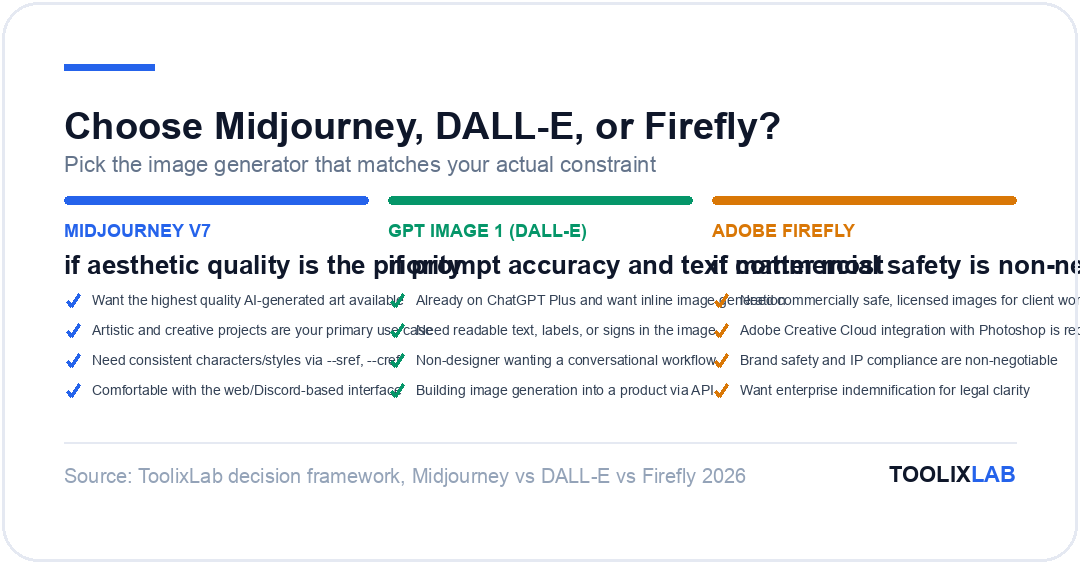
Choose Based on Your Primary Use Case
What About Using More Than One?
Many professional teams use two of these tools for complementary tasks. The most common pairing is Midjourney + Adobe Firefly: Midjourney for concept exploration and high-quality creative development, Firefly for final production-ready assets with licensed content guarantees. Some content studios add GPT Image 1 specifically for social graphics that require readable text overlaid within the image.
If you're building a complete AI image generation stack for a creative team, see our roundup of the 15 best AI image generation tools in 2026, which covers additional tools like FLUX 2, Ideogram V3, and Leonardo AI that fill specific gaps in the Midjourney/DALL-E/Firefly stack.
What's Coming: The 2026 Roadmap
All three tools have publicly signalled what's coming:
- →Midjourney V8 is in active development as of early 2026. Based on V7's architecture, V8 is expected to improve photorealism and real-world physics rendering while preserving V7's aesthetic quality. Video generation is also in the Midjourney roadmap.
- →OpenAI / GPT Image continues to iterate its image models rapidly, with improvements to consistency, speed, and the canvas editing interface expected through 2026. API pricing is also expected to become more competitive.
- →Adobe Firefly continues expanding its suite integration — Firefly Video is now in beta for Creative Cloud subscribers, and the Firefly API is being positioned for enterprise custom-workflow deployment. Text rendering improvements are also a confirmed roadmap item.
The broader trend in 2026 is convergence on quality — the gap between the best and worst outputs has narrowed substantially compared to 2023. But the workflow, licensing, and use-case fit differences remain real and meaningful. Choosing based on those dimensions rather than quality rankings alone will serve you better in the long run.
Final Verdict
| If You Are... | Choose | Why |
|---|---|---|
| A creative professional or artist | Midjourney V7 | Best artistic quality, style reference, aesthetic control |
| A marketer needing product mockups or ad visuals | GPT Image 1 | Best prompt accuracy and text rendering for commercial briefs |
| A Photoshop/Illustrator user | Adobe Firefly | Generative Fill and native CC integration, zero workflow disruption |
| An enterprise brand or agency | Adobe Firefly | Licensed training data, enterprise indemnification, commercial safety |
| A non-designer on a content team | GPT Image 1 | Conversational workflow, no prompt engineering, ChatGPT integration |
| A developer building image generation into a product | GPT Image 1 (API) | OpenAI API is the most mature, well-documented image API in 2026 |
| A social media creator wanting free generation | Adobe Firefly (free) | Most generous free credit allowance; ChatGPT free tier is second option |
There's no universal winner — and any guide that tells you there is hasn't tested the tools across real workflows. Midjourney V7 is the best image generator for creative output. GPT Image 1 is the best for instruction-following accuracy and text. Adobe Firefly 3 is the best for commercial licensing and Adobe integration. Identify which dimension matters most for your specific work, and the choice becomes straightforward.
For a broader look at where these tools sit in the wider market — including FLUX 2, Ideogram, Leonardo AI, and Stable Diffusion — see our full guide to the 15 best AI image generation tools in 2026. To get better results from any of these generators, a good image prompt library is invaluable — our roundup of the best ChatGPT prompt libraries includes several platforms with dedicated image generation prompt collections.
Further Reading & Sources
⚖️ Our Verdict
Midjourney, DALL-E, and Adobe Firefly each lead in a distinct dimension — artistic quality, conversational integration, and commercial licensing respectively. None of the three is universally "best," and the right choice depends entirely on what you're creating and where you're working. Identify your primary constraint — quality, convenience, or licensing — and the decision becomes obvious.
✅ Choose Midjourney if...
- • You want the highest quality AI-generated art available
- • Artistic and creative projects are your primary use case
- • You're comfortable with a Discord-based interface
✅ Choose DALL-E if...
- • You're already on ChatGPT Plus and want inline image generation
- • Quick, conversational image creation matters more than top quality
- • Casual image generation as part of a writing workflow is your need
✅ Choose Firefly if...
- • You need commercially safe, licensed images for client work
- • Adobe Creative Cloud integration with Photoshop is a requirement
- • Brand safety and IP compliance are non-negotiable
Related Guides
- Best AI Tools for Graphic Designers — where these image generators fit inside a full professional design workflow.
- AI Prompt Engineering Guide — the prompting fundamentals that improve output from all three generators.
- Best Free AI Tools in 2026 — free alternatives if you're not ready to pay for image generation.