
Claude Trust Snapshot
Real Free Score
76/100
Lock-In Risk
Low
Billing Friction
Low
Commercial Use
Allowed
Data Privacy
Clear
Volatility
Medium
Last checked
2026-07-22
Using AI for school isn't just about ChatGPT. In 2026, specialized AI tools for research, studying, and paper-writing have become more efficient than any general AI chatbot.

⚡ TL;DR — Best AI Tools for Students by Use Case
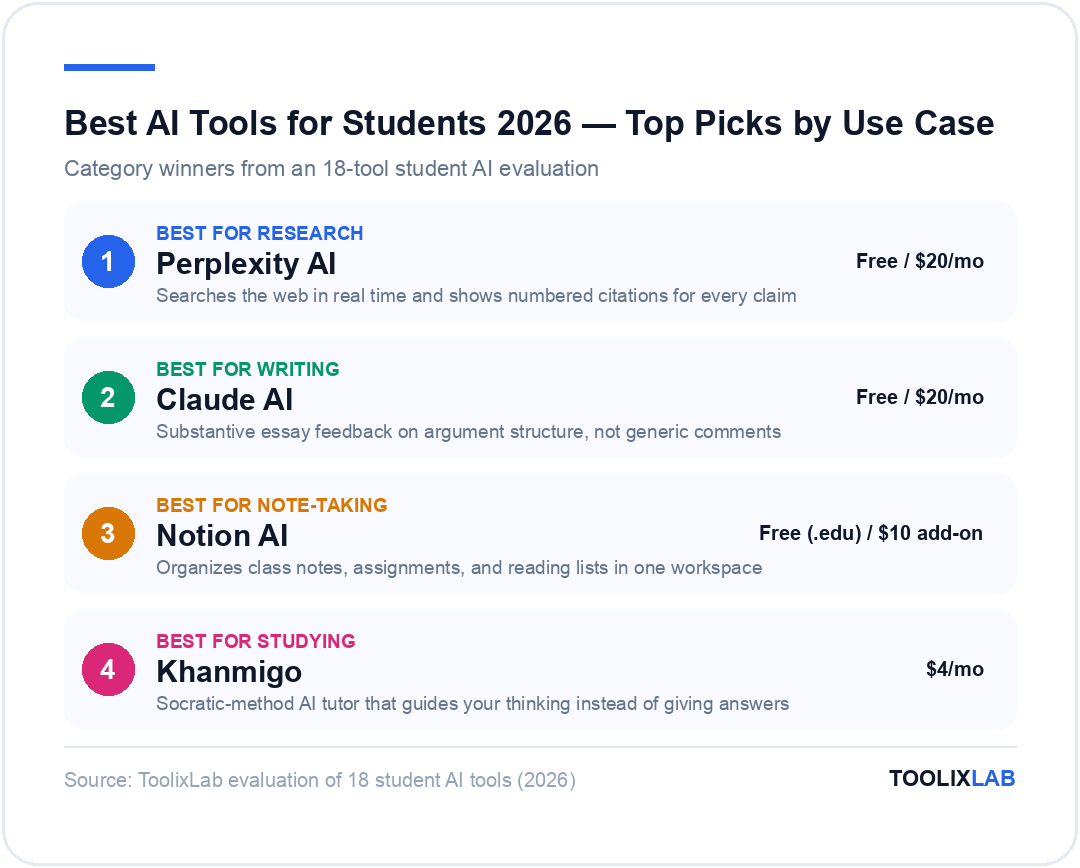
- Best for research: Perplexity AI
- Best for writing: Claude AI
- Best for note-taking: Notion AI
- Best for studying: Khanmigo
- Best for academic papers: Consensus
- Best for flashcards: Quizlet AI
- Best for grammar: Grammarly
- Best meeting/lecture recorder: Otter.ai
- Best for coding students: GitHub Copilot (free)
- Best all-in-one free: ChatGPT Free
Most students use exactly one AI tool: ChatGPT. They use it for everything — research, essay drafts, math problems, study guides — and then wonder why the results are sometimes mediocre. The problem isn't ChatGPT. The problem is using a hammer for every job.
In 2026, there are 17 other AI tools that dramatically outperform ChatGPT on specific student tasks. Perplexity AI retrieves cited, current sources for research. Consensus searches peer-reviewed papers specifically. Khanmigo tutors you through concepts without giving you the answer. Quizlet AI generates personalized flashcard decks from your notes in 30 seconds.
This guide organizes 18 AI tools by the student task they're actually best at — research, writing, note-taking, studying, and productivity — with honest pricing (most are free or heavily discounted for students) and honest limitations. By the end, you'll know exactly which 3–5 tools to add alongside whatever you're already using.
💡 Already using ChatGPT? See our full How to Use ChatGPT guide to get more out of it, then add the specialized tools below for the tasks it handles poorly.
Best AI Research Tools for Students
Research is where most students lose the most time — sifting through irrelevant search results, finding paywalled papers, and struggling to verify whether information is accurate and current. These AI tools solve that specifically.
1. Perplexity AI — Best for Real-Time, Cited Research
Perplexity is the best AI research tool for students who need cited, current information. Unlike ChatGPT, which draws on training data with a knowledge cutoff, Perplexity searches the web in real time and displays numbered citations for every claim. You can click any citation to verify the source.
Why it beats Google for research: When you type a research question into Google, you get 10 blue links and have to read each one to synthesize an answer. Perplexity reads those sources for you and gives you a synthesized answer with citations. For initial research and understanding new topics, this is dramatically faster.
Student-specific features: Perplexity's Academic mode filters results to peer-reviewed sources from Semantic Scholar, PubMed, and arXiv — crucial for STEM, social science, and humanities research where you need citable academic sources, not blog posts.
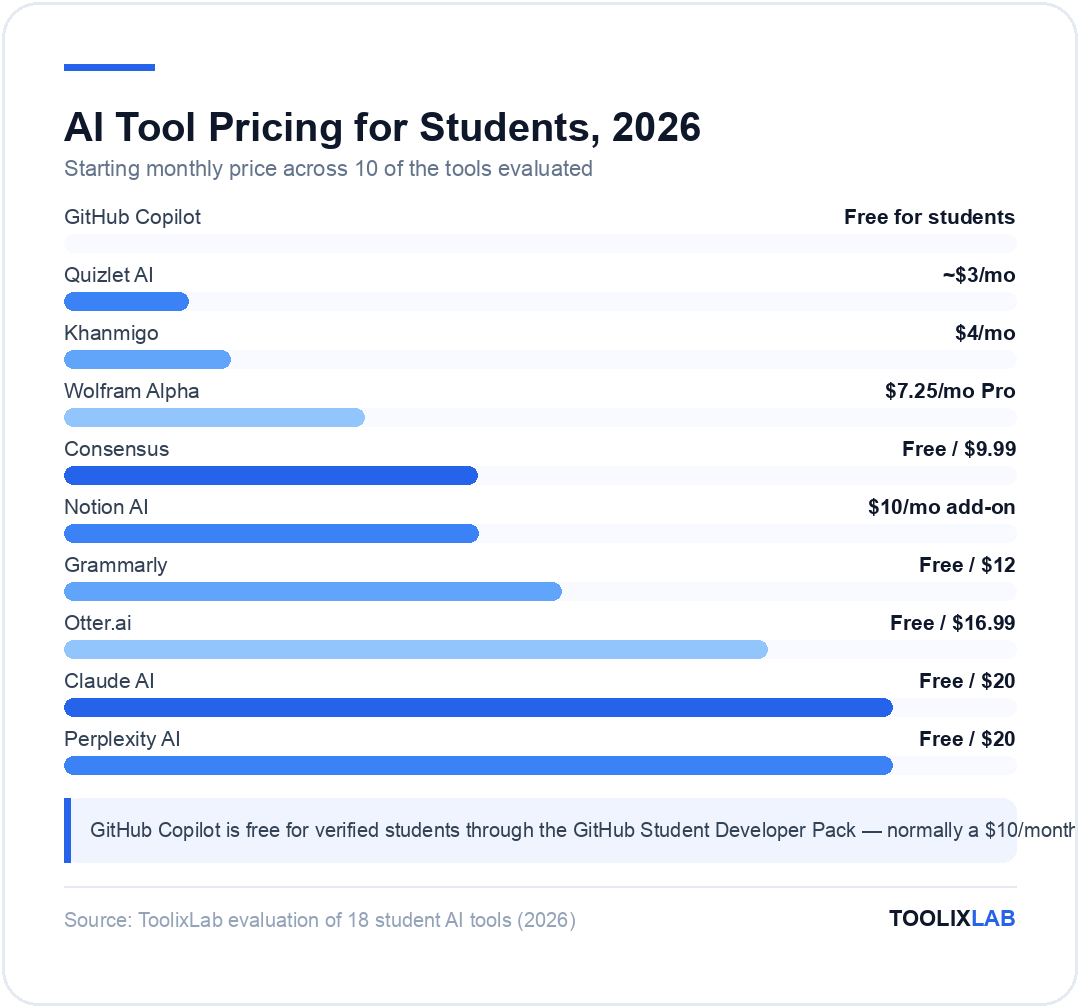
Free tier: Generous — you get unlimited basic searches with citations. Pro Search (which goes deeper, runs multiple searches, and synthesizes more complex answers) is limited to 5/day on free tier. Pro: $20/month, with 50% student discounts available.
Limitation: Perplexity is excellent for understanding and synthesizing existing knowledge. For generating original arguments, writing full essays, or creative work, Claude or ChatGPT are better choices. Think of Perplexity as your research starting point, not your writing tool.
🔗 See our full Perplexity AI Review — we tested it across 6 research scenarios and compared it directly to Google and ChatGPT.
2. Consensus — Best for Academic Papers Specifically
Consensus is purpose-built for academic research. You ask it an empirical question ("Does intermittent fasting improve cognitive function?") and it searches 200+ million peer-reviewed papers, extracts the relevant conclusions, and tells you what the scientific consensus is — with direct paper citations.
The Consensus Meter: Consensus's signature feature is the visual consensus indicator — it analyzes multiple papers and tells you whether the evidence leans "Yes," "Mostly Yes," "Mixed," "Mostly No," or "No." This alone saves hours on literature reviews.
Best use cases: Literature review for research papers, fact-checking claims with academic sources, understanding what the scientific consensus is on a specific question, finding papers to cite in essays. consensus.app offers 20 free searches per month on the free tier.
3. Elicit — Best for Structured Literature Review
Elicit (elicit.com) is similar to Consensus but provides more structured output — it extracts specific data points from papers (study design, sample size, key findings) into a sortable table. Ideal for systematic reviews and meta-analysis prep. Used by PhD students and researchers at major universities. Free tier: 5 free credits/month; Paid: $12/month for students.
4. SciSpace (formerly Typeset) — Best for Understanding Dense Papers
SciSpace solves a specific pain point: you find a relevant academic paper but it's written in dense technical language you can't fully parse. SciSpace's "Copilot" feature lets you highlight any section of a PDF and ask it to explain, summarize, or give examples. It also has a paper search across 270M+ papers. Free tier is generous; Pro: $12/month with student discounts.
Best AI Writing Assistants for Students
Writing assistance for students occupies a spectrum from legitimate (improving grammar, getting feedback on arguments) to problematic (ghostwriting entire essays). The tools below are positioned on the legitimate end — they help you write better, not write for you.
5. Claude AI — Best for Longer Writing and Critical Feedback
Claude AI is widely considered the best AI for writing quality, critical feedback, and nuanced analysis. For students, its most valuable feature is the ability to paste a full essay draft and get substantive, specific feedback — not generic comments like "could be clearer" but specific suggestions about argument structure, evidence gaps, and logical consistency.
How to use Claude as a student:
- Essay feedback: "Here's my essay draft. Give me critical feedback on the strength of my argument, gaps in evidence, and structural weaknesses." Claude will give you a professor-level critique.
- Explaining concepts: "Explain Keynesian economics to me like I'm a smart high school student, then give me 3 real-world examples." Claude's explanations are clearer than most textbooks.
- Reading comprehension: Paste a dense academic text and ask Claude to summarize the main argument and identify the author's assumptions.
- Brainstorming: "I'm writing about climate change policy. Help me develop 5 different thesis angles, ranging from economic to ethical framings."
Free tier: Claude's free tier gives access to Claude Sonnet 4.6 with daily message limits. For occasional use, it's enough. Heavy users (writing multiple essays per week) will hit the limits and benefit from Pro at $20/month.
🔗 See our complete How to Use Claude AI guide for step-by-step setup and 10 use cases including student workflows.
6. Grammarly — Best for Grammar, Style, and Plagiarism
Grammarly is the most-used writing assistant on Earth for a reason: it works everywhere, integrates into Gmail, Google Docs, Microsoft Word, and your browser, and catches the grammar, spelling, and style mistakes that other tools miss. Its Premium tier adds clarity suggestions, tone adjustments, and a plagiarism checker against 16 billion web pages.
The student workflow: Use Claude or ChatGPT to brainstorm and draft. Use Grammarly as your final-pass editor before submission. The two tools complement each other — Claude improves argument and structure, Grammarly polishes surface-level quality.
Student discount: Grammarly offers 20% discounts for .edu email addresses. Premium is $12/month at standard pricing; many universities also provide institution-wide access — check your student portal first.
7. QuillBot — Best Free Paraphrasing and Summarizing Tool
QuillBot is free and purpose-built for the specific student tasks of paraphrasing and summarizing — restructuring your own writing in different ways, or compressing dense source material. Its summarizer can reduce a 10-page research paper to key points in 30 seconds. Free tier is genuinely useful; Premium: $4.17/month (annual).
Best AI Note-Taking Tools for Students
Effective note-taking is one of the highest-leverage study habits. AI note-taking tools don't just record — they organize, summarize, and make your notes searchable and interactive.
8. Notion AI — Best All-in-One Student Workspace
Notion is a note-taking tool, database, project manager, and AI assistant rolled into one. For students, the biggest advantage is organizing everything — class notes, assignments, reading lists, and essay drafts — in a single workspace. Notion AI (included in paid plans, or $10/month add-on) can summarize pages, find action items in your notes, and generate study guides from your notes.
The free plan for students: Notion offers its Plus plan free for students with a verified .edu email. This gives you unlimited pages, unlimited blocks, and 5 guests — sufficient for most student use. Notion AI is $10/month extra.
Best student templates: Notion has thousands of free student templates — class schedules, reading trackers, essay planners, assignment trackers. You don't need to build from scratch.
🔗 See how Notion AI compares to ChatGPT in our Notion AI vs ChatGPT comparison — we test both on the same student tasks.
9. Otter.ai — Best for Recording and Transcribing Lectures
Otter.ai records and transcribes your lectures in real time — whether in person via your phone or in online classes via Zoom, Google Meet, or Teams integration. After the lecture, it generates an AI summary and lets you search the transcript to find any moment in the lecture by keyword.
Why this matters for students: Taking notes and listening simultaneously is cognitively demanding and means you often miss nuance. With Otter, you can focus on understanding the lecture and review the verbatim transcript afterward. The AI summary identifies the key points, so you know what to focus on when reviewing.
Free tier: 300 minutes of transcription per month — enough for 3–5 lectures/week. Pro ($16.99/month, or $8.33/month on annual) gives unlimited minutes and advanced summary features.
10. Reflect — Best for Networked Student Notes
Reflect is a note-taking app built around AI-assisted connection. As you add notes, Reflect uses AI to surface related notes you've written previously, helping you build a connected knowledge base over time — the "second brain" concept in practice. For students reading across multiple subjects, this prevents knowledge silos. $10/month with a 60-day free trial.
11. Mem — Best AI-Organized Notes (No Structure Required)
Mem is a note-taking app where organization is handled entirely by AI. You dump notes in any format — lecture summaries, book quotes, random ideas — and Mem's AI organizes them automatically, surfaces relevant notes when you're working on related topics, and lets you query your notes in natural language ("What did I write about behavioral economics?"). $14.99/month; student pricing available.
Best AI Study and Flashcard Tools
Passive re-reading is one of the least effective study techniques. Active recall — testing yourself — is dramatically more effective. These AI tools make active recall effortless to generate and personalized to your specific material.
12. Khanmigo — Best AI Tutor for Understanding Concepts
Khanmigo is Khan Academy's AI tutor, and it's fundamentally different from using ChatGPT for homework. Rather than giving you answers, Khanmigo uses the Socratic method — asking you questions, guiding your thinking, and helping you arrive at the answer yourself. This produces actual learning rather than answer-getting.
What makes it different: You can ask ChatGPT "What is the derivative of x²?" and it tells you "2x." Ask Khanmigo the same question and it asks: "What do you remember about the power rule? Let's start there." It pushes you to think rather than consume.
Content coverage: Khanmigo is integrated with Khan Academy's entire library — math (up to calculus), science (biology through AP Physics), SAT prep, history, and more. For students in these subject areas, it's the most educationally sound AI tool available.
Pricing: $4/month for learners. Many school districts provide it for free — check with your school. khanacademy.org/khan-labs
13. Quizlet AI — Best for Flashcards from Your Own Notes
Quizlet added AI-powered features that make it dramatically faster to create study sets. You can paste your notes, a textbook passage, or a list of terms and Quizlet AI generates a complete flashcard set in seconds. Its spaced repetition algorithm then schedules cards based on what you're struggling with.
The AI advantage: Previously, creating a good flashcard set from scratch took 30–60 minutes. With Quizlet AI, paste your notes → flashcard set in 30 seconds. The flashcards are well-formed and cover the key terms and definitions automatically.
Free vs. paid: Quizlet's free tier lets you study existing sets but limits AI creation features. Quizlet Plus ($35.99/year, or ~$3/month) unlocks unlimited AI set generation and advanced study modes.
14. Anki with AnkiGPT — Best for Serious Memorization
Anki is the gold standard for spaced repetition — medical students and language learners have used it for decades. AnkiGPT is a tool that uses AI to generate Anki cards automatically from your text. You paste your lecture notes or textbook section, and it creates the cards in proper Anki format. Anki is free (desktop/Android) or $25 one-time (iOS). AnkiGPT: free web tool.
Best AI Productivity Tools for Students
15. ChatGPT — Best All-Purpose AI Assistant
ChatGPT is the most versatile general-purpose AI tool and belongs in every student's toolkit — not as the only tool, but as the Swiss Army knife when no specialized tool fits. It's best for brainstorming essay topics, explaining concepts in different ways, working through math and coding problems, generating practice exam questions, and translating or simplifying dense texts.
Where ChatGPT beats the alternatives: It's the most capable at following complex multi-step instructions, has the widest language support, integrates with image generation (DALL-E 3), and has the most developed memory and custom GPT ecosystem.
Where the specialized tools beat it: Perplexity beats ChatGPT for cited current research. Consensus beats it for academic paper search. Khanmigo beats it for actual learning (vs. answer-getting). Grammarly beats it for grammar polishing. Use ChatGPT as the default and reach for specialized tools when you need something specific.
16. GitHub Copilot — Free for Students, Essential for CS Majors
Computer science, data science, and engineering students: GitHub Copilot is free for verified students through the GitHub Student Developer Pack. This is arguably the most valuable student discount available — a $10/month professional-grade tool at zero cost. Copilot provides inline code completions, generates functions from comments, writes tests, and explains code in plain English. Apply at education.github.com/pack.
17. Wolfram Alpha — Best for STEM Calculations
Wolfram Alpha is not new, but its integration with AI makes it more powerful than ever. For STEM students, it solves math problems step-by-step (calculus, linear algebra, differential equations), draws graphs, converts units, and answers factual science questions with full computational precision. The free web version handles most student needs; Pro ($7.25/month) adds deeper step-by-step math explanations. An essential complement to AI chatbots for anything quantitative.
18. Speechify — Best for Students with Reading Challenges
Speechify converts any text — PDFs, web articles, Google Docs, textbooks — into audio at speeds up to 4.5x normal reading speed. For students with dyslexia or ADHD, or those who absorb information better by listening, this is transformative. It can also read your own notes back to you for passive review. Free tier: 10 hours/month of text-to-speech. Premium: $139/year with an AI voice that sounds natural at high speeds.
Comparison: Best Free AI Tools for Students
| Tool | Best for | Free tier | Student deal |
|---|---|---|---|
| Perplexity AI | Research with citations | Unlimited basic, 5 Pro/day | 50% off Pro |
| Consensus | Academic papers | 20 searches/month | Student pricing |
| Claude AI | Writing feedback | Daily message limit | No student deal |
| ChatGPT | General AI tasks | GPT-5.4 with limits | No student deal |
| Notion | Note-taking + workspace | Limited pages | Plus free with .edu |
| Otter.ai | Lecture transcription | 300 min/month | Education pricing |
| Khanmigo | AI tutoring | Via some schools | $4/mo or free via school |
| Quizlet AI | Flashcard generation | Study only | $35.99/year |
| Grammarly | Grammar & editing | Basic grammar checks | 20% off with .edu |
| GitHub Copilot | Coding assistance | — | FREE for students |
| Wolfram Alpha | STEM calculations | Basic computations | $7.25/mo Pro |
Which AI Tools for Your Degree?
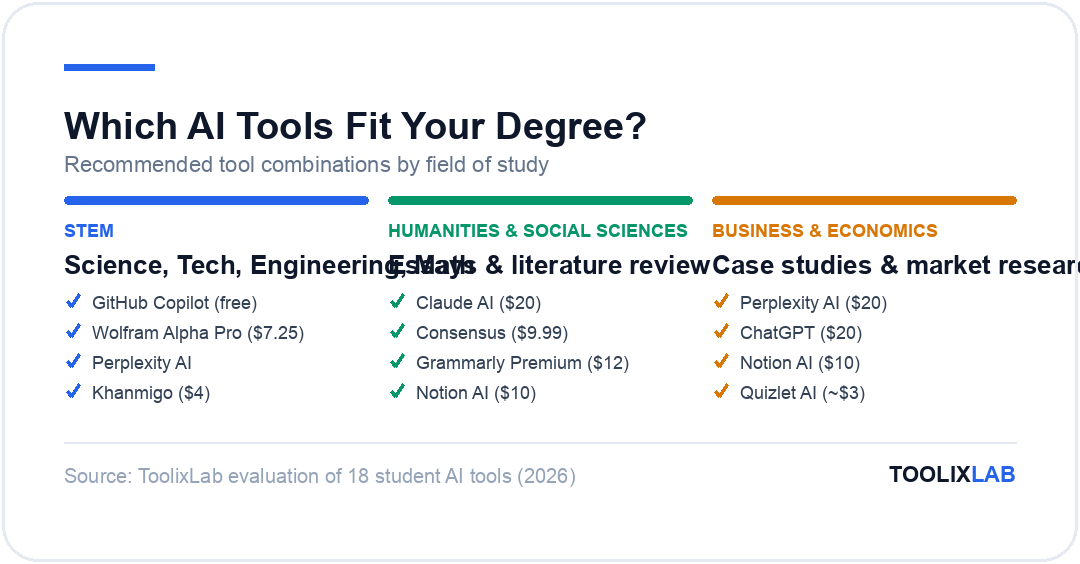
STEM (Science, Tech, Engineering, Math)
- ✓ GitHub Copilot (free — apply immediately)
- ✓ Wolfram Alpha Pro
- ✓ Perplexity AI (research)
- ✓ Khanmigo (concept understanding)
- ✓ Claude AI (technical writing help)
Humanities & Social Sciences
- ✓ Claude AI (essay feedback)
- ✓ Consensus (literature review)
- ✓ SciSpace (paper comprehension)
- ✓ Grammarly Premium
- ✓ Notion AI (research organization)
Business & Economics
- ✓ Perplexity AI (market research)
- ✓ ChatGPT (case analysis)
- ✓ Notion AI (case study organization)
- ✓ Grammarly (professional writing)
- ✓ Quizlet AI (terminology)
Language Learning
- ✓ ChatGPT (practice conversations)
- ✓ Quizlet AI (vocabulary flashcards)
- ✓ Grammarly (grammar correction)
- ✓ Speechify (listening practice)
- ✓ QuillBot (paraphrasing practice)
Academic Integrity: How to Use AI Ethically as a Student
This conversation can't be avoided. AI tools exist on a spectrum from legitimate academic assistance to academic dishonesty, and the line isn't always clear. Here's a practical framework:
Generally acceptable
- ✓ Using AI to brainstorm ideas (then developing them yourself)
- ✓ Getting AI feedback on your own draft (like asking a friend to review)
- ✓ Using AI to understand a concept you're struggling with
- ✓ Using Grammarly for grammar and spelling
- ✓ Using AI to generate flashcards from your own notes
- ✓ Using Perplexity to find relevant sources (then reading them)
Likely prohibited (check your institution's policy)
- ✗ Submitting AI-generated text as your own writing
- ✗ Using AI on take-home exams without explicit permission
- ✗ Using AI to complete assignments that assess your own reasoning
Many institutions are now providing explicit AI policies. If yours hasn't, ask your professors directly — the answer is usually more permissive than students expect for brainstorming and feedback, and stricter than expected for final submissions.
The Starter Stack: Best Free AI Toolkit for Any Student
If you're starting from scratch, here's the minimum viable AI toolkit for a student — all free:
Zero-cost student AI stack
-
1
ChatGPT Free — General AI tasks, explanations, brainstorming, math help
-
2
Perplexity AI Free — Research with citations (use for every research task)
-
3
Grammarly Free — Grammar check (install the browser extension now)
-
4
Notion Free (.edu) — Apply with your .edu email for the Plus plan
-
5
GitHub Copilot Free (CS students) — Apply at education.github.com/pack
Total monthly cost: $0. Add Quizlet Plus ($3/month) or Otter.ai Pro ($17/month) when you find specific friction points.
🔗 See the full list: Our 20 Best Free AI Tools in 2026 guide covers every free AI tool worth using — not just for students, but for any budget-conscious user.
Key Takeaways
- Use Perplexity AI for research — it's categorically better than Google or ChatGPT for finding cited, current information on any topic.
- Use Claude AI for writing feedback — it gives more substantive, specific feedback on essays and arguments than any other AI tool.
- Get Notion free — apply with your .edu email today if you haven't already. The Plus plan is genuinely free for students.
- CS students: apply for GitHub Copilot immediately — it's free, takes 10 minutes to set up, and will change how you code.
- Don't replace thinking with AI — use it to enhance understanding (Khanmigo, Perplexity) and get feedback on your own work (Claude, Grammarly). The goal is learning better, not learning less.
- Build the free stack first — ChatGPT Free + Perplexity Free + Grammarly Free + Notion Plus covers 80% of student AI needs at zero cost.
🔬 How We Test AI Tools at ToolixLab
Every recommendation in this guide comes from hands-on evaluation, not spec-sheet comparison. Our process for this category:
- Real-task testing: we run each tool through the actual workflows this guide covers — the same tasks you'd use it for — and compare outputs side by side.
- Verified pricing: every price is checked against the vendor's official pricing page at review time, and re-checked on our refresh cycle.
- Free-tier reality check: we test the free tier limits ourselves so "free" claims reflect what you actually get.
- Ongoing re-evaluation: AI tools change monthly; posts carry a visible "Last updated" date and stale recommendations get replaced.
ToolixLab is reader-supported: some links may earn us a commission, which never affects rankings — several tools we rank highest have no affiliate program at all.