
By ToolixLab Research Team · Last Updated: July 2026
Quick Answer
The best AI stack for startups in 2026 pairs a general assistant (Claude or ChatGPT), an AI coding tool (Cursor or GitHub Copilot), a meeting note-taker (Granola), a workspace (Notion), and an automation layer (Zapier). Five tools cover almost every job a lean team needs, and every one of them has a usable free tier before you spend a cent.
The best AI stack for startups in 2026 isn't the biggest one — it's the smallest one that removes the most work. According to the Small Business & Entrepreneurship Council's March 2026 survey, the typical small business uses just five AI tools, not fifteen. Founders who try to bolt on every trending tool end up paying for overlapping subscriptions and never mastering any of them well enough to get the time back.
We built this guide the way we'd build the stack ourselves: one tool per job, real pricing pulled from each vendor's official page this month, and an honest note on where a free plan is genuinely enough versus where it's a trap that funnels you into upgrading fast. We also priced out what a full stack actually costs at different team sizes, because "starting from $X/month" marketing copy rarely matches what you pay once a real team is using the tool daily.
Below are the 10 tools that make up a complete 2026 startup AI stack — covering research and writing, coding, meetings, workspace, presentations, sales-and-marketing content, automation, and voice — plus a full pricing comparison, real use cases by team stage, and our verdict on what to install first.
⚡ Quick Summary
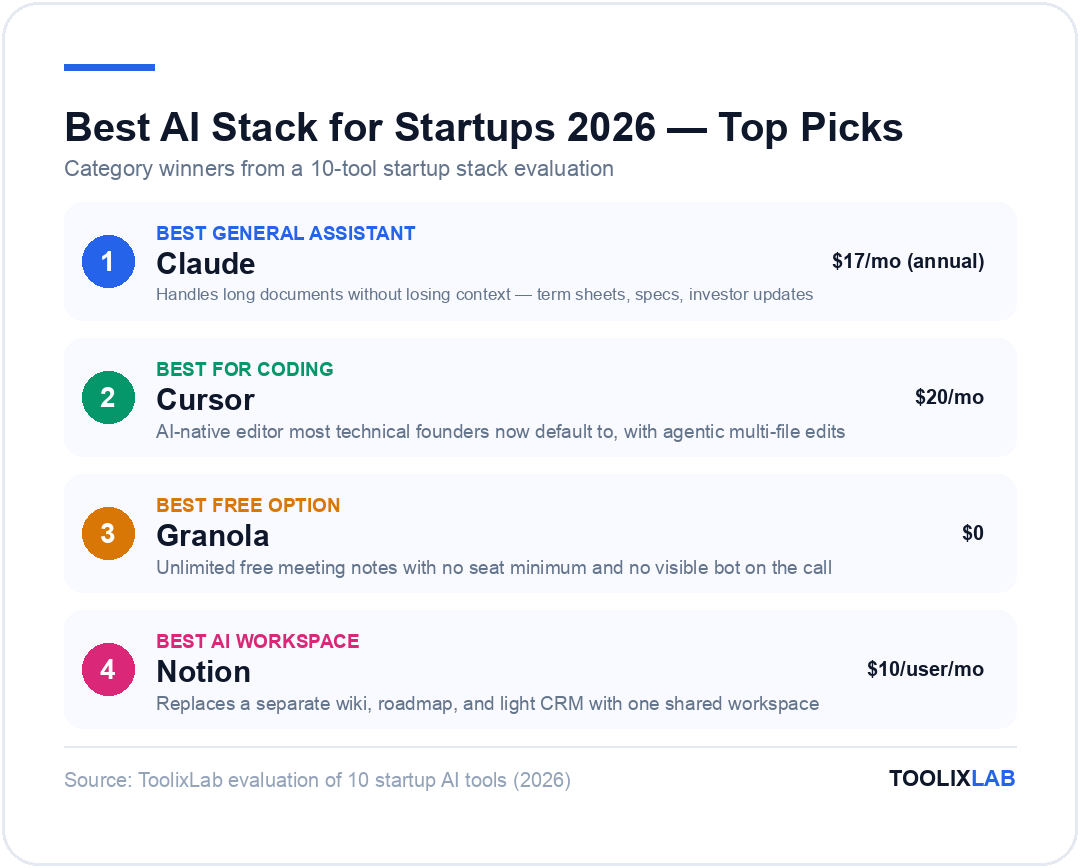
Best overall assistant: Claude — Pro plan from $17/month (annual), strongest for reasoning-heavy work and long documents
Best for coding: Cursor — $20/month Individual plan, AI-native editor most technical founders now default to
Best free option: Granola — unlimited free meeting notes with no seat minimum
Jump to: Comparison Table | Verdict
What to Look For in a Startup AI Stack
Four things matter more than any feature list when you're picking AI tools as a founder with no dedicated IT team:
One tool per job, not per feature. The founders who stay under budget pick a general assistant, a coding tool, a meeting tool, and a workspace — then stop. Every extra subscription is a password, an invoice, and a context switch.
A free tier that's actually usable, not a seven-day trial. Claude, Cursor, Granola, Notion, and Zapier all let you run real work on their free plans. That matters when you're pre-revenue and testing which tools you'll actually keep.
Per-seat pricing that won't punish you for hiring. Several tools on this list jump in price the moment you add a second seat (Granola's Business tier, Notion's Business plan). Know that jump before you're mid-onboarding.
Integration with the rest of your stack. A tool that can't talk to Slack, Notion, or your CRM through Zapier or a native integration becomes an island. We noted integration depth for every tool below.
A model or feature set that keeps up. AI tools ship new capabilities monthly, and a subscription that looked like the best deal in January can fall behind by summer. Re-check the tools you're paying for every quarter rather than assuming today's pick is permanent — the pricing and feature notes below are current as of this month, not locked in for the year.
The 10 Best Tools for a 2026 Startup AI Stack
1. Claude — Best General AI Assistant
Claude, built by Anthropic, has become the default assistant for founders who spend their day reading long documents — term sheets, product specs, customer feedback — and need a model that stays accurate across all of it rather than losing track halfway through. It also ships Claude Code, an agentic coding mode that many technical founders now run alongside or instead of a dedicated IDE assistant.
In practice, that means pasting an entire investor update thread, a 40-page product requirements doc, or a support ticket export into a single conversation and getting a coherent answer back — something that trips up shorter-context assistants. For a founder juggling fundraising, product, and support in the same afternoon, that reliability is worth more than any single flashy feature.
Pricing: Free plan covers basic chat, code generation, and web search. Pro is $17/month billed annually ($200 upfront) or $20/month billed monthly, and adds Claude Code access, unlimited projects, and much higher usage limits. Max starts at $100/month for 5x–20x the usage.
✅ Pros
- • Handles long documents without losing context
- • Claude Code covers agentic refactors, not just autocomplete
- • Annual pricing undercuts monthly ChatGPT Plus
❌ Cons
- • No native image generation like GPT's built-in tools
- • Team plan seat pricing ($20–$100/user) adds up fast past 5 people
Best for: Founders who read and write more than they design — specs, contracts, investor updates, customer research synthesis.
2. ChatGPT — Best for Multimodal, Everyday Use
ChatGPT remains the most widely adopted assistant on any startup team, and for good reason: it's the one co-founders, contractors, and new hires have almost certainly already used. Its built-in image generation, voice mode, and custom GPTs make it the more flexible pick when your team's needs span writing, quick design mockups, and research in one place.
Pricing: Free plan available. Plus is $20/month with no annual discount option. Business and Enterprise plans exist for teams needing admin controls and data-retention guarantees.
✅ Pros
- • Nearly every new hire already knows how to use it
- • Built-in image generation and voice mode in one subscription
- • Custom GPTs let you package repeatable workflows for the team
❌ Cons
- • No annual billing discount, unlike Claude or Perplexity
- • Long documents can lose accuracy compared to Claude
Best for: Teams that want one assistant everyone already knows how to use, with image generation included.
3. Perplexity — Best for Research and Fact-Checking
Perplexity earns its spot as a dedicated research layer — competitor teardown, market-sizing, or checking a claim before it goes in a pitch deck — because it cites sources inline rather than making you verify claims yourself afterward. That's a meaningful difference from asking a general chatbot the same question and hoping it's right.
Pricing: Free plan with limited daily searches. Pro is $20/month or $200/year (about $16.67/month). Enterprise Pro runs $40/seat/month for teams needing shared workspaces and admin controls.
✅ Pros
- • Inline citations mean less time double-checking claims
- • Faster than manually searching and cross-referencing multiple tabs
❌ Cons
- • Weaker than Claude or ChatGPT for long-form writing and coding
- • Free tier's daily search cap runs out fast during active research days
Best for: Founder-led sales and content teams who need cited, checkable answers — not just fluent ones.
4. Cursor — Best AI Coding Tool
Cursor has become the default editor for startup engineering teams that build fast: it's a full IDE fork with AI agents built into every layer of the workflow, not a plugin bolted onto VS Code. For a side-by-side against the plugin-based alternative, see our Cursor vs GitHub Copilot vs Codeium comparison and full Cursor AI review.
Founders shipping an MVP report using Cursor's Agent mode to scaffold entire features — a new API route, its tests, and the frontend hook that calls it — from a single prompt, then reviewing the diff rather than writing it line by line. That workflow shift is why most technical founders we've talked to switched their whole team over rather than running it as a side experiment.
Pricing: Hobby is free with limited Agent requests. Individual is $20/month with extended limits and access to frontier models. Teams is $40/user/month with centralized billing and SSO. Enterprise is custom.
✅ Pros
- • Agent mode can execute multi-file refactors, not just suggest lines
- • Frontier model access included at the $20/month tier
- • Bugbot catches issues before code review
❌ Cons
- • Full IDE switch, not a lightweight plugin — a bigger ask for teams happy with VS Code
- • Bugbot billing is usage-based on top of the subscription
Best for: Any startup with a technical co-founder or in-house engineering team shipping product weekly.
5. GitHub Copilot — Best Coding Tool Inside Your Existing Editor
If your team is attached to VS Code, JetBrains, or Neovim and doesn't want to switch editors, GitHub Copilot delivers most of the same AI benefit as a plugin instead of a fork. It's also the simpler procurement choice if you're already paying for GitHub Enterprise.
Pricing: Free plan includes 2,000 completions/month. Pro is $10/month per user with unlimited completions plus $15 in monthly AI credits. Pro+ is $39/month with premium model access and $70 in credits. Max is $100/month for heavy workflows.
✅ Pros
- • Cheapest entry point of any coding tool on this list at $10/month
- • Works inside the editor your team already has installed
❌ Cons
- • Less agentic than Cursor out of the box — more autocomplete than autonomous refactor
- • Premium models and heavier usage push you into Pro+ or Max quickly
Best for: Teams standardized on GitHub who want AI autocomplete without changing tools.
6. Granola — Best AI Meeting Notes
Granola sits quietly in the background of investor calls, customer interviews, and standups, turning your own rough notes into a structured summary without a bot visibly joining the call — a detail that matters when you're on sensitive fundraising or customer-discovery conversations.
Pricing: Basic is free with limited history. Business is $14/user/month with unlimited notes, advanced models, and integrations into Notion, Slack, HubSpot, and Zapier. Enterprise is $35/user/month with SSO and admin controls.
✅ Pros
- • No visible bot joining the call — less friction on sensitive conversations
- • Free plan is generous enough for a solo founder to run on indefinitely
❌ Cons
- • Free plan caps note history, so older summaries roll off
- • Per-seat Business pricing adds up once the whole team joins calls
Best for: Founders running back-to-back investor, customer, and hiring calls who need searchable notes without manual typing.
7. Notion — Best AI Workspace and Docs
Notion is the closest thing most startups have to a company operating system — wiki, roadmap, CRM-lite, and now an AI agent layer in one place. If you're deciding whether the AI features are worth the upgrade from a plain workspace, read our full Notion AI review and the Notion AI vs ChatGPT breakdown.
The practical upside for a new team is consolidation: instead of a separate wiki tool, a separate project tracker, and a separate lightweight CRM spreadsheet, one Notion workspace with linked databases covers all three, which means one place new hires learn on day one instead of three.
Pricing: Free plan includes limited-trial AI. Plus is $10/user/month billed annually ($12 monthly) with basic AI writing. Full AI Agents and Ask Notion access require Business at $20/user/month billed annually ($24 monthly).
✅ Pros
- • Replaces separate wiki, roadmap, and light CRM tools with one workspace
- • Templates make it fast to stand up onboarding docs and project trackers
❌ Cons
- • Full AI Agents require the Business plan, not the cheaper Plus tier
- • Per-seat Business pricing gets expensive fast once headcount grows past 20
Best for: Any startup that wants one shared source of truth for docs, projects, and light CRM without adopting five separate apps.
8. Gamma — Best AI Presentation and Deck Tool
Gamma turns a rough outline into an investor-ready deck or sales one-pager in minutes rather than hours in PowerPoint or Google Slides, which matters most in the weeks before a fundraise or a big customer pitch when design time is the scarcest resource you have.
Pricing: Free plan with limited credits. Plus is $8/month billed annually ($10 monthly). Pro is $15/month billed annually ($20 monthly) with unlimited AI credits and custom branding.
✅ Pros
- • Cheapest tool on this list at $8/month annual
- • Turns a bullet-point outline into a designed deck in minutes
❌ Cons
- • Free-plan credits run out quickly if you're iterating on a deck
- • Custom branding and unlimited credits require the Pro tier
Best for: Founders building pitch decks, board updates, or sales collateral without a designer on staff.
9. Zapier — Best AI Automation Layer
Zapier is the glue that connects every other tool on this list — pushing a Granola call summary into Notion, syncing a new Stripe customer into your CRM, or triggering a Slack alert from a form fill. For alternatives at different price points, see our Zapier vs Make vs n8n comparison and the wider list of workflow automation tools for small businesses.
A typical early Zap: a new lead fills out a form on your site, Zapier creates a row in your Notion CRM database, drops a Slack message in #sales, and adds them to a follow-up sequence — all without a single line of backend code, and running the moment you publish it rather than after an engineer finds time to build it.
Pricing: Free plan covers 100 tasks/month across 5 Zaps. Professional is $29.99/month billed monthly (cheaper billed annually) for 750+ tasks, unlimited premium apps, and conditional logic. Team is $103.50/month billed monthly (or $69/month billed annually) for up to 25 users.
✅ Pros
- • The widest app-integration library of any automation tool
- • No code required to connect two SaaS tools together
❌ Cons
- • Task-based pricing means costs scale with usage, not a flat fee
- • Free plan's 2-step-only Zaps limit what you can automate before upgrading
Best for: Non-technical founders who need integrations without writing custom backend code.
10. ElevenLabs — Best AI Voice and Audio Tool
If your product includes any voice interface, narrated content, or multilingual support, ElevenLabs is the tool most AI-native startups reach for — realistic voice cloning and text-to-speech that's good enough to ship in a customer-facing product, not just an internal demo.
Pricing: Free plan includes 10,000 credits/month. Starter is $6/month for 30,000 credits with a commercial license. Creator is $22/month for 121,000 credits. Pro is $99/month for 600,000 credits at higher audio quality.
✅ Pros
- • Voice quality good enough to ship in a customer-facing product
- • $6/month Starter plan is the cheapest way to get a commercial license
❌ Cons
- • Only useful if your product actually needs voice or audio
- • Credit-based pricing means heavy usage can climb toward Pro or Scale fast
Best for: Startups building voice agents, narrated onboarding, or any product feature that talks back to the user.
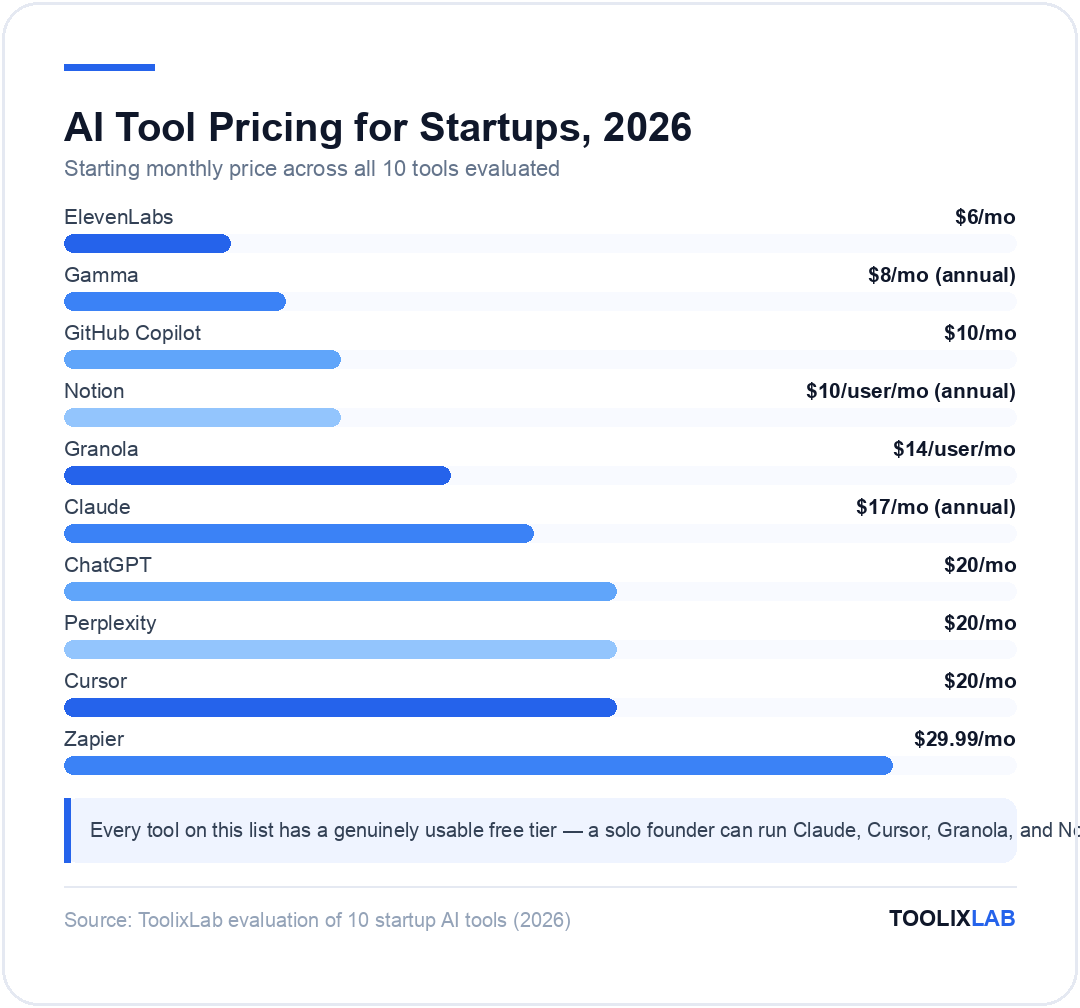
Full Pricing Comparison Table
*Prices verified July 2026 — check each vendor's official pricing page for current rates.
| Tool | Best For | Starting Price | Free Plan | Our Rating |
|---|---|---|---|---|
| Claude | General assistant | $17/mo (annual) | Yes | 4.7/5 |
| ChatGPT | Everyday multimodal use | $20/mo | Yes | 4.6/5 |
| Perplexity | Research & fact-checking | $20/mo | Yes | 4.5/5 |
| Cursor | AI coding | $20/mo | Yes | 4.7/5 |
| GitHub Copilot | Coding in existing editor | $10/mo | Yes | 4.4/5 |
| Granola | Meeting notes | $14/user/mo | Yes | 4.6/5 |
| Notion | Workspace & docs | $10/user/mo (annual) | Yes | 4.5/5 |
| Gamma | Decks & presentations | $8/mo (annual) | Yes | 4.4/5 |
| Zapier | Automation | $29.99/mo | Yes | 4.3/5 |
| ElevenLabs | Voice & audio | $6/mo | Yes | 4.5/5 |
How We Evaluated These Tools
We use most of these tools inside our own workflow at ToolixLab — Notion as our shared workspace, Zapier to push new posts into our distribution pipeline, and Claude and ChatGPT side by side for research and writing. For this guide, we re-verified every price directly against each vendor's official pricing page this month rather than relying on older roundups, since AI pricing changes fast enough that a six-month-old figure is often already wrong. We weighted free-tier usability, per-seat cost at 5 and 25 users, and integration depth with the rest of a typical startup stack over raw feature counts.
We also deliberately excluded tools that looked good on a feature list but failed our own "would we actually keep paying for this" test — general-purpose automation platforms with steep learning curves, presentation tools that required a design background to get good output, and coding assistants that added more configuration overhead than the time they saved. If a tool didn't earn its subscription in our own use, it didn't make the list, regardless of how it's marketed.
How Much Does a Full AI Stack Cost Per Month?
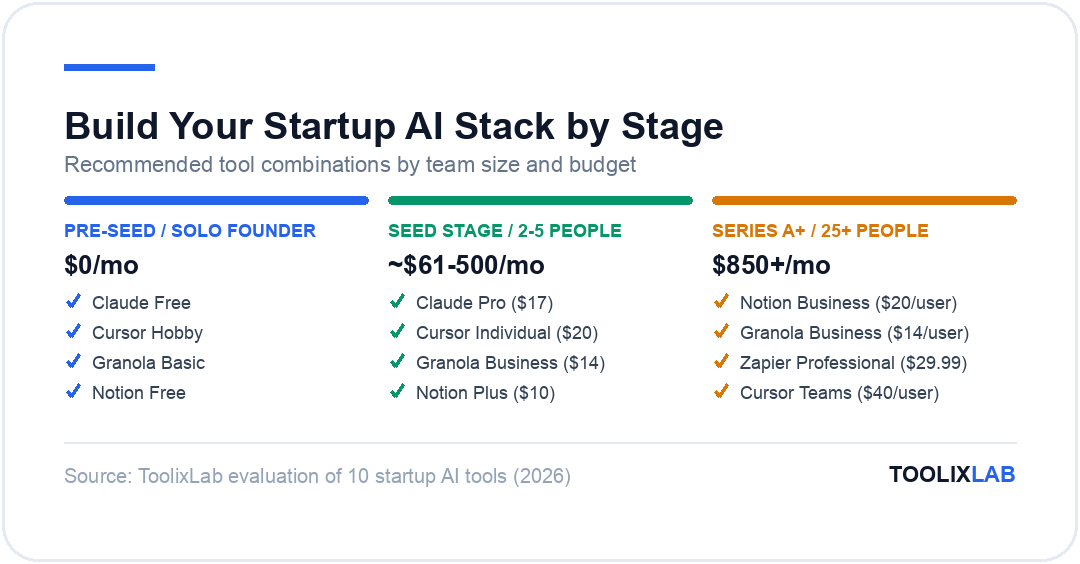
A solo founder can run a genuinely useful stack — Claude free, Cursor Hobby, Granola Basic, and Notion free — for $0/month. The moment you want to remove daily friction rather than just survive on free tiers, a lean paid stack for one person runs Claude Pro ($17), Cursor Individual ($20), Granola Business ($14), and Notion Plus ($10), for roughly $61/month total.
For a five-person team where everyone is on the same core tools, expect $300–500/month once you add Zapier Professional ($29.99) and a deck tool like Gamma Plus ($8) for the whole stack. That's still less than the cost of one part-time contractor, which is the argument for AI tools over hiring at pre-seed and seed stage.
Past 25 people, per-seat pricing on Notion Business ($20/user/month) and Granola Business ($14/user/month) starts to dominate the bill — a 25-person team on both tools alone is $850/month before anything else. That's exactly where the "audit who needs it" advice in our verdict below starts to save real money.
Common Mistakes When Building a Startup AI Stack
Buying the same tier for everyone. Not every employee needs Notion Business or Granola Business. Put the upgrade where the job actually requires it — a founder on 15 calls a week needs Granola Business; someone who joins two meetings a month doesn't.
Running two general assistants at full price. Claude and ChatGPT overlap on most day-to-day tasks. Pick one as the team default and let individuals expense the other only if their specific workflow genuinely needs it — paying full price for both across an entire team rarely earns back the second subscription.
Skipping the free tier entirely. Founders under pressure to "look serious" sometimes buy the paid plan on day one. Every tool in this stack has a usable free tier — use it to confirm the tool earns its keep before you put it on the company card.
Never re-auditing the stack. A tool that made sense at 3 people can be the wrong shape at 30. Revisit this list every time headcount roughly doubles, not just when a renewal invoice lands.
Which Tools You Need at Each Stage
Pre-seed, solo founder: Start entirely on free plans — Claude or ChatGPT free, Cursor Hobby, Granola Basic, Notion free. That combination handles research, an MVP's first code, and meeting notes for $0/month while you validate the idea.
Seed stage, 2–5 people: Upgrade the tools your team touches daily first. A technical co-founder justifies Cursor Individual ($20/month) immediately; a founder doing 10+ calls a week justifies Granola Business ($14/user/month) before anyone else on the team does.
Series A, 25+ people: This is where per-seat pricing bites. Notion Business at $20/user/month for 25 people is $500/month alone — audit who actually needs Business-tier AI Agents versus who can stay on Plus. The same logic applies to Cursor Teams and Granola Business: buy the upgrade for the people whose job depends on it, not the whole company by default.
Growth stage, 50+ people: By this point you likely have a dedicated ops or IT owner for tooling decisions. The stack itself doesn't need to change much — the discipline does. Run a quarterly review of every seat on every tool, cut licenses for people who log in once a month, and treat AI tool spend with the same scrutiny as any other line item in the budget, not as an exception because it's "just software."
For teams distributed across time zones, our guide to the best AI tools for project management and best AI tools for finance teams cover the operational side this stack doesn't — and once your finance stack is in place, our guide to automating financial reporting with AI walks through turning that stack into a repeatable monthly close process. Our ChatGPT prompts for sales teams and AI prompts for developers give you a running start inside the tools above.
Tools Worth Watching Beyond the Core 10
The 10 tools above cover the jobs almost every startup has on day one. A few more are worth a second look once you hit a specific need rather than being part of the default stack:
Clay for sales teams doing outbound at volume — it enriches lead lists and automates personalized outreach in a way that a general assistant can't do at scale. HubSpot Breeze is worth evaluating once you already run HubSpot as your CRM and want the AI layer bundled rather than bolted on. Jasper suits marketing teams that need consistent brand voice across a high volume of ad copy and landing pages. Otter.ai is a solid Granola alternative if your team specifically wants a bot that visibly joins the call. And if your product involves video or image generation rather than just voice, Runway and Midjourney are the categories' current leaders.
None of these made the core 10 because they solve a narrower problem than "every startup needs this on day one" — but they're the natural next additions once your team's needs get specific enough to justify a dedicated tool.
Our Verdict
There is no single "best AI stack" — there's a best stack for your team's stage. But every startup, regardless of stage, should have a general assistant, a coding tool if there's any technical work, a meeting note-taker, and one shared workspace before adding anything else. Start free, upgrade the tool your team uses daily first, and revisit the whole stack every time headcount doubles.
✅ Start with the free tier if...
- • You're pre-revenue or still validating the idea
- • You're a solo founder or two-person team
✅ Upgrade to paid plans if...
- • A tool is already saving 5+ hours a week
- • You're onboarding new hires who need the same tools day one
🔑 Key Takeaways
- ✓ Five tools — a general assistant, a coding tool, a meeting note-taker, a workspace, and an automation layer — cover most of what a lean startup team needs.
- ✓ Every core tool in this stack has a genuinely usable free plan; start there before paying for anything.
- ✓ Per-seat pricing (Notion Business at $20/user/month, Granola Business at $14/user/month) is where costs escalate fastest past 10 employees — audit who actually needs the upgrade.
- ✓ Re-check vendor pricing pages before budgeting; AI subscription prices change more often than traditional SaaS.
The best AI stack for startups in 2026 is the one your team actually uses every day, not the one with the most logos on a slide. Start with Claude or ChatGPT, Cursor or GitHub Copilot, Granola, and Notion — all four have free tiers — and add Zapier once you have more than two tools that need to talk to each other. If you're setting up the rest of your operations alongside this stack, our workflow automation tools guide and free AI workflow templates are the natural next stops.