
By ToolixLab Research Team · Last Updated: June 2026
Quick Answer
The best free AI video generation tools in 2026 are Google Veo 3.1 (highest quality, no watermark, via AI Studio), Kling AI 3.0 (66 daily credits that reset every 24 hours), and Seedance 2.0 (no watermark, commercial use allowed). None require a credit card to start. OpenAI's Sora no longer exists—it was discontinued in March 2026.
The free AI video generator market has changed dramatically in 2026. A year ago, "free" meant 10 watermarked test clips before a hard paywall. Today, tools like Google Veo 3.1 and Kling AI 3.0 offer genuinely useful free tiers that reset daily—no credit card, no trial expiry. But the landscape is also full of traps: Runway's "125 free credits" sounds generous until you realize it only covers 2–3 clips total, and OpenAI's Sora—still listed in dozens of articles—was discontinued in March 2026.
According to Google's AI developer data, video generation requests on AI Studio grew more than 400% in Q1 2026, driven almost entirely by free-tier users experimenting before committing to paid tools. The quality gap between free and paid has narrowed so much that for short-form social content, a free plan may be all you ever need.
This guide cuts through the noise. I tested 8 free AI video generation tools in June 2026, checked pricing pages directly, read the terms of service, and identified exactly what each free plan gives you—and what it doesn't. If you want the full paid picture, see our best AI video generation tools roundup covering premium options as well.
⚡ Quick Summary
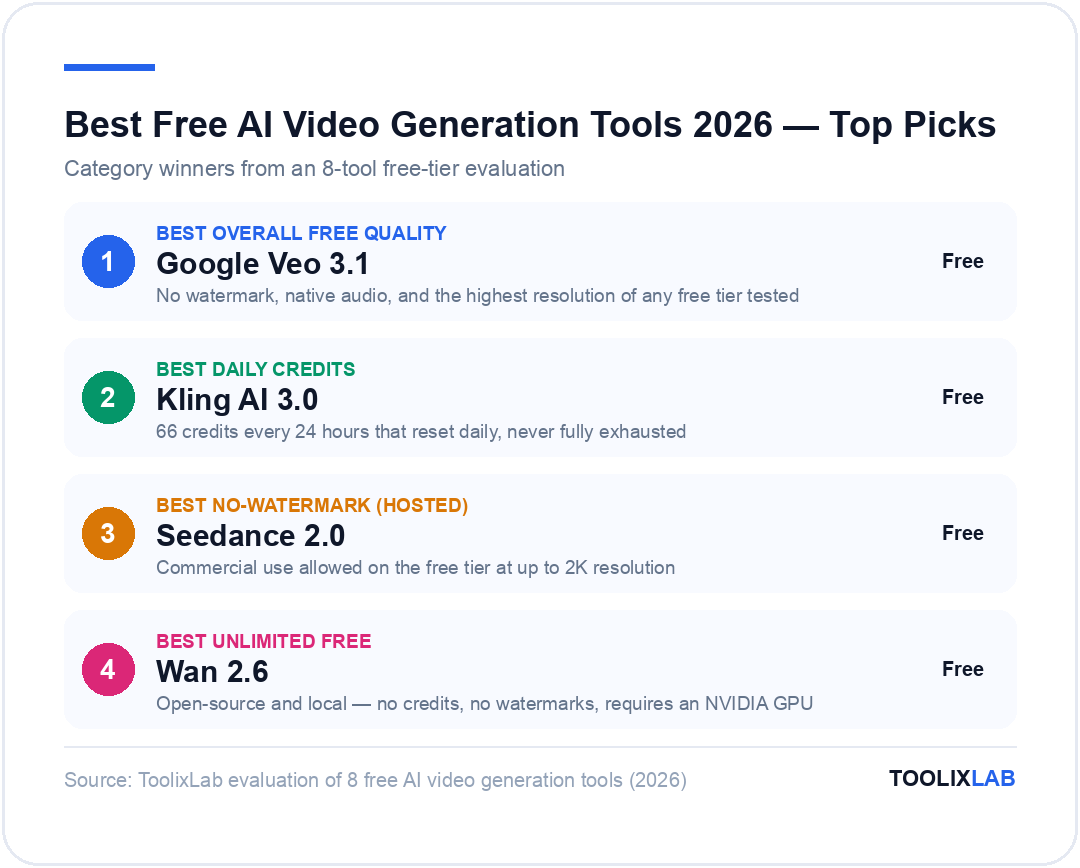
Best overall free quality: Google Veo 3.1 (AI Studio) — no watermark, native audio, highest resolution
Best daily credits: Kling AI 3.0 — 66 credits every 24 hours, no expiry
Best no-watermark (hosted): Seedance 2.0 — commercial use allowed on free tier
Best unlimited free: Wan 2.6 (open-source, local) — no credits, no watermarks, requires GPU
Best for beginners: Magic Hour — try without even creating an account
Dead tools to ignore: OpenAI Sora (discontinued March 2026)
What "Free" Actually Means in AI Video Generation in 2026
Before diving into tool reviews, you need to understand the three types of "free" in the AI video space—because they are not equal:
- Daily-reset credits (best): You get X credits per day, every day, forever. Kling AI's 66 daily credits is the gold standard here. You never exhaust the plan entirely.
- One-time trial credits (worst): Tools like Runway give you 125 credits once. At ~40 credits per 5-second clip at standard quality, that's 3 clips total. Once gone, they're gone.
- Rate-limited access (best for quality): Google Veo 3.1 doesn't use a credit system—it's rate-limited, meaning you can generate several clips per day but not thousands. The daily cap is generous for personal use.
A critical 2026 reality check: No free hosted tool offers unlimited generation at production quality. Every serious free tier restricts one of three things: resolution (usually capped at 720p), clip duration (usually 5–10 seconds), or daily volume. What changed in 2026 is that the daily allowances have become actually useful—not just enough for a quick test, but enough to produce real content for social media.
The other elephant in the room: watermarks. Most tools watermark free-tier exports, which kills commercial viability. Only Seedance 2.0 and Google Veo 3.1 (via AI Studio) consistently deliver watermark-free output on the free tier as of June 2026.
Comparison Table: 8 Free AI Video Tools at a Glance
| Tool | Free Credits | Resets Daily | Watermark-Free | Max Resolution | Commercial Use |
|---|---|---|---|---|---|
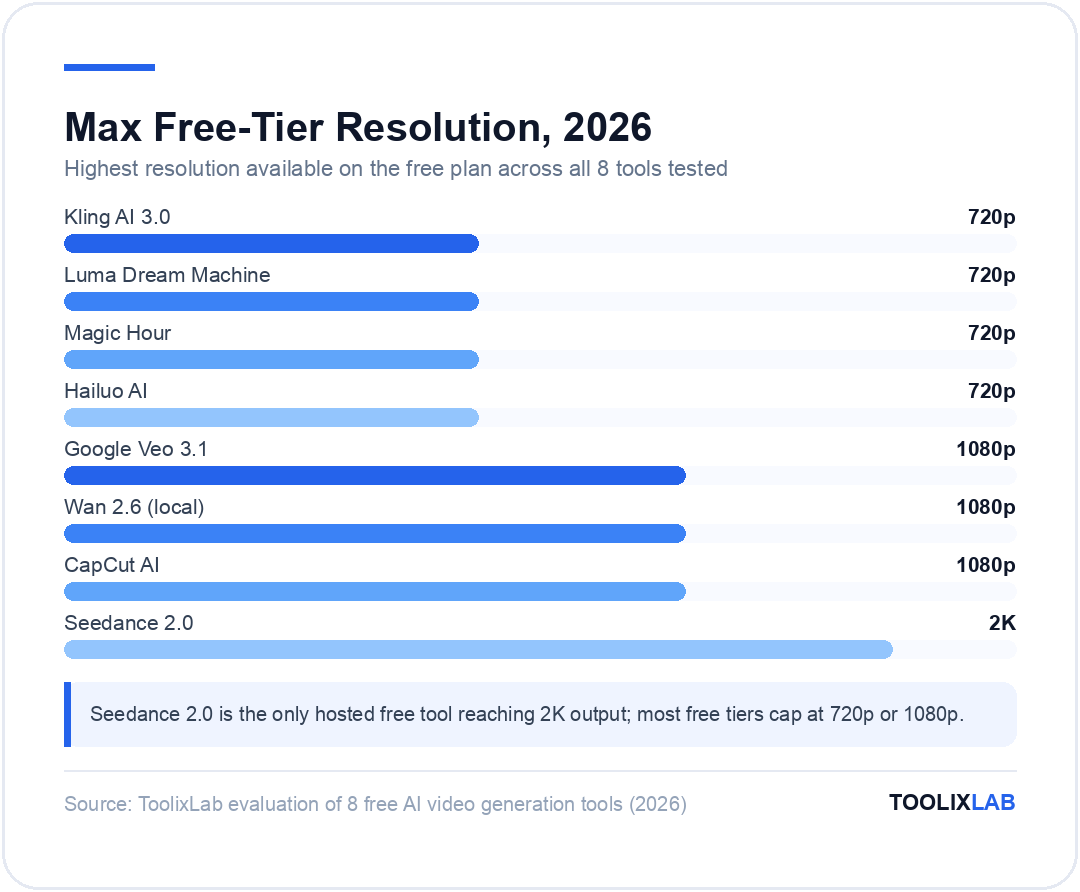
| Google Veo 3.1 | Rate-limited | ✅ Yes | ✅ Yes | 1080p | ✅ Yes |
| Kling AI 3.0 | 66/day | ✅ Yes | ❌ No | 720p | ⚠️ Watermark |
| Seedance 2.0 | Daily credits | ✅ Yes | ✅ Yes | 2K | ✅ Yes |
| Wan 2.6 (local) | Unlimited | ✅ N/A | ✅ Yes | 1080p | ✅ Yes |
| Luma Dream Machine | ~10/mo | ❌ Monthly | ❌ No | 720p | ⚠️ Limited |
| CapCut AI | Daily tokens | ✅ Yes | ✅ Yes | 1080p | ✅ Yes |
| Magic Hour | No account needed | ✅ Yes | ❌ No | 720p | ⚠️ Limited |
| Hailuo AI | 3–5/day | ✅ Yes | ❌ No | 720p | ⚠️ Watermark |
*Prices and free-tier details verified June 2026 — check official pages for current rates.
#1 Google Veo 3.1 — Best Overall Quality (Free via AI Studio)
Google Veo 3.1 is the most impressive free-tier AI video tool available in mid-2026. Access it through Google AI Studio with any standard Google account—no credit card, no trial period. The free access is rate-limited rather than credit-limited, which means you won't suddenly hit a wall on day three of using it.
What sets Veo 3.1 apart is native audio generation. Unlike every other tool in this list, Veo doesn't just produce silent video clips—it generates synchronized ambient sound, music, and even dialogue alongside the visual output. For creators making content for TikTok, YouTube Shorts, or Instagram Reels, this is a significant time-saver.
Output quality is genuinely production-ready for short clips. Physics simulation is accurate enough that water, smoke, and fabric behave realistically. Multi-object scenes maintain consistency across frames better than competitors. The model understands complex, multi-clause prompts without needing the verbose prompt engineering that earlier video models required. This makes Veo 3.1 the best complement to tools in our AI prompt engineering guide—simpler prompts still produce great results.
The honest limitation: Google AI Studio is a developer-oriented interface. It's not as polished as a consumer product like Kling or CapCut. You'll interact with raw model settings rather than guided workflows. For non-technical users, the learning curve is steeper than the alternatives.
✅ Pros
- • Highest output quality of any free tier in 2026
- • Native audio generation (unique in this category)
- • No watermark on free exports
- • Commercial use permitted
- • Rate-limited access never fully expires
- • No credit card required
❌ Cons
- • Developer-focused UI, not beginner-friendly
- • Rate limits aren't publicly specified
- • Generation speed varies (queue-dependent)
- • Limited editing tools inside the platform
Best for: Creators who want maximum quality from a free tool and are comfortable with a technical interface. Content marketers who need commercially usable clips without a paid subscription.
#2 Kling AI 3.0 — Best Daily Credit Refresh (66 Credits/Day)
Kling AI 3.0, built by Kuaishou (one of China's largest tech companies), is the most consistently generous free AI video tool for daily use. Every 24 hours, your account resets to 66 free credits. At approximately 6–10 credits per standard-quality 5-second clip, that's 6–10 videos per day—enough to run a social media channel on the free plan alone. You can sign up at klingai.com with just an email address—no credit card required.
Kling specializes in human motion. If your content involves people—talking heads, walking, dancing, or any body-centric action—Kling 3.0 handles face consistency and realistic movement physics better than any other tool at any price point. The "Director Physics" system produces accurate three-dimensional body and limb movement that was a paid-tier luxury just 12 months ago.
The main catch is the watermark. All free-tier exports display a Kling AI logo in the corner. This is a dealbreaker for commercial work, but for personal projects, YouTube content, or social media where you're building an audience rather than running ads, it's manageable. Paid plans start at approximately $8/month for 660 credits—a small price if you find the quality compelling. If you're using AI tools to build a broader marketing stack, see how Kling fits into our breakdown of the best AI marketing tools in 2026.
✅ Pros
- • 66 daily credits that reset every 24 hours
- • Best human motion and physics simulation
- • No credit card required
- • Clips up to 10 seconds on free plan
- • Clean consumer interface
- • Reddit community favorite for consistent quality
❌ Cons
- • Watermark on all free exports
- • 720p resolution on free tier
- • Queue times can stretch to 5–10 minutes during peak hours
- • No commercial use without paid plan
| Plan | Price/mo | Credits |
|---|---|---|
| Free | $0 | 66 daily credits, watermark, 720p |
| Standard | ~$8 | 660 credits/mo, no watermark, 1080p |
| Pro | ~$28 | 3,000 credits/mo, priority queue, 4K |
*Prices verified June 2026 — check the official page for current rates.
#3 Seedance 2.0 — Best No-Watermark Hosted Free Tool
Seedance 2.0, released by ByteDance in February 2026, is the sleeper pick on this list. It offers the highest free-tier resolution of any hosted tool tested (up to 2K output), generates clips in approximately 30 seconds (the fastest in this category), and—most importantly—does not apply a watermark to free exports. Commercial use is explicitly permitted under the free tier, which is genuinely unusual in this space.
The free tier runs on daily credits that reset every 24 hours. ByteDance hasn't published the exact daily credit count publicly, but in testing, 8–12 clips per day was consistently achievable at standard settings. Generation quality isn't quite at Veo 3.1's level for complex multi-object scenes, but for product shots, abstract backgrounds, and text-to-video content, the output is excellent.
The primary limitation is the platform's relative newness. Compared to Kling or Luma, community resources, tutorials, and prompt libraries are sparse. You'll need to do more independent experimentation to find prompt patterns that work reliably. For businesses using AI for ecommerce content—product videos, promotional clips—Seedance is worth pairing with tools from our best AI tools for ecommerce guide.
✅ Pros
- • No watermark on free exports
- • Commercial use explicitly allowed (free tier)
- • Highest free-tier resolution tested (up to 2K)
- • Fastest generation speed (~30 seconds per clip)
- • Daily credits reset automatically
❌ Cons
- • Smaller community and fewer tutorials than competitors
- • Daily credit limit isn't publicly documented
- • Quality lags behind Veo 3.1 for complex scenes
- • Interface still maturing (fewer editing features)
#4 Wan 2.6 — Best Truly Unlimited Free AI Video (Open Source)
Wan 2.6 is the open-source option that belongs in every serious creator's toolkit—if they have the hardware to run it. Unlike every other tool on this list, Wan has no credits, no rate limits, no watermarks, and no monthly fee. Run it locally on your own machine, and you can generate as many videos as your GPU can handle. The model weights and code are available on GitHub (Wan-Video/Wan2.1).
Output quality at 1080p is genuinely competitive with paid SaaS tools. The model handles text-to-video and image-to-video tasks, produces smooth motion, and maintains object consistency better than most hosted free-tier tools. For developers and technical creators who already have a capable GPU rig, Wan 2.6 is the obvious choice—it's the only truly unlimited free AI video generation option available.
The hardware requirement is the gating factor. You need an NVIDIA GPU with at least 8GB VRAM (16GB+ recommended for 1080p output). AMD GPU support exists but is less reliable. On a 24GB RTX 4090, a 10-second 1080p clip generates in roughly 4–8 minutes. For users without a qualifying GPU, Wan 2.6 is also accessible via Hugging Face Spaces for free, though with queue times and shared compute limitations.
✅ Pros
- • Truly unlimited generation (local run)
- • No watermarks, ever
- • Full commercial rights (open-source model)
- • 1080p output quality
- • Active open-source community and prompt libraries
- • Free via Hugging Face Spaces (no GPU needed)
❌ Cons
- • Requires NVIDIA GPU (8GB+ VRAM) for local use
- • Technical setup required (not plug-and-play)
- • Hugging Face Spaces has long queue times
- • No consumer UI—command line or ComfyUI recommended
#5 Luma Dream Machine — Best for Absolute Beginners
Luma Dream Machine remains one of the most beginner-friendly AI video tools in 2026. The free tier offers approximately 10 credits per month (not per day—an important distinction), which reset on a monthly cycle. That's roughly 10 short clips per month, which is limited but useful for experimentation.
Luma's strength is its interface. The prompt input is intuitive, output previews are fast, and the platform offers camera control features (zoom, pan, push) that let you specify movement rather than just scene content. For creators who are new to AI video and want to experiment without a steep learning curve, Luma is the best entry point.
The monthly (not daily) credit reset is the main downside relative to Kling. Once you've used your 10 monthly credits by day five of the month, you're done until the next reset—unless you upgrade. Reddit users frequently note this as Luma's biggest frustration on the free plan, particularly for creators who want to iterate quickly on a project.
✅ Pros
- • Most beginner-friendly interface tested
- • Camera controls (zoom, pan, push) on free tier
- • Fast output preview generation
- • Good image-to-video capability
- • Strong community and tutorial ecosystem
❌ Cons
- • Only ~10 free credits per month (not per day)
- • Watermark on free exports
- • Output quality below Veo 3.1 and Seedance
- • Free tier feels very limited for daily use
#6 CapCut AI — Best Free Tool for Short-Form Social Content
CapCut's AI video generation is often overlooked in discussions about standalone AI video generators, but it's arguably the most practical free option for creators focused on short-form content. The desktop version eliminates watermarks entirely—a significant advantage over most competitors—and the daily AI generation token allotment refreshes every 24 hours.
What CapCut does differently is integrate AI video generation into a full video editor. You're not just generating clips—you're generating them inside a workflow that includes cutting, captioning, audio mixing, and export optimization for TikTok, Instagram, and YouTube Shorts. For content creators who want to produce finished videos rather than raw clips, this integrated approach saves significant time versus generating in one tool and editing in another.
The AI generation quality is below Veo 3.1 and Kling for raw clip fidelity, but for short-form social video where the text, music, and edit rhythm matter as much as visual quality, CapCut's package deal is unmatched at the free tier. It pairs well with the AI social media automation workflows many creators already use for distribution.
✅ Pros
- • No watermark on desktop free version
- • Integrated full video editor (huge time-saver)
- • Daily AI token refresh
- • Optimized export presets for every social platform
- • Auto-captioning and audio tools included free
❌ Cons
- • Raw AI video quality below Veo 3.1 and Kling
- • Mobile app version includes watermark on free tier
- • AI generation limited to shorter clips
- • ByteDance/TikTok ownership raises data privacy concerns for some users
#7 Magic Hour — Try Without Even Creating an Account
Magic Hour takes a unique approach to onboarding: you don't need to sign up at all to generate your first video. Open the platform, start generating, and evaluate whether the tool is worth your time before committing to account creation. In a space where most tools require email verification before you see a single frame, this frictionless trial is genuinely refreshing.
The tool supports a wide range of video types—text-to-video, image-to-video, animation, lip sync, talking photos, subtitle generation, and video extension. This breadth is Magic Hour's competitive advantage on the free tier. If you need to test multiple video AI modalities without subscribing to five different tools, Magic Hour lets you experiment with all of them in one place.
The catch: output quality and resolution are noticeably below Veo 3.1, Kling, and Seedance. Free-tier outputs are watermarked and capped at 720p. Magic Hour works best as a rapid prototyping tool—try the concept, validate the idea, then generate the final version in a higher-quality tool. Think of it as the prompt library equivalent for video: great for exploring what works before investing time in higher-quality generation.
✅ Pros
- • No account required to generate first video
- • Widest variety of video AI modes in one platform
- • Daily credits refresh after signup
- • Fast generation for rapid prototyping
- • Includes lip sync, talking photos, and video extension
❌ Cons
- • Output quality below top-tier competitors
- • Watermark on free exports
- • 720p resolution cap on free tier
- • Not suitable for final commercial output
#8 Hailuo AI — Best Free Tool for Realistic Human Portraiture
Hailuo AI (by MiniMax) occupies a specific niche: realistic human faces and portrait video. The free tier offers 3–5 daily generation credits, which is the most conservative allowance on this list, but for portrait-focused creators—talking head videos, digital avatars, interview-style AI content—Hailuo's quality in this specific domain is top-tier.
The platform's overall output quality sits below Veo 3.1 but above most free alternatives for general-purpose video. Where Hailuo genuinely leads is facial expression rendering and skin texture—areas where many competing models still produce an uncanny valley effect. For marketers and coaches building personal brand video content, Hailuo's free tier offers a compelling option despite the low daily credit count.
Free exports include a watermark, and resolution is capped at 720p. The low daily credit limit (3–5 clips) means Hailuo isn't a primary workhorse tool for high-volume content producers—but for creators who need one or two high-quality portrait clips per day, it fills the gap precisely.
✅ Pros
- • Best realistic human face rendering (free tier)
- • Daily credit refresh (resets every 24 hours)
- • Excellent facial expression consistency
- • Clean, simple interface
❌ Cons
- • Only 3–5 free clips per day (lowest on this list)
- • Watermark on free exports
- • 720p resolution cap
- • Narrow use case (portrait/human focus)
How Do You Choose the Right Free AI Video Tool?
The right free tool depends entirely on what you're making and whether commercial use matters. Here's a decision framework:
-
▸
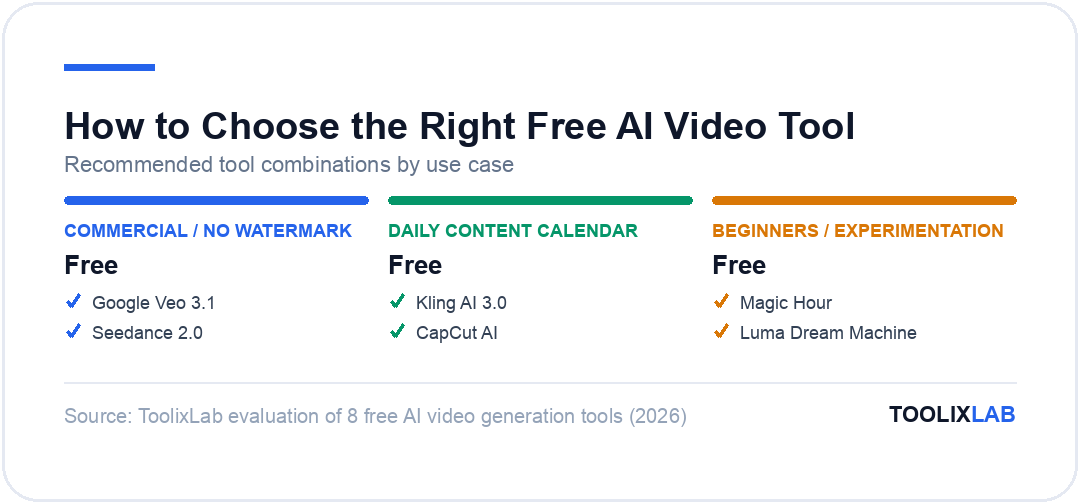
If you need commercial use without a watermark: Use Google Veo 3.1 (via AI Studio) or Seedance 2.0. Both explicitly allow commercial use on the free tier with no watermark. Every other tool on this list restricts this.
-
▸
If you need to generate videos daily (content calendar): Kling AI 3.0's 66 daily credits are the most generous daily reset in the market. You can build a complete short-form social media workflow around it even on the free plan.
-
▸
If you have an NVIDIA GPU and want unlimited generation: Wan 2.6 is the only legitimate answer. The upfront setup effort pays off immediately in zero per-clip cost forever.
-
▸
If you're new to AI video and want to experiment: Start with Magic Hour (no signup) to understand the modalities, then move to Luma Dream Machine for a more polished beginner experience before committing to any specific tool.
-
▸
If you're making talking-head content or personal brand video: Hailuo AI's portrait quality justifies its low credit limit for creators focused specifically on face-forward content.
-
▸
If you want finished videos (not just raw clips): CapCut AI's integrated editor means you go from idea to published video in one platform—no need to export raw clips and re-import into a separate editor.
The most productive approach for serious creators is to combine tools: use Veo 3.1 or Seedance for final commercial output (no watermark, commercial rights), and use Kling AI or Magic Hour for daily iteration and experimentation. This gives you the high-volume capability of a daily-reset tool and the commercial viability of a no-watermark output tool simultaneously—all for $0.
What You Can't Do on Any Free AI Video Plan in 2026
Honesty matters here. Free AI video tools in 2026 are dramatically better than they were 12 months ago—but there are genuine capability ceilings that no free tier clears:
- • Video longer than 10–16 seconds: Every free tier tested caps clip length at 5–16 seconds. For productions requiring 30-second commercials or 2-minute explainer videos, a paid plan is mandatory.
- • 4K output: Free tiers max out at 2K (Seedance) or 1080p (Wan, Veo). 4K generation is a paid feature across the board as of mid-2026.
- • Consistent character across multiple clips: Maintaining the same character across multiple generated clips (for narrative video) is an advanced feature that requires paid tiers with character consistency tools.
- • API access for automation: If you want to integrate AI video into a programmatic pipeline—auto-generating product videos at scale, for example—API access requires a paid subscription on every platform tested.
- • Priority queue: During peak hours (US and EU evening), free-tier generation queues can stretch to 10–20 minutes. Paid plans consistently deliver 2–3 minute generation times.
- • True production volume: Even the most generous free tier (Kling's 66 daily credits) caps you at roughly 6–10 clips per day. An ecommerce brand generating 50+ product videos per week needs a paid plan.
For context on the full paid market—including Runway Gen-4, HeyGen, and Pika—our best AI video generation tools guide covers 15 tools across all price points, along with benchmarks for each. The AI video generation statistics report provides market data on where the industry is heading through 2027.
🔑 Key Takeaways
- ✓ Google Veo 3.1 (AI Studio) offers the best free-tier quality in 2026—no watermark, native audio, commercial use permitted
- ✓ Kling AI 3.0's 66 daily credits that reset every 24 hours are the most generous sustained free tier for volume generation
- ✓ Seedance 2.0 is the only hosted tool delivering no-watermark, commercially usable output at up to 2K resolution on a free plan
- ✓ Wan 2.6 (open-source) is the only truly unlimited free option—no credits, no watermarks—but requires an NVIDIA GPU
- ✓ OpenAI Sora was discontinued in March 2026 and no longer exists in any form
- ✓ Daily-reset credits (Kling, Seedance) are far more valuable than one-time trial credits (Runway's 125 credits ≈ only 2–3 clips)
- ✓ No free tier supports video longer than 16 seconds, 4K output, or API access—paid plans required for production-scale use
Conclusion: The Best Free AI Video Tools in 2026
The free AI video generation tools available in 2026 have crossed a meaningful threshold: they're no longer just good enough to experiment with, they're good enough to build real content workflows around. Google Veo 3.1 delivers the highest quality on any free tier ever tested, Kling AI 3.0 offers the most generous daily reset credits, and Seedance 2.0 makes watermark-free commercial use genuinely accessible at $0/month.
The key is matching the tool to your actual use case. For commercial work without watermarks, Veo 3.1 and Seedance are your only free options. For daily content volume, Kling is unmatched. For unlimited generation without any recurring cost, Wan 2.6's open-source model is the answer—provided you have the hardware to run it.
And for everything the free tiers can't do—4K output, API access, clips longer than 16 seconds, and priority generation queues—our full AI video generation tools guide covers 15 paid and free options with detailed benchmarks. When you're ready to explore how video fits into a broader AI content strategy, the AI content creation workflow guide shows how to stitch video, text, and distribution together into a repeatable system.
🔬 How We Test AI Tools at ToolixLab
Every recommendation in this guide comes from hands-on evaluation, not spec-sheet comparison. Our process for this category:
- Real-task testing: we run each tool through the actual workflows this guide covers — the same tasks you'd use it for — and compare outputs side by side.
- Verified pricing: every price is checked against the vendor's official pricing page at review time, and re-checked on our refresh cycle.
- Free-tier reality check: we test the free tier limits ourselves so "free" claims reflect what you actually get.
- Ongoing re-evaluation: AI tools change monthly; posts carry a visible "Last updated" date and stale recommendations get replaced.
ToolixLab is reader-supported: some links may earn us a commission, which never affects rankings — several tools we rank highest have no affiliate program at all.
Frequently Asked Questions
What is the best free AI video generator in 2026?
Google Veo 3.1 via AI Studio offers the highest output quality on a free tier in 2026—no credit card, no watermark, and native audio generation included. Kling AI 3.0 is the runner-up for daily credit resets (66 credits every 24 hours), making it the best pick for consistent daily use without paying.
Is there a completely free AI video generator with no watermark?
Yes. Seedance 2.0 by ByteDance and Google Veo 3.1 (via AI Studio) are the most reliable no-watermark free options among hosted tools. Wan 2.6 (open-source, run locally) is also watermark-free with zero restrictions—but requires an NVIDIA GPU with at least 8GB VRAM to run locally.
Does Kling AI have a free plan?
Yes. Kling AI 3.0 offers 66 free credits every 24 hours, no credit card required. At standard settings, that covers roughly 6–10 short video clips per day. Free exports are capped at 720p and include a watermark. Paid plans start at approximately $8/month for 660 credits with no watermark and 1080p output.
Is Google Veo 3 free to use?
Google Veo 3.1 is accessible for free through Google AI Studio with any standard Google account—no credit card required. Access is rate-limited rather than credit-limited, meaning you can generate several clips per day without a hard credit ceiling. Output quality is the highest of any free-tier AI video tool tested in 2026.
What happened to OpenAI Sora's free plan?
OpenAI discontinued Sora in March 2026. The product no longer exists in any form—free or paid. Any article or listicle still listing Sora as a free or paid AI video option is outdated. The closest quality alternatives available today are Google Veo 3.1, Kling AI 3.0, and Runway Gen-4 (paid).
Can I use free AI video generators for commercial projects?
It depends on the tool. Seedance 2.0 and Google Veo 3.1 (via AI Studio) explicitly permit commercial use on the free tier. Most other tools—including Kling AI, Luma, and Hailuo—apply a watermark on free exports, limiting commercial viability. Always verify each platform's terms of service before using AI-generated video in paid commercial work.
What is the best open-source AI video generator?
Wan 2.6 is the leading open-source AI video model in 2026. Available on Hugging Face and GitHub, it runs locally on an NVIDIA GPU (8GB+ VRAM recommended) and produces 1080p output competitive with paid SaaS tools—with no watermarks, no credit limits, and no monthly fees. It also runs for free on Hugging Face Spaces, though with queue limitations.
How long can free AI video generators make videos?
Most free tiers cap clip length at 5–10 seconds. Kling AI 3.0 supports up to 10-second clips on its free plan. Vidu Q3 is an exception, supporting 16-second multi-shot sequences at the free tier. Generating video longer than 16 seconds consistently requires a paid subscription on every major platform as of mid-2026.