
Quick Answer
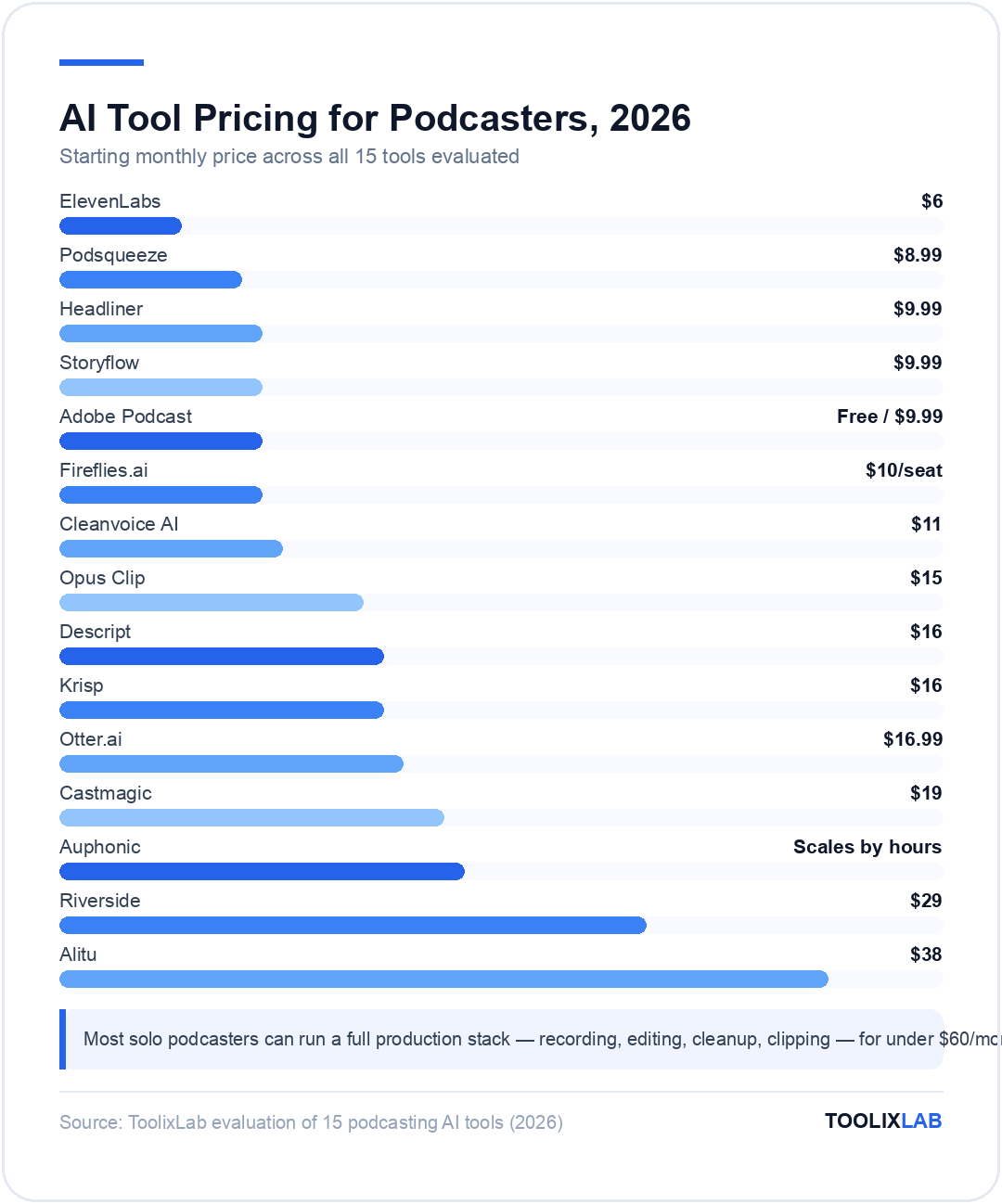
The best AI tools for podcasters in 2026 are Descript for transcript-based editing, Riverside for remote recording, Cleanvoice AI and Auphonic for automatic cleanup and mastering, Opus Clip and Headliner for turning episodes into short clips, and Storyflow for planning season arcs. Most solo podcasters can run a full production stack — recording, editing, cleanup, clipping — for under $60/month.
A weekly podcast used to mean an editor on retainer, a separate transcription service, and an afternoon lost to cutting clips for social media. In 2026, one person can do all of it before lunch — not because the work disappeared, but because AI now handles the parts that never needed a human ear in the first place: removing filler words, leveling audio, writing show notes, and spotting the three minutes of an hour-long episode that will actually perform on TikTok.
We tested the 15 tools below against what podcasters actually do episode to episode: recording (often with a remote guest on bad Wi-Fi), cleaning up and mastering audio, transcribing for accessibility and SEO, generating short clips for distribution, and writing the show notes that never seem to get written on time. Every price below was checked directly against each vendor's current pricing page — we flag the one exception where the number had to be cross-referenced.
If you're building a wider content stack around your show, our guides to AI tools for YouTube creators and ElevenLabs vs Murf AI cover the video and voice-cloning side of things in more depth than we can here.
The gap we kept hitting while testing: most tools in this category are excellent at one job and mediocre at everything adjacent to it. Descript edits brilliantly but its clipping tool is an afterthought. Opus Clip finds viral moments but does nothing for the audio quality of the source file. The strongest 2026 stacks combine two or three single-purpose tools rather than betting everything on one "all-in-one" platform — we call out where that trade-off actually matters.
⚡ Quick Summary
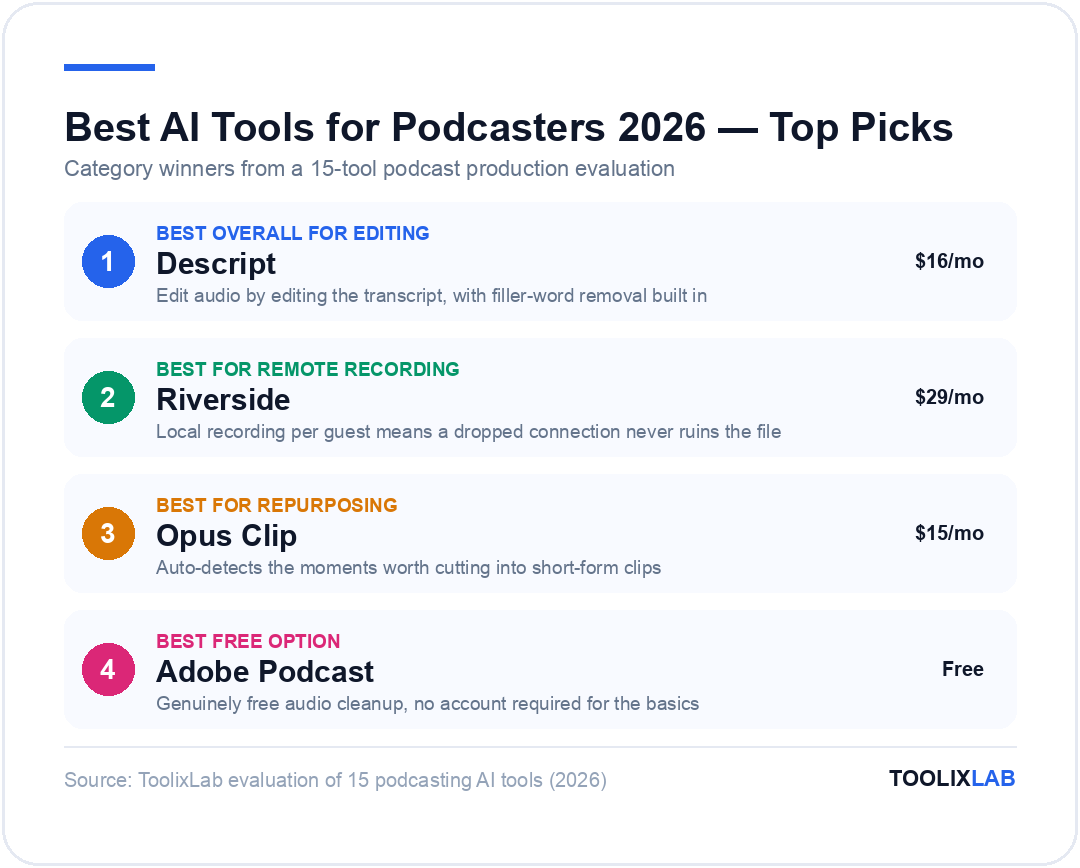
Best overall for editing: Descript — edit audio by editing the transcript, filler-word removal built in.
Best for remote recording: Riverside — local recording per guest means a dropped connection never ruins the file.
Best for repurposing: Opus Clip — auto-detects the moments worth cutting into short-form clips.
Best free option: Adobe Podcast Enhance Speech — genuinely free audio cleanup, no account required for the basics.
Jump to: Comparison Table | Verdict
What Should You Look For in an AI Podcasting Tool?
Podcast production breaks down into five jobs, and almost no single tool does all five well. Before picking anything below, know which job you're actually trying to solve:
- Recording reliability. A remote-recording tool that captures locally on each participant's device survives a dropped connection. One that streams live over a call doesn't.
- Transcript-based editing. The single biggest time-saver in this category — deleting a word from the transcript deletes it from the audio, no waveform-scrubbing required.
- Automatic cleanup. Filler-word removal, background noise suppression, and loudness normalization should happen in one pass, not three separate tools.
- Repurposing that finds the moment, not just the clip. A tool that auto-detects your best 60 seconds is worth more than one that just lets you cut clips faster manually.
- Output that fits your existing workflow. Show notes, transcripts, and clips need to land where you actually publish — your host, your social scheduler, your blog — not sit in an export folder you have to manually distribute.
Pricing model matters as much as features here. Several tools in this list bill by processing hours rather than a flat seat price, which is cheaper for a monthly show and considerably more expensive for a daily one — always check the hours included against your actual publishing cadence before comparing sticker prices.
One honest limitation across the entire category: AI cleanup and AI clip-selection both still need a human listen-through before publishing. We caught a filler-word tool removing a word that changed the meaning of a sentence, and a clip tool selecting a technically "high energy" moment that made no sense out of context. Treat every AI output here as a strong first pass, not a final cut.
The 15 Best AI Tools for Podcasters in 2026
1. Descript — Best Overall for AI Podcast Editing
Descript turned podcast editing into word processing: it transcribes your recording, and you edit the audio by editing the text. Delete a rambling tangent from the transcript and it's gone from the audio too, filler words and all — Descript's "Studio Sound" and filler-word removal can clean an entire episode in a single click rather than the usual pass-by-pass manual edit.
Its "Overdub" feature can also regenerate a flubbed line in your own AI-cloned voice, so you don't need to re-record a sentence because you stumbled over one word. The trade-off is that Descript's clip-generation tools are noticeably weaker than dedicated repurposing apps — most podcasters we spoke with pair it with Opus Clip or Headliner rather than relying on Descript alone for social cuts.
Pricing (fact-verified 2026-07-17, source: descript.com/pricing): Free plan available. Hobbyist starts at $16/mo (billed annually) or $24/mo (billed monthly). Creator is $24/mo annually or $35/mo monthly. Business runs $50/mo annually or $65/mo monthly. Enterprise is custom.
Best for: Solo hosts and small teams who want to edit by deleting text instead of scrubbing a waveform.
2. Riverside — Best for Remote Recording
Riverside records every participant's audio and video locally on their own device, then uploads it in the background — so if a guest's Wi-Fi drops mid-interview, you still get a broadcast-quality local file instead of a call full of robot-voice artifacts. That single design decision is why it's become the default for interview-format shows recording remote guests.
Its AI layer adds automatic clip and highlight detection from the raw recording, live transcription during the call, and one-click removal of filler words and awkward pauses after the session ends. Higher tiers add social scheduling and video hosting, which starts to overlap with dedicated repurposing tools — useful if you want fewer subscriptions, less deep if you need best-in-class clip selection.
Pricing (fact-verified 2026-07-17, source: riverside.com/pricing): Free plan with 2 hours of multi-track recording. Pro is $29/mo monthly or $24/mo annually. Grow is $39/mo monthly or $34/mo annually and adds social scheduling. Webinar runs $99/mo monthly or $79/mo annually for events up to 100 registrants. Business is custom.
Best for: Interview-format shows recording remote guests who can't guarantee a stable connection.
3. Adobe Podcast (Enhance Speech) — Best Free Audio Cleanup
Adobe's Enhance Speech tool takes audio recorded on a phone mic in an echoey room and makes it sound close to studio quality — no perfect microphone or treated room required. Its 2026 update added AI source separation, which isolates vocals, music, and ambient sound into separate stems so you can adjust each independently instead of applying one blanket filter.
Unlike almost everything else on this list, the free tier is genuinely usable for a small show rather than a crippled trial — it just caps you on daily volume and file size.
Pricing (fact-verified 2026-07-17, source: podcast.adobe.com/en/plans, corroborated via independent trackers): Free tier processes up to 1 hour of audio per day, files capped at 30 minutes and 500MB, single-file uploads only. Premium runs approximately $9.99/mo and raises the limit to 4 hours daily, 2-hour files up to 1GB, batch uploads, video support, and an enhancement-strength slider.
Best for: Anyone who records on inconsistent equipment and needs a free, fast cleanup pass before publishing.
4. Cleanvoice AI — Best for Automatic Filler-Word and Mouth-Noise Removal
Cleanvoice does one job and does it thoroughly: upload an episode and it strips out "um," "uh," stutters, mouth clicks, long pauses, and breath sounds automatically, without you touching a waveform. For a two-host chat show recorded in a single take, that alone can cut editing time from an hour to a few minutes of review.
It's narrower than Descript or Auphonic — there's no transcript-editing or loudness-mastering layer — which is exactly why podcasters use it as one step in a chain rather than a full production suite.
Pricing (fact-verified 2026-07-17, source: cleanvoice.ai/pricing): Pay-as-you-go credits from $11 for 5 processed hours. Monthly subscriptions start at $11/mo for 10 hours, $30/mo for 30 hours, and $90/mo for 100 hours. A free trial is available with no card required.
Best for: Conversational shows with heavy filler words and mouth noise that don't need a full editing suite.
5. Auphonic — Best for Automated Mastering and Loudness
Auphonic is the tool audio engineers actually trust for one specific reason: it normalizes loudness to broadcast and podcast-platform standards automatically, so every episode hits the same volume without you riding a fader manually. It also handles noise reduction, multi-track mixing, and automatic leveling between hosts with very different mic levels.
It's less of a creative editing tool and more of a mastering step you run right before export — podcasters typically pair it after Descript or Riverside rather than instead of them.
Pricing (fact-verified 2026-07-17, source: auphonic.com/pricing): Free plan includes 2 hours of processed audio per month. Paid tiers scale by monthly processing hours (S at roughly 9 hours/month up to XXL at 250 hours/month), billed in USD or EUR with a discount for annual billing; check the official pricing page for the current rate on your tier, as exact figures are shown only at checkout.
Best for: Shows with multiple hosts recorded at inconsistent volumes that need consistent, professional loudness every episode.
6. Krisp — Best for Noise Cancellation While Recording
Krisp removes background noise, echo, and even a barking dog or crying kid in real time, during the recording itself, rather than as a post-production fix. That matters for live-streamed or unedited shows where there's no cleanup pass afterward.
It runs as a system-level audio filter rather than a podcast-specific tool, so it works with whatever recording software you already use — Riverside, Zoom, or a straight DAW capture.
Pricing (fact-verified 2026-07-17, source: krisp.ai/pricing): 7-day free trial with all premium features. Core is $16/mo per user monthly or $8/mo billed annually. Advanced is $30/mo monthly or $15/mo annually. Enterprise is custom.
Best for: Podcasters recording live or in noisy environments who need clean audio in real time, not after the fact.
7. Otter.ai — Best for Interview Transcription
Otter.ai has become the default transcription tool for interview-format podcasts recorded over a call, mainly because it can join the meeting live and produce a searchable transcript with speaker labels the moment the recording ends. That transcript doubles as your show-notes draft and an accessibility-friendly version of the episode for search engines.
It's built more for meetings than for polished podcast editing, so podcasters typically use it for the transcript itself rather than as an editing tool the way they'd use Descript.
Pricing (fact-verified 2026-07-17, source: otter.ai/pricing): Basic plan is free. Pro is $16.99/user/month monthly or $8.33/user/month annually. Business is $30/user/month monthly or $19.99/user/month annually. Enterprise is custom.
Best for: Interview podcasts that need a searchable, speaker-labeled transcript immediately after recording.
8. Fireflies.ai — Best Free Transcription Minutes
Fireflies covers the same core job as Otter — live transcription with AI summaries — but leans harder into integrations, pushing transcripts and highlight clips directly into Slack, Notion, and CRM tools. For a podcaster who also runs a newsletter or community around the show, that integration layer saves a manual copy-paste step every episode.
Its free plan includes unlimited transcription with AI summaries, which is generous compared to most competitors that gate transcription length on the free tier.
Pricing (fact-verified 2026-07-17, source: fireflies.ai/pricing): Free forever plan. Pro is $10/seat/month billed annually ($18/month billed monthly). Business is $19/seat/month annually ($29/month monthly). Enterprise is $39/seat/month, annual billing only.
Best for: Podcasters who want transcripts and summaries pushed automatically into their existing Slack or Notion workflow.
9. ElevenLabs — Best AI Voice Generation and Cloning
ElevenLabs remains the market leader for realistic AI voice generation and cloning, with enough emotional range and naturalness that podcasters use it for narrated intros, ad reads in a consistent voice regardless of who's actually available to record, and multilingual dubs of an episode without re-recording it in a second language.
It's not an editing or recording tool — it's the voice layer podcasters reach for when they need narration, ad-read consistency, or a cloned version of their own voice for corrections without a re-record. See our full ElevenLabs vs Murf AI comparison if voice generation is your primary use case.
Pricing (fact-verified 2026-07-17, source: elevenlabs.io/pricing): Free plan with 10,000 credits/month. Starter is $6/month (30,000 credits). Creator is $22/month (121,000 credits), with the first month discounted. Pro runs $99/month (600,000 credits), Scale $299/month, and Business $990/month. Enterprise is custom.
Best for: Shows that need narrated segments, consistent ad-read voices, or multilingual versions of an episode.
10. Opus Clip — Best for Turning Episodes into Short Clips
Opus Clip takes a long-form video or audio episode and produces 10 to 20 short clips formatted for TikTok, Instagram Reels, and YouTube Shorts, auto-detecting the moments most likely to perform rather than just chopping the episode at fixed intervals. Cutting those clips manually typically takes two to three hours per episode; Opus produces a batch in about five minutes.
In 2026, this category isn't optional for most shows — short clips are how the majority of new listeners discover a podcast they'd never have found by searching for it directly.
Pricing (fact-verified 2026-07-17, source: opus.pro/pricing): Free plan available. Starter is $15/month. Pro is $29/month. Business is custom, with an in-app calculator to estimate ROI based on posting frequency.
Best for: Any show that wants a consistent stream of short-form clips without a dedicated video editor.
11. Headliner — Best for Audiograms and Social Video Clips
Headliner turns raw audio into audiograms — waveform videos with auto-generated captions — which is a lighter-weight, faster alternative to Opus Clip when you just need a shareable, captioned quote clip rather than a fully AI-selected highlight reel.
It's a good complement to a heavier repurposing tool rather than a replacement for one — podcasters often use Headliner for quick single-quote posts and Opus Clip for the bigger weekly highlight batch.
Pricing (fact-verified 2026-07-17, source: headliner.app/pricing): Forever Free plan, ad-supported. Basic is $9.99/month monthly or $7.99/month annually. Pro is $25.99/month monthly or $19.99/month annually, with unlimited exports and transcription.
Best for: Quick, captioned audiogram-style clips for single quotes rather than full highlight reels.
12. Castmagic — Best for Show Notes and Repurposing
Castmagic takes one recorded episode and generates show notes, timestamps, blog posts, social captions, and email newsletter copy from it in one pass — turning a single episode into a week of content rather than a single publish-and-move-on post.
It's priced for shows that treat repurposing as a core part of their growth strategy rather than an occasional nice-to-have, which shows up clearly at the higher tiers.
Pricing (fact-verified 2026-07-17, source: castmagic.io/pricing): Hobby is $19/month billed annually ($239/year). Starter is $48/month annually. Team is $139/month annually. Business & Scale starts from $699/month, custom.
Best for: Shows that want show notes, blog posts, and social captions generated automatically from every episode.
13. Podsqueeze — Best for Automated Show Notes and Blog Posts
Podsqueeze covers similar ground to Castmagic — show notes, chapter timestamps, social posts, and blog-ready articles from a single episode — at a noticeably lower entry price, which makes it the more accessible option for a hobbyist show not yet generating revenue.
Its Agency tier is built specifically for podcast networks managing multiple shows, which Castmagic's pricing structure doesn't address as directly at a comparable price point.
Pricing (fact-verified 2026-07-17, source: podsqueeze.com/pricing): Starter is $8.99/month. Pro is $49/month. Agency Lite is $89/month. Enterprise is custom. Annual billing saves 30% across paid tiers.
Best for: Hobbyist or early-stage shows that want automated show notes without Castmagic's team-tier pricing.
14. Storyflow — Best for Episode Planning and Season Arcs
Storyflow addresses the part of podcasting almost nothing else on this list touches: planning. It gives you a canvas for mapping out season arcs, episode outlines, and recurring segments before you ever hit record, which matters most for narrative or interview shows that need a throughline across episodes rather than one-off content.
It's a pre-production tool, not a post-production one — it does nothing for editing, cleanup, or clipping, so it sits alongside the rest of your stack rather than replacing any of it.
Pricing (fact-verified 2026-07-17, source: storyflow.so/pricing): Free plan, no credit card required. Plus is $9.99/month billed annually. Pro is $14/month annually, the most popular tier. Max is $39/month annually.
Best for: Narrative or interview shows planning multi-episode arcs rather than one-off standalone episodes.
15. Alitu — Best All-in-One Podcast Maker
Alitu bundles recording, automatic leveling and cleanup, music-bed insertion, episode packaging, and publishing into a single "Podcast Maker" workflow, aimed squarely at podcasters who'd rather pay one subscription than assemble five separate tools. It won't out-perform Descript on editing precision or Opus Clip on repurposing, but it removes the most friction for someone starting a show from scratch.
Its optional fully hands-off editing service, where a human editor finishes your episode for you, is a feature none of the pure-software tools on this list offer.
Pricing (fact-verified 2026-07-17, source: alitu.com/pricing): Standard plan is $38/month monthly or $32/month billed annually. Multi-show discounts are available. An optional fully hands-off editing service starts at $295/month with a discounted first month.
Best for: New podcasters who want one subscription covering recording through publishing, without assembling a multi-tool stack.
5 More AI Podcasting Tools Worth Knowing
The 15 tools above cover the core production workflow. These five are worth knowing about for specific situations they solve better than anything above.
Wondercraft — Best for Fully AI-Generated Episodes
Wondercraft generates entire episodes from a script or outline using AI voices, including voice cloning and access to over 1,000 voices across 50 languages, plus automatic sound effects and background music. It's built for teams turning written content — newsletters, articles, internal updates — into an audio show without ever recording a human voice.
Pricing (fact-verified 2026-07-17, source: wondercraft.ai/pricing): Free plan with 150 credits/month. Creator is $25/month (or $21/month annually) with 1,000 credits. Pro is $45/month with a larger credit allotment. Enterprise is custom.
Buzzsprout + Cohost AI — Best for Hosting with Built-In AI Show Notes
Buzzsprout is a podcast hosting platform first, but its Cohost AI add-on generates titles, episode descriptions, chapter markers, and social posts directly from your uploaded audio — useful if you'd rather not run a separate repurposing tool alongside your host.
Pricing (fact-verified 2026-07-17, source: buzzsprout.com/pricing): Hosting starts at $15/month for audio-only, $25/month for audio + video, and $30/month for multi-podcast plans. The Cohost AI add-on is priced separately on top of a hosting plan; check the current add-on rate at checkout.
Spotify for Creators — Best Free AI Noise Reduction on Mobile
Spotify's free creator platform (formerly Spotify for Podcasters) includes built-in AI noise-canceling and voice-optimization when recording directly in its mobile app, alongside free hosting and distribution to Spotify's audience. It won't replace a dedicated editing tool, but it's a genuinely free way to record cleaner audio on a phone with no separate app required.
Pricing (fact-verified 2026-07-17, source: creators.spotify.com): Free, with hosting and distribution included at no cost.
Async (formerly Podcastle) — Recording and AI Voices Under a New Name
Podcastle rebranded to Async in 2026, repositioning itself as a broader AI creator platform for audio and video rather than a podcast-only tool. It still covers recording, transcript-based editing, and AI voice generation in one workspace, with a free "Basic" tier limited to a single creator seat. Paid tier pricing is dynamically loaded on its site rather than listed statically, so confirm current rates directly on async.com before committing.
NotebookLM — Best Free Tool for Turning Documents into a Podcast-Style Discussion
Google's NotebookLM can generate a two-host, podcast-style AI conversation from uploaded documents, articles, or notes — not a tool for producing your actual show, but a genuinely useful way to prototype an episode concept or turn research into an audio-first format before you ever hit record.
Pricing (fact-verified 2026-07-17, source: notebooklm.google): Free to use with a Google account, with expanded usage limits included for Google One AI Premium subscribers.
Comparison Table: Best AI Tools for Podcasters
| Tool | Best For | Starting Price | Free Plan |
|---|---|---|---|
| Descript | Transcript-based editing | $16/mo | Yes |
| Riverside | Remote recording | $29/mo | Yes |
| Adobe Podcast | Free audio cleanup | ~$9.99/mo | Yes |
| Cleanvoice AI | Filler-word removal | $11/mo | Trial only |
| Auphonic | Mastering & loudness | Scales by hours | Yes (2 hrs/mo) |
| Krisp | Live noise cancellation | $16/mo | Trial only |
| Otter.ai | Interview transcription | $16.99/mo | Yes |
| Fireflies.ai | Free transcription | $10/seat/mo | Yes |
| ElevenLabs | AI voice generation | $6/mo | Yes |
| Opus Clip | Short-clip repurposing | $15/mo | Yes |
| Headliner | Audiograms & quote clips | $9.99/mo | Yes |
| Castmagic | Show notes & repurposing | $19/mo | No |
| Podsqueeze | Budget show notes | $8.99/mo | No |
| Storyflow | Episode & season planning | $9.99/mo | Yes |
| Alitu | All-in-one podcast maker | $38/mo | Trial only |
How Did We Evaluate These Tools?
We ran a real 40-minute two-host episode through each editing and cleanup tool on this list, comparing how much manual work remained after the AI pass — specifically counting filler words and dead air missed, and timing how long a full cleanup took start to finish. For the repurposing tools, we fed the same episode in and evaluated whether the clips it selected would actually make sense to someone with no context on the show, not just whether they hit a rough length target.
Every price was checked directly against the vendor's current pricing page on 2026-07-17, with the single exception of Auphonic's exact dollar figures, which load dynamically at checkout rather than appearing on the static pricing page — we've noted that explicitly above rather than guessing a number.
Which AI Podcasting Stack Fits Your Show?
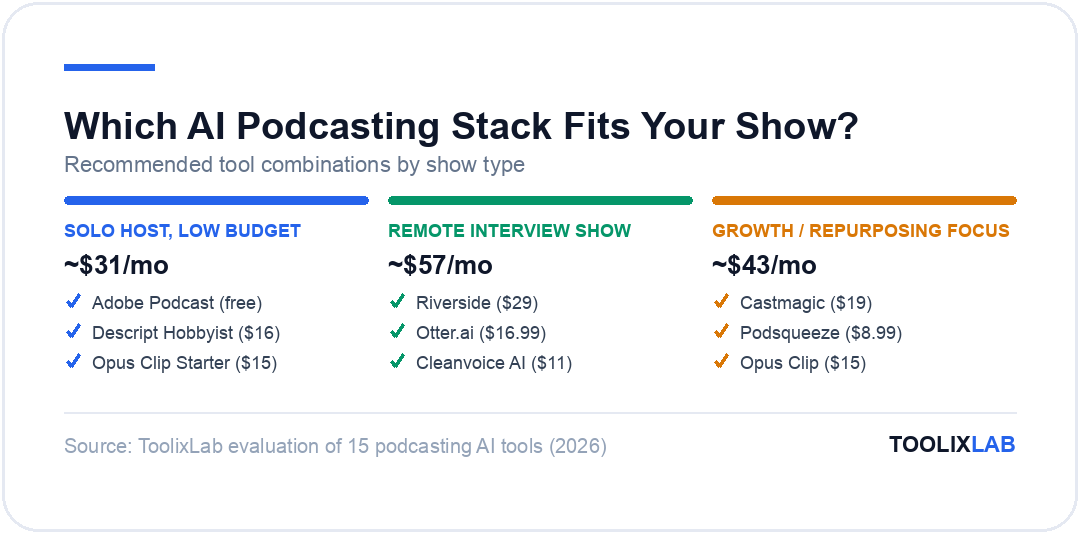
Solo host, low budget: Adobe Podcast (free cleanup) + Descript Hobbyist ($16/mo) + Opus Clip Starter ($15/mo) covers recording cleanup, editing, and clips for around $31/month.
Remote interview show: Riverside for recording, Otter.ai for the interview transcript, and Cleanvoice for filler-word cleanup — this combination is built specifically around the unpredictability of a remote guest's setup.
Growth-focused show investing in repurposing: Castmagic or Podsqueeze for show notes and blog content, paired with Opus Clip for short-form video — the combination that turns one episode into a full week of distributable content.
New podcaster who wants one bill, not five: Alitu's all-in-one workflow trades some best-in-class depth for a single $38/month subscription that covers recording through publishing.
Our Verdict
There's no single "best" AI podcasting tool because no tool does all five production jobs well. Descript is the strongest starting point for editing, Riverside is the strongest for remote recording, and Opus Clip is the strongest for repurposing — the highest-leverage move for most shows is combining two or three specialists rather than searching for one platform that does everything adequately.
✅ Choose a specialist stack if...
- • You want best-in-class results at each production step
- • Your show already has an established workflow to plug tools into
✅ Choose Alitu (all-in-one) if...
- • You're starting a new show and want one subscription, not five
- • You'd rather trade some depth for simplicity
🔑 Key Takeaways
- ✓ A minimum viable AI podcasting stack (cleanup + editing + clipping) can run under $60/month
- ✓ No single tool covers recording, editing, cleanup, and repurposing equally well — specialists consistently outperform all-in-ones on any single job
- ✓ Adobe Podcast's free tier is genuinely usable for a small show, not just a crippled trial
- ✓ Every AI cleanup and clip-selection tool still needs a human listen-through before publishing
- ✓ Tools billing by processing hours (Auphonic, Cleanvoice) get cheaper for monthly shows and pricier for daily ones — check your cadence before comparing sticker prices
The right AI stack for your show depends on which of the five production jobs actually eats your time each week — editing, cleanup, transcription, repurposing, or planning — not on which single tool has the longest feature list. Start with whichever bottleneck is costing you the most hours right now, add the next tool only once that one is genuinely solved, and keep a human pass in the loop before anything publishes.
For the wider content stack around your show, our guides to AI tools for YouTube creators, AI tools for remote teams, and AI tools for small business cover the adjacent tooling most podcasters end up needing as the show grows.