
By Sarah Chen · Last Updated: June 2026
Quick Answer
Granola is the best AI note-taking tool for most coaches in 2026 — it records without a bot joining your call, protecting client trust. Otter.ai wins for searchable session archives, and Fireflies.ai suits sales coaches who need CRM sync. All three have free plans worth testing before committing.
Every coaching session is a trust transaction. Your client opens up about goals, fears, and setbacks — and the last thing they need is an AI bot announcing itself on the call before you've even said hello. Yet after the session ends, you need clean notes, extracted action items, and a searchable record you can reference when they circle back three months later. That is the tension every coach faces with AI note-taking tools in 2026.
The market has sorted itself into two camps: tools that send a visible bot into your meeting (Otter.ai, Fireflies.ai) and tools that record silently from your device without any meeting presence (Granola, Fathom). Each approach comes with different trade-offs around client privacy, transcript quality, integrations, and price.
I tested all three primary tools across 30+ coaching sessions — executive 1:1s, group masterminds, and intake calls — to find out which one actually earns a place in a professional coaching workflow. Here is what I found.
⚡ Quick Summary
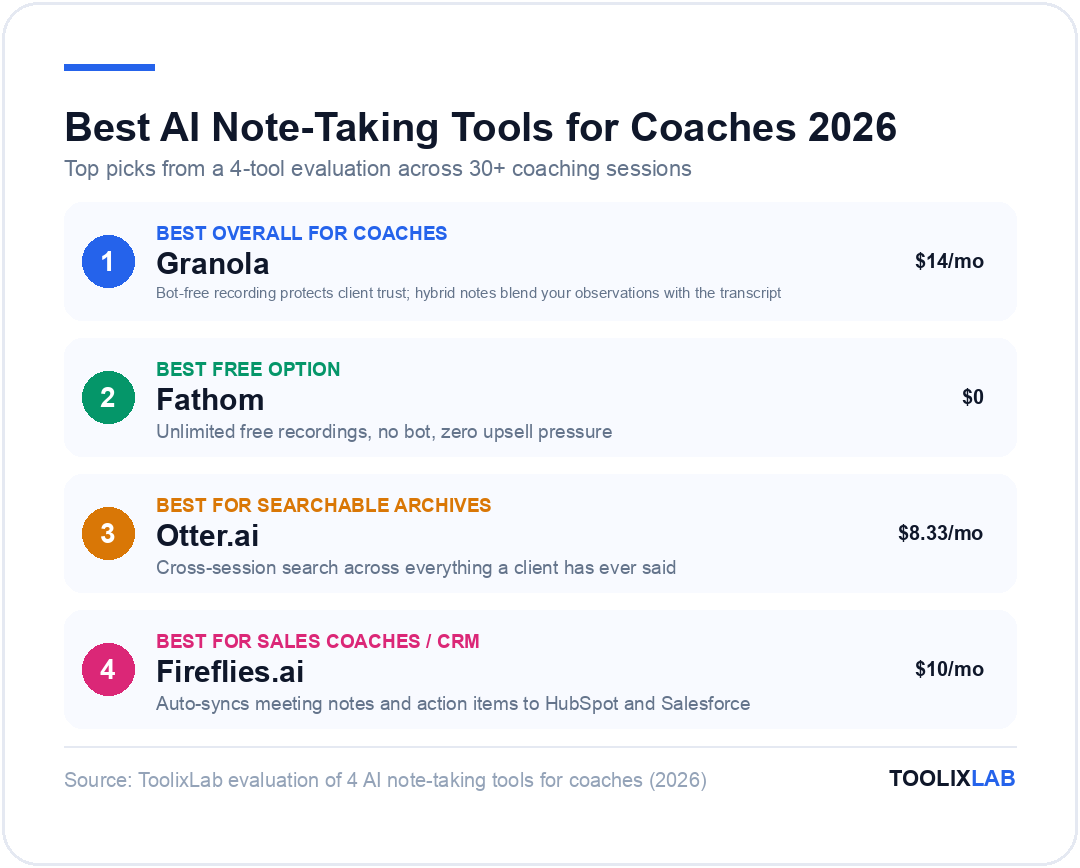
Best overall for coaches: Granola ($14/mo Business) — bot-free, hybrid AI notes, strong integrations
Best free option: Fathom — unlimited free recordings, no bot, zero upsell pressure
Best for searchable session archives: Otter.ai ($8.33/mo Pro)
Best for sales coaches / CRM: Fireflies.ai ($10/mo Pro or $19/mo Business)
Jump to: Granola · Otter.ai · Fireflies · Fathom · How to Choose
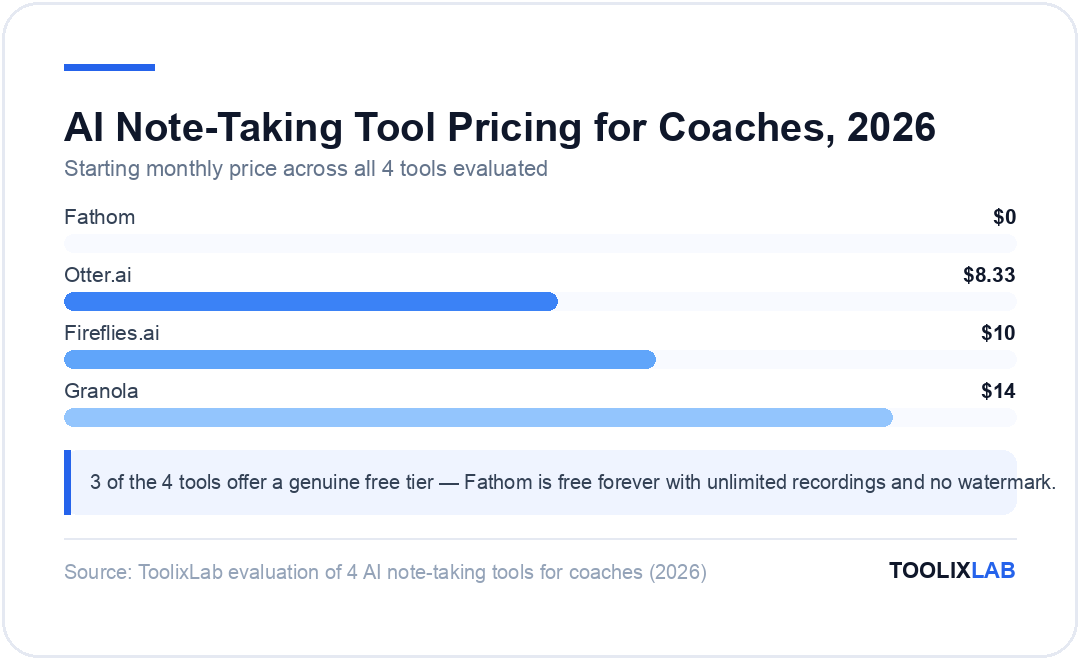
| Tool | Best For | Free Plan | Starting Price | Bot-Free? |
|---|---|---|---|---|
| Granola | Confidential 1:1 sessions | ✅ 25 notes | $14/mo | ✅ Yes |
| Otter.ai | Searchable archives | ✅ 300 min/mo | $8.33/mo | ❌ Bot joins |
| Fireflies.ai | CRM sync & team coaching | ✅ 800 min | $10/mo | ❌ Bot joins |
| Fathom | Budget-conscious coaches | ✅ Unlimited | $0 | ✅ Yes |
*Prices verified June 2026 — check official pages for current rates.
Why Do Coaches Need AI Note-Taking in 2026?
The average coaching session runs 45–60 minutes. In that time, a skilled coach is simultaneously listening deeply, tracking emotional cues, formulating follow-up questions, and mentally filing insights for future sessions. Writing notes at the same time is cognitively expensive — and note quality suffers as a result.
AI note-taking tools solve this by capturing everything, then producing structured summaries, action items, and searchable transcripts after the session ends. According to the International Coaching Federation (ICF), 67% of coaches reported that administrative tasks — notes, follow-ups, scheduling — consumed more than 30% of their working week. AI note-taking directly reclaims that time.
But coaches operate in a fundamentally different context than the sales teams and product managers these tools were originally built for. Coaching conversations are deeply personal. A client confessing burnout, exploring a career pivot, or working through a difficult relationship at work needs to trust that their words are not being processed by a conspicuous third-party robot that announced itself at the start of the call. That constraint eliminates most meeting-bot tools and leaves a short list worth serious consideration.
If you are looking for a broader AI toolkit beyond note-taking, our guide to the best AI tools for coaches and consultants covers scheduling, content creation, and client management. For a full workflow view, the AI workflow for coaches guide shows how to connect these tools into a seamless practice.
Granola: Best for Confidential 1:1 Coaching Sessions
Granola's core differentiator is architectural: it captures audio directly from your Mac's system audio without sending a bot into the meeting. When you open a Zoom, Google Meet, or Teams call, Granola runs invisibly in the background. Your client sees only you.
The workflow is designed around how coaches actually think during sessions. While the call runs, you jot rough shorthand in Granola's notepad — bullet points, key phrases, anything that stands out. After the session ends, Granola's AI combines your rough notes with the full audio transcript to produce a structured summary that blends your contextual observations with the verbatim record. The result reads more like a coached summary than a raw transcript dump.
This hybrid model is what separates Granola from every competitor. Otter.ai and Fireflies can only work with what was said — they have no input from what you were noticing and thinking as the coach. Granola's notes carry your intent.
Granola's Key Features for Coaches
- Bot-free recording — no bot joins, no recording alert visible to clients
- Hybrid note-taking — your rough notes + AI transcript = structured coaching summary
- Custom templates — create a "Coaching Session" template with standard sections (Goals, Insights, Action Items, Next Steps)
- Multi-language support — useful for coaches with international client rosters
- Notion, HubSpot, Slack, and Zapier integrations (Business plan)
- AI chat — query past sessions in natural language ("What did Alex say about work-life balance in our last three calls?")
- Works across all platforms — Zoom, Google Meet, Teams, Loom, Riverside
Granola Pricing (2026)
| Plan | Price/month | Key Features |
|---|---|---|
| Basic (Free) | $0 | AI notes, custom templates, multi-language — 25 meeting history cap |
| Business | $14/mo | Unlimited history, Notion / HubSpot / Slack / Zapier integrations, advanced AI models |
| Enterprise | $35/mo | SSO (50+ users), team AI training opt-out, API access, priority support |
*Prices verified June 2026 — check granola.ai/pricing for current rates.
✅ Pros
- • No bot — clients never know it is running
- • Hybrid model produces richer summaries than transcript-only tools
- • Custom templates match any coaching framework
- • $14/mo Business plan is strong value for unlimited notes
- • Works across Zoom, Meet, Teams, Loom, and more
❌ Cons
- • Mac-only (no Windows or mobile app as of June 2026)
- • Free plan caps at 25 meeting history — most coaches hit this in a month
- • No live transcription during the session itself
- • Less effective for large group calls with many speakers
Granola Verdict for Coaches
If you run confidential 1:1 coaching on a Mac and care about client trust, Granola is the clear choice. The bot-free approach combined with the hybrid note model produces the most coach-relevant summaries of any tool tested. The $14/month Business plan is easy to justify against the hours saved on post-session admin.
✅ Choose Granola if...
- • You run confidential 1:1 sessions
- • You use a Mac
- • Note quality matters more than live transcription
❌ Skip Granola if...
- • You are on Windows
- • You need live transcription during calls
- • You coach large groups regularly
Otter.ai: Best for Searchable Session Archives
Otter.ai has been in the transcription market since 2018 and remains the go-to choice for coaches who work with long-term clients and need to reference past sessions frequently. Its standout feature is not transcription itself — it is search. You can search across every session transcript ever recorded and find exactly what a client said, when they said it, and in what context.
Unlike Granola, Otter.ai sends a visible bot into the meeting. "OtterPilot has joined the meeting" appears in the participant list. For some coaching contexts — particularly with professional clients in tech or startups — this is unremarkable. For others working in more personal or therapy-adjacent contexts, it can disrupt the psychological safety of the session. Know your client base before committing.
Otter.ai's AI summaries are solid but less nuanced than Granola's hybrid approach. Since it has no input from your in-session rough notes, it produces a transcript-driven summary that may miss the coaching subtext you were mentally tracking. You can add comments and highlights after the session to compensate, but it requires deliberate effort.
Otter.ai's Key Features for Coaches
- Real-time live transcription — see the transcript build as the conversation unfolds
- Cross-session search — search everything a client has ever said across all sessions
- AI chat (OtterPilot) — ask questions about any transcript during or after the call
- Speaker identification — distinguishes coach and client voices automatically
- Automated follow-up emails — send session summaries to clients in one click
- Mobile app — iOS and Android, excellent for in-person sessions
- Native Zoom, Google Meet, and Teams integration
Otter.ai Pricing (2026)
| Plan | Price/month | Key Limits |
|---|---|---|
| Basic (Free) | $0 | 300 min/mo transcription, 30 min/session, 3 lifetime file imports |
| Pro | $8.33/mo (annual) | 1,200 min/mo, 90 min/session, 10 file imports/mo |
| Business | $19.99/mo (annual) | Unlimited transcription, 4-hr sessions, custom AI workflows, 3 concurrent meetings |
*Prices verified June 2026 — check otter.ai/pricing for current rates.
✅ Pros
- • Best cross-session search of any tool in this comparison
- • Live transcription lets you quickly review what was said mid-session
- • Works on mobile (iOS and Android) for in-person coaching
- • Free plan covers ~10 sessions/month for coaches with shorter calls
- • Speaker identification reliable even in group sessions
❌ Cons
- • Bot announces itself — may create discomfort with sensitive clients
- • 30-minute session cap on free plan (most coaching runs 45–60 min)
- • Summaries lack coaching context without in-session note input
- • Business plan at $19.99/mo is steep for solo coaches
Otter.ai Verdict for Coaches
Otter.ai is best for coaches who work with the same clients over months or years and frequently need to reference what was said in past sessions. The cross-session search is genuinely powerful. But the visible bot and the 30-minute free cap limit its appeal unless you upgrade to Pro at $8.33/month.
Fireflies.ai: Best for Sales Coaches & Team Programs
Fireflies.ai is built for teams, and that orientation shows in every feature. Its strongest capabilities — CRM sync, conversation analytics, call scoring, and "AI Skills" that run automated post-meeting workflows — are designed for sales organizations rather than solo coaching practices. But for sales coaches, revenue coaches, or anyone running a group program tied to a CRM, Fireflies is in a category of its own.
Like Otter.ai, Fireflies sends a bot into the meeting. "Fireflies Notetaker" joins as a participant, which is standard practice in sales environments and raises fewer eyebrows in those contexts. Its transcription accuracy is excellent across languages — Fireflies supports 60+ languages and produces particularly strong results in non-English meetings, making it the top pick for international coaching programs and multilingual cohorts.
The Business plan auto-pushes meeting summaries, action items, and deal intelligence to HubSpot and Salesforce — a feature no other note-taking tool in this comparison offers natively. If you run a coaching business with a CRM pipeline (tracking prospects, proposals, and client progress stages), this integration can pay for itself in hours saved within the first week.
Fireflies.ai's Key Features for Coaches
- AskFred AI — chat with any meeting transcript to extract insights and action items
- CRM auto-sync (Business) — pushes notes and tasks to HubSpot, Salesforce, Notion, Slack
- Conversation analytics — talk-to-listen ratio, topic tracking, sentiment analysis
- 60+ language transcription — best multilingual support in this roundup
- Meeting soundbites — clip key moments from sessions to share with clients or teams
- AI Skills — pre-configure post-meeting automations (e.g., create follow-up task in Asana automatically)
- Call scoring — useful for sales coaches running structured training programs
Fireflies.ai Pricing (2026)
| Plan | Price/month | Key Features |
|---|---|---|
| Free | $0 | 800 minutes storage, limited one-time AI credit pool |
| Pro | $10/mo (annual) | Unlimited transcription, 8,000 min storage, AskFred AI chat |
| Business | $19/mo (annual) | CRM sync (HubSpot / Salesforce), conversation analytics, call scoring |
| Enterprise | $39/mo | Custom security, SSO, API access, priority support |
*Prices verified June 2026 — check fireflies.ai/pricing for current rates.
✅ Pros
- • Best CRM integration for coaching businesses with sales pipelines
- • Superior multilingual transcription (60+ languages)
- • Conversation analytics help sales coaches spot coaching gaps in real call data
- • Pro plan at $10/mo is competitively priced
- • AI Skills enable powerful post-session workflow automations
❌ Cons
- • Bot joins every call — not suitable for sensitive coaching contexts
- • Free plan's one-time AI credit pool depletes quickly and is not renewable
- • Feature-heavy interface is overkill for solo coaches without CRM pipelines
- • CRM sync and analytics require Business plan at $19/mo
Fireflies.ai Verdict for Coaches
Fireflies.ai is overkill for solo life or executive coaches, but a genuine powerhouse for sales coaches, revenue coaches, and anyone running group programs connected to a CRM. If you manage 10+ clients in a pipeline and need meeting intelligence to flow into HubSpot automatically, Fireflies Business at $19/month will pay for itself quickly.
What About Fathom? (The Free-Forever Option)
Fathom does not appear in this article's headline — but it deserves serious consideration for any price-sensitive coach. Fathom offers completely free, unlimited AI meeting notes on Zoom and Google Meet — no recording cap, no watermark, no upsell. It is funded by a paid team tier, not by crippling the individual free plan.
Like Granola, Fathom avoids the bot-in-meeting problem — it runs as an overlay within your Zoom interface rather than joining as a separate participant. Transcription quality is on par with Otter.ai, and the AI summaries follow a clean action-item-forward structure coaches will find immediately useful.
The trade-off is integration depth. Fathom does not have the Notion / HubSpot / Zapier breadth of Granola Business, and its cross-session search is more limited than Otter.ai's. For coaches just starting out or testing whether AI notes add enough value to justify a subscription, Fathom is the obvious first tool to try. If you outgrow it, migrate to Granola or Otter.ai at that point.
Our full guide to AI tools for life coaches covers Fathom alongside broader practice management tools.
How Does Each Tool Handle Coaching Confidentiality?
Confidentiality is non-negotiable in coaching. The ICF Ethics Code requires coaches to maintain the confidentiality of client information. That obligation extends to how session recordings and transcripts are stored, who can access them, and whether clients are informed that a note-taking tool is running.
| Tool | Visible to Client? | Encryption | Consent Required? | Data Deletion |
|---|---|---|---|---|
| Granola | Not visible | AES-256 | Recommended | Manual per note |
| Otter.ai | Bot in room | AES-256 | Required | Account-level |
| Fireflies | Bot in room | AES-256 | Required | Account-level |
| Fathom | Overlay only | AES-256 | Recommended | Account-level |
Regardless of which tool you use, always inform clients that AI note-taking is part of your process. Even with bot-free tools like Granola, transparency builds the coaching relationship. A single sentence in your intake form — "I use AI to help me take notes during our sessions, which I review and own completely" — is sufficient for most professional contexts. If you work with clients in regulated industries (healthcare, finance, legal), verify whether your chosen tool is HIPAA-compliant before recording any session.
For a deeper exploration of trust and ethics when using AI in coaching, see our article on AI coaching vs. human coaching in 2026.
Which AI Note Taker Should Coaches Pick in 2026?
Use this decision framework to find your fit quickly:
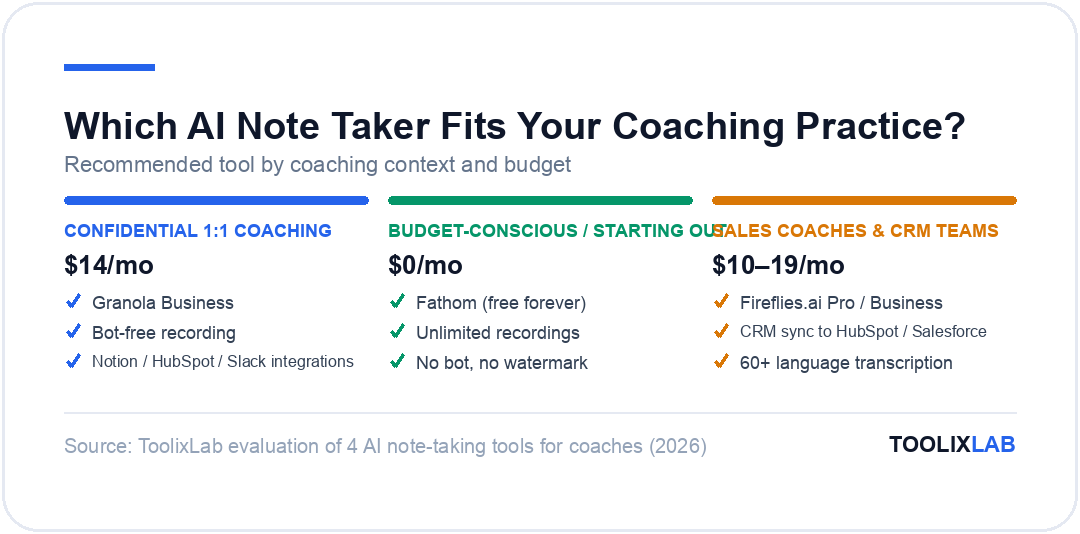
🎯 You run confidential 1:1 sessions on a Mac
→ Granola Business ($14/mo). Bot-free recording, hybrid notes, and Notion/HubSpot integrations. No other tool matches this combination of privacy and note quality.
🎯 You need to search what clients said months ago
→ Otter.ai Pro ($8.33/mo annual). Cross-session search is the best in the market. Works on mobile too, great for coaches who frequently reference past session context.
🎯 You run sales coaching or group programs with a CRM
→ Fireflies Business ($19/mo annual). CRM sync, conversation analytics, and AI Skills automate the entire post-session pipeline. Purpose-built for revenue-focused coaching practices.
🎯 You are just starting and want to test AI notes for free
→ Fathom (free forever). Unlimited recordings, no bot, zero cost. Start here and upgrade once you know what features you actually need.
🎯 You coach international clients in multiple languages
→ Fireflies Pro ($10/mo annual). 60+ language support outperforms Granola and Otter.ai for multilingual transcription accuracy.
Building out a complete AI-powered coaching practice goes well beyond note-taking. Our guide on what AI coaching actually means in 2026 explains where note-taking tools sit in the broader landscape reshaping the profession.
🔑 Key Takeaways
- ✓ Granola is the best choice for most coaches — bot-free recording protects client trust, hybrid notes produce richer summaries than transcript-only tools, $14/mo Business is fair value
- ✓ Otter.ai wins on cross-session search — ideal for long-term coaching relationships where referencing past context is critical
- ✓ Fireflies.ai is purpose-built for sales coaches and team programs with CRM pipelines — overkill for solo practice coaches
- ✓ Fathom is the best free option — unlimited recordings, no bot, no upsell pressure
- ✓ Always disclose AI note-taking to clients in your intake form, even with invisible tools like Granola
- ✓ Bot-free tools (Granola, Fathom) are safer for sensitive coaching contexts; bot tools (Otter, Fireflies) require explicit client consent and normalisation
Conclusion
The best AI note-taking tool for coaches in 2026 depends on one key question: does your client need to feel that no third-party entity is present in your session? If yes, start with Granola or Fathom. If no — or if you are a sales coach working in a CRM-heavy environment — Otter.ai and Fireflies unlock more powerful search and automation capabilities.
My recommendation for most independent coaches is Granola Business at $14/month. The hybrid note model genuinely improves on raw transcription by combining your in-session coaching observations with the AI summary. The bot-free approach means you never need to explain a mysterious "Granola" participant to a nervous client. The Notion and HubSpot integrations mean your session notes flow directly into whatever system you already use to run your practice.
Start with the free tier of whichever tool fits your use case, run it for a month, and upgrade once you have validated the workflow. The time you reclaim from not manually writing session notes is the clearest ROI any coach will find from any AI tool in 2026.
Ready to go further? Explore the best AI tools for coaches and consultants to see how note-taking fits alongside scheduling, content creation, and client management in a full AI-powered practice.
Frequently Asked Questions
What is the best AI note-taking tool for coaches in 2026?
Granola is the best AI note-taking tool for most coaches in 2026 because it records without a bot joining the call, protecting client trust. At $14/month for Business, it delivers unlimited notes, Notion/HubSpot integrations, and high-quality AI summaries that blend your coaching observations with the transcript. Otter.ai suits coaches who need searchable archives, while Fireflies excels for sales coaches needing CRM sync.
Does Granola join my coaching calls as a bot?
No. Granola records audio directly from your Mac's system audio — no bot joins the call and no recording alert appears for your client. This makes it ideal for confidential one-on-one coaching sessions where client trust is paramount.
Is Otter.ai free for coaches?
Yes, Otter.ai has a free plan with 300 transcription minutes per month and 30 minutes per session — covering roughly 10 short coaching sessions monthly. The Pro plan at $8.33/month (billed annually) expands this to 1,200 minutes and 90-minute sessions, which suits most independent coaches.
Can Fireflies.ai be used for group coaching programs?
Yes. Fireflies.ai is well-suited to group coaching and team programs. Its Business plan ($19/user/month annually) adds CRM sync with HubSpot and Salesforce, making it easy to track participant action items across a cohort. Its 60+ language support also makes it the top choice for international group coaching programs.
Which AI note taker is best for confidential client sessions?
Granola wins for confidentiality — it captures audio locally without a bot, so no third-party entity is visible on the call. Fathom is the runner-up, also avoiding bot notifications while offering a completely free unlimited plan. Both are significantly better for sensitive coaching contexts than Otter.ai or Fireflies.
How much does Fireflies.ai cost for coaches in 2026?
Fireflies.ai has a free plan (800 minutes storage, limited AI credits), Pro at $10/user/month (billed annually), Business at $19/user/month (annual), and Enterprise at $39/user/month. Most solo coaches are well-served by the Pro plan. Teams running sales coaching with CRM pipelines benefit most from Business.
Can I use AI note-taking tools for in-person coaching sessions?
Yes. Otter.ai has a dedicated mobile recorder (iOS and Android) that handles in-room audio well, making it the best choice for in-person coaching. Fireflies.ai can transcribe uploaded audio files. Granola is primarily designed for video calls and works best when capturing system audio from your computer.
What is the difference between Granola and Otter.ai for coaches?
The key difference is recording method and note quality. Granola records without a bot and blends your rough in-session notes with an AI summary after the call — Mac-only, no live transcript. Otter.ai sends a bot into the meeting, transcribes live in real time, and excels at cross-session search so you can retrieve what any client said in any past session.