
⚡ TL;DR — Quick Verdict
Teachers already work one of the most demanding professional schedules of any career. The average educator spends 10.5 hours per day on work-related activities during the school year — including evenings and weekends spent on lesson planning, grading, parent communications, and administrative tasks. Much of that time is spent on work that doesn't involve direct student interaction at all.
AI tools for teachers in 2026 are changing this equation. The best tools don't replace educators — they eliminate the most time-consuming preparatory and administrative work so teachers can spend more of their finite energy on the part of teaching that AI cannot replicate: the human connection with students.
This guide covers the 12 best AI tools for teachers and educators in 2026, tested across the most time-intensive teaching workflows: lesson planning, differentiation, grading and feedback, parent communication, quiz and assessment creation, and student support. Each tool includes current pricing, honest pros and cons, and a clear verdict on which grade levels and subjects it serves best.
How AI Is Changing Teaching in 2026
The conversation about AI in education has matured significantly since 2023. The initial panic about ChatGPT enabling student cheating has given way to a more nuanced reality: teachers who learn to use AI effectively gain back hours every week, while the most thoughtful AI tools are designed specifically to support learning rather than bypass it.
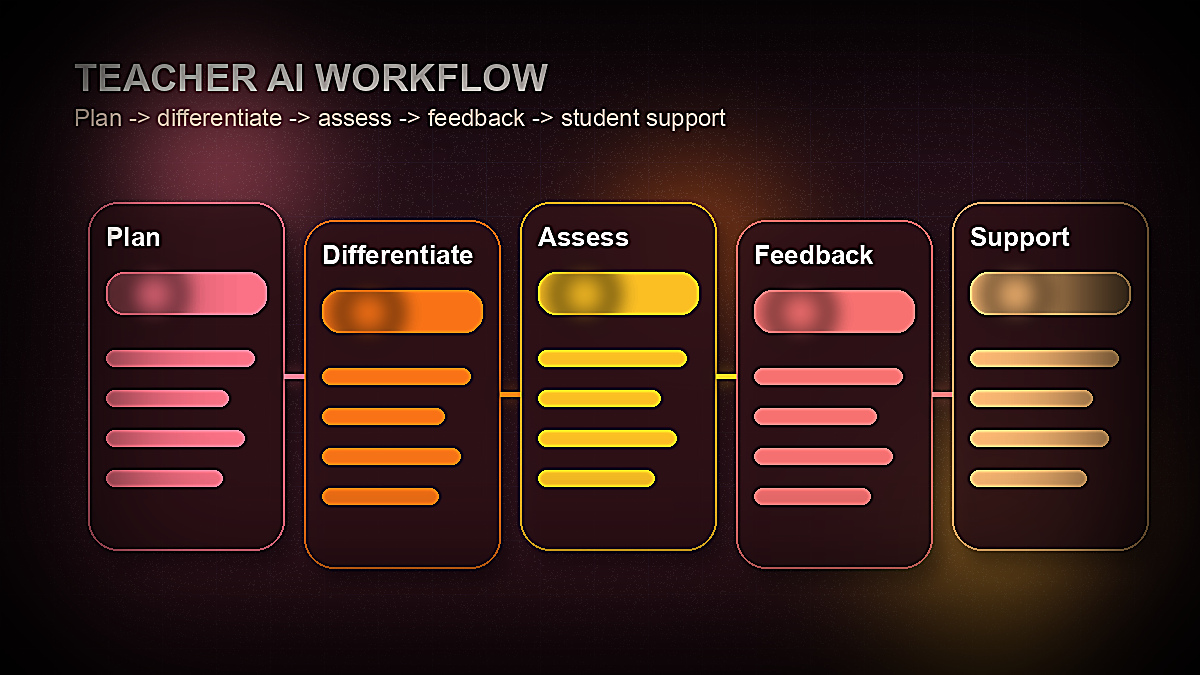
Here's where AI is delivering the clearest impact for educators in 2026:
- →Lesson planning and curriculum design — AI can generate complete lesson plans, learning objectives, activity sequences, and discussion questions aligned to specific standards in minutes
- →Differentiation — Adapting the same lesson for different reading levels, learning needs, and language proficiencies used to require hours of separate work. AI does it in seconds
- →Assessment creation — Generating quizzes, tests, rubrics, and exit tickets aligned to specific learning objectives and Bloom's taxonomy levels
- →Feedback and grading assistance — AI can provide initial feedback on student writing, flag common errors, and help teachers write detailed comments more efficiently
- →Parent and administrator communication — Drafting newsletters, progress report comments, IEP goal language, and parent emails — all time-consuming writing tasks AI handles quickly
- →Student AI tutoring — Purpose-built AI tutors that help students learn by asking guiding questions, not by providing answers, represent a genuine breakthrough for personalized learning at scale
The key distinction worth understanding: the best AI tools for education are those designed with learning theory in mind, not just general AI capabilities bolted onto an educational interface. Tools like Khanmigo and MagicSchool AI are built around how learning actually happens — they're fundamentally different from simply asking ChatGPT to write a lesson plan.
What to Look for in AI Tools for Teachers
Before evaluating specific tools, five criteria matter most for educators:
1. Student data privacy and FERPA/COPPA compliance. Any AI tool used in a K-12 environment must comply with FERPA (Family Educational Rights and Privacy Act) and COPPA (Children's Online Privacy Protection Act) for students under 13. Always verify that a tool has a Student Data Privacy Consortium (SDPC) agreement or equivalent before having students use it directly.
2. Standards alignment. The best AI tools for lesson planning allow you to specify the exact standards (Common Core, Next Generation Science Standards, state-specific standards) you're teaching to. Generic AI tools produce generic lessons; standards-aligned tools produce classroom-ready materials.
3. Grade level and subject appropriateness. Some tools are designed for higher education or corporate training and feel awkward in K-12 classrooms. Others are purpose-built for elementary or secondary education. Match the tool to your context.
4. Differentiation capability. The practical value of AI in teaching multiplies when it can adapt content for different learning levels. Look for tools with built-in Lexile adjustment, ELL support, and IEP/504 accommodation features.
5. Integration with existing tools. Tools that connect to Google Classroom, Canvas, Schoology, or your LMS save time. Tools that require separate logins and manual copy-pasting add friction.
The 12 Best AI Tools for Teachers & Educators in 2026
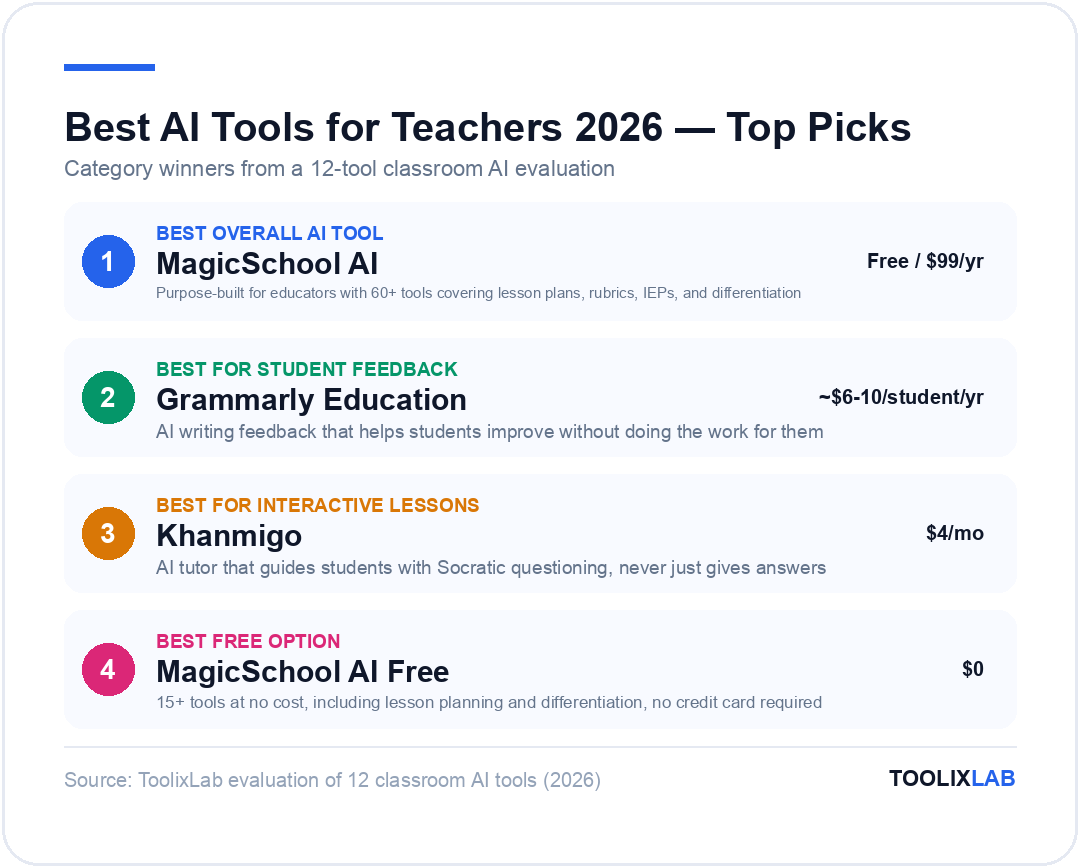
1. MagicSchool AI — Best All-in-One AI Platform for Teachers
MagicSchool AI is the most comprehensive AI tool built specifically for K-12 educators, and in 2026 it has become the default starting point for most teachers adopting AI. The platform provides 60+ educator-specific AI tools covering virtually every aspect of teacher workflow: lesson plan generator, rubric creator, differentiation helper, IEP goal writer, parent email drafter, quiz generator, text leveler, student report comment writer, and many more.
What distinguishes MagicSchool from simply using ChatGPT for education is the context it builds in. The lesson plan generator doesn't just produce a generic plan — it asks for your grade level, subject, specific standard, student context, and available time, then produces a structured, classroom-ready plan with objectives, activities, discussion questions, and assessment suggestions. The output reflects educational best practices rather than just AI text generation.
The differentiation tools are particularly valuable. The Text Leveler can take any reading passage and adapt it to multiple Lexile levels simultaneously. The Accommodation Generator produces specific, legally appropriate accommodation language for IEPs and 504 plans. These tasks that might take a teacher 20–30 minutes each are completed in under 2 minutes.
| Plan | Price | Key Features |
|---|---|---|
| Free | $0 | 15+ tools, lesson planning, differentiation, quiz gen — limited monthly uses |
| Teacher Pro | $99/year (~$8/month) | Unlimited uses of all 60+ tools, priority access, saved outputs |
| School / District | Custom pricing | School-wide access, admin dashboard, PD resources, FERPA compliance |
- • Purpose-built for K-12 — every tool reflects teaching context
- • 60+ tools covering virtually every teacher workflow
- • Free tier is genuinely useful for daily planning tasks
- • Standards alignment built into lesson planning tools
- • IEP/504 accommodation language generator is uniquely valuable
- • Free tier has monthly usage limits per tool
- • No direct LMS integration — outputs require copy-paste
- • Output quality varies — always review before classroom use
- • Less useful for higher education context
Best for: K-12 teachers at any grade level or subject. This is the tool to start with — the free tier alone delivers enough value to meaningfully reduce daily planning time. At $99/year for unlimited access, Teacher Pro is one of the best-value subscriptions available to educators.
2. Khanmigo by Khan Academy — Best AI Tutor for Students
Khanmigo is Khan Academy's AI tutoring assistant, and it represents one of the most educationally principled AI tools in existence. Built in partnership with Anthropic and powered by Claude, Khanmigo is explicitly designed to never give students direct answers — instead, it uses Socratic questioning to guide students toward understanding the solution themselves.
When a student asks Khanmigo "What's the answer to this math problem?", it responds with questions like "What do you think the first step might be?" or "What do you know about this type of problem?" This approach reflects genuine learning science — students who work through problems with guided questioning retain concepts far better than students who receive direct answers.
For teachers, Khanmigo also provides a separate set of educator tools: lesson hook generator, unit plan assistant, and a "debate practice" feature that argues multiple sides of topics to help students develop critical thinking. The platform integrates directly with Khan Academy's existing curriculum library, meaning teachers can deploy Khanmigo alongside curriculum content their students are already using.
| Plan | Price | Key Features |
|---|---|---|
| Student / Teacher | $4/month (or $44/year) | Full AI tutoring, teacher tools, debate practice, writing feedback |
| Districts | Custom (often free via grants) | School-wide access, admin reporting, COPPA/FERPA compliant |
- • Pedagogically sound — guides, never just answers
- • COPPA and FERPA compliant for K-12 student use
- • Exceptional value at $4/month
- • Integrates with Khan Academy's existing curriculum
- • Covers K-12 math, science, humanities, test prep
- • Socratic approach can frustrate students who want quick answers
- • Works best within Khan Academy's curriculum ecosystem
- • Teacher tools less comprehensive than MagicSchool
- • Limited coverage of highly specialized subjects
Best for: K-12 teachers wanting a safe, pedagogically sound AI tutor students can use independently — especially for math, science, and standardized test prep. Khanmigo is one of the few AI tools teachers can confidently give students direct access to without worrying it will do their work for them.
3. Diffit — Best AI Tool for Reading Differentiation
Diffit is a specialized AI tool that solves one of the most time-consuming differentiation challenges in teaching: adapting text and reading materials for different ability levels and language backgrounds. A teacher can paste any text, enter a URL, or search for a topic, and Diffit generates a fully adapted reading resource at a specified grade level — with comprehension questions, vocabulary highlights, and discussion prompts built in.
The output goes beyond simple text simplification. Diffit generates a complete instructional package: the leveled reading passage, key vocabulary terms with definitions, multiple choice and open-ended comprehension questions, a graphic organizer, and extension activities — all calibrated to the specified reading level. Creating this manually for a single text at three different levels would take hours. Diffit does it in under 60 seconds.
Diffit also supports English Language Learners specifically, with the ability to generate bilingual vocabulary support and scaffolded versions of texts in over 25 languages. For teachers with diverse classrooms, this is a transformative capability.
| Plan | Price | Key Features |
|---|---|---|
| Free | $0 | 5 resources/month, core leveling features |
| Pro | $12/month ($96/year) | Unlimited resources, multilingual support, Google Classroom export, save library |
| School | Custom | School-wide access, admin controls, FERPA compliance |
- • Produces a complete instructional package, not just leveled text
- • 25+ language support for ELL students
- • Google Classroom export (Pro) saves significant time
- • Works from any URL, pasted text, or topic search
- • Comprehension questions automatically aligned to Bloom's taxonomy
- • Free tier limited to 5 resources per month
- • Works best for informational text — less suited for literary analysis
- • Leveling accuracy can vary for very technical or specialized content
- • No student-facing interface — teacher tool only
Best for: ELA, social studies, science, and any content-area teacher who regularly assigns reading across mixed ability classrooms. Particularly valuable for teachers serving ELL students or inclusion classrooms with wide reading level variation.
4. Curipod — Best AI Tool for Interactive Lessons & Presentations
Curipod is an AI-powered interactive lesson creation tool that combines presentation slides with live student participation features — polls, word clouds, open-ended responses, and drawing activities. A teacher types a topic and grade level, and Curipod generates a complete interactive lesson in under 60 seconds, including discussion prompts, reflection activities, and formative assessment questions embedded throughout.
The student engagement dimension is what sets Curipod apart from tools that just generate slide content. Students participate via a code on any device — responding to questions, voting in polls, contributing to class word clouds — and responses appear live on the classroom display. This creates immediate formative assessment data while keeping students actively engaged throughout the lesson rather than passively watching slides.
Curipod's AI can also generate exit tickets, hook activities, and debate structures embedded within the presentation — making it a comprehensive lesson tool rather than just a slide generator.
| Plan | Price | Key Features |
|---|---|---|
| Free | $0 | Unlimited AI lesson creation, interactive polls and responses, up to 40 students |
| Pro | $10/month | Unlimited students, response history, Google Classroom integration, custom branding |
Best for: Teachers who want AI to generate interactive, student-participation-based lessons rather than static slide content. Particularly effective for whole-class discussion facilitation, formative assessment, and hook activities that get students engaged from the first minute. The free tier is exceptionally generous.
5. Grammarly Education — Best AI Writing Feedback Tool
Grammarly Education is the school and district version of Grammarly, designed to provide AI-powered writing feedback for students in a way that supports their development rather than replacing their effort. Unlike the consumer version, Grammarly Education includes features specifically designed for educational contexts: plagiarism detection, writing analytics across a class or grade, and teacher-facing dashboards showing where students commonly struggle.
For teachers assigning writing, the value is in shifting from "catching errors at submission" to "supporting improvement during drafting." Students receive real-time feedback on grammar, clarity, structure, and tone as they write, allowing them to self-correct before submission. This changes the teacher's role from error-corrector to writing coach focusing on higher-order feedback — argument quality, evidence use, analysis depth — that AI cannot adequately evaluate.
The plagiarism detection integrates AI-generated text detection alongside traditional plagiarism checking, which is increasingly important as AI writing tools become more prevalent among students.
| Plan | Price | Key Features |
|---|---|---|
| Education (per student) | ~$6–$10/student/year | Real-time writing feedback, plagiarism + AI detection, teacher dashboard |
| Institution | Custom | LMS integration, district-wide analytics, SSO |
Best for: ELA teachers, writing-intensive courses at any level, and higher education instructors dealing with AI writing and plagiarism concerns. The teacher dashboard providing class-wide writing analytics is uniquely useful for identifying skill gaps that inform instruction.
6. Quizizz AI — Best AI Tool for Quiz & Assessment Creation
Quizizz has long been one of the most popular student engagement tools in education, and its 2025–2026 AI features have transformed it into a comprehensive formative assessment platform. Teachers can generate complete quizzes on any topic and grade level from a text prompt, or upload their own content (notes, textbook passages, videos) and have Quizizz AI generate questions from that material automatically.
The AI goes beyond simple multiple-choice generation. Quizizz AI creates mixed question types — multiple choice, open-ended, fill-in-the-blank, drag-and-drop ordering — and can generate questions at different Bloom's taxonomy levels (recall, comprehension, application, analysis) within a single assessment. This level of assessment design sophistication typically requires significant teacher time or a formal assessment specialist.
For students, Quizizz's gamified interface — with instant feedback, leaderboards, memes, and power-ups — creates genuine engagement with formative assessment content. Students associate Quizizz with fun rather than testing, which meaningfully increases participation and honest self-assessment.
| Plan | Price | Key Features |
|---|---|---|
| Free | $0 | Unlimited quizzes, AI generation (limited), basic reports, all question types |
| Super | $20/month ($96/year) | Unlimited AI, detailed analytics, lessons mode, assignments, no ads |
| School / District | Custom | Admin controls, LMS integration, FERPA compliant, bulk licensing |
Best for: Teachers at any grade level (K-12 and higher ed) who want fast, engaging formative assessments. The free tier is genuinely powerful — most teachers find it sufficient for their quiz creation needs without upgrading.
7. Brisk Teaching — Best AI Chrome Extension for Teachers
Brisk Teaching is an AI Chrome extension that brings AI assistance directly into the tools teachers already use — Google Docs, Google Slides, Google Forms, YouTube, and websites — without requiring a separate platform or login. When you're working in any of these tools, Brisk's AI is available in a sidebar, ready to help with the task at hand.
The practical applications are extensive: open a student's Google Doc essay and Brisk immediately suggests feedback options calibrated to the student's grade level. Open a YouTube video and Brisk generates comprehension questions. Open a Google Form and Brisk suggests quiz questions based on your topic. The contextual awareness — the AI knows what you're looking at and offers relevant actions — reduces the friction of using AI to near zero.
Brisk's "Change Level" feature is particularly clever: it can adjust any web page's reading level in-place, making any online article accessible for struggling readers or more challenging for advanced students without leaving the page.
| Plan | Price | Key Features |
|---|---|---|
| Free | $0 | Core features in Google Workspace + YouTube, limited monthly uses |
| Pro | $10/month ($96/year) | Unlimited uses, all features, student writing detection |
Best for: Teachers in Google Workspace environments (the majority of K-12 schools in the US) who want AI that works within their existing tools rather than requiring a platform switch. The contextual intelligence of a Chrome extension that knows what you're looking at is genuinely more useful than a standalone tool for many workflows.
8. Canva for Education — Best AI Tool for Visual Content & Presentations
Canva for Education provides every teacher and student with free access to Canva Pro features — including all AI tools — at no cost. For educators, this means AI-powered design tools for creating visual learning materials: illustrated lesson presentations, infographics, classroom posters, student certificates, newsletter templates, and more.
The AI features most valuable for teachers are Magic Design (generates complete presentation layouts from a text description), Text to Image (creates custom illustrations for worksheets and handouts that are copyright-safe), and Magic Write (AI copywriting within the design canvas for generating activity instructions, rubric language, and explanatory text).
For students, Canva for Education enables multimedia project creation — infographics, video presentations, digital posters, and illustrated reports — that develop visual communication skills alongside content knowledge. The AI tools lower the barrier so students can focus on the ideas rather than the design execution.
| Plan | Price | Key Features |
|---|---|---|
| Canva for Education | Free for K-12 teachers and students | All Pro features including AI tools, class management, 100GB storage |
| Higher Ed | Discounted institution pricing | Campus-wide access, LMS integration |
Best for: Every K-12 teacher — Canva for Education is completely free and one of the highest-value tools on this list. Apply through Canva's education portal with your school email. Students create accounts through a teacher's class, keeping them in a supervised environment.
9. Otter.ai for Education — Best AI Tool for Lecture Notes & Transcription
Otter.ai's education features bring AI meeting transcription into the classroom context — automatically transcribing lectures, discussions, and video content so students have accurate, searchable notes. For teachers, the most valuable use cases are transcribing their own recorded lectures for students who need written support, capturing professional development sessions, and recording and transcribing parent-teacher conferences (where permitted by school policy).
The OtterPilot feature integrates with Zoom, Google Meet, and Microsoft Teams — tools widely used for hybrid instruction, recorded lessons, and staff meetings. When a teacher records a lesson on Zoom, OtterPilot automatically joins, transcribes, and produces a structured summary with highlighted key points and action items.
For students with learning differences (dyslexia, processing disorders, hearing impairments), access to accurate lecture transcripts represents a meaningful accessibility accommodation that Otter can provide at low cost.
| Plan | Price | Key Features |
|---|---|---|
| Free | $0 | 300 minutes/month transcription, AI chat on transcripts, mobile app |
| Pro | $16.99/month | 1,200 minutes/month, import audio/video, advanced search, OtterPilot |
| Education (via institution) | Custom discounted | Class management, FERPA compliance, bulk accounts |
Best for: Higher education instructors recording lectures, teachers in hybrid environments, and any educator supporting students with learning differences who benefit from text-based access to verbal instruction. The free tier covers basic transcription needs.
10. Twee — Best AI Tool for EFL/ESL Language Teachers
Twee is a specialized AI tool built specifically for English language teachers (EFL/ESL), offering a complete toolkit for generating grammar exercises, vocabulary activities, reading comprehension materials, dialogue practice, and speaking prompts calibrated to CEFR levels (A1 through C2). For English language teachers, Twee delivers in minutes what would otherwise require hours of material development from scratch.
The tool generates the types of resources that are most time-consuming to create: fill-in-the-blank grammar exercises with answer keys, vocabulary matching activities from any text, conversation starter cards for speaking practice, and reading comprehension passages at specified CEFR levels on any topic. The ability to generate these from any YouTube video — producing vocabulary exercises, comprehension questions, and discussion prompts from authentic content — is particularly popular with language teachers.
| Plan | Price | Key Features |
|---|---|---|
| Free | $0 | Limited daily uses, core activity generators |
| Pro | $12/month ($96/year) | Unlimited generations, all activity types, YouTube integration, export to PDF/Word |
Best for: EFL/ESL teachers at any level — from primary school English classes to adult language programs. The specificity of CEFR-leveled materials and language-learning activity types makes Twee far more useful for language teachers than general AI tools.
11. Formative — Best AI Tool for Real-Time Formative Assessment
Formative is an AI-powered formative assessment platform that allows teachers to assign work students complete in real time, with the teacher watching responses appear live on a class dashboard. The AI features added in 2025–2026 include automatic scoring of open-ended responses with teacher-adjustable rubrics, AI-generated question sets from any content, and personalized feedback suggestions based on student answer patterns.
The real-time visibility is Formative's core differentiator — teachers can literally see every student's in-progress response as they type, identifying misconceptions and struggling students while instruction is still happening rather than after papers are submitted. The AI scoring layer reduces the time required to review open-ended responses, flagging which answers need teacher attention and which meet the rubric criteria automatically.
| Plan | Price | Key Features |
|---|---|---|
| Free | $0 | Real-time responses, basic question types, limited AI features |
| Gold | $12.50/month | Full AI scoring, audio/video questions, standards tracking, Google Classroom sync |
Best for: Teachers who want to check understanding during instruction rather than after — particularly valuable for math, science, and any subject where real-time misconception identification allows immediate re-teaching before errors compound.
12. NotebookLM — Best AI Tool for Higher Education Research & Seminars
Google's NotebookLM is an AI research and note-taking tool that allows users to upload documents, PDFs, research papers, and lecture notes, then ask questions, generate summaries, and create study guides from that specific source material. For higher education instructors and advanced secondary students, NotebookLM's ability to become an expert on your specific course materials — not general internet knowledge — is uniquely valuable.
A professor can upload their course readings, lecture slides, and supplementary materials, and NotebookLM creates a conversational AI that answers student questions grounded entirely in the assigned course materials. Students can use it to study more effectively, generate practice questions from the actual readings, and get explanations of difficult passages without the risk of the AI confabulating information from outside the course.
The Audio Overview feature — which generates a podcast-style conversational summary of uploaded documents — is particularly useful for students who learn better through audio than reading.
| Plan | Price | Key Features |
|---|---|---|
| Free | $0 | Up to 50 sources per notebook, Q&A, summaries, audio overview, study guide gen |
| NotebookLM Plus | $20/month (via Google One) | 500 sources, more audio overviews, customized AI persona, sharing controls |
Best for: Higher education instructors and advanced secondary teachers who want students to engage deeply with course-specific materials. Also excellent for teacher professional learning — upload curriculum frameworks, research articles, and professional readings and query them conversationally.
Complete Comparison: All 12 AI Tools for Teachers
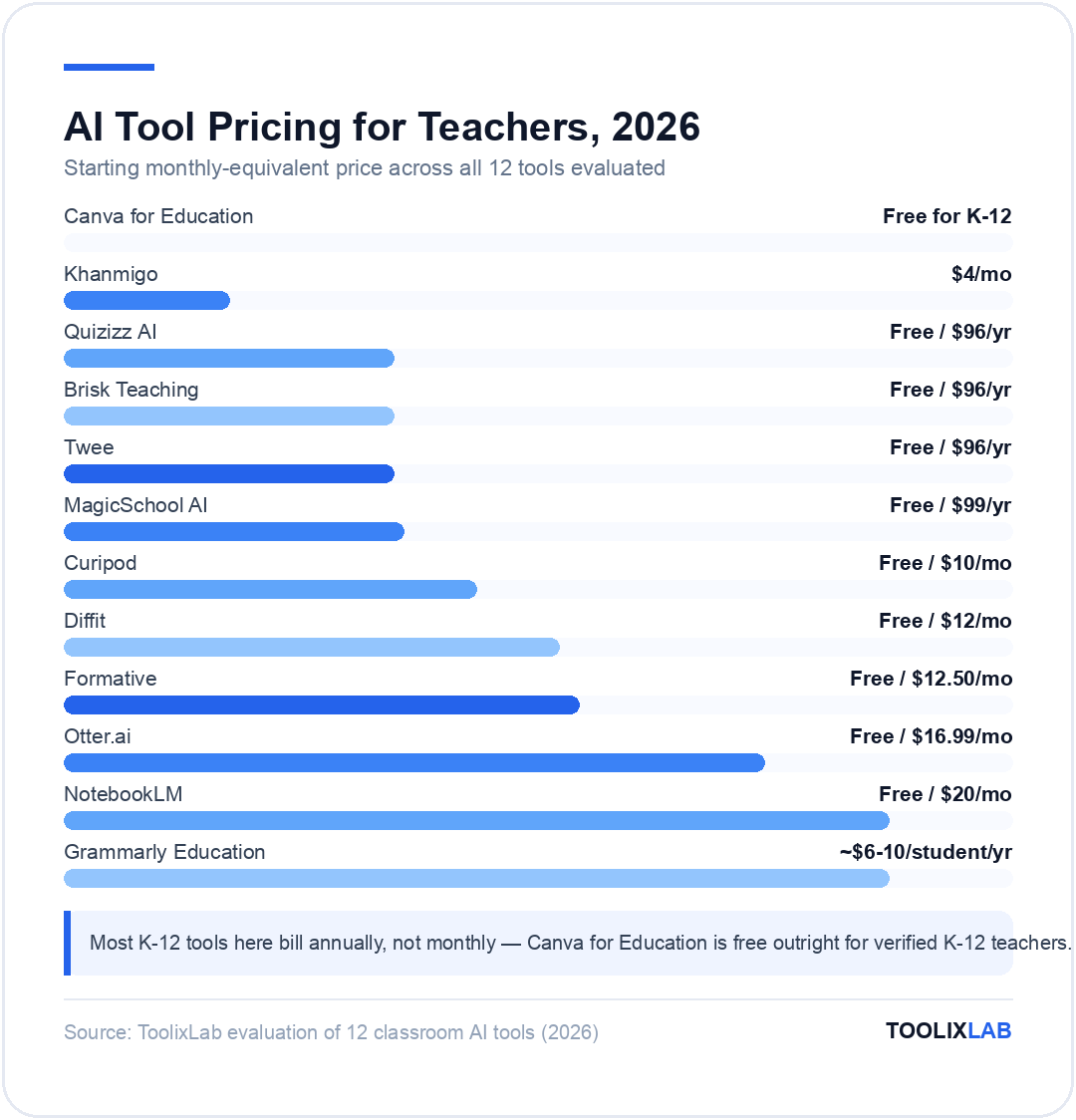
| Tool | Primary Use | Price | Free Plan | Best Level |
|---|---|---|---|---|
| MagicSchool AI | All teacher workflows | Free / $99/year | ✅ | K-12 |
| Khanmigo | Student AI tutoring | $4/month | ❌ | K-12 |
| Diffit | Reading differentiation | Free / $12/month | ✅ | K-12 |
| Curipod | Interactive lessons | Free / $10/month | ✅ | K-12 |
| Grammarly Education | Student writing feedback | ~$6–10/student/year | ❌ | Secondary + Higher Ed |
| Quizizz AI | Quiz & assessment | Free / $96/year | ✅ | K-12 + Higher Ed |
| Brisk Teaching | In-context AI (Chrome) | Free / $96/year | ✅ | K-12 (Google schools) |
| Canva for Education | Visual content & design | Free for K-12 | ✅ | K-12 |
| Otter.ai | Transcription & notes | Free / $16.99/month | ✅ | Higher Ed |
| Twee | EFL/ESL materials | Free / $96/year | ✅ | K-12 + Adult EFL |
| Formative | Real-time assessment | Free / $12.50/month | ✅ | K-12 |
| NotebookLM | Research & course materials | Free / $20/month | ✅ | Higher Ed + Advanced Secondary |
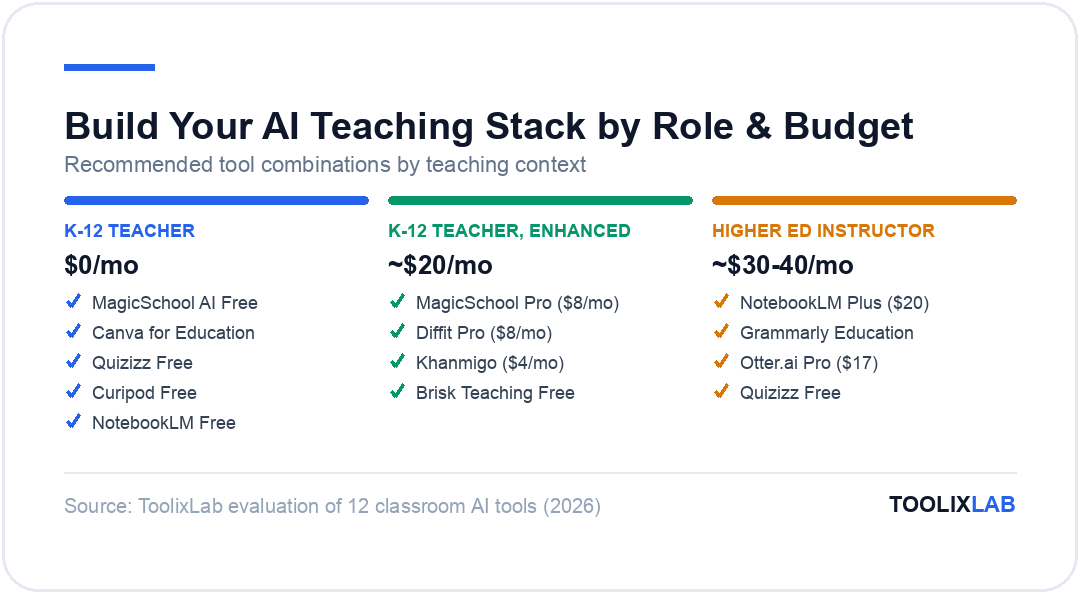
Building Your AI Teaching Stack: By Role & Budget
- ✓ MagicSchool AI Free (planning)
- ✓ Canva for Education (visuals)
- ✓ Quizizz Free (assessments)
- ✓ Curipod Free (interactive lessons)
- ✓ NotebookLM Free (research)
- ✓ MagicSchool Pro ($8/mo annual)
- ✓ Diffit Pro ($8/mo annual)
- ✓ Khanmigo ($4/mo) for student use
- ✓ Canva for Education (free)
- ✓ Brisk Teaching Free
- ✓ NotebookLM Plus ($20)
- ✓ Grammarly Education (institutional)
- ✓ Otter.ai Pro ($17)
- ✓ Quizizz Free
- ✓ Canva (institutional)
How to Introduce AI Tools to Students Responsibly
The question of how to use AI ethically in the classroom is one every educator is navigating in 2026. Here are principles that experienced teachers have found effective:
Start with AI literacy, not AI tools. Before students use any AI tool, teach them what AI is and isn't — that it generates plausible text rather than finding truth, that it can be confidently wrong, and that using it without critical evaluation is like citing Wikipedia as a primary source. Students who understand how AI works use it more appropriately.
Distinguish between AI as tutor and AI as ghostwriter. Tools like Khanmigo are explicitly designed to help students learn — they guide rather than answer. General AI tools like ChatGPT can be either, depending on how students use them. Your AI policy should distinguish between these use cases rather than treating all AI use as equivalent.
Design assessments that are AI-resistant by design. The most effective response to AI is not detection software — it's assignment design. Personal reflection assignments, in-class writing, presentations, portfolio documentation of process, and assignments referencing specific class discussions are far more difficult to complete with AI than generic essay prompts.
Be transparent about your own AI use. Teachers who tell students "I used AI to generate the first draft of this lesson structure, then edited it" model exactly the relationship with AI they want students to develop: AI as a starting point, not a finished product. For broader strategies on building AI workflows that save time without compromising quality, see our guide to AI content creation workflows.
Which AI Tools Should Teachers Start With?
Our Recommendation by Teaching Context
The single most important thing teachers can do with AI in 2026 is start small and build habits. Pick one tool that addresses your biggest time drain — whether that's lesson planning, differentiation, quiz creation, or parent emails — and use it consistently for two weeks. Once that tool is habitual, add the next one. Teachers who try to implement six tools simultaneously rarely get lasting value from any of them.
For a broader look at how AI is transforming knowledge work across professions, our guide to the best AI tools for freelancers covers general-purpose productivity tools that teaching professionals also find valuable for their administrative and communication work.
🔑 Key Takeaways
- ✓The highest AI ROI for teachers is in differentiation, lesson planning, and assessment creation — all high-volume, time-intensive tasks with clear, repeatable structure AI handles well
- ✓MagicSchool AI free + Canva for Education free is the best zero-cost starting stack for any K-12 teacher
- ✓Student-facing AI tools require FERPA/COPPA compliance verification before deployment — always check before having students create accounts
- ✓Khanmigo is the standout student AI tool because it's designed to support learning rather than replace student thinking — Socratic questioning instead of direct answers
- ✓Start with one tool targeting your biggest time drain, build the habit, then expand — teachers who try to adopt six tools at once rarely sustain any of them
Related Guides
- Best AI Tools for Students in 2026 — the companion guide for what your students are (or should be) using, including study and research tools.
- How to Use ChatGPT: Complete Beginner's Guide — master the foundational skills behind every lesson-planning prompt in this article.
- AI Prompt Engineering Guide — write better prompts for differentiation, rubrics, and assessment generation.
- Best Free AI Tools in 2026 — more zero-budget options that complement a classroom stack.